Shortwave listening and everything radio including reviews, broadcasting, ham radio, field operation, DXing, maker kits, travel, emergency gear, events, and more
Connecting the Pieces Through Radio: A Personal Journey
by Don Moore
Part Two
Don’s traveling DX stories can be found in his book Tales of a Vagabond DXer[SWLing Post affiliate link]. If you’ve already read his book and enjoyed it, do Don a favor and leave a review on Amazon.
Except where noted otherwise, all photos are from the Vietnamese Military History Museum in Hanoi.
At the end of Part OneI wrote how Vietnam became a single united independent country on 2 September 1945. That may have surprised you. It did me. But before we look at what happened, let’s consider what could have happened.
Ho Chi Minh was a nationalist with a desire to create a strong, independent Vietnam. Vietnam may have declared independence in 1945, but it needed help from a stronger nation to rebuild and to tell the French to keep out. Ho appealed to both the Soviet Union and the United States to support his new nation.
Ho Chi Minh had embraced Communism after living and studying in the Soviet Union for a few years in the 1920s. So, could modeling the Vietnamese Declaration of Independence after the US one have been part of a conspiracy with Moscow and a trick to cover Ho’s true intentions? Some claim so, but reality tells a different story. In 1945, the Soviet Union was devastated by World War II. Stalin’s focus was on rebuilding and on bringing the future satellites in Eastern Europe under his wing. He did not have the means, the interest, or the need to support an ally in a distant corner of Asia. Not only did Moscow ignore Ho’s requests, but the Soviet Union didn’t even recognize his government until 1950.
As a young man, Ho had also lived and traveled in the United States. He admired the country and its revolutionary heritage. He had good relationships with his OSS advisors. He believed that the American people were generally opposed to colonialism. Washington had already announced that the Philippines would become independent on 4 July 1946 and President Franklin Roosevelt was known to have opposed continued French rule of Vietnam. Ho Chi Minh had strong hopes that the United States would use its diplomatic might to tell the French to stay out. If that had happened, Vietnam would have been drawn closer to the United States. Then what? It would probably have developed into an Asian version of Tito’s Yugoslavia – a non-aligned country with an economy blending Communism and capitalism.
The French War
History took a different path. At the July 1945 Potsdam conference, Allied leaders had agreed that French troops would occupy and disarm the Japanese south of the 16th parallel and that Chiang Kai-shek’s Nationalist Chinese would do so in the north. By the end of August, the Vietnamese had already taken care of that for themselves. But the plans didn’t change. On 13 September 1945, a joint French and British force landed on the coast near Saigon and began to take control of population centers in the south. Meanwhile, two hundred thousand Nationalist Chinese troops crossed the border from the north, occupying all the major towns and cities, including Hanoi. Clearly outnumbered, the Viet Minh retreated to the countryside.
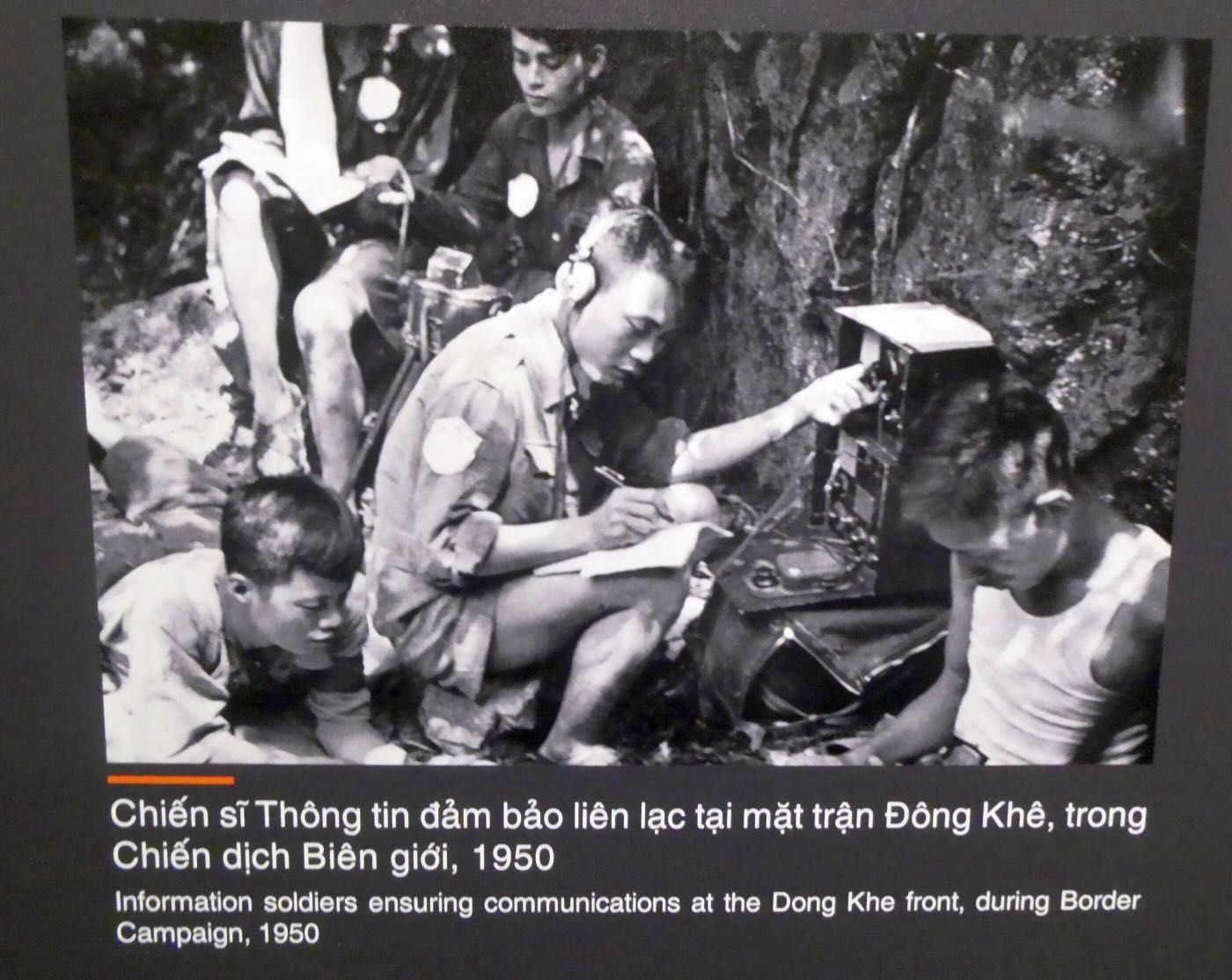
What happened over the next nine years is a long, complex story. It was brutal, and both sides committed atrocities. The British and Nationalist Chinese would soon be replaced by additional French troops. Unlike his predecessor, President Truman of the United States fully backed renewed French control of the region. The Viet Minh fought back. For the first few years, they were on their own and desperate for any help. They finally got that after Mao Tse-tung’s victory over the Nationalist Chinese in 1949. But what the Chinese supplied never matched the quality and quantity of what the French forces received from the United States. The Viet Minh countered that advantage through strong support of the populace, a well-developed intelligence-gathering network, and effective use of communication.
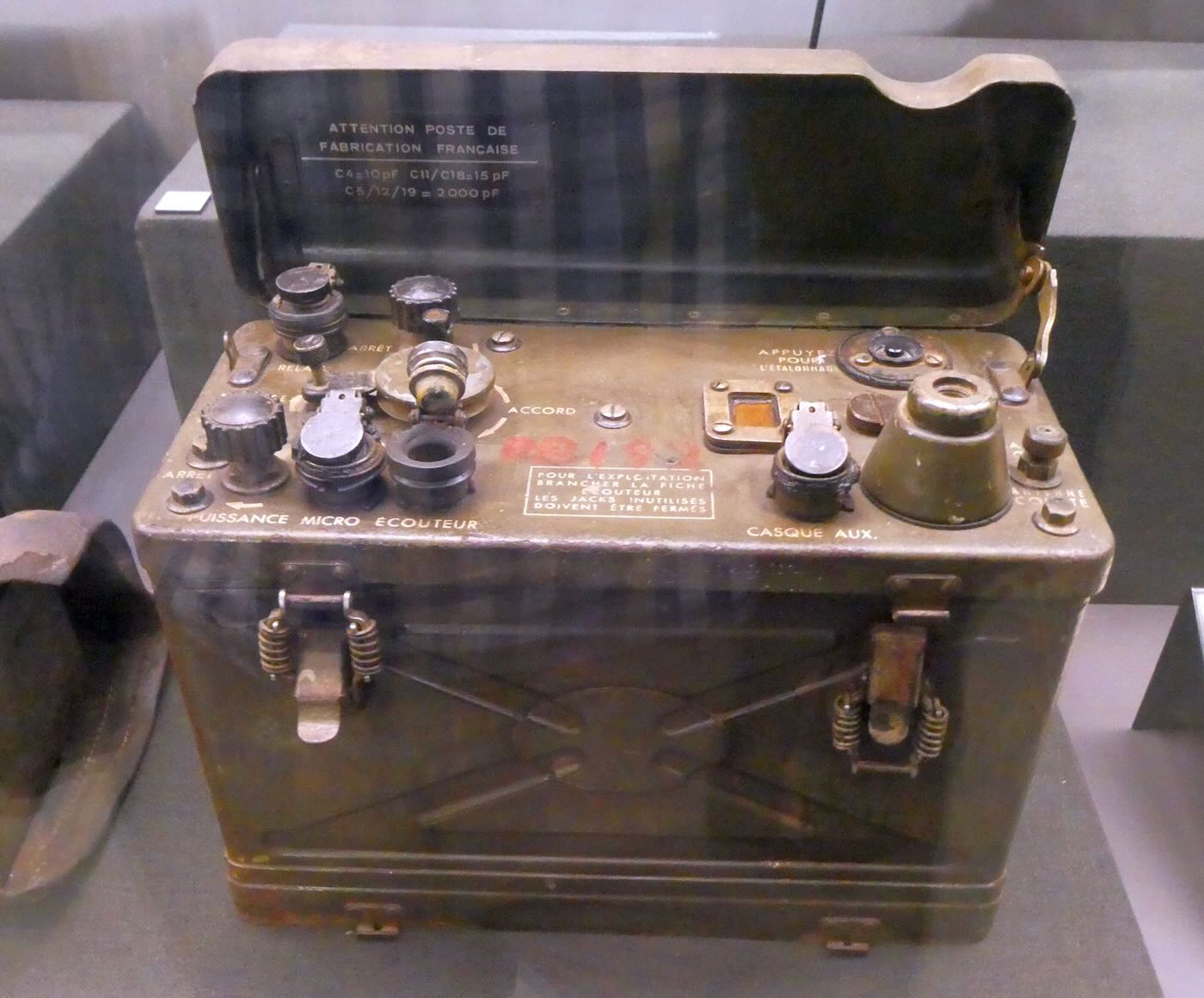
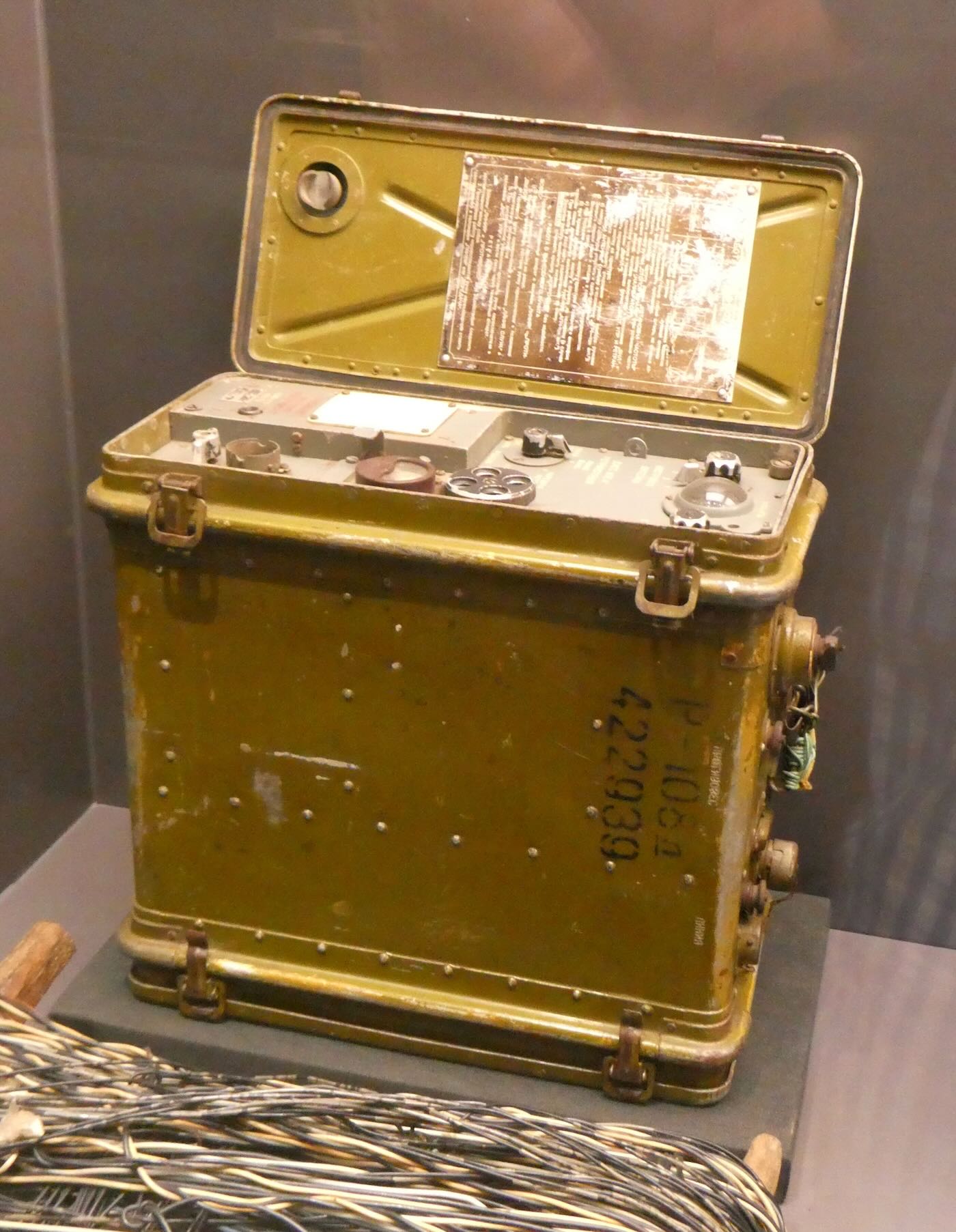
On 9 October 1947, Vietnamese forces shot down a French plane carrying Colonel Lambe, the Deputy Chief of Staff for French forces. This radio unit came from that plane. The make is not identified, but it appears to be from the American-made ARC-5 series.
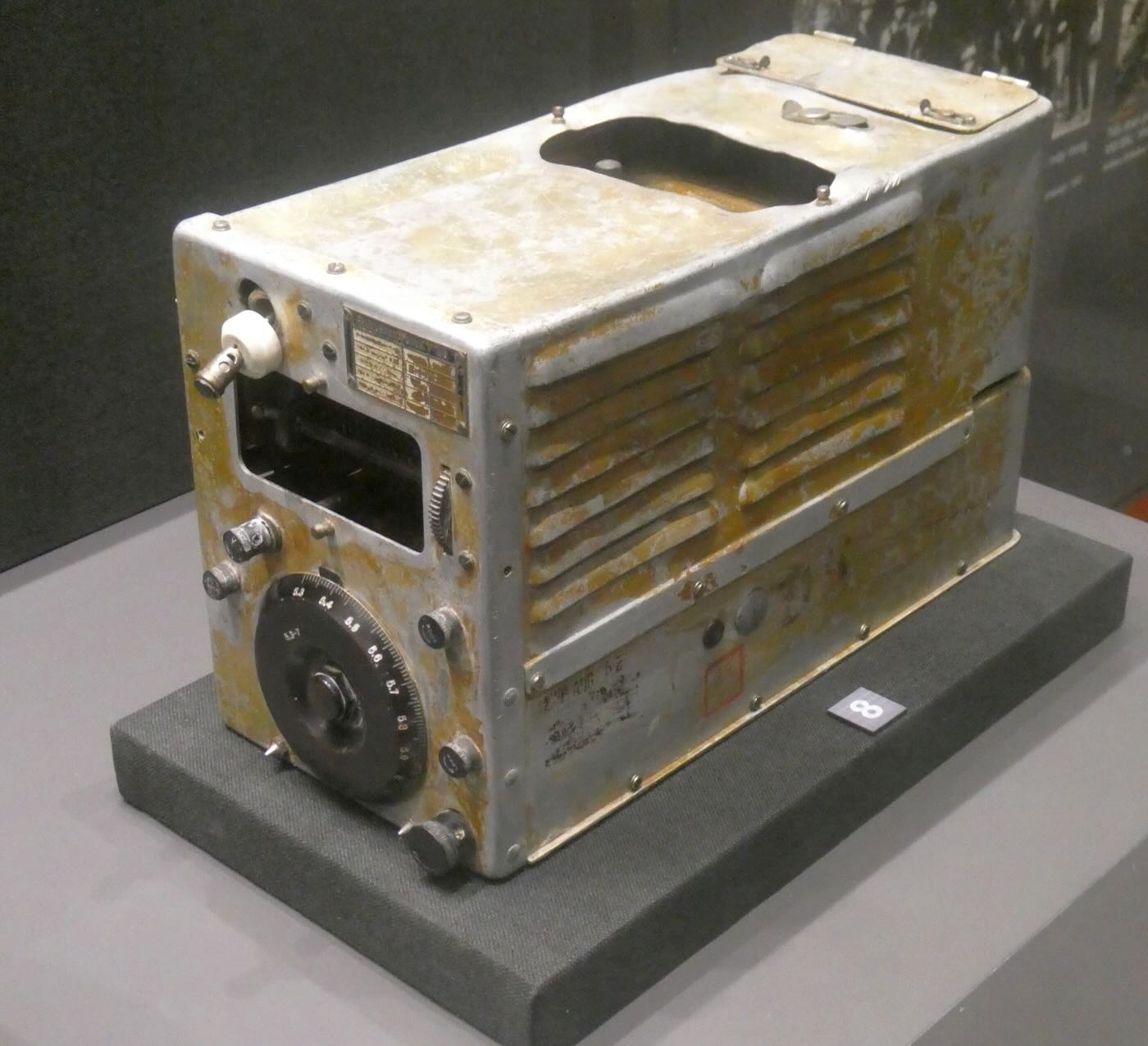
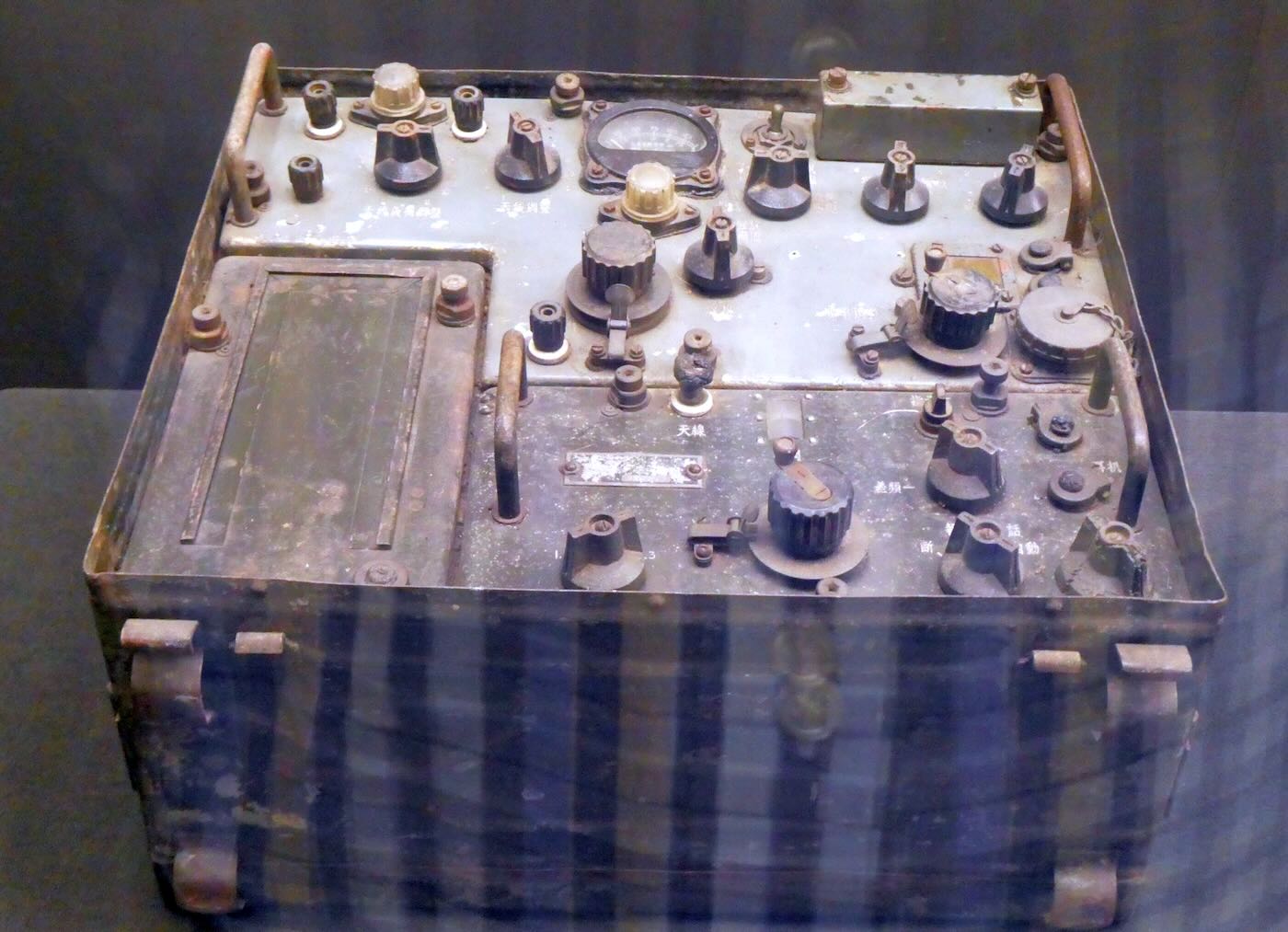
This transceiver was captured by Vietnamese soldiers in 1950. The label on the bottom identifies it as a US Army Signal Corps RT-196/PRC-6
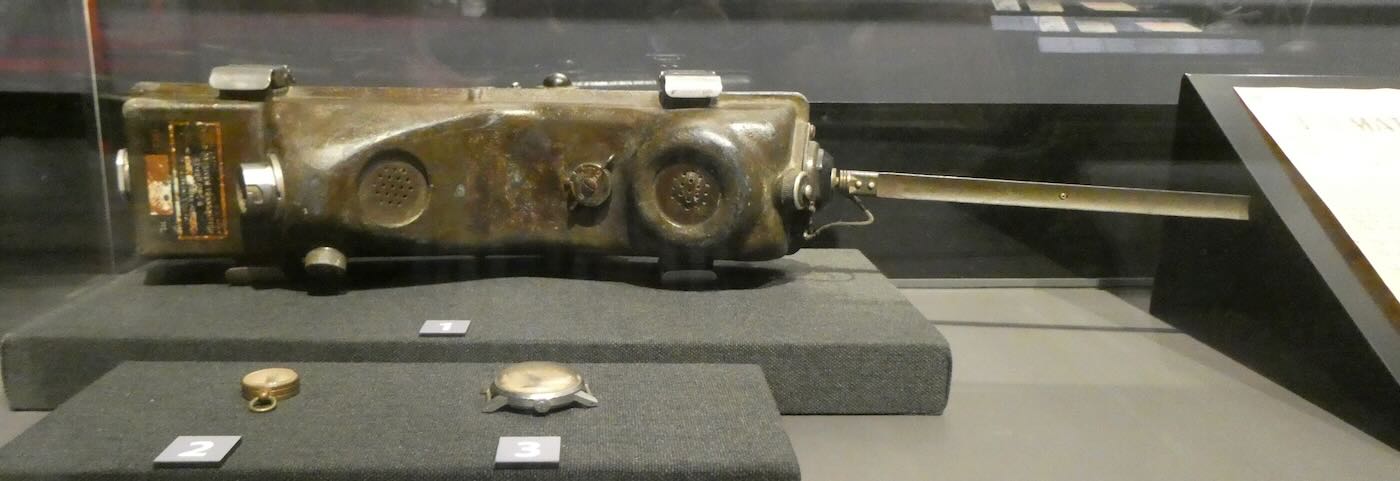
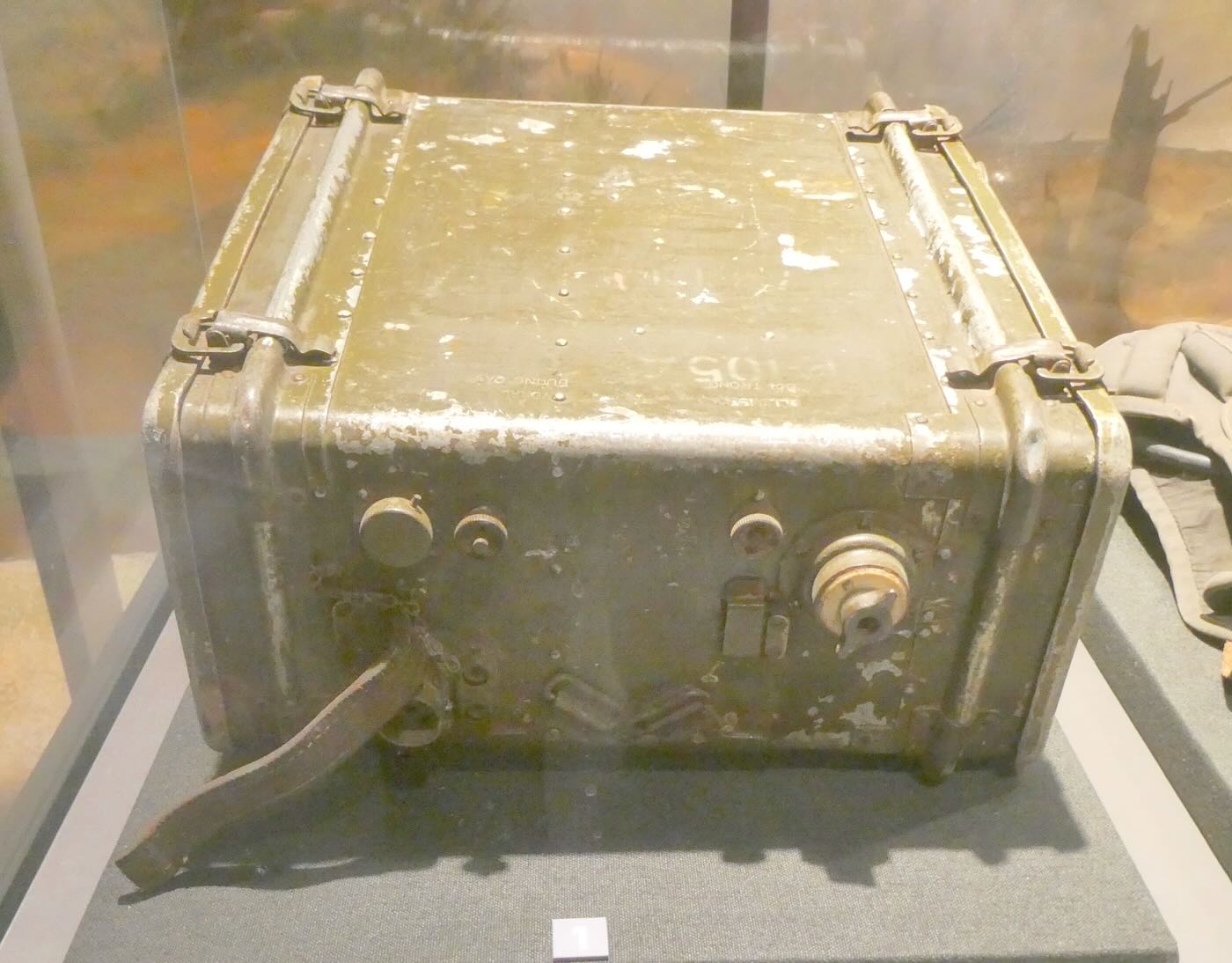
The American-made RPC-10 transceiver was used by Vietnamese forces in 1954 to coordinate the attack on the French position at Doc Lap in the early phases of the Dien Bien Phu campaign.
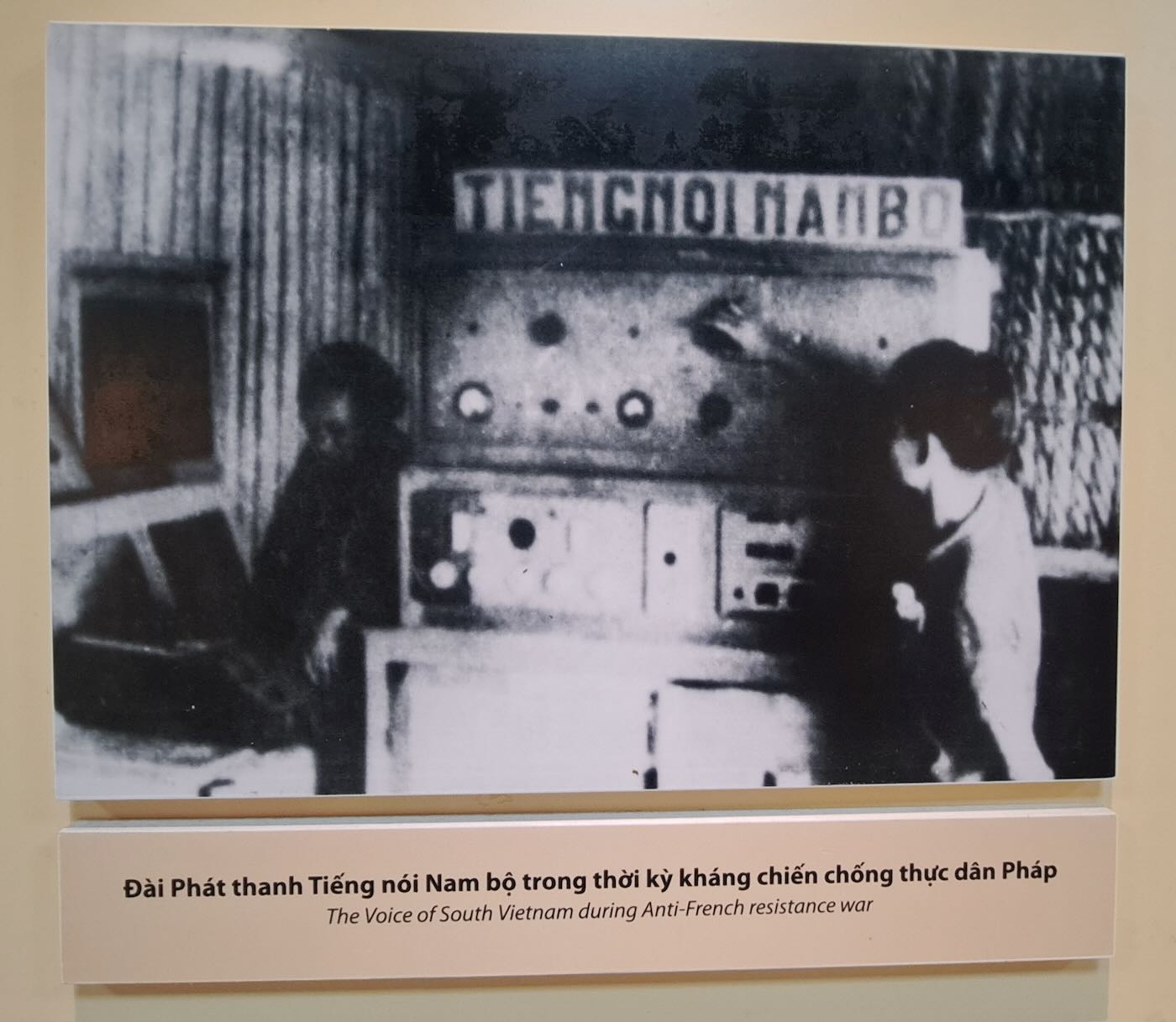
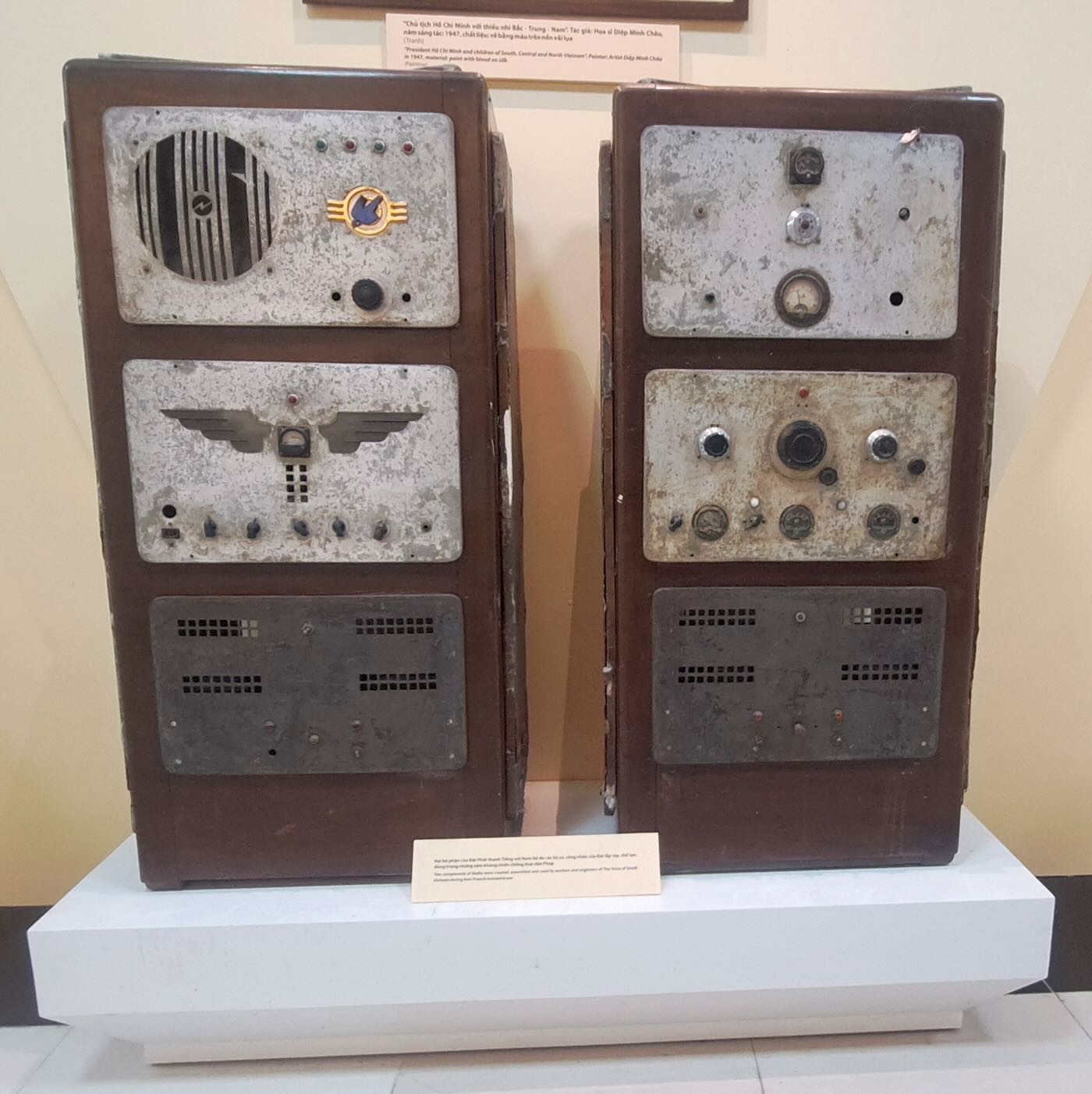
The Vietnamese forces also operated clandestine radio stations to broadcast their views to the general populace. The Voice of South Vietnam operated in the south with transmitting equipment built by Vietnamese engineers. It’s probable that the transmitters were still being used by clandestine stations into the 1960s and 1970s. (Photos from the Vietnam National Museum of History).
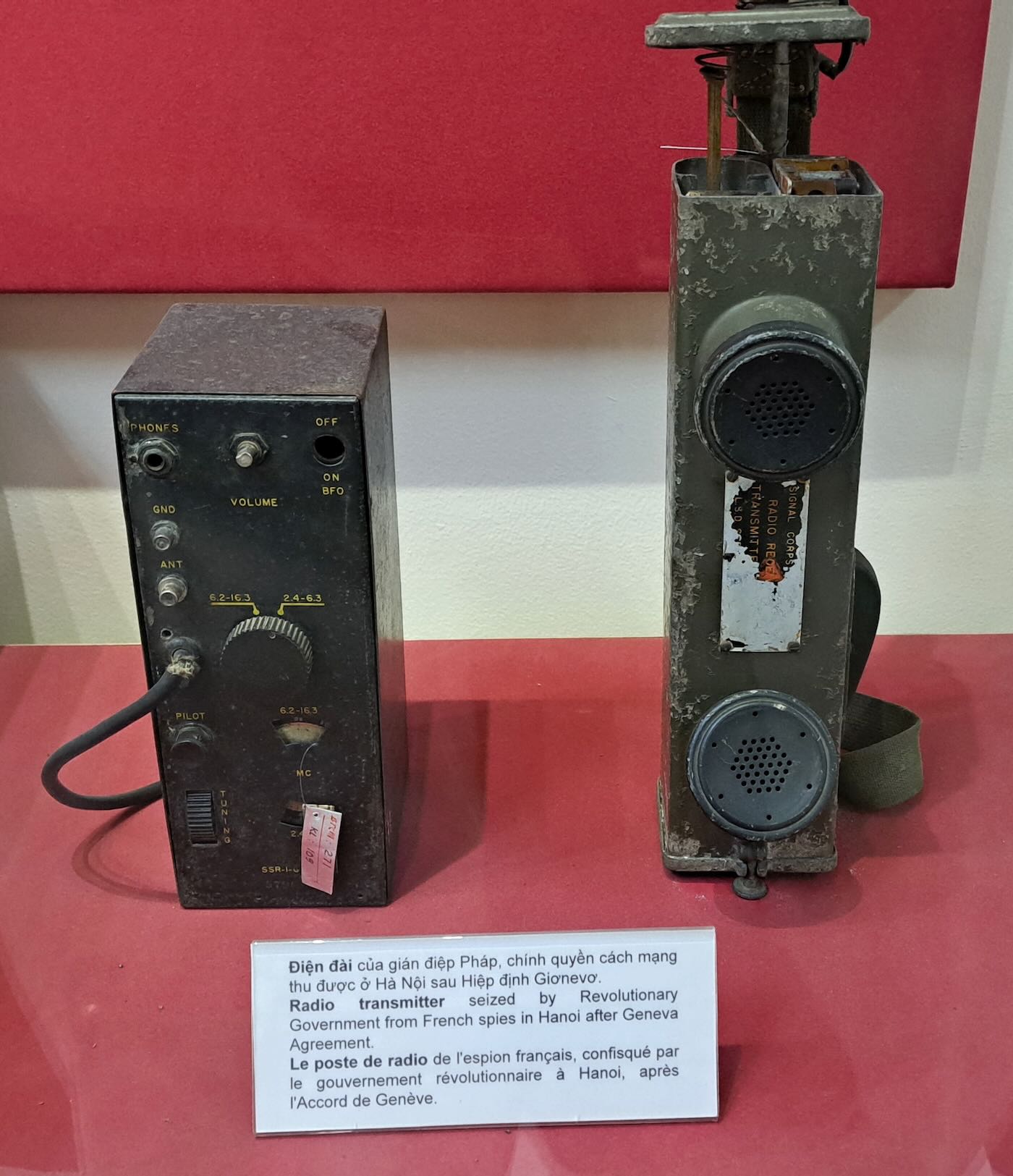
Another SSTR-1 set spy radio. This one was confiscated from French spies in Hanoi after the peace agreement had been signed. (Photo from the Vietnam National Museum of History).
By 1954, the war had turned into a sideshow of the Cold War. The Viet Minh were now firmly in the Communist camp, that being where their support came from. France had firm backing from the United States in the name of stopping Communism. Neither side was capable of decisively defeating the other. But the people of France were tiring of the endless war. The turning point came in May with the surrender of 11,000 French troops at Dien Bien Phu. The French people no longer had the stomach to continue the war. However, France still controlled much of the south. In 1949, they had created the quasi-independent State of Vietnam with its capital in the southern city of Saigon (now Ho Chi Minh City). The 1954 Geneva Conference resulted in Vietnam being divided into two countries at the 17th parallel. A few months later, the State of Vietnam became the fully independent Republic of Vietnam. France was done in Southeast Asia.
(However, the French government hadn’t learned a thing from their experiences in Vietnam. Before 1954 was over a rebellion broke out in Algeria. That led to another brutal colonial war until Algeria was granted its independence in 1962.)
The Vietnam era produced dozens of recognizable, memorable images. In my memories, the one that stands out above all others is of a Buddhist monk sitting calmly as he is engulfed in flames. What would cause a peaceful monk to pour gasoline over himself and then light a match? And it wasn’t just one person. At least seventy-six Buddhist monks and nuns are known to have self-immolated in the early 1960s.
It’s easy to think in black and white. The North was Communist, and that made them the bad guys. But what if the other side weren’t the good guys, either? The government of South Vietnam was never popular with its own citizens. The people who France put in charge of the south were, unsurprisingly, sympathetic to French interests. Many had collaborated with the Vichy French during World War Two. Some, including President Ngo Dinh Diem, had collaborated with the Japanese occupation forces. But the biggest reason for the government’s unpopularity was religion. The vast majority of the South Vietnamese people were Buddhists, but the government was almost wholly run by Roman Catholics. They represented only ten percent of the population. The corrupt Diem government gave preference to Catholics in every way and systematically discriminated against Buddhists. That led to growing Buddhist opposition, which in turn led to the government further oppressing Buddhists. By the early 1960s, the Saigon government had even begun outlawing public displays of some Buddhist religious symbols. And that is what led to the self-immolations that drew international attention to what was happening in South Vietnam.
The American War
The third section of the Vietnamese Military History Museum is about the American War. We call it the Vietnam War in the United States. Military historians refer to it as the Second Indochina War, the first being the one with France just before. Once again, what happened is a long, complex story. Some of you reading this were there. Others, like me, have been around long enough to remember those times.
In 1960, opposition to the Diem government led to the formation of the Viet Cong guerrilla movement. Hanoi would do all it could to fan the flames of the rebellion, but it was the policies of the Saigon government that provided the fuel to start the fire. If Saigon had had a Buddhist government, maybe the war would never have happened, and there would still be two Vietnams, as there are two Koreas.
What followed was a gradual escalation on both sides. Hanoi began by providing the Viet Cong with supplies and military advice. The United States did the same for the Saigon government. When one side increased its involvement, the other did the same. Within a few years, American forces were fighting alongside the South Vietnamese army, and the North Vietnamese Army was fighting alongside the Viet Cong. (Although they worked hand-in-hand, the VC and the NVA were not the same. The Viet Cong were an insurgent guerrilla force. The NVA was an army and fought in organized military units.)
This radio transmitter was used by the 84th Artillery Regiment of the North Vietnamese Army in Quang Tri province during the January 1968 Tet Offensive. The campaign was a surprise attack on over one hundred towns and cities in South Vietnam during the Lunar New Year celebrations. It was one of the bloodiest periods of the war.
According to the display, Company Five of the 205th Regiment of the North Vietnamese Army used this set to send 213,567 messages between 1965 and 1968. I doubt anyone really kept an exact count, but the radio clearly had a lot of use.
This unit was used by the First Battalion of the Tenth Division of the North Vietnamese Army from 1968 to 1975.
The Finale
It seems long ago, but there once was a time when my daily news arrived in the form of a printed newspaper and not on the screen of a cellphone. The number of newspapers that I’ve held in my hands must number over ten thousand. But there is only one headline that I remember. It was late October 1972. I went to the back door to get the morning paper, the Altoona Mirror, and opened it up. Blazoned across the top were the words “PEACE IS AT HAND!” I can still picture it clearly over fifty years later.
According to Secretary of State Henry Kissinger, the peace talks were on the verge of producing a cease-fire. The 1972 US presidential election was just days away, and the war was the most important issue. No one doubted that Richard Nixon would win reelection, but being able to declare he had ended the war would add to his margin of victory. But Kissinger had been ignoring the South Vietnamese government, and the next day they rejected the treaty on numerous points. That caused the North Vietnamese to walk out.
Both the North and the South were willing to continue the war, but their major backers wanted it over. Nixon had made historic visits to China and the Soviet Union earlier in the year, and all three were looking for improved relations. Neither China nor the Soviet Union supported the North walking out, other than making obligatory diplomatic statements.
In order to bring the North back to the negotiating table, the US launched Operation Linebacker II, the most controversial bombing campaign of the entire war. From the 18th to the 29th of December 1972, over two hundred B-52 bombers dropped over twenty thousand tons of bombs on Hanoi and Haiphong. Thousands were killed, and huge swaths of both cities were leveled, destroying everything from military installations to children’s hospitals. Continue reading →
Reprinted with the kind permission of Ken Reitz, Editor The Spectrum Monitor (Originally published in Volume 13, Number 8, August 2026).
by Robert Gulley K4PKM
The tinySA Ultra is an upgraded version of the tinySA which came out a number of years ago [see “TSM Reviews: tinySA Spectrum Analyzer” by Bob Grove W8JHD in the January 2021 issue of TSM]. As the “SA” implies, this is primarily a spectrum analyzer, with the additional ability to perform as a signal generator and is extremely portable. Because it is so similar in looks to the NanoVNA, it can easily be mistaken in function as just a different brand of antenna analyzer.
Rather than being equivalent to the NanoVNA, the tinySA Ultra is actually a complimentary piece of equipment which helps locate signals, study their characteristics, and perform many of the same functions as a larger, much more expensive, spectrum analyzer. Similarly, by using the included signal generator, one can have a compact unit for carrying in the field, rather than being limited to working at a test bench.
My goal in this article is to talk about some of the capabilities of the unit, but this is in no way intended to be a tutorial on how to use it. You will want to make extensive use of the tinySA wiki pages for operation (https://tinysa.org/wiki/pmwiki.php?n=Main.HomePage), and I do recommend watching some of the many YouTube videos demonstrating the tinySA Ultra in action. The developer has a number of short “how-to” videos on his YouTube channel which may be found here: https://www.youtube.com/playlist?list=PL5ZELMM2xseNkwVBtyAG00uZevwWUd-VIg
This unit was provided for review by Radioddity, with the usual proviso that my reviews show the good and the bad, without respect to, or review by, Radioddity. Also, I guess one needs also to say these days, these are my own thoughts and review, no AI will ever be used to produce my writing. For better or worse, it’s all mine. With all of that out of the way, let’s dig in!
What’s in the Box
The unit comes nicely packaged in a solid, attractive box with excellent packaging to secure the contents inside. In addition to the device itself, there are two (!) jumper cables with dual male SMA connectors, as well as a SMA barrel connector, telescopic antenna, USB-C cable, and a stylus. Unlike many devices which require an additional purchase of a Micro SD memory card, a 32G(!) card is included already in the slot. There is also a strap with a guitar pick attached which can be used as a stylus in a pinch.
tinySA Ultra ZS405 Basic Specs
(From the tinySA wiki Page)
Screen size 4-inch
Spectrum Analyzer for 0.1-800 MHz or, with Ultra mode enabled up to 5.3 GHz, level calibrated up to 6 GHz. Can observe signals up to 12 GHz
Signal Generator with sine wave output between 0.1-800MHz or square wave up to 4.4GHz or RF test signal output up to 5.3 GHz when not used as spectrum analyzer.
Switchable resolution bandpass filters from 200 Hz to 850 kHz
Built-in 20 dB optional LNA
Color display showing max 450 points providing gapless covering up to the full frequency range.
MicroSD card slot for storing measurements, settings and screen captures.
Input Step attenuator from 0 dB to 31 dB (cannot be used in combination with LNA).
A built-in calibration signal generator that is used for automatic self-test and (low) input calibration.
Connected to a PC via USB it becomes a PC controlled spectrum analyzer or signal generator
Rechargeable battery allowing a minimum of two hours of portable use
Max input level +10 dBm.
The generator function cannot be used as a tracking generator as you cannot use the spectrum analyzer and generator functions at the same time.
My local noise in radio room. (K4PKM photo)
Spectrum Analyzer Mode
As mentioned, there are two basic modes to this tinySA ultra: a spectrum analyzer mode, and a signal generator mode. I’ll first look at the spectrum analyzer side, and then at the signal generator side.
When turning on the tinySA ultra, it will default to the spectrum analyzer mode. Attaching an antenna like the one included in the box, you will see the ambient noise level based on your location. For example, if you open it in your living room, you’re likely to see a very low noise level with an occasional spike. There is an automatic marker which shows when a spike, or several spikes register, with the marker showing the strongest signal. At the top of the unit, you can see the frequency and decibel reading of that spike. You can also configure the analyzer to place markers on all of the spikes which rise to a specified noise level through the menu options.
tinySA Ultra calibration mode. (K4PKM photo)
Operation
I would recommend going to the tinySA Ultra wiki either by scanning the QR code printed on the box materials, or by going to the tinySA.org page, and follow the startup self-test and calibration instructions before using the unit for actual testing. This will ensure proper calibration as well as indicate any problems with the unit before you depend on the results of your testing. This is also where you can find the instructions to activate the Ultra mode when you’re ready.
Below is an overview of the self-test and calibration setup. When running the self-test, you should end up with a message that says the self-test passed and then a message to “touch screen to continue.”
If something fails, before you fear there is something wrong with your unit, run the calibration process, and then run the self-test again. That likely will clear up any issues. Note that you do not have to perform the calibration check each time you use the device. This is basically for first time use, or if you suspect the device has lost calibration for some reason. The same is true for the self-test.
Fundamental mode. (K4PKM photo)
Note that there are two calibration processes. One is from 100 kHz to 5.34 GHz, the other is a calibration process above 5.34 GHz. If you don’t plan on using the tinySA above 5.34 GHz, you can ignore that 2nd calibration process altogether.
As the instructions indicate, you will want to connect one of the jumper cables to each of the two ports, the RF port and the CAL port.
This presents a loop to the unit allowing it to test itself and calibrate accordingly. When the calibration is complete, you will get a message indicating that and the instruction to “touch the screen to continue” just as with the self-test.
Local Noise
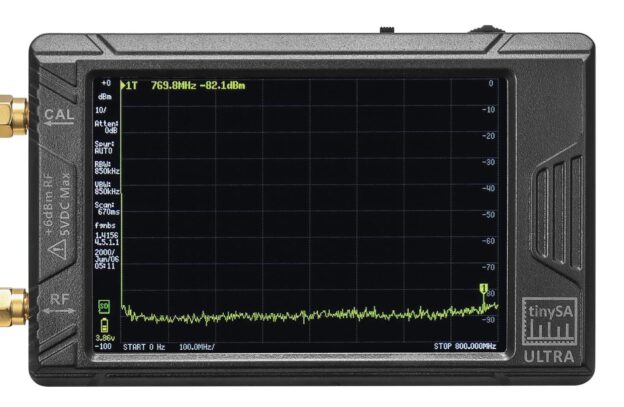
Right now, in my radio room, I am reading an ambient noise floor of approximately -90 dBm (decibels in milliwatts), with a spike at 460.88 MHz. You will notice I have arbitrarily narrowed the spectrum analyzer frequency range to start at 250 MHz and stopping at 500 MHz, with two smaller (lower dB) spikes showing. By narrowing the search range, two things happen. First, the scanning time is faster. Second, the indicated signal becomes wider in the display, allowing the unit to give a more precise reading.
As an aside, while it might go without saying, this unit in no way compares to the level of accuracy possible with units costing thousands of dollars. If you need the closest absolute precision you can get, you likely already know this is not the unit for you. However, for SWL, amateur radio, and basic calibration usage, this unit is perfectly capable of giving you acceptable results. And did I mention it’s extremely portable?!
Looking for harmonics. (K4PKM photo)
A nice feature of the software is the pause function, which can help identify a frequency or range of frequencies, or study more of a signal’s characteristics. While paused, you can also use the wheel at the top to scroll through the frequencies to identify other peaks and their signal strength and frequency location. If you want to save the screen, you can go to the menu and tap on “save capture.”
Using the menu, you also have the option of displaying multiple markers. If you have two or three signals coming in, you can bring up the menu, tap on marker, and choose 2, 4, 6 or 8 markers to be displayed as needed.
First Test/Activation
A simple test you can do right away is to measure something like your key fob. I measured mine and it showed a frequency of 434 MHz. An easy test, but effective to show the unit’s ability to identify a signal (and there is no danger of overloading the tinySA on your first test!).
What then happens when you test a handheld radio, for example? While you can connect the radio directly to the RF input using one of the cables provided, the power, even from a handheld, could damage the unit unless you put an attenuator (or more than one if needed) between the radio and the device.
The tinySA Ultra can handle about 6 dBm input strength. More input power than this risks damaging the unit. However, if you test your handheld 10 or 15 feet away from the unit on low power with its included antenna connected, you will be able to get sufficient readings, indicating the primary frequency as well as one or more harmonics, assuming the scan range is set to cover the possible harmonic frequencies.
If you want to connect a transmitter directly to the tinySA Ultra, please see the recommended attenuation required in the notes below in the Safety Issues section.
For example, I have a low-power handheld (Yaesu VX-3 1.5W) set to 146.670 MHz which, with offset, transmits on 146.070.
As you can see in the photo as I transmit, the fundamental frequency is 146.070 MHz, with a signal strength of -37.9 dBm. In the second photo representing the 2nd harmonic, you can see the frequency is 292.29 MHz, with a signal strength of -57.9 dBm. The 2nd harmonic of a fundamental frequency is 2x that frequency, so if you set your analyzer stop frequency above this multiple, the tinySA will display that 2nd harmonic as shown here.
A really nice feature of the analyzer is that you can directly measure multiple harmonics of an input signal by going into the menu and choosing “measure” and then tapping on “harmonic.” You then set, as the center frequency, the transmit signal from the radio. You can then set the span for how far away from the fundamental frequency you want the measurements to be taken above and/or below that fundamental frequency. This allows you to see multiple harmonics.
Spectral Purity/Deviation
Another useful feature of the tinySA Ultra for amateur radio operators is to test the spectral cleanliness and deviation of a transmitted signal, say, for example, of your handheld. This would also apply to GMRS and Family Radio Services radios as well. This will help ensure you are not creating splatter which, of course, goes against FCC regulations, but also just ensures you have the cleanest signal possible.
For FM, frequency deviation is optimized for voice clarity, typically 5 kHz, which means the transmitted signal can have roughly a 5 kHz width to carry voice, digital signals, etc., which can then easily be understood through a repeater or in simplex mode, radio-to-radio.
Without getting in too deep, basically what we look for using a 5 kHz deviation is an additional 3 kHz of typical voice range, making a width of 8 kHz. Since this can be 8 kHz plus or minus, we actually double that to 16 kHz. We also want a little extra room to cover pops or higher pitches from certain letters, like “S” or “P” sounds, and so when we test a radio for splatter, we want to try to hold the signal to within roughly 18 kHz, which gives us about 95% clarity. Enough technical talk! The main point is that we can check our likely signal clarity by measuring it with the capabilities of this device.
Obviously, there are many other features associated with a spectrum analyzer function, but I will stop here to keep the article manageable. Besides, I suspect many reading this will find unique or otherwise untested uses for this function!
Signal Generator Mode
To switch from spectrum analyzer mode to the signal generator mode, you’ll tap on the “menu mode” button, and then select “signal generator.”
The signal generator will start with a default setting of 10 MHz. This can be adjusted using the stylus by sliding back-and-forth to change the frequency, or, and more useful typically, tapping in the center and entering a specific frequency.
Testing the signal generator. (K4PKM photo)
Beneath the frequency is the dBm setting, which can be adjusted in exactly the same way as the frequency. It defaults to the highest level of -17.5 dBm, and you can slide back-and-forth to set a general range, or tap the set option on the slider to enter a specific dBm.
You can modulate a tone in either AM or FM, set the frequency of modulation, depth, deviation, and even set a sweep generator to sweep along a certain frequency range. Again, all of this is explained in the wiki pages, and demonstrated by various YouTube videos. This is an overview of the analyzer/generator capabilities, and as such, we don’t want to get too deep in the weeds for this article.
Testing the Signal Generator
An easy test of the signal generator is to set a frequency on the generator and match that on a radio receiver. Transmit the signal with the tinySA’s antenna connected and transmit the signal with the default -17 dBm signal setting on AM, remembering to set the radio receiver to the same mode. If you attach a simple short wire antenna to the receiver, or use a built-in telescopic whip with portable receivers, you should be able to hear a good strong signal at the designated frequency. If you reduce the dBm on the tinySA to something like -35 dBm, you should hear the signal weaken, just as if you were to move the tinySA antenna farther away from the receive antenna.
You can also connect the radio receiver directly to the tinySA and drop the dBm down to around -73 dBm, so as to receive an S9 signal on the radio. Again, we want to make sure we don’t overload the radio receiver by generating too strong of a signal from the tinySA. (If you wonder why I keep mentioning this, it is simply that all similar devices, even expensive spectrum analyzers, are designed to work with very low input power. Likewise, radios receiving signals through an antenna are receiving very weak-powered signals by the time the signal reaches them, even from shortwave stations around the world starting out with 100,000 watts.)
If you want to test the radio above S9, you could add 20 or 25 dBm to increase the received strength at your receiver, by roughly the same amount. Likewise, if you reduce the signal strength using the dBm slider, you can see how low you can go before the receiver stops recognizing the generator’s signal.
To reach a level where the receiver cannot hear the signal at all may require an attenuator, depending on the receiver’s sensitivity. Of course, these are not hard and fast numbers, because your receiver’s meter may not be calibrated exactly, or you may see different results using different radios because of the variance between their respective meters.
The signal generator function is also great for tightening up the alignment of a receiver, particularly older units, or when building your own receiver. By injecting a known frequency at various points, receivers can be aligned to show accurate frequency displays.
A Sampling of Additional Features and Uses
There is a speaker/headphone jack which allows you to listen in on a signal such as an FM modulated station or AM modulated station (broadcast or shortwave) when you turn on the low noise amplifier, or LNA. It’s not designed for impressive sound, but rather a down and dirty ability to hear a signal right from the unit.
You can turn on a waterfall display, which can show you more information about various signals that are being received, much like modern SDR radios.
RFI Tracking – The tinySA Ultra is very useful for tracking down radio frequency interference. One of the tricks for locating RFI is to attach a dummy load to the antenna connector so that you are isolating as many signals as possible from various sources like AM and FM radio stations, Wi-Fi, etc. When you are trying to track RFI in your shack or in your house, you do not want to have to figure out if what you are hearing is a legitimate signal.
One thing many more advanced spectrum analyzers have is a tracking generator, which the tinySA does not have. However, I have seen plans on the internet for building one, so if that is of interest to you, you can do some research and possibly add that capability.
You can also find tear-down videos on the internet, as well as videos from folks who have overloaded the unit and what they did to bring it back to life.
For field work, I would recommend carrying both a NanoVNA and a tinySA Ultra in a case with various needed attachments. These two units combined will give you most, if not all, of the testing capability you will need to setup your radio and to make sure you are producing a clean signal, all while having minimal additional weight in your pack.
Software
There are several programs which can connect your device to a computer, which will allow you to operate on a larger screen. Not all features work through the software, but most of the main ones do. Of course, if you are out in the field, you may not want to carry the extra weight of a laptop, and so operating with just a stylus is perfectly fine as well. I have been using the tinySA software since it is the most common software being used to control the device, but you may like to try something else.
Safety Issues
From the tinySA wiki page regarding power limits on input:
Required attenuation between transmitter and tinySA
For 100 W: between 60 and 70dB
For 10 W: between 50 and 60dB
For 1 W: between 40 and 50dB
The best approach is to ALWAYS use a 30 dB attenuator directly connected to the tinySA and to use power attenuators to reduce the output of the transmitter to the target input level of this 30dB attenuator, that is +10 dBm
So, you will need these power attenuators
For 100 W output: 30-40 dB
For 10 W output: 20-30 dB
For 1 W output: 10-20 dB
Thankfully, there are Power (in watts)-to-dBm calculators on the web if, like me, you do not remember the analog way of calculating these conversions. An excellent site is at: www.everythingrf.com/rf-calculators
Also, the manufacturer recommends keeping the dust covers on the unit to avoid static discharge damage when not in use.
tinySA Ultra dimensions and location of features. (Courtesy: Radioddity.com)
Pros and Cons
As I always do, below is a list of the Pros and Cons as I see them based on my experience with the tinySA Ultra. None of the cons are deal-breakers by any means, just mentioned as things of which to be aware.
Pros
Portable, self-contained test instrument for use as a multi-featured spectrum analyzer and signal generator
USB-C charging
Headphone/speaker jack for listening to demodulated signals
Ability to go into “Level” and “Unit” to change from dBm to watts to measure power units in watts
The ability to flip the screen display so that the USB cable can be positioned at the top, making it easier to work with it when tethered to a computer.
Using either the tinySA Ultra or the tinySA.app you can grab screen captures and save them either to the included memory card, or to your computer when connected and using the app. You can also load/save previous captures, traces, settings and more.
Software operation – With the tinySA software, you are not limited to the small 4-inch screen of the unit, so the spectrum analyzer display can be much larger.
Cons
All of the units I have used or seen used seem to require tapping toward the bottom of a menu item to activate the menu choice. It’s not really a true “con” once you use the device for a bit, but it takes some getting used to.
As you move the included antenna around it can become slightly loose. To be fair, this is a rather common problem with small antennas having a SMA connection. It’s not so much a fault with the radio, but rather something of which to be aware.
On my unit, the USB-C cable is a very snug fit on both ends. This can be a plus in that the connections will not come loose easily, but also a potential negative if one is not careful plugging in the connections. Since it is an almost ubiquitous connection, I may use another cable and keep this one in reserve.
When entering information on the popup keypad, I have noticed the touch sensitivity is such that one can easily enter a doubled number without meaning to (e.g. 77 instead of 7). The solution is to carefully check your numbers before hitting enter. (Physician, heal thyself?!)
Conclusions
This has been a very brief overview of the capabilities of the tinySA Ultra. As mentioned above, the wiki pages, online user videos, and especially the short videos produced by the developer of the tinySA will be of great help in getting the most from the device.
As both a shortwave listener and an amateur radio operator (and occasional builder), I can see a number of uses this device can fill without having to spend massive amounts of money on bench testing devices. Shortwave listeners can tighten up receivers using the signal generator function; use the spectrum analyzer/waterfall functions to see what signals are coming in on a given band (very helpful for non-SDR receivers), and track local RFI sources that might not be obvious upon casual listening.
Amateur radio operators can test transmitters for splatter and deviation, harmonic levels, as well as finding signals through the analyzer and waterfall functions. If you’re building your own equipment for amateur radio operation, a number of the tinySA Ultra features will come in handy for testing along the way. And if you do any amateur radio satellite work, or just like to listen in, the large frequency range of the tinySA Ultra can be a great way to identify signals out in the field. This device, along with one of the NanoVNA models, makes for a great POTA/SOTA activation kit, or a set of useful tools for field days.
I am impressed with the capabilities of the tinySA, its compactness, stability, and software making it easier on these tired old eyes. I also appreciate having a number of the most common accessories included in the box, rather than having to dig up cables and power cords to get things going. For long-term use I would recommend buying (or 3D-printing) a carrying case to protect the unit from damage, as well as carrying those accessories that one is likely to need in the field.
While I rarely comment on the looks of a product’s packaging, I must admit when something is packaged properly AND stylishly, I think it shows pride of manufacturing. The tinySA folks seem to show that pride not only in their presentation, but also when reading through their wiki pages. They do not try to oversell what their product is, but neither do they apologize for what it is not. They have placed the device within a niche they believe delivers value as well as function, and I agree.
Many thanks to Colin Newell, who notes that you can now search 1,202 articles from IRCA’s DX Monitor (1966–2025) directly on a dedicated portion of the DXer.ca website.
On November 8, 2026 we celebrate Romanian Radio Day, which we mark every year on November 1. We look forward to celebrating Radio Romania International’s Listener’s Day.
In an increasingly polarized world, the differences between us may seem like barriers. However, beyond our beliefs or cultures, we are united by simple things: music, stories, travel or the desire to be heard. For an international radio station, dialogue in diversity is intrinsic to its mission, and RRI aims to be the space that brings people together every day.
For the 2026 edition of our special show, Listener’s Day on RRI, we are asking you:
What do you think unites us in a divided world? What are the experiences or values we share, regardless of where we live, and what helps us better understand each other?
We look forward to your answers to include them in our November special broadcast. They can be sent via email to [email protected] or via Facebook.
You can also send your recorded audio responses via WhatsApp at +40744312650, or you can send us your phone number and we will call you from the studio to record your audio message.
We look forward to hearing from you!
Paul notes: I’d like to add a suggestion regarding the role of international radio stations, which, through some of their programs, can foster greater mutual understanding.
Automakers could not keep the AM Radio for Every Vehicle Act from clearing the House, but their lobbying disclosures show the money still moving while the bill waits on a Senate calendar that holds no vote before the midterms, leaving broadcasters watching the clock.
Third quarter reports show organizations opposed to the bill spending about $6.3 million.
Toyota Motor North America reported about $1.7 million, the Alliance for Automotive Innovation about $1.5 million, Tesla $650,000, Honda $520,000, Volkswagen Group of America $420,000, and BMW of North America $230,000. Lucid USA reported $80,000 and Mazda $60,000.
While not directly representing the automotive industry, other organizations known to oppose pro-radio legislation, like the Consumer Technology Association and SoundExchange, spent $810,000 and $290,000, respectively.
While the House of Representatives in the U.S.approved the Sunshine Protection Act, the Senate has not yet passed it, meaning most states should return to “Standard Time” on November 1. The DJ in the following recording seemed pleased that he would be getting an extra hour of sleep on Sunday, October 28, 1973. However, should some states choose to adopt Daylight Time permanently in the future, the time zones, as we have known them, could become quite fragmented. Caution will need to be taken when trying to ID a BCB station by means of their time check.
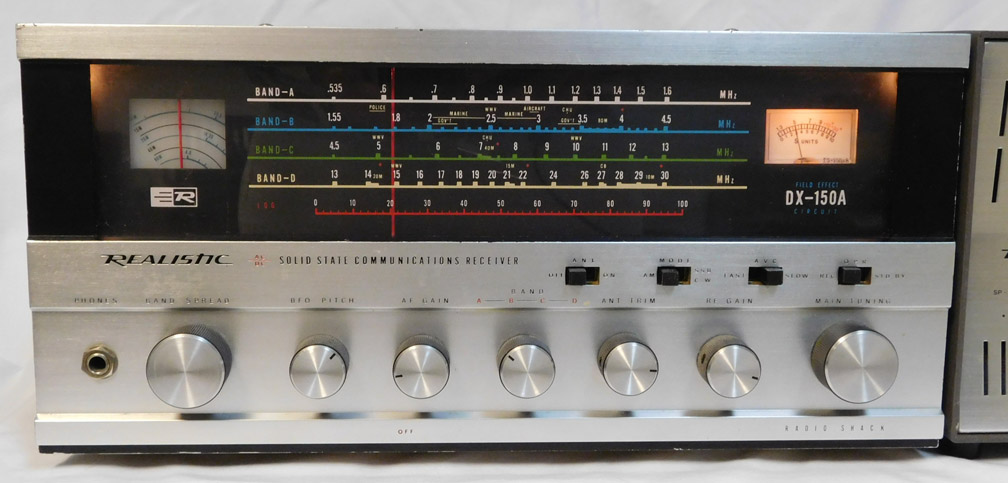
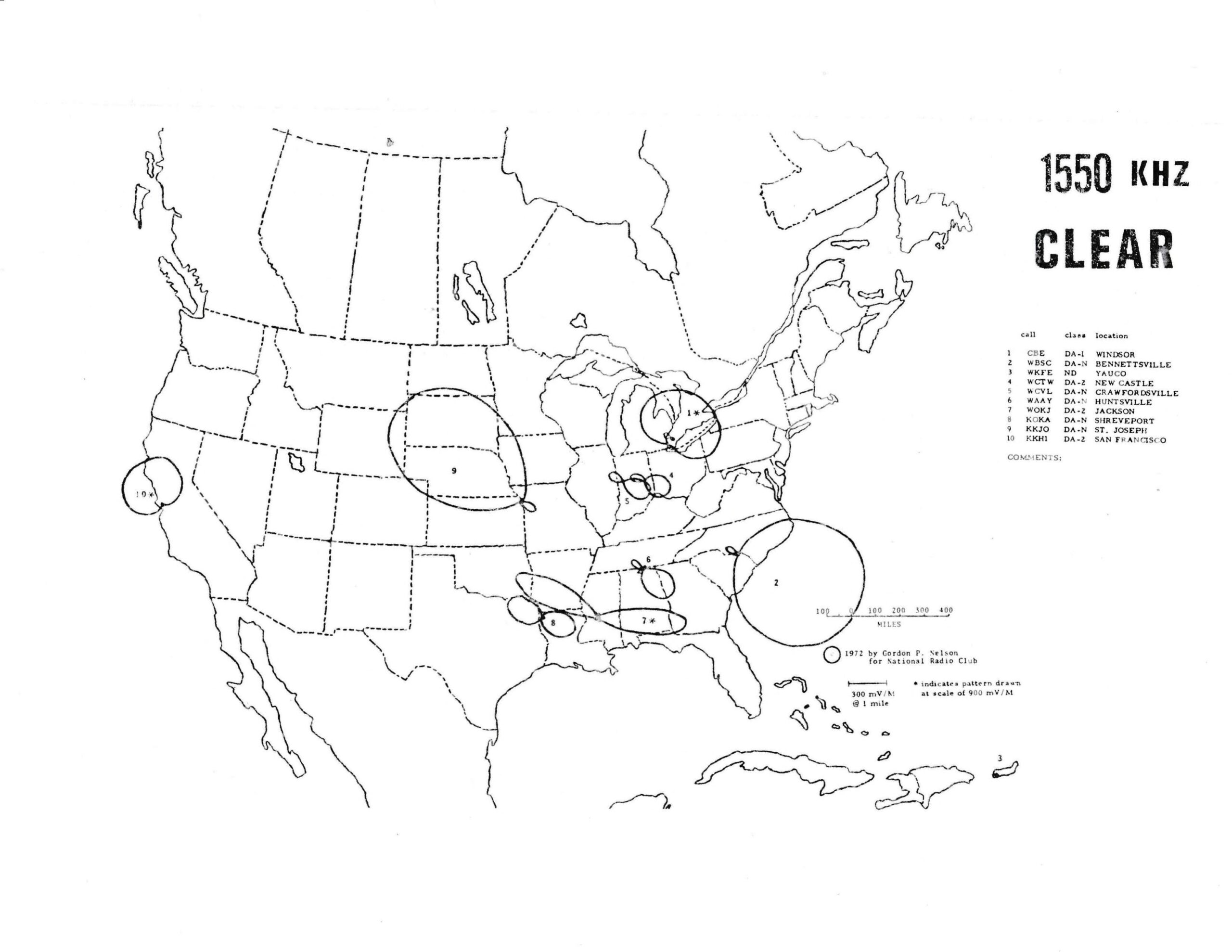
In the wee hours of October 28, 1973, this DX recording was made of radio station KKJO in St. Joseph, MO (about an hour’s drive north of Kansas City) broadcasting on 1550 kHz in the AM broadcast band. According to White’s Radio Log for Fall 1973, KKJO was running 5000 watts of power. My receiving post was some 800 + miles distant in Ancaster, Ontario, Canada. I was using a Realistic DX-150A communications receiver hooked up to a long wire antenna. You can hear the station fade gradually in and out a number of times during the recording, but fortunately faded in around the 2:49 mark to catch their station ID and announcement about returning to Central Standard Time. Paul Simon’s “Kodachrome” is heard at first, and Art Garfunkel’s “All I Know” afterward, 2 very popular songs in 1973.
You will note that Windsor, Ontario station CBE is normally heard in southern Ontario, and that KKJO’s signal is mostly directed to the north and west of St. Joseph, MO. On this occasion, it seems that CBE may have been off the air for maintenance, and KKJO was then heard off the side of their beamed signal.
Many thanks to SWLing Post contributor Bill Tilford, who shares the following update:
From the Isle of Music, November 2026
This month, we’ll taste some vintage artists from Cuba like Los Guaracheros del Oriente and Guillermo Portabales. I’ll be wearing mi sombrero de yarey while recording it.
Friday, November 13, 1600-1700 UTC, 3955, 6070 and 9670 kHz
Uncle Bill’s Melting Pot, November 2026
This month, the fascinating Ian Brennan joins us during the first half hour to present his new release by the Red Spirit Singers, a Ute Nation (Utah) ensemble, “Land of the Sun”. The second half will feature a new release by the Moroccan musical duo Seffarine.
Friday, November 20, 1600-1700 UTC, 3955, 6070 and 9670 kHz
All from Channel 292 auf Kurzwelle (on shortwave) in Germany. In addition to terrestrial listening, we do accept reception reports using remote SDRs, provided both your own physical location and the location of the SDR are included. EQSLs only for either. We do NOT archive for later listening – be there or be square.