
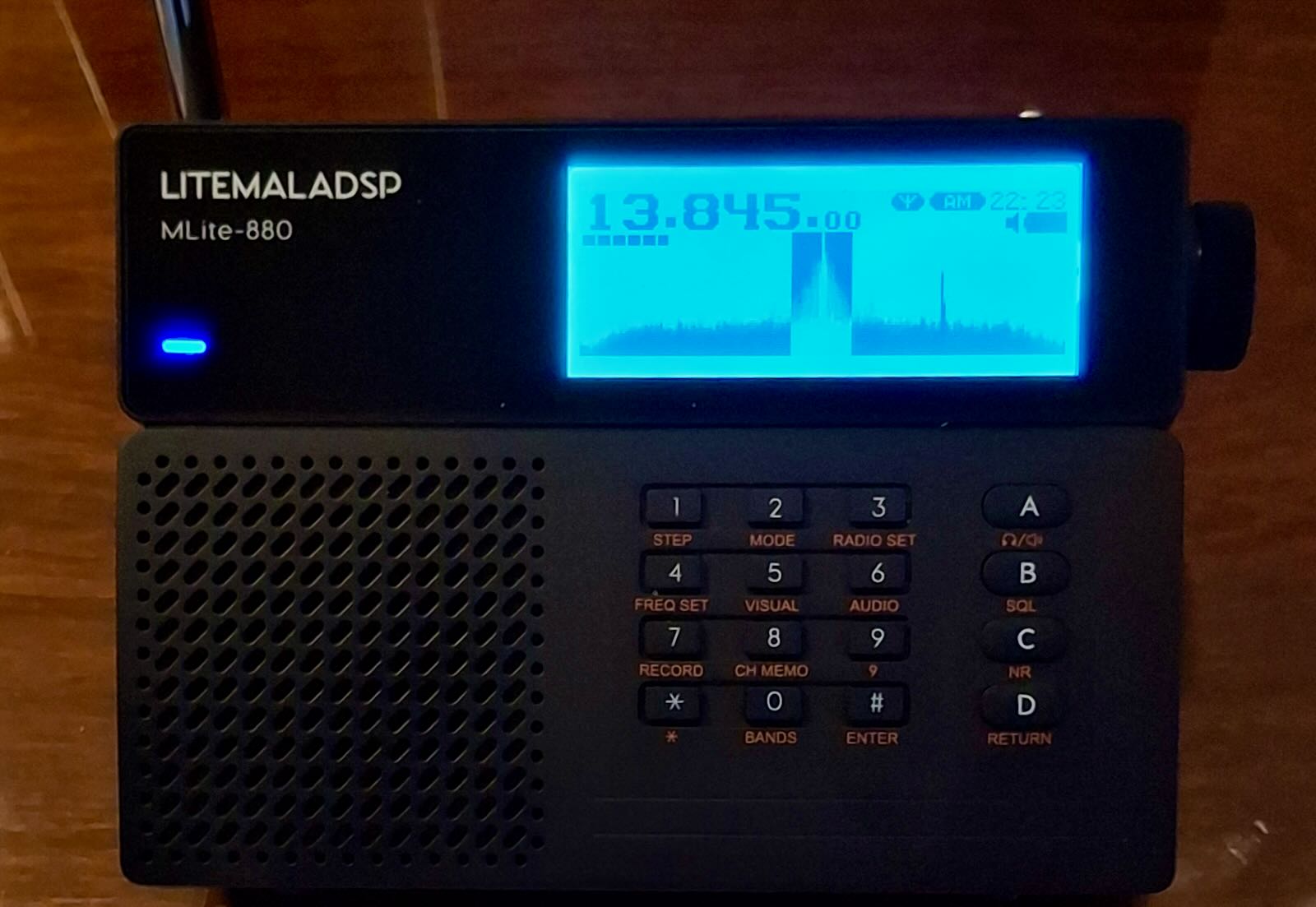
The MLite-880 portable has been on the market for some time now. There have been a number of important developments, so it’s time to update my original articles for those who already own the receiver and those who are still considering purchasing. A note to begin: I have no financial interests with either Russia-based Malahiteam or China-based Elecevolve.
I have not changed my view of this receiver — this was a major step forward in portable design, providing a spectrum display that dominates the LCD panel. Users have commented that this has an addictive quality about it — there’s just something different to picking up a portable that doesn’t have a numerical frequency as the dominant factor but allows you to quickly view a 40 khz segment and see what other signals may be there. While not the more involved color display one finds on current China-made DSP-2 units, it is a very good basic monochrome that more than accomplishes the task at hand.
But as with any new device, issues always arise and that is the case too with the MLite. I’m going to assume that those who are now MLite-880 users are also members of both main Facebook groups. If not I highly recommend joining one or both of those groups for the latest discussions about firmware and issues that have arisen. They are: https://www.facebook.com/share/g/1ChxSTA7Lw/ and https://www.facebook.com/share/g/14XV4Vxefej/
We are now at 1.52 firmware, but here is the changelog for 1.51:
New features in version 1.51:
- Added another brightness control option – manual mode
- Fixed a file naming error in the recorder
- Bug with range presets exceeding their limits
- Fixed a frequency shift in CW mode
- Added duplicate encoder switching with the # button
- Added recording disable when running SQL
- Added the ability to listen to memory cells when cycling through cells in Menu 8
- Added the ability to directly enter a cell number when working in Menu 8
- Added the ability to resave a cell in Menu 8
- Fixed a bug with the receiver freezing when trying to play a file with size 0
- Changed the cursor movement direction when working with the list in Menu 7
- The frequency range has been expanded to 165 MHz. This is beyond the stated frequencies; sensitivity above 148 MHz decreases, which is normal
- Universal firmware, suitable for all circuit design versions
According to Malahiteam, 1.52 fixed a bug with the memory menu though it’s possible there were other changes we’re not aware of. The most important headlines involve the additional tuning range to 165 mHz and the VOL/TUNING function. It’s now possible to switch between VOL and TUNING with a push of the # button — this is great because anything that reduces the wear on the plastic encoder is very welcome. Though 1.51 provided expanded tuning to 165 mHz this was broken on some units. Now at 1.52 most of us now can enjoy listening to local EMS and NOAA weather frequencies. Also very welcome is the ability to monitor memory cells while cycling through them. And yet another change involves expanded flexibility in the brightness control.
All of this is great news — for me it’s nice to be able to hear local emergency and weather frequencies. And I am now more impressed with the capabilities of the MLite in AIR band, though listening to aircraft frequencies requires careful setting of AGC or manual gain levels and be sure also to adjust the length of your whip antenna.
Now for the issues we’re seeing at the 1.52 level.
IMAGES: I and other users have noted images, appearing in the 130 mHz to 165 mHz range. While tuning NOAA frequencies I see an image on 141.050 mHz which as a friend noted is “exactly 21.4 MHz away from their freq of 162.45 …. 2x the standard FM IF of 10.7 MHz. We have also noted EMS on 132.76, which as my friend noted “would be the image of their regular freq, 154.160 mHz.”
I have alerted Malahiteam to this and the response is that “using a high intermediate frequency (IF) is a rather expensive solution—ranging from the filters to the frequency synthesizer. This issue has been completely eliminated in the new hardware version, which is currently on sale. So, it appears that Malahiteam and Elecevolve have already moved to address this issue, though I’ll be awaiting new reports from users as to whether the problem has been resolved or minimized. What specific new hardware changes have taken place we don’t know yet.
CALIBRATION: It’s important to note that the calibration function on the MLite (called F-Correct on DSP units) has separated sections, one for HF, another for higher frequencies. Thus it’s possible to correct/re-calibrate when tuning say 154.160 mHz and separately fine correct for zero beat at 15.770 mHz. Longtime DX’er Guy Atkins states: “My MLite 880 on new 1.52 firmware (updated from 1.3) seems be working flawlessly; I spent an hour today trying all features, bands, and functions. Very pleased! I now have working NOAA weather band frequencies too. This is a very early MLite 880 radio that originally had version 1.1 firmware. I purchased it through Banggood weeks before Elecevolve appeared on the scene. I did need to adjust the freq calibration on the weather band with 1.52, but that did not affect HF and below, fortunately, as my 880 is spot-on for those frequencies.”
OVERLOADING/BLEED-THROUGH: On my MLite I have noticed only one case of bleed-through from strong local AM/FM stations. One user states: “I’ve had an 880 for about 2 months and I haven’t experienced those problems, even using a large outdoor antenna.” Another user states: “I have an FM transmitter about 300 metres from my house yet had nothing.” Another stated: “I initially had quite a few of these issues , however, narrowing the filter settings helped remedy these challenges immensely.”
MEMORY MANAGEMENT: This is an area where more work could be done. Right now the MLite has “Pages” each containing 50 “cells” But it’s impossible to scan through each page, or label the Page, or set a range within the page. So for now we’re left with having to just jam in a bunch of frequencies and scroll through them, though we can not monitor each cell in the process. Malahiteam and Elecevolve are aware of user comments on this and hopefully there will be improvements in new firmware updates.
REVERSE TUNING: I and other users have confirmed an issue of reverse tuning, notably in the 150 mHz+ range. One user notes that this seems to start at 151.000 mHz. I’m still gathering information about this and Malahiteam and Elcevolve are aware of the issue.
VOLUME: A number of users have noted that the volume on the MLite is low overall, forcing users to increase level to 70 to 80 percent. This too is something the manufacturer and software designer are aware of.
Stepping back and looking at the big picture, the MLite–880 represents a huge step forward. Here we have a manufacturer in China, working with the Malahiteam software, that brought about a major change by providing a spectrum-dominant receiver in what I call a traditional portable cabinet.
In a recent message, Elecevolve stated: “We are truly grateful for the valuable suggestions you consistently provide and welcome all reasonable requests from our users. Of course, the MLite-880 is an innovative product, and no radio is perfect—but we are committed to continuous optimization and improvement. Thank you once again for all your support throughout this process.”
As of this writing, the price for the MLite–880, as shown on the Elecevolve website, increased by $15 dollars to $195. Even with shipping and any potential extra charge due to tariffs this makes the receiver an excellent choice for anyone who is willing to step into this new world in which, as the Elecevolve description states: “The spectrum display helps users quickly identify distant stations and weak signals.”
As I have stated before, I am waiting for the day when other of the remaining manufacturers finally jump into the game by providing this kind of spectrum-dominant display.
I just updated both of my MLite-880s to the new firmware 1.5.8 – as of June 29 2026. WOW!
If you do this with the new updated Windows interface (downloads off the Elecevolve site) – you NEED the new MLIte version to get this new firmware BTW – we now have Sync AM and YES!!! U/L Sync Selectable Sideband – it toggles off the “9” button in the mode selector – between standard DSB Sync AM, USB Sync, and LSB Sync. Yahoo!
Worked superbly last night off my FXLoop I have inside my 2nd floor “den”. Was able to grab a medium weak station 10KHz up from a local 50kW “boomer” here in Edmonton… USB Sync and Voila!
Worthy update FYI! Grab it now! Cheers and good DX
Darren VE6QY
PS – What I really like about this radio is that update capabilities continuously ENHANCE the rig and features. Well Done, Malahit TEAM!
At some point the calibration units changed. As of V1.5 they are 0.1ppm on HF and 0.5ppm on VHF. No calibration on the FM broadcast band.
For those of us who don’t use Facebook , are there other on-the-web knowledgeable sources of information on the MLite receiver?
There is a long thread about this receiver on radioscanner.ru/forum/.
You need to know Russian or alternatively use a translator.
Thanks very much for posts on the MLite.
A few thoughts and things I’ve noticed:
1. You actually can label each memory PAGE as well as individual memories.
2. While looking at a page of memories you turn the tuning knob to move through the list. While doing this, the radio is actively tuning each in the background and you can listen so that you can stop on a station with listenable activity.
3. I have 2 NWS radio stations roughly equidistant to me (about 30-ish miles to the north and south) that I can pick up reasonably well on a number of other radios. Even with firmware 1.5.2 I cannot pick them up indoors at all, and taking the radio outdoors I can barely get the strongest of the 2, so while the expanded VHF range is available on my radio it’s still much weaker than I need to be usable.
As for my wishlist, the main thing missing for me is anything resembling working scan capability, especially the ability to do an ATS style scan and store. Supposedly the radio can at least “seek”, stopping on strong enough stations, but this is so badly calibrated that it flies right by stations that show up strong on the spectrum display.
Current thoughts – I knew from the outset this radio would be a work-in-progress, built around some very capable hardware and with firmware that would allow for fixes and new features. Some people seem to be very unhappy that we are not already on a “final” firmware. As for myself I am enjoying being part of the process and seeing where the team takes this fine receiver, and I have no regrets about the purchase.
Thank you very much for this article. You have captured quite well the essence of this “little big radio.”
I received mine with FW 1.4 and didn’t experience any major issues at first; later on—thanks to the administrators of the two Facebook groups and some fellow users—the flaws inherent in the radio gradually came to light. I have since updated the firmware all the way to this latest version, 1.52, and the improvement has been significant. I just want to say that I absolutely love this radio, and I would like to thank the administrators of the Facebook groups for their dedication.
Best regards, 73.
Great update on the MLite-880 — the spectrum display really does change the way you approach shortwave listening.
For anyone using the MLite to hunt for stations, I’ve been developing an app called SWListener that pairs well with any receiver — it gives you a full shortwave schedule database so you know exactly what should be on a given frequency before you tune there. Live DX spots from the community are included too, which helps when propagation is unpredictable.
Available free on iOS, Android just submitted to Google Play. Happy to hear feedback from experienced DXers!
73
Hey, just searched for SWListener on iOS App Store and it’s €.99c but you said it’s free on the iOS ?