
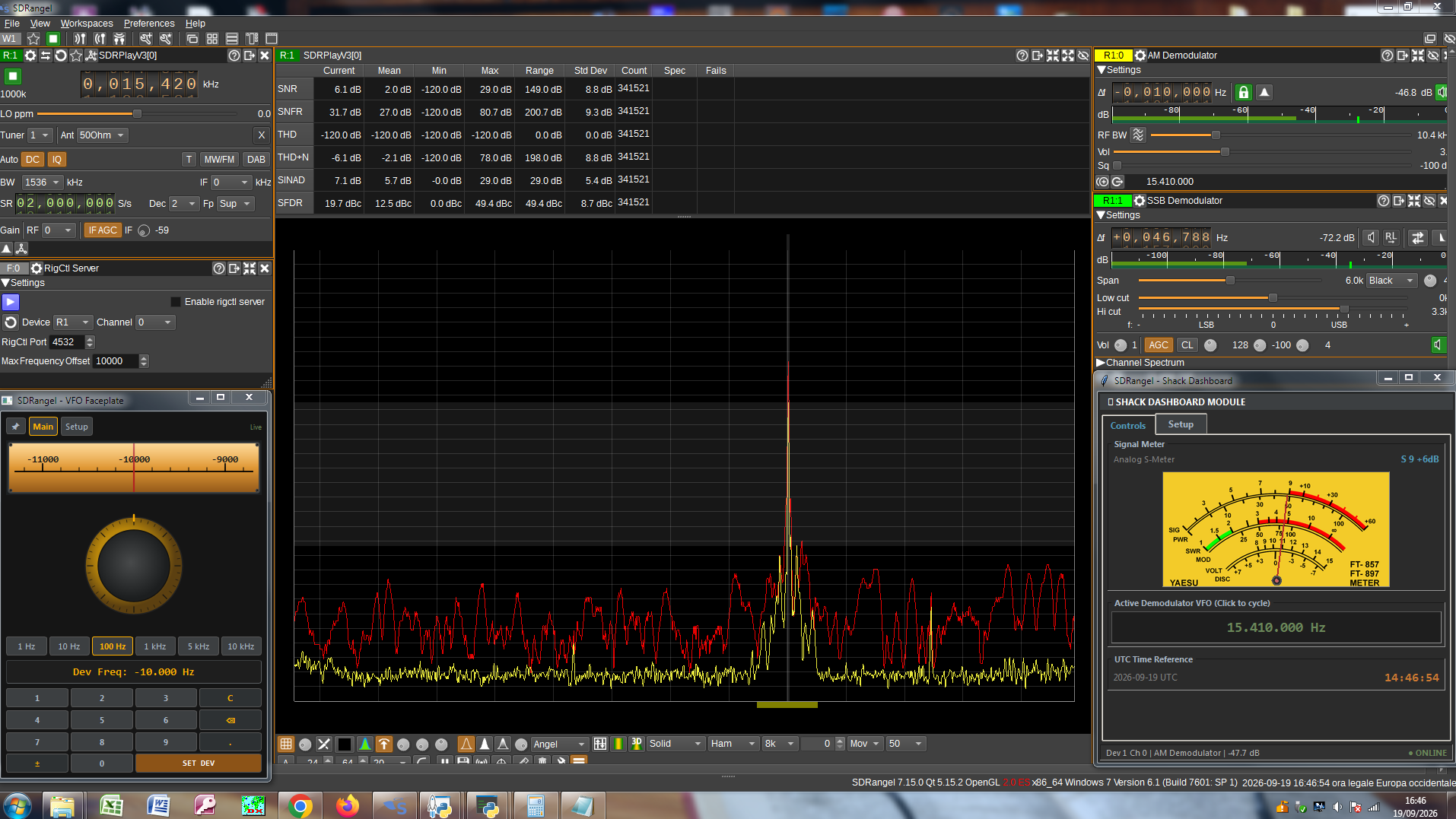
 Many thanks to SWLing Post contributor Patrizio (IN3032SWL), who writes:
Dear SWLing Post Readers,
Before presenting the projects, I would like to share a brief personal reflection. I am 59 years old, not a professional programmer, I still use an old PC running Windows 7, and I am studying to take the amateur radio license exam next November 26th. All the software you see below was developed entirely and for free with the valuable help of Gemini. This proves that at any age you can challenge yourself and create useful tools: Artificial Intelligence is not a demon to fight, but the natural evolution of technology that we can all access today to cultivate our passions.
As shortwave enthusiasts, we know how fascinating the visual and operational aspect of radio frequency is: having clear instruments, a nice analog dial, and essential data right at hand makes listening much more engaging. Often, modern SDR software is powerful but cold, lacking that classic warmth of traditional tabletop receivers.
To bridge this gap and optimize the listening station, I created two lightweight open-source projects designed to integrate seamlessly with SDRAngel.
1. What is it?
These are two modules designed to accompany SDRAngel by bringing dedicated tools to the desktop:
-
- SDRangel Shack Dashboard: A compact, always-on-top panel combining an analog S-meter (with selectable aesthetic skins such as the classic amber yellow, white, blue, black, or green), a digital frequency meter of the active VFO, and a UTC clock with a permanent time reference.
- SDRangel VFO Faceplate: A true virtual front control panel equipped with an interactive rotary tuning knob (a virtual knob that can be rotated with the mouse or scroll wheel), a numeric keypad, and quick step selectors (from 1 Hz to 10 kHz) for fine frequency tuning.
2. Who is it for?
For all SWLs, SDR users, and radio amateurs who use SDRAngel and want a clean, independent, and customizable interface for signal monitoring, without having to dig through the complex menus of the main software.
3. What problem does it solve?
It allows you to monitor signal strength at a glance (via the needle instrument) and tune or verify the exact frequency with an ergonomics similar to a traditional hardware receiver, keeping the windows freely positionable on the screen.
4. What does it require and how does it work?
-
- Cross-Platform Soul: These applications are designed to run smoothly on different platforms. In my shack, for example, I run them without any issues on an old PC with Windows 7.
- Maximum Simplicity: No complex installation procedures are needed; once you download the code, launching it takes literally a double-click.
- It requires Python installed on your computer and SDRAngel running locally (the program connects automatically via the software’s local REST APIs).
5. Where can you see it in action and download it?
You can see the programs in action in the demonstration video published on YouTube: ? Watch the demonstration video on YouTube
All source code, instructions, and graphic skins are available freely on GitHub: GitHub Repository – SDRangel VFO Faceplate & Analog S-Meter
Happy listening and 73 to everyone!
Patrizio (IN3032SWL)