
 This past week has been a bit of a rollercoaster behind the scenes. After enjoying about a week free from the Lumma Password malware, it unfortunately managed to reinsert itself—despite all of the security measures we had put in place. As mentioned previously, we believe the original entry point was a compromised user account with a weak password. Following the first cleanup, we forced password resets for all users and had our security team harden the site significantly. Even so, it appears some portion of the malicious code may have remained hidden in the database and was able to reestablish itself.
Out of an abundance of caution, I took the SWLing Post offline again this week so it could be thoroughly inspected and cleaned. I didn’t want to bring the site back online until I was confident the issue had been resolved and the site databases had been checked carefully. It’s been a time-consuming process, but the goal has been to ensure the site is stable and secure before returning to normal operation.
All of that said, this particular malware is known to be especially persistent and difficult to fully eradicate.
If it resurfaces again, I may have no choice but to take the SWLing Post offline for an extended period and rebuild the site from the ground up. This would involve migrating all posts and media to a completely fresh WordPress installation, with a new database, on a new server—essentially starting clean. It’s a time-consuming process and could mean the site is offline for a week or more.
Keep in mind that we have almost 10,000 posts, 47,000 comments, and tens of thousands of media files (graphics, audio files, etc.).
I truly hope it doesn’t come to that, but I want to be transparent about the possibility.
Also, if you happen to encounter a fake Cloudflare verification window like the one shown below—especially one that asks you to open a terminal or paste code—please do not follow those instructions.
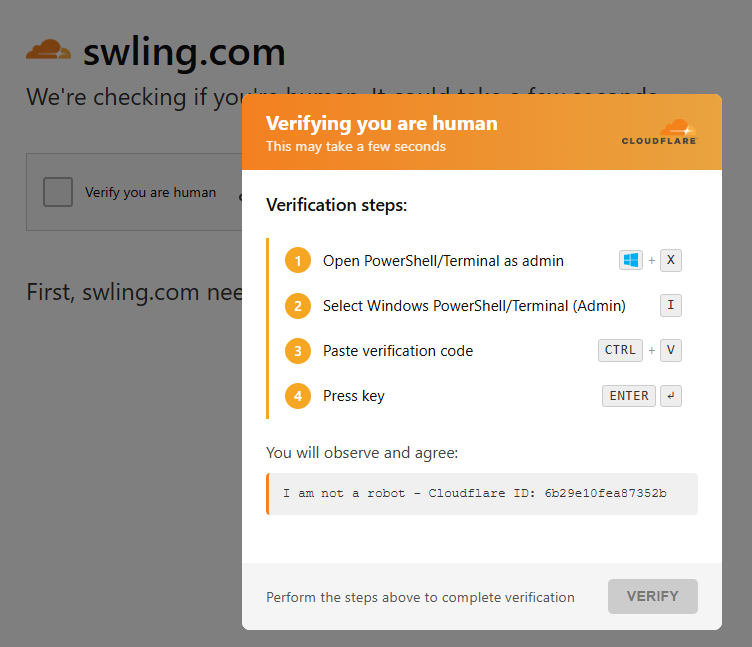
This is a screenshot of the FAKE CloudFlare challenge window. We do use CloudFlare and they will ask for versification that “you’re human” sometimes, but they never ask you to input information into the shell/terminal of your computer.
This is malicious behavior. Simply close your browser immediately and let me know. You can reach me at this temporary email address. If you report it, it will help me respond more quickly and keep the site safe for everyone.
Thank you again for your patience, support, and understanding as I work through this. It truly means a lot.
73, Thomas
Yeah, I’ve experienced this with a different suite of malware. I feel your pain. I now default to a range of security products, multi-factor authentication, etc. It’s less convenient, but I sleep better.
Wishing you well. I second the idea of testing in a VM if you have to rebuild/restore.
I feel your pain! One of our websites was attacked by a particularly pernicious malware attack, with it trying to download user names, passwords and personal data. This particular suite of misery came (originally) from Russia, and once it was isolated and all its traces removed from the databases and other areas of the site, it was fascinating to examine its code. The writers had tried to obsfuscate their code, but had used a particularly crude type of encryption….
It was obviously an attempt to get us to pay for the “removal” of the malware, with escalating threats of the site’s destruction. It was interesting that they only took interest in our site when there was discussion of (and offers of) money. They seemed to believe that it was a big commercial site (not the hobby site it actually was!).
I hope that you’re successful in the eradication of this nuisance. You can be certain that the original code injection came from a compromised Windoze computer (since M$ still believe that security is a bolt-on!).
I appreciate that WordPress makes site construction easier, but it’s often subject to malware, so you might consider migration to another site construction tool in future.
Good Luck!
Many thanks for what you and the team do to maintain this site, Thomas. As for the future, do what you’ve got to do – even if that means leaving behind older content that has become contaminated and unusable, in order to focus on present and future content.
Whatever path you take here, know that we’ll be with you and will continue to support the site.
Hang in there, Thomas! I know this has to be a frustrating experience.
Scott
First WELCOME BACK
then… would it be possible to bring up a VM, bring up a new site and restore the DB and files ?
Thank you, Thomas, for these detailed explanations.
Congratulations to the whole team on getting the site back up and running so quickly.
A unique and indispensable site for all radio enthusiasts.
See you soon for more news…