
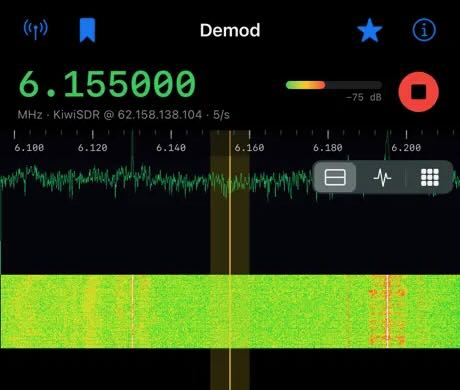
 Many thanks to SWLing Post contributor Alphonse, who is an SWL and independent app developer, who recently reached out to introduce Demod, a new iOS/iPadOS receiver app designed for exploring shortwave and other radio signals via remote receivers.
Demod connects to KiwiSDR, SpyServer, and rtl_tcp servers, and includes a built-in directory of public receivers, so you can start exploring even if you don’t have any radio hardware of your own. One particularly intriguing feature is its Identify function, which uses the HFCC broadcast schedule, your receiver’s location, and the current UTC time to help identify the station you’re hearing, including its language and approximate transmitter distance. The app can also perform on-device live transcription and translation of received audio.
Alphonse says the app collects no data and contains no ads or tracking. The current release is version 1.3, and he has put together a short 90-second demonstration for anyone interested in seeing it in action:
I haven’t had a chance to try Demod myself yet, so consider this an announcement rather than a review—but it certainly looks like an intriguing tool for SWLs, particularly those who enjoy exploring remote receivers. I do plan to take it for a spin soon!
Hi there.
The App looks nice, but what about WebSDR’s and so on,
also, will it Play in StandBy like the Echo: Global SDR App ?
73
Thx
DL0205SWL
If the RNZ Pacific staff were to go to their transmitter site and received their transmissions the signal would travel 3507 km.
Well this is the best $14.99 AUD I have ever spent in my life!
An amazing app, it’s mind-blowing – thanks Alphonse!
PS – Demod is so slick on an iPad, but in case anyone is wondering it’s even better when running on a Mac with an Apple Sillicon processor. On my M1 MacBook Air it is so slick.
The whole concept is a massive new adventure, station ID’s, scanning, noise reduction, speech translation and transcription is so wow!
Interesting! I looked on the app store but it says Demod is only for iPhone/iPad, not for the Mac. Did you install the iOS app on the macOS?
PS I tried and indeed it downloads, installs and runs on my Apple M2 macbook air, macOS Tahoe. Amazing.
Looks interesting, but you should have mentioned that it costs $10 with no way to check it out for a short period of time. One thing I’ve learned from the App Store is to never buy an app without trying it out first. This could be better than sliced bread, but I don’t buy apps without a free trial period.
I’ve never had a problem getting a refund from the Apple App Store. Just go to reportaproblem.apple.com and submit a refund request. Keep in mind that you may need to wait a few days after the purchase before the option to request a refund becomes available.
Nice! I bought & installed it on my iPad and listened to a KiwiSDR in Amsterdam, USA for a while. Soon I’ll see if it will also connect and operate my Icom IC-R8600, that would be fun as well.