
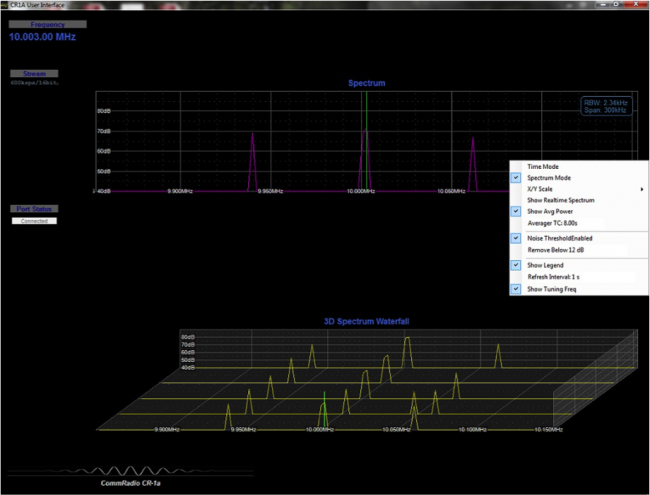
 Many thanks to SWLing Post reader, Grzegorz Jasionek, who notes that CommRadio has just released a firmware update for the CommRadio CR-1a that includes a new Graphic User Interface (GUI) with a 3D spectrum display.
The CommRadio Dropbox site has an 18 minute video showing how to operate the GUI and the various features; CommRadio recommends you watch the video prior to using the GUI for the first time.
Click here to view Dropbox folder with CommRadio newsletter, video, update instructions and files.
I can’t get the CR-1A to connect with my Windows 10 tower. The port is assigned at plug in but no connection to the receiver. Windows 7 at work works fine and the laptop works as well.???????
Gerry
I found the software’s visualization rather limited, definitely not up to the quality of the device.
Does anybody know if there are other SDR software clients that would process the CR-1a signal?
hi can anyone tell me i have connected my radio ok to the software but the spectrunm does not seem to work on the screen i can see the frequency port status connected and streaming ok but the visuliser does not work so as far as im aware i downloaded all the drivers fo it off dropbox the only thing im on windows 10 maybe thats the problem not sure any help please i have emailed commradio but as yet no reply!!!! cr-1a user
I found the same problem until I realized I didn’t have the last firmware version on the radio. Once updated everything worked fine.
I have been using the GUI with my CR-1a now for a few days. I’m not a electronic guru so I’m still figuring out some of the settings. As far as function control for the radio, I can only control frequency directly. It would have been nice to have more controls incorporated such as filter selection, mode control, and possibly a wider spectrum control to see what is going on in the bands.
It seems to be a good first start but does not reall integrate the radio as a true SDR program does such as on my Winradio or SDR-IQ. I am not overwhelmed by the program and as a basic user do not see any benefits except for frequency control. Like I said I am not a electronic guru.
That is a nice program that I personally have waited for since getting my CR-1a. I really like the ability to tune frequency using the mouse as I was getting tired of turning the dial and using the arrows. Seeing the noise floor and other spectrum data makes this a useful tool for me as an avid DXer. The only improvements I was also hoping for was to be able change filter settings, and mode while hooked up to the PC, and maybe a recording function. Maybe next time? Thank you CommRadio. It was worth the wait!
Let us know what you think about the added functionality! (I have the original CR-1, which doesn’t have IQ out via USB, so I can’t try the new GUI.) I’ve been very impressed with CommRadio so far. They don’t haphazardly release updates or products. Everything is well thought through and based on customer feedback.