(This Review was originally published in The Spectrum Monitor in the April 2025 issue, and is used by the kind permission of Ken Reitz)
The Choyong LC90 is, to my knowledge, the first of its kind: a portable Wi-Fi/4G/E-SIM FM/LW/MW/ SW/SSB radio. Or, to put it in simpler terms, a radio that can connect to wireless internet or to a hotspot, such as one created by your phone, as well as be a fully functional traditional portable shortwave radio. There is also an E-Sim purchase option which allows for internet connections without using a local carrier. This is a feature I have not explored, as my primary use will be at home.
The radio is able to be updated though firmware, and this is a major benefit as can be seen by the new features which have been added along the way, as well as fixes to bugs or adjustments to operation. For example, when the radio first came out, it did not feature SSB operation – only AM shortwave (I cover more about SSB implementation later in the review). Another major feature to be added to the radio is voice activated search features for finding internet radio stations and podcasts. This is truly an innovative radio, and I have been excited to explore its many features. Full disclosure – this radio was provided to me by Radioddity for review purposes, with the understanding I will give an accurate and unbiased assessment of the radio. With that out of the way, let’s dive in!
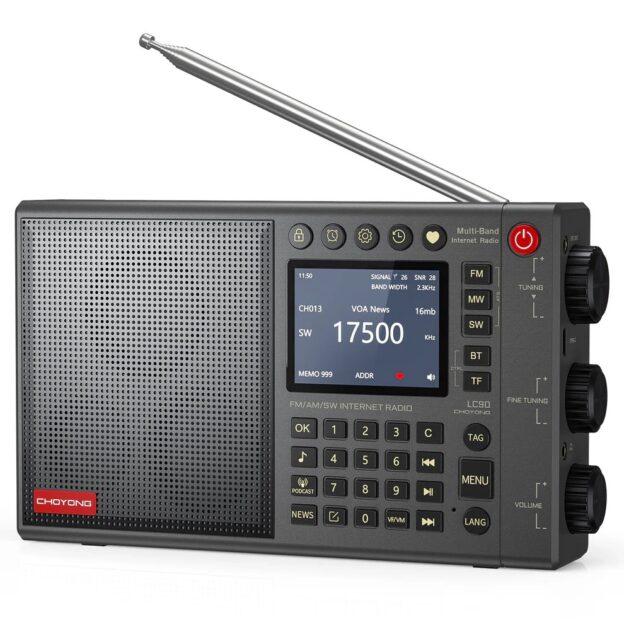
Impressive Looks I do not usually talk about the looks of a radio – I am always more concerned about its ergonomics and ease of use. However, this is a classy looking radio. My version has a smoky gray shell, with clearly defined markings in the buttons and silk-screening. Everything is easy to identify, and the IPS LCD screen is bright and clear, with excellent readability from almost any angle. Even the box it came in has a classy look and appeal. Still, how it operates and how it feels are the most important aspects of any device, the looks and styling are just a very appreciated bonus!
The radio features a bass driver, bass radiator, and a silk dome
tweeter. (Courtesy: Choyong)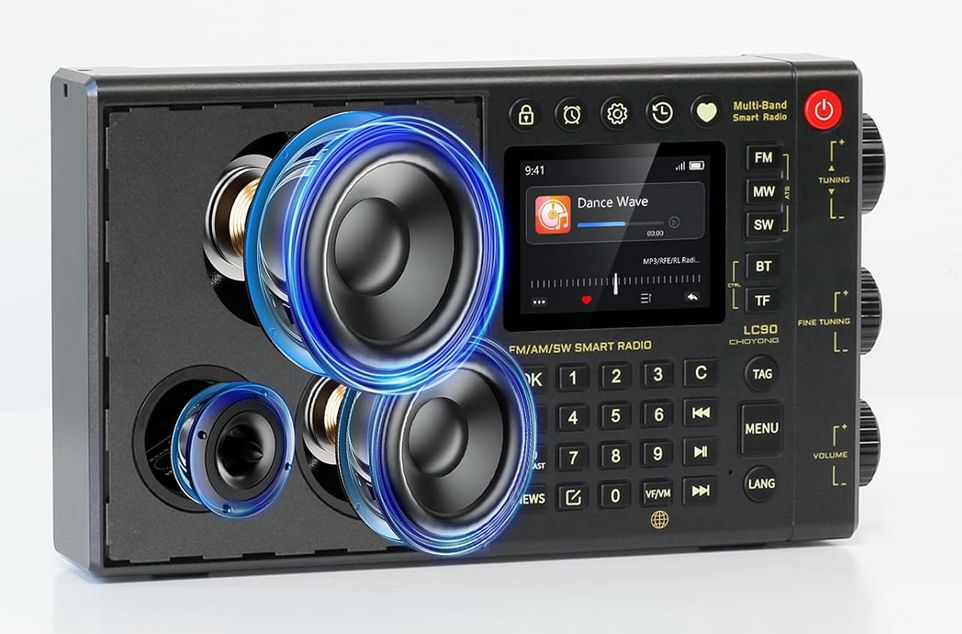 Ergonomics The radio has a very solid feel to it, weighty, but not too heavy. One gets the impression that this is a solid piece of kit. The telescopic antenna is tall (~38-inches) and firm. Any antenna can be bent if mishandled, and many radios have fairly flimsy antennas, but this antenna should last the life of the radio under normal conditions.Buttons are spaced nicely and press firmly. The volume, fine tuning, and standard tuning knobs are large and easy to grip, and they have just the right amount of tension when rotated. Of course, ergonomics are somewhat subjective as each person has their preferences, but I doubt anyone would feel the radio is physically hard to operate. Oh, and the keys are backlit! Great for bedside operation!!
The radio features Bluetooth capabilities for playing music from external sources, and a TF card for playing song lists through its two 15-watt speakers, featuring a bass driver, bass radiator, and silk dome tweeter. It also has two 2500 mAh batteries that are rechargeable and replaceable. A word of caution when you go to replace the batteries – the screws are small and of the “star” shape (not Phillips). Make sure you have the right type and right size driver so as not to strip the screws. They would be hard to get out if stripped!
Additionally, the radio has a clock, an alarm clock, and a timer playback. There is also a keypad lock to help avoid accidentally changing modes or features. When locked, any press of a button brings up a reminder on the LCD screen that the keypad is locked. As an aside, the power button will not turn on the radio with an accidental press. Hold the power button for three seconds to turn on the radio, and the same to power it off.
Menu operation? Well, everyone has differing ideas about what is clear and what is confusing, so I cannot offer much in the way of a conclusion, simply to say I did not find any difficulties navigating the menu system. It is relatively short and is very self-explanatory when used in conjunction with the manual. Most features have their own button, so accessing the settings menu is not needed on a regular basis. Likewise, the manual is short and to the point, covering most everything to operate the radio, with pointers to the radio website where needed.
I offer some tips for operation which seem to work best for me later in the review, but as they say, your mileage may vary.
If I were to make changes to the layout of the radio it would be to separate the jacks for the external antenna, headphones, and USB charging/computer connection to the other side of the radio. Currently they are located beside the tuning and volume knobs on the right side of the radio, and this can make reaching the knobs a bit tricky, especially if the cords are thick. But this is a small issue overall, and I do have rather large fingers, so this will not be an issue for many users.
Specifications. Weight: 640 g/1.4 lbs. Size: 200 x 122 x 40mm/7.9 x 4.8 x 1.6 in Frequency: FM 64-108 MHz (Step: 10 kHz / 100kHz) LW: 153-279KHz(Step: 1 kHz / 9 kHz) MW: 522-1710KHz(Step: 1 kHz / 9 kHz / 10kHz) SW: 2300-26100KHz(Step: 1 kHz / 5 kHz) Speaker: 15 watts Battery: 5000 mAh (Replaceable and rechargeable 18650*2) Network: 4G Band supported: FDD Band 2/3/4/5; TDD Band 38/39/40/41 BT version: 5.2 TF card: Maximum 32 GB Earphone Jack: 3.5 mm External Antenna Jack: 3.5 mm
Like the LC90 itself, this review is divided into two parts—the internet side and the radio side, along with some hints and tips and my conclusions.
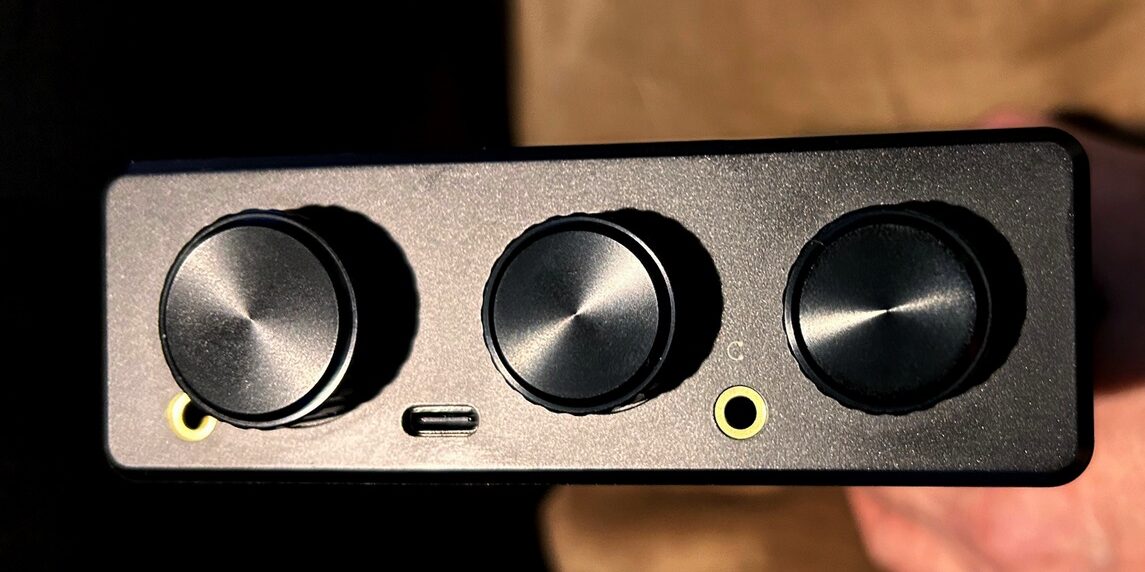
There are jacks for an external antenna (left), USB-C cable (middle) and headphones (right). (K4PKM photo)
Internet Capability Now, before you “tune out” on me (couldn’t resist the pun!) because I mention the internet capabilities of the radio, think of it as another tool in the toolbox. Internet “radio” will never replace “real” radio for me. I have been playing with analog radios for over 55 years, and I have no intention of stopping now! It’s likely I will die with a radio turned on somewhere near me, if not holding one in my hands!
However, just like SDRs with which I had to make some adjustments in my thinking a few years back, so I have come to appreciate internet streaming stations for their vast numbers, clarity, and availability, particularly those stations which are no longer broadcasting analog signals over the air.
With a portable internet-capable radio that can work off my phone hotspot or my Jetpack, I have options. (The Jetpack is my main internet source at home as I live in a rural area not served by wired services.) Storming outside with static crashes too loud for listening? Internet streaming to the rescue. Want to listen to a shortwave radio station during a time of day when propagation is not possible? Internet streaming to the rescue. Feeling in the mood for 1940s U.K. Radio programming while sitting on my porch with a hot cup of coffee? Internet streaming to the rescue. You get the idea.
No antennas to adjust, no turning the radio this way and that, no fiddling with fine tuning or Local/DX switches, or endless knob turning to find something I like without commercials. Here’s the thing: I like doing all of that at times. I like digging out a hard to hear signal (I am an amateur radio geek, after all!). I like catching programs over the airwaves and logging my catches. I have never lost my fascination for the “magic” of radio in all of those 55+ years of listening, and I will not lose it in the twilight of my life! But I can certainly add to the enjoyment of the listening hobby by being able to hear even more and varied, music and cultural broadcasts. Heck, that’s one of the things I like about FTA satellite comms – it’s all good!
Multiple Ways to Connect to Internet The radio now features three ways to make a connection to the internet. There is a Nano SIM card port for traditional SIM cards from cell phone companies (check provider support for compatibility). There is traditional 4G Wi-Fi connectivity through home wireless or hotspot connectivity. And there is a new E-SIM option (currently United States only) by which you can purchase a connection package through CHOYONG. (Go to the “Settings” menu and select “Data SIM Card” to purchase your data package.) This works similarly to newer cell phones which utilize E-SIM cards.
Finding Streaming Stations A recent firmware upgrade (4.7) enhanced voice activated searches on the LC90, and it works quite well. For those who have had internet streaming boxes in the past, one typically had to either laboriously enter one letter at a time while dialing through the alphabet, or do searches based on categories of music, such as Jazz, Bluegrass, Classical, etc. With voice activated searches incorporating ChatGPT’s Speech-to-Text and optimized search algorithm, one can search by saying “1940s U.K. Radio” and several options will come up, including the particular station you are looking for.
To test the reliability of these searches, and not knowing many streaming stations by heart, I did an internet search on the computer for “Best streaming radio stations” and came up with a number of sites with various recommended stations. One such result was “15 Best Online Radio Stations To Listen to in 2023” by radio. co (yes, 2023 – I know, ancient!). I took a random sampling of stations and voiced them into the LC90, along with another similar site’s recommendations, and the radio search found each one. Impressive, and I did not have to type a single thing -Yay!
While the instruction manual recommends using the menu option for recording your request, I found holding down the Lang (Language) button and saying the station name after the microphone image appears, gets you where you want to go much faster. Just remember to keep holding the button down until you have made the request. At first, I was releasing the button as soon as the microphone image came on, and this started the search without any input.
If you are in the mood to find random stations, you can search by continent (which I have not seen offered in other internet boxes) which is then broken down into country-state (province, prefecture, county) search. If no stations are available in certain states, it will show “No Streaming Stations.” I like this option for when I want to experience new cultural programming. In addition to music, the search can be broken down into National Stations, Podcast, News, or Other Stations, for options which might not fit within the main categories.
Shortcut buttons on the radio allow for searching Music, Podcasts, and News. These are listed in a pre-programmed order, and one can scroll through the lists using the main tuning dial, which also serves as an “enter” button when pressed. There is also a Favorites shortcut where you can access stations you have previously flagged as ones you would like to load regularly. The Add/Edit button allows you to add stations by their URL.
A feature added in the 4.7 version connected to podcast searches is the Tag button. Holding it down similarly to the Lang button now allows voice search for podcasts. For example, I searched for “Moose Peterson’s Photography” podcast and then added it to my favorites.
Another really useful button is the History button which stores and recalls stations you have previously listened to, and which can be selected by the tuning dial. This can make quick work of getting back to a station you want to hear but do not necessarily want in your favorites list or were interrupted while listening and had to turn off the radio before saving to the favorites list.
Finally, the Tag button also allows you to search by dozens of categories or “Tags” such as Oldies, Hits, Christian, 80s, Public Radio etc. Just give a short press to the Tag button and the search options will appear.
The only stations I have been unsuccessful in hearing are stations broadcasting in the FLAC format. This is not a format with which I am familiar in terms of how it is implemented in playback devices, other than certain internet browsers will work with it while others will not. As for the LC90, this may be something which can be added down the road in a firmware update, or it may require licensing-based software implementation.
Fortunately, there are over 50,000 streaming internet stations readily available in Choyong’s database, and more which can be added directly into the radio as noted above. There are also over 10 million(!) podcasts in their database, all searchable.
The “word on the street” is that the addition of OpenAI’s ChatGPT has made voice searching much more accurate. My experience with voice searching has been surprisingly good, not because I expected poor performance from the radio, but because my voice is not exactly broadcast quality! So far, I have not had to repeat or correct anything I have spoken into the recorder.
I must also mention the ability to search and add stations and podcasts through Choyong’s internet site after setting up an account. Each radio has a validation code which can be entered in as part of the account, and then with the radio connected to wireless, stations and podcasts can be searched and added online and even synchronized between multiple Choyong devices if applicable. This is a lot faster than typing in URLs manually.
Lastly, firmware upgrades are performed over the air using a TF card (Micro-SD), no larger than 32 GB. Make sure to be connected to the internet, press the settings button, and choose ‘Version Info’ and follow instructions. I had no problem updating to the latest firmware. Let’s turn to the radio side.
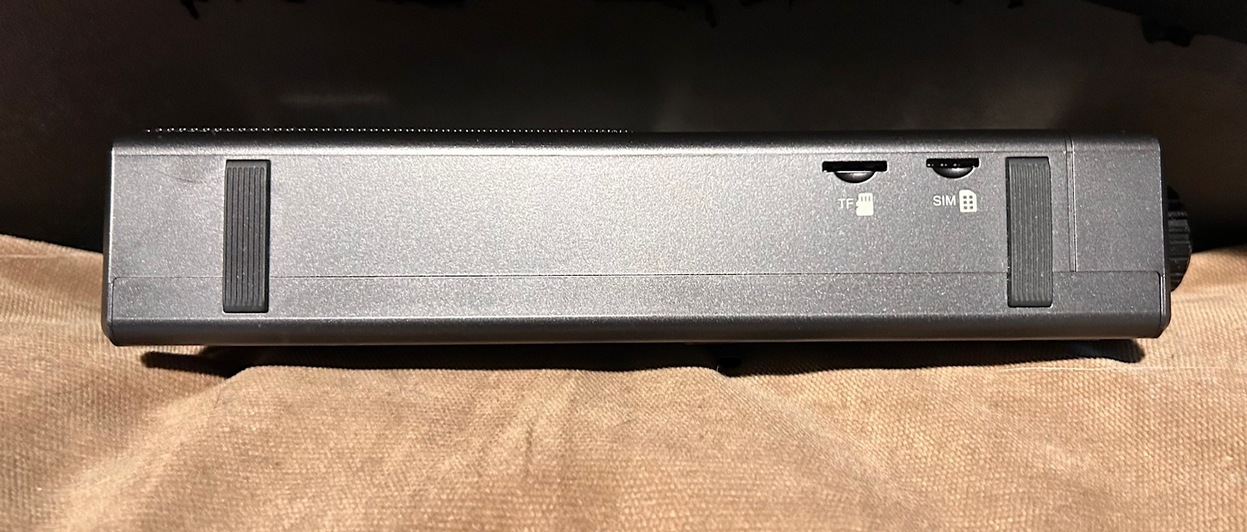
The slots for the TF (Micro-SD) card and SIM card are on the bottom of the radio. (K4PKM photo)
Radio Features and Functions The radio features most all of the things one would expect from a multi-band radio, including LW/MW/SW/FM/ SSB. The multi-function tuning knob allows for tuning steps of: FM 100 kHz, MW 9/10 kHz, SW 5 kHz, selectable by mode by pressing in the multi-function knob. The Fine-Tuning knob allows for tuning steps of: FM 10 kHz, MW 1 kHz, SW 5 kHz, selectable by a short press of the knob. Adjustments are made by rotating up or down when in the selected band mode.
One radio feature I like that works for the radio or internet side is the radio ‘Sleep’ function. Turning the volume knob counterclockwise all the way down until a click is heard, puts the radio into sleep mode without having to power it down completely. When the volume is turned back up, the radio returns to where it was when put into sleep mode. Likewise, after you power the radio down completely and start up the radio again, it will return to where it was before and making an internet connection if needed.
Radio Performance First, the good. FM station acquisition is very good, and the ATS and RDS functions work great to find stations and present station information if available. The 15-watt speaker easily provides room-filling sound. Saving stations to favorites works well, with each band having its own listing under favorites. The breakdowns even include upper and lower sideband options in addition to AM shortwave broadcasts. This is a nice feature as it automatically puts the radio in the right mode based on the station requested.
Shortwave reception is on par with most portables of this size, and the larger antenna pulls in weak stations well. As mentioned above, the radio did not have SSB when first introduced but now has this along with the ability to fine-tune stations for the best clarity. As of yet, there is no ability to calibrate the frequency display to the proper zero-beat, but this may be added down the road.
However, this is really a relatively new capability with some modern radios – those of us who have been listening to shortwave radio broadcasts for decades are used to having to off-tune slightly from some posted shortwave frequencies, and slight drifting has been an issue with shortwave broadcasts basically from the start.
Other than entering a frequency to get to a particular station, I rarely look at the frequency dial, but almost always fine-tune to get the best audio, and adjust again if necessary. It’s just my habit with any radio. As for SSB performance (separate from AM shortwave) this is a software implementation through firmware, not a hardware feature. For more excellent information of how this evolved, I refer you to several YouTube videos by Dan Robinson, including a recent update regarding the 4.7 firmware release.
In a nutshell, the designers of the LC90 never anticipated the need for SSB when coming up with the radio because China does not allow SSB. However, because the radio has become popular elsewhere, particularly in the United States, they responded to requests for SSB capability using a software workaround. This implementation has been improved for clarity within the limitations of the firmware, and is quite useable, despite not being quite on par with radios which have specific hardware in their design for SSB.
As for the LW band, I am unable to give any insight to the radio’s capabilities at my location, as even my desktop radios do not receive much in the way of LW signals.
Now for the not-so-good. MW (AM) reception is sub-par. Even when turning off the Wi-Fi (as recommended for better MW and shortwave reception), I receive very few signals. This is not a radio I would pick up for MW broadcast signals. Virtually all of my portable radios do a better job. If MW is of primary importance, this is not the radio for you. However, please read my thoughts on the radio as a whole in the conclusion.
Audio quality is very good on the internet side, but not as good on the radio side. There are likely a couple of factors at play here. First, and most obvious, your mileage may vary, as there are likely unit-to-unit variations, especially since I have seen reviews praising the audio.
Second, I suspect there may be interference being caused by the IPS LCD display. This is something of a common problem associated with larger LCD screens. Since you cannot disable the screen display while listening to the radio, there is no way to tell for sure if the display is adding unwanted noise to the radio side of things.
Lastly, there might be some unexpected electrical interference between the two disparate sides of the radio affecting the radio audio, while not affecting the streaming audio.
Here are the issues I have experienced. On FM there is a slight, but always present static sound even on strong signals. This is pretty much mitigated by music and distance from the radio, but it is there. On talk stations or segments of voice with no music, it is more noticeable. Is it a deal-breaker? Not for me, but could be for some. (This is not a speaker issue, but rather a radio-side issue, as the same sound is heard when using headphones.)
Also, there is a very low electrical “rumble” present – not a chuffing sound, but rather a very low frequency repeated pattern present. This is not heard at a typical distance with the radio on a coffee table, for example, but can be heard when holding the radio near to you. This is only noticeable when there are breaks in the audio and becomes almost unnoticeable when there is voice. I mention this more for completeness than for an actual problem in typical listening situations. Again, this is on the radio side only. I do not hear this on the streaming side.
Both of these issues may or may not affect other bands, but it is noticeable on FM due to the typically clear audio of strong stations. On weaker stations with some slight noise present already, you would not hear the static or repeated electrical interference.
As common with many portable radios, there is soft-muting present when tuning the radio, and while not as slow to rebound as some other radios, I mention it because some folks find this annoying. Personally, I do not find it objectionable on this radio.
Whether these issues are enough for you to pass on the radio, only you can decide. As with any radio purchase, make sure the seller accepts returns, and make sure you understand the terms of any returns, such as RMAs or restocking fees if applicable. I have learned this by experience!
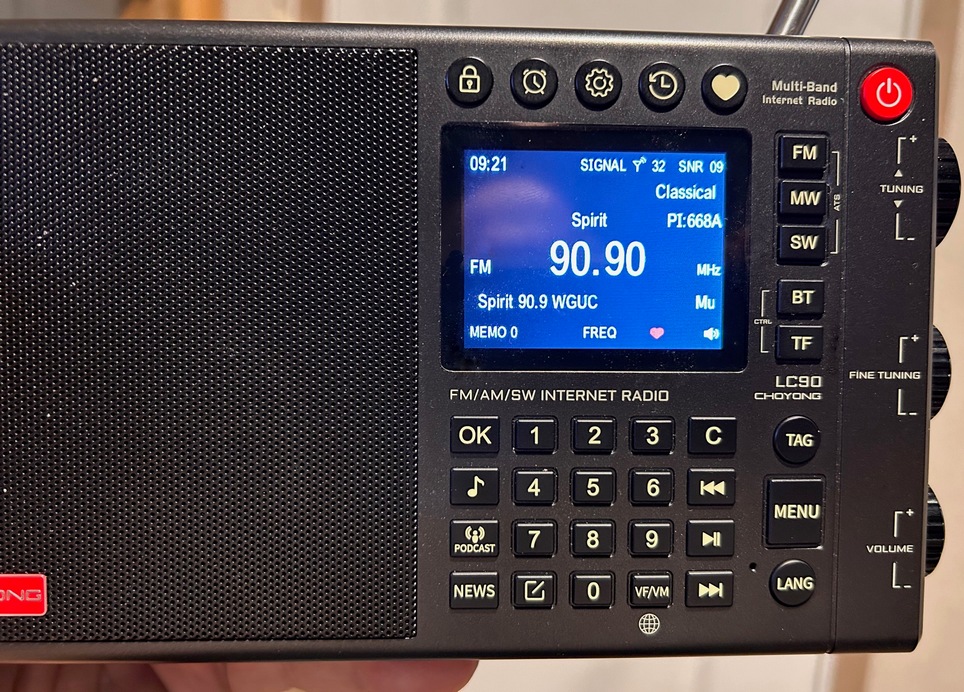
The radio has an excellent RDS implementation added in a recent firmware update. (K4PKM photo)
Conclusions The CHOYONG LC90 is a breakthrough radio offering excellent portable internet streaming capabilities, with an impressive database of radio stations and podcasts. With multiple ways to access these stations, both on the radio and through their online resources, it is by far the easiest internet streaming device I have ever used. I really appreciate the ability to break out stations by continent and the subsequent divisions, particularly when I want to experience something new in terms of various cultural programming. I do not need to understand the language to appreciate the music!
The ‘Favorites’ and ‘History’ features of the radio really impress me, and they make quick work of returning to stations I have liked or recently reviewed. I also appreciate the shortcut keys and the wide variety of divisions within those shortcuts. These features combine to take much of the tedium out of finding and saving stations I want to hear.
The traditional radio side of the LC90 offers a wide range of modes and bands common to most portables, but with some caveats as noted above. This is an all-in-one solution to give the listener the most opportunities to hear vast numbers of traditional and streaming stations, as well as functioning as a Bluetooth player and song-list player.
Personally, I find the addition of the traditional radio-side of the LC90 a bonus, not its main feature. I do not expect it to have the same level of performance as a dedicated high-end portable radio. The internet side is what separates this radio apart from other offerings on the market, and I appreciate the responsiveness of CHOYONG to its customers’ wants. I do not know of any other company’s internet streaming devices that have the full range of capabilities as the LC90, especially not in a portable package.
Up until now, the only way I could have the option of portable streaming was using my smart phone. While certainly useable, the audio is, by the phone’s necessary limitations, less than desirable. With the LC90, I can take the radio wherever I want and listen to some of my favorite streaming stations and podcasts with quality audio. I can sit out on my porch, lounge in my recliner, or take it into the workshop as desired. Along with the now almost ubiquitous USB-C charging capabilities, I can even take the radio on trips and recharge the radio in my car if needed. That is a real plus!
My thanks to Radioddity for sending me this review copy. Radioddity has excellent customer service should you have questions about the LC90’s operation, and there are numerous videos online, both from CHOYONG and other YouTubers, which can give you a visual feel for the performance and features of the radio. This radio fills an important niche in the portable world. This kind of innovation is quite welcome, and I look forward to more innovation from companies like CHOYONG and Radioddity in the future!
The Choyong LC90 is available from Amazon.com for $249
(This Amazon affiliate link supports the SWLing Post at no cost to you.)