Shortwave listening and everything radio including reviews, broadcasting, ham radio, field operation, DXing, maker kits, travel, emergency gear, events, and more
[…]For years, NASB members have wanted to replace (or at least augment) the poor audio quality of analog SW with the crystal-clear sound of digital SW radio, specifically the Digital Radio Mondiale standard developed in Europe that is now being used in China and India.
[…]There are some DRM radios in use now, which is why some NASB members are offering limited DRM broadcasts alongside their regular analog SW transmissions.
“But the current generation of DRM SW receivers cost about $100 each, whereas you can buy a cheap analog SW radio for as little as $10,” said Dr. Jerry Plummer, a professor at Austin Peay State University in Clarksville, Tenn., and frequency coordinator for U.S. SW station WWCR. “Given that the audiences being targeted by NASB members are largely in the third world, the lack of inexpensive DRM receivers keeps them listening tDRMo analog shortwave.”
[…]Given the NASB’s interest in low-cost DRM receivers, it was no coincidence that Johannes Von Weyssenhoff was invited to speak at the annual meeting. Von Weyssenhoff said his StarWaves manufacturing firm (www.starwaves.de) has the technology, capability and existing prototypes to build DRM radios for $29 each, but only if the sale order is large enough to deliver economies of scale. (He also estimated $18 DRM modules could be built for installation in other radio models.)
“Twenty-nine dollars is doable at volumes staring at 30,000 receivers,” Von Weyssenhoff told Radio World. “Even smaller quantities would be possible at this price for very simple radios — for example, without graphics displays — but these would be special projects that had to be discussed individually. But even more advanced radios with Bluetooth or premium designs will be possible to offer at a reasonable price,” he said — as long as the sales orders was in the tens of thousands or more.[…]
Many thanks to SWLing Post contributor, Mike Ladd (KD2KOG), who shares the following guest post. Note that the following tutorial is also available as a PDF (click here to download).
Basics to decoding Inmarsat L-Band signals using the RSP SDR
by Mike Ladd
Note: CHECK WITH YOUR LOCAL LAWS BEFORE DECODIING ANY SIGNALS FROM THE INMARSAT SYSTEM
(some text taken and edited from the RTL-SDR Blog website)
This document is not a definitive guide to Satcom, L-Band transmission or the Inmarsat system. This is a collection of information that I have found scatter throughout the internet and re-compiled into a document, this document. My aim is to help you get started and hopefully guide you in the right direction. Expect typographical mistakes, inaccuracies, or omissions
Inmarsat is a communications service provider with several geostationary satellites in orbit. Inmarsat provides services such as satellite phone communications, broadband internet, and short text and data messaging services. Geostationary means that the Inmarsat satellites are in a fixed position in the sky and do not move.
The Inmarsat 3-F(x) satellites have transponders transmitting data in L-Band (1.5 GHz) that can be decoded.
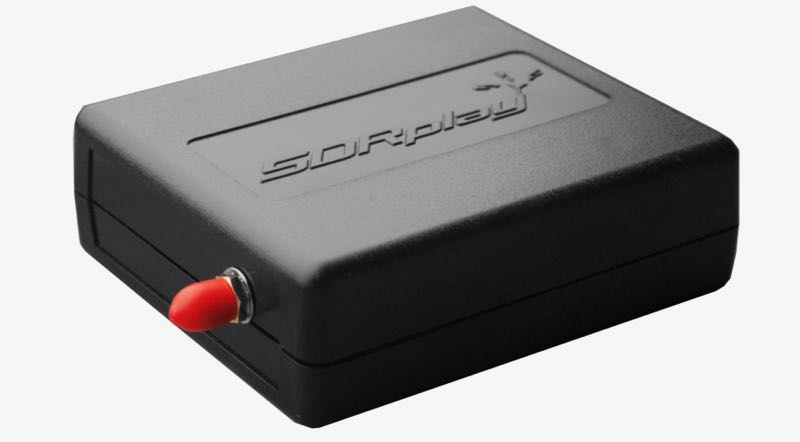
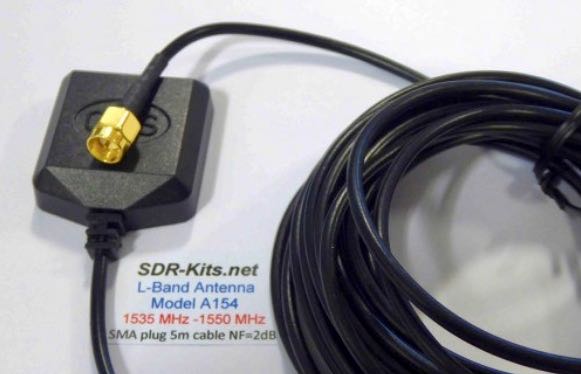
The modes we will cover in this document are Aeronautical (Classic Aero or ACARS) and Inmarsat-C (STD-C) using an RSP1a, RSP2/2pro or RSPduo connected to the SDR-Kits modified L-Band patch antenna. The Inmarsat system is not limited to only these types of networks. We are limited to the decoders available. https://en.wikipedia.org/wiki/Inmarsat
Two of the most popular decoding applications are JAERO used for ACARS and Tekmanoid STD-C Decoder used for decoding STD-C NCS transmissions on the Inmarsat 3-F(x) satellites
Virtual Audio Cable: A virtual audio cable allows you to pipe audio from application (SDRuno) into another application (a decoder like JAERO) digitally. I will assume SDRuno is already installed with your device attached and functioning properly.
You can now download a virtual audio cable package.If you already have a virtual audio cable package installed, you can skip to the next section. If you don’t have a virtual audio cable application installed, you only need to choose one and only install one of the two, either one works fine
Close any running apps, install the virtual audio cable and reboot your computer. When your computer boots back to your desktop, your computer will now have a virtual audio cable pair installed on the system.
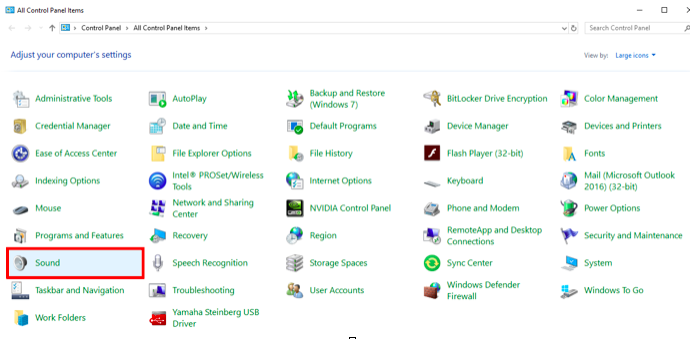
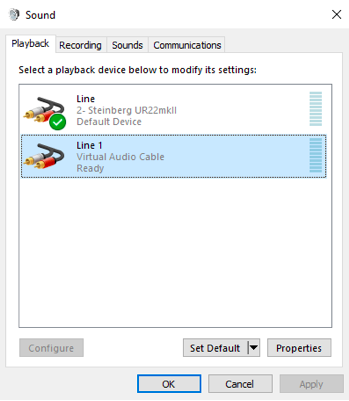
You can verify by going to your Control Panel and double clicking the Sound icon. VB-Cable and Virtual Audio Cable will only install a single virtual audio cable pair, one is for the input (Recording) and one is for the output (Playback). A single pair is all that is needed (as shown below).
JAERO
(some text taken and edited from the JAERO website)
JAERO is a program that decodes ACARS (Aircraft Communications Addressing and Reporting System) messages sent by satellites (in this case Inmarsat) to Airplanes (SatCom ACARS). This is commonly used when airplanes are well beyond VHF range.
JAERO also allows for decoding and demodulation of voice calls, due to local laws and privacy, I will not show or discuss how to do this. You can find more information about that JAERO feature online.
JAERO can be downloaded from the link provided on the first page of this document. After downloading the installer, simply double click the setup file and install it on your primary drive.
Tekmanoid STD-C Decoder
(some text taken and edited from the USA-Satcoms website)
Inmarsat STD-C is a data or message-based system used mostly by maritime operators. An Inmarsat C terminal transmits and receives on L-Band to various geosynchronous satellites that service each major ocean region.
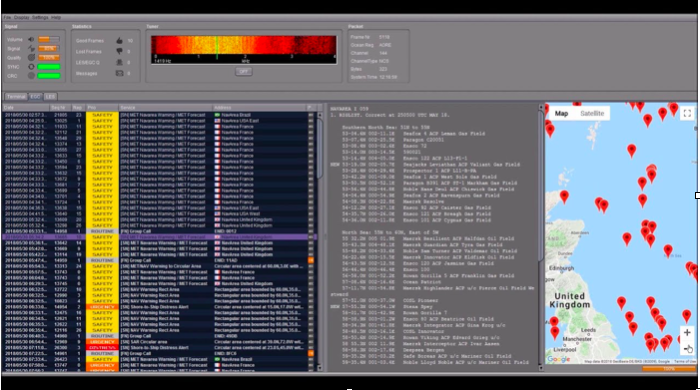
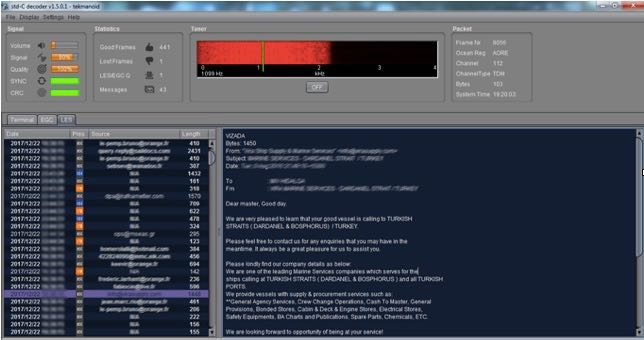
The Tekmanoid STD-C decoder will decode STD-C Inmarsat EGC (enhanced group call) and LES (land earth station) messages. Some of these messages contain private information. Reception of these messages may not be legal in your country; therefore, your local laws should be checked.
The Enhanced Group Call (EGC) service is a message broadcast service with global coverage (except the poles) within the Inmarsat-C communications system. Two of the services provided are:
FleetNET and SafetyNET
FleetNET is used to send commercial messages to individuals or groups of subscribers (for example, individual companies communicating with their own Mobile Earth Stations (MES). SafetyNET is used for broadcasting Maritime Safety Information (MSI) such as Navigational warnings, meteorological warnings, meteorological forecasts and other safety related information (including Distress Alert Relays) from official sources.
The LES station acts as an interface (or gateway) between the Inmarsat space segment and the national/international telecommunications networks.
The Tekmanoid STD-C decoder requires Java JRE in order to run. The link for the Java runtime environment is on page 2 of this document. For information contact the developer direct [email protected]
There are alternatives to using the Tekmanoid STD-C decoder, but in my opinion the other decoders available do not perform as well on low end systems or even work without needing “helper” applications to be installed. Tekmanoid STD-C decoder is very easy to use and works great on my low-end system using minimal system resources.
Putting all the pieces together
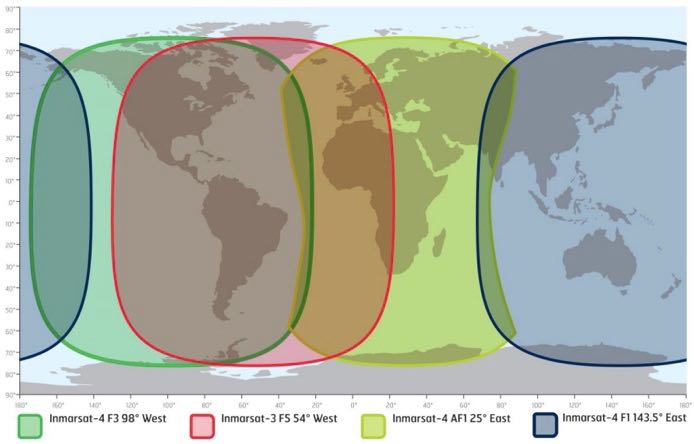
ACARS and STD-C messages will transmit via the Inmarsat satellite deployed within your coverage area/region, you will need to choose the Inmarsat satellite that is closest to your coverage area.
Note that only different frequencies are used between ACARS transmissions and STD-C transmissions. You will only need to receive from one of the available 3-F(x) Inmarsat satellites.
L-Band ACARS transmissions are in the 1.545 GHz range but STD-C messages are on fixed frequencies (shown on page 8)
Since STD-C transmissions are broadcasted on fixed frequencies, we want to monitor the TDM NCSC channel, again these are fixed for the following Ocean Regions. Choose the region closest to your location (page 9).
Inmarsat satellite: Inmarsat-4 F1 (IOR) Direction: 25° East Frequency: 1.537.10 GHz
Inmarsat satellite: Inmarsat-4 F1 (POR) Direction: 143.5° East Frequency: 1.541.45 GHz
I will assume you have located the Inmarsat satellite that covers your region. I suggest using a compass on your mobile phone to pinpoint the general direction. The direction is in ° (degrees). I am referencing true north, not magnetitic north (traditional analog compass). https://en.wikipedia.org/wiki/Magnetic_declination
You can also download an app for your smartphone called Satellite AR (Android and IOS). After you locate the correct direction of the Inmarsat satellite, you will want to place the L-Band patch on a flat metal surface. I have read that the receive pattern of this patch antenna is z (about 85-90°, straight up). Point the top of the antenna facing the Inmarsat satellite. Using the roof of my car worked just fine, just remember to point the front of the antenna at the satellite.
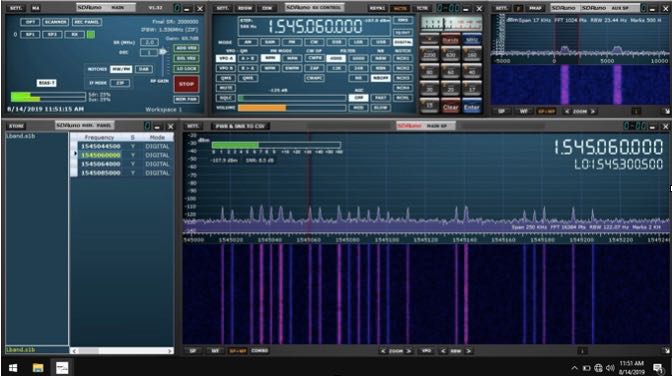
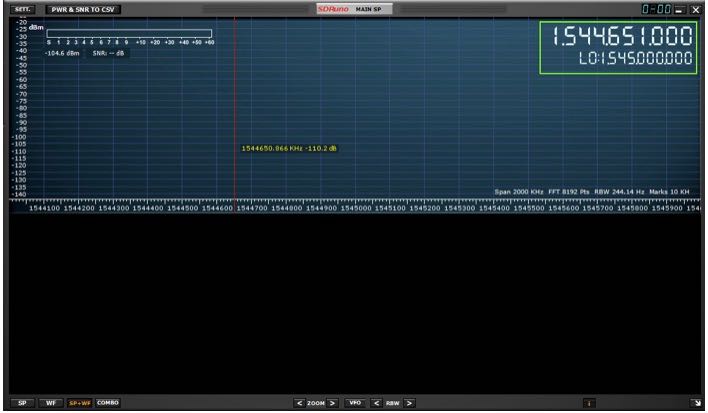
Launch SDRuno and click the PLAY button, remember that if the RSP(x) is in ZERO IF mode, give frequency separation between the VFO (top frequency) and LO (bottom frequency). In LOW IF mode this is not needed. I suggest running a sample rate of 2 MHz, larger bandwidths are not needed.
The SDR-Kits patch antenna requires that the RSP(x) Bias-T be enabled. The Bias-T option is enabled within the MAIN panel of SDRuno. See the SDRuno manual located here. https://www.sdrplay.com/docs/SDRplay_SDRuno_User_Manual.pdf view page 17.
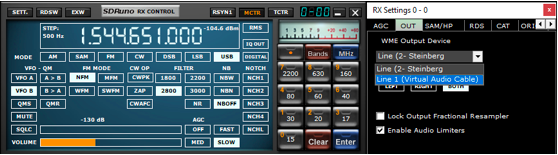
Select the Virtual audio cable as the output in SDRuno, this is selected via the RX Control panel. SETT. button and clicking on the OUT tab.
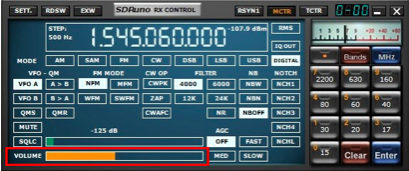
Have SDRuno’s Volume slider (RX Control) at about 35-40%
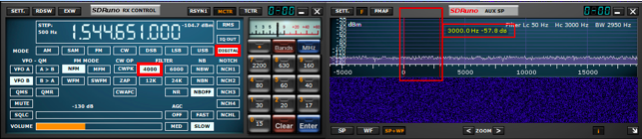
Upper sideband is recommended but I found the best mode to use for L-Band ACARS or L-Band STD-C decoding is DIGITAL with a filter width of 3k.
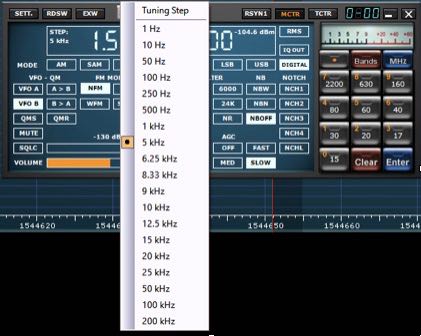
Be sure to set a proper step size (right click the RX Control frequency readout). The step size is not important for STD-C transmissions because these signals are only on one frequency for the satellite in your region but L-Band ACARS signals will be on many frequencies. Setting the proper step size will avoid issues when you point and click on signals you want to decode using the JAERO decoder.
You will want to center the signal with a little breathing room within the AUX SP filter passband. The filter slopes are very sharp. Keep the signal centered and away from the extreme edges (red markers).
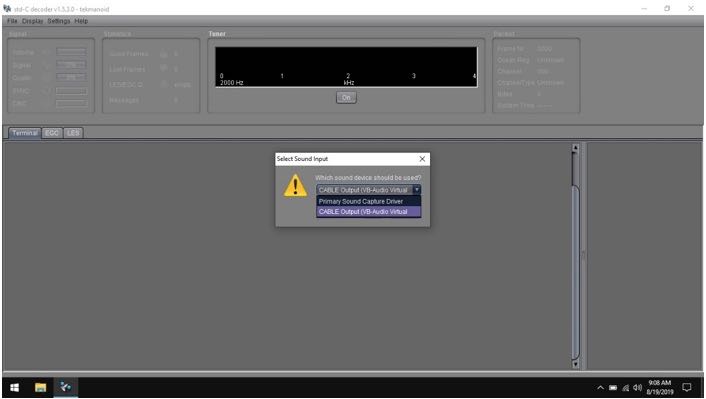
Select your virtual audio cable within the decoder’s audio input preferences.
The Tekmanoid STD-C decoder sound properties are located under Settings in the toolbar menu.
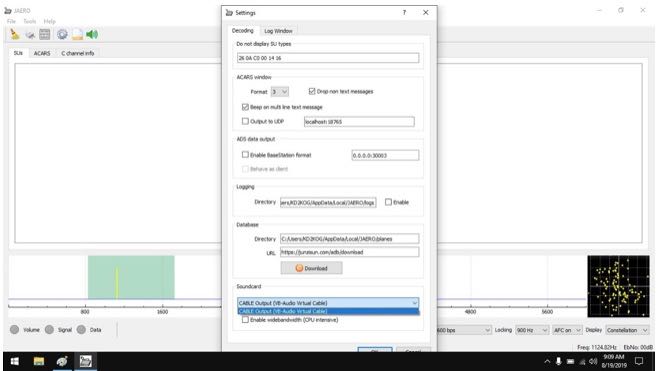
JAERO’s sound settings is located under the Tools menu and Settings.
For STD-C decoding use the frequency from page 8 of this document, remember we only want to monitor the TDM NCSC channel in the Tekmanoid STD-C decoder.
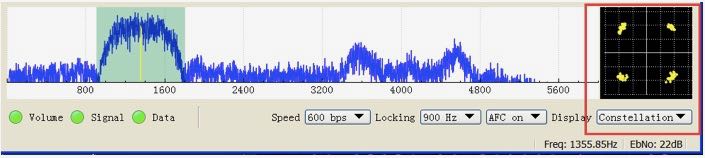
For JAERO decoding, I suggest you start in the 1.545 GHz portion and observe the constellation in the JAERO decoder.
The signal to noise ratio (SNR) needed for successful decoding in these decoders will need to be greater than 7dB. When working with a weak satellite signasls, try decimating the signal using SDRuno’s decimation feature. (MAIN panel, DEC).
I hope this document helps you get started decoding Inmarsat L-Band transmissions from the I3-F(x) satellites. I am sure I missed some key features, remember this is only a primer/basics to decoding these types of transmissions.
Warmest of 73,
Mike-KD2KOG
Many thanks for sharing your tutorial here on the SWLing Post, Mike! This looks like a fascinating activity that really requires little investment if one already owns an RSP or similar SDR. I’m certainly going to give L-Band a go! Thank you again!
Many thanks to a number of SWLing Post readers who shared this latest press release from Silicon Labs. This is certainly a major upgrade to the Silicon Labs line of tuners/DSP chips. Native Digital Radio Mondiale (DRM) support will, no doubt, meet the needs of car manufactures in countries (like India) that have adopted DRM rather than HD radio and DAB/DAB+. Of course, perhaps this might lead to an affordable DRM portable in the future:
Silicon Labs enhances Si479xx automotive tuner family with software-defined radio (SDR) technology.
(Source: Silicon Labs)
AUSTIN, Texas, July 29, 2019 /PRNewswire/ — Silicon Labs (NASDAQ: SLAB), a leading provider of automotive radio solutions, has introduced new hybrid software-defined radio (SDR) tuners, expanding its portfolio to meet the growing need of automotive radio manufacturers to support all global digital radio standards with a common platform. The new Si479x7 devices are Silicon Labs’ first automotive radio tuners supporting the Digital Radio Mondiale (DRM) standard. The Si479x7 tuners are an extension of Silicon Labs’ popular family of Global Eagle and Dual Eagle AM/FM receivers and digital radio tuners, providing the same outstanding field performance, pin and package compatibility between single and dual tuners, and bill of materials (BOM) cost advantages.
In addition to introducing new DRM-capable tuners, Silicon Labs is enhancing its Si4790x/1x/2x/5x/6x automotive tuners with unique “SDR-friendly” technology, effectively transforming these devices into hybrid SDR tuners. Silicon Labs’ hybrid SDR technology includes advanced DSP-based automotive features such as Maximal Ratio Combining (MRC), Digital Automatic Gain Control (AGC), Digital Radio Fast Detect and Dynamic Zero-IF (ZIF) I/Q. These features enable automotive radio manufacturers to support global digital radio standards with a common radio hardware and software design. This added flexibility helps OEM and Tier 1 customers reduce design, qualification, sourcing and inventory costs while avoiding the complexity and inefficiency of supporting multiple automotive radio platforms.
“Silicon Labs’ automotive tuners with hybrid SDR capabilities deliver the highest integration and reception performance and the lowest BOM cost of any automotive SDR tuners in mass production today,” said Juan Revilla, General Manager of Broadcast Products at Silicon Labs. “Our tuners with advanced digital radio features enable radio manufacturers to develop a single platform to demodulate and decode worldwide digital radio standards, greatly simplifying car radio designs and reducing system cost. A single digital radio platform can be achieved either with an SDR-based design approach or by using a tuner-plus-coprocessor design.”
Silicon Labs’ automotive tuner portfolio includes highly integrated single and dual device options with best-in-class AM/FM receiver performance. The portfolio supports all broadcast radio bands including AM, FM, Long Wave, Short Wave, Weather Band, HD Radio, DAB (Band III) and DRM. The tuners are built on Silicon Labs’ industry-leading RF CMOS technology, delivering outstanding automotive receiver performance. The tuners’ proven mixed-signal, low-IF RF CMOS design provides excellent sensitivity in weak signal environments and superb selectivity and intermodulation immunity in strong signal environments.
Radio: Is that an AM digital signal I hear? No, but it could be.
by Richard Wagoner
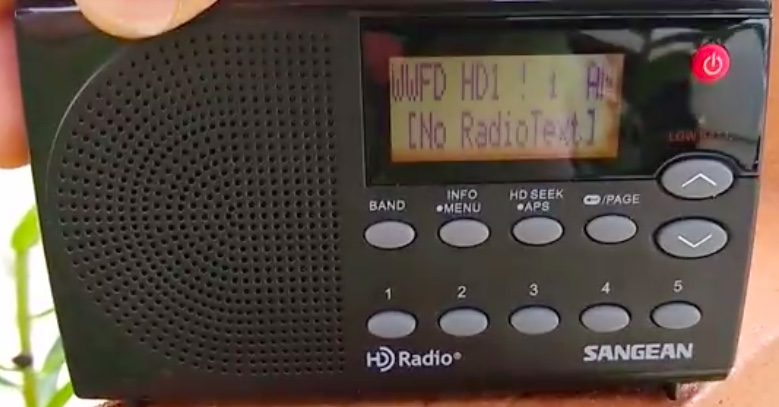
One possible version of AM radio’s future was posted on a Facebook group called “I Love AM Radio.” It came from group member Steve West and was a recording of WWFD/Frederick, MD as received on a radio in Beacon Falls, CT. This is a driving distance of about 320 miles via I-95; as the crow flies it’s probably closer to 275. Still very impressive.
Of course, long-distance AM radio reception is not new … people have been listening to distant stations since radio broadcasting began in the 1920s. In my case, when I was young and before I even knew what phenomenon I was really experiencing, I remember picking up stations at night from great distances on my tube table radio, then wondering why I could not hear them during the day.
I also wondered why I picked up a buzz sometimes … turned out that was due to my Dad using a fluorescent light in his office down the hallway from my bedroom. But I digress.
What makes this recording intriguing is that WWFD doesn’t transmit analog audio like most stations. Instead, they are all digital, under special permission of the FCC. Only those with HD radios can hear them. West is demonstrating that long distance digital AM radio reception is indeed possible, and — perhaps (though it may be wishful thinking) — AM radio could be better than FM from a practical standpoint.
All-digital is a mode of the HD Radio system that uses the space formerly used for analog broadcasting and puts the digital signal there instead of sandwiching the digital around the analog as with the hybrid system currently in use on all other AM HD stations, which locally includes KNX (1070 AM), KSUR (“K-Surf” 1260 AM), KFWB (980 AM), and KBRT (740 AM).
The problem with the hybrid mode is that the digital portion of the signal extends out far enough from the main frequency of a station and thus can cause interference to other stations nearby. Hybrid mode thus limits the digital signal to a fraction of a station’s broadcast power.
All-digital, being centered on the frequency, allows a station to broadcast the digital signal at a station’s full power, permitting better coverage, less interference, and better sound quality.
At least that’s the theory. Right now more testing is needed, primarily to see what happens when more stations are using the system. The problem is the all-digital system is not yet authorized without special permission, and of course, many stations would be reluctant to try it, as doing so means losing every listener without an HD radio … most of the potential audience.
West’s recording is not perfect. The signal is like any digital signal — as on your computer or your digital television, the signal is either there … or it is not. Being received at such a great distance the reception is not perfect and cuts out, but as I said, it does show some great potential.[…]
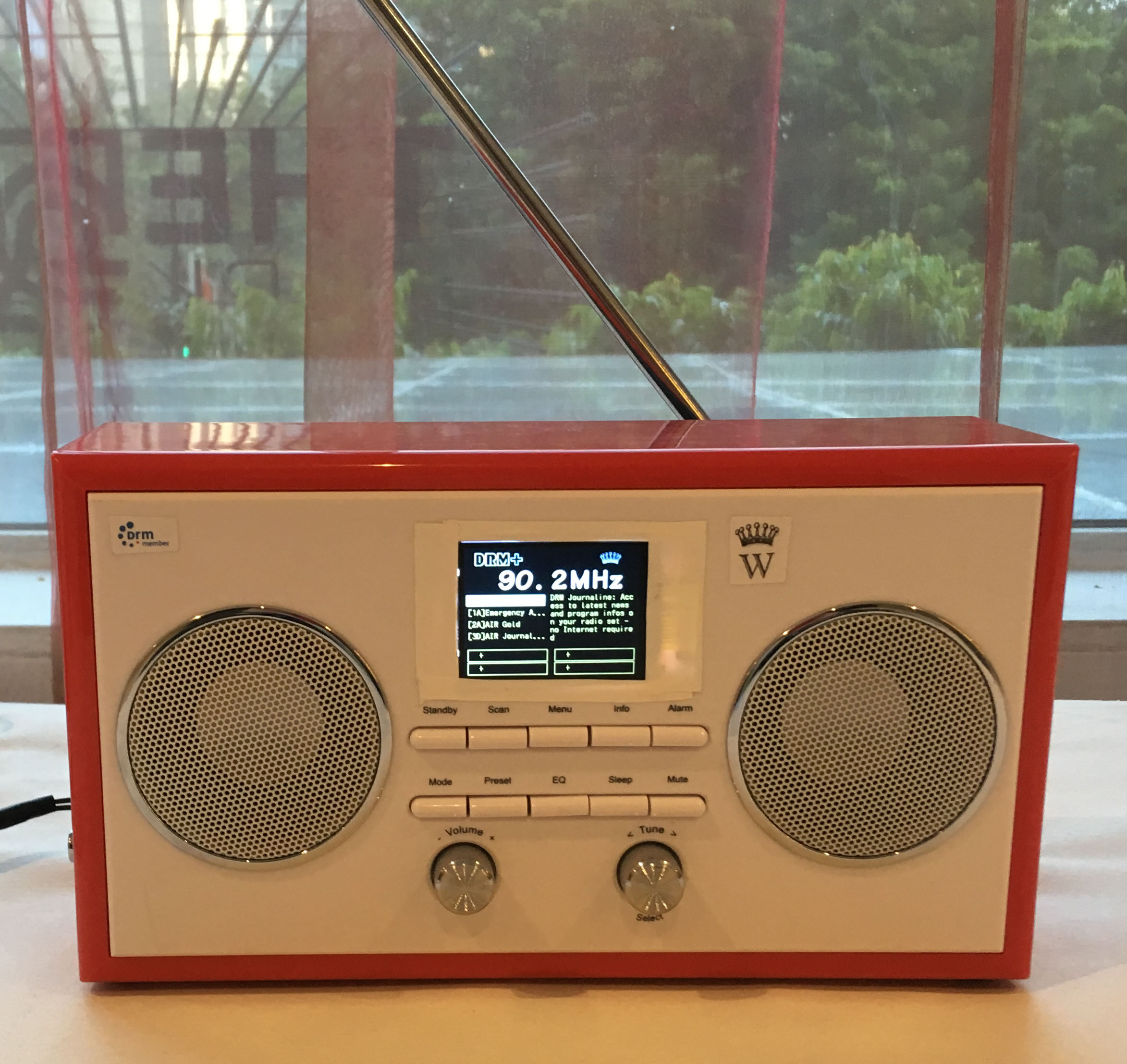
Russia will begin testing the Digital Radio Mondiale digital radio standard in the FM Band in July in St. Petersburg.
Russian firms Digiton and Triada TV are working with Fraunhofer IIS, RFmondial, chipmaker NXP and others to carry out the pilot.
The organizers will install a DRM-capable transmitter mid-July and begin regular simulcast broadcasts (DRM for FM) immediately after site acceptance checks are complete. The transmitter will reportedly be on air for six months and have an analog transmitting power of 5 kW and a digital output power of 800 W.[…]
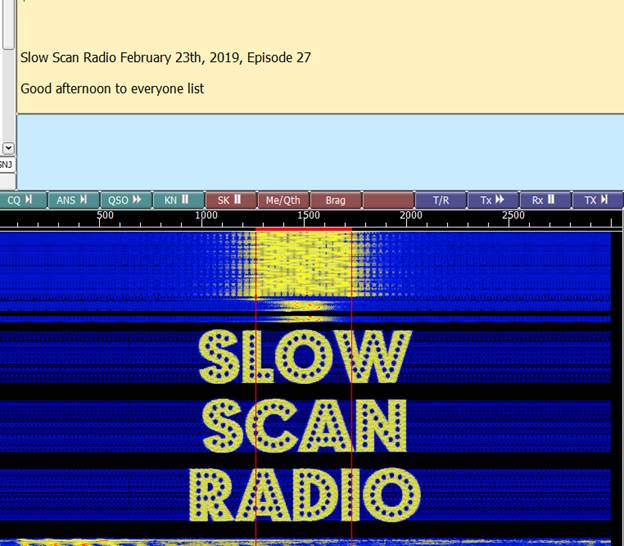
But it has been off the air for the past weeks due to some minor health issues. The program was interesting in that besides Slow Scan photos, he also did other digital modes using FLDigi.
Some of the test included multiple digital signals in the same waterfall.
When I went to website today to check to see if there were any updates on when it might return to the air, I discovered that he is doing a podcast: Daily Minutes Podcast. Following is podcast feed:
This podcast is a combination of new items as well as some re-runs of earlier Show Scan Radio programs. They also are a combination of English & Dutch. The June 13 & 14 podcasts are about off-shore radio. Very interesting and enjoyable.
The Jun 12 & 14 podcasts include a re-run of an earlier Slow Scan Radio Show in the last thirty minutes of the podcast.
[The screen shot at the top of the page is a] sample of the start of the digital portion.