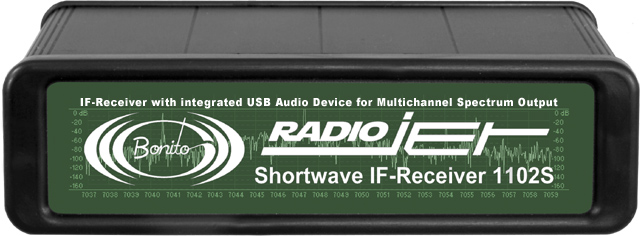
The Bonito 1102S RadioJet - Click to Enlarge
SWLing Post reader and fellow SW radio reviewer, Fernando, has apprised us of his review of the Bonito 1102S RadioJet. While his site is in German, which we don’t read or speak here, Google Translate gives us English speakers a fair idea of his findings, and Fernando helps us with the rest.
To summarize, his comparison of the Bonito 1102S RadioJet with his Microtelecom Perseus concludes that the two perform well, running about neck-and-neck–in other words, offer almost identical performance characteristics. There were some differences, though. I outline a few key review points that Fernando was kind enough to clarify for us:
- The noise floor between the Perseus and RadioJet is more or less the same, in his tests.
- He finds that the Perseus is slightly more sensitive on higher frequencies (above 22Mhz). This comparison is made with the “DX Channel” on the Bonito 1102S RadioJet (a feature only found on the Radiojet–see note below).
- Fernando believes the sensitivity and selectivity of both radios to be very similar. He told us that he could not hear a great difference.
- The Perseus software is, of course, very stable and mature in comparison with that of the new Radiojet. This is quite typical of new SDR products on the market, as it takes time and user feedback to eliminate bugs and quirks. Fernando expresses his confidence, however, that the software engineers at RadioJet will be quick to respond to patches and upgrades.
- Overall, he believes that RadioJet will be able to provide a very stable product in short order.
Since Fernando has been a beta tester for the Bonito 1102S RadioJet, he’s familiar with the company and their attentiveness to feedback, and he’s impressed.
One feature unique to the RadioJet is the “DX Channel.” You can see this in action in a video the company released last year: in essence, when activated on a weak signal, the noise floor drops, and the signal seems to pop out of the static. I asked Fernando about this feature and he told me that, when the DX Channel is activated, the software lowers the IP3+ and increases the sensitivity. This is the default channel or mode on the software.
The normal “RX Channel” is used for strong signals and is better for in-band interference. The DX Channel has a higher IP3+. He mentioned that the software can automatically determine which channel should be used, and auto-switches it for the user. Fernando said that this function works quite well.
Like to hear the difference for yourself? Fernando’s website Fenu-Radio.ch has a page dedicated to audio comparisons between the Perseus and RadioJet. The first 15 seconds of each audio clip feature the Perseus, the second 15 seconds features the RadioJet. Click here to go to the audio page.
By the way–Fernando’s website is most impressive. He has a long list of receiver reviews, comparisons and audio files. I encourage you to spend some time there, whether or not you read German.
Thanks for sharing your review, Fernando!

 One of the major complaints I hear regarding the benchmark