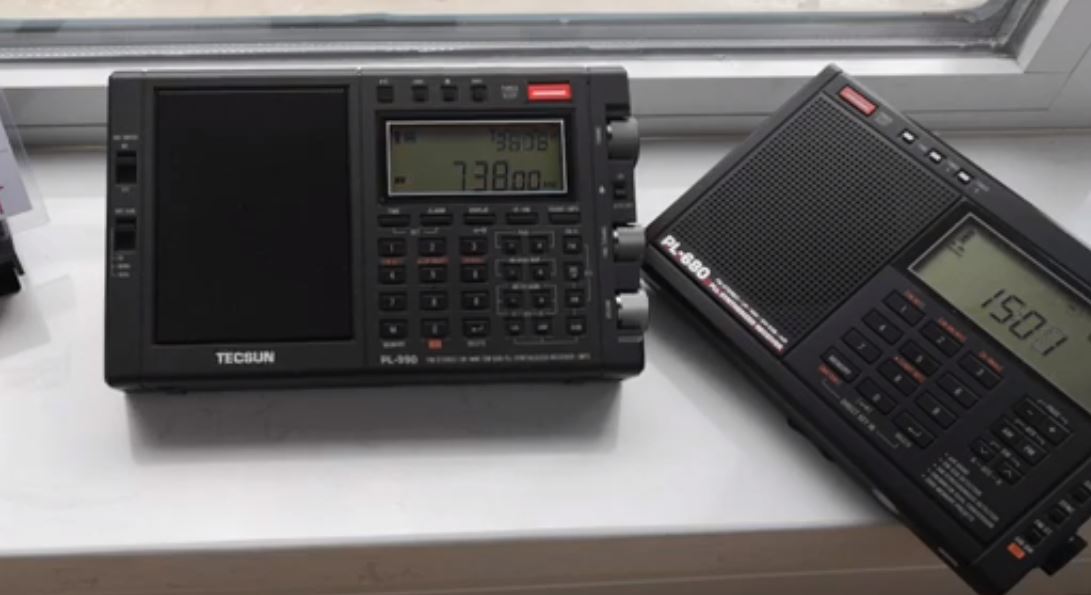
Many thanks to SWLing Post contributor, Steve Lebkuecher, who shares this video which compares the mediumwave performance of the PL-990 and PL-680:

Many thanks to SWLing Post contributor, Steve Lebkuecher, who shares this video which compares the mediumwave performance of the PL-990 and PL-680:
Many thanks to SWLing Post contributor, Mike Ladd with SDRplay, who shares the following guest post:

by Mike Ladd
SDR I use:
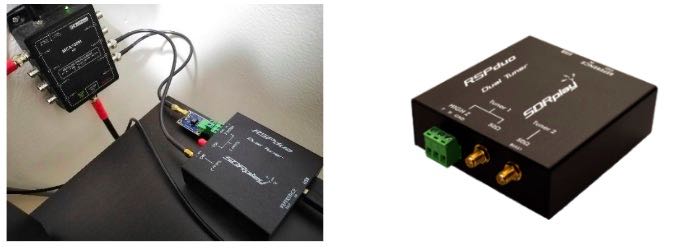
RSPduo from SDRplay using the Hi-Z input. Any model RSP’s can tune WEFAX transmissions. https://www.sdrplay.com/rspduo/
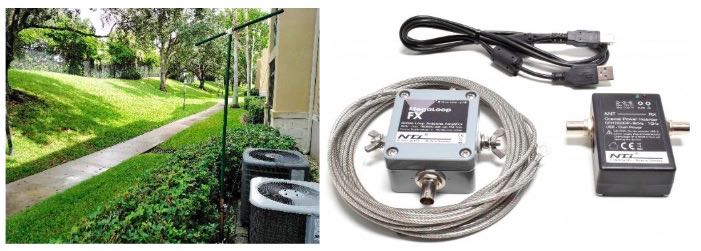
Antenna I use: Megaloop FX from Bonito. In an Inverted delta loop configuration pointed N/E-S/W. Any good antenna placed outdoors should be fine. It’s all about the SNR, not your S-meter reading. https://www.bonito.net/hamradio/en/mega-loop-fx/
SDRuno v1.32
SDRuno is an advanced Software Defined Radio application platform which is optimized for use with SDRplay’s range of Radio Spectrum Processing receivers.
https://www.sdrplay.com/downloads/
VBcable (donationware) vPack43
Transfers audio, digitally from one application (SDRuno) to another (Black Cat HF weather Fax) with zero loss.
https://www.vb-audio.com/Cable/
VAC (paid for use) v4.60
Transfers audio, digitally from one application (SDRuno) to another (Black Cat HF weather Fax) with zero loss.
https://vac.muzychenko.net/en/
https://www.sdrplay.com/docs/SDRuno_VAC.pdf
Black Cat HF Weather Fax (paid for use) beta 19
Decodes and produces images from the WEFAX transmissions from the output of SDRuno using a virtual audio cable.
Use the discount link available here
http://blackcatsystems.com/register/black_cat_hf_weather_fax_sdrplay_promo.html
https://www.blackcatsystems.com/software/hf_weather_fax.html
Black Cat Uno UDP
UnoUDP allows you control SDRuno’s VFO frequency from within Black Cat HF Weather Fax scheduler. This is done over a virtual com port pair using a virtual com port emulator. http://blackcatsystems.com/download/UnoUDP.zip
VSPE or COM0COM
VSPE is a paid for use app. COM0COM is completely free. Either one of these applications will work. A virtual com port emulator allows you to create a virtual com port. The pair will internally link Black Cat Weather Fax decoder to SDRuno’s using UnoUDP as the transport protocol.
VSPE http://www.eterlogic.com/Products.VSPE.html
https://www.sdrplay.com/docs/SDRuno_VSPE.pdf
COM0COM http://com0com.sourceforge.net/
https://youtu.be/dZg7puQ9Ajk
(some text taken and edited from various website)
This document is not a definitive guide to the WEFAX protocol, the process of decoding WEFAX images or reading a synoptic weather chart https://youtu.be/kzfNSvQREu8. This is only a collection of information that I have found scatter throughout the internet and re-compiled into a document, this document. Expect typographical mistakes, inaccuracies, or omissions.
WEFAX is an analog mode for transmitting monochrome images. It was the predecessor to slow-scan television (SSTV). Prior to the advent of the commercial telephone line “fax” machine, it was known, more traditionally, by the term “radio facsimile”.
Facsimile machines were used in the 1950s to transmit weather charts across the United States via land-lines first and then internationally via HF radio. Radio transmission of weather charts provides an enormous amount of flexibility to marine and aviation users for they now have the latest weather information and forecasts at their fingertips to use in the planning of voyages.
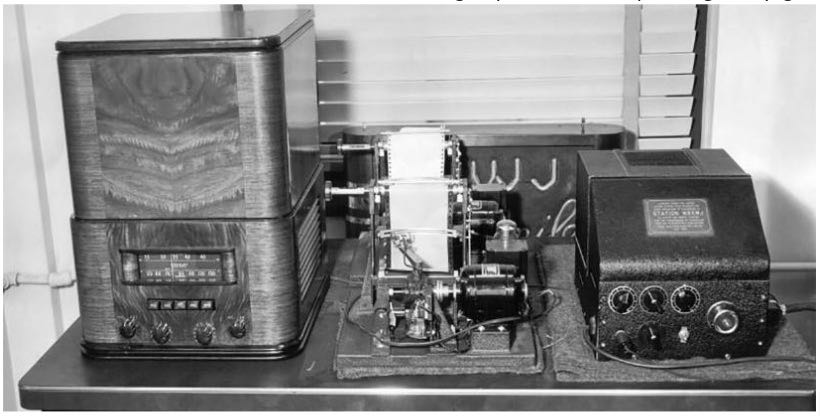
Radio fax relies on facsimile technology where printed information is scanned line by line and encoded into an electrical signal which can then be transmitted via physical line or radio waves to remote locations. Since the amount of information transmitted per unit time is directly proportional to the bandwidth available, then the speed at which a weather chart can be transmitted will vary depending on the quality of the media used for the transmission.
Radio fax data is available from the web on sites such as the ones hosted by the National Oceanic and Atmospheric Administration (NOAA). https://tgftp.nws.noaa.gov/fax/marine.shtml Radio fax transmissions are also broadcasted by NOAA from multiple sites in the country at regular daily schedules https://www.nws.noaa.gov/os/marine/rfax.pdf. Radio weather fax transmissions are particularly useful to shipping, where there are limited facilities for accessing the Internet.
Black Cat HF Weather Fax is a program that decodes WEFAX (Weatherfax, HF-FAX, Radiofax, and Weather Facsimile) transmissions sent from fixed locations around the globe.
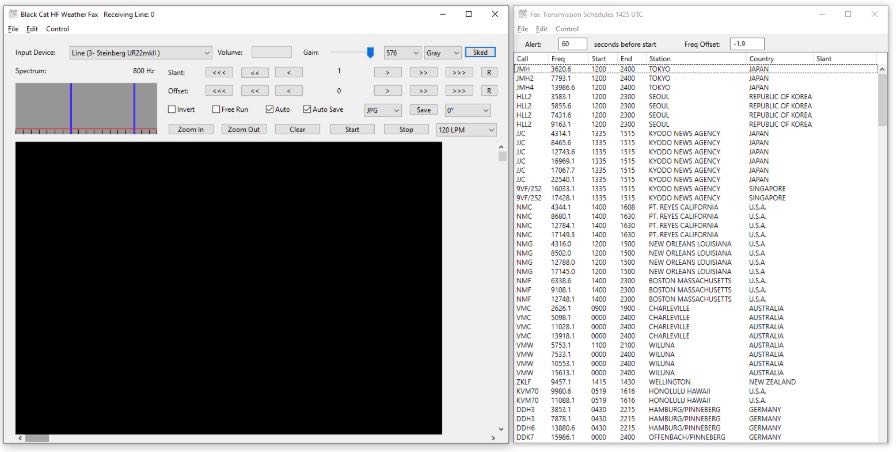
A fax is transmitted line by line, typically at a rate of 120 lines per minute, or half a second per line. For example, to send a weather chart, you would start in the upper left corner. You would send the value of that pixel (dot), black, white, or perhaps a shade of gray. Then you would move over one pixel to the right, and send that pixel, and so on, until you reach the edge of the chart. Then you’d move all the way back to the left edge, and move down slightly, one line, and repeat the process.
Each pixel is converted into a certain audio frequency or tone. By convention, a tone of 1500 Hz represents black, 2300 Hz represents white, and frequencies in-between represent shades of gray. So if you listen to a fax transmission, you’ll hear the different tones as each pixel is present. For example, listen to a chart with mostly white background being sent. You’ll hear mostly the high pitch 2300 Hz, and some lower (1500 Hz) blips as each black pixel is sent. When a horizontal line is sent, you’ll hear a long half second burst of 1500 Hz, since the line is all black.
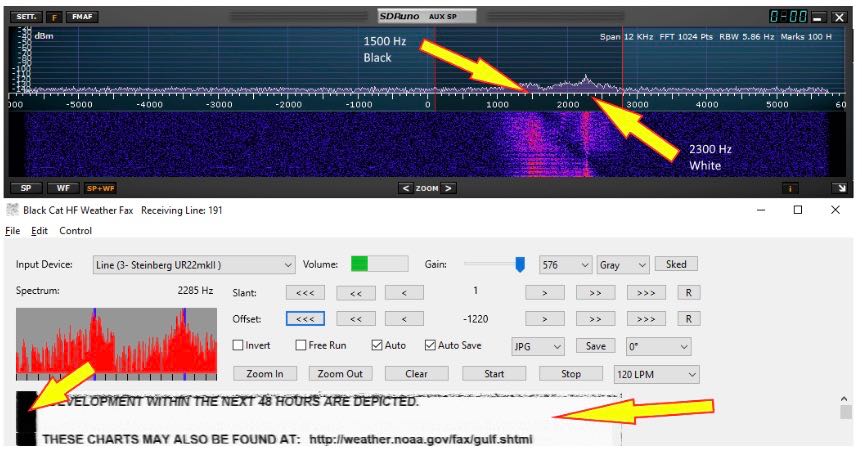
The transmitting station frequency modulates the carrier. That is, when a black pixel is transmitted, the carrier shifts down 400 Hz. When a white pixel is transmitted, the carrier shifts up 400 Hz. For a medium gray pixel, it stays on the assigned frequency. This is how most fax transmissions are made. Since we’re tuning it in SSB, it sounds to us as if the station is transmitting a variable frequency audio tone. The two processes are identical. This accounts for the confusion regarding what frequency to tune the radio to in order to properly decode the fax transmission. Different stations list their frequency in different ways. It is important to remember that a black pixel produces a 1500 Hz tone, and a white pixel produces a 2300 Hz tone within the AUX SP.
The setup works as follows. SDRuno demodulates the received signal. The demodulated audio is piped from SDRuno using virtual audio cable and sends it to the HF weather fax decoder. HF weather fax decoder receives this audio from the virtual audio cable that was demodulated from SDRuno and processes it, producing a picture on the screen
HF weather fax decoder can also set the VFO (tune) frequency of the RSP in SDRuno. This is done over the virtual com port pair using the UnoUDP application as the transport.
SDRuno can internally emulate a Kenwood TS-480, UnoUDP sends the Kenwood TS-480 serial commands via UDP over the virtual com port pair in order to set the frequency selected from the HF Weather Fax Scheduler option over to SDRuno.
You will need to install and configure the following applications.
1: A virtual audio cable.
2: A virtual com port emulator (If you would like HF Weather fax to communicate with SDRuno).
3: UnoUDP (If you would like HF Weather fax to communicate with SDRuno using the virtual serial emulator).
4: HF Weather Fax.
5: A simple wire antenna placed outdoors.
A virtual audio cable allows you to pipe the audio from one application (SDRuno) into another application (a decoder like HF Weather Fax) digitally. I will assume SDRuno is already installed with your device attached and functioning properly.
You can now download a virtual audio cable package. If you already have a virtual audio cable package installed, you can skip to the next section. If you don’t have a virtual audio cable application installed, you only need to choose one and install only one of the two that are available.
Close any running apps, install the virtual audio cable and reboot your computer. When your computer boots to your desktop, your computer will now have a virtual audio cable pair installed on the system.

You can verify it the installation by going to your Control Panel and double clicking the Sound icon. VB-Cable and Virtual Audio Cable will only install a single virtual audio cable pair, one is for the input (Recording) and one is for the output (Playback). A single pair is all that is needed (as shown below).

A virtual com port emulator is only needed if you would like Black Cat HF Fax decoder the ability to tune the station in SDRuno when you double click a station name in the HF Fax Decoder scheduler.
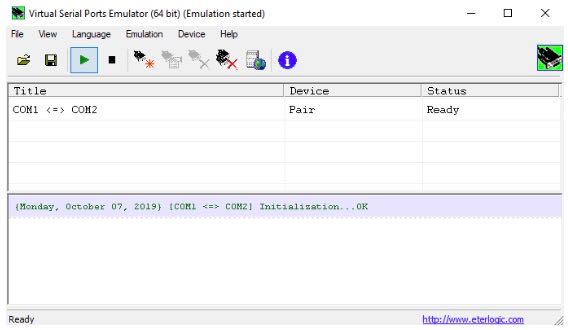
Please use the links provided (additional PDF’s and YouTube videos) on Page 2 of this document for an installation / configuration walkthrough.
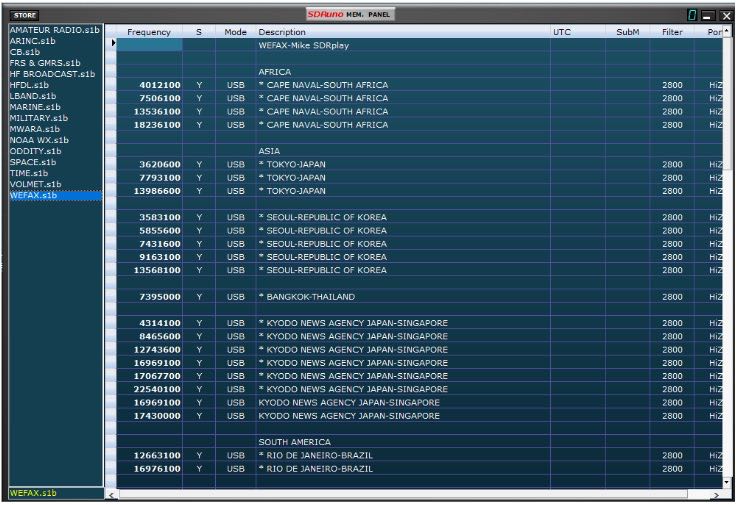
You can download my WEFAX frequency bank for use in SDRuno below should you choose not to use a virtual com port emulator. https://signalsacrossthepond.com/download/mike-kd2kog-sdrplay-complete/
Download the latest HF Weather Fax beta package and the UnoUDP application from the link provided on Page 2 of this document. I suggest making one main folder called HFfax and two subfolders within HFfax for each of the applications. One folder is for the HF Weather Fax Decoder and the other folder is for the UNO UDP transport application.
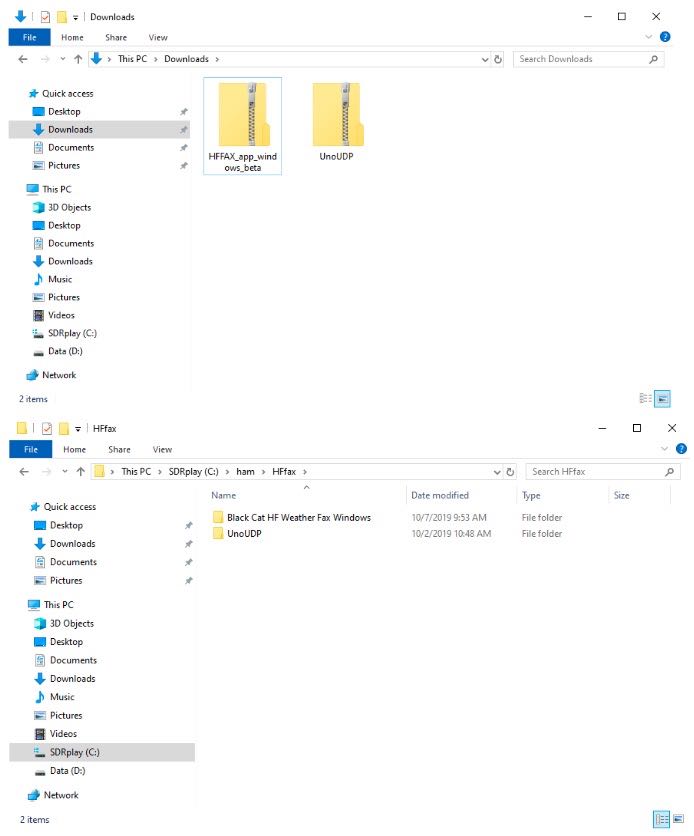
Double click the HF Weather Fax beta ZIP file you downloaded and extract the full contents of this ZIP into the folder you created on your local drive. Right click the “Black Cat Weather Fax” EXE file and send a shortcut to your Desktop.

Double click the UnoUDP zip file you downloaded and extract the full contents of this ZIP into the folder you created on your local drive. Right click the “UnoUDP” EXE file and send a shortcut to your Desktop.
You should have two shortcuts on your desktop, One for the decoder and one for the transport app.
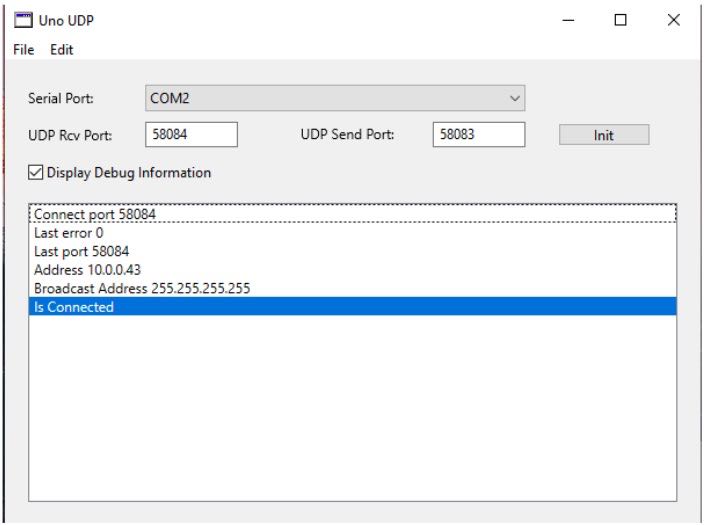
HF Weather Fax needs a way to communicate with SDRuno, this is done via UnoUDP and the virtual com port emulator.
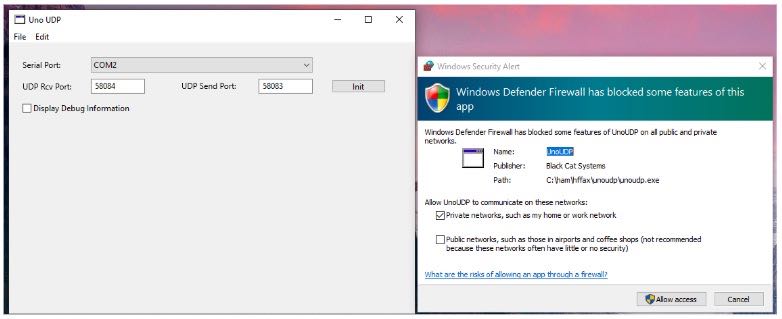
Launch UnoUDP with the above configuration. Set your UDP Receive port to 58084 and your UDP send port to 58083. UnoUDP must be left running in the background, this will control SDRuno. You can minimize the application or right click the shortcut and have UnoUDP auto minizine on launch.
You should see a Firewall popup prompt asking permission to allow UnoUDP to pass data within the system. You must allow this traffic to pass or external control of SDRuno will not be possible from the HF Weather Fax decoder scheduler.
Assign 1 of the 2 com ports from the virtual com port emulator to UnoUDP (the 2nd com port will be assigned to SDRuno). My com port pair is Com 1 and Com 2, SDRuno uses Com1 and UnoUDP uses Com 2.
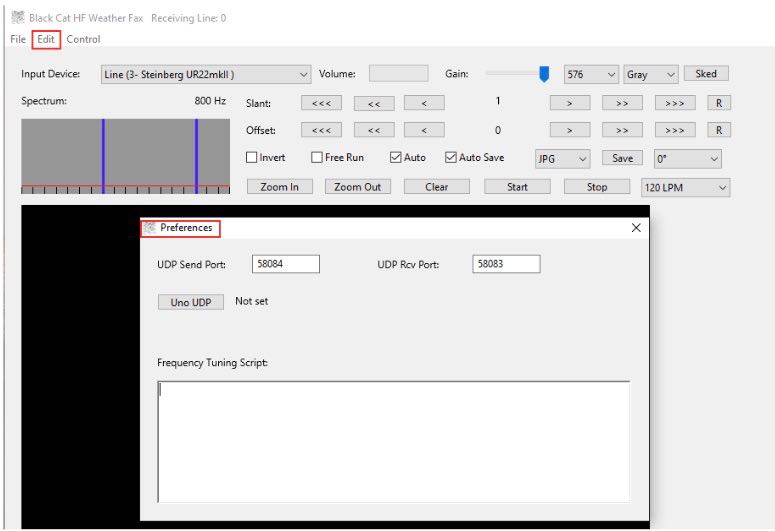
HF Weather Fax needs to be configured in order to communicate with UnoUDP, this is done via the UDP settings. Click “Edit” and “Preferences” Set the UDP Send port to 58084 and the UDP Receive port to 58083.
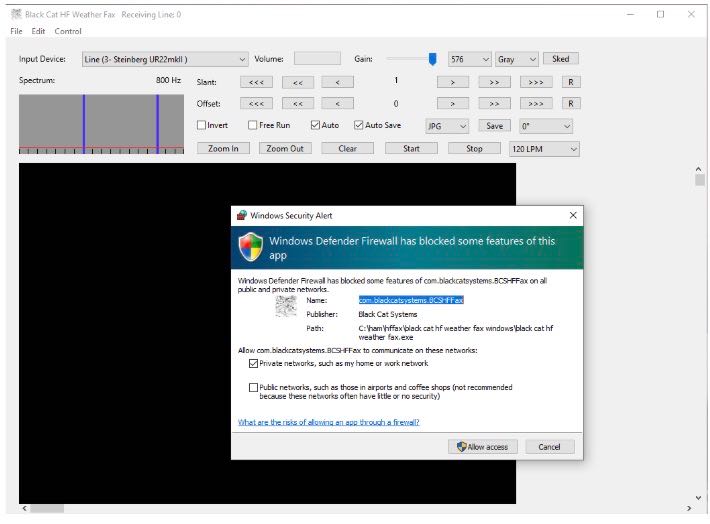
You should see a Firewall popup prompt asking permission for HF Weather Fax to pass data within your system. You must allow UDP traffic to pass or external control of SDRuno will not be possible from the HF Weather Fax decoder scheduler.
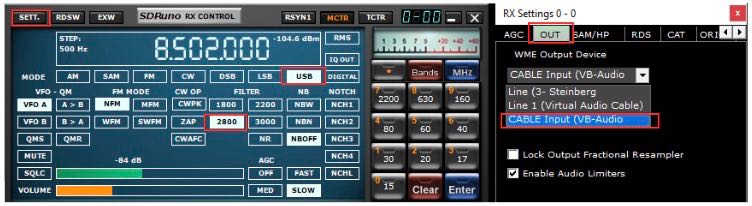
SDRuno needs its Output assigned to the Virtual Audio Cable. The output can be changed via the RX CONTROL panel, clicking the SETT. button on the top left and clicking the OUT tab.
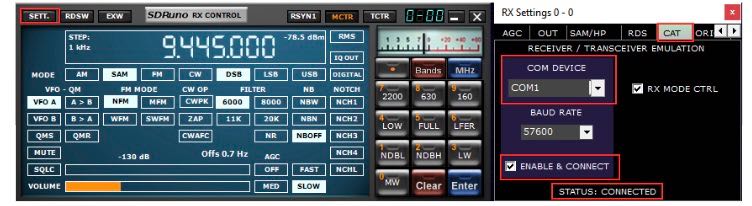
SDRuno needs a com port assigned so it can be externally controlled. The serial port is assigned via the RX CONTROL panel, clicking the SETT. button on the top left and clicking the CAT tab.
I recommend running the RSP in LOW-IF mode, this is selected via the MAIN panel. This reduces the need to track separation between the Tuned frequency and LO (local oscillator) https://youtu.be/Fsns4P3JxrM
LOW-IF mode also minizines the LO being placed outside of the desired preselect filter of the device in use, Remember the preselect filter is automatically enabled based on the LO frequency https://youtu.be/w-vkiVp7Q4E
I also recommend leaving the IF AGC enabled and placing the RF GAIN as high as possible without causing an ADC OVERLOAD warning within the MAIN panel. If an ADC OVERLOAD warning appears, back the RF GAIN down.
https://www.sdrplay.com/wp-content/uploads/2018/06/Gain_and_AGC_in_SDRuno.pdf
Launch UnoUDP and minimize it.
Launch Black Cat HF Weather FAX.
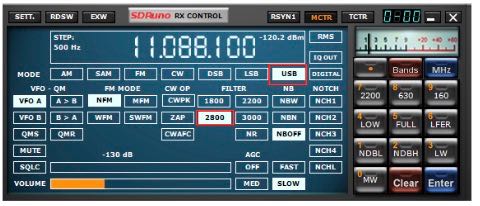
Launch SDRuno. Set the mode to USB and the filter width to 2.8k
HF weather fax will not set the mode or filter width at this time.
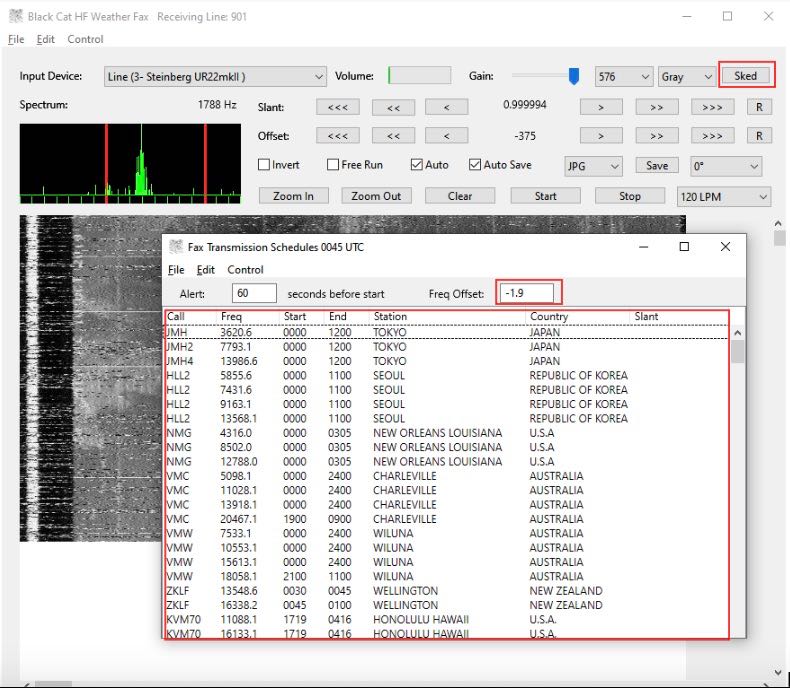
Click the Sked button in Black Systems HF Weather Fax. A current WEFAX transmission schedule will appear. Stations listed in White are either scheduled to transmit or about to transmit based on your computers clock. Stations show in Grey at the bottom of the list are currently off the air or not transmitting.
In the Freq Offset: box enter -1.9 and hit enter (Reason for this is on Page 5).
Click any of the stations listed in the Fax Transmission Schedule and it will automatically tune SDRuno to the correct frequency.
Black Cat HF Weather Fax folder will have a file named “Black Cat HF Weather Fax Docs” Please view this file to understand some of the advanced features available.
Launch Black Cat HF Weather FAX.
Launch SDRuno.
Navigate to the Memory Panel (MAIN panel and click the MEM PAN button)
Right click the Memory panel and select “Open bank”. Navigate you C drive telling SDRuno the location of WEFAX.s1b
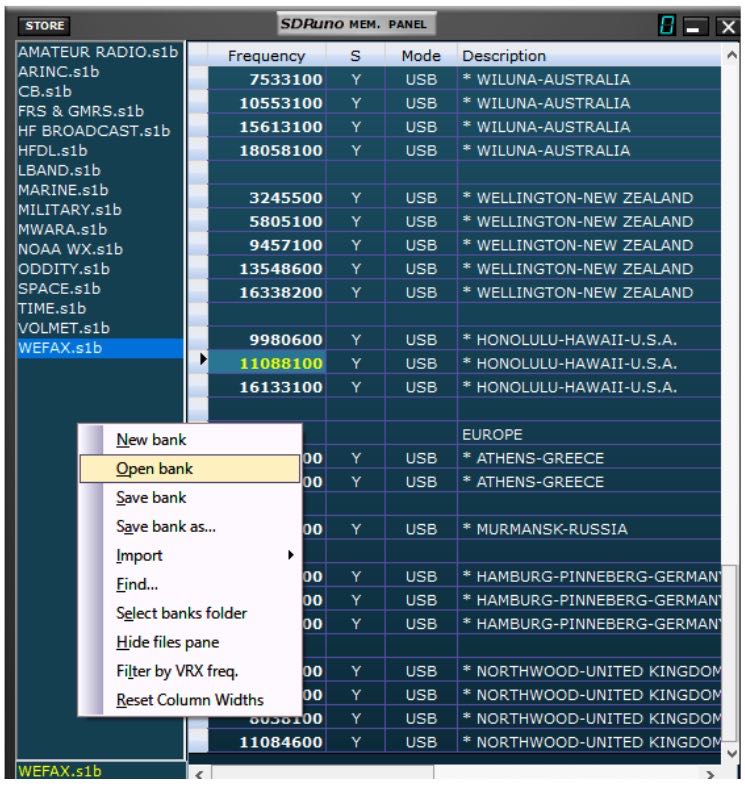
Double click any of the frequencies shown within the WEFAX bank and SDRuno will set the correct mode and tune that station. My WEFAX.s1b file defaults to the Hi-Z port. If your device lacks a HI-Z input, navigate to the port section within the memory panel, double click the stations port you want to edit and change it to the correct port that’s available or in use for your device. Right click the memory panel and “Save bank” to save the changes.
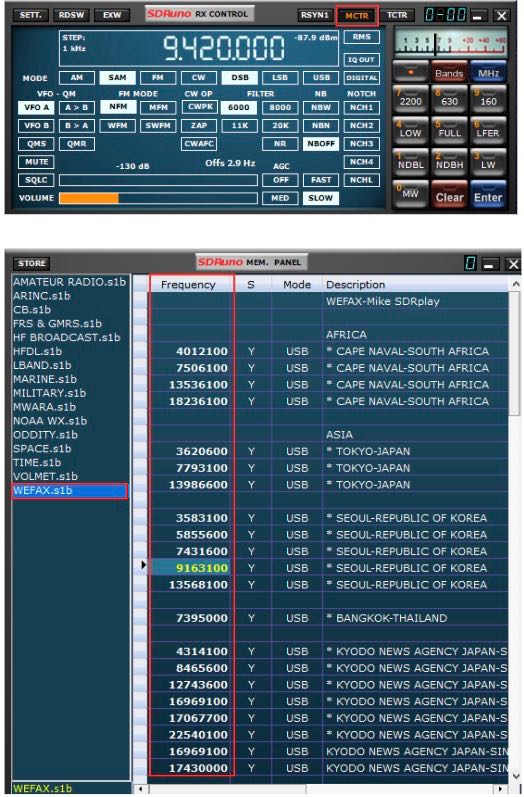
To use my SDRuno WEFAX frequency bank properly. The MCTR button must be enabled within the RX CONTROL panel, enabling this option allows you to double click and tune a station that is stored within the WEFAX bank. Make sure the LO is not locked in the MAIN panel (LO LOCK).
If a decoded WEFAX image looks blocky or skewed or possibly pixeled, I recommend that the lock output fractional resampler option is enabled in SDRuno. You can enable this from the RX CONTROL panel, clicking the SETT. button on the top left and clicking the OUT tab.
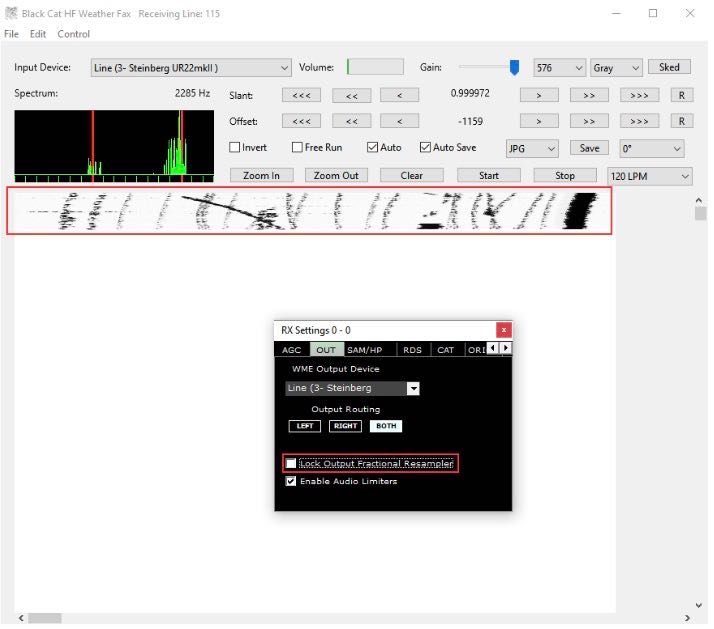

I hope this document helped guide you in getting started with decoding WEFAX transmissions from around the world. I am sure I missed some key features, remember this is only a primer/basics to decoding WEFAX. I do have an accompanying video located here
Warmest of 73,
Mike-KD2KOG
Disclaimers
SDRPlay modules use a Mirics chipset and software. The information supplied hereunder is provided to you by SDRPlay under license from Mirics. Mirics hereby grants you a perpetual, worldwide, royalty free license to use the information herein for the purpose of designing software that utilizes SDRPlay modules, under the following conditions:
There are no express or implied copyright licenses granted hereunder to design or fabricate any integrated circuits or integrated circuits based on the information in this document. Mirics reserves the right to make changes without further notice to any of its products. Mirics makes no warranty, representation or guarantee regarding the suitability of its products for any particular purpose, nor does Mirics assume any liability arising out of the application or use of any product or circuit, and specifically disclaims any and all liability, including without limitation consequential or incidental damages. Typical parameters that may be provided in Mirics data sheets and/or specifications can and do vary in different applications and actual performance may vary over time. All operating parameters must be validated for each customer application by the buyer’s technical experts. SDRPlay and Mirics products are not designed, intended, or authorized for use as components in systems intended for surgical implant into the body, or other applications intended to support or sustain life, or for any other application in which the failure of the Mirics product could create a situation where personal injury or death may occur. Should Buyer purchase or use SDRPlay or Mirics products for any such unintended or unauthorized application, Buyer shall indemnify and hold both SDRPlay and Mirics and their officers, employees, subsidiaries, affiliates, and distributors harmless against all claims, costs, damages, and expenses, and reasonable attorney fees arising out of, directly or indirectly, any claim of personal injury or death associated with such unintended or unauthorized use, even if such claim alleges that either SDRPlay or Mirics were negligent regarding the design or manufacture of the part. Mirics FlexiRFTM, Mirics FlexiTVTM and MiricsTM are trademarks of Mirics .
SDRPlay is the trading name of SDRPlay Limited a company registered in England # 09035244.
Mirics is the trading name of Mirics Limited a company registered in England # 05046393
Please consider supporting us via Patreon or our Coffee Fund!
Your support makes articles like this one possible. Thank you!

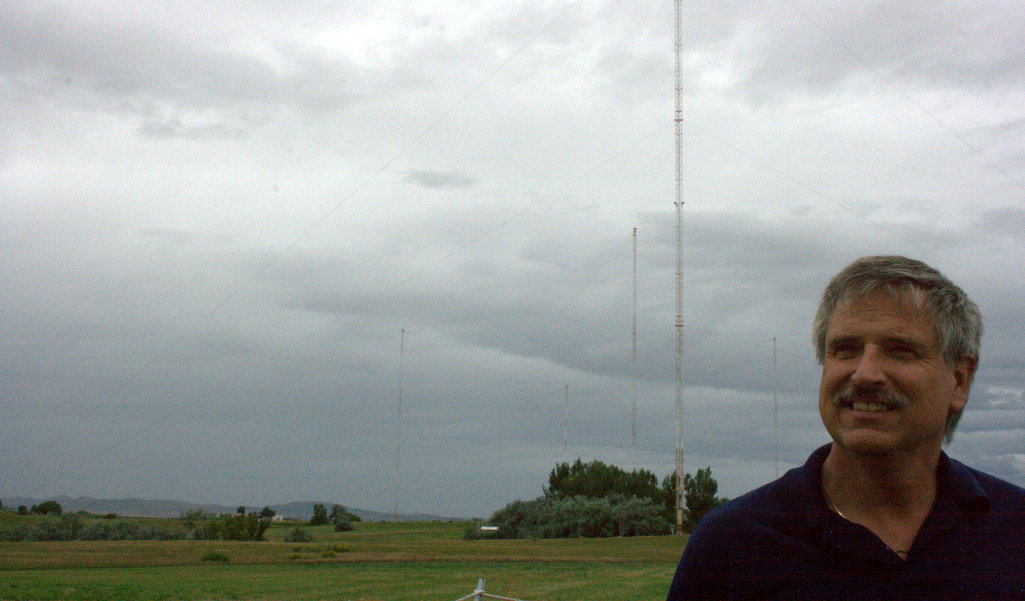
Chief Engineer Matt Deutch at WWV/WWVB. (Photo: Thomas)
(Source: Southgate ARC via Eric McFadden)
Broadcaster KUNC reports that a little-known radio station in Fort Collins might one day save the world
An array of radio towers sits behind security fences amid farms and pastures north of Fort Collins. This is home to WWV, the country’s oldest radio call letters. The station’s high-frequency broadcasts can be heard around the globe if you have the right kind of radio.
Now playing: pulsing sounds, every second, followed by an announcement of the exact time.
The station is run by the National Institute of Standards and Technology in Boulder, which is home to the atomic clock. WWV is capable of more than telling time. It could, if need be, save the world.
“Could be,” said Elizabeth Donley, chief of NIST’s Time and Frequency Division. “It’s an important part of our work.”
This year the station conducted communications exercises in coordination with the Department of Defense. Thirty-seven states, National Guard units, emergency management agencies and others participated in simple announcements. They were meant to see how many listeners are out there and how far away they can be reached. The answer: there are thousands of listeners as far away as Australia and New Zealand.
Mark Jensen, a civilian planner with U.S. Northern Command, the military’s homeland security operation in Colorado Springs, called WWV a “most essential asset to our nation.”
Should an emergency arise, volunteers would jump into action. They’re part of a program the military dubs MARS, which stands for Military Auxiliary Radio System. While jokes abound that the operators should not be confused for Martians, their work is serious. It’s doomsday stuff, like responding to the aftermath of a nuclear attack because the associated electromagnetic pulse could wipe out most communications.
Listen to program and read the full story at
https://www.kunc.org/post/how-little-known-radio-station-fort-collins-might-one-day-save-world
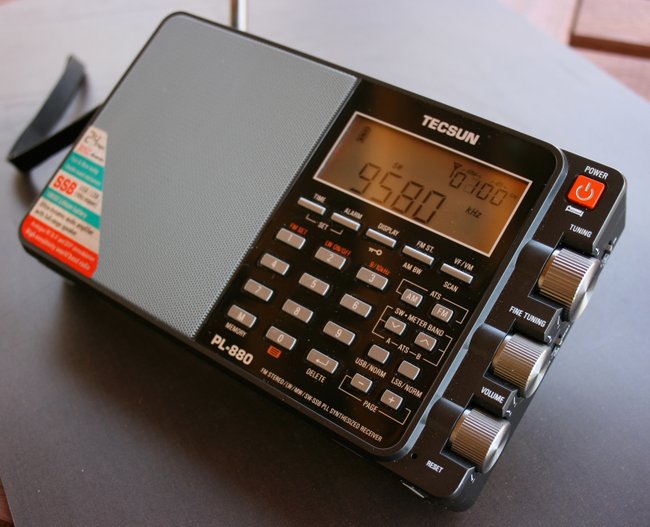
Many thanks to SWLing Post contributor, S. Thomas Bradley, who shares the following:
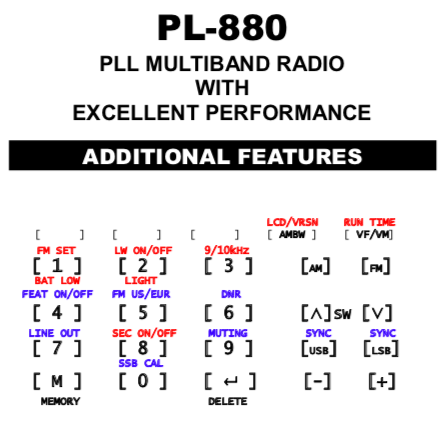
I just upgraded my receiver from my trusty old FRG-7 (I bought it new back in the 70’s) to a Tecsun PL-880. For my own benefit I have gathered together all of the PL-880 hidden features I could find on the web and put them into a booklet which I then printed out for easy reference and put a copy with the PL880 Operators Manual.
I don’t know if anyone else would be interested in this, but I thought I would share, so attached is a pdf copy.
Very well done! Thanks for sharing your quick reference guide. I’ll also add a link to our PL-880 Hidden Features page.
Please consider supporting us via Patreon or our Coffee Fund!
Your support makes articles like this one possible. Thank you!
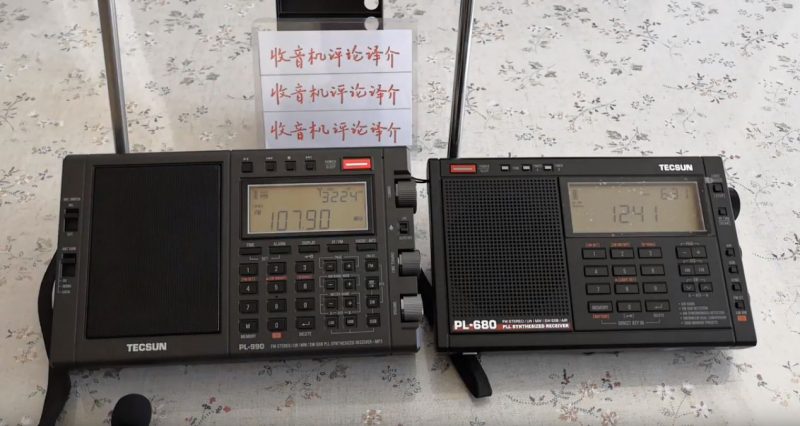
Many thanks to SWLing Post contributor, Steve Lebkuecher, who shares this video which compares the speaker audio of the PL-990 and PL-680:
Click here to view on YouTube.
I would love to hear a comparison with the PL-880 since the PL-880’s audio is also superior to that of the PL-680.
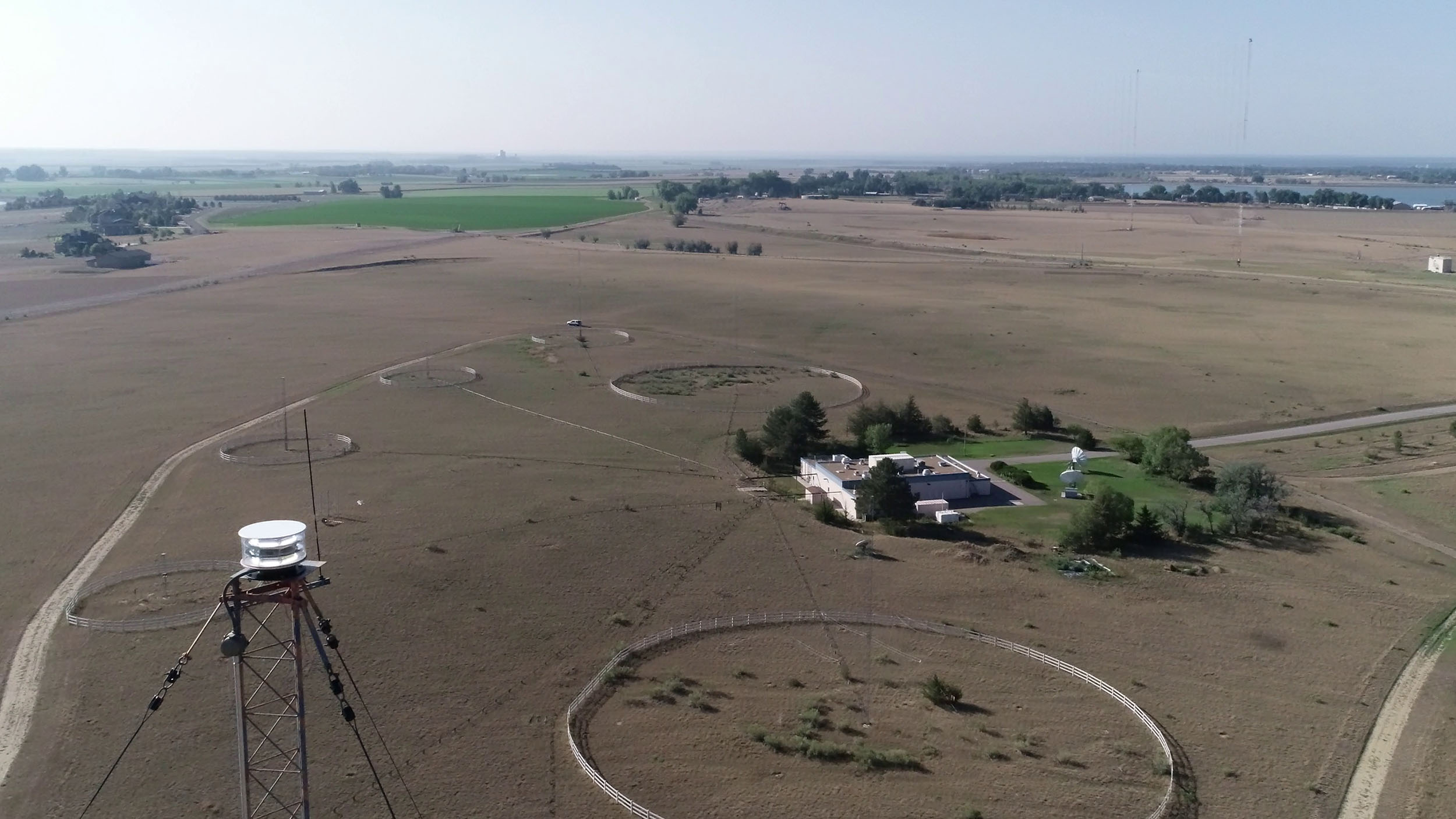
NIST radio station WWV from the air. Each of the six frequencies the radio broadcasts in has its own antenna, each one surrounded by a white safety fence. The tall antenna for the lowest frequency has a flashing white strobe on top (in the left foreground) to make it visible to aircraft pilots.
Credit: Glenn Nelson, NIST
(Source: NIST Blog via Eric McFadden)
NIST Radio Station WWV Celebrates a Century of Service
By Laura Ost
What technological application has had musical, timekeeping, navigational, scientific, traffic-control, emergency-response, and telephone applications?
Answer: WWV, one of the world’s oldest continuously operating radio stations.
NIST received the call letters WWV a century ago, in 1919. Since then, it has operated the station from several different locations — originally Washington, D.C., then a succession of locales in Maryland, and now Fort Collins, Colorado.
The programming is rather dry but very, very useful. WWV broadcasts time and frequency information 24 hours a day, seven days a week, to millions of listeners worldwide. The station broadcasts standard time (aka Coordinated Universal Time) and standard frequencies (e.g., at 5, 10 and 15 megahertz) for use in calibrating radio receivers, alerts of geophysical activity, and other information.
WWV broadcasts on six different shortwave frequencies because transmission effectiveness and reception clarity vary depending on many factors, including time of year, time of day, receiver location, solar and geomagnetic activity, weather conditions and antenna type and configuration. Broadcasting on different frequencies helps to ensure that the radio transmission can be received on at least one frequency at all times.
Over the years, WWV has had a startling number of applications.
“Historically, WWV will always be interesting because of the huge role it played in the development of radio in the United States by allowing broadcasters and listeners to check and calibrate their transmit and receive frequencies,” says Michael Lombardi, leader of NIST’s Time and Frequency Services Group.
“Today, WWV still serves as an easily accessible frequency and time reference that provides information not available elsewhere,” he says. “For example, along with its sister station, WWVH in Hawaii, WWV provides the only high-accuracy voice announcement of the time available by telephone [by calling 303-499-7111 or — in Hawaii — 808-335-4363]. These phone numbers receive a combined total of more than 1,000 calls per day. Both the radio and telephone time signals are used by many thousands of citizens to synchronize clocks and watches, and also by numerous industries to calibrate timers and stopwatches. We also know that WWV is highly valued by scientists performing radio propagation studies because it provides them with accurate time markers on six different shortwave frequencies.”
NIST time and frequency broadcasts are also available via the internet, of course, but the internet is not always available. Radio broadcasts can also support celestial navigation (i.e., using the stars to set one’s course) and can provide backup communication of public service announcements during disasters or emergencies.
WWV is also popular with amateur radio (aka ham radio) operators, who use the broadcasts to get geophysical alerts — indicating how far high-frequency radio signals will travel at the current time and receiver location — as well as to tinker with their electronics and teach young people how radio works.
As a ham operator said on NPR, WWV is “the heartbeat of shortwave radio. When something goes wrong, you check WWV to see if you’re picking up their signal. And you know then that everything’s OK. Maritime operators, military operators, amateur radio operators, we all listen to and use WWV regularly.”
Many technical papers and even books have been written about NIST’s radio work. One such book, published by NIST, is Achievement in Radio.
The radio broadcasting craze started after World War I. NIST, then known as the National Bureau of Standards (NBS), got the call letters WWV for its experimental radio transmitter on Oct. 1, 1919.
A 1919 newspaper story recounted that NBS experimented with broadcasting “music through the air,” transmitting tunes played on a Victrola record player several hundred yards to an NBS auditorium. That demonstration might have been sponsored by military laboratories then operating at NBS.
WWV began broadcasting in May 1920 from Washington, D.C., at a frequency of 600 kilohertz. The first broadcasts were Friday evening music concerts that lasted from 8:30 to 11. The 50-watt signal could be heard about 40 kilometers away.
Among many other relevant activities, NBS supported the public’s use of the novel technology by publishing instructions on how to build one’s own radio receiver. The agency’s 1922 how-to publication cost 5 cents.
A legacy of impact
WWV and WWVH had a broad impact on the world in their early years, as the 1958 NBS annual report indicated:
The radio broadcast technical services are widely used by scientific, industrial, and government agencies and laboratories as well as by many airlines, steamship companies, the armed services, missile research laboratories and contractors, IGY [International Geophysical Year (PDF)] personnel, satellite tracking stations, schools and universities, numerous individuals, and many foreign countries. They are of importance to all types of radio broadcasting activities such as communications, television, radar, air and ground navigation systems, guided missiles, anti-missile missiles, and ballistic missiles.
NIST has conducted several surveys of WWV users. Many people rely on WWV to set the clocks and watches in their homes, as indicated by regular increases in calls to the telephone time-of-day service whenever Daylight Saving Time starts or ends.
In one interesting example of the NIST radio station’s impact, WWV time codes were used in a 1988 project by the city of Los Angeles to synchronize traffic lights at more than 1,000 intersections. City officials estimated that this project saved motorists 55,000 hours a day in driving time, conserved 22 million gallons per year in fuel, and prevented 6,000 to 7,000 tons of pollutants per year.
“It’s not easy to think of a lot of technical services offered by the government that have stayed relevant for 100 years, but WWV is about to do just that,” Michael Lombardi says.
WWV history highlights
WWV has been very useful to the general public and to many industries and government agencies over the years, as indicated by the newly published article, “A Century of WWV,” by NIST electronics technician Glenn Nelson. Following are some of the station’s highlights:
1919—First public announcement of call sign WWV being assigned to NBS in Washington, D.C.
1923—First WWV broadcast of standard frequencies to help users calibrate their radios. (In subsequent years, the station began broadcasting at higher frequencies, as well, to get better transmission and reception.)
1931—The WWV broadcasting station moves to College Park, Maryland.
1933—The WWV station moves to Beltsville, Maryland.
1936—The FBI asks NBS to conduct tests using WWV to determine the feasibility of using one transmitter to cover the entire country. (Such a system was eventually ruled out.)
1936—In response to requests, WWV broadcasts its first musical note. Such tones are useful to piano tuners, for example, and in later years to the police for calibrating radar used to check vehicle speeds.
1937—WWV begins broadcasting time interval signals.
1939—Pioneering NBS effort to reflect WWV transmissions off the moon. It didn’t work then but the military later accomplished it. (It turns out that bouncing signals off the moon is easier and scientifically more useful if done with lasers.)
1943—NIST begins using quartz crystal oscillators to provide greater accuracy in setting standard frequencies.
1945—WWV begins broadcasting the time using telegraphic code.
1948—NBS’ second high-frequency radio station, WWVH, begins operating in Maui, Hawaii (later moved to Kauai), in order to broadcast to the West Coast and to ships and countries throughout the Pacific Ocean.
1950—WWV voice announcements of standard time begin.
1954—The NBS Central Radio Propagation Laboratory moves to Boulder, Colorado, and the quartz crystals are flown to Denver and driven to Boulder (although WWV still broadcasted from Maryland).
1957—WWV broadcasts its first solar-storm and geophysical data alerts.
1960—WWV becomes the nation’s first radio station to place a digital time code in its broadcasts.
1961—The WWV station moves to Greenbelt, Maryland
1963—NIST’s low-frequency radio station, WWVB, goes on the air from Colorado, to broadcast accurate standard frequencies needed by satellite and missile programs.
1966—WWV moves to Fort Collins, Colorado, and begins broadcasting from there.
1967—The second is internationally redefined to be based on the vibrations of the cesium atom, and NIST’s radio stations begin broadcasting Greenwich Mean Time rather than the local time at the stations. (Several years later, WWV and the other stations begin broadcasting Coordinated Universal Time, as they do today.)
1971—WWV begins offering the time of day by telephone, gets 1 million calls per year by 1975.
1980s—GPS and the internet are introduced, offering new and more accurate ways to distribute time and to support navigation, and NBS is renamed NIST.
[…]
Click here to read this full post with accompanying photos via the NIST Blog.
Many thanks to SWLing Post contributor, Mike (KA3JJZ), who writes:
Have you ever heard of the SW Radiogram digital broadcasts? These are produced by Dr. Kim Andrew Elliott and started way back when as the VoA Radiogram. They are now carried on 2 other stations (WRMI and WINB) on a schedule (check every week for a summary of images) that you can find on the SW Radiogram website;
These tests consist of both text and images. Currently MFSK32 and 64 have been used, and an occasional ‘secret’ mode has been slipped in at the end of the transmission. The last time this was done, the mode was PSK125R.
You might ask how you can receive these broadcasts, and what you need to decode them. We have 2 wiki articles that go into great detail – one for PCs, and one for Android devices – here;
https://wiki.radioreference.com/index.php/Decoding_the_SW_Radiogram_Broadcasts
https://wiki.radioreference.com/index.php/Decoding_the_SW_Radiogram_Broadcasts_with_TIVAR
Yes, you can copy these broadcasts using an Android powered phone or tablet using an application called TIVAR. John VK2ETA has written a quick start guide which is available on the SourceForge website as well as the RadioReference wiki (the links are provided in the article)
These articles are written for folks who are just getting their feet wet, so the above articles touch on radios (no, you don’t need to use an expensive radio, though many do), antennas, propagation and more. The most popular software is FLDigi, but if you happen to have MultiPSK or DM780 (part of Ham Radio Deluxe), they can be used as well. Links are given for the software and any available support.
Along with Tumblr, SW Radiogram has both a Facebook and Twitter page (where members often post decoded images) here…
https://www.facebook.com/groups/567099476753304/
https://twitter.com/swradiogram
Thank you, Mike! Yes, I’m a big fan of the SW Radiogram–the community that has formed around this particular shortwave program is quite amazing. Thanks for all of the tips!