Category Archives: New Products

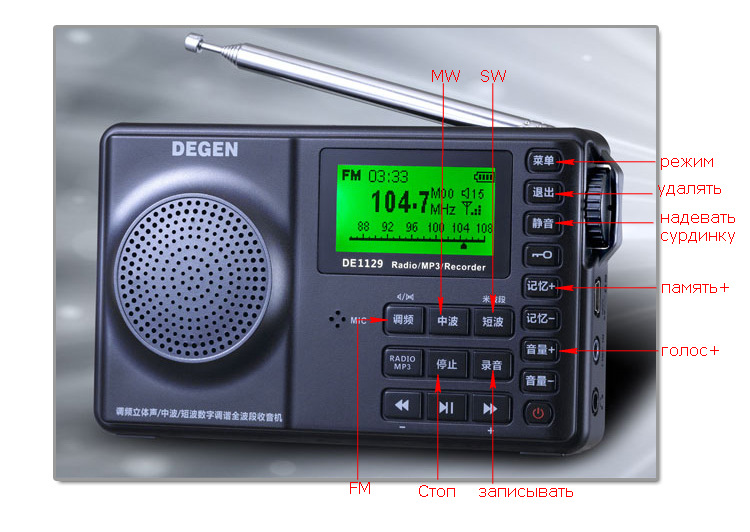
Degen DE1129 front panel: Alex provides Russian translations and English corrections

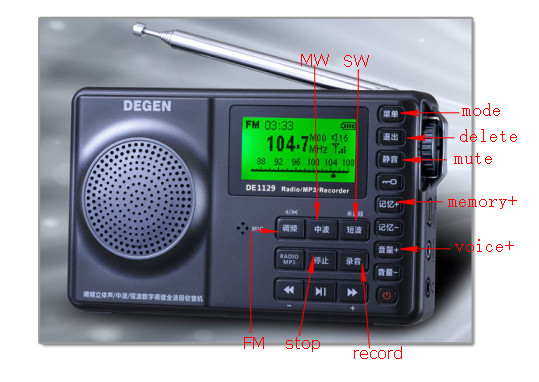
Click to enlarge (Source: TecsunRadio.com)

A few weeks ago, I posted an image with English translations of some of the buttons on the Degen DE1129 front panel.

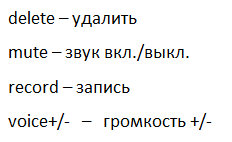
Alex, an SWLing Post reader, commented with the Russian equivalents for some of the buttons and corrections to the one posted at TecsunRadio.com (see photo). As he points out, even in the English translation the “voice+” and “voice-” buttons are actually the +/- of the volume control.

Now that I’ve had time to use the DE1129 myself, I believe the button labeled “mode” should actually be translated as “menu.”

Here are some Russian equivalents from Alex:

Thanks, Alex!

The Degen DE1129 features 10 kHz steps on medium wave

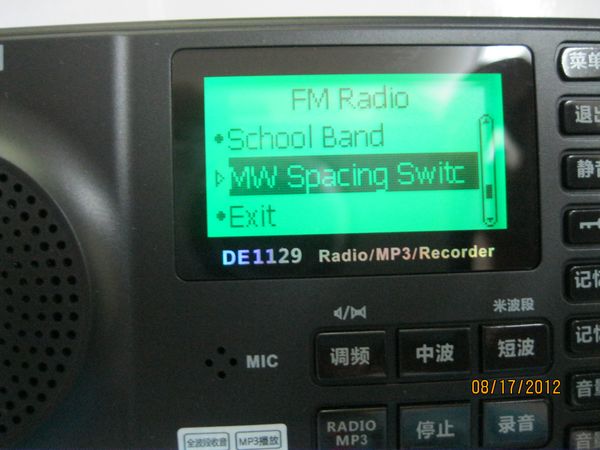
I just received confirmation from a representative at TecsunRadio.com that the Degen DE1129 will offer selectable 10kHz steps for the medium wave (AM) band in North/South America (ITU Region 2).

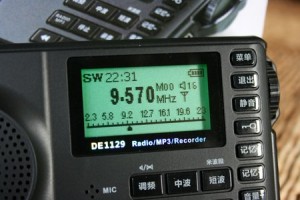
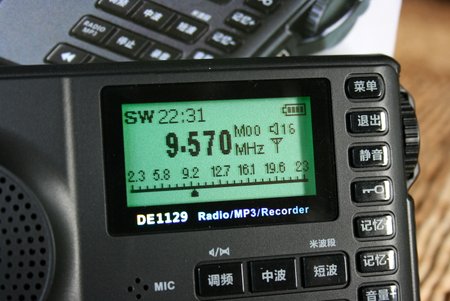
My contact had to verify this fact by actually trying out a radio and making the selection manually (see photo), as the written radio specifications were unclear.

Upon learning that its predecessor, the Degen DE1128, did not have 10 kHz stepping, it lost an audience in the Americas.  I feared that the DE1129 would have the same limitations, but fortunately (for Degen) it is not. Of course, here in North and South America, we have the Grundig G2 Reporter–which is sold and supported here in the US as a DE1128 alternative.  But this newest member of the Degen line is a welcome addition.

ITU (International Telecommunication Union) Regions Map

Frank’s assessment of the Elad FDM-S1

The ELAD FDM-S1 Software Defined Receiver

SWLing reader Frank Holden (VK3JFH/VP8DNM) contacted me by email to share his experience with the ELAD FDM-S1–of particular interest because we have yet to see many reviews of this particular software defined receiver. Although the FDM-S1 was announced with some modest fanfare, its actual release and availability skipped over many of us. Not over Frank, however:  he purchased an FDM-S1 and had it shipped to his home in Australia, where he apparently put it through its paces.

Frank’s overview of the ELAD FDM-S1 is quite good, and he has kindly given us permission to post his observations here:

I have had an ELAD FDM-S1 now for over a month, having purchased it directly from the manufacturers, and while I don’t feel qualified to write a review you may be interested in my opinion of it.

In my shack at present I have an Icom R-1500, Icom 718, Tecsun 390, Tecsun 660, Grundig G6, Sangean ATS 909, Drake SW 8, Kenwood R5000, a Funcube Dongle and an Alinco DJ-X11. In the way of antennas I have a couple of dipoles, a G5RV , and a 10 metre vertical for TX together with an AOR DC to Daylight, a Diamond discone , a GWhip longwire and a simple 7 metre long untuned vertical on a squid pole for RX.

I was going to buy my ELAD pre-release from WoodBoxRadio but language difficulties and confusion over getting it VAT-free put paid to that. I take full responsibility for the confusion……

In the end I bought one direct from ELAD sdr for 362.81 Euros VAT-free, which price included 10 Euros postage to Australia. It arrived within a week… would that everything that I bought from overseas was as cost effective and fast.

Out of the box it was simple enough to set up with just a USB connection to the computer. I have it connected to a Dell Netbook and this had to be upgraded to XP Service Pack 3 together with some .Net software, the purpose of which remains something of a mystery. I imagine with a newer computer it would operate straight out of the box. It came with a DVD which had both the .net software on it plus an early version of the operating software. I immediately upgraded this software to v3.07 which is what I am currently using.

I believe that originally the frequency range stopped at 30 MHz… however, it can now receive up to 452 MHz if this is selected in the advanced menu. As I write this I am monitoring aviation traffic on 132.200.  Likewise the original viewable spectrum was quite restricted,  but in the latest version 1.2 MHz can be viewed in the waterfall.

Tuning is straightforward… either by direct keyboard entry or by clicking on the waterfall…. there are also three ‘sliders’ at the bottom of the screen which permit ‘mouse tuning’ by either metre band, MHz, or kHz. Mode selection and quite a bit of other stuff (did I mention that this is not a technical review?) are on a drop down menu at the right hand side of the screen. DRM is included amongst the modes and I listen to RNZI DRM most evenings.

I haven’t used any of the recording options on this radio yet.  What I have been doing is either simple SWLing where the ability to monitor an entire Metre band is excellent, especially when combined with the info on the WRTV frequency guide DVD. I also use it at other times of the day  in what I suppose you could call ‘Ham’ mode where it can be left watching the 20 metre, 40 metre or other ham band and I can see when a band has opened… far simpler than scanning around…

So all in all, I am very satisfied and would recommend this SDR to anyone.

My #2 radio these days is my Tecsun 390 with its ETM… another bit of brilliant kit.

Frank also sent some helpful photos of his screen, and added:

I am currently running v.3.07 beta… the last shot is the latest  ‘polished’ version   3.01.

As you can see in that shot, you can now get three screens, including an AF and an IF screen. That version also comes with a separate program that lets you work with recorded files more easily.

He even included some photos of recording:

Thanks for your most interesting observations, Frank.  If there are any others out there who have experience with the Elad FDM-S1, feel free to comment below or simply contact me.

For those of us here in the US, to my knowledge there still is no FCC approval of this device. I have contacted Elad with this question; they’re on annual holiday leave just now.

Follow our other Elad FDM-S1 posts with the tag: Elad FDM-S1

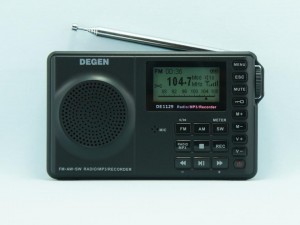
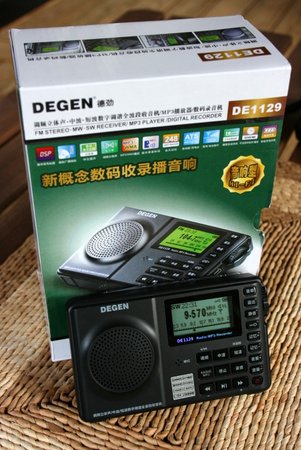
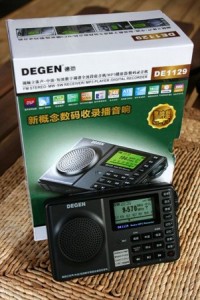
The new Degen DE1129 shortwave radio with MP3 recording and playback

(Photo source: TecsunRadio.com)

TecsunRadio.com has posted the new Degen DE1129 shortwave radio on their website. Though they have not yet posted pricing, it appears pre-orders are being taken.

The DE1129 looks like a decedent of the Degen DE1128 that has not exactly been a market success in North America. The DE1128 lacks medium wave (AM) 10kHz steps (spacing) that allows it to be useful in the North America AM broadcast market.  It also lacks English as a selectible language on the display. (The Grundig G2 Reporter, however, does have the features and is, in essence, the North American version of the DE1128).

The published features/specs of the new DE1129 do not reveal if AM spacing or English language will be an issue in the DE1129. I will try to contact the manufacturer. Until then, I would keep this in mind if pre-ordering. UPDATE: The DE1129 does have 10kHz spacing.

UPDATE: Vimal points out pricing is $102 US/each with shipping.

Thanks for the tip from the excellent Herculodge blog!

Features (per retailer)

  • FM :87.0-108 .0 MHz
  • campus radio:64.0-108.0MHz
  • MW (medium wave) :522-1710KHz
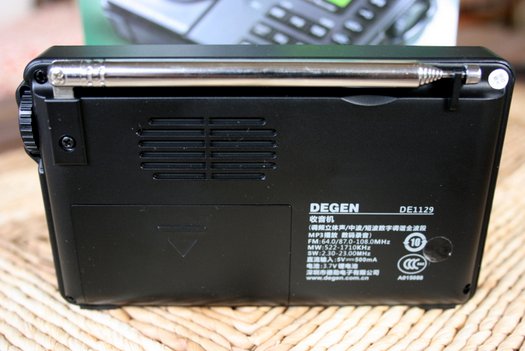
  • SW (shortwave) :2.30-23 .00 MHz
  • Stored radio frequency of 248
  • Radio signal strength indicator
  • High-frequency stereo
  • Five tuning methods: (encoder knob / manual / automatic / memory / ATS)
  • Large-size LED backlit dot-matrix screen, full support of the Chinese display
  • Playback: MP3 and WMA decoding
  • Multiple repeat mode
  • A variety of sound modes
  • Variable speed playback
  • A-B repeat
  • Recording function: MIC recording, recording radio
  • MP3/WAV sound recording format selection
  • Can be used as the active speaker
  • E-book features: TXT document reading
  • Intelligent timer switch
  • Alarm clock function
  • Sleep timer (05-90 minutes)
  • Support software upgrades
  • Support for multiple languages
  • Built-in memory, support for the MICRO SD card playback
  • Key Lock Switch
  • The electronic volume control (31)
  • Built-in top super bass vibration film and wideband audio speaker
  • MINI-USB interface, USB2.0 high-speed transmission
  • The intelligent charging can be connected to the computer charge
  • Battery level indicator, low battery automatically shut down
  • Removable battery, replace the batteries more convenient
  • Machine size: 130 * 78 * 30MM
  • Weight (with lithium battery): about 145G
  • Supplied accessories: USB cable, lithium battery, and Operations Guide


Do you own a Quantum shortwave radio?

The Quantum FX J-114U portable analog shortwave radio features an analog radio dial, but USB/SD media playback. Who knew?

Several of you have written to me in the past few months asking about the new Quantum analog shortwave radios found on eBay. The prices for the various models are anywhere between $20-40 US.

I’ve resisted checking into these radios as they have very little technical information available and I assumed would not be worth the bother. In fact, sellers don’t even list the frequency coverage of the shortwave bands, only how many “bands” each unit has (i.e. “SW 1-7”). However, one unit (the Quantum FX J-114U) is available on Amazon, and there have been a few favorable reviews. Now I’m a bit curious.

Do you have experience listening to shortwave on one of these radios? If so, please share your comments.

I just added three of them to the Shortwave Radio Index:

A Review of the Bonito 1102S RadioJet 24 bit IF Receiver

Bonito’s Dennis Walter at the Bonito booth in Hara Arena at the 2012 Dayton Hamvention

At the Dayton Hamvention this year, I met Dennis Walter, who is with Bonito, German manufacturer of the 1102S RadioJet. Dennis was kind enough to loan us a radio for review on SWLing.com. I have been evaluating the Bonito 1102S RadioJet over the course of eight weeks and have formed some impressions about its performance. And while I haven’t made any A/B comparisons yet with either the Microtelecom Perseus or the WinRadio Excalibur–both on my review table at the moment–I have taken the time to get to know this lean, high-performance IF receiver.

First impressions

The RadioJet box (left) is about the size of the highly portable Tecsun PL-380 (right)

When I first held the RadioJet, I was amazed at how small and sturdy the unit is. It’s built quite well; I expect you would have difficulty putting a dent in its aluminium body. It has a very small footprint on the desktop and fits very easily in my suitcase. Specifically, the RadioJet box is about the size of the highly portable Tecsun PL-380—in fact, the PL-380 is slightly wider than the RadioJet.

And though I knew about this feature in advance, what really stands out is its lack of dependence upon a power cable or a DC-in jack on the back of the unit.  Indeed, the only two connections are a USB port and a female BNC connector for the antenna. The RadioJet derives its power directly from the USB cable. This is a major plus, providing additional freedom, as there’s no need for an external power supply or “wall-wart” type DC adapter. With the radio and USB cord, you’re ready for radio on-the-go—as I was on my recent DXpedition family vacation, when I reviewed the RadioJet.

Plug and play

Installing the RadioJet is very simple. You simply plug the receiver into your computer via the supplied USB cable, then install the RadioJet software via the supplied installation disc. As far as I know, the RadioJet software only works with Windows PCs. I tested the RadioJet with my Toshiba Satellite 64 bit Intel core i3 laptop computer.

I had no difficulty getting the RadioJet running.  Indeed, it worked after the first software install. In my experience, it was true plug-and-play.

Is the RadioJet an SDR?

To be clear, the RadioJet is technically not an SDR, it is an IF receiver, more like the Ten-Tec RX-320D. I’ve certainly been guilty of calling it an SDR in the past as it’s easily to lump it in the same category. Within this review, I do compare RadioJet features with SDRs currently on the market since it is software (PC) controlled, has many of the same features as an SDR and directly competes with them.

Software and Usability

Unquestionably, the Bonito 1102S RadioJet’s software offers the most flexibility of any Software Defined Radio (SDR) or IF receiver I’ve ever reviewed.

A screen capture from my Toshiba Satellite Windows 7 laptop (click on image to enlarge)

Having used several SDRs and IF receivers–including the Microtelecom Perseus, Ten-Tec RX-320D, RFspace IQ and WinRadio Excalibur—I can state that the basic functions of the RadioJet are comparatively easy to locate.  The graphic user interface (GUI), however, could appear somewhat complicated, particularly if you are new to software based receivers.   While I like options and the ability to customize a user interface to best match my preferences, having a GUI that is both highly-adaptive and full-featured can be a double-edged sword until you become accustomed to it.

On one hand, you can customize the RadioJet GUI more completely than any other SDR I’ve ever used:  you can change the window size, layout, spectrum display, and color palette; you can also load pre-designed screens to help with signal measurement, IF control, and AF control.  Indeed, the RadioJet’s designers have also included a unique “Scanner and Signal Utilities” screen for working with utility reception.

On the other hand, there is a learning curve in both customizing the GUI and familiarizing yourself with the radio’s controls. This is why I wish the RadioJet had a proper owner’s manual. Early in my experience with the unit, while making setting modifications during a broadcast, I found I could lose my place within the control settings or accidently alter a setting that would result in degraded reception (such as the WAV volume, AGC, DSP or attenuator).  I thought that the RadioJet was malfunctioning, only to discover that I had a setting adjusted incorrectly.  Note that Bonito’s online support, however, has been very responsive in helping me when this happens.

The RadioJet GUI is the most flexible and adaptable of any software radio I’ve used

Fortunately, Bonito is fully aware that many listeners could be overwhelmed by the various options the RadioJet offers, and have designed the GUI so that if you minimize the window (as you would any Microsoft Windows “window”), only the basic receiver options will display.

The only major drawback I’ve observed with the RadioJet, as fellow reviewer Fenu mentions in his comprehensive review, is that its software still has a few trouble spots to be ironed out.  This is not surprising, considering that is very new to the market. To be clear, software is a very important part of an SDR or IF receiver’s usability: after all, its interface is software defined. An SDR or IF receiver without the software is merely a small paperweight–but with it, becomes highly functional radio with a performance that can be enhanced with upgrades over time.

The success of the RadioJet over time will be directly tied to the responsiveness of Bonito to customer feedback. Like Fenu, my experience with Bonito is quite encouraging in this regard—Bonito has even provided remote desktop help sessions for individuals, and I can personally vouch that I’ve benefitted from this support. Bonito also closely attends to discussions on the RadioJet Yahoo Group, indicating that the company is listening to their customers. Bonito has been updating the software regularly—in fact, they’ve just added a noise blanker to the software which, I hear, effectively deals with electrical pulse noises like those produced by electric fences.

Tuning around

Though not required, if you don’t already have a mouse with a scrolling wheel, you will want one to tune and adjust the RadioJet. Band-scanning is pretty straightforward and there are a variety of methods to adjust the frequency:

  • Hover your mouse over the tuning knob and click to rotate clockwise or counter-clockwise
  • Hover over the digital frequency display and use the mouse scroll wheel to adjust each digit of the frequency up or down
  • If the display is expanded, there is also a number pad where you can click on each number to adjust
  • In the current revision of the software–much like with the Perseus–you cannot directly key in the frequency with the number pad of your computer

With the scroll wheel of the mouse, you can easily adjust most settings and filter controls of the RadioJet. It acts, in a sense and in most cases, as a proxy for a tangible knob you would have on a traditional radio. I imagine there are other (perhaps even better) peripherals that would work, too.

I do find the controls a bit frustrating to manipulate if you do not have at least a mouse with a scrolling wheel. I did not bring a mouse on my recent DXpedition and later regretted the decision. The track pad on my Toshiba laptop does not offer the accuracy and scrolling features needed to fluidly operate the RadioJet GUI.

Recording

The RadioJet audio recording and playback panel

Unlike a lot of SDRs on the market, the RadioJet does not have the ability to record large chunks of HF spectrum. For example, the WinRadio Excalibur and Microtelecom Perseus can record 2,000 kHz of spectrum; the RadioJet, however, is limited to 24 kHz. I asked Dennis at Bonito about this and he said that when designing the RadioJet the designers focused on the performance of the received signal and the radio’s overall efficiency rather than upon having a wide IQ output.

Bonito is catering to the discriminating DXer who is seeking the highest quality signal upon receiving, even among weak signals, but who is less interested in spectrum recording. Personally, I like to record and archive spectrum, but I do appreciate this focus upon delivering the best possible received signal, even with a very modest computer. Indeed, unlike most other SDRs on the market, the Bonito 1102S RadioJet reportedly works well on Netbooks with Atom processors. I can say that my Intel Core i3 laptop runs the RadioJet beautifully. I do plan to try the RadioJet on my netbook soon, as well.

RX and DX modes

One unique and highly-promoted feature of the Bonito 1102S RadioJet are the RX and DX “Channels” or operating modes.  On the Bonito site, they show an example of a very weak signal showing up on the spectrum display, almost totally hidden in the band noise. When the user switches to the “DX Channel,” however, the noise floor drops and the received signal pops out, and becomes armchair listening.

Here is the video:

I have found that the DX Channel is indeed very effective at pulling a weak signal out of the noise. The RX Channel, on the other hand, does an even better job of receiving stronger broadcasts signals. The channels appropriately balance AF and RF gains along with the raw IQ to deliver the receiver’s very best under prevailing conditions.

The RadioJet RX/DX channel selection panel

I find that I switch between the two channels rather frequently, and tend to do so manually. There is a setting in which the RadioJet will automatically determine what settings should be used to best hear the target broadcast—it switches very quickly between the RX and DX Channels and even makes small adjustments to the AGC and other settings.  Though quite effective, I still prefer to manually adjust these features to enjoy greater control of them.


Digital Radio Mondiale (DRM)

This is perhaps one of the most fluid and flawless features of this radio.  Though I have not had an opportunity to record DRM yet, I have decoded several broadcasts with great success (REE, Vatican Radio and RNZI).

In fact, if you are looking for a an excellent DRM receiver, the RadioJet may be your best bet.  Unlike many SDRs on the market, the RadioJet decodes DRM natively:  in other words, you simply tune to a DRM signal and change the mode from AM to DRM. That’s all. Your software already has a built-in, paid-in-full decoder (no need for a costly plugin or DREAM license). It’s the best implementation I’ve ever tried.

Summary

When I begin a radio review, I keep a checklist of pros and cons as I discover them. In this way, I can remember my initial discoveries.

Here’s my list from the Bonito 1102S RadioJet:

The RadioJet derives its power from the supplied USB cable, the only two connections are the USB port and the antenna (BNC)

Pros:

  • Excellent sensitivity and selectivity
  • Low noise floor
  • Excellent DRM implementation
  • Customizable filters—some can actually be hand-drawn with the computer mouse to accomodate received signal conditions
  • Though I haven’t done an A/B comparison with the Perseus yet (coming soon!), but like Fenu, I expect the sensitivity and selectivity to be very similar
  • Operates without a separate, external DC power supply
  • Software and GUI are extremely customizable—the most flexible and resizable I have used (see con)
  • Audio fidelity, once adjusted, is excellent
  • Two modes of listening (RX and DX channels) allow for either manual or automatic settings for strong or weak signals (see con)
  • Technicians and support representatives from Bonito have been responsive to customer requests and feedback
  • Software updates are frequent and occasionally include new features
  • Since the RadioJet doesn’t use or have to process wide IQ, (see con) its 24 kHz bandwidth targets one broadcast and places emphasis on clean RX performance
  • Doesn’t require robust PC processing power, will even run smoothly on a netbook (per manufacturer—though I will test soon)
  • Scroll wheel on a standard PC mouse acts as a nice proxy for the many control knobs on the RadioJet GUI (see con)

The RadioJet software even has a unique map display of broadcasting schedules

Cons:

  • Software has some bugs and is not yet fully mature
  • Software and GUI are so customizable that they reqire a learning curve—could be a negative for SWLs seeking simpler functionality (also see pro)
  • No IQ output like the Perseus, WinRadio and RFspace SDRs, which allows for wide spectrum recordings (also see pro)
  • Software occasionally crashes
  • Sometimes when switching between RX and DX Channels, WAV volume settings are altered and not returned to original settings, resulting in a “splattered” or “hot” audio sound
  • Software controls are frustrating to use without a mouse—or by using a laptop track pad only (see pro)
  • Lack of a proper owner’s manual

Final thoughts

Overall, I like the Bonito RadioJet; I would certainly recommend it for the shortwave radio listener and DXer, especially one who wants:

  • raw performance
  • flexibility
  • portability
  • robust receiver control software package
  • good value for performance

I would also recommend the RadioJet to those who don’t want a receiver to task their computer’s processor excessively.

If you are looking for a mature, simple software defined radio—or if you need wide spectrum recording–you may want to check out a true software defined radio (SDR) from WinRadio, RF Space or Microtelecom.

In my opinion, the only drawback to the RadioJet, as of time of this review publication, is that the control software is not yet refined and still has a few bugs. None of these limitations have affected my ability to use the RadioJet, but they have proved annoying at times.

My impression of Bonito and their staff is that they are trying in earnest to respond to customer feedback and focus on delivering an effective receiver for the DXer and for those wishing for excellent performance on a budget.

If this attentiveness continues, the RadioJet should only improve with time.

The US price tag for the Bonito 1102S RadioJet is $689 through Universal Radio. This is fully $300 less than the Microtelecom Perseus. If you want serious performance, from a lightweight, rugged, flexible software controlled receiver, you should be pleased with the RadioJet.

UPDATE: Want to hear a broadcast recorded on the RadioJet?  Check out my previous post on the final broadcasts of RNW. The RadioJet did an amazing job pulling this station out of the static.

Follow our tag “RadioJet” for updates to this review and future A/B comparisons with other receivers.

Keep in mind…

SWLing Post regulars know that I don’t post highly technical or “laboratory” reviews. Take this review as my experience as an experienced shortwave radio listener, where I focus on usability, receiver quality, and audio fidelity, and provide general operating notes. I also focus on helping consumers make purchase decisions, as I outline the pros and cons of each receiver.  For a more technical review, I would refer you to previously-mentioned Fenu’s review and–potentially upcoming–Rob Sherwood’s receiver performance data.