Tag Archives: Guest Posts

Guest Post: Bob’s conundrum with the Radio Data System (RDS)

Many thanks to SWLing Post contributor, Bob Colegrove, who shares the following guest post:


A Conundrum with the Radio Data System (RDS),
or Why I Set the Clock Manually

By Bob Colegrove
There’s an old story about a man who owned two watches.  One watch ran but lost a minute every hour.  The other watch didn’t work at all.  He always wore the watch that didn’t work, because as he said, “At least it will have the correct time twice a day.”

First off, a couple of caveats.  This is not a definitive description of the Radio Data System (RDS).  I leave that to much more knowledgeable sources.  One detailed description is at https://en.wikipedia.org/wiki/Radio_Data_System.  Second, my experience described here is confined to the Eton Elite Executive and the XHDATA/SIHUADON D-808.  Other radios may operate differently.

I have surrounded myself with several multiband travel radios over the past year and enjoy them very much – each for different reasons.  Besides listening, I like to push buttons to see what happens.  The manuals?  At best they occasionally provide a clue.  I read them, eventually filling in the blanks on my own.
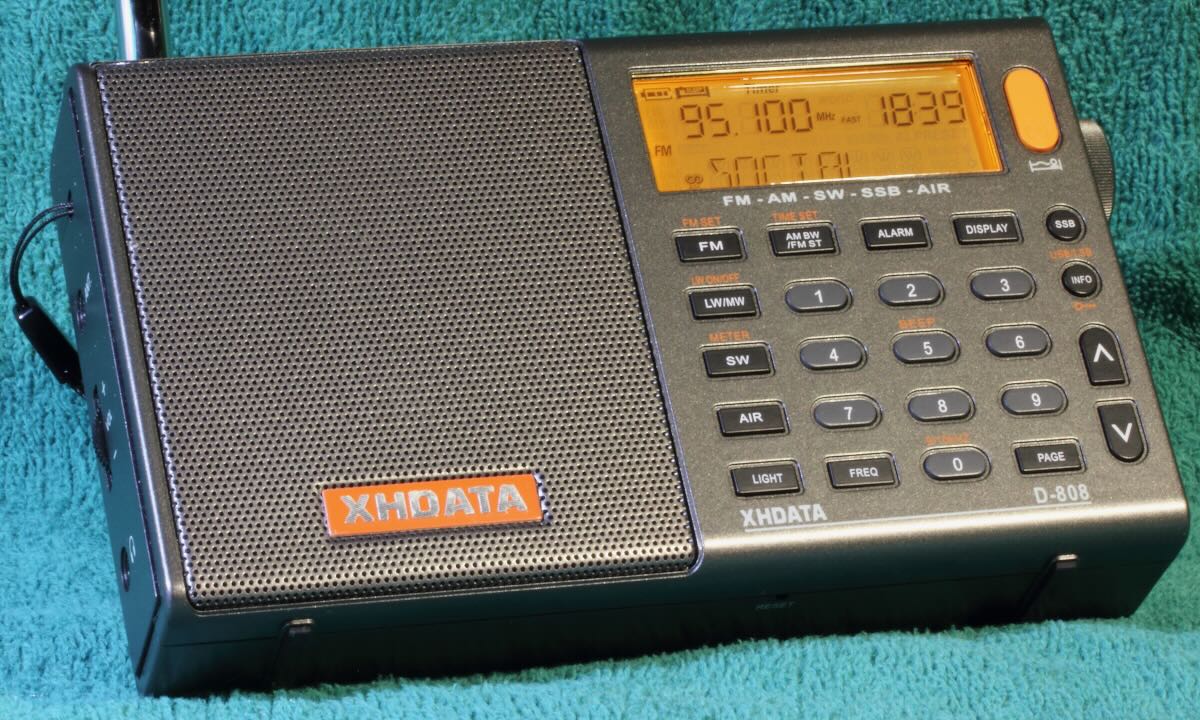
XHDATA/SIHUADON D-808

Basic RDS

What is RDS? RDS is a system which enables an FM station to transmit various fields of information such as date, time, call letters, frequency, and program information in text form.  The call letters are useful, but if you have a digital radio, you already know the frequency.  The name of the song and artist are particularly helpful if the DJ won’t tell you.  As for the date and time, well, I’ll get to that.

RDS is an international standard and Radio Broadcast Data System (RBDS) is the official name used for the U.S. version.  So why don’t we in the States just call it RBDS?  Probably because our radios aren’t made here.
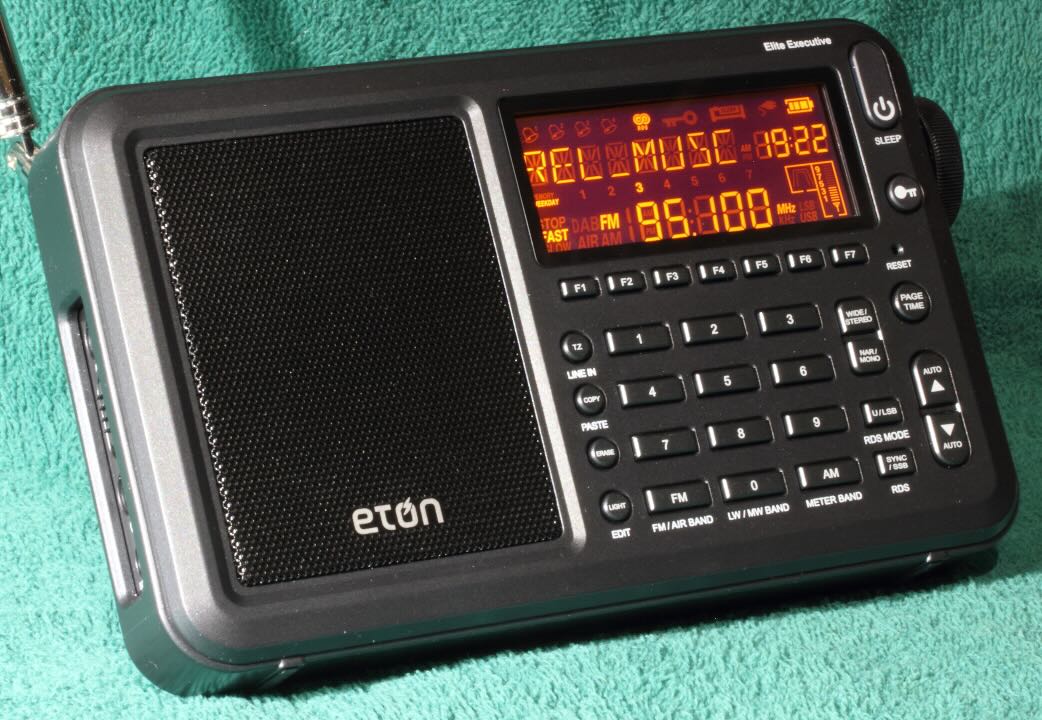
Eton Elite Executive

The XHDATA and Eton allow the user to display four of the several fields comprising the RDS standard.  They each step through the same sequence, indicating a similar or possibly the same demodulator chip.
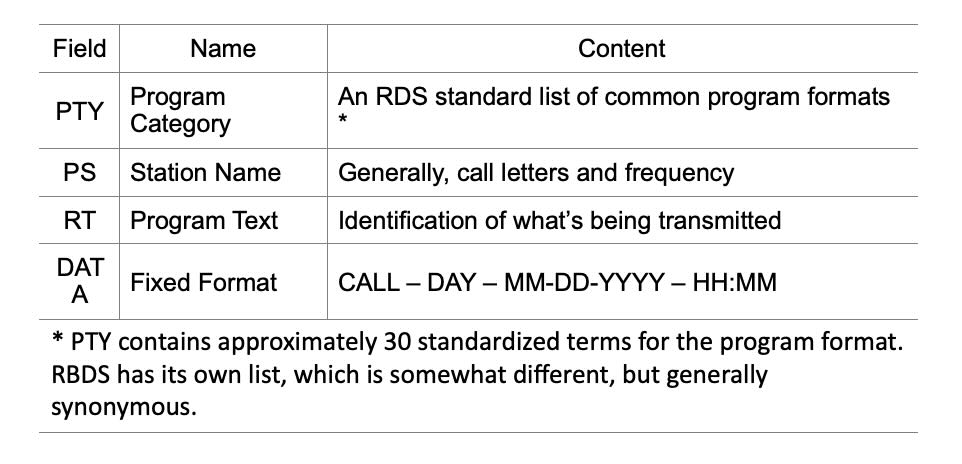
PS and RT seem to be freeform fields with stations providing whatever information they want to share.  Often the call letters and frequency are contained here, along with program content.  Clock Time (CT) is not displayed per se, but is used to set the radio time, and is included as part of the DATA field.  DATA is important; it has four elements, which should provide the listener with an indication of the call, day, date, and time being received by the radio.  The international RDS standard omits the call letters.

The RDS information transmitted by any given station may not contain all the fields identified above, including the time.  For example, stepping through the fields you may encounter “NO PTY,” “NO PS,” “NO RT,” or “NO DATA.” Consequently, you may tune in to a station broadcasting RDS and wait a long time for the radio clock to synchronize, which it never does.  The display of any content in the DATA field is probably the best clue whether CT is being transmitted.

It is interesting that the Eton is programmed for the US RBDS system, whereas the XDATA follows the international RDS system.  For the international system on the D-808:

  • “DATE” replaces “DATA” in the display.
  • The call letters are omitted from the DATE field.
  • The terms in the PTY field differ; for example, WRBS, 95.1 MHz, the PTY element displays “SOCIAL” instead of “RELIGIOUS MUSIC.”
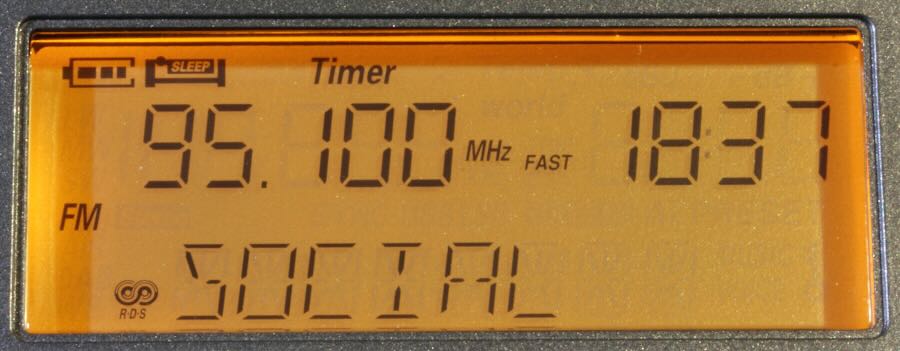
International PTY RDS term on the XHDATA
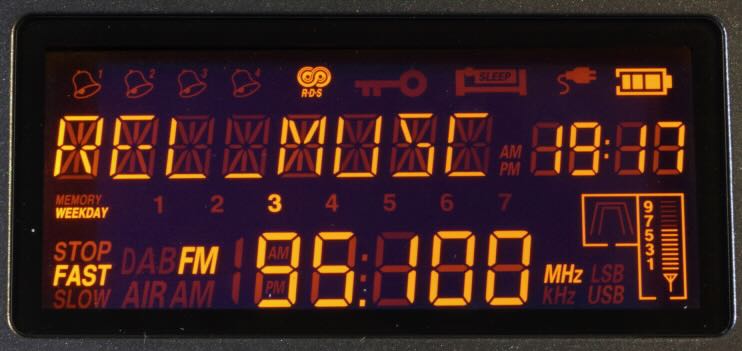
US PTY RBDS term on the Eton

The Conundrum

The mischief all began when I got my XHDATA D-808 and tried to program the clock to automatically update using the RDS information off FM stations.  Minutes seem to display correctly, but try as I might, I couldn’t get the hours to register properly.  Then I bought an Eton Elite Executive.  It also has the RDS feature, so I tried again.  It appeared to work OK for a day or so.  Then the hour indication started to misbehave.  In addition to the clock, the Eton allows programming of time zones and day of the week.  I determined that the erroneous indication did not appear to be related to GMT, EST, 12-hour or 24-hour format settings.  In theory, if you try to set your radio to GMT or some other time zone, the RDS time from a local station should override it.

When I tested the radios side-by-side, the DATA field was fraught with problems on both radios.  Several local RDS stations containing CT were monitored.  The whip antenna was extended a tad, as the information may not reliably register with some otherwise clear audio signals.

  • When tuned to the same station, there were occasional inconsistencies between the two radios, presumably receiving the same exact information from the station.
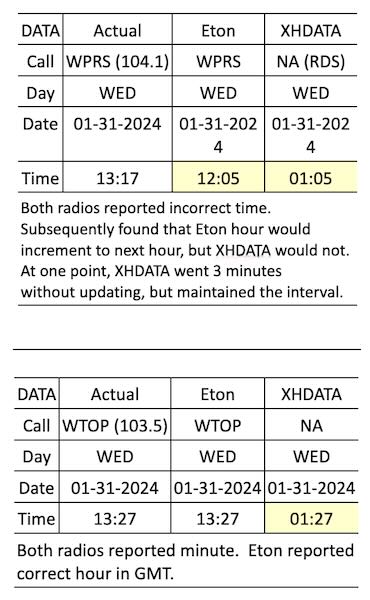
 

  • Sometimes the hour would not advance on the XHDATA after minutes transitioned from 59 to 00.
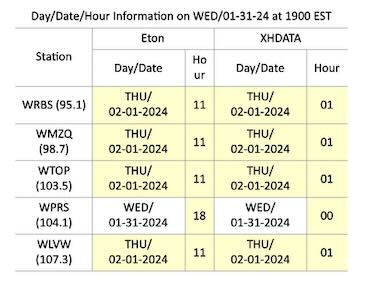
  • Curiously, both radios might exhibit the correct date and time during the day, then at 1900 EST, several stations on both radios prematurely advance to the next day and date, and the hour would display incorrectly, completely unrelated to local hour.  Minutes may or may not be correct.  1900 EST happens to be 0000 GMT.  Are some station clocks running on GMT?
RDS content obviously requires some attention at the station.  In the end, they are responsible for the information going out.  In fairness, with all that goes on in a studio and limited staffing, RDS content may not be a priority.  As an example:

  • Call letters in the DATA field for local WMZQ read KZQK, which is not assigned.

Conclusions

There are two main factors which may impinge on the accuracy of a radio clock when set automatically by the RDS:

  • Accuracy depends on the station transmitting it correctly.
    • With RDS set to the AUTO mode, there is a good chance that the clock will be updated repeatedly as the radio is tuned among various stations – not necessarily to the correct time.
      • For the Eton, the clock would reset each time when changing stations between WTOP (correct time) and WPRS (incorrect time).
      • For the XHDATA, the clock would reset each time when changing stations between WTOP (correct minutes) and WPRS (incorrect minutes).  In both cases, the displayed hour remained 00.
    • There is still the unexplained premature update of day and date by some stations observed on both radios.
  • Correct time depends on the radio’s RDS demodulator to interpret the incoming data.

Trivial?  Perhaps, but you may want to reconsider and program the clock manually, particularly if you depend on the alarm function of the radio to get to work on time.
Back When You Had to Pay: Radio Receiving Licences in Canada

Many thanks to SWLing Post and SRAA contributor, Dan Greenall, who shares the following guest post:


THE DAY YOU HAD TO PAY: Radio Receiving Licences in Canada

by Dan Greenall

MANY of us who are licensed [Canadian] amateurs can appreciate the fact that we are no longer subject to an annual licence renewal fee. As of April 1, 2000, that practice was discontinued by Industry Canada as a new streamlined authorization procedure was put in place for the amateur radio service. This came as a pleasant surprise to many who were paying $24 per annum per licence up until that point.

What many of us may not realize is that, prior to 1953, Canada had a licensing system in place for your radio receiver. Under the Radiotelegraph Act of 1913, a government minister (for most of this period, the Minister of Marine and Fisheries) had the power to license radio broadcasting stations and to charge a $1 licence fee on each receiving set. By 1929 three hundred thousand licenses were bought at $1.00 each.

An article appearing on the Friends of Canadian Broad- casting website a few years ago stated that the annual licence fee for receiving sets doubled to $2.00 in 1930. It was also noted that this was a lot of money during the Depression days that followed and two bucks could buy more than 40 loaves of bread. As a result, so the story goes, “harassed citizens” would try to outwit approaching government collectors by passing word along in time for their neighbours to shut off their radios and lock their doors.

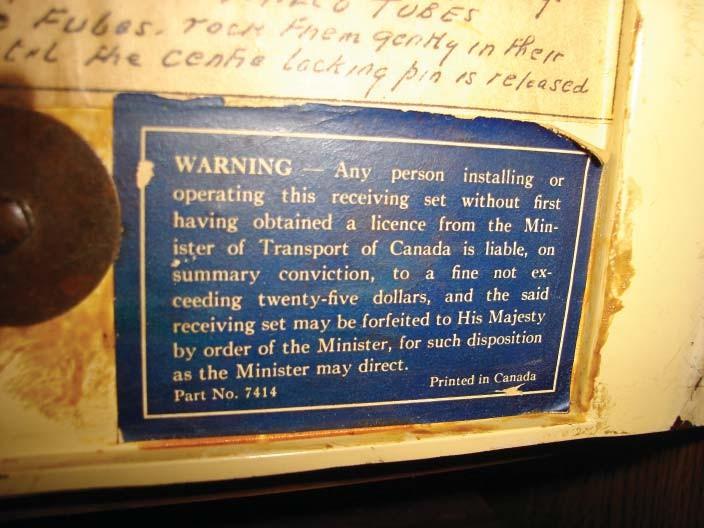
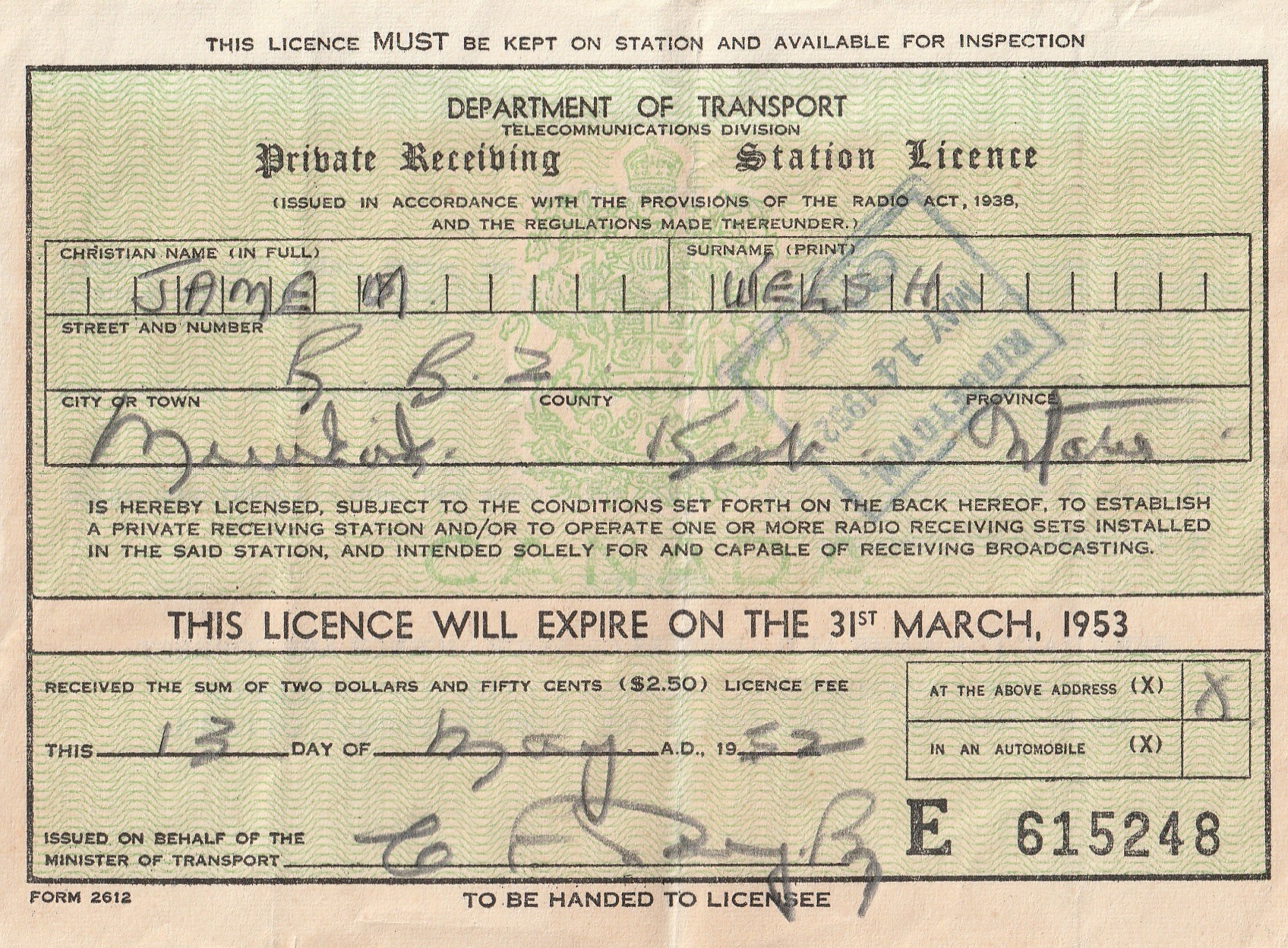
During much of this period, radios that were made in Canada bore a “Warning” sticker such as the one in the accompanying photo. It stated that anyone convicted of operating the receiving set without first having obtained the proper licence could be liable to be fined for up to $25 and have their equipment confiscated. As noted in the book Radios of Canada by Lloyd Swackhammer, the penalty in 1924 was $50.

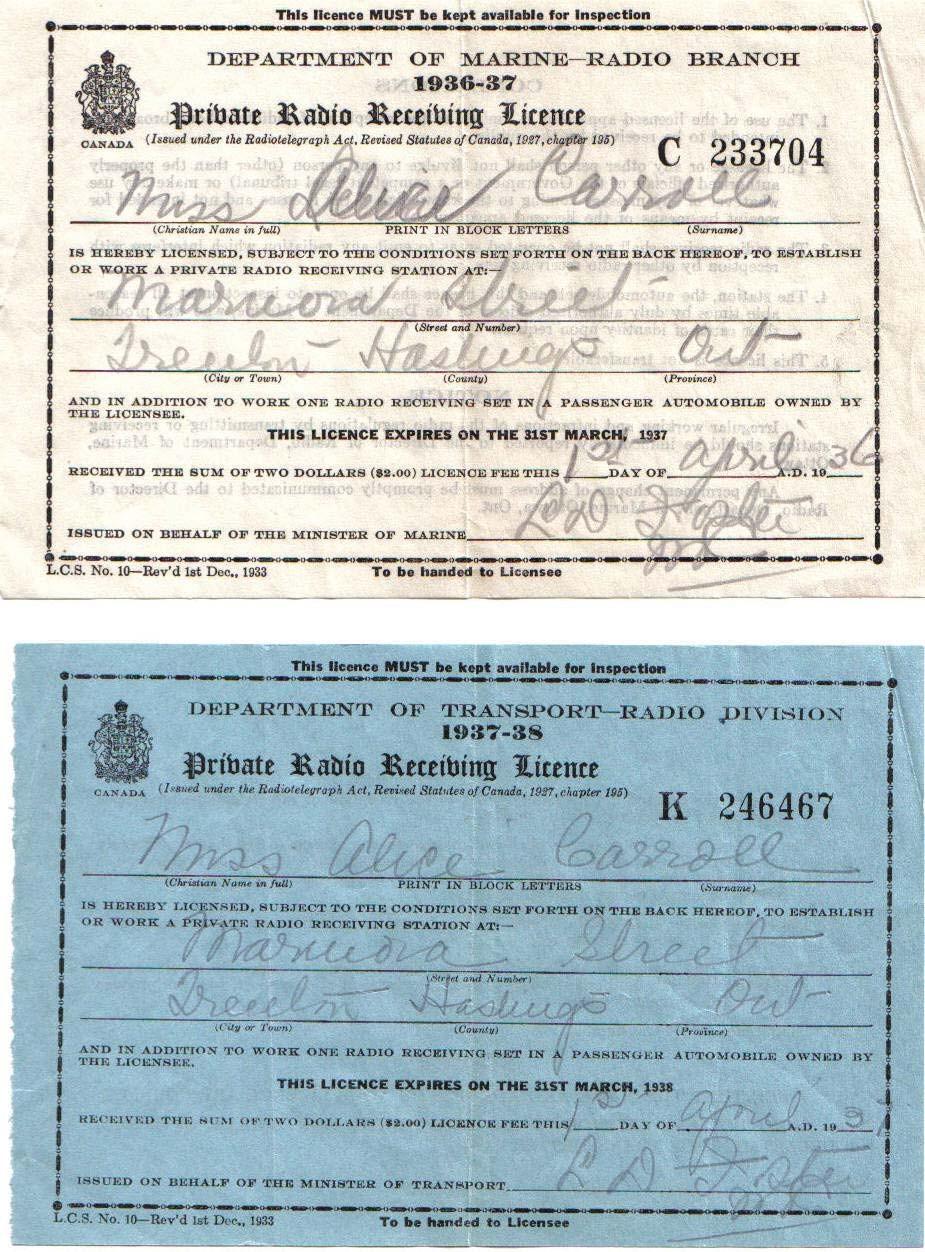
As you can see from the attached copies, such licences were being issued by the Department of Marine Radio Branch in 1936. In 1937, it was the responsibility of the Department of Transport – Radio Division.

Then in 1938, the DOT upped the fee to $2.50. It was another 15 years until this practice was finally abandoned.

So the next time you sit back and flip on the switch of your receiver, you might now have a greater appreciation of a privilege that most of us now take for granted.

Carlos’ Experience and Motivation for Receiving Kydodo News via Radiofax

Many thanks to SWLing Post contributor, friend, and political cartoonist Carlos Latuff, who shares the following guest post:


My experiences receiving Kyodo News

by Carlos Latuff

Back in the 90s, I used the fax machine a lot, I even had one in my house, sending messages and cartoons to my clients and even to live TV shows (see the video example below). Lots of fun!

But for me, the fax only worked through the phone line.

It was only in 2020, during the covid-19 pandemic, that I, by chance, during one of my radio listening sessions, came across a strange signal that I would only later discover was a radiofax.

It was then that I realized that several meteorological agencies around the world broadcast synoptic charts and satellite images to vessels on the seas by radiofax, and that there was a Japanese news agency (the only one left in the world) that broadcast daily news to fishing boats and cargo ships: Kyodo News.

I was fascinated by that!

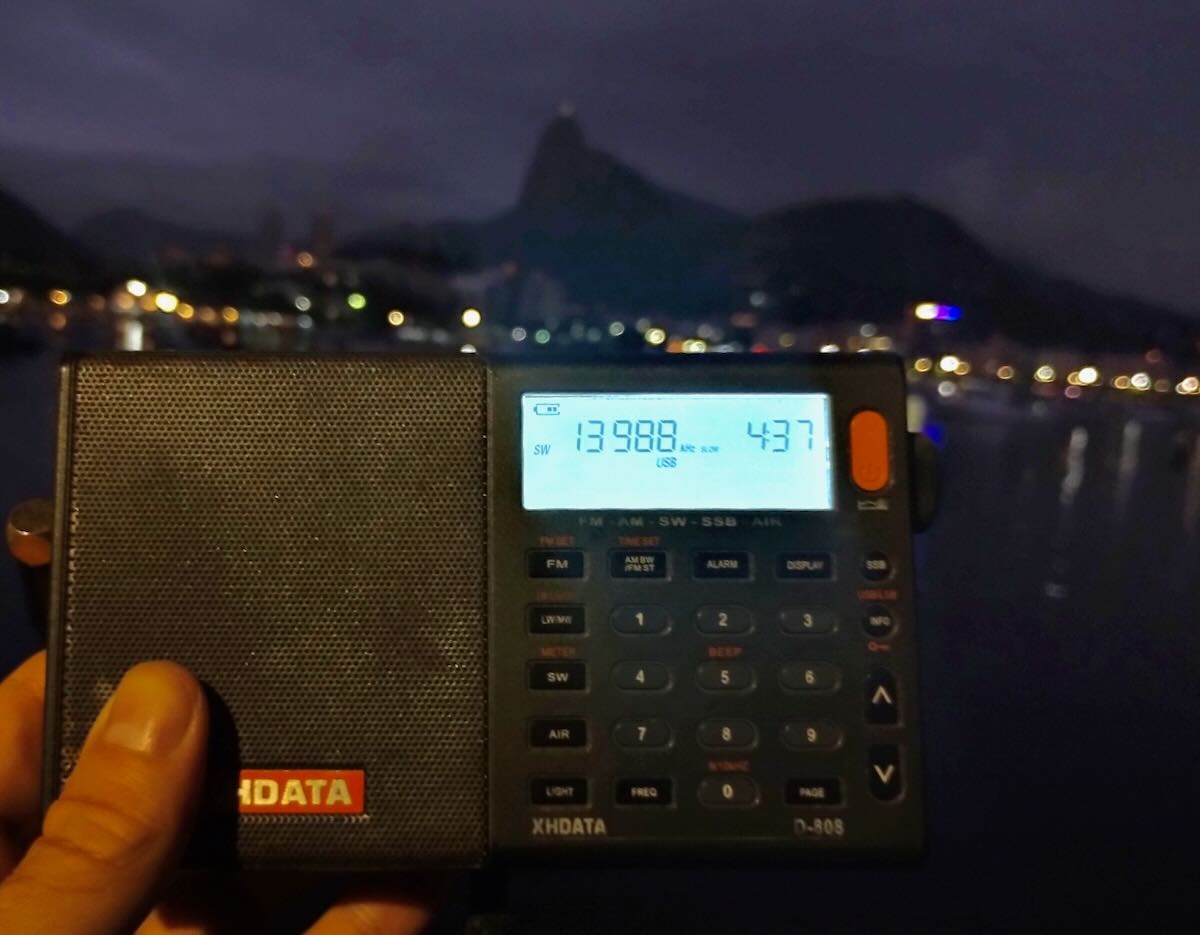
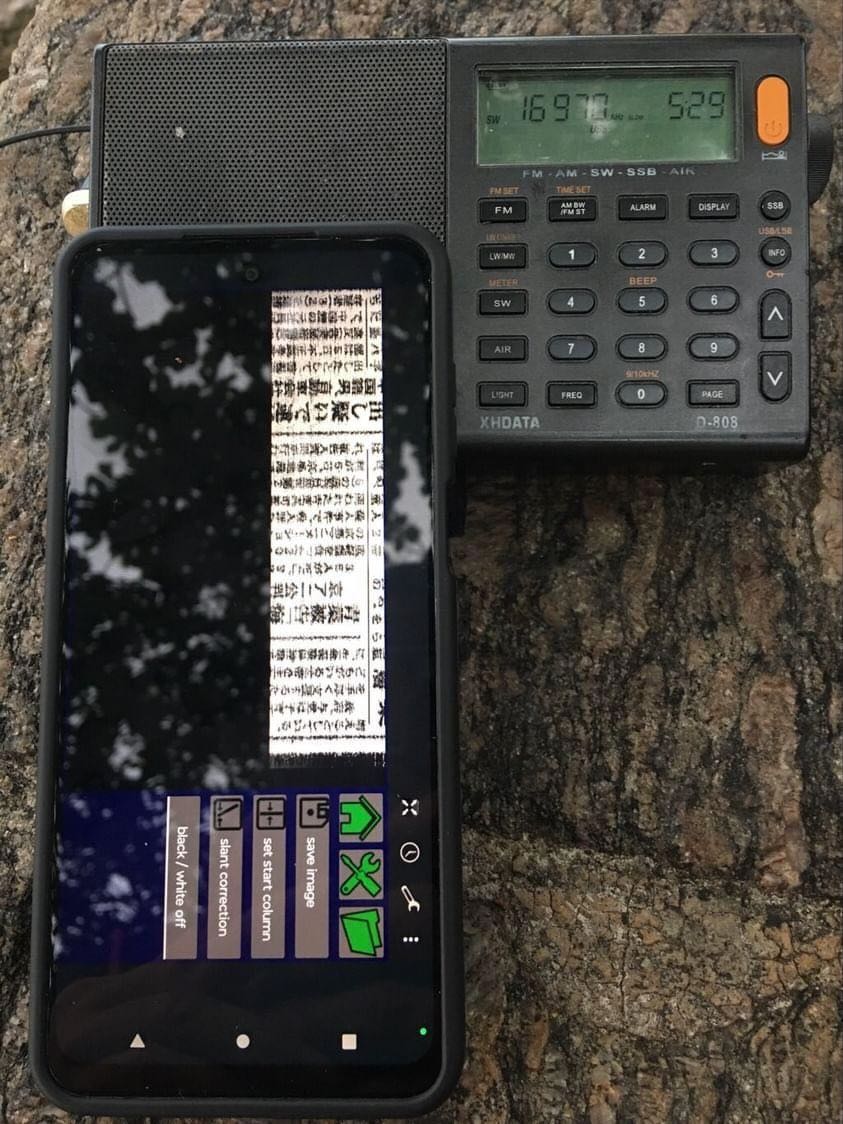
And I started tuning to the frequency of 16971 kHz USB (16970 in fact, to properly receive images) using basically my Xhdata D-808 and its telescopic antenna (now I use a 3-meter long wire antenna).

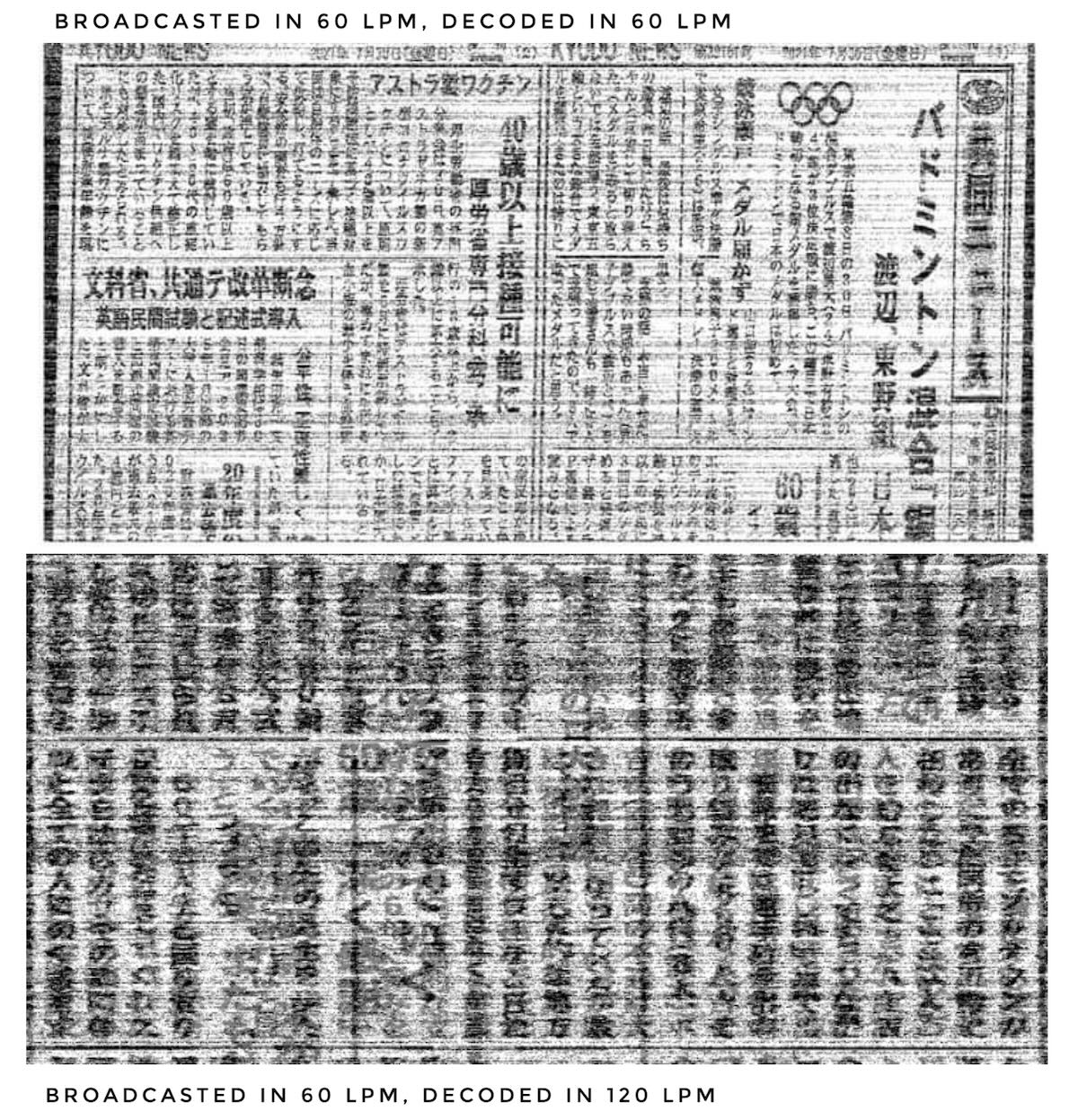
All the weather agencies I know broadcast at 120 lines per minute, while Kyodo News broadcasts at 60 lines. When I used to have a laptop, I had programs installed where I could adjust this cadence, like MixW, however, using an Android cell phone, the only application that works for radiofax is HF Weather Fax, which only decodes at 120 lines per minute (I had some problems with the app, which, being old, sometimes generated conflicts with Android and crash suddenly or even didn’t even open. Another bug is that after around 40 minutes of continuous decoding, the app stops). When you receive a radiofax at a rate of 60 lpm and decode it at 120 lpm, it’s as if you cut the image in half, vertically, and joined the two parts into one, mixing the letters.

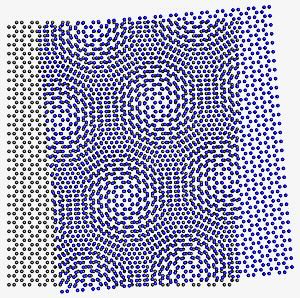
I noticed that, when enlarging the image with my fingertips on the surface of the cell phone, while receiving the radiofax, I was able to see the right and left side of the image at a time, in an effect known in graphic arts as “moiré pattern”.

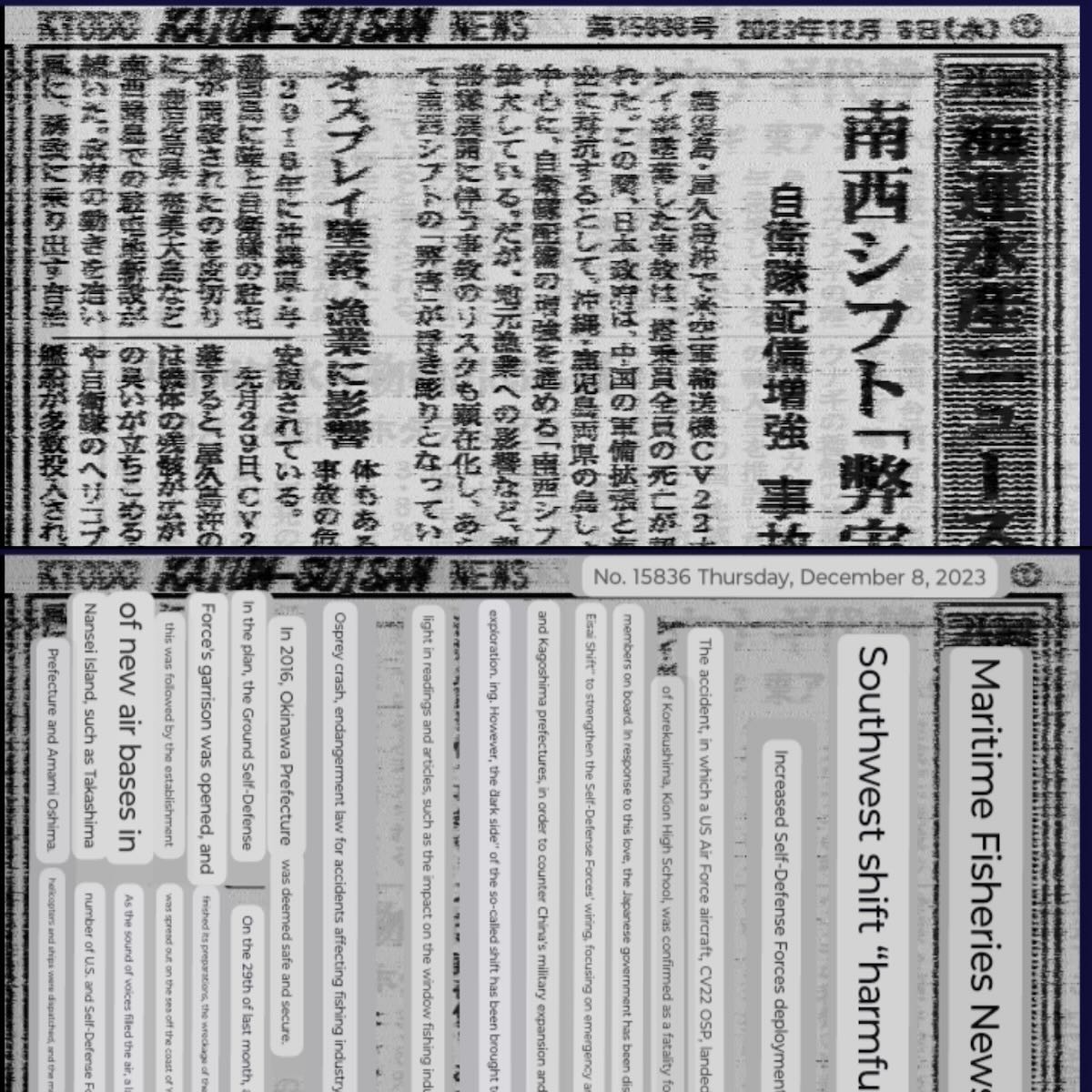
So, using HF Weather Fax I cannot download a Kyodo News radiofax in full (except when I receive the bulletin in English, the only time Kyodo News broadcasts in 120 lpm), but I can view parts of it and make print screens. And with these prints, I open them on Google translator app translating from Japanese to English. If image is in good quality, the translation is perfect.

Results I got were obtained from radio listening in Porto Alegre, Tramandaí beach in Rio Grande do Sul, and Urca beach in Rio de Janeiro, all located in Brazil. The best time has been late in the morning/early in the morning.

I’ve already obtained digital QSL cards from some meteorological agencies, such as those in Germany, Australia and Kagoshima in Japan, but Kyodo News doesn’t even respond to my emails.

But the main question is: why go to so much work to receive news via radiofax when you can easily receive it on the Internet through the Kyodo News website–?

Firstly, I’m nostalgic, receiving these radiofax has a touch of the past that I like to remember. And second, I believe that with the advancement of new satellite data transmission technologies, it’s only a matter of time before radiofax disappears as means of communication for vessels on the high seas. This is already happening!

Remember the end of radiofax transmissions from the New Zealand meteorological agency MetService this year?

So I’m enjoying the radiofax, before it ends!

The following are reports from some of my listening/decoding sessions: Continue reading

The Sony ICF-8000: Bob’s nostalgic journey

Many thanks to SWLing Post contributor, Bob Butterfield, who shares the following guest post:


The SONY ICF-8000

By Bob Butterfield

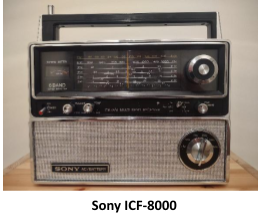
As many radio enthusiasts have experienced there are some pieces of equipment that come and go for a variety of reasons.  Many times, there are regrets about radios or accessories that are here one day and then gone another.  Years ago, I was gifted a Sony ICF-8000 “Super Sensitive” FM/MW/SW portable radio.  My ICF-8000 was one of those that “went.”  To tell you the truth, I am not actually sure where it went off to!  In those days I used my “Super Sensitive” radio on vacation trips, on the back deck, and for local MW/FM and casual SW listening.  When a new position with the Government necessitated relocation, I left this radio behind at my parents’ house where it was regularly used by my mother in the kitchen.  That is when things get fuzzy.  Suffice it to say that I am not sure what happened to it.

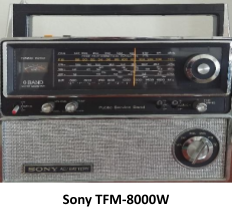
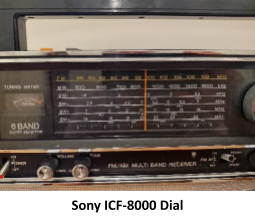
As far as I can determine, the Sony ICF-8000 is a close relative of the earlier Sony TFM-8000W, another “Super Sensitive” model.  What sets them apart is that the Sony TFM-8000W has the Public Service Band (PSB) and the Sony ICF-8000 does not.  The ICF-8000 has its SW bands spread out into 4 bands: 1.6 to 3.5, 3.5-7, 7-14, and 14-26.1 MHz.  In contrast the TFM-8000W has a slightly shorter SW frequency range split into three bands: 1.6-4, 4-10, and 10-22 MHz.  Both radios have continuous coverage with no gaps from MW to SW as well as FM.  These radios are almost identical in appearance.  Other than the PSB and three SW bands on the TFM-8000W, the only other visual differences from the ICF-8000 are how the bands are arranged, identification of the Public Service Band on the face plate, and the addition of an on/off squelch toggle switch for the PSB.  Internally the TFM-8000W has a couple more semi-conductors.  In line with these two radios is the older Sony TFM-1600W “Super Sensitive” which came out circa 1971, has its own distinctive but similar appearance, and is set up like the ICF-8000 with FM/MW/SW.

A while ago the “I used to have that radio nostalgia bug” hit me, and I have been searching since for a decent ICF-8000 to purchase.  Sony TFM-8000Ws in decent shape are up for sale on eBay on occasion, but I was looking for the ICF-8000.   Finally, I spotted one recently (which was listed as a TFM-8000W!) at a price and condition I was comfortable with.  After negotiation with the seller, I purchased it.   There is some useful information on the Web about the Sony TFM-8000W.  Jay Allen has a good piece on this unit worth checking out.  The Sony ICF-8000 appears to be much harder to find, information on the Web is skimpier, and I am not sure how long they were produced.  It is quite possible that its production run was limited.  Manufacturing likely started in 1976 when it probably replaced the Sony TFM-8000W.  One reference I located on the Web listed the ICF-8000 being made as early as 1974 but provided no source.   I also found evidence of at least two versions of ICF-8000s being produced; one with a switch located in the battery compartment allowing multiple different voltages including that for Japan, and one operating on 120 volts only.  The corresponding model number identification panels on the rear are annotated accordingly with voltages available.  Both versions have “FM/AM Multiband Receiver” lettering on the face plate.   Sony, like Panasonic, often tweaked models for domestic and foreign markets, adding or modifying features to fit those markets accordingly.  If anyone has more information on these models, year(s) manufactured, availability of free manual copies, etc., drop them in the comments section.

The Sony ICF-8000 I purchased was in very good shape having just some minor imperfections showing on the faceplate paint. No cleaning was necessary, nevertheless I gave it one.  All switches were quiet and functioned as they should.  A nice feature of the ICF-8000 is its exceptionally smooth tuning mechanism which utilizes a flywheel.  In addition, on my radio, the tuning scale is practically spot-on on all the bands.  Not usually the case in an analog set of this type forty-five plus years old.  When added to the fact that the SW frequencies are spread out in four bands instead of three, tuning is easy.  The presence of a fine-tuning knob is a nice touch and can be useful.  Also available is a tone control knob, signal/battery strength meter, a lighted dial, AC/DC capability, external antenna connection, world time calculator wheel (at the rear on the battery compartment cover), and a dual FM AFC and AM Broad/Sharp bandwith control.

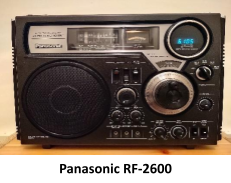
Nostalgia aside, the Sony ICF-8000 has provided reliable performance on all bands so far.  MW sensitivity is adequate while SW reception is above average using the built-in telescoping antenna which measures 44 inches (111.75 cm) in length.  I did a limited shortwave reception comparison in the 49-meter band between the ICF-8000 and the Panasonic RF-2600 with its 37 inch (94 cm) built-in telescoping antenna and found the Sony performing equally with the Panasonic; at times even better perhaps due to its longer antenna.  When connected to an external 75-foot (22.86 meters) longwire I found the ICF-8000 shortwave reception to be particularly good.  I did not experience any overloading, nor did I encounter multiple images.  The sound was, as others have attributed to the TFM-8000W, “mellow”.  If this is not to your liking on the shortwave bands the tone adjustment is useful.   Noise levels were well tolerated.  I suspect that the Sony TFM-8000W would perform similarly.

Is the Sony ICF-8000 a fantastic DX machine?  No, it is not.  Is it “super sensitive”?  Maybe not “super,” but definitely above average, and surely sensitive enough for general listening.  Is it an attractive, affordable classic, easy to use, and sturdy radio with decent performance that can hold up through the years?   I think so.  Does it bring back fond memories?  Absolutely!

“If Memory Serves Me Right, . . .”

Many thanks to SWLing Post contributor, Bob Colegrove, who shares the following guest post:


If Memory Serves Me Right, . . .

By Bob Colegrove

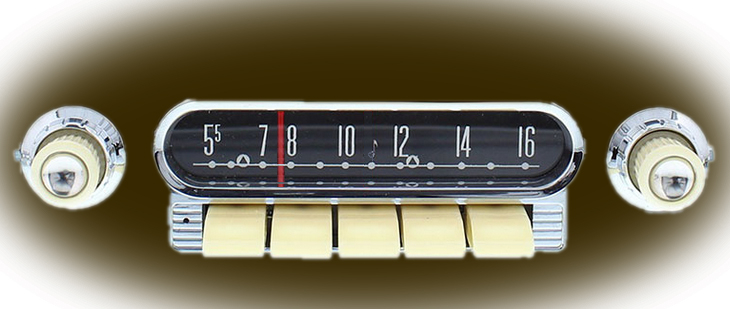
The radio in my ’61 Ford Falcon came with memory.

Memory features on portable radios have become increasingly popular in recent years.  I would say the subject ranks up there with antennas and batteries in many discussion groups.  Memory is really a matter of convenience; that is, the quick and easy recall of favored frequencies.

Mechanical Memory

Memory-capable radios are nothing new.  My very first multi-band radio was a Howard Radio Company Model 308 radio-phonograph console.  It was manufactured sometime in the late 1930s and came with four memories.  These were in the form of pushbuttons, which when pressed, quickly accelerated rotation of the variable capacitor to frequencies of local interest.  The radio even came with a set of call letter stickers for AM stations all over the country.  Memory in car radios goes back almost as far.  It was convenient when you were driving.

During daylight hours it wasn’t hard to find stations in the nearby radio listening area, so you could just twirl the tuning knob in the usual manner until you got to the desired station.  In lieu of push buttons, my mother marked the dial of her kitchen radio with red fingernail polish, WXLW, WIBC, WIRE, WFBM, WISH.  At night it was quite another problem, when the great ionosphereic mirror in the sky began to reflect radio signals from hundreds of miles away.  That’s when the buttons really became useful.  Being a mechanical system, you had to be careful; a hard press of a button would cause the mechanism to overshoot the frequency.

Digital Memory

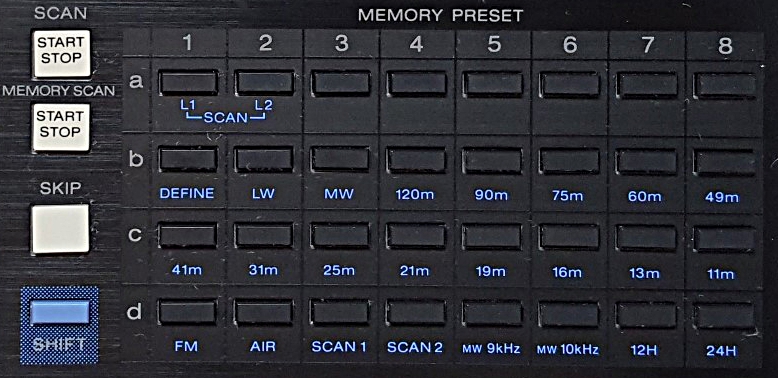
The digital age brought with it the capability of adding electronic memory to the product, as well as much more precision.  My next experience with radio memory came in the mid-eighties with the Sony ICF-2010.  This radio has a matrix of 8 x 4 = 32 dedicated keys on the front panel, each key recalling one stored frequency.  Further, in the case of SW, the single-sideband and bandwidth settings can be saved.  I found the feature very useful and managed to keep many of the 32 memory locations occupied a good deal of the time, honestly never giving much thought to the need for more memory.

Memory matrix on the Sony ICF-2010.  In conjunction with the SHIFT key,
many buttons have a secondary function for scanning or band selection.

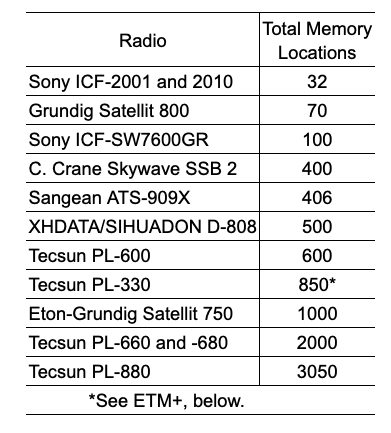
But today’s small multiband portables do not have the available real estate for a large matrix of memory buttons on the front panel.  It’s now done with a sequence of key presses or possibly rotation of the tuning knob.  Since the Sony ICF-2001/2010, there has been a race among manufacturers to include more and more memory capacity in their radios.  “If you build it, they will come.”  Below is a sample of the total memory locations in some popular portable radios.

I am reminded of a passage in Life on the Mississippi in which Mark Twain speculated about the continual shortening of the Mississippi River due to new channels flooding across its bends.  According to his extrapolation, in 742 years Cairo, Illinois will be joined with New Orleans.  Similarly, we may soon reach the point where memory capacity of a multiband radio exceeds the total number of available channels.  But memory is cheap these days.  I suppose it’s already on the chip, so why not make it available and tout it as a feature?

As a result of this large memory capacity, recalling a saved station can quickly become a problem.  First, if you have band-specific paging, you must ensure you are on the appropriate band.  On page memory radios, it requires that you first recall the page number and button on the number pad where you have saved the frequency.  In any event, you navigate through the stored locations mentally correlating location numbers with frequencies.

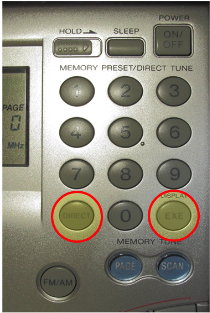
There is no standard by which manufacturers implement memory.  On the Skywave SSB 2, D-808, and ICF-SW-7600GR, the number pad defaults to memory tuning.  For direct frequency tuning, you must first press FREQ on the SSB 2 and D-808.  The Tecsun radios on the other hand have toggling VF and VM modes, and you best be careful which one is active.  To recall memory on the PL-330, you can either spin the tuning dial to the channel or key the channel on the number pad if you can remember it.

To directly enter a frequency Sony ICF-SW7600GR, there are two extra key presses:
DIRECT before the frequency and ENTER after.

At this point I must ask, at what point does it become more convenient just to directly key in a 4- or 5-digit frequency?

One of the things to remember about radio memory, even the old push-button kind, is that it stores frequencies not stations.  If another shortwave station is broadcasting on a frequency you saved, that may be what you will hear when the frequency is recalled.  With some extra effort, the Sangean ATS-909X will allow you to record a memo (i.e., station call or name) with frequencies you have stored.  Just remember, this may not be the station you thought you saved.

As an aside, the C. Crane Skywave SSB 2 can scan the first page of AIR band storage (10 frequencies).  If you don’t have 10 frequencies of interest, simply duplicate some of them to fill out the page.  This is also a good way to prioritize a favored frequency.

ATS

If you use the auto tune system (ATS) the computer searches and memorizes all detectable signals for AM, SW, FM or possibly AIR – each band separately.  When it’s done, you’ve caught a net full of fish, and are then confronted with a memory bank full of frequencies, many of which you may not be interested in, but must tune through in much the same way as with conventional tuning.  Finally, there is no easier way to destroy a meticulously hand-programmed memory page than to hold a button down too long and inadvertently activate ATS.  How do I know that?

Keep in mind, ATS requires a broad-band antenna to keep the playing field level during the scan.  The whip is generally all I need.  In the dense population of FM stations along the US East Coast, a completely retracted whip is often best.  I find the Tecsuns best for adding or deleting frequencies after the ATS scan.

Enhanced Tuning Mode

Tecsun has introduced ETM in recent years.  It is interesting and useful.  The most recent incarnation is called Enhanced Tuning Mode (ETM+), and the manufacturer has dedicated 3 ½ pages of the PL-330 manual to explain it.  In essence, it operates on each band much like auto tuning storage (ATS), but protects whatever you have in the radio’s main memory, and allows you to store time-specific sets of frequencies in separate ETM pages.  This expands the total memory to whatever extent on-air stations are detected during each time period.  I haven’t been able to put a number on it.

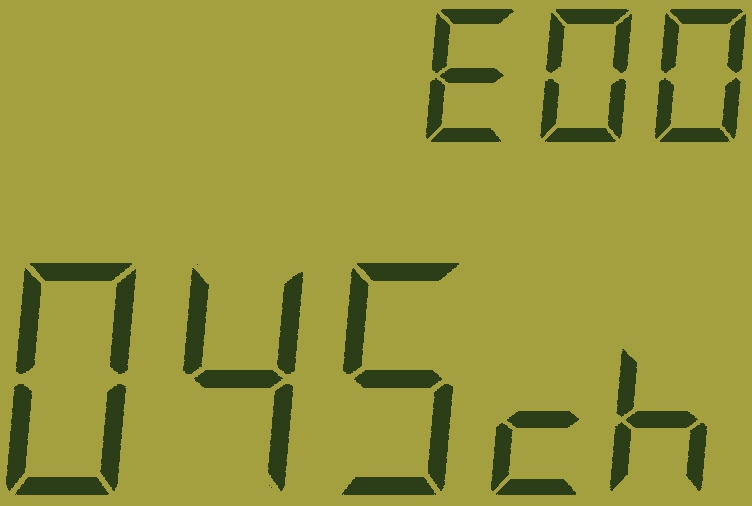
This Tecsun PL-330 display indicates the radio captured 45 frequencies
on an ETM scan of international broadcast bands made during the 00 UTC hour.

ETM is a quick way to find out what’s currently on SW international broadcast bands.  ETM logs SW broadcast stations to memory and reports the total number of stations captured at a given time (think of it as a separate page).  The total number could be used to determine SW reception conditions by comparing it with a previously calculated average for the same period.  For AM and FM, the feature can be used to store stations at a travel location without affecting main storage.  Regardless of how you use ETM, there is a learning curve, as well as a need to be continually alert to what you are doing.

Virtual ETM

For any other radio with page memory, you can still have many of the advantages of ETM, as well as avoid the likelihood of accidentally wiping out your carefully programmed frequencies.  Here’s how.

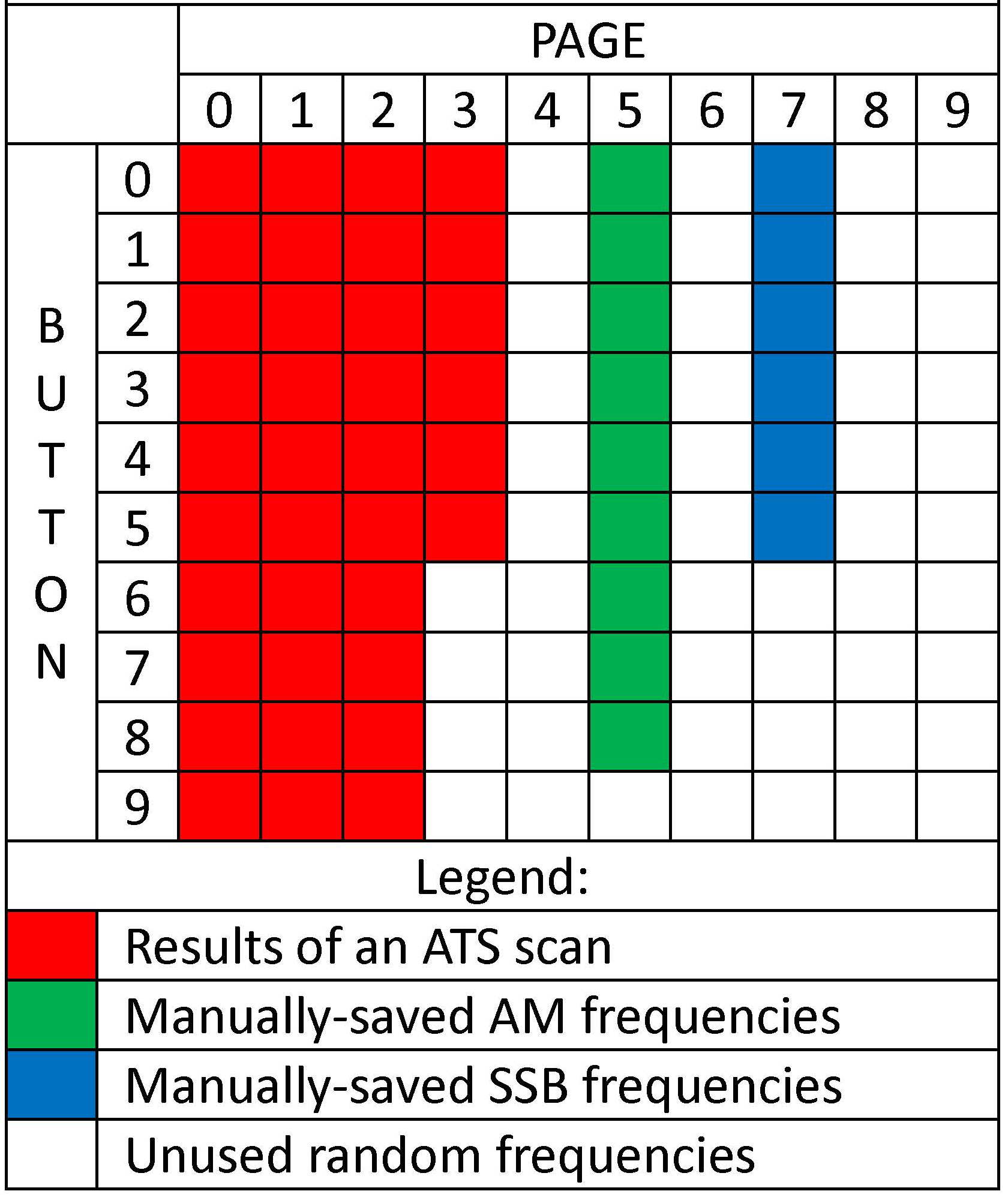
ATS on most radios begins saving frequencies on the lowest numbered page.  Note that the lowest page on the SSB 2 is 1, while it is 0 on the D-808, and the first station on each page is at button 0 (bottom).  My experience in the highly congested AM and FM bands on the US East Coast is that an ATS scan will likely take up no more than four or five pages of memory.  Likewise, ATS for SW is limited to AM stations on the international broadcast bands and will not require many pages, even at night.  By manually programming your favorite frequencies beginning on the sixth page of a 10-page memory arrangement they will likely be out of reach of an ATS scan and your manually-saved frequencies will still be there when you want them.

The travel benefit also applies to virtual ETM.  An ATS scan performed at a different location using the lower pages will quickly put you in touch with local stations in that area and preserve your manually saved frequencies at home.

As an aside, I would also suggest that sideband frequencies be kept together on separate pages, as the SSB function must be engaged separately to detect them.  With SSB engaged, the C. Crane Skywave SSB 2 will recall the saved LSB or USB mode, but you may have to switch from one to the other on the XDATA D-808.

Example of virtual ETM for D-808 on the shortwave band.
Skywave SSB 2 would be similar.

Virtual ETM is not perfect.  This method does not provide all the time-specific paging that the Tecsun PL-330 has.  Also, there is a danger if your radio has an auto-sorting feature which might be inadvertently activated.  Lock the buttons on your radio when you turn it off or pack it up.

Conclusion

Apart from simply listening to the radio, it’s still entertaining to press buttons and see what they do – something like an electronic Rubic’s Cube.  I will go as far as to put a half dozen favorite AM and FM stations into memory.  I may enter a DX frequency or two I want to check out periodically.  That said, there are a limited number of storage locations beyond which memory ceases to be convenient, and for me the number is well short of what is generally available.

On the other hand, ETM or virtual ETM opens some useful possibilities if you take one of these small portables on travel or want to do a quick scan to see what’s currently on shortwave.

No radios were harmed in the preparation of this blog.

The Sony ICF-SW800: A Most Unusual Sony Radio

Many thanks to SWLing Post contributor, Bill Hemphill (WD9EQD), who shares the following guest post:


A Most Unusual Sony Radio

By Bill Hemphill WD9EQD

Over the years, I have owned many of the various Sony shortwave radios.  From analog to digital, I would buy the latest and sell my current radio.  For the past few years, I have been using mainly Tecsun radios and didn’t own any Sony radios anymore.   This changed last year.  I got the urge to acquire a few of the Sony’s that I remember so fondly.  Over several months I bought off eBay four ICF-2010 (one of which works), two ICF-SW100 (one of which works), four ICF-SW1 (none of which works).  After spending way too much money just to acquire two working Sony radios, I started realizing that any Sony radio was probably going to need re-capping – a chore which I am not skilled at.  I could have saved money by just paying the high price for a radio that had already been completely re-capped and working.

During the many hours spent watching eBay, I would occasionally come across a Sony radio that I was not familiar with – the Sony ICF-SW800.  This is a very unusual radio in that it has only two bands – FM and SW.  And the SW band only covers 3.7 to 17.9 MHz  It also has these small credit card size pre-programmed memory cards.  I ended up buying a couple of the radios just to learn what was going on with the memory cards.

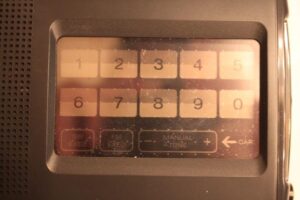
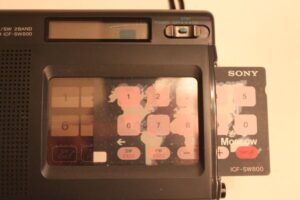
The radio is very plain and simple.  Dull black plastic, telescoping antenna, nice flip out tilt stand on the back, very small LCD display that shows time when off or in stand-by and band (FM or SW), frequency and card Preset memory number when card is inserted.  Following are photos of front of radio, without and with card inserted:

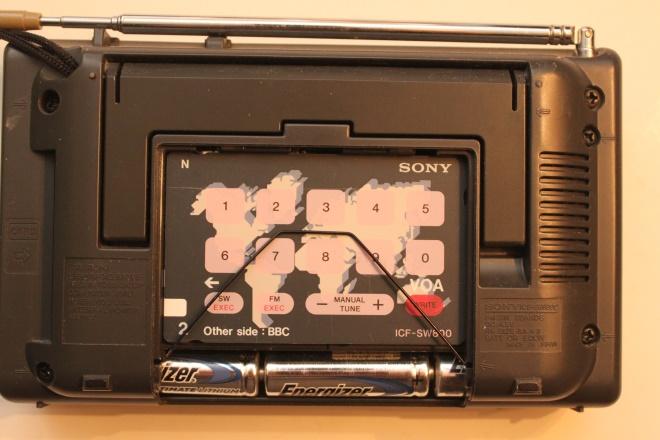
Removing the battery cover reveals a storage area for the cards when not in use:

The cards are slid into the slot on the right of the radio.  There is a plastic cover over the keyboard.  This cover is touch sensitive. The plastic has imbedded in it small dots which can detect which part of the screen is being touched.  Without a card inserted, you can select the band (SW EXEC or FM EXEC) and directly enter a frequency using the 0-9 keypad.  Or you can use the manual +/- tune keys.

I had originally thought that the memory cards must be storing the memories in circuitry within the cards.  When I got the first radio and looked at the cards I was really surprised to see that they were just cardboard cards – no circuity.  So how was the radio knowing which card was inserted and what was stored in the memory.

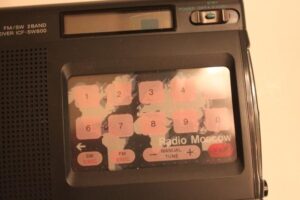
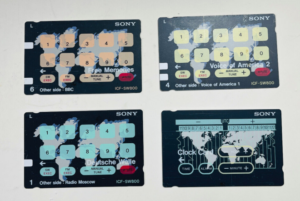
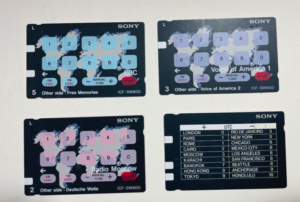
The radio comes with four double side cards. Three of the cards are for the memories while the fourth is a card used to set the clock.  Following are photos of the “L” series cards:

As you can see some cards are pre-programmed for Radio Stations and some are Free Memories for you to program your own station.  But since the memories are NOT stored on the cards, how does the radio know which card is inserted and which memory on the card is selected?

Each card has one or two white tabs on the left of the card.  There are three possible tab locations.  A review of the service manual and the wiring diagram shows that the locations of these tabs make up a binary code for 1 to 7.  (only 7 is needed since the clock card is single sided while the other three cards are double sided)  The clock card has all three white tabs and is thus seven (Tab 1 = 1, Tab 2 = 2 and tab 3 =4 for 1+2+4 = 7).  Then each of the other cards are 1 thru 6 depending on the tab locations.  The radio has infrared leds along with sensors.  By shining a LED light onto the card, the radio can sense which card is inserted and then reference the correct ten memory locations in the storage..

The memories are stored in an EEPROM chip soldered into the radio.  Depending on where the radio was purchased, a different set of memories would be pre-programmed into the chip in the radio.  An associated set of memory cards would be provided with the radio.  There were at least the following different set of memories manufactured with associated card sets as follows:

Area 5/AE7 Austria:

  • (Card Series “I”)
    • Card 1:  Austrian Radio 1/Austrian Radio 2
    • Card 2:  Omnibus 1/Omnibus 2
    • Card 3:  Free Memories 1/Free Memories 2

Area 3/AE7 Swiss:

  • Card 1:  Omnibus 1/Omnibus 2
  • Card 2:  Omnibus 3/Free Memories 1
  • Card 3:  Free Memories 2/Free Memories 3

Area AE6 Germany:

  • (Card Series “A”)
    • Card 1:  Deutsche Welle/Omnibus 1
    • Card 2:  Omnibus 2/Free Memories 1
    • Card 3:  Free Memories 2/Free Memories 3

Area 2/AE7: Scandinavia:

  • Card 1:  Danmarks Radio/Norsk Rikskringkasting
  • Card 2:  Sveriges Radio/ Yleis Radio
  • Card 3:  BBC/Free Memories

Area 6/AE7 Portugal:

Area 7/AE7 Europe:

  • (Card Series “N”)
    • Card 1:  BBC/VOA
    • Card 2:  Free Memories 1/Free Memories 2
    • Card 3:  Free Memories 3/Free Memories 4

Area 7/AE7 International Sales Division in Europe:

  • Card 1:  BBC/Omnibus FM
  • Card 2:  Free Memories
  • Card 3:  BBC/Omnibus SW

Area US United States:

  • (Card Series “L”)
    • Card 1:  Deutsche Welle/Radio Moscow
    • Card 2:  Voice of America 1/Voice of America 2
    • Card 3:  BBC/Free Memories

Area UK United Knigdom:

  • (Card Series “B”)
    • Card 1:  BBC (FM)/Omnibus (FM)
    • Card 2:  BBC World Service/Omnibus (SW)
    • Card 3:  Free Memories 1/Free Memories 2

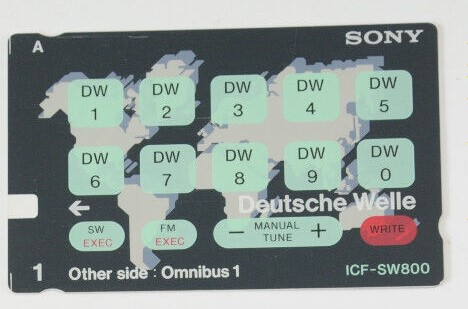
It should be noted that even though a memory is preprogrammed (in the chip), you could re-program the memory using the “WRITE” feature on the card.  Most of the cards just show memory location 0-9 with no indication of the frequency.  Some cards do indicate the radio station but not the frequency.  For example, Card Series “A”, Deutsche Welle has DW 0 thru DW 9 on the card:

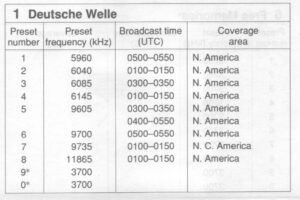
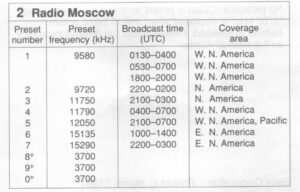
In the packing material that came with my US version, there is a small fold out piece of paper that lists the Memory Presets for each card along with the preset frequency, broadcast time and coverage area:

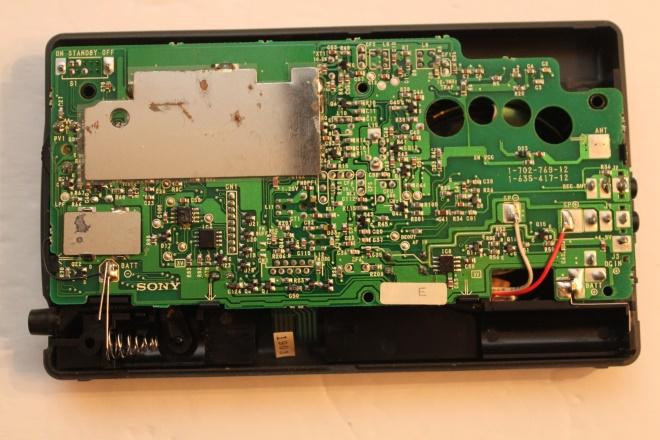
There is no way to know from the outside of the radio which memory chip was pre-programmed at the factory.  The model number does not differentiate between the regions.   If the back cover of the radio is removed, then there is a printed sticker on the circuit board denoting which region the radio is for.

For example, one of my radios has a sticker with “E” on it to denote that it for the Europe market:

At this point, Sony was trying to market to people who just wanted to listen to their favorite station, be it FM or SW.  Thus a simple to use. pre-programed radio.  Never mind the fact that radio stations may change frequencies, or even disappear entirely.   At least the ICF-SW800 allowed the user to re-program all the memories.

Sony also made two other radios that used the cards for memory.

The first was the ICR-SW700.  This was a two band receiver covering MW and SW.

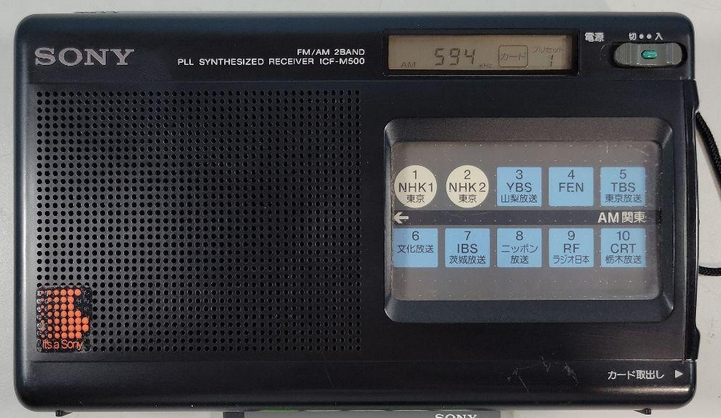
The second radio was the ICF-M500 which was made for the Japanese market.  This radio was FM/AM two band radio:

Audio Plugins For Radios, Part 3 – VST Technical Setup

Many thanks to SWLing Post contributor, TomL, who shares the following guest post. Click here to check out all of the posts in this Audio Plugin series:


Audio Plugins For Radios, Part 3 – VST Technical Setup

by TomL

Processing legacy audio still has a place in an increasingly digital world for the time being.  The first article on this topic was strictly using the speaker jack output from an old Kenwood transceiver using a simple Behringer UCA-202 RCA-to-USB converter.  However, my main receive radio is the SDR based AirSpy HF+.  Either type of radio should work with the apps discussed below as long as the audio gets to your Windows computer unmolested.  There are VST apps for Mac and Linux, too.

VST apps: VST3/VST2/DLL files

Also mentioned was how to install VST Host and the VST apps run inside it.  A simple reminder is that VST Host does not really install.  It just resides in any one Directory/Folder you want and you create a shortcut to run VSTHOST.EXE.  All the .XML files and profiles will be stored there.

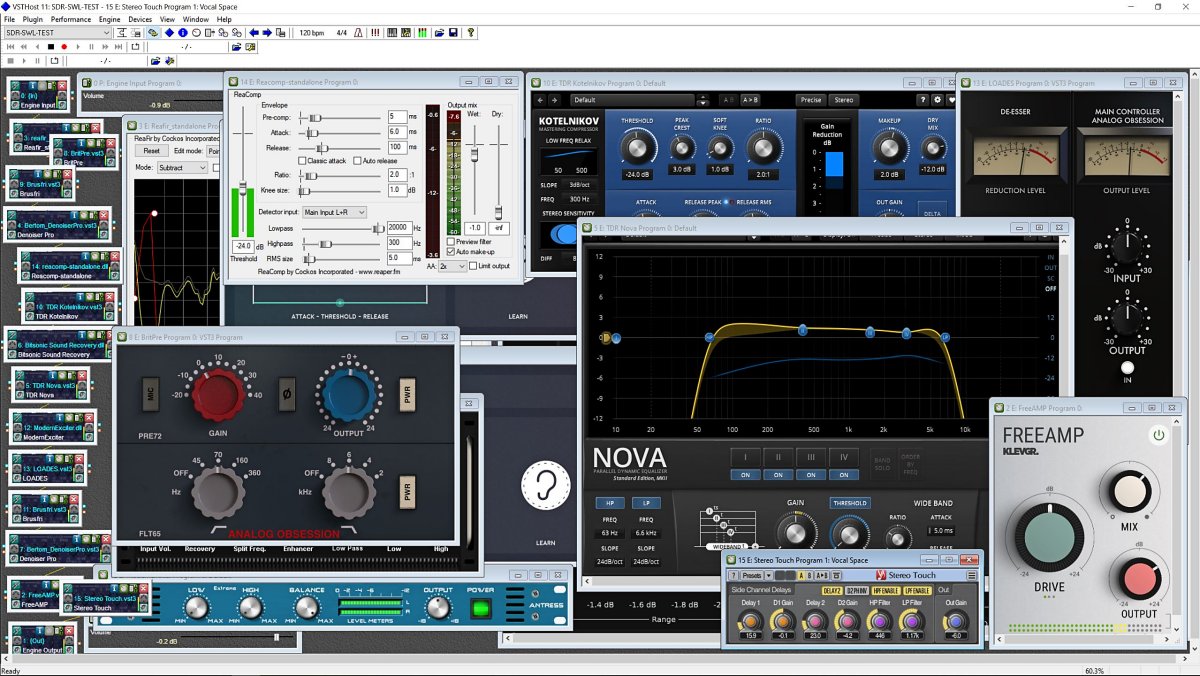
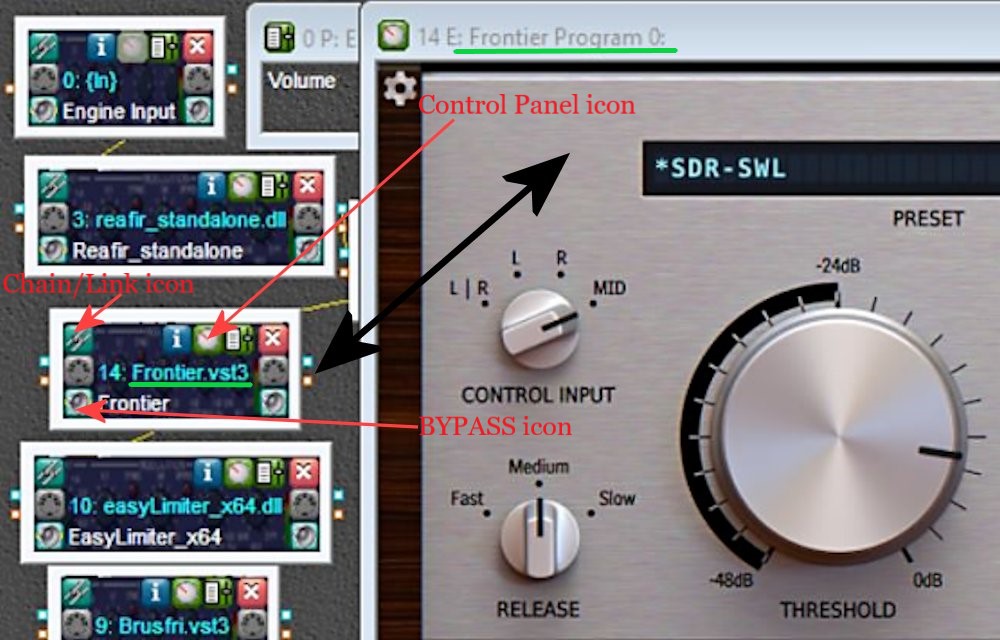
I like tinkering with many apps but you may prefer things a lot simpler.  I use 64-bit versions when possible, like VST3 and x64 DLL files.  Because of the myriad settings involved, I will just list the apps in order of processing with brief comments.  The second icon on the top of each app opens up its control panel and the bottom left icon will Bypass the app as if it is not in the audio chain.  The top-left icon Links to the Preceding app in the audio chain.  Most controls inside the apps let you double-click on that control to reset to a default.

The general functional order of these apps is:

  • Limiting/Compressing volume – dealing with shortwave signal volume spikes plus judiciously squeezing high & low volumes for a more even sound.
  • High Pass & Low Pass Filters – limit the frequency range apps will need to work on.
  • De-noising – the biggest challenge in shortwave is to reduce static and local noise without damaging the wanted audio.
  • EQ adjustments – frequency tweaks.
  • De-essing – getting rid of screechy “sss”, “shhh”, and “squeak” noises as well as fading distortion, perhaps the second hardest thing to do.
  • Then a final Drive/Gain control to feed into the Windows mixer.
  • Special Effects apps, like adding stereo, or reverb, etc.

I would suggest not to spend any money until you get to use apps from each of these broad categories to understand how they work.  It is very easy to destroy the audio with a couple of offending settings.  If you need help with understanding how plugins work, there are plenty of YouTube videos available.  One channel I like is “In The Mix” from a Scottish music production engineer, Michael Wynne (over 1 million subs!).  He gives simple to understand instruction videos (especially EQ and Compressors), among other topics.

Check out: YouTube – In The Mix

Welcome to the world of Audio Production.  Here are some plugins (most are FREE!):

Reaper ReaComp – A Compressor which I am using to limit volume spikes in the <300 Hz range.

Kotelnikov – A great dynamic Compressor that helps compress volume peaks in both Peak and RMS (average) levels.  Useful for highly variable signals and highly recommended.

Reaper ReaFir – A dynamic processor, the Subtract feature is a special “negative EQ” which only reduces specified frequency “Points”.  It is also used as a brick filter for low & high frequency limits.

Klevgrand Brusfri Denoiser –  In Swedish, “brusfri” means “noise free”, and is a Denoiser app that functions similarly to Audacity’s Noise Reduction feature but works in real time.  I move to a blank frequency on the same shortwave band, have Brusfri “Learn” for about 5 seconds, and it starts working.
Bertom Denoiser Pro –  A good Denoiser app but on noisy shortwave it can have digital artifacts that get very loud.  I use it sparingly immediately after Brusfri.

Bitsonic Sound Recovery –  This app beings midrange more forward and can brighten up dull audio.  However, it can lead to increased sibilances, accentuated fading distortion, and “boxy” sounding voices.

TDR Nova – A clean sounding parametric EQ; my settings are a work-in-progress for best settings.  I am experimenting with having the Wideband setting do most of the work with a slight expansion of the audio coming from the SDR.  Also used as a better Gain control for Bitsonic.

Modern Exciter – Set to MIN for shortwave, this app can enhance the extreme low and extreme high frequencies without increasing noise.

LOADES – A DeEsser from Analog Obsession, controls sibilance and squeaks  (beware of wonky controls!).

Klevgrand Brusfri Denoiser & Bertom Denoiser Pro run a second time.  More Denoising is needed after the processing done by Bitsound, TDR Nova, and Modern Exciter.

Klevgrand FreeAmp – A simple Drive and Gain control that was free when I purchased Brusfri.  It makes sure audio is driven correctly into Voicemeeter AUX Input.

Voxengo Stereo Touch – Allows adding “stereo” to a mono signal.  Various Presets are available, from narrow (Voice or Guitar) to wide soundspaces (Stage, Surround, and Wide).  Very interesting!

Here are three VST Host processed .MP3 files from an IQ recording of Radio Amazonia using 5.3 kHz & 7kHz filters in SDR Console 3.2 (Noise Reduction 4 was used but only 1dB Reduction).  The third one is using the Stereo Touch app using just the lowest setting (Voice).  I like it!  🙂 :

VST processed 5.3k:

VST processed 7 kHz:

VST processed 7 kHz with Stereo Touch:

Click here to download all VST processed 5.3k & 7k .MP3 files

Happy Listening & 73’s,

TomL