Category Archives: Schedules and Frequencies

Sydney Hobart Yacht Race Frequencies

Many thanks to SWLing Post contributor, Jerome van der Linden, who writes:

I just found after reviewing a 16 page PDF of regulations etc from the Cruising Yacht Club of Australia, some relevant information for listeners who may want to try to hear the boat to shore communications of yachts participating in this annual yacht race, which is quite famous in this part of the world.

This race will commence at 1300 Sydney time 26th December, which is 0200 UTC, by my reckoning (today, down here). The race normally runs for about 3 or 4 days depending on conditions. It’s not clear to me just when the boats are expected to report their positions, other than that shown below for Green Cape, which is in southern News South Wales. Perhaps someone else can add the time schedule if they know it.

“Boats shall be capable of transmitting/receiving, as a minimum, on the following frequencies:

– VHF – International Channels 16, 72, 73, 80 and 81
– HF/SSB – 4483kHz and 6516kHz and such other frequencies as the Organising Authority may determine”

“Boats shall maintain a 24 hour listening watch for the duration of their race on VHF Channel 16.

For radio communications, a boat’s name may be limited to not more than two words. The Race Committee may alter names where appropriate. The Sailing Instructions will require that boats report by radio when they are in the vicinity of Green Cape and make a declaration confirming their time of passing as well as the following:

  • The HF radio is fully operational
  • Liferaft(s) are on board
  • Engine and batteries are operational
  • Boat and crew are in a satisfactory condition to continue
  • The skipper has comprehensively considered the most current weather forecast and the boat and crew are fully prepared for the conditions forecast.”

[Note that] I just found, from a post a couple years ago, that the time for reporting may be 0735 and 1905 Australian eastern time, which would mean 2035 and  0805 UTC while the race is in progress. It also suggests the 6516kHz frequency is the main one, with 4483 being the backup.

Brilliant, Jerome! Thank you for sharing these frequencies—how I would love to listen to some of the craft report in on HF. I think I’ll be spending some time down under on the KiwiSDR network the next few days!

Updated Frequency: Special VORW Radio International Holiday Broadcast

Please note that the frequency for the VORW Radio International Holiday Broadcast has changed. Please read the announcement below which includes the new frequency of 9350 kHz:

Hello Shortwave Listeners! In addition to our regularly scheduled broadcasts of VORW Radio International every Thursday, Friday, Saturday and Sunday – I am pleased to announce that there will be a special holiday broadcast on Christmas Day!

This show will feature some mixed talk and music of all genres (including some holiday songs) and a newly designed E-QSL will be sent out to any and all reception reports received! Here is the schedule:

Tuesday 2100 UTC (3 PM Central / 4 PM Eastern) – 9350 kHz – WWCR 100 kW – North America

Reception reports and feedback are most appreciated at [email protected] and I hope you can tune in!

SAQ’s 17.2 kHz Christmas Eve transmission

(Source: ARRL News via Ron)

Alexanderson alternator in the SAQ Grimeton VLF transmitter.

Sweden’s Alexanderson alternator station SAQ has planned a Christmas Eve transmission on 17.2 kHz. The transmitter will be tuned up starting at around 0730 UTC, and a message will be transmitted at 0800 UTC. The 200 kW Alexanderson alternator is an electromechanical transmitter dating back to 1924.

The event will be streamed live on the Alexanderson site YouTube Channel. Listener reports are invited via email or direct to Radiostationen Grimeton 72, SE-432 98 Grimeton, Sweden. Amateur Radio station SK6SAQ will be active on Christmas Eve on 7,035 and 14,035 kHz on CW, or on 3,755 kHz on SSB. Two stations will be on the air most of the time.

Special VORW Radio International Holiday Broadcast

Many thanks to SWLing Post contributor, John, with TheReportOfTheWeek who writes:

Hello Shortwave Listeners! In addition to our regularly scheduled broadcasts of VORW Radio International every Thursday, Friday, Saturday and Sunday – I am pleased to announce that there will be a special holiday broadcast on Christmas Day!

This show will feature some mixed talk and music of all genres (including some holiday songs) and a newly designed E-QSL will be sent out to any and all reception reports received! Here is the schedule:

Tuesday 2100 UTC (3 PM Central / 4 PM Eastern) – 12160 kHz – [UPDATE 12/22/18] 9,350 kHz WWCR 100 kW – North America

Reception reports and feedback are most appreciated at [email protected] and I hope you can tune in!

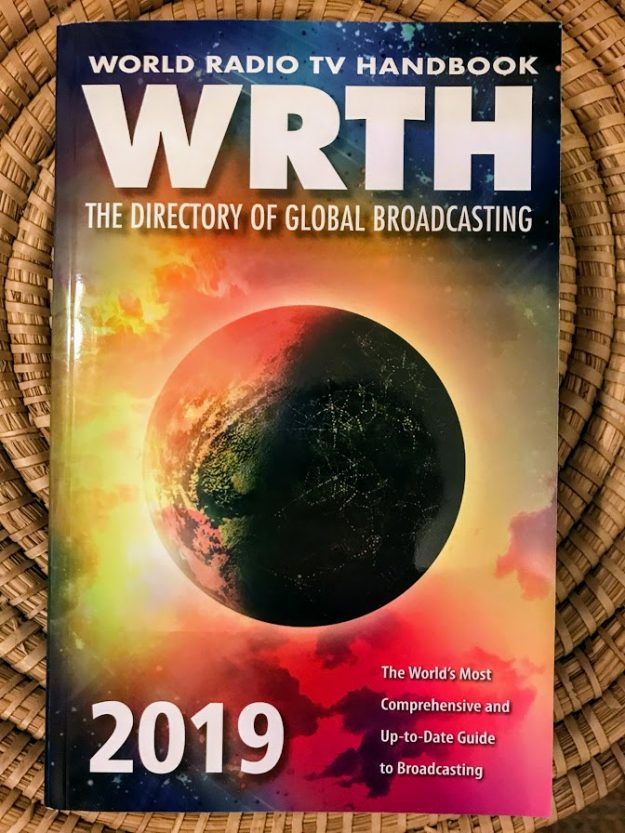
WRTH 2019 available for order

(Source: Nicholas Hardyman WRTH)

World Radio TV Handbook 2019

Published 7 December 2018 – Order your copy today!

We are delighted to announce the publication of the 73rd edition of WRTH.

For full details of WRTH 2019 and to order a copy please visit our website at www.wrth.com where you can also order the B18 WRTH Bargraph Frequency Guide on CD and Download.

WRTH 2019 is also available for pre-order, for readers in the USA, from Amazon.com or Universal Radio in Ohio.

I hope you enjoy using this new edition of WRTH and the new CD.

Best regards,

Nicholas Hardyman

Publisher

Click here to visit WRTH online.

WRTH Retailers:

Alan Roe’s updated B18 season guide to music on shortwave

Many thanks to SWLing Post contributor, Alan Roe, who notes:

I have now compiled my Music on Shortwave listing for the B-18 broadcast
period.

Alan, thanks so much for keeping this brilliant guide updated each broadcast season and for sharing it here with the community!

Click here to download a PDF copy of Alan Roe’s Music on Shortwave B-18.

Guest Post: How to use the Shortwave Signals Alexa skill

Many thanks to SWLing Post contributor, Mark Hirst–developer of the Shortwave Signals Alexa skill--who shares the following tutorial:


How to use the Shortwave Signals Alexa skill

Introduction

Alexa skills come in all shapes and sizes, from the trivial random fact skill, to a fully fledged news reader.

Some have little or no input, while others try to carry out a conversation with you.

Recognising that Alexa might be new to some people, and that the Shortwave Signals skill tries to capture everything from you in a single phrase, I wanted to give readers a guide on how to get the best from the skill, as well a little background on how Alexa ‘understands’ or ‘misunderstands’ what you said.

The Basics

You have two ways of starting an Alexa Skill:

  • Open the skill using its name
  • Ask the skill using its name

Opening the skill is a great place to start when you’ve first installed a skill. It should provide you with an introduction, then offer to answer a question or suggest how you can get further help.

Once you are familiar with a skill, you can save time by ‘Asking’. This cuts through the opening pleasantries and gets on with the job.

A skill doesn’t get approved by Amazon unless it supports these approaches in an appropriate way.

With that out of the way, the essential thing is to make sure that your words are clear and don’t blur together. I remember eating lunch at my desk while developing the skill, and then wondering why Alexa was making such a mess of my questions.

How Do Alexa Skills Recognise What You Say?

The short version is that skill developers have to provide training phrases to Alexa with two objectives in mind; to figure out what you want to do, and to recognise the parts of those phrases that contain important information.

If you were writing a weather skill, those phrases might look like this:

  • What is the weather like in [placename]
  • Will it rain in [placename] on [date]
  • What will the weather be like on [date] in [placename]

The challenge is to figure out the different ways that people might ask a question, and then help Alexa know what parts of the question are important to the skill. This data can can include numbers, dates, times, real world locations, famous places, famous people, countries, languages, and much more.

So let’s see how that works in the Shortwave Signals skill.

The Simplest Possible Question

The simplest question you can ask is to identify a signal by frequency – you’ve stumbled across something of interest and you’re not sure what it is.

A question directed to your Alexa device would sound like this:

  • Alexa
  • Ask Shortwave Signals
  • Who broadcasts on one five five eight zero kiloHertz

I usually leave a slight pause after each line, and make sure that words don’t run into each other. Always say the frequency as digits, as this is much more reliable than trying to express it in thousands, hundreds, tens and so forth.

It’s good practice to put kiloHertz on the end as this aids Alexa in interpreting the frequency part of your question.

A common gotcha is not leaving enough of a gap between the frequency and the word kiloHertz. If the words blur together, Alexa sees a mixture of words and numbers where the frequency ought to be and doesn’t pass it through to the skill.

Adding a Broadcast Time to your question

Depending on the frequency you pick, you might get quite a few results.

This is particularly common when the frequency belongs to one of the main international broadcasters, or a commercial shortwave station like WRMI.

At present, I’ve set a limit of 15 results so you’re not stuck listening to a long list of broadcast information, although if all else fails, you can say:

  • Alexa
  • Stop!

To make it clear you want to specify a broadcast at a particular time, add this to your question:

  • at 3PM

Note that times are always in UTC, and using AM and PM is a reliable way of qualifying your time.

Now your question sounds like this:

  • Alexa
  • Ask Shortwave Signals
  • Who broadcasts on one five five eight zero kiloHertz
  • at 3PM

Make sure you put the word ‘at’ in front of the time, as it makes it clear that this is the time ‘at’ which the broadcast is active. It also neatly separates the frequency part of the question from the time part.

Searching across a time range

If you are sitting on a frequency and wondering what might be coming up next, you can add a time range to your question.

A time range is instead of using a broadcast time.

You would add this to your question:

  • from 3PM to 4PM

Notice how the range is described FROM 3PM TO 4PM

Now your question sounds like this:

  • Alexa
  • Ask Shortwave Signals
  • Who broadcasts on one five five eight zero kiloHertz
  • from 3PM to 4PM

Using FROM and TO makes it easier for Alexa to detect the time range in your question.

Adding a Language to your question

Adding a commonly recognised language to your question is easy.

To specify a language in your question you would add:

  • in English

Putting the word ‘in’ makes it clear that the word that follows is a language, and it also makes sure that the word kilohertz is separated from the language word. If you let the words run together, Alexa might think the language is ‘kiloHertz English’.

Now your question looks like this:

  • Alexa
  • Ask Shortwave Signals
  • Who broadcasts on one five five eight zero kiloHertz
  • In English

The Most Complex Questions

The most complex questions you can ask combine a frequency with a language and broadcast times. For example:

  • Alexa
  • Ask Shortwave Signals
  • Who broadcasts on one five five eight zero kiloHertz
  • In English
  • From 3PM to 8PM

Or:

  • Alexa
  • Ask Shortwave Signals
  • Who broadcasts on one five five eight zero kiloHertz
  • In English
  • At 4PM

Some Languages are tough to search

Commonly recognised languages are easy for Alexa to detect. These include English, French, German, Russian and many more.

Things get tricky when using more obscure languages.

A good example that I’ve struggled with is Oromo. No matter how carefully and comically I try and pronounce the word Oromo, Alexa always hears something similar to but not quite the same as Oromo, the most frequent misspelling being Orono. This phonetic re-interpretation of less common languages is a tough problem, even though my training data tells Alexa that this part of the question is a language.

Perhaps this will improve over time as Amazon tweak their service.

In Summary

It’s all about clarity and how you phrase your question. I’ve mumbled my way through Alexa’s built-in skills as well as third party ones, and it’s amazing how well it copes.If you’ve tried a skill and it’s stumbled, double check the sample phrases that come with the skill and give it another try.

Amazon use those phrases to test the skill before it is approved, so you know that they are a good place to start forming your own questions.


Thank you, Mark! Almost every Alexa skill is subject to the same issues you mention above.  I find that I need to “think like Alexa” in order to ask skill questions properly.  I’ve actually found your skill to be one of the easiest I’ve used. The tutorial above really helps form questions properly.

Post readers: Keep in mind that Amazon has lowered the prices of all of their devices for the holidays. The Echo Dot 2nd generation is currently $24.99 shipped and the 3rd generation Dot is $29.99 shipped (note both links are affiliate links that support the SWLing Post).  

I created an easy-to-print PDF of Mark’s tutorial above–click here to download.