Tag Archives: Software Defined Radio

Recording the 2014 World Cup Final

WorldCupBall-001Sunday was the FIFA World Cup Final, and not only was I looking forward to the game, but (to tell the truth) I was also looking forward to recording the game via the BBC World Service for the Shortwave Radio Audio Archive. Due to the BBC WS cuts, part of me fears this may be a last chance to capture this radio and sports history.

If you would like to hear the recordings of the World Cup Final, skip to the bottom of this post. But if you want to know how I managed to make the recordings, and why I made the choices I did, feel free to continue reading…Warning: full-on radio geek tech ahead!

Making the recording

I had two SDRs (software defined radios) at my disposal: the Elad FDM-S2 and my trusty WinRadio Excalibur.  To record this match, I choose to use an SDR rather than a tabletop receiver for several reasons, namely:

  1. I wanted to make a spectrum recording so that I could record more than one frequency at a time;
  2. SDRs make recording radio content on the fly much easier than using a tabletop receiver, which must be connected to an external audio recorder, and I wanted ease of use so I could enjoy the game, too.

Propagation was rather mediocre Sunday, and there were only three feasible BBC World Service English frequencies I could tune in mid-afternoon, none of which, of course, were targeting North America:

  • 11,810 kHz from Ascension Island
  • 13,660 kHz from Woofferton, UK
  • 15,400 kHz from Ascension Island
  • 9,915 kHz from Woofferton, UK (starting at 20:00 UTC)

My hunch was that either 13,660 or 15,400 kHz would be my best bet for the early part of the match (pre-game starting at 18:30 UTC, half time at 20:00 UTC), however, I knew they would drop off after the first half of the game. And 11,800 kHz would be my best bet in the latter part of the game, unless 9,915 kHz happened to be stronger.

In the past, 11,800 had served me quite well for afternoon BBC listening, but yesterday there was an unscheduled religious broadcaster on 11,825 that was causing interference a full 30 kHz on either side of their carrier! During my pre-game check of the frequency, each attempt I made to block this broad interference was unsuccessful–very frustrating.

Which SDR?

The FDM-S2 is a fine SDR, and I was very tempted put it to the test.  But while the Elad FDM-S2 is quite capable of making very wide spectrum recordings (up to 6 MHz) and could easily record all four frequencies on four different meter bands at the same time, I decided to use the WinRadio Excalibur, instead.

Why? If 11,800 kHz was my only viable frequency option in the latter half of the game, I needed a receiver that could sync to the less noisy lower sideband of 11,800 kHz. While Elad plans to add USB/LSB selectable synchronous detection in the next version of their SDR application, it currently does not have this capability.

I suppose, too, I feel more comfortable with the WinRadio Excalibur; I’ve been using it now for well over two years. If something were to go wrong during the broadcast, I knew I could diagnose it quickly on the Excalibur.

In addition, the Excalibur can do both a spectrum recording and up to three individual AF recordings at the same time (though limited within a 2MHz bandwidth). I’m not sure if Elad has plans for this in their next SDR.

Setting up the Excalibur

The Excalibur only has a 2 MHz bandwidth for spectrum recordings. I knew if I focused on the middle frequency of 13,660, I would be able to record it and either 15,400 or 11,810 at the same time, but not all three.

The first half of the match, I recorded both 13,660 kHz and 15,400 kHz in a 2 MHz wide spectrum recording. At the same time, I recorded the audio (an AF recording) from 13,660 kHz, which was consistently the stronger of the two frequencies.

Half time

By 20:00 UTC, I knew both 13,660 and 15,400 kHz would stop transmitting and I would need to either hop to 11,810 kHz or 9,915 kHz.

While maintaining a good audio recording of 13,660, I stopped the 2 MHz spectrum recording and moved it to encompass 13,660 and 11,810 kHz. A quick check proved that 11,810 was the strongest station. Fortunately, the interference above 11,810 had quieted somewhat at that point, and by using the LSB sync lock, this noise was successfully mitigated a bit.

Still, I could hear a chuffing sound coming from the splatter 11,825 was producing. So I enabled the notch filter and widened it to 2 kHz. By shifting it around in the upper side band, I was able to find the “sweet spot” where most of the splatter noise was canceled. I then started the audio recording on 11,810 a few minutes prior to 20:00 UTC, making a little audio overlap with simultaneous recording on 13,660.
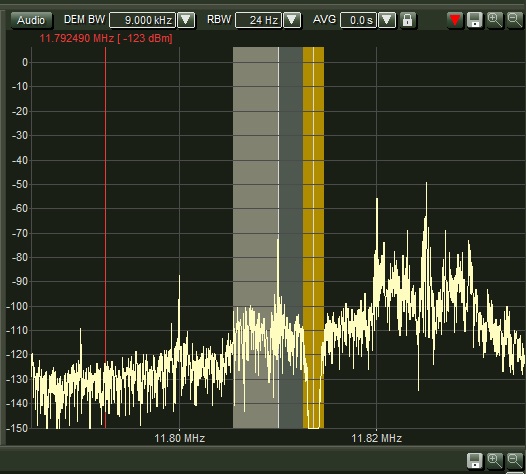
Syncing on the lower sideband and using the notch filter in the upper sideband mitigated most of the interference.

Syncing on the lower sideband and using the notch filter in the upper sideband mitigated most of the splatter interference.

In the end, I was very pleased with the results of the recordings. While capturing the BBC World Service isn’t exactly like snagging rare DX, I felt I had a lot riding on this recording, so pre-game preparations were necessary, especially since the Excalibur couldn’t record spectrum from 9,915 to 15,400 kHz.

And in theory, had I used the Elad FDM-S2, I could have recorded the entire chunk for three hours and then revisited the material later to make audio recordings from the AF.

The recordings

For your listening pleasure: the full 2014 World Cup final via the BBC World Service. This broadcast is broken into 3 sections: pre-game and the first half, second half, and extra time. Enjoy!
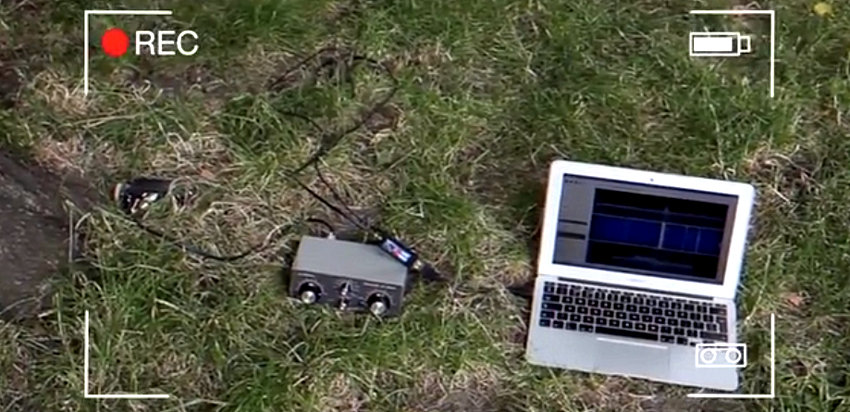
Pre-game and first half (13,66o kHz):

Second half (11,810 kHz):

Extra time and game wrap-up (11,810 kHz):

SDR# now has AM synchronous detection

LondonShortwave-Park

SWLing Post reader, London Shortwave writes with a remarkable story about the free SDR application, SDR#(or, “SDR sharp”). He writes:

“Two days ago, I emailed Youssef (SDR# developer lead) to ask if he would consider adding synchronous AM detection to his software at some point.

To my great surprise he e-mailed me back the same day and told me that it wouldn’t take him long to write the necessary code. A few hours later he sent me a preview copy of the software with the feature included (all I had to do was to swap one .dll file in the version I had installed at the time). The following day, he integrated it into the latest release!

With the new sync detector the software is rapidly becoming my favourite SDR application.

Here’s a demo video I made for Youssef (and everyone else!) to show how I’ve been getting on with it:

This is amazing–what’s especially impressive is that a first iteration of AM sync should be so well implemented.  I love the way you can use the IF shift to block out interference within a sideband, much like USB/LSB selectable sideband. There are paid and OEM SDR applications that can’t do this.

London Shortwave: you’ve convinced me to see if SDR# will drive any of my receivers. Many thanks!

Cross Country Wireless introduces an HF Upconverter

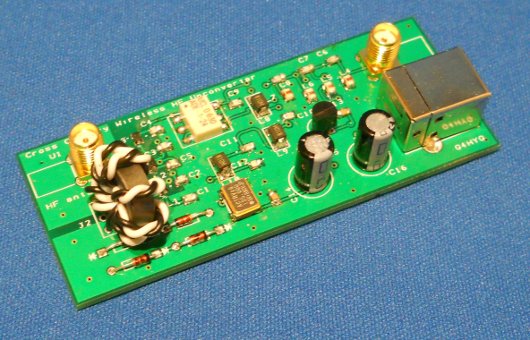
The CCW HF Upconverter (Photo: Cross Country Wireless)

The CCW HF Upconverter (Photo: Cross Country Wireless)

(Source: Southgate ARC)

Cross Country Wireless have just released a HF Upconverter. This will allow HF or VHF SDR receivers such as the RTLSDR dongles, Funcube or our own SDR-4+ receiver to work on HF, LF and VLF.

Unlike other upconverters currently available we have added the RF protection features from our SDR-4+ receiver including an antenna isolation transformer and RF over-power protection. This protects the SDR receiver or dongle and the attached PC from damage caused by static electricity charges on the antenna or nearby high power transmitters.

There are two versions of the Upconverter. One has a 125 MHz local oscillator and the frequency range is 12 kHz to 45 MHz. This is intended for use with the RTLSDR and Funcube dongles.

The other version has a 10 MHz local oscillator and is designed for use with the SDR-4+. This has a frequency range of 12 kHz to 1.6 MHz.

Here are some of the specifications Cross Country Wireless  has published for the HF Upconverter:

Technical data – 125 MHz version for RTLSDR and Funcube dongles

  • Frequency range: 12 kHz to 45 MHz
  • Input impedance: 50 ohms
  • IF rejection: > 60 dB
  • Local oscillator frequency: 125 MHz
  • Local oscillator level at antenna socket: < -50 dBm
  • Gain: -6 dB
  • RF connectors: SMA female
  • Power connector: USB B

Technical data – 10 MHz version for SDR-4+ receiver

  • Frequency range: 12 kHz to 1.6 MHz
  • Input impedance: 50 ohms
  • IF rejection: >100 dB
  • Local oscillator frequency: 10 MHz
  • Local oscillator level at antenna socket: < -60 dBm
  • >Gain: -6 dB
  • RF connectors: SMA female
  • Power connector: USB B

Also, from CCW on YouTube:

“This is a video of a Cross Country Wireless HF Upconverter used with a CCW SDR-4+ receiver to listen to VLF and LF transmissions using a half wave dipole cut for the 80m amateur band.”

(Click here if you are unable to view the video above.)

There are 20 second samples of the following stations:

  • BBC Radio 5 Live on 693 kHz AM
  • BBC Radio 4 on 198 kHz AM
  • GYN2 Skelton on 81 kHz FSK
  • MSF Anthorn on 60 kHz time signal
  • GQD Anthorn on 22.1 kHz Anthorn
  • GQD Anthorn on 19.6 kHz

This version of the Upcoverter uses a 10 MHz local oscillator so the frequency displayed is 10 MHz higher than that received i.e. 10.693 MHz = 0.693 MHz = 693 kHz.

Click here for more information on CCW’s website.

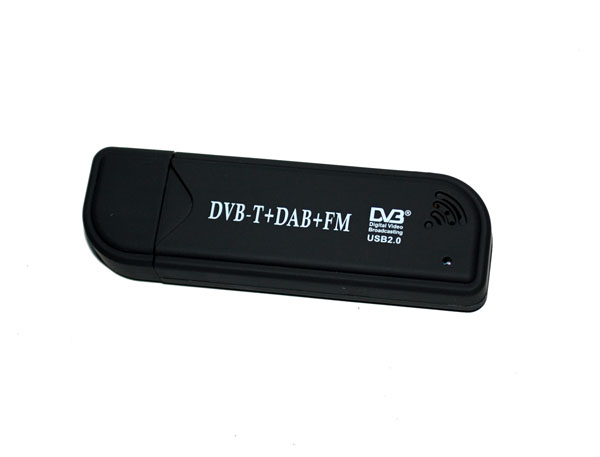
Using the RTL2832U $20 SDR for HF & trunk-tracker scanning?

DE_DVB_T_1In response to our post on inexpensive SDRs based on the RTL2832U, Jeff Benedict writes:

Here’s a website that has a lot of info on cheap SDR gear.  They have a write-up on an external board which adds HF capabilities.  I have one but haven’t done anything with it yet.

http://www.hamradioscience.com

Jeff  KB7AIL  CN88

Thanks, Jeff! Has anyone tried HF with any success? I’m curious how well this über-cheap receiver will cope with adjacent signals and blowtorch stations within the HF spectrum.

Meanwhile Neil, blogger on Fofio, commented:

I have an RTL-SDR system up and running.  I have done 2 demonstrations for my local Ham Radio club.  One on the basic setup and use of the dongle, using both SDR# and HDSDR.  The other presentation showed the remote receiver capability using a Raspberry Pi as the receiver with the dongle attached and a remote SDR# computer decoding the stream over a network connection.  Once I compensate for some minor frequency discrepancies it’s a pretty good receiver.  The only issue I have noticed with mine (one of the early E4000-based models) is a tendency to overload in the presence of a strong signal.  We have a pretty powerful 2 Meter repeater less than a 1/4 mile from our home, and when it’s active it causes some strange results with the RTL-SDR setup.

I have yet to try one of the HF converters they make for these.  I hope to do that soon.

Another project I was reading about today that I may try out is using 2 of the dongles at once to create a trunk-tracker scanner.

Wow! Two $20 USB SDRs and a little PC magic could yield a trunking scanner? I want to hear more about this. Trunking scanners tend to be both expensive and complicated. If a web-updated database could be downloaded and used to control this sort of rig, the possibilities would be most impressive!

Neil, keep us informed!

A very inexpensive Software Defined Radio based on the RTL2832U

DE_DVB_T_1Many thanks to Benn (AK4AV) for passing along this article from the IEEE which describes how a $20 USB digital TV antenna tuner can be transformed into an impressive, flexible software defined radio:

http://spectrum.ieee.org/geek-life/hands-on/a-40-softwaredefined-radio

The article incldes the following embedded video from the IEEE:

Here is another informative video via YouTube:

This year at the SWL Winterfest we had a presentation on the topic of $20 SDRs configured like those above. Some scanner enthusiasts had used them to receive satellite and many other VHF/UHF communications. I’ve heard of some devices being nearly plug-and-play easy to install and configure; others may take some minor tweaking. All of the SDR applications and drivers are either open source or free.

This page contains a wealth of information on the topic of RTL2832U based SDRs–it makes for a great starting point.

If you have experimented with thRTL2832U USB SDR, please comment below.

Confessions of an SDRaholic: when 4.5 terabytes is not enough

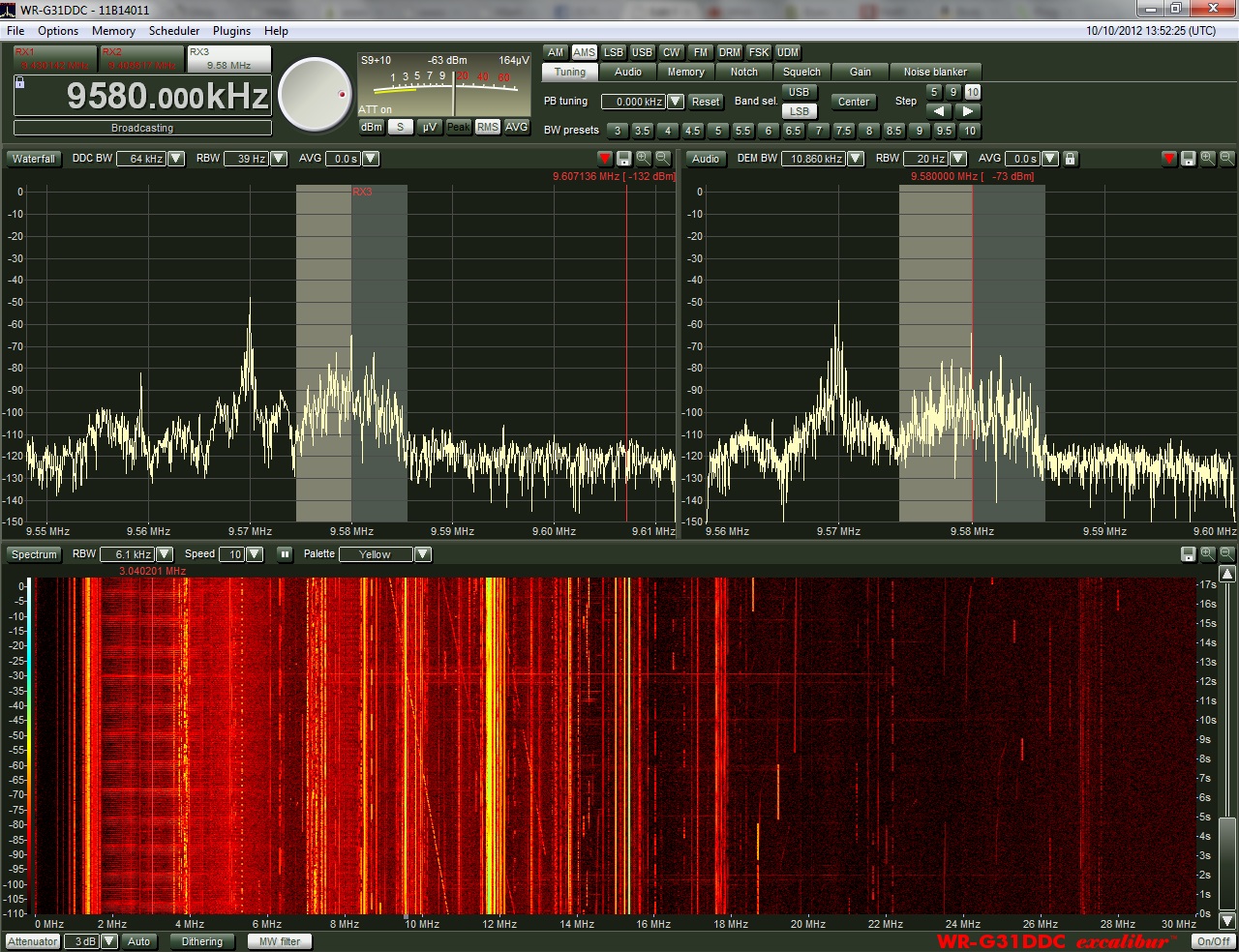
WinRadioExcaliburFullScreen Alas, ever since I started using Software Defined Receivers (SDRs) last year, I’ve found that I fill up hard drives faster than I can buy them. As you may have noted, I like to make spectrum recordings–especially during the night-time hours, as I slumber. The following morning, upon waking, I’ll “tune” through, say, the 31 meter band as if it were live. What makes it even more amazing for me, is that I can fast-forward through time and scan for DX stations even more quickly.  Great fun–highly addictive.  And did I say, space-consuming?

On my WinRadio Excalibur, I find that I use about 4 gigabytes of hard drive space for a one-hour-long spectrum recording, 100 kHz wide. Of course, if I were to record a 2,000 kHz (2 MHz) chunk of spectrum, it would chew through 4 GB in, roughly, 3.5 minutes.

Fortunately, I rarely ever record spectrum that wide. I find that the maximum width I ever record is 1.25 MHz, which I reserve for occasions once in a blue moon. Most of the time, I stick to 100 kHz-160 kHz widths.

After I record a chunk of spectrum, I usually listen to it, create an AF recording of anything of interest, then delete it from my drive. You’d think this would effectively keep my hard drive cleared out, ready to receive the next installment? Not so. Well, at least, not in my undisciplined SDR beginnings.

The flaw in my logic

Quite often, I make spectrum recordings while traveling, and do so remotely (using TeamViewer to control my PC). In the past eight months, I’ve done a lot of traveling. When I return from a trip, I find that I’ve often amassed a sizable collection of spectrum recordings. Upon returning from travel I also find (not surprisingly) that I’m typically busier than normal, catching up with email, phone calls, and delayed appointments. Thus, I never quite get around to reviewing–and therefore deleting–these files. Most of the spectrum recordings taking up space on my internal drives are those I’ve recorded remotely.

Last year, I thought I’d solve the space problem on my ailing laptop by purchasing a dedicated tower PC (Core i5) maxed-out with RAM and with a 1TB internal (7200 RPM) hard drive. This particular Gateway PC also has a bay that accepts cheap internal SATA drives; I simply insert an internal SATA hard drive in the ejectable bay, load the drivers, and it’s good to go. When I purchased an additional 2 TB SATA drive for spectrum recordings, I thought I would be set for years to come…Ah, how the mighty crumble…

As I write this today, I find I only have a total of 350 GB available on my PC. I’ve also filled an entire 1.5 TB external hard drive with recordings I plan to archive and share with a fellow SWLer.

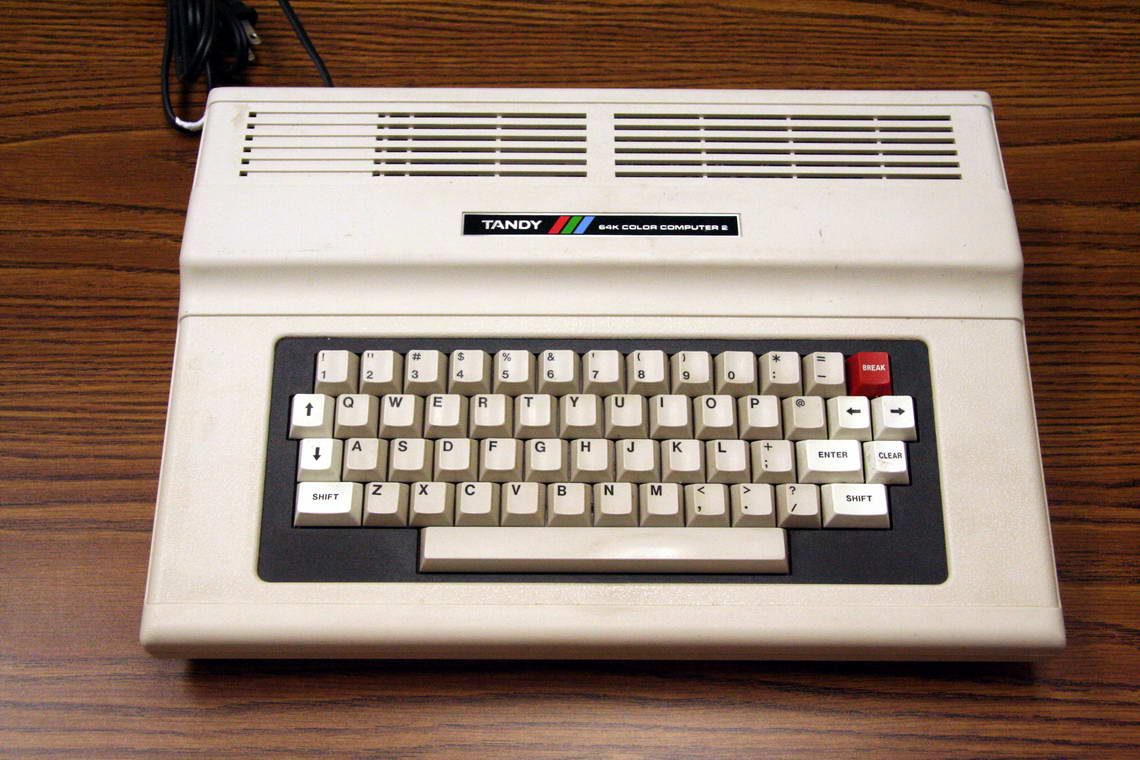
The Tandy Color Computer 2 (or, "CoCo 2") was my first personal computer. (Image: Wikimedia Commons)

The Tandy Color Computer 2 (“CoCo 2”) was my first personal computer. (Image: Wikimedia Commons)

My, how times have changed

Reverse to the 1980s:  When I was ten years old, I thought my Tandy Color Computer 2 was the best thing since sliced bread.  Its 16 kB was surely plenty of memory for whatever I wanted to do, and the cassette tapes I used as a form of external hard drive gave me the certainty of a virtually limitless supply of memory.

Today, I doubt I could make an intelligible MP3 recording, even with aggressive compression, that would fit a 16 kB file size.

Facing the truth

The frank fact is that I’ve gotten much better at managing hard drive space, now that I’ve been doing spectrum recordings for more than a year. I shouldn’t need to buy additional hard drive space unless it’s specifically for archiving/sharing purposes. I just need to regularly face the music (or static)–dig through spectrum recordings made last year, and delete those I no longer need.

How do I manage space now? Here are my tricks for staying on the wagon, and saving both space and time:

  • Use the minimum amount of bandwidth possible while making recordings
  • If possible, have your SDR parse files into 2GB chunks. This makes it easier to delete sections of recording that are no longer needed without having to delete the entire recording. Happily, the WinRadio Excaliber allows for this.
  • Each time you create a new spectrum recording, have it saved into a specific directory with a label that will help you identify the contents.  For example, “Saturday Night Pirates” or “31 M Tues AM.”
  • Use Notepad or any simple text application and create a log sheet for the spectrum recording; make notes, then save it in the same directory as your spectrum recording.
  • When saving MP3/WAV files, use a standard file-naming convention to help you quickly ID a recording (you’ll notice all of my recordings do this). Mine follow this pattern: “StationName-Fequency-Date-StartingTimeInUTC.mp3” –e.g., “RadioAustralia-9580kHZ-05Feb13-1000Z.mp3”
  • Delete unwanted spectrum recordings as soon as you decide they are not worth keeping. If you wait a few days, you may forget that they’re okay to delete.
  • I also use my Bonito RadioJet for narrow IF recordings (of, say, one station).  It allows me to adjust filters and “tune,” but takes very little hard drive space. The same can be achieved by narrowing your SDR spectrum width to 20-48 kHz.

Are you an avid shortwave/medium wave audio archivist (aka, audio addict)?  What are your tricks of the trade?  Please comment!

SDR Touch: An Android-based software defined radio

SDRtouchThough not available for the shortwave bands, Google Play reviews are mostly positive for the new software defined radio application that will run on your Android phone or tablet: SDR Touch.

According to the Google Play page, SDR Touch covers 50 MHz to 2.2 GHz and demodulates WFM, AM, NFM, USB, LSB, DSB, CWU and CLW signals. It requires an inexpensive USB rtl-sdr compatible USB DVB-T tuner. Click here to search eBay for RTL-SDR receivers. You then connect to your Android device via a USB OTG cable and SDR Touch should control the receiver.

SDR Touch’s Google Play website has a list of supported receivers–make sure to check the model number from eBay against this list before purchasing. Additionally, you should install their free demo SDR app to make sure your Android device is compatible.

This video shows SDR Touch in action on the FM broadcast band:

SDR touch claims that crashes should be expected as this app is still considered somewhat experimental.

Would be great if SDR Touch could support the HF bands some day.