Tag Archives: Software Defined Radio

Capturing spectrum and logging band openings last night

My 31 meter band spectrum display last night. Strong signals across the board.

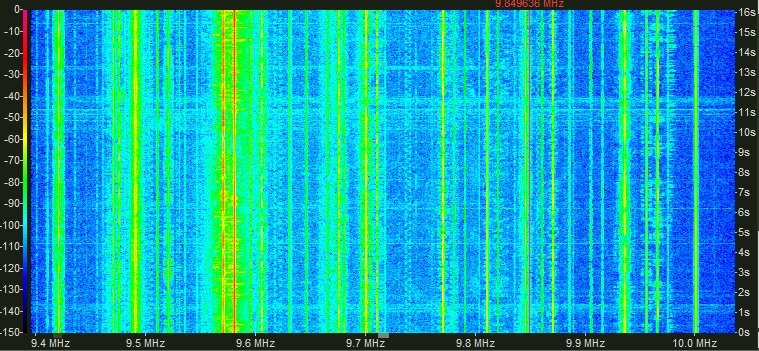
Waterfall display of the 31 meter band last night.

Last night, band conditions were superb above 7 MHz. Both the 31 and 25 meter bands seemed crowded with stations; for a moment, it felt like a true solar peak.

This morning, solar flares have dampened down the excitement but I imagine conditions could favorably change at times this weekend, so stay tuned!

I recorded the entire 25M band for a couple of hours yesterday evening and a large portion of the 31 meter band throughout the night. Fortunately, I had just invested in another Western Digital Caviar Green 3 TB SATA drive, so there was ample space to make these (very) large recordings. I think this brings my overall spectrum storage up to 12 TB!?!

I love the fact that these SDR band captures will make for good listening sometime this winter when the sun isn’t being so cooperative. I liken it to radio time travel, but I believe David Goren (of shortwaveology.net) said it best in a comment he posted in “Confessions of an SDRaholic: when 4.5 terabytes is not enough“:

“My approach to recording SDR band captures is like assembling a collection of fine wines. I tend to record captures when there are unusual propagational openings…and while recording a whole swath of frequencies for an hour or so you can still tune around and make discoveries and even record them singly.. And then once the capture is done, you have it as long as you want to keep it.. So, on a static-y summers day I can go to the shelf and pull down “Ye Olde Auroral MW Opening 10/15/11? or “Hot Bolivian evening on 60 meters.” and I can make discoveries to my heart’s content. Since I can listen to an hour’s worth of each frequency it will take a long time to exhaust the potential of any particular capture, esp. with the ability to refilter and change. multiple parameters of reception.”

See? (I tell my wife) I’m simply building my collection of fine wines!

Below, you’ll find some of the stations I logged last night (actually, this morning in UTC).

Logs:

31 meter band beginning 00:00 UTC, 25 OCT 2014

  • 9410 BBC English Nakhon Sawan
  • 9420 ERT Open/VOG Greek
  • 9455 China National Radio 1 Chinese
  • 9470 AIR National Channel Hindi/English (vy wk)
  • 9475 WTWW English
  • 9510 China Radio International Russian
  • 9520 PBS Nei Menggu Chinese AND Radio Romania International Romanian
  • 9565 Radio Tupi/Super Radio Deus e Amor Portuguese (QRM from CRI 9570)
  • 9570 China Radio International English
  • 9586 Super Radio Deus e Amor Portuguese
  • 9590 China Radio International Spanish
  • 9630 Radio Aparecida Portuguese
  • 9645 Radio Bandeirantes Portuguese
  • 9660 Radio Taiwan International Chinese
  • 9665 China National Radio 5 Chinese or possibly KCBS Pyongyang Korean
  • 9690 All India Radio English
  • 9700 Radio Romania International English
  • 9705 All India Radio English
  • 9710 China Radio International Portuguese
  • 9730 Adventist World Radio Manumanaw Karen or possibly 9730 Myanmar Radio Burmese
  • 9740 BBC English (vy weak)
  • 9800 China Radio International Spanish
  • 9810 Radio Havana Cuba Spanish
  • 9820 Radio 9 de Julho Portuguese
  • 9855 Voice of America Tibetan
  • 9860 Voice of Islamic Rep. of Iran Spanish
  • 9870 AIR New Delhi Hindi
  • 9880 Voice of America Chinese (vy weak)
  • 9935 ERT Open, VOG Greek
  • 9965 Radio Cairo Arabic
  • 10000 WWV Ft. Collins

25 meter band beginning  0100 UTC, 25 OCT 2014

  • 11520 EWTN (WEWN) English
  • 11580 SOH Xi Wang Zhi Sheng Chinese/Cantonese
  • 11590 Radio Japan Hindi (vy weak)
  • 11620 China National Radio 5 Chinese
  • 11640 Radio Free Asia Uyghur
  • 11650 China Radio International Chinese
  • 11670 Radio Havana Cuba Spanish
  • 11695 Radio Free Asia Tibetan
  • 11710.7 Radio Cairo Spanish (transmitter noise)
  • 11760 Radio Havana Cuba Spanish
  • 11780 Radio Nacional da Brasilia Portuguese
  • 11825 Bro Stair
  • 11840 Radio Havana Cuba Spanish
  • 11855 Radio Aparecida Portuguese
  • 11870 EWTN (WEWN) Spanish
  • 11905 Sri Lanka BC English/Hindi
  • 11955 Radio Romania International French
  • 12020 VoA Deewa Radio Pashto
  • 12025 UNID
  • 12070 Radio Cairo Spanish (jammed or transmitter noise?)
  • 12105 WTWW Spanish

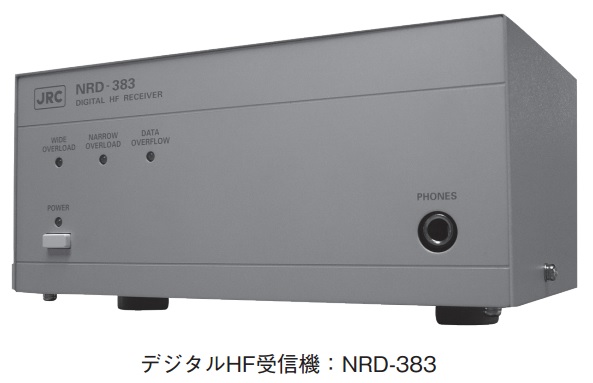
The Japan Radio Company NRD-383 SDR carries a hefty price tag

JRC-NRD-383Many thanks to Dave Zantow (N9EWO) who relays this info regarding the new NRD-383 via Takahito Akabayashi:

[The JRC] NRD-383 is sold by “Defense Systems Sale Division” of JRC, so this SDR receiver is especially for military use.

The price is more than $50,000 [each].

Recent JRC products [have] nothing to do with amateurs.

Takahito Akabayashi
Tokyo, Japan

OK, I think I can safely remove the NRD-383 from my wish list. At $50,000 each, this is indeed a receiver intended for government and commercial use.

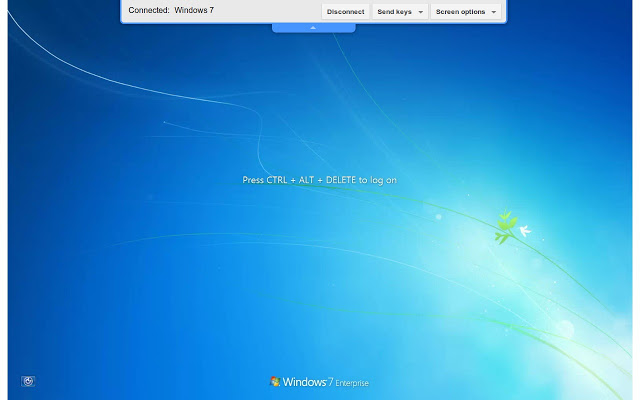
Chrome Remote Desktop: another application choice

chromeDesktop

In response to my post about SWLing in a hospital waiting room via TeamViewer, Stephen Cooper comments:

“Google Chrome Remote Desktop also works well for this.

[Click here to download]

Allows me to listen to my Elad when I am in work. Although it doesn’t transfer sound on Android (not sure about iPad) which isnt that good if you haven’t got a PC/Mac to use to login to home.”

Thanks for the suggestion, Stephen!

Shortwave listening in a hospital lobby

ExcaliburviaTeamviewer

This morning, at 6:00 am, I had to take a friend to the hospital for a scheduled (minor) operation.

The hospital waiting room is spartan for a projected three hour wait, but the complimentary wi-fi Internet is quite speedy. I had planned to catch up on a movie or two via Netflix, but the hospital blocks video streaming.

Fortunately, I just noticed that the hospital does not block TeamViewer–my remote PC application of choice.

Remote listening

I just logged into my home PC and launched both the Elad FDM-S2 and WinRadio Excabur SDR applications–fortunately, I discovered that the Excalibur was hooked up to an external antenna.

Not only does TeamViewer allow me to control a software defined radio, but it actually streams the receiver audio from my PC. With my inexpensive in-ear Sony headphones, the sound isolation and audio fidelity are quite good for a compressed audio stream. Indeed, other than a one second delay in response, the user experience is nearly as good as being home.

I should note that I could also use the TeamViewer app on my iPhone, but 4G reception in the hospital is very poor and controlling an SDR from a small touch screen is less than desirable (though works in a pinch–no pun intended).

I’m currently tuned and listening to Radio Australia, Radio Mali and the Voice of Korea.

The 31 meter band seems to be wide open at this morning. At this point, I don’t think I care if my friend’s out-patient procedure takes a while longer!

Japan Radio Company (JRC) announces a new SDR receiver: the NRD-383

JRC-NRD-383

Dave Zantow (N9EWO) writes:

Sungchul Cho informs us that JRC has listed a new HF SDR Receiver on the web site. The new NRD-383 is a direct sampling, 2 channel with digital IQ data output with width up to 10 MHz each. Frequency coverage from 100 kHz to 32 MHz. Third-order intercept point + 23 dBm (typ), Second order intercept point + 80 dBm (typ). Not much information at this time , more when I have it .

See the PDF Brochure here : http://www.jrc.co.jp/jp/company/html/review65/pdf/JRCreview65_15.pdf

Many thanks, Dave!  It’s exciting to see that JRC could manufacture a receiver once again; their products, in the past, have been world-class. If history is an indicator, I imagine the NRD-383 will not be an inexpensive rig; still, JRC equipment is often worth the price.

London Shortwave refines his tablet-based portable SDR

IMG_0248 (1)

One of the great things about the SWLing Post is that readers share their varied–and highly creative–methods of playing radio.  A few weeks ago, SWLing Post reader, London Shortwave, shared his portable SDR set-up with us; he uses this outdoors to mitigate London’s heavy radio interference. Dennis Walter, president of Germany-based Bonito, commented, and later posted an alternative portable SDR solution using the Bonito RadioJet IF receiver.

Below, London Shortwave shares a guest post (also viewable on his blog) which describes in detail his design for his portable SDR around the FunCube Dongle Pro+ and an 8″ Windows tablet, and explains how effectively it works for him. This post includes recordings and a video; it’s an excellent tutorial:


DESIGNING A PORTABLE SDR SYSTEM

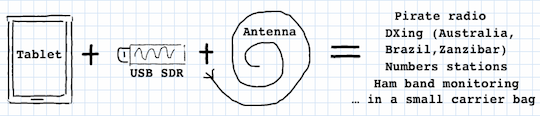
This article is a follow up to the submission I made to the SWLing Post a little while ago. In short, the idea was to combine the FunCube Dongle Pro+ USB-based software defined radio (SDR) with an 8″ Windows tablet running SDR# to have a portable, on-the-go SDR solution.

The original inspiration

The original inspiration

Tablet radio interference

At the outset, I thought that all that was necessary was a tablet (I chose Toshiba Encore 8″), the FunCube dongle itself and just some antenna wire. This turned out to be a naive assumption because the tablet’s USB interface injected enormous amounts of radio frequency interference (RFI) into the SDR, making listening on some shortwave frequencies essentially impossible. Just to be sure that I wasn’t being plagued by a defect of my chosen tablet model, I tried out the same set-up on a Dell Venue 8, with identical results.

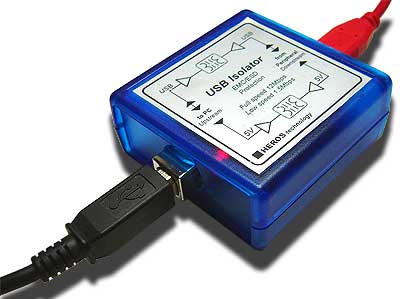
To deal with the issue of tablet-generated RFI, I bought a galvanic USB isolator, which, in essence, is a box that breaks the electrical connection between the USB dongle and the tablet’s USB interface while allowing USB data to pass through in both directions.

Heros Technology galvanic USB isolator

Heros Technology galvanic USB isolator

Additional power for the SDR

Connections

The isolator resolved the RFI issue completely, but created another problem altogether: the device specifications state that the isolator’s power output is restricted to 100mA at 5V. This is sufficient for USB devices that are self-powered but not for the FunCube dongle that draws all of its power from the USB port to which it is connected.

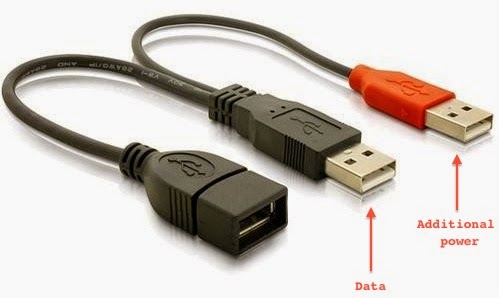
USB Y cable

USB Y cable

One way to supply extra power to a USB device is to use a “Y-cable”. Such cables have one extra USB plug that can be attached to a source of additional power (for example, a USB power bank). This solution is commonly used to connect power-hungry items, such as large hard disks, to low-power, portable computing devices (laptops and tablets). Having bought this cable, my next step was to find/improvise a battery that meets the USB power specifications (5V, 500mA).

Yet more interference

My first thought was to use the mobile USB power bank that I use to charge my iPhone while on the go. After all, it already has a USB port and supplies power with the right voltage. Once again, my expectations were confounded and RFI reared its ugly head! The power bank radiates significant interference into the circuit because it uses a switching regulator to maintain steady voltage. Luckily, I came across Gomadic’s portable AA battery pack with regulated 5V output that emits way less interference than any of the other USB batteries I tried (my intermediate solution used 4 rechargeable AA batteries and a makeshift USB connector, and although this resulted in zero additional interference I decided that it’s not safe to supply the SDR with unregulated voltage that doesn’t match the rest of the circuit). I used the handy passthrough USB voltmeter I bought in Maplin to check that Gomadic’s nice-looking gadget does indeed give out 5V as advertised.

So, what can one do with the remaining RFI from the additional power supply? It turns out that it can be mitigated quite effectively by inserting a balun (item 10 on Figure 2) between the SDR and the antenna wire (item 12). The balun is connected to the SDR with a coaxial cable (the “feed line”, item 11). Additionally, ferrite choke rings (item 9) attached to the feed line help reduce this RFI further: winding the feed line through the choke rings several times is sufficient. However, neither the balun nor the chokes are effective enough to replace the USB isolator! It appears they only help with the noise generated by the power supply, which is relatively minor anyway.

 Cost vs Portability

When SWLing Post published the details of my intermediate solution, Dennis Walter – one of the engineers behind Bonito RadioJet – popped up in the comments section and suggested that my setup is too tedious, as it involves lots of cables, and that his SDR is superior in terms of portability and the supplied software. While I haven’t had the chance to evaluate RadioJet, I pointed out that the cost of his radio is significantly higher than that of all of my components put together. I also mentioned that the free SDR# software I use is superb: it sounds excellent and offers a number of features that many software packages and conventional radios don’t have. So, having finalised my design, I thought that it might be time to tally up the cost and listen to the results.

Below is the full component list:

1) Toshiba Encore 8″ tablet $194

2) On The Go USB host cable for Toshiba’s micro USB connector: $7

3) Heros Technology USB Isolator: $125

4) USB Y cable with two males + 1 female plugs: $8

5) Gomadic Portable AA Battery Pack with regulated 5V output: $20

6) Gomadic female USB connector tip: $6

7) FunCube Dongle Pro+: $208

8) USB volt-meter (optional): $33

9) 2 ferrite choke rings: $10

10) Wellbrook HF Balun: $50

11) Feedline cables $7

12) 6 metres of thick copper antenna wire: $8

Adding up the prices of items 2 – 12 (and excluding the optional voltmeter) brings the total cost to  $449 vs. Bonito RadioJet’s $689. For the price difference you can throw in the Toshiba tablet at $194 and still have some change, enough to buy a carrier bag and perhaps even a nice pair of headphones!

Figure 1. Radio components

Figure 1. Radio components

Figure 2. Antenna components

Figure 2. Antenna components

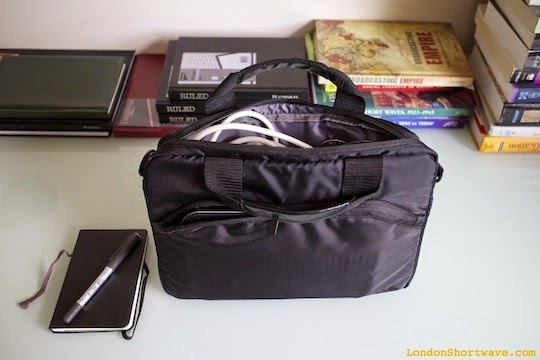
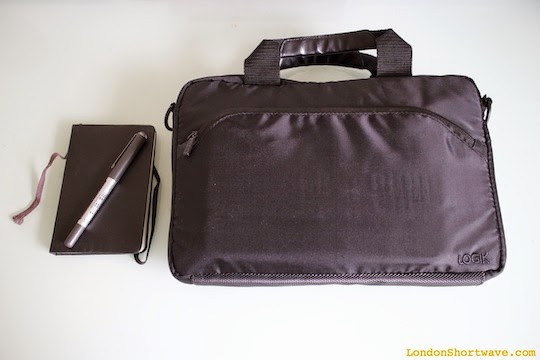
In terms of portability, the entire setup fits nicely into an 11″ laptop carrier bag.

Figure 3. Packing the components into an 11" carrier bag

Figure 3. Packing the components into an 11″ carrier bag

Figure 4. Ready to go

Figure 4. Ready to go

Setting things up in the field is not particularly cumbersome, either:

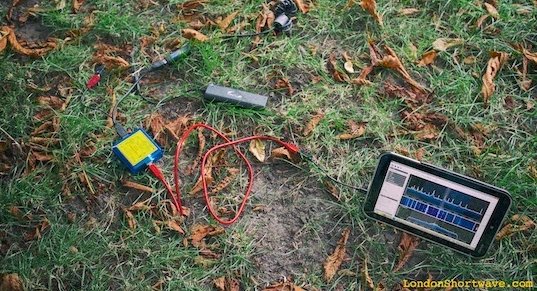
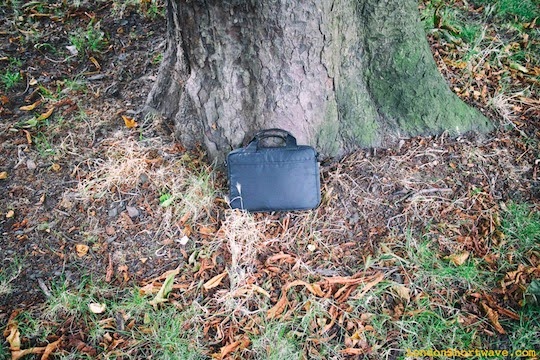
Figure 5. Portable SDR setup in action in a local park

Figure 5. Portable SDR setup in action in a local park

As for the results, listen to the below snippets and be the judge. The only thing I will say is that none of my other portable radios have ever given me this kind of performance, not even with the long wire antenna attached:

And while we’re at it, here’s a demo video:

Portable SDR on Toshiba Encore 8″ Tablet from London Shortwave on Vimeo.

At one point I wanted to build an enclosure to house the FunCube dongle, the power supply and the USB isolator in a single tidy unit, but I no longer see the need. It’s easy to pack all of those items into the carrier bag and also they are all useful individually: the USB isolator can be paired with other SDRs, and I recently discovered a neat additional use for the Gomadic battery pack.

Well, that brings me to the end of this post. I hope my design will inspire you to come up with your own portable SDR system, and that you will share your results with me in the comments section. Happy listening!

IMG_0241

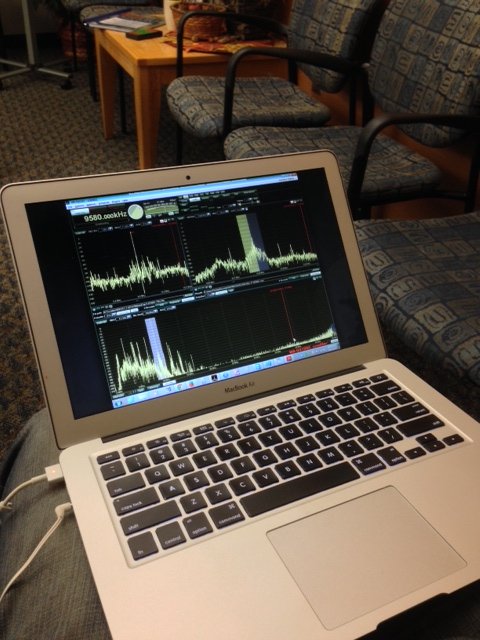
Best application for the SDR-IQ on a MacBook Air?

RFSpace-SDR-IQ-2

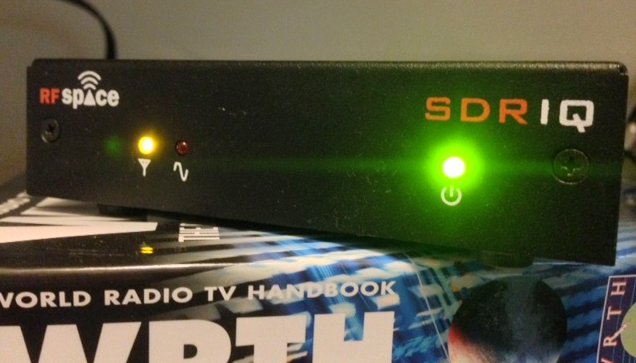
I’m plotting travels soon and plan to take my RF Space SDR-IQ along for the ride.

I’ve noted a number of excellent open source applications that work with the SDR-IQ, but many of them don’t work on the Mac OS X operating system. Those that do work on Mac OS X seem to lack the ability to make spectrum and audio (AF) recordings.

I had considered installing Windows 7 on my MacBook Air (as a dual boot) and running an app like SDR#, but I simply don’t have the storage space to effectively house two operating systems on the Air’s solid state drive.

I’m curious if anyone has an SDR application recommendation. Please comment if you do!