Category Archives: How To

An Introduction to WavViewDX SDR Playback Software (A Totsuka DXers Circle Article by Kazu Gosui)

Many thanks to SWLing Post contributor Nick Hall-Patch, who has kindly provided a translation of this article from the Japanese-language publication PROPAGATION by the Totsuka DXers Circle (TDXC). In this piece, Kazu Gosui introduces WavViewDX, an impressive SDR file playback and analysis tool developed by Reinhard Weiß of Germany.


About WavViewDX, SDR File Playback Software

by Kazu Gosui

Introduction

“WavViewDX,” developed by Reinhard Weiß of Germany, is SDR file playback software. It maps the received signals from SDR-recorded files into bar graphs, with time on the vertical axis and frequency (channel) on the horizontal axis, for each of the following channel separations: medium wave (9/10 kHz), short wave (5 kHz), and FM (50/100 kHz).  Clicking the cursor (blue crosshair) plays the received audio. By “visualizing the received signal” through mapping (see also the separate article by Satoshi Miyauchi), you can see at a glance the start and end times of broadcasts, fade in, fade out, channels you should listen to, and channels you don’t need to listen to.

Basic Usage and Screen Description

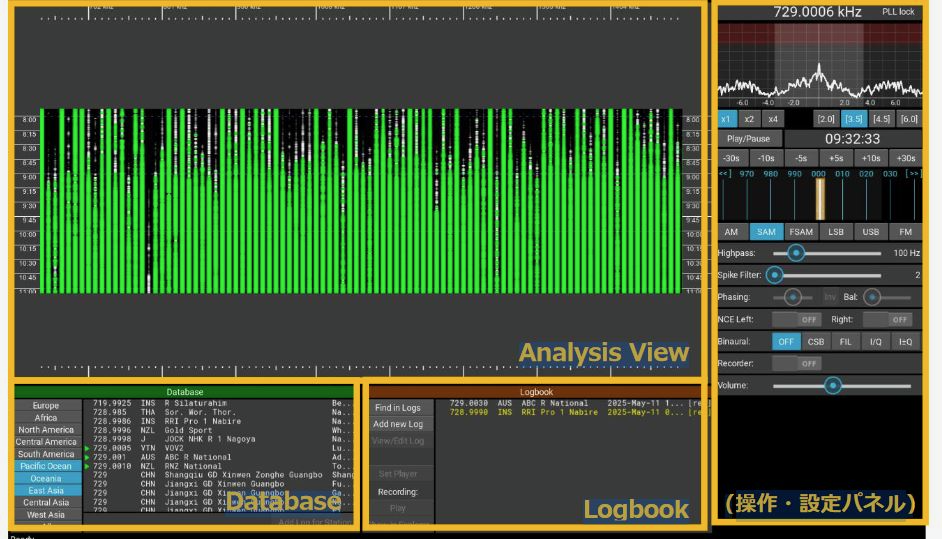
First, download and install WavViewDX from the WavViewDX webpage (https://rweiss.de/dxer/tools.html). The latest version is version was 1544 as of June 8, 2025, when this was written, but version 1662 is available in October 2025. When you launch WavViewDX, the Main Window (Figure 1) will appear, showing Analysis View, the Operation/Settings Panel, Logbook and Database.

Figure 1

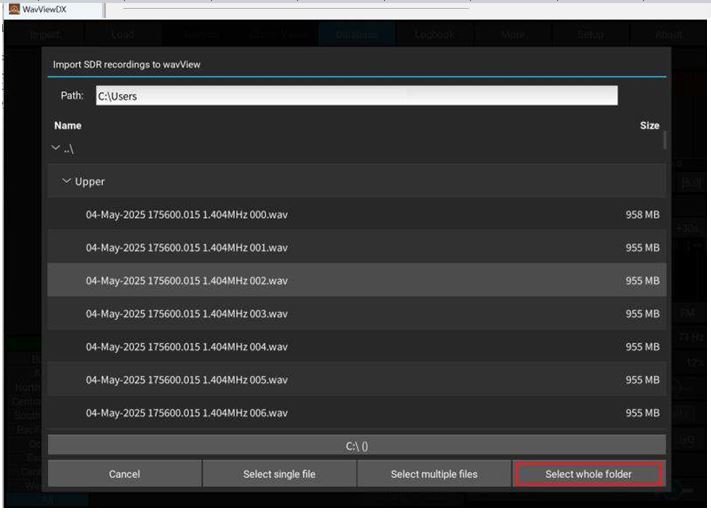
To play back recorded files, you must import them. Click Import to display the Import SDR Recording settings screen. Source files can be selected as single or multiple files, or by folder. Set the reception location, time, channel separation, etc., and begin importing. A progress percentage will appear, and green and white bar graphs will appear on the Analysis View screen. Hovering the cursor over a bar graph and clicking will display a red circle, and the audio recorded for that channel and time will play. Scrolling the mouse will allow you to zoom in and out of the Analysis View.

When you import, a WVD format file is created. Once you’ve imported the files, you can simply load the corresponding WVD file at another time, and the files will be available to play immediately.

In addition to Import and Load, the following settings are available at the top of the Main Window.

  • Analysis: Allows you to select the file/folder and frequency separation when importing.
  • Carrier Views: Displays offset frequencies to identify and estimate the received medium wave station.
  • Database: Links with the MWLIST webpage (https://www.mwlist.org/ul_login.php) to identify and estimate the received medium wave station.
  • Logbook: For documenting stations heard, along with creation of audio recordings during playback.
  • More: Allows you to set multiple options, such as manual tuning and contrast setting.
  • Setup: Allows you to set the sound device and select the file format for recording audio clips during playback.
  • About: Allows you to select the software version, Help, etc.

The Main Window also displays the frequency list linked to the aforementioned Database and the Logbook.  The database frequency list can be selected by region, such as Europe or East Asia. The Logbook allows you to record reception records and associate recorded audio files.

The right side of the Main Window contains the operation and settings panel. At the top are the Frequency Display and Spectrum View. Hovering the cursor over Spectrum View allows you to select PBT (Pass Band Tuning) and NOTCH.

Below these are:

  • Spectrum Zoom (x1, x2, x4), which expands the spectrum;
  • Bandpass Bandwidth Presets ([2.5] etc.), which change the reception bandwidth;
  • Player Time Controls (Play/Pause; -30s etc.), which control the playback time;
  • Carrier View, which displays the offset frequency; (+/- 30Hz, and can be shifted above and below the nominal .000 frequency)
  • Demodulator Modes, which change the reception mode.

(Keyboard shortcuts are available for the above functions.)

  • The AF Highpass Filter adjusts the audio frequency passband to improve intelligibility.
  • The Spike Filter reduces popping during reception.
  • Phasing combines two synchronized recording files to reduce same-frequency interference and noise.
  • NCE (Neighbor Channel Eliminator) reduces interference from adjacent channels.
  • Binaural allows you to select the sideband of the AF output during playback.
  • The AF Audio Recorder allows you to record by clicking during playback. Recording formats include WAV, FLAC, and MP3.

As you can see, there are so many features it’s impossible to introduce them all. Detailed adjustments to each function make it even easier to use; it may seem tedious at first, but give the features a try. The user interface is intuitive, so you’ll quickly get used to it. If you’re unsure how to use something, just press the F1 key and refer to the Help.

Actual Usage 

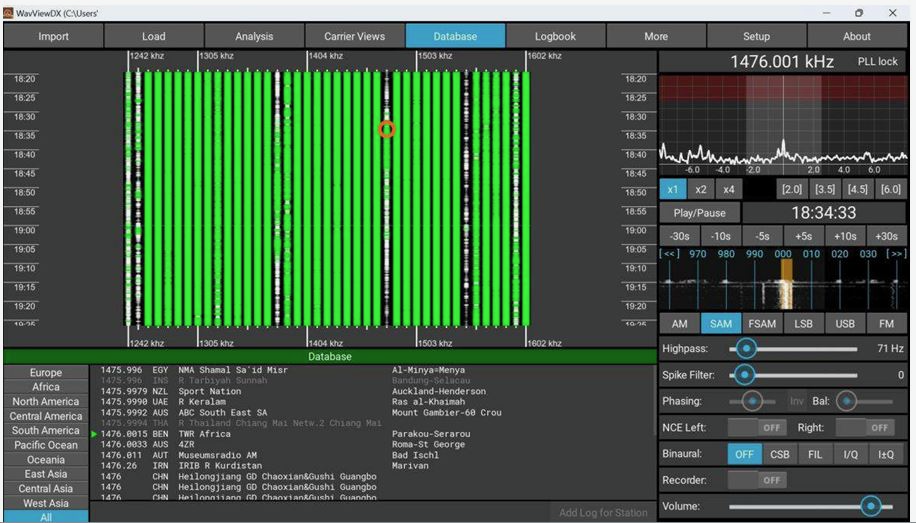
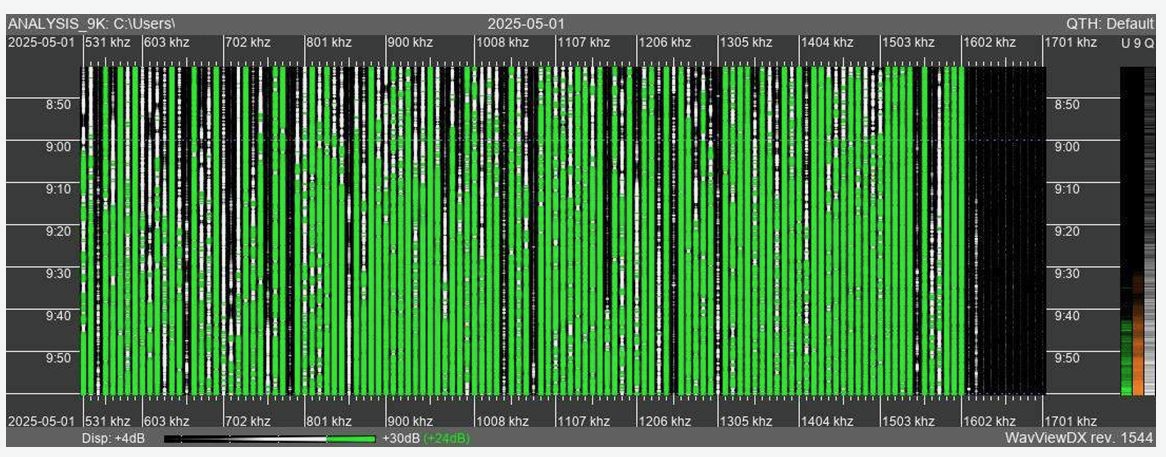
Let’s try it out. The import settings are set to MW 9+10kHz Channel Analysis Configuration. Configuration, and other settings are set to default. (editor’s note:  “SDR Calibration” allows the use of reference carrier frequencies in the data, for those SDRs without a frequency standard, so that each carrier frequency in the passband will be displayed accurately.)   Once the import is complete, a bar graph will appear. Figures 2 and 3 show the analysis view of the actual file import from early May 2025, during the Hachijojima DXpedition showing evening reception; time is UTC.

Figure 2

Figure 3

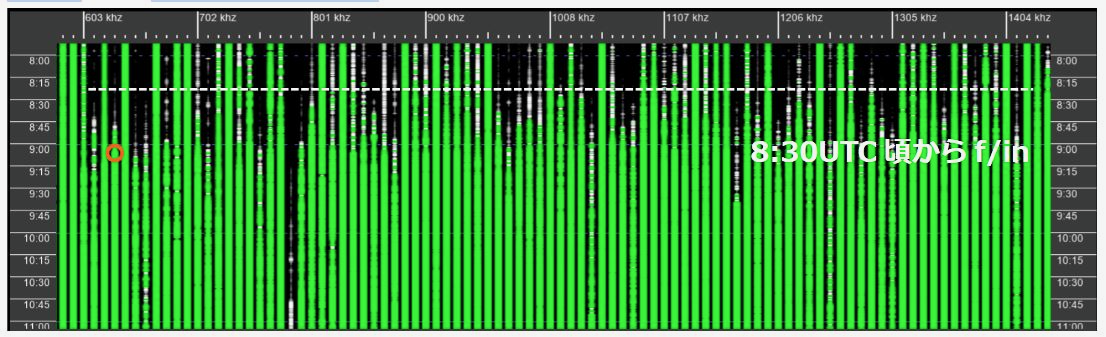
9kHz separation is used in Figure 2. You can hear the audio from 630kHz at the time indicated by a circle. Black areas of the bar graph indicate no signal, while white to green indicates good signal reception. If you miss an ID during reception, press the up arrow key to rewind the time by 5 seconds and listen again.   Click Recording to record the ID.

As you can see, the bar graph color changes from black to white and then white to green over time. This indicates that as the day turns from daytime to evening and then nighttime, channels that previously had no reception begin to receive broadcasts. Sunset on this day was 9:29 UTC (18:29 JST), and the received signal fade in was between 8:30 UTC (17:30 JST) and 9:15 UTC (18:15 JST).

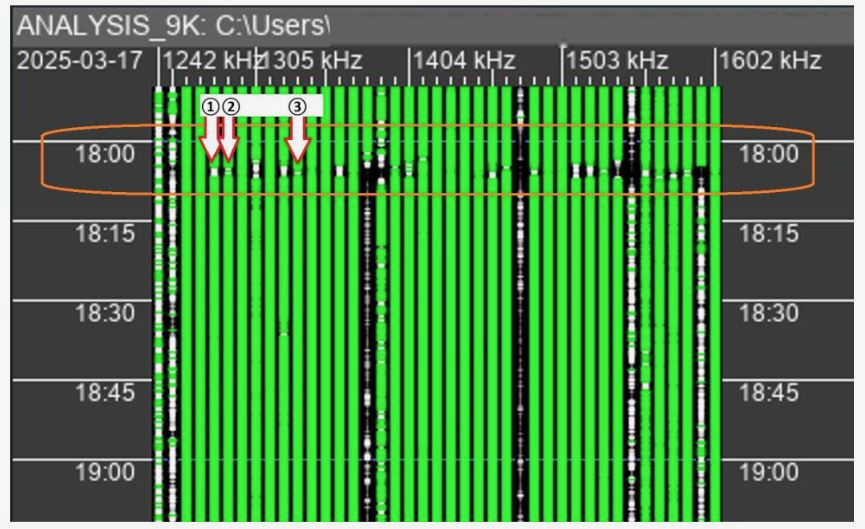
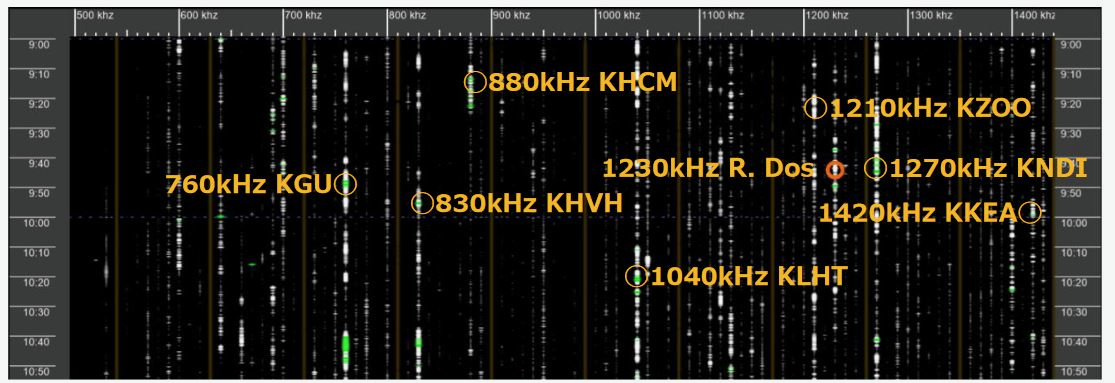
Next, click Analysis and switch to MW 10kHz channel analysis. The Analysis View after switching is shown in Figure 3. This shows the reception status with 10kHz separation. Most channels are black, with a few white spots. There is very little green. In this image, there are certainly no 10kHz channels with good audio, but by clicking on the white, we can see some with faint English talk and music. I checked the database and found that these channels appear to be Hawaiian stations (see orange circle marks in Figure 3) that have been active since around 8:30 UTC.

Also, Latin music was heard on 1230 kHz (Orange circle in Figure 3). This may be Radio Dos from Argentina. By visualizing reception status like this, I was able to determine where to listen and where not to listen. During the Hachijojima expedition in May, I was blessed with outstanding reception conditions from the evening through the early morning hours of the following day, and was able to track 187 overseas medium wave stations, including 165 in Australia, 5 in New Zealand, 2 in Papua New Guinea, Solomon Islands, Tonga, Marshall Islands, Kiribati, Palau, Fiji, Tuvalu, Indonesia, and the Philippines, achieving significant results. Playback and analysis took about a week, which was shorter than usual, thanks to WavViewDX.

Summary 

As mentioned above, WavViewDX has proven to be an efficient tool for analysis, allowing users to discover previously unnoticed stations. Since it can play files recorded with various SDRs, we hope that many DXers will use it. WavViewDX is compatible with multiple PC operating systems, including Windows, Linux, and macOS, and is freeware. According to Reinhard Weiß, additional features and enhancements are planned for the future, so we look forward to seeing its future developments. Finally, we would like to express our gratitude and respect to Reinhard Weiß for developing such useful and excellent software.

Reference Materials 

Table 1. Supported IQ Formats

ELAD FDM-SW2 Generic RAW recordings
GQRX recordings HDSDR
Jaguar Linrad RAW, single and dual-channel
recordings PERSEUS (*.wav)
PERSEUS P22 (*.P22) SDR#
SDR Console SDR Uno
SDRconnect SpectraVue
WiNRADiO DDC WiNRADiO RXW (only for G33)
Winrad

Trying WavViewDX on FM 

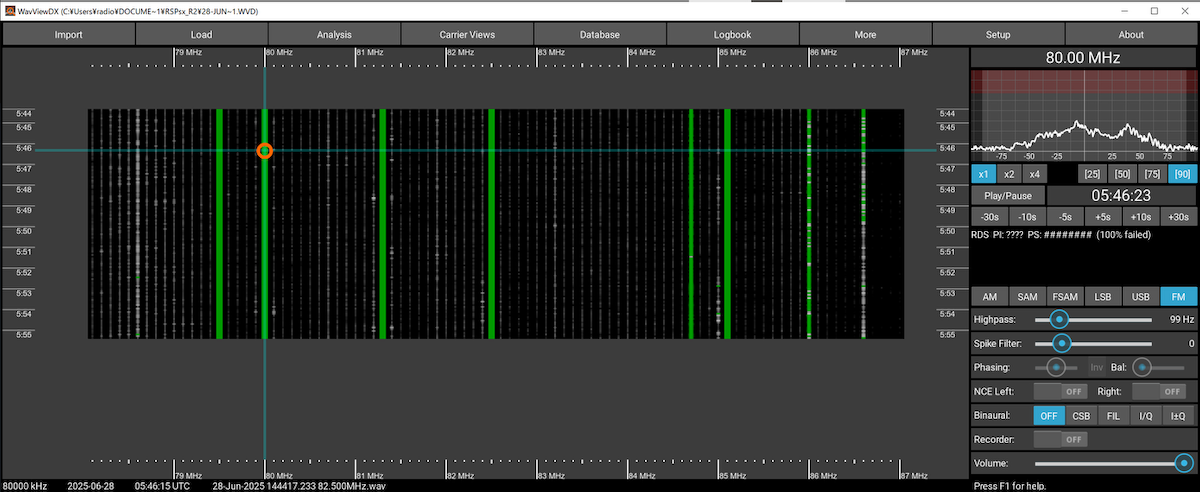
WavViewDX is primarily geared toward medium wave DX, but it seems like it can be used for FM DX as well. The image in Figure 4 shows reception from 79-87MHz using an RSPdx-R2 and an indoor YouTwin antenna. It supports stereo and has good audio quality. With an outdoor antenna, it could also be used for FM DX, such as with sporadic E and other short-lived propagation enhancements.

Figure 4


These English translations were prepared for IRCA’s DX Monitor, and are used with the kind permission of  IRCA as well as of the authors and the editor of the Totsuka DXers Circle publication, PROPAGATION.
Taming the Noise: Don Moore’s Simple, Cheap Filter Solution for Traveling DXers

Many thanks to SWLing Post contributor Don Moore–noted author, traveler, and DXer–who shares the following post:


A Cheap and Simple Noise Filter

By Don Moore

Don’s traveling DX stories can be found in his book Tales of a Vagabond DXer [SWLing Post affiliate link]. If you’ve already read his book and enjoyed it, do Don a favor and leave a review on Amazon.

My DXing career started over fifty years ago in an upstairs bedroom in tiny Milesburg, Pennsylvania. I had a consumer-grade multi-band radio and some copper wire strung from the roof to a nearby tree.  It was a simple setup but it worked very well. Do you know what I didn’t have? A noise problem. The only time I remember noise ruining my DX was when my mother was using the electric mixer and that meant she was making cookies or a cake. I never complained.

Times have changed, haven’t they? What DXer doesn’t complain about noise these days? I know people who have left the hobby because the place they lived at and DXed at for decades gradually became so noisy they couldn’t DX anymore.

Unsurprisingly, a lot has been written about how to find and eliminate noise in your home. However, most of my DXing is done as I wander the globe. I try to find places to stay at that should be good for DXing. But no matter how good a place looks beforehand, there’s no way of knowing what the noise level will be until I get there.

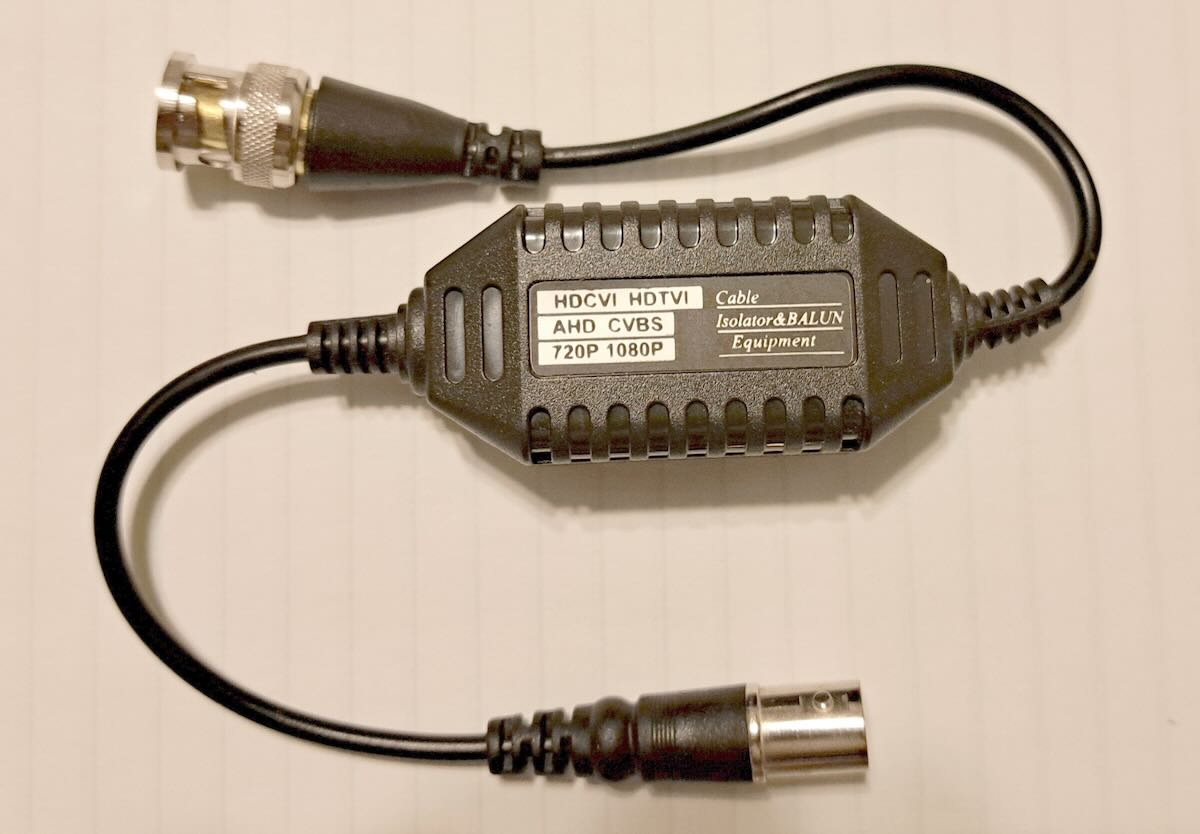
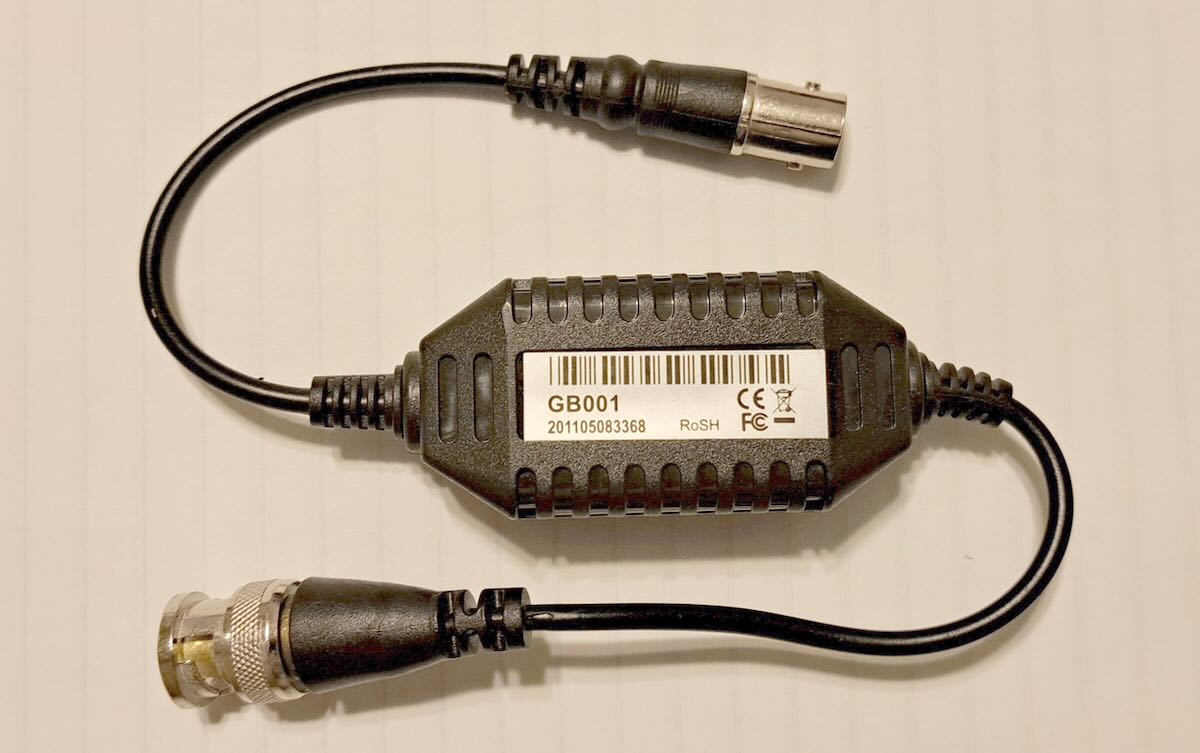
As a traveling DXer, I need quick, easy, and compact noise solutions. The best solution I’ve found are these CCTV distortion filters (ground loop isolators) that Brett Saylor recommended to me several years ago.

No, these weren’t designed for radio use. And they aren’t a miracle solution that will eliminate all the noise that plagues DXers. Sometimes they’re no use at all. But I’ve DXed in dozens of locations over the past ten years and there have been multiple occasions where one of these filters has turned what would have been a disappointing stay into a good DX session. I don’t go anywhere without two of these packed in my mobile DX shack.

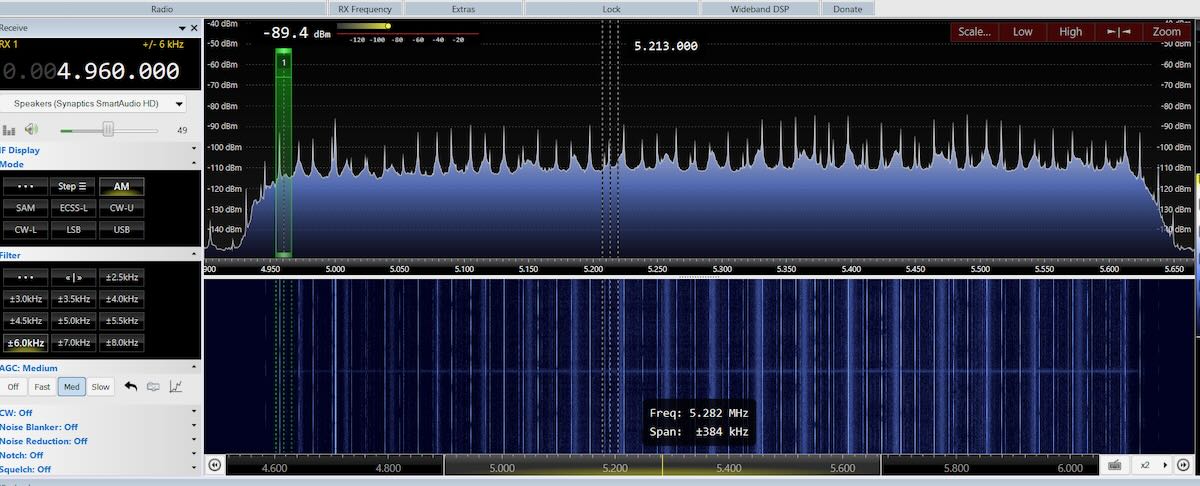
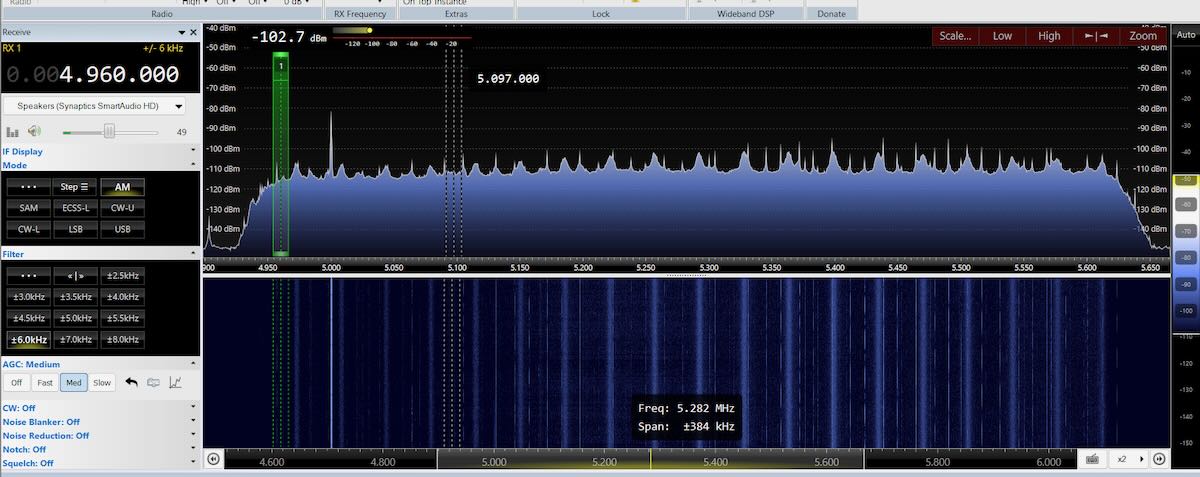
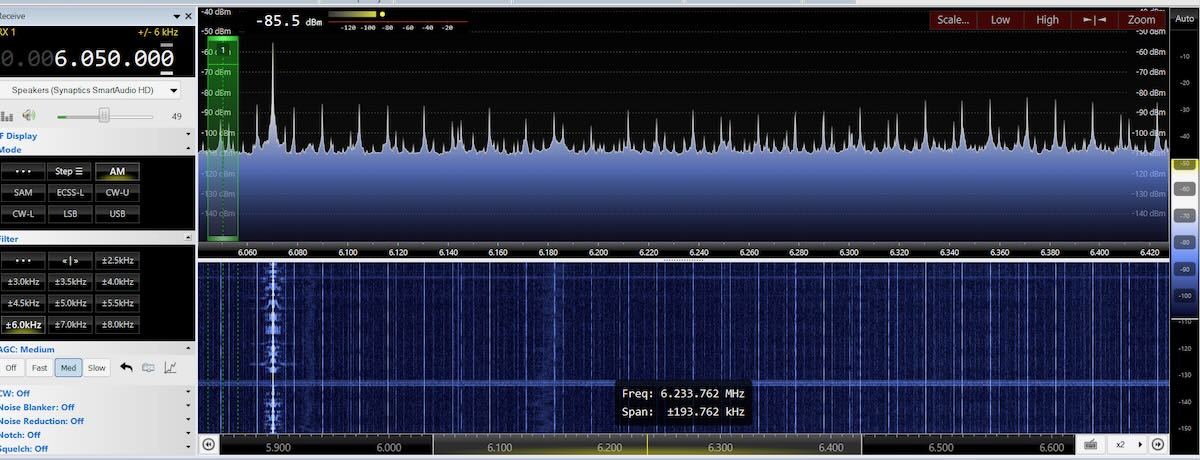
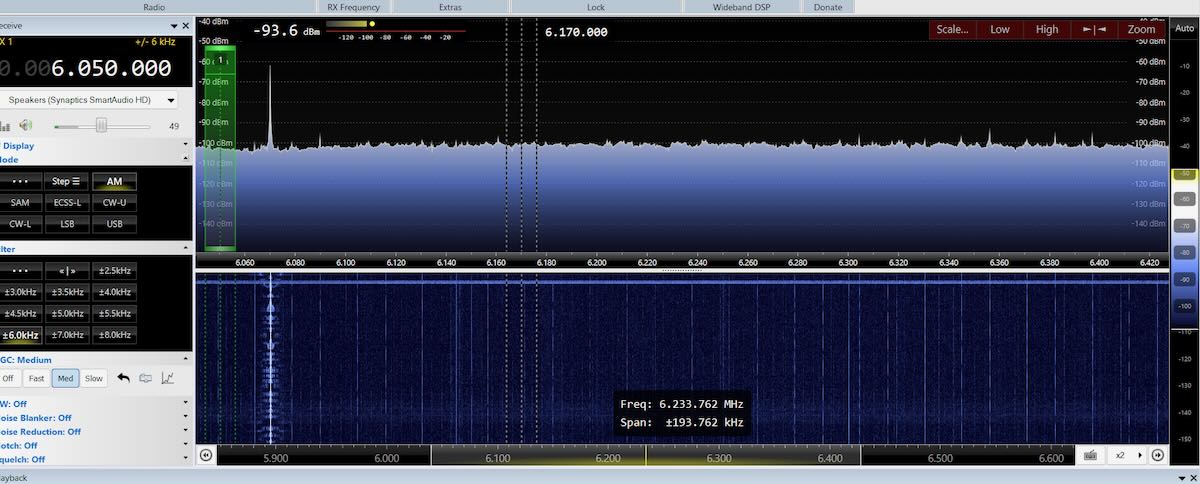
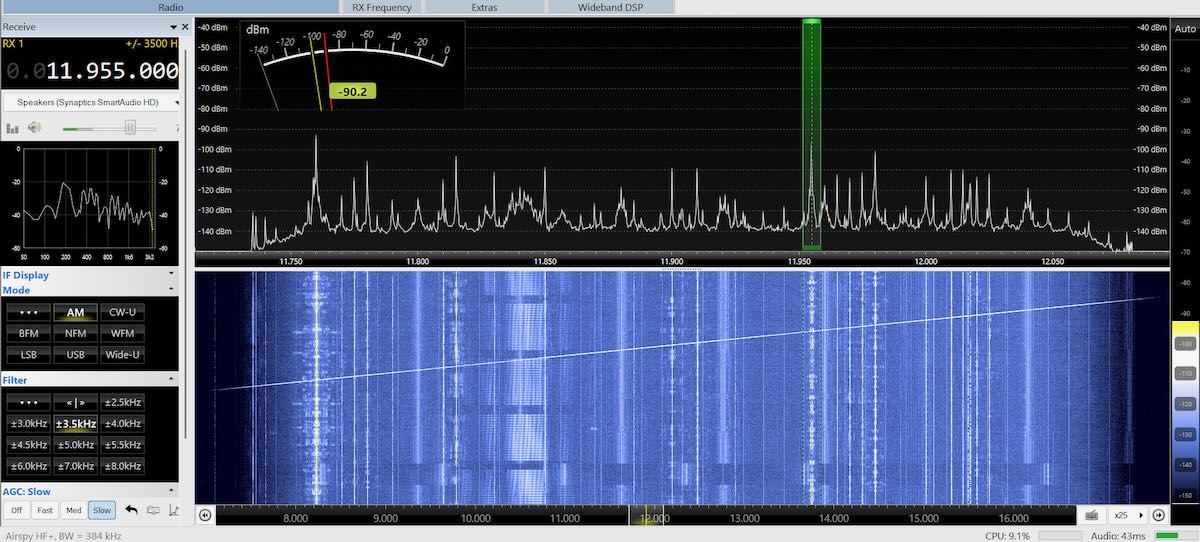
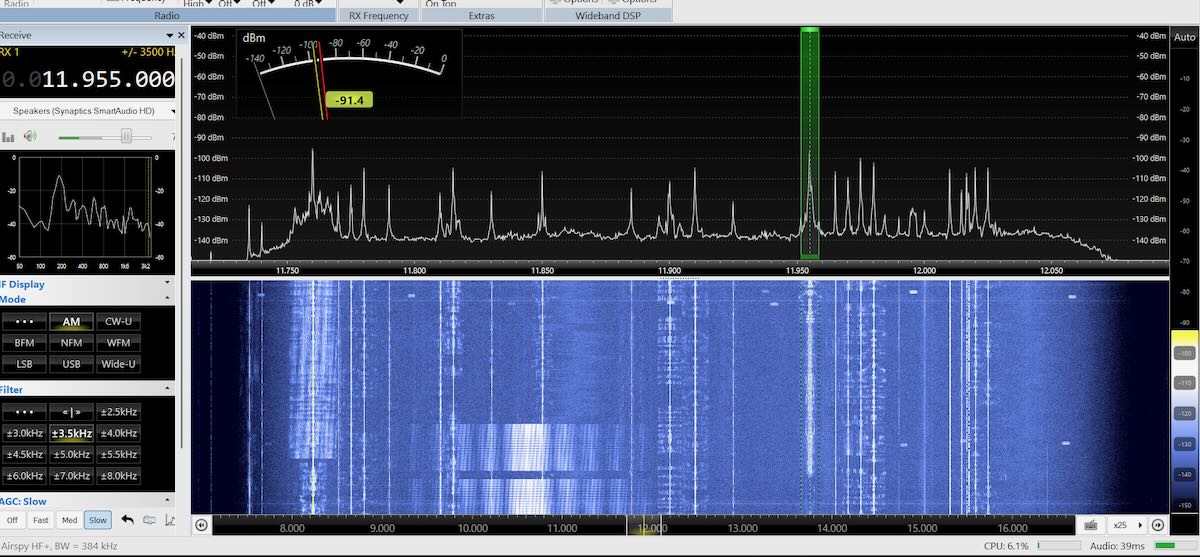
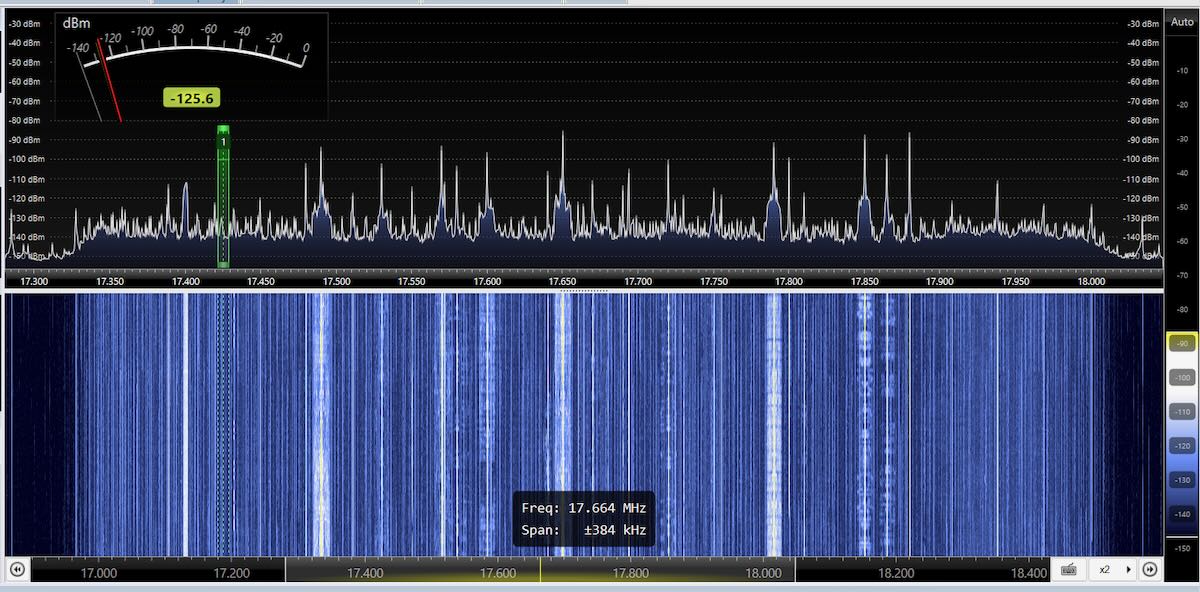
But let me show you some results. All of these SDR screenshots were made with SDR-Console using an Airspy HF+ Discovery SDR connected to a PA0RDT mini-whip antenna.

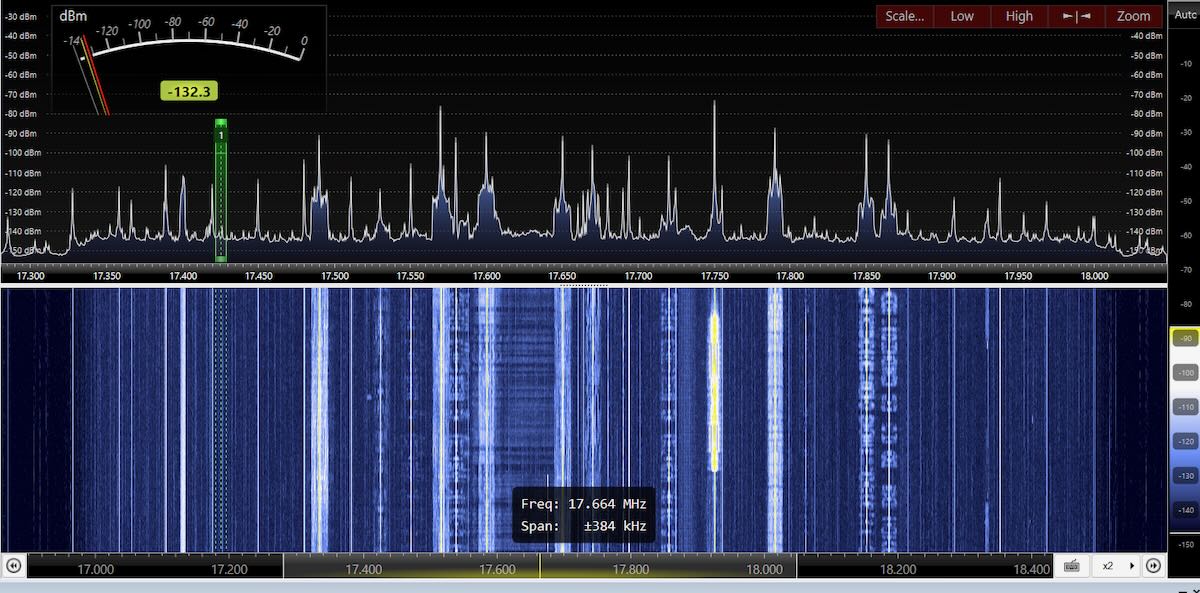
I spent last summer in the north suburbs of Chicago and several times went to a park to test my DX equipment. Around midday, the lower shortwave frequencies were filled with noise peaks. On this first image, it’s hard to pick out WWV on 5 MHz from all the noise peaks. In the second image the filter hasn’t totally eliminated the noise, but WWV’s signal is now strong and clear.

The noise was nearly as strong on 49 meters but the filter almost totally eliminated it. CFRX’s signal on 6070 kHz was slightly weaker with the filter, but it was significantly more listenable without the noise.

Which frequencies noise affects can vary between locations. At that park the noise was gone above about 11 MHz.  While traveling across the US in mid-October, I stopped at a park just west of Kansas City to do some more DXing and equipment tests.  The noise there was bad in the middle shortwave bands, such as in the 25 meter band.

But the filter did a good job cleaning it up.

Finally, about two years ago when I was DXing in Rafina, Greece, the noise was bad on the higher bands. Here are before and after screen shots on the 16-meter band.

These filters should work with any coax-fed antenna. I’ve used them with beverages, Wellbrook loops, the PA0RDT, and the MLA-30+ loop. If the antenna has an interface, such as the last three mentioned, the filter goes between the interface and your receiver (and not between the interface and the antenna).  I’m not sure what the impedance on these is, but I’ve used them with both 50- and 75-ohm coax cable.

Sources of the Filters

An Internet search for “CCTV Ground Loop Isolator” brings up all kinds of products. They are probably all the same but I have no way of knowing that. So I recommend getting the exact ones that I have purchased. Just compare the product to the pictures of mine.

Here are links to three current sources for these exact ones on Amazon. They can also be found on eBay and other sites. [Note that all of these links are affilliate links that support the SWLing Post at no cost to you.]

A Few More Ideas

At just a couple dollars each, every DXer should have a few of these filters in their shack. But types of noise vary and at several places I’ve DXed from using one of these filters made no difference at all. When that happens I have a few other solutions to try.

The first thing I try is to either move the antenna or, if it’s directional, to point it in a different direction. On several occasions that’s all it has taken to totally eliminate what at first seemed like an impossible noise problem.

If the noise is coming in through the power lines, unplugging the laptop and DXing off of battery power might do it. (I only use SDRs powered off the USB connections on my laptop.)  If you do that, be sure to unplug the cord from the outlet and move it away from the wall.  If you unplug the cord from the laptop and leave the other end plugged into the outlet, it may act as an antenna and radiate the noise from the power lines into your SDR. And, yes, I learned that lesson the hard way!

Do you have any interesting experiences or solutions to the DX noise problem? Please leave them in the comments section. 

Improving SW Reception with a Simple Ground Wire

Many thanks to SWLing Post contributor, Vladimir, who writes with a tip:

I’d like to share a very simple lifehack for improving reception on a regular radio broadcast receiver. I’ve been reading SWLing Post for a long time and I remember that you already had something similar, but I’m not sure how much it’s the same.

The method involves using a “virtual ground” – a quarter-wave resonant wire connected to the receiver’s “ground”, while the antenna itself remains a standard telescopic one. In amateur radio practice, this is widely known, but, as I see, it is very rarely used for SWLing, and meanwhile, it gives a good increase in performance without overloading the input circuits of the receiver. Of course, we are talking about reception at a known frequency and does not imply broadband.

My video about it:

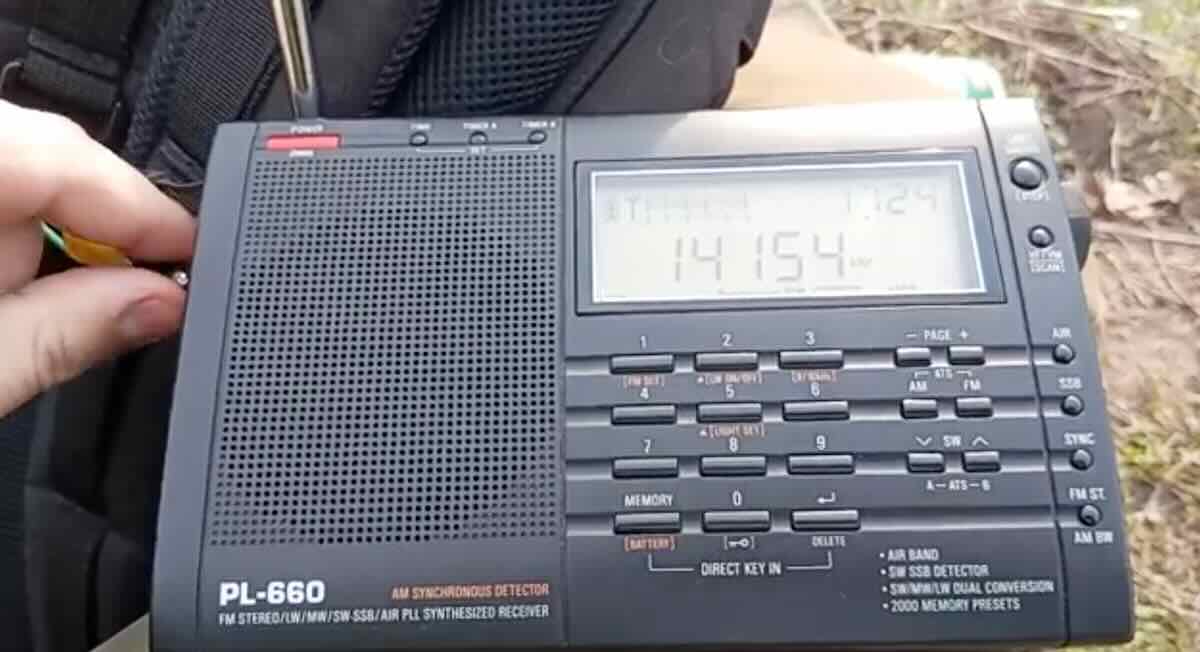
I apologize that the experiment here is not entirely clean, since the “virtual ground” was made at a frequency of 13650 kHz, and the video shows reception at 14154, but I recorded this video spontaneously and did not prepare. But the result still pleased me.

As you can probably see, a male banana plug with a wire is used, and it is recessed into the antenna socket just enough to touch only the “ground” of the receiver, without touching the antenna contact. If you need to avoid electrical interference along the “ground”, for example, near power lines, then you can connect a second similar wire to the same point, stretched in the opposite direction.

There is an important nuance regarding the length of the wire. If it is located close to the ground, then its resonant length will be shorter then ?/4, but approximately ?/5, because the proximity of the ground greatly reduces the resonance. How do I know this? I experimented with resonant dipoles lying on the ground, measuring the resonance with an antenna analyzer directly at the feed point. It is important that the analyzer can measure and display separately active and reactive resistances, I used “Sector-200+”, the closest analogue of FAA-450, design EU1KY. Selecting the lengths by zero reactive resistance (i.e. by resonance), on my soils I got a shoulder length of 4.0 m for a frequency of 14150 kHz and 8.25 m for 7175 kHz, i.e. approximately ?/5. For comparison: a 5 m long wire lying on the ground resonates at about 9.7 MHz, and this is far from where we need it on the 20 m range, for example. Since then, I only use resonant radials on field trips with the GP antenna, but that’s another story. Those who have a similar antenna analyzer can get more accurate values ??for their area and height above the ground.

Thank you so much for sharing this hack with us, Vladimir!

Coupling Three Homebew Antennas for 40-Meter DX

Many thanks to SWLing Post contributor Giuseppe Morlè, who writes:

Dear Thomas and Friends,

I’m Giuseppe Morlè (IZ0GZW) from Formia, in central Italy on the Tyrrhenian Sea.

This time I wanted to experiment by combining three different antennas that interact with one another through induction. In the video, you’ll see the Milk Box Loop, the SW/MW Tablet, and the Wire Coil all working together to capture very faint 40-meter signals from W2V in North Carolina and ZL3CHE in New Zealand.

This experiment is especially promising as we move into the fall season, when nighttime listening on 40 meters becomes even more interesting.

I’ll continue testing with this fun, simple, and free antenna. You can see more in this video:

Thank you all, and happy listening!

—Giuseppe (IZ0GZW)

Thank you so much for sharing another one of your antenna experiments and impressive results, Giuseppe! 

Giuseppe’s Ingenious Recycled Antenna Board for SW & MW Listening

Screenshot

Many thanks to SWLing Post contributor Giuseppe Morlè, who writes:

Dear Thomas,

I’m Giuseppe Morlè, IZ0GZW, from Formia, in central Italy on the Tyrrhenian Sea.

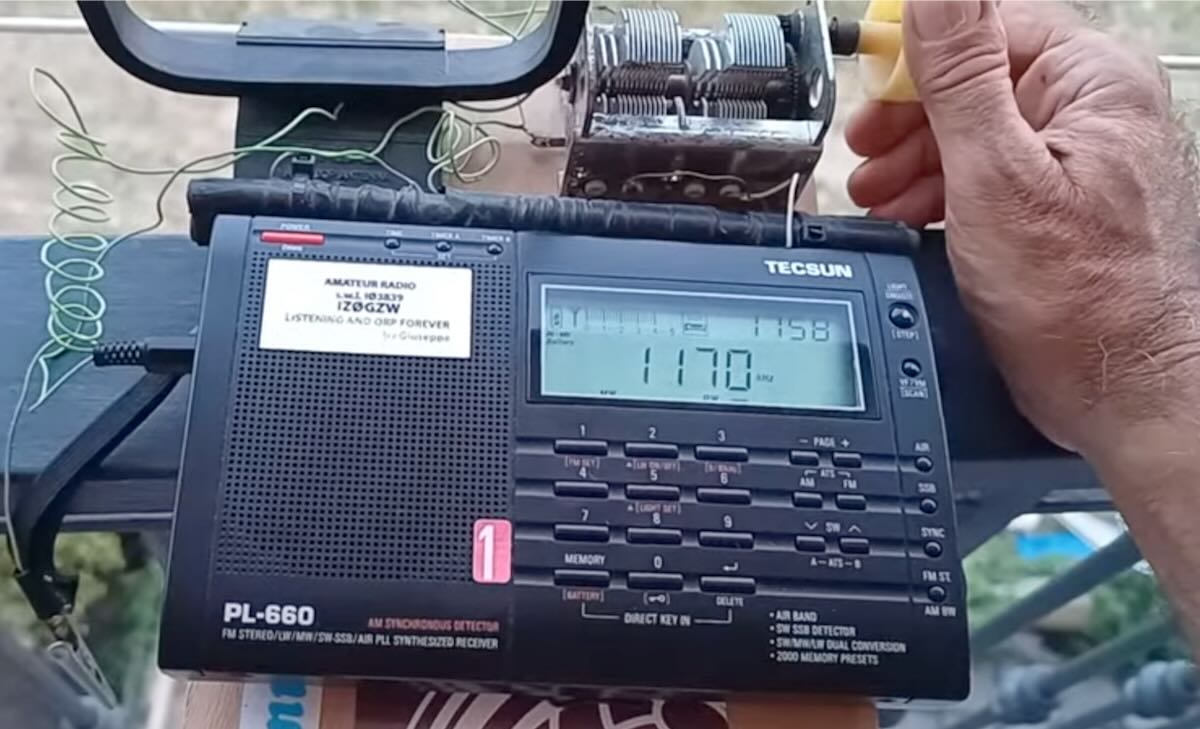
I’d like to show you my antenna board for shortwave and mediumwave listening with portable receivers like the Tecsun PL-660.

The board has two distinct circuits:

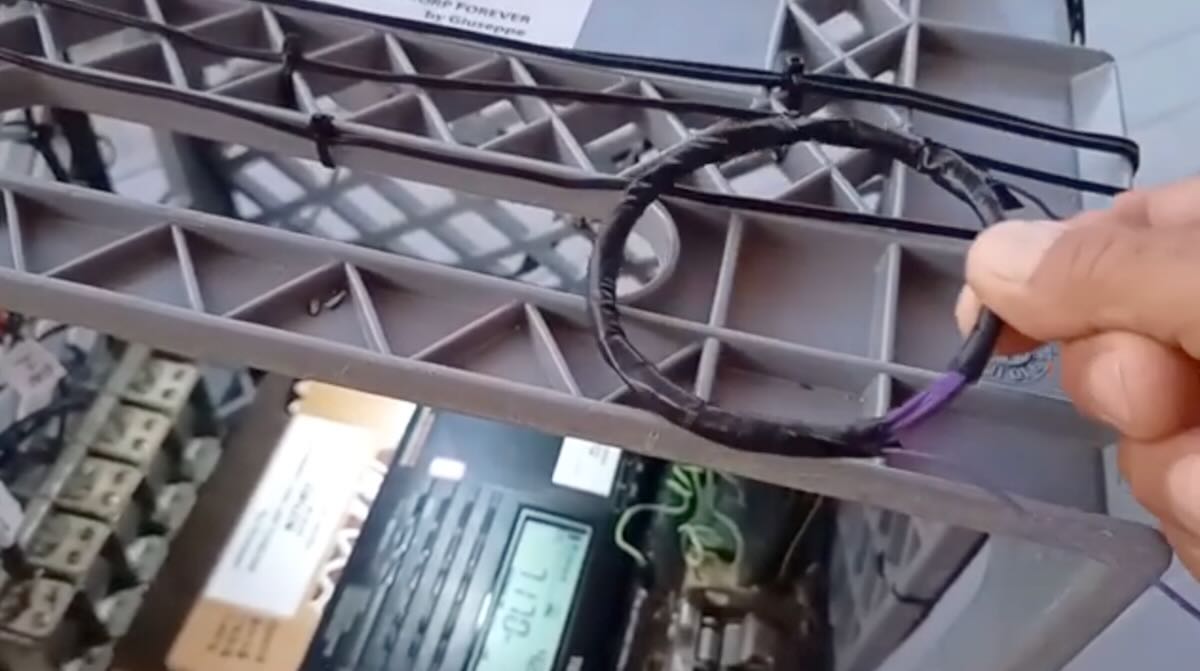
      • A small-diameter loop with two turns for shortwave reception (3.5–18 MHz).
      • Three ferrite rods with 30 turns each, plus a four-turn link coil that carries the signal to the receiver for mediumwave reception.

In the video, you’ll see how the board works on its own, and then how performance improves when I connect a 15-meter wire and throw it over the balcony of my house. In that case, the signal becomes much stronger.

Tuning is done with a 900 pF variable capacitor. To listen to mediumwave, I simply disconnect one side of the shortwave loop. With just that single variable capacitor, I can tune all of the bands.

It’s a surprisingly effective antenna for small portable receivers, and it’s built entirely from recycled materials—at no cost.

I hope you enjoy it. Greetings to all the friends of the SWLing Post.

73, Giuseppe Morlè, IZ0GZW

Click here to view on YouTube.

Many thanks, Giuseppe, for once again sharing your creativity with us. I’m always impressed by the antennas you design and by the performance you achieve—especially considering they’re largely homebrewed from recycled parts. That’s radio at its very best!

[Note that his video is in Italian, but you can turn on subtitles for your preferred language.]

Building an SWL Chimera

By Sam (WN5C)

Picture this: a cool July evening on the northern shores of Lake Huron, the water gently lapping on the beach. Feet being warmed by a smoldering fire with crystal clear skies and the Milky Way brilliantly displayed overhead. Radio in my lap, hastily deployed 20-meter vertical antenna in the sand, and zero RFI. Radio New Zealand coming in strong, and SSB contacts between Scotland and Australia sounding local. I’ve never felt so connected to the electromagnetic spectrum. The radio? Surprisingly, a cheap ATS-20+ from AliExpress.

I’ve been curious about the radios built around the si4732 chip for a while and purchased an ATS-20+ [affiliate link] to throw in my pack to try out. It’s pretty good (and cheap!), especially after flashing the firmware by Goshante. With a long wire it does well on HF (I carry 30 feet with a BNC connector) and even better on my dipole at home or a full-sized vertical. The UI is clunky but after some practice gets better. For my family trip to Michigan and the shore of Lake Huron it was a lot easier to just pull this out to listen versus setting up my transceiver and I’m glad I did, there’s a beautiful simplicity in passively taking in whatever the ether sends my way.

I’m sold on the idea of these cheap general coverage receivers. Sure, they’re not as good as a radio with a real RF front end (gulp), but they’re more than toys. A perfect middle ground for tinkering.

And there are a lot of variations! In past few months one variety, the mini (it’s called many names), caught my attention. I purchased the AMNVOLT V3S version from AliExpress before my Michigan trip, and it was in the mailbox when I arrived home. New versions come out every couple of months but for the project described below it doesn’t matter the version, here’s something similar [affiliate link]. It’s tiny, but it’s not a Belka, and does best with FM and AM broadcast stations on the small whip. The advantage that this little guy has over the ATS-20+ is a much more capable microcontroller (an ESP32 versus an Arduino Nano) and a beautiful 1.9-inch color display. The included firmware is fine, but there is an active development community that makes it better. I’ve been using Max Arnold’s v2.30 firmware. This firmware has lots of features, but some of the standouts include being able to download shortwave schedules to display what you’re listening to and a lot of display customization.

But I wasn’t too impressed with the hardware design for my purposes. My version has a high-impedance RF amp for the whip and would overload with my dipole at home. The audio wobbles when touching the base of the antenna. The speaker is tiny and tinny. And, although the size is super novel I like using big antennas so the scale seems out of whack. Some of these design limitations have been addressed by Peter Neufeld (particularly addressing the wobble). But I decided to pursue a different route.

I stumbled upon a video by ElectroBananas on Youtube where he lays out, in exacting detail, how to create a hybrid of the ATS-20+ and the si4732 mini radio. The wiring isn’t difficult, and he even provides the design for a new front panel to 3D print.

The advantage of combining these radios is that I have the better-designed RF front end of the ATS-20+, the powerful ESP32 microcontroller and the beautiful display of the mini, and the big speaker/audio/battery of the ATS-20+. While I was in there I also added some protection diodes (two back-to-back 2N4148s) to the antenna input. What’s fun is that I added a “bail” using a single mini laptop stand [affiliate] and changed the display to an orange theme. It looks like a miniature version of my Icom IC-703 (and in A-B tests they’re not too far off). It’s the best of both worlds. And it’s still very small, a perfect bedside radio, or one to carry to the beach.

The combination of cheap hardware with open-source software development is creating a very exciting time in radio, and I look forward to see what emerges in the months ahead.

Until then, I wonder if I could fit a low-powered CW transmitter in the case…

Unlocking Rare DX Treasures with SDR-Console’s Powerful Data File Analyzer Tool

Finding Rare DX with the Data File Analyzer

By Don Moore

Don’s DX traveling stories can be found in his book Tales of a Vagabond DXer

I’ve been a real jack-of-all-trades in my over five decades of DXing. I began with SWBC (shortwave broadcast) but soon branched out to medium wave and voice utility. Later I added longwave beacons and more recently I’ve gotten into digital utility stations. My goal has always been to log lots of different stations from lots of different places. And the rarer they are, the better.

For SWBC and medium wave stations, as well as scheduled utility broadcasts such as marine and aeronautical weather reports, the DXing process is simple. You tune to a frequency at a time when a station is scheduled to be on the air. It’s either there or it’s not there. If it’s not there then maybe propagation isn’t right or maybe your antenna/receiver setup isn’t the best for that frequency band or the station’s power level. You tune away to find something else with plans to try again another day.

But it’s not always that easy. Most utility stations do not have fixed schedules and only come on as needed. The best example of that is two-way marine, aeronautical, and military voice communications.

In eastern North America, tune to 8906 kHz anytime from late afternoon until morning and set your receiver to USB mode. You’ll probably hear empty static at first but it’s unlikely that more than ten or fifteen minutes will pass before you’ve heard some aeronautical traffic. The frequency is assigned for communication on the North Atlantic and is heavily used by aircraft communicating with New York Radio, Gander Radio (Newfoundland, Canada), and Shanwick Radio (Shannon, Ireland). If you keep listening, the frequency will probably be occupied around 25% of the time. Wherever you are in the world, there are a few heavily used air frequencies like 8906 kHz and listening to them can be fascinating. But I want to log more than just a few easily heard stations.

Sticking to aeronautical DX, there are many assigned frequencies for different regions and air routes around the world. But propagation to those distant areas is unpredictable and less-used routes have fewer flights. Fewer flights mean less radio communication and more empty static. The most interesting frequencies may only see traffic a few times a week.

Hearing the rarest voice utility DX requires listening to lots of empty static just to get a brief DX catch. For years my process was simple. I would set my receiver to an interesting frequency and leave the tape recorder running while I sat nearby listening and doing something productive. I got some very good DX over the years that way. But I don’t want to think about how many long hours of empty static I listened to in order to get that DX.


SDRs offered some improvement. Instead of audibly monitoring a specific frequency I could now make a spectrum recording that included a band of interest, say the 8815 to 9040 aeronautical band. During playback I could visually monitor the SDR waterfall for interesting signals. That works. But watching an SDR waterfall scroll by for three or four hours gets tedious quickly.

(When I refer to SDRs, I mean ones consisting of a small box that is connected to and controlled from a computer using a software program. None of this applies to models such as the Malachite line or the Icom IC-R8600, which use SDR technology inside but mostly function as a traditional receiver.)

Finding a Better Way

That better way is, I think, one of the most exciting DX tools out there – the Data File Analyzer in the SDR-Console program. Since I learned about it a few years ago, the Analyzer has gotten me all kinds of catches that I probably wouldn’t have gotten otherwise. Let’s start with an overview and then dig into the how-to.

SDR-Console is one of the better-known SDR programs and it works well with most of the common SDR radios on the market, including the Airspy, Elad, Perseus, and SDR-Play models. Here’s what the main window looks like:

The Data File Analyzer is a second window that produces a scrollable waterfall display for the entire length of an SDR spectrum recording. The display is similar to a standard waterfall with frequencies along the bottom and times along the side. However, there is also a scroll bar on the right side for browsing through the entire length of the recording. Instead of watching a four-hour spectrum recording slowly roll by in real time, I can scroll through the window looking for DX.

And this is what makes the Data Analyzer really useful. When I spot an interesting signal, I click on it and that causes the main window to start playing at that time and frequency. Now going through a four-hour spectrum recording takes from a few minutes to around half an hour, depending on how much DX I find.

Here’s a closeup of part of that same screen of spectrum recording made on 24 October 2024 at a DXpedition in western Pennsylvania, USA.

“A” marks a short exchange between an aircraft and Ndjamena Radio in Chad on 8894 kHz. “B” is Niamey Radio in Niger on 8903 kHz. “C” is Gander Radio on 8891 kHz. Just to the left of that is a string of digital signals. “D” is New York Radio on 8918 kHz. Again, there is a string of digital signals just to the left. Finally, “E” is communication from Dakar Radio in Senegal and Sal Radio in the Cape Verde Islands on 8861 kHz. I caught four African aero stations in just four-and-a-half minutes. I could also show you long stretches of time when there was nothing interesting coming in. With the Data File Analyzer I was able to visually find and focus on the DX and not waste my time with the empty static.

Here’s another image taken at the same DXpedition. Notice the three transmissions between 8820 to 8845 that seem to be mirroring one other.

That turned out to be Flightwatch Brisbane, the Australian regional aeronautical network. It uses multiple transmitter sites on 8822, 8831, and 8843 kHz to cover the entire country. I had never logged it before and I doubt I would have found it if DXing in the traditional manner.

The How-To

Here I’m going to assume that you already have SDR-Console installed and know the basics of how to use it, including making spectrum recordings. (If not, see the links at the end.) This article was written using version 3.4 of SDR-Console. Some of the functionalities described are not in earlier versions, so upgrade if you are not up to date. And I should point out that while you can do this on a single monitor, it works more smoothly if you have a dual monitor setup and can put each window on a different screen. Continue reading