Tag Archives: Utility

From Missouri to Oklahoma: Discovering America’s Secure Nets on 5140 kHz

Many thanks to SWLing Post contributor Don Moore–noted author, traveler, and DXer–who shares the following post:
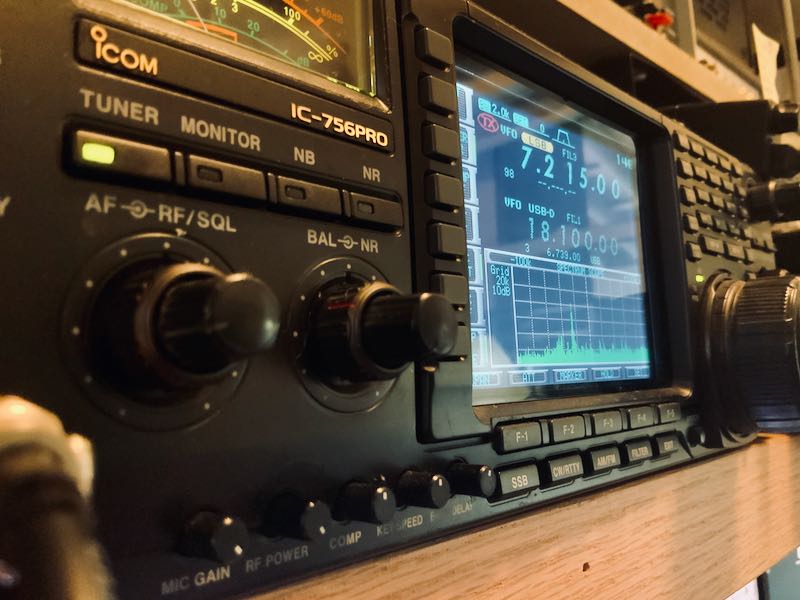

Icom IC-756 Pro Transceiver DialThe Missouri and Oklahoma Secure Nets

By Don Moore

Don’s traveling DX stories can be found in his book Tales of a Vagabond DXer [SWLing Post affiliate link]. If you’ve already read his book and enjoyed it, do Don a favor and leave a review on Amazon.

I’m always looking for new stations to add to my logbook, and the more unusual, the better.  So I was intrigued by a pair of messages in the Utility DXers Forum (https://www.udxf.nl/) email group in mid-August. Steve Handler posted a list of emergency station call signs from the state of Missouri that he found on the web in a 2014 emergency plan document. Then Jack Metcalfe responded that the last time he had checked, in early 2024, they ran a regularly scheduled net on 5140 kHz.

I immediately sent an email to Jack to find out more. He answered that on Wednesdays the Oklahoma State Secure Net had been doing a check-in at 0900 local time and that the Missouri State Secure Net followed at 0930 local time. Both of these started on 5140 kHz and then moved to 7477 kHz.

Going After the Secure Nets

I was spending my summer at an Airbnb in the north suburbs of Chicago. It wasn’t a good place to DX from, but I had already found a good listening site at the Old School Forest Preserve near Libertyville, Illinois. I began a series of regular Wednesday morning listening sessions. I knew that this wasn’t the best time of year for reception on lower frequencies, but I wanted to give it a try.

All I got from the Oklahoma net was a few very weak and unreadable signals. From the Missouri net, I got two loggings of the net control station, WNBE830, and of WQKX373 in St. Charles County. Two other Missouri stations did check in, but they were too weak for me to copy the call signs. They did say that the net is only on the first and third Wednesdays of the month. And there was nothing on 7477 kHz, so they apparently stick to 5140 kHz only now.

Recording of WNBE830 as heard on 5140 kHz at 1430 UTC on 03 September 2025, as heard in Old School Forest Preserve:

In mid-September, I left Chicago to visit my daughter in western Colorado. While I was planning my return drive back east along I-70, I realized that I would be spending the night of Tuesday, October 14, somewhere around Kansas City. And that meant I would be in the area the next morning for the third Wednesday of the month. I made plans for another mini DXpedition.

I found a hotel in the west suburbs and the next morning headed to a picnic shelter in nearby Wyandotte County Park for another remote DX session with my Airspy HF+ Discovery SDRs and PA0RDT mini whip. It was an excellent location. I logged five stations participating in the Oklahoma net. During the initial chitchat before the roll call, it was mentioned that some of the participants were at a conference. I might have gotten more stations if it hadn’t been for that. The Missouri net, on the other hand, did not make an appearance even though it was the third Wednesday.

Recording of roll call in the Oklahoma State Secure Net on 5140 kHz at 1407 UTC on October 15, 2025, as heard in Wyandotte County Park.

How To Log the Secure Nets

I didn’t hear as many new stations as I had hoped, but then I was listening in late summer and early autumn. There had already been several hours of daylight before the net started, which isn’t the best for propagation on the lower shortwave frequencies. The northern hemisphere is moving into winter, and as that happens, sunrise times will move later. And that will allow 5140 kHz to be heard at greater distances during the timeslot these nets are on. If you can hear WWV on 5 MHz in mid-morning in mid-winter at your location, you should have a chance at these.

The nets are on at 0900 and 0930 local (Central) time. When I was tuning in, that was 1400 and 1430 UTC, but when the US goes off of Daylight Savings Time on November 2nd, that changes to 1500 and 1530 UTC. From what one of the Oklahoma stations said, it sounded like the Oklahoma net is on every Wednesday. The Missouri net did say only first and third Wednesdays, but according to Jack Metcalfe, it was weekly some years ago. And for some reason, they weren’t on the third Wednesday of October.

I’m going to be spending the next four months traveling in Southeast Asia, so I won’t be DXing these again until I return to Chicago for a short visit in March. But hopefully some of you reading this in North America will try to hear these networks, too. Given that there is some question as to which Wednesdays these networks take place, I suggest setting up your SDR to make a spectrum recording including 5140 kHz every Wednesday at 1400/1500 UTC for the next few months. And let me know what you hear by dropping me a message to Don AT DonMooreDXer DOT com. If I get enough good information, I’ll put together an update to this article.

And that brings up something else. Do you know of any other regularly scheduled utility voice networks on shortwave like this one? Over twenty years ago, the US Army Corps of Engineers and the Federal Aviation Administration had weekly voice nets, but those are long gone.

Please post what you know in the comments or send me an email to the above address.

Oklahoma Secure Net Stations

On logs going back to 2005, these are the stations that Jack Metcalfe has heard participating in the net.

  • KNBV428 Santa Fe, NM
  • KNFG267 Oklahoma City, OK (normal net control)
  • KNGR728 Rush Springs, OK
  • WGY926 Oklahoma City, OK
  • WNBM839 Stillwater, OK
  • WNCH624 Department of Emergency Management, Tulsa, OK
  • WNPV700 Durant, OK
  • WNUW211 Oklahoma City, OK
  • WNUW212 Department of Emergency Management, Shawnee, OK
  • WNUW213 Department of Emergency Management, Altus, OK
  • WNUW215 Ponca City, OK
  • WNUW216 Oklahoma City, OK
  • WNUW217 Ardmore, OK
  • WPBV938 Beaver, OK (Beaver County EOC)
  • WPFY721, Oklahoma Emergency Management Agency EOC at the National Guard Armory, Seminole, OK
  • WQSY836 Byng, OK

My logs include three more stations either participating in or being unsuccessfully called.

  • WQYW833 Unknown location
  • WQZT582 Broken Arrow
  • WSHM692 Oklahoma City

Missouri Secure Net

Stations Jack Metcalfe has logged.

  • WNBE830 Ike Skelton Training Center, Jefferson City, MO (net control)
  • WNUW240 Missouri EMA, Jefferson City, MO
  • WQKE203 Missouri Dept of Transportation, Jefferson City, MO
  • WQOI753 Missouri Dept of Transportation, Hannibal, MO
  • WQOI754 Missouri Dept of Public Safety, Sikeston, MO
  • WQOJ557 Missouri State Police Radio Shop, Jefferson City, MO
  • WQOL350 Missouri Dept of Public Safety, Chesterfield, MO
  • WQOL459 Missouri Dept of Transportation, Lee’s Summit, MO

I heard one additional station:

  • WQKX373 St. Charles County, MO

Next listed are the stations Steve Handler found listed in the 2014 edition, Appendix 2, Section 2.22 of the 2014 Emergency Operations Plan. This plan was publicly posted by the City of Battlefield at the following URL:

https://core-docs.s3.us-east-1.amazonaws.com/documents/asset/uploaded_file/4319/CBM/3591786/complete_emergency_operations_plan.pdf

  • KNNT320 Boonville, MO
  • KNNT321 Greenwood, MO
  • WNUW238 Battlefieldd, MO
  • WNBE824 Jackson, MO
  • WNBE825 Rock Port, MO
  • WNBE826 Lee’s Summit, MO
  • WNBE827 Macon, MO
  • WNBE828 St. Louis, MO
  • WNBE829 Springfield, MO
  • WNBE830  Jefferson City, MO
  • WNBE831 Poplar Bluff, MO
  • WNBE832 St. Joseph, MO
  • WNBE833 Willow Springs, MO
  • WNBE834 Raytown, MO
  • WNBE835 St. Charles, MO
  • WNBE836 Hillsboro, MO
  • WNBE837 Neosho, MO
  • WNUS448 Union, MO 64084
  • WNWU734 St. Joseph, MO
  • WPCY526 Kansas City, MO
  • WPBN258 Kirkwood, MO
  • WNZJ459   Belton, MO
  • WPES740  Camdenton, MO
  • WPGA369 Fort Leonard Wood, MO
  • WPKX561 Hermann, MO

According to the same document, the net is authorized to use the following frequencies. Under 7477 kHz, there is a note that the station uses 1000 watts during the day and 250 watts at night.

2326, 2411, 2414, 2419, 2439, 2463, 5140, 5192, 7477, 7802, 7805, and 7935 kHz.

A big thanks to Jack Mecalfe for his assistance with this and to Steve Handler for making the initial post that drew my interest. 

Unlocking Rare DX Treasures with SDR-Console’s Powerful Data File Analyzer Tool

Finding Rare DX with the Data File Analyzer

By Don Moore

Don’s DX traveling stories can be found in his book Tales of a Vagabond DXer

I’ve been a real jack-of-all-trades in my over five decades of DXing. I began with SWBC (shortwave broadcast) but soon branched out to medium wave and voice utility. Later I added longwave beacons and more recently I’ve gotten into digital utility stations. My goal has always been to log lots of different stations from lots of different places. And the rarer they are, the better.

For SWBC and medium wave stations, as well as scheduled utility broadcasts such as marine and aeronautical weather reports, the DXing process is simple. You tune to a frequency at a time when a station is scheduled to be on the air. It’s either there or it’s not there. If it’s not there then maybe propagation isn’t right or maybe your antenna/receiver setup isn’t the best for that frequency band or the station’s power level. You tune away to find something else with plans to try again another day.

But it’s not always that easy. Most utility stations do not have fixed schedules and only come on as needed. The best example of that is two-way marine, aeronautical, and military voice communications.

In eastern North America, tune to 8906 kHz anytime from late afternoon until morning and set your receiver to USB mode. You’ll probably hear empty static at first but it’s unlikely that more than ten or fifteen minutes will pass before you’ve heard some aeronautical traffic. The frequency is assigned for communication on the North Atlantic and is heavily used by aircraft communicating with New York Radio, Gander Radio (Newfoundland, Canada), and Shanwick Radio (Shannon, Ireland). If you keep listening, the frequency will probably be occupied around 25% of the time. Wherever you are in the world, there are a few heavily used air frequencies like 8906 kHz and listening to them can be fascinating. But I want to log more than just a few easily heard stations.

Sticking to aeronautical DX, there are many assigned frequencies for different regions and air routes around the world. But propagation to those distant areas is unpredictable and less-used routes have fewer flights. Fewer flights mean less radio communication and more empty static. The most interesting frequencies may only see traffic a few times a week.

Hearing the rarest voice utility DX requires listening to lots of empty static just to get a brief DX catch. For years my process was simple. I would set my receiver to an interesting frequency and leave the tape recorder running while I sat nearby listening and doing something productive. I got some very good DX over the years that way. But I don’t want to think about how many long hours of empty static I listened to in order to get that DX.


SDRs offered some improvement. Instead of audibly monitoring a specific frequency I could now make a spectrum recording that included a band of interest, say the 8815 to 9040 aeronautical band. During playback I could visually monitor the SDR waterfall for interesting signals. That works. But watching an SDR waterfall scroll by for three or four hours gets tedious quickly.

(When I refer to SDRs, I mean ones consisting of a small box that is connected to and controlled from a computer using a software program. None of this applies to models such as the Malachite line or the Icom IC-R8600, which use SDR technology inside but mostly function as a traditional receiver.)

Finding a Better Way

That better way is, I think, one of the most exciting DX tools out there – the Data File Analyzer in the SDR-Console program. Since I learned about it a few years ago, the Analyzer has gotten me all kinds of catches that I probably wouldn’t have gotten otherwise. Let’s start with an overview and then dig into the how-to.

SDR-Console is one of the better-known SDR programs and it works well with most of the common SDR radios on the market, including the Airspy, Elad, Perseus, and SDR-Play models. Here’s what the main window looks like:

The Data File Analyzer is a second window that produces a scrollable waterfall display for the entire length of an SDR spectrum recording. The display is similar to a standard waterfall with frequencies along the bottom and times along the side. However, there is also a scroll bar on the right side for browsing through the entire length of the recording. Instead of watching a four-hour spectrum recording slowly roll by in real time, I can scroll through the window looking for DX.

And this is what makes the Data Analyzer really useful. When I spot an interesting signal, I click on it and that causes the main window to start playing at that time and frequency. Now going through a four-hour spectrum recording takes from a few minutes to around half an hour, depending on how much DX I find.

Here’s a closeup of part of that same screen of spectrum recording made on 24 October 2024 at a DXpedition in western Pennsylvania, USA.

“A” marks a short exchange between an aircraft and Ndjamena Radio in Chad on 8894 kHz. “B” is Niamey Radio in Niger on 8903 kHz. “C” is Gander Radio on 8891 kHz. Just to the left of that is a string of digital signals. “D” is New York Radio on 8918 kHz. Again, there is a string of digital signals just to the left. Finally, “E” is communication from Dakar Radio in Senegal and Sal Radio in the Cape Verde Islands on 8861 kHz. I caught four African aero stations in just four-and-a-half minutes. I could also show you long stretches of time when there was nothing interesting coming in. With the Data File Analyzer I was able to visually find and focus on the DX and not waste my time with the empty static.

Here’s another image taken at the same DXpedition. Notice the three transmissions between 8820 to 8845 that seem to be mirroring one other.

That turned out to be Flightwatch Brisbane, the Australian regional aeronautical network. It uses multiple transmitter sites on 8822, 8831, and 8843 kHz to cover the entire country. I had never logged it before and I doubt I would have found it if DXing in the traditional manner.

The How-To

Here I’m going to assume that you already have SDR-Console installed and know the basics of how to use it, including making spectrum recordings. (If not, see the links at the end.) This article was written using version 3.4 of SDR-Console. Some of the functionalities described are not in earlier versions, so upgrade if you are not up to date. And I should point out that while you can do this on a single monitor, it works more smoothly if you have a dual monitor setup and can put each window on a different screen. Continue reading

Rediscovering the Golden Age of Utility DXing

Many thanks to SWLing Post contributor, Dan Greenall, who writes:

Hi Thomas

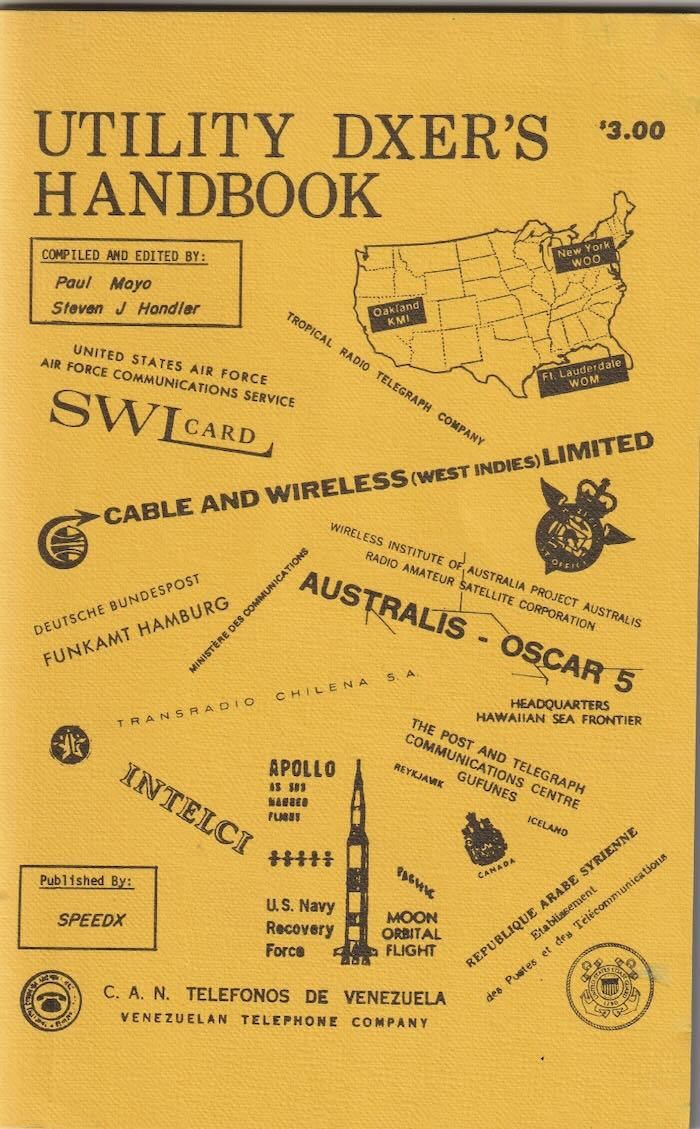
Back in the 1970’s, I used to enjoy hunting for “utility” radio stations outside the regular SWBC bands. When I came across a copy of the Utility DXer’s Handbook from 1971 recently on eBay, I couldn’t resist purchasing it. I have since made a page on archive.org for it to help preserve this unique piece of radio history. Anyone interested can follow this link and take a look at the world of utility radio as it was over 50 years ago.

Also, I have included links to some of the recordings and QSL’s from these stations that I have set up on the Internet Archive.

Wow, Dan! What a utility DXing treasure trove you’ve created on Archive.org. Thank you for sharing these resources and recordings with us!

Patrizio seeks information about mystery signals he’s discovering across the HF bands

Many thanks to SWLing Post contributor, Patrizio Cardelli, who has discovered some interesting signals on the HF bands and is seeking information about them.

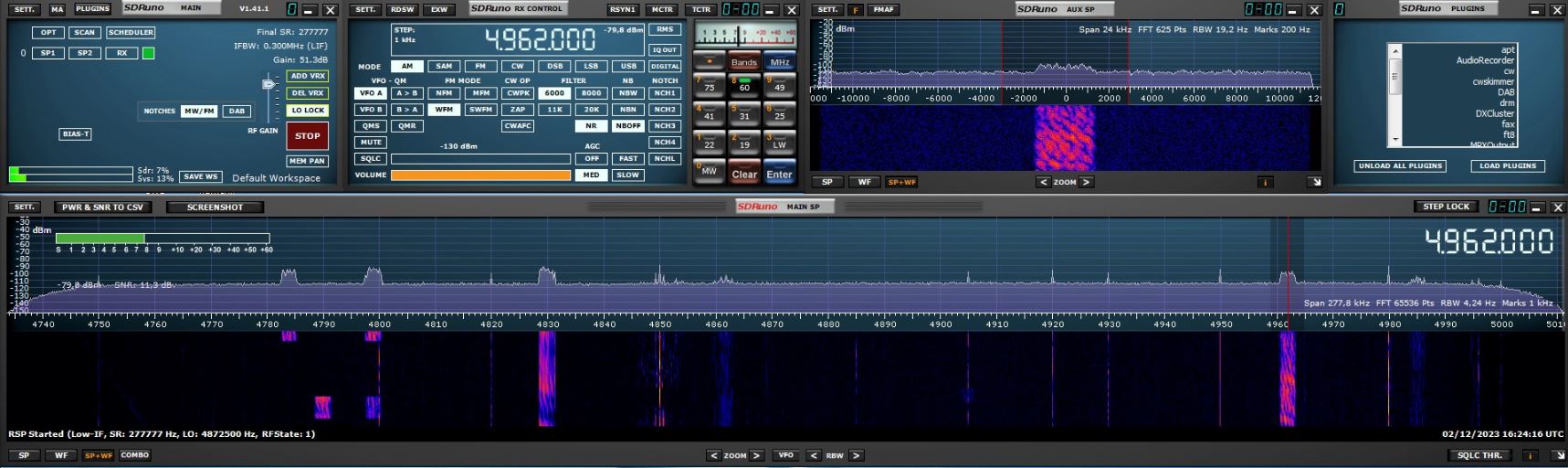
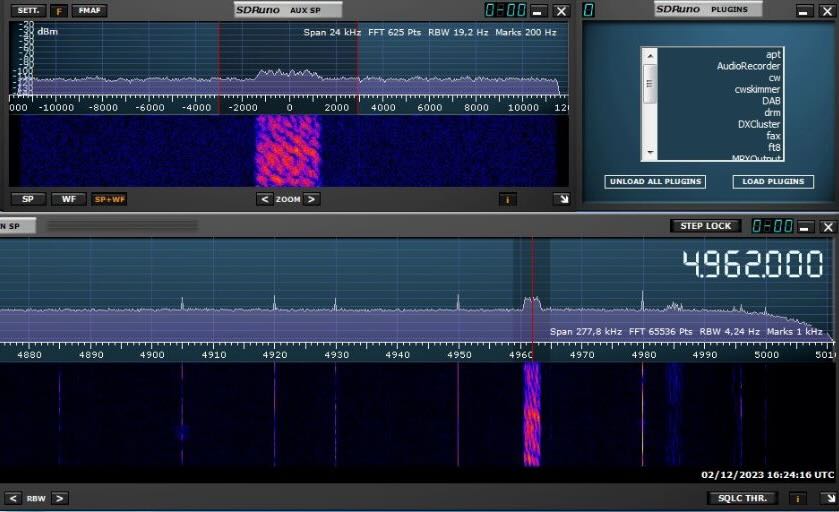
A little background: Patrizio asked me about these signals a few weeks ago and based on a quick glance at the spectrum and waterfall images I assumed it was DRM (Digital Radio Mondiale). I was wrong, of course. Had I looked at the actual frequency and bandwidth, I would have immediately realized is was not DRM. My email load has been so heavy as of late, and my time to reply at such a premium, I rushed through the reply–my apologies, Patrizio!

Patrizio followed up with this message:

Hello Thomas,

I hope this message finds you well. I wanted to share my recent radio exploration based on your advice. I followed your suggestion and investigated a sample signal within the 60-meter band, specifically settling on the one at 4.962 kHz.

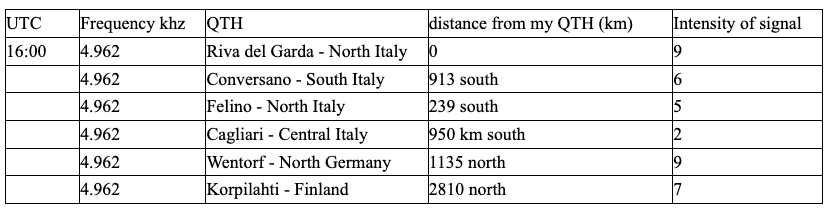
I attempted to decode it using the Dream software but encountered no success. It seems this isn’t a Digital Radio Mondiale (DRM) transmission. To rule out local QRM (interference), I tested various Kiwi SDR receivers across Europe, both to the south and north of my QTH. Interestingly, I managed to pick up this signal everywhere, with a stronger intensity noted in the northern locations.

I’m eager to publish this article to find out if other Shortwave Listeners (SWL) have been able to decode this transmission. Additionally, I’d like to mention that similar signals, either continuous or intermittent, are present on various HF frequencies.

I look forward to any insights or experiences others in the community might have regarding this intriguing signal.

Audio sample:

While I recognize these signals now, and I’m sure most of you who cruise the bands have seen/heard these as well, Patrizio is a relatively new SWL, turns out, and I thought it might be fun exploring just what these signals are. 

Readers: If you know what these signals are, please comment. Indeed, I’m sure there are a number of SWLing Post readers who have hands-on time with generating these signals as well in a past life or current career. Let’s explore!

Guest Post: Monitoring Digital Selective Calling (DCS) with YADD

Many thanks to SWLing Post contributor, Don Moore–noted author, traveler, and DXer–for the following guest post:


Photo by Borderpolar Photographer

Monitoring DSC with YADD

By Don Moore

(The following article was originally published in the April/May 2022 edition of the Great Lakes Monitor, bulletin of the Michigan Association of Radio Enthusiasts. An all-band listening club, MARE publishes a bi-monthly print bulletin and a weekly e-mail loggings tip-sheet. The club also holds regular get-togethers, picnics, and DXpeditions, generally in southeastern Michigan.)

There are dozens if not hundreds of different digital modes used for communication on the MF and HF bands. These aren’t broadcasts you want to listen to unless you like to hear weird tones, beeps, warbles, and grinding noises interspersed with static. Digital modes are for monitoring, not listening. And monitoring them requires having software that does the listening for you and converts the noises into something meaningful – like the ID of the station you’re tuned to. The learning curve to DXing digital utilities can be steep. There are lots of modes to identify and the software can be complicated to learn. Some broadcasts are encrypted so you can’t decode them no matter how hard you try. But the reward is lots of new stations and even new countries that you wouldn’t be able to add to your logbook otherwise.

One of the easiest digital modes to DX is DSC, or Digital Selective Calling. DSC is a defined as “a standard for transmitting pre-defined digital messages.” Look online if you want to understand the technical specifications that specify the values, placement, and spacing of the tones. The result of those specifications is a string of three-digit numbers like this:

125 107 125 106 120 105 120 104 000 120 022 120 041 000 002 022 020 041 108 002 053 020 080 108 006 053 021 080 070 006 118 021 126 070 126 118 126 126 126 126 126 126 126 126 126 126 117 126 112 126 117 117 117 112 109 125 108 125

Each three-digit value represents either a digit or a key word and the positions of the values map to the various fields contained in the message. This message, which was received on 8414.5 kHz, is a test call from the tanker Brook Trout to the coastal station Coruña Radio in Spain. The sender and destination are not identified by name but rather by their nine-digit MMSI (Maritime Mobile Service Identity) numbers – 538006217 for the vessel and 002241022 for the coastal station.

GETTING STARTED WITH DSC

Logging DSC stations requires three pieces of software. First you need a decoder program that turns the noises into numbers and the numbers into meaning. There are several free and commercial options but the most popular one for beginners is YADD – Yet Another DSC Decoder. YADD is free and easy to set up and while YADD can be used by feeding the audio from a traditional radio into your computer, the most common use is with an SDR. That’s what I use and what I will describe here.

Second you need an SDR application and an SDR. I prefer HDSDR for most of my SDR use but I like SDR-Console for digital work. But any SDR program will work if you can feed the audio to a virtual audio cable. And that’s the final thing you need – a virtual audio cable to create a direct audio connection between your SDR application and YADD. There are several different ones available but I recommend VB-Cable. Your first VB-Cable is free and that is all you need to run a single instance of YADD. If you want to expand you can buy up to four more cables from them later. Continue reading

Guest Post: Why listen to shortwave radio?

Many thanks to SWLing Post contributor, Jock Elliott, who shares the following guest post:


Why listen to shortwave radio?

By Jock Elliott, KB2GOM

Decades ago, an entrepreneur challenged his audience with a concept of critical importance: “Every once in a vhile, it is important to ask ourselves vhy are we in business?” He had a waaay cool Austrian accent, and his point was valid: every once in a while, we should examine our fundamentals.

So why, indeed, listen to shortwave radio?

For me, the short answer is: because there are treasures out there on the shortwave spectrum, that’s why. Further, with a relatively inexpensive shortwave receiver (even better if you have a receiver with single-sideband – SSB – capability), you hear them too. You can discover things that you are unlikely to find anywhere else, and not only are they fun to hear, they are also fun to find.

So let me present for your approval a shortwave journey that I took on October 24, 2021.

1115Z – It all starts when I am flipping through my old shortwave reference materials, and a copy of a page from Popular Communications magazine, April, 1986, catches my eye: “Handy Ute Finder by Hubble Gardiner, KNE0JX.” Utes are utility stations (as opposed to hams or international broadcasters), like ships at sea, planes in the air, and fixed commercial and military stations, and the like. The article presented places to look in the HF radio spectrum between 4000 kHz and 26960 kHz, for utility stations transmitting in SSB, CW, and RTTY/ARQ modes. Is this chart still valid? I don’t know, but since I enjoy hearing people doing their jobs on the air, why not start tuning from 4000 kHz in upper sideband and see what I can hear? Freeing the Tecsun PL-880 from its case, I extend the antenna, press the power button, punch in 4000 kHz, and start turning the dial. And while my initial impulse was to discover some “utes,” I am open to whatever comes through the headphones.

1128Z, 4426 kHz USB – a ute, super loud and clear, a weather forecast from the US Coast Guard Communications Command, including a forecast of tropical weather from the National Hurricane Center. If I were a mariner, I would be pleased to hear this forecast.

Duties call, and my cruise of the bands is interrupted, to be continued later in the day . . .

2130Z, 7490 kHz AM, — highly unusual music that sounds like a mash-up between 1930s movie music and oompah bands. It’s odd but pleasant and certainly not anything you are going to hear on the “regular” broadcast stations. Turns out it is a program called Marion’s Attic on WBCQ from Monticello, Maine. Two females, Marion (with a high squeaky voice) and Christine, play recordings from yesteryear (including wax cylinders, I think). Evidently, this program has been on the air for 22 years, and it made me smile.

2150Z, 8950 kHz USB, — a ute, European weather conditions for aviators from Shannon VOLMET, Ireland, very difficult to hear on the PL880’s whip antenna, but fully copyable on my Satellit 800 with wire antenna. How cool to hear weather from all the way across the pond!

2206Z, 9350 kHz AM, (back on the PL880) — USA Radio News on WWCR, then Owen Shroyer and a Dr. Bartlett discussing the problem of a hospital in Texas apparently putting plastic bags on the heads of covid patients. Unusual, I think, but I had heard enough about the virus of late and continue to rotate the tuning knob.

2215Z, 9395 kHz AM, — My ears are tickled by cool jazz, a very together group, laying it down with style. “This is cool jazz, jazz from the left coast,” the announcer intones as he cues up another group. It’s WRMI, transmitting from Okeechobee. Hearing it, I flashed back to “The Hawthorn Den, Jazz after Midnight” Saturday nights, listening under the covers when I was a kid.

2226Z, 9830 kHz, Voice of Turkey, in English — A professor presents an analysis of the United Nations, which he thinks needs to be reformed due to the shifting of the axes of power. This is followed by exotic music with nice female singer.

2239Z, 9955 kHz,WRMI, — Glen Hauser hosts The World of Radio, detailing the status of various shortwave stations around the world. Fascinating stuff and well worth the time.

2257Z, 10051 kHz USB, — a ute, weather for aviators again, but this time from Gander, Newfoundland. Makes me glad to be in a nice warm house.

So that’s what a little over an hour of turning the knob yielded, and that’s why to listen to shortwave radio: because you never know what you may encounter. Who knows what you might discover with a shortwave radio and a little wandering around?

Remember what Gandalf said: “Not all who wander are lost.

CPRM Lisboa: Another mystery signal solved

In response to our latest mystery utility signal challenge, SWLing Post contributor, Dean Bianco replies:

This is the musical marker for CPRM Lisboa, a radiotelephone terminal that provided overseas telephone and telegraph communications in the days prior to satellites.

I remembered the non-broadcast HF frequencies being loaded to bursting with many of these radio services. When not scrambled for privacy, one could hear a telephone call in progress. Instead of a musical IS such as this one, most were loop tape voice ID’s in several languages (almost always including English). So naturally these musical loops made it quite difficult to know what exactly one was hearing, to say the least!

To verify check out the following embedded audio file made by Willi Passmann  (via the excellent UtilityRadio.com website):

Once again, thanks to Dean Bianco for solving yet another mystery! Obviously, Dean is a Black Belt SWL and DXer!

FYI: I’ve received a number of emails from readers who really enjoy these mystery signals. Since we all seem to have more time at home these days, I’ll plan to keep them coming!


Do you enjoy the SWLing Post?

Please consider supporting us via Patreon or our Coffee Fund!

Your support makes articles like this one possible. Thank you!