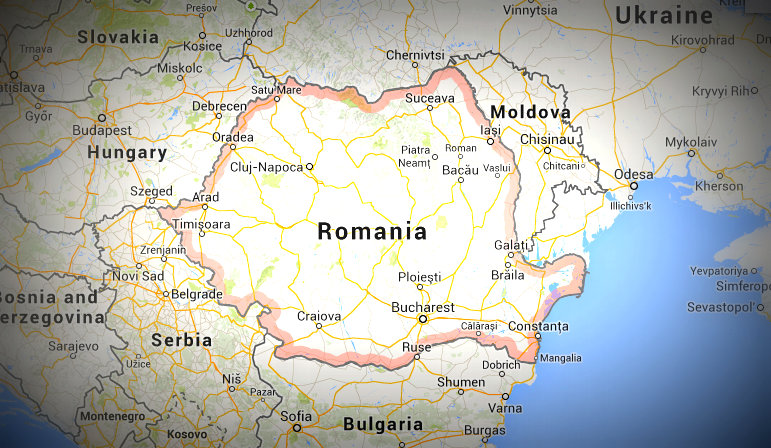
 Many thanks to SWLing Post contributor, David Iurescia (LW4DAF), for sharing the following additional update from Radio Romania International:
Dear friends,
As of October 25th 2015 RRI broadcasts on new SW frequencies. Please check them out:
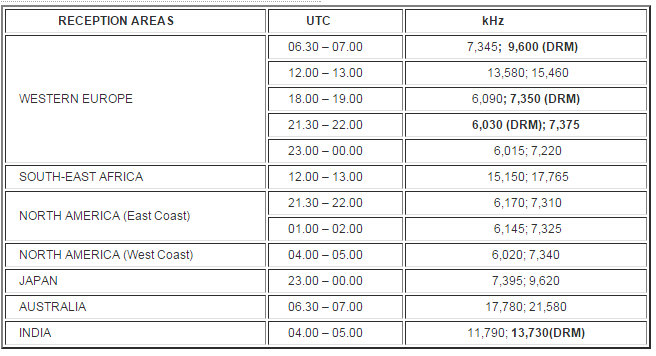

Many thanks to SWLing Post contributor, David Iurescia (LW4DAF), for sharing the following additional update from Radio Romania International:
Dear friends,
As of October 25th 2015 RRI broadcasts on new SW frequencies. Please check them out:
SWLing Post sponsor, Bob Raymond (NE1I) at DXtreme, writes:
I’m pleased to announce that the latest version of our logging software for radio and TV monitoring enthusiasts is now available:
Please find the full product announcement below:
DXtreme Reception Log X (Version 10.0)
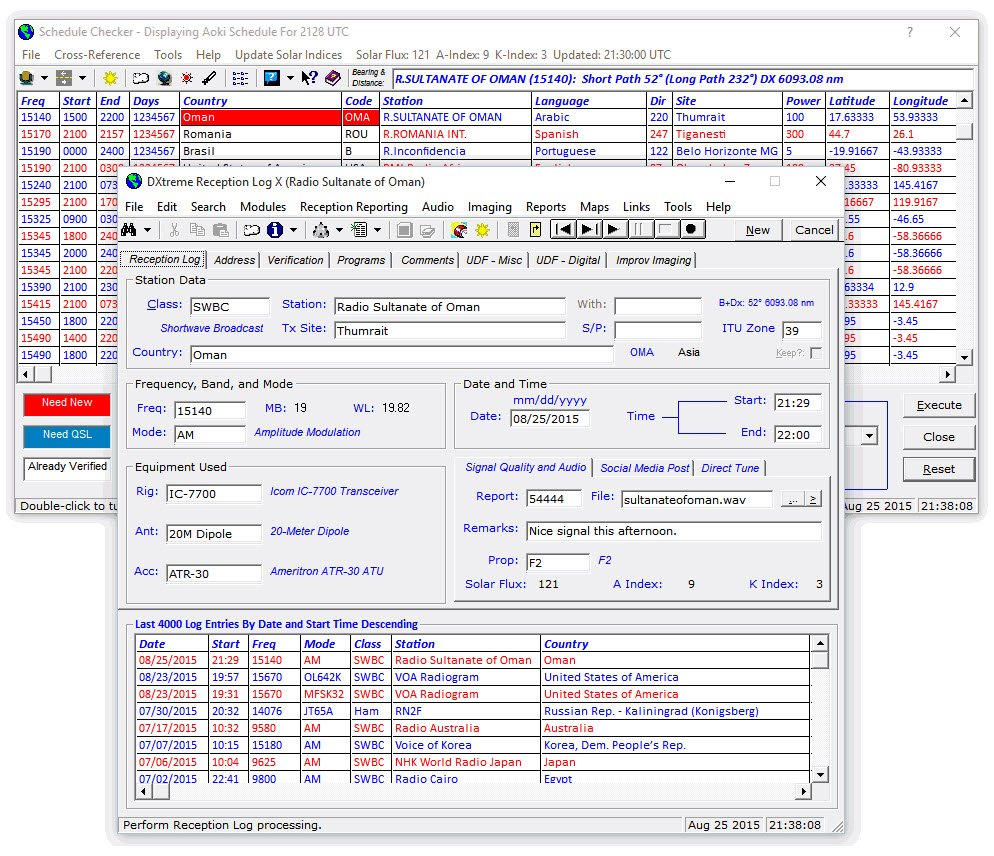
DXtreme Software™ has released a new version of its popular logging program for radio monitoring enthusiasts: DXtreme Reception Log X™ (Version 10.0).
Like other logging programs, DXtreme Reception Log X lets listeners and DXers log the stations they’ve heard. But unlike other logging programs, Reception Log X provides advanced features that can add a new dimension to logging activities.
New Features in Version 10.0
Advanced Features
For each schedule item, Schedule Checker queries the Reception Log X database to let users know – by means of user-defined, foreground and background display colors – whether they need to monitor a station for a brand- new or verified country. Schedule Checker also displays bearing and distance, runs Ham CAP propagation predictions and DX Atlas azimuth plots2, tunes supported radios to schedule frequencies when double-clicking schedule items3, and starts log entries for scheduled stations.
Operating Systems, Pricing, Contact Information
DXtreme Reception Log X runs in 32- and 64-bit versions of Microsoft Windows® 10, 8.1, 8, 7, Vista®, and XP. It retails for $89.95 USD worldwide for electronic distribution. Pricing for CD versions and upgrading users is available on our Web site. All prices include product support by Internet e-mail. For more information, visit www.dxtreme.com or contact Bob Raymond at [email protected].
Bob, thanks for sharing your product announcement and thank you for sponsoring the SLWing Post!
Click here to visit DXtreme or here to download the PDF of this product announcement.
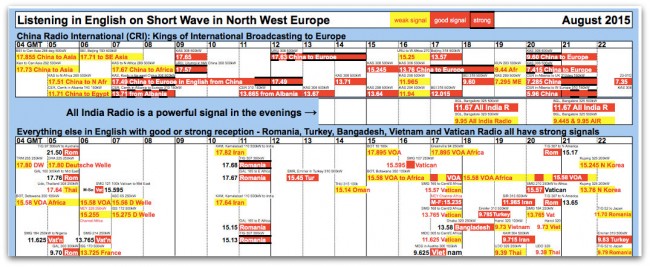
SWLing Post reader, Alex, has just informed me that he’s updated his printer-friendly shortwave frequency charts for the winter broadcasting season.
Note that Alex creates his charts based on listening to broadcasters rather than importing schedules from other sources.
You can download the free charts on his website:
Shortwavetimes.com
Many thanks, Alex!
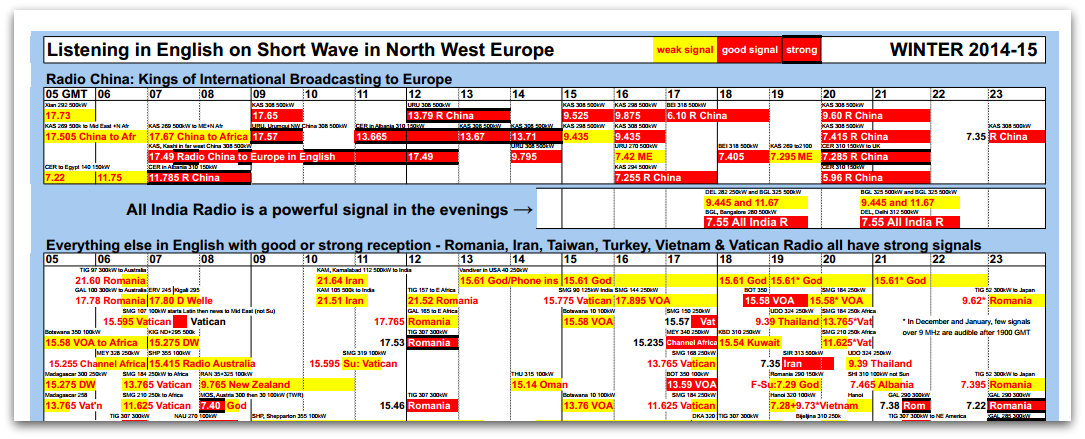 SWLing Post reader, Alex, has just informed me that he’s updated his printer-friendly shortwave frequency charts for the winter broadcasting season.
Note that Alex creates his charts based on listening to broadcasters rather than importing schedules from other sources.
You can download the free charts on his website:
Shortwavetimes.com
Many thanks, Alex!
 Peter De Groot writes:
A series of special Radio Netherlands broadcasts will begin on January 17th and 18th, 2015. Presenters will be John van den Steen, Jerry Cowan and Tim Thomasson. See frequencies and times below:
- 0100 to 0200 UTC on 7,570 kHz
- 0100 to 0200 UTC on 11,790 and perhaps 13700
Peter sent no more information than this, so I’m not sure where the transmissions will originate. Since RNW is no longer on the air, I’m certain these broadcasts aren’t coming from Hilversum.
Hopefully, someone will attempt to record these broadcasts in case I’m not in the broadcast footprint. Would like to add this to the SW Radio Audio Archive.
 Many thanks to Swedish DXer and SWLing Post reader, Lennart Weirell, who writes:
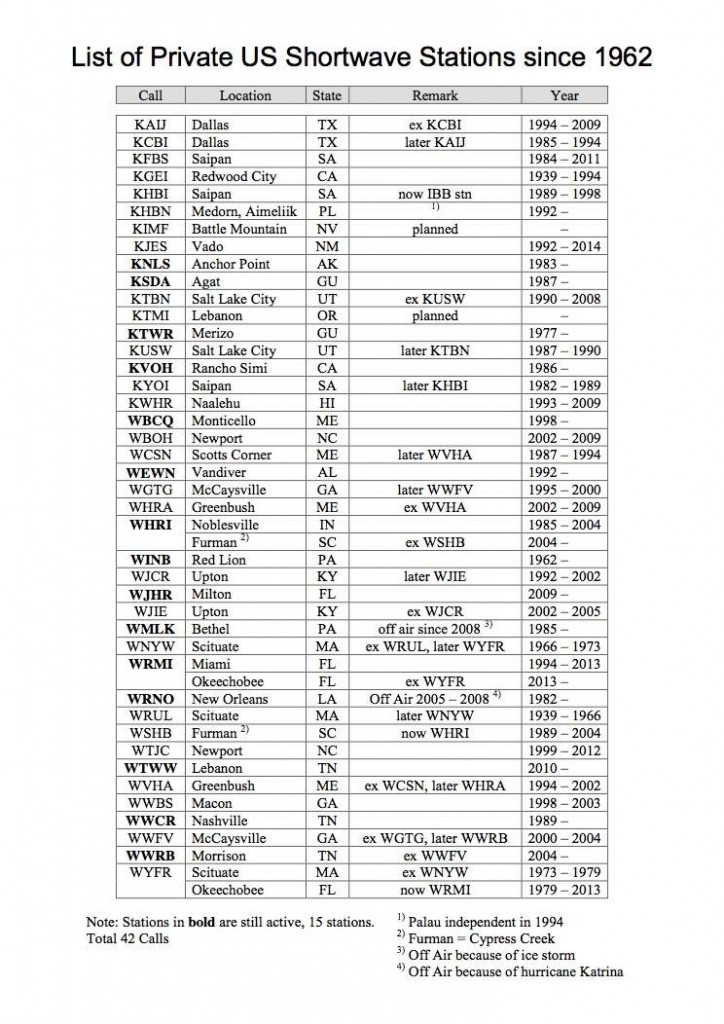
“Late last year I compiled a list of private shortwave stations in USA from 1962 and a graph over the stations from 1982, when the increase of stations started after the FCC had lifted the ban to issue licenses for private radio stations in 1973. I also consulted Glenn Hauser during the process. I myself have 35 out of the 42 different calls verified.
This list was first presented in the Swedish bulletin, Shortwave Bulletin (SWB), in November last year and I thought that maybe it could be of interest for the readers of SWLing Post.”
Lennart has kindly shared a printable PDF of the private broadcaster list (click here to download). I have also pasted an image of the list below, for quick reference.
Again, many thanks, Lennart!
Yesterday, John Figliozzi (editor of The Worldwide Listening Guide) followed Radio Australia schedule changes as he heard them online and over the air:
“Listening in now (1415 GMT/UTC) on 12065 kHz. and via the internet, the scheduled program (up to now) “Late Night Live” is missing with alternative rock music from Triple J taking its place at this time. On the RA web page, there is a notice stating:
“Schedule update
We are in the process of updating our radio schedule. We’re introducing some new shows and some existing ones have moved to new time slots. Please stay tuned, we’ll be publishing the full new schedule soon.”LNL is a Radio National-sourced program, so I gather this means it’s either being moved to a new time slot or (hopefully not) dropped altogether. No doubt a bit of confusion wrought by the thoroughly precipitous manner in which the ABC has had to adjust to the government budget cut that prompted that all this, a budget cut the Coalition had claimed prior to its election that it was in no way contemplating.”
Three hours later:
“At this point, it appears that Radio Australia shortwave frequencies and online is just relaying Triple J Unearthed, one of the ABC’s all digital networks, that plays new Australian music 24/7 with occasional IDs but no DJ commentary.
Then four hours later:
“A more normalized schedule appears back in place as “Pacific Beat” was heard via the RA internet stream from just past 1900 until 2100 GMT. This is the two hour morning edition of the program which carried a very nice tribute to the “retiring” Sean Dorney, the ABC’s and RA’s Pacific correspondent, after 40 years with the organization. There was a reminder at the end of the program for listeners to tune into the afternoon edition of the program later in the day, which if memory serves is a shortened compilation of some of the morning content. Perhaps the earlier relay of Triple J Unearthed is just a temporary placeholder or is intended as overnight programming (Australian time)?
Listening now (2100) via shortwave. 17860 putting in a steady listenable signal peaking at S8 albeit with the usual local late afternoon QRN. “ABC News for Radio Australia” followed by “AM”, morning news program at 2110.”
Be sure to check out John Figliozzi’s book, The Worldwide Listening Guide online–click here for my most recent review.
Thanks for sharing this, John!