Many thanks to SWLing Post contributor Nick Hall-Patch, who has kindly provided a translation of this article from the Japanese-language publication PROPAGATION by the Totsuka DXers Circle (TDXC). In this piece, Kazu Gosui introduces WavViewDX, an impressive SDR file playback and analysis tool developed by Reinhard Weiß of Germany.
About WavViewDX, SDR File Playback Software
by Kazu Gosui
Introduction
“WavViewDX,” developed by Reinhard Weiß of Germany, is SDR file playback software. It maps the received signals from SDR-recorded files into bar graphs, with time on the vertical axis and frequency (channel) on the horizontal axis, for each of the following channel separations: medium wave (9/10 kHz), short wave (5 kHz), and FM (50/100 kHz). Clicking the cursor (blue crosshair) plays the received audio. By “visualizing the received signal” through mapping (see also the separate article by Satoshi Miyauchi), you can see at a glance the start and end times of broadcasts, fade in, fade out, channels you should listen to, and channels you don’t need to listen to.
Basic Usage and Screen Description
First, download and install WavViewDX from the WavViewDX webpage (https://rweiss.de/dxer/tools.html). The latest version is version was 1544 as of June 8, 2025, when this was written, but version 1662 is available in October 2025. When you launch WavViewDX, the Main Window (Figure 1) will appear, showing Analysis View, the Operation/Settings Panel, Logbook and Database.
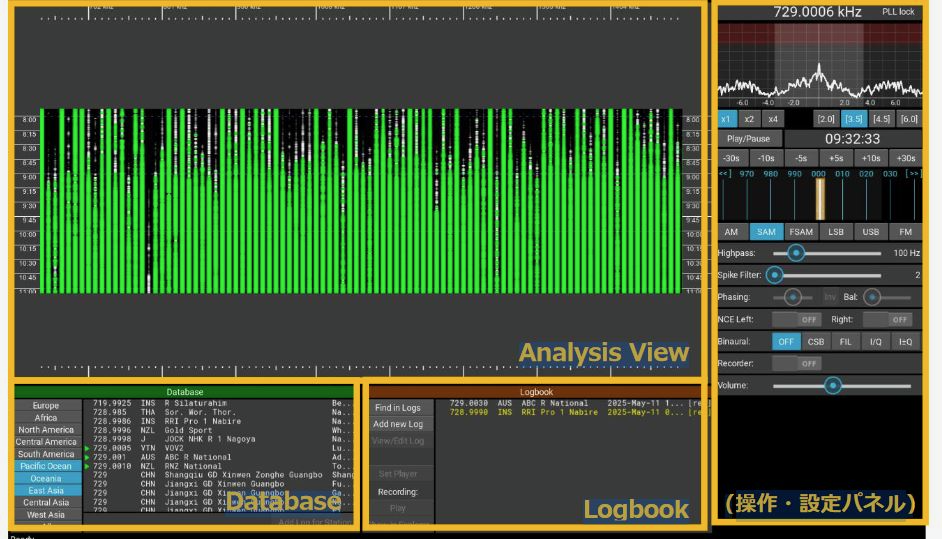
Figure 1
To play back recorded files, you must import them. Click Import to display the Import SDR Recording settings screen. Source files can be selected as single or multiple files, or by folder. Set the reception location, time, channel separation, etc., and begin importing. A progress percentage will appear, and green and white bar graphs will appear on the Analysis View screen. Hovering the cursor over a bar graph and clicking will display a red circle, and the audio recorded for that channel and time will play. Scrolling the mouse will allow you to zoom in and out of the Analysis View.
When you import, a WVD format file is created. Once you’ve imported the files, you can simply load the corresponding WVD file at another time, and the files will be available to play immediately.
In addition to Import and Load, the following settings are available at the top of the Main Window.
- Analysis: Allows you to select the file/folder and frequency separation when importing.
- Carrier Views: Displays offset frequencies to identify and estimate the received medium wave station.
- Database: Links with the MWLIST webpage (https://www.mwlist.org/ul_login.php) to identify and estimate the received medium wave station.
- Logbook: For documenting stations heard, along with creation of audio recordings during playback.
- More: Allows you to set multiple options, such as manual tuning and contrast setting.
- Setup: Allows you to set the sound device and select the file format for recording audio clips during playback.
- About: Allows you to select the software version, Help, etc.
The Main Window also displays the frequency list linked to the aforementioned Database and the Logbook. The database frequency list can be selected by region, such as Europe or East Asia. The Logbook allows you to record reception records and associate recorded audio files.
The right side of the Main Window contains the operation and settings panel. At the top are the Frequency Display and Spectrum View. Hovering the cursor over Spectrum View allows you to select PBT (Pass Band Tuning) and NOTCH.
Below these are:
- Spectrum Zoom (x1, x2, x4), which expands the spectrum;
- Bandpass Bandwidth Presets ([2.5] etc.), which change the reception bandwidth;
- Player Time Controls (Play/Pause; -30s etc.), which control the playback time;
- Carrier View, which displays the offset frequency; (+/- 30Hz, and can be shifted above and below the nominal .000 frequency)
- Demodulator Modes, which change the reception mode.
(Keyboard shortcuts are available for the above functions.)
- The AF Highpass Filter adjusts the audio frequency passband to improve intelligibility.
- The Spike Filter reduces popping during reception.
- Phasing combines two synchronized recording files to reduce same-frequency interference and noise.
- NCE (Neighbor Channel Eliminator) reduces interference from adjacent channels.
- Binaural allows you to select the sideband of the AF output during playback.
- The AF Audio Recorder allows you to record by clicking during playback. Recording formats include WAV, FLAC, and MP3.
As you can see, there are so many features it’s impossible to introduce them all. Detailed adjustments to each function make it even easier to use; it may seem tedious at first, but give the features a try. The user interface is intuitive, so you’ll quickly get used to it. If you’re unsure how to use something, just press the F1 key and refer to the Help.
Actual Usage
Let’s try it out. The import settings are set to MW 9+10kHz Channel Analysis Configuration. Configuration, and other settings are set to default. (editor’s note: “SDR Calibration” allows the use of reference carrier frequencies in the data, for those SDRs without a frequency standard, so that each carrier frequency in the passband will be displayed accurately.) Once the import is complete, a bar graph will appear. Figures 2 and 3 show the analysis view of the actual file import from early May 2025, during the Hachijojima DXpedition showing evening reception; time is UTC.
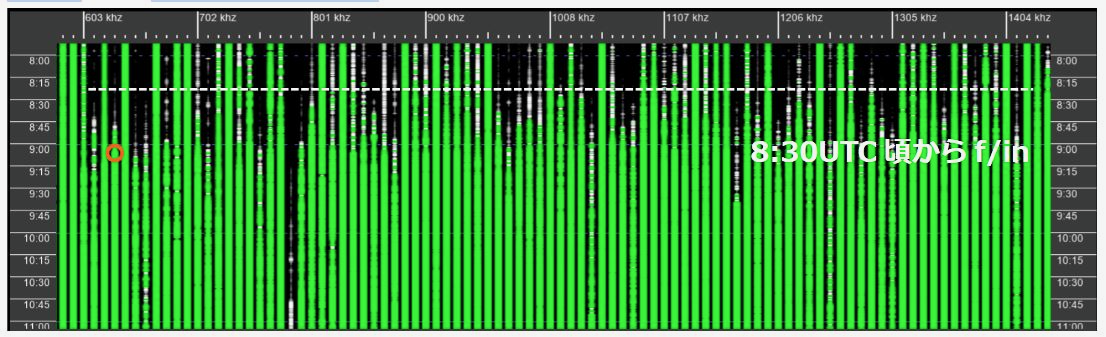
Figure 2
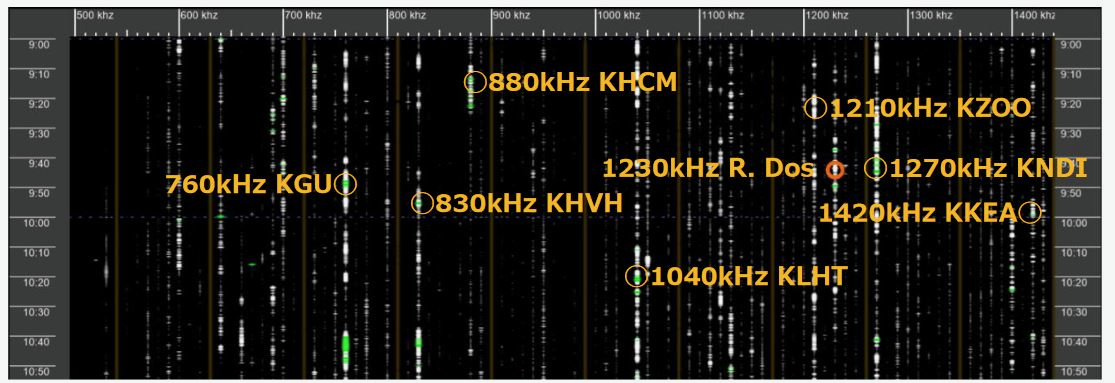
Figure 3
9kHz separation is used in Figure 2. You can hear the audio from 630kHz at the time indicated by a circle. Black areas of the bar graph indicate no signal, while white to green indicates good signal reception. If you miss an ID during reception, press the up arrow key to rewind the time by 5 seconds and listen again. Click Recording to record the ID.
As you can see, the bar graph color changes from black to white and then white to green over time. This indicates that as the day turns from daytime to evening and then nighttime, channels that previously had no reception begin to receive broadcasts. Sunset on this day was 9:29 UTC (18:29 JST), and the received signal fade in was between 8:30 UTC (17:30 JST) and 9:15 UTC (18:15 JST).
Next, click Analysis and switch to MW 10kHz channel analysis. The Analysis View after switching is shown in Figure 3. This shows the reception status with 10kHz separation. Most channels are black, with a few white spots. There is very little green. In this image, there are certainly no 10kHz channels with good audio, but by clicking on the white, we can see some with faint English talk and music. I checked the database and found that these channels appear to be Hawaiian stations (see orange circle marks in Figure 3) that have been active since around 8:30 UTC.
Also, Latin music was heard on 1230 kHz (Orange circle in Figure 3). This may be Radio Dos from Argentina. By visualizing reception status like this, I was able to determine where to listen and where not to listen. During the Hachijojima expedition in May, I was blessed with outstanding reception conditions from the evening through the early morning hours of the following day, and was able to track 187 overseas medium wave stations, including 165 in Australia, 5 in New Zealand, 2 in Papua New Guinea, Solomon Islands, Tonga, Marshall Islands, Kiribati, Palau, Fiji, Tuvalu, Indonesia, and the Philippines, achieving significant results. Playback and analysis took about a week, which was shorter than usual, thanks to WavViewDX.
Summary
As mentioned above, WavViewDX has proven to be an efficient tool for analysis, allowing users to discover previously unnoticed stations. Since it can play files recorded with various SDRs, we hope that many DXers will use it. WavViewDX is compatible with multiple PC operating systems, including Windows, Linux, and macOS, and is freeware. According to Reinhard Weiß, additional features and enhancements are planned for the future, so we look forward to seeing its future developments. Finally, we would like to express our gratitude and respect to Reinhard Weiß for developing such useful and excellent software.
Reference Materials
- WavViewDX Homepage https://rweiss.de/dxer/tools.html
- Radio-Kurier – weltweit hören https://www.radio-kurier.de/
Table 1. Supported IQ Formats
| ELAD FDM-SW2 | Generic RAW recordings |
| GQRX recordings | HDSDR |
| Jaguar | Linrad RAW, single and dual-channel |
| recordings | PERSEUS (*.wav) |
| PERSEUS P22 (*.P22) | SDR# |
| SDR Console | SDR Uno |
| SDRconnect | SpectraVue |
| WiNRADiO DDC | WiNRADiO RXW (only for G33) |
| Winrad |
Trying WavViewDX on FM
WavViewDX is primarily geared toward medium wave DX, but it seems like it can be used for FM DX as well. The image in Figure 4 shows reception from 79-87MHz using an RSPdx-R2 and an indoor YouTwin antenna. It supports stereo and has good audio quality. With an outdoor antenna, it could also be used for FM DX, such as with sporadic E and other short-lived propagation enhancements.
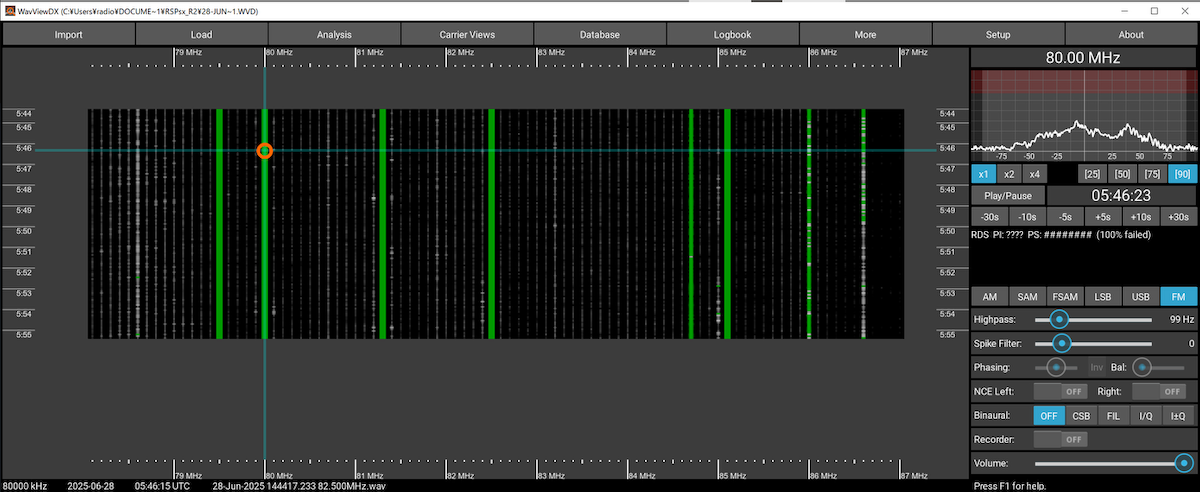
Figure 4
These English translations were prepared for IRCA’s DX Monitor, and are used with the kind permission of IRCA as well as of the authors and the editor of the Totsuka DXers Circle publication, PROPAGATION.