Tag Archives: SDR

More about hacking VGA cables to make binocular ferrite cores

A few days ago, we posted an a short article showing how Oscar hacked a VGA cable to make a binocular ferrite core for his homebrew NCPL/Youloop antenna. Many thanks to SWLing Post contributor, Grayhat, who explored this clever hack a little further:

Hi Thomas, Having some time in my hands Sunday afternoon I decided to try pulling out the ferrite chokes from a VGA cable I had around, and while doing so, I decided to coarsely document the process with some pics.

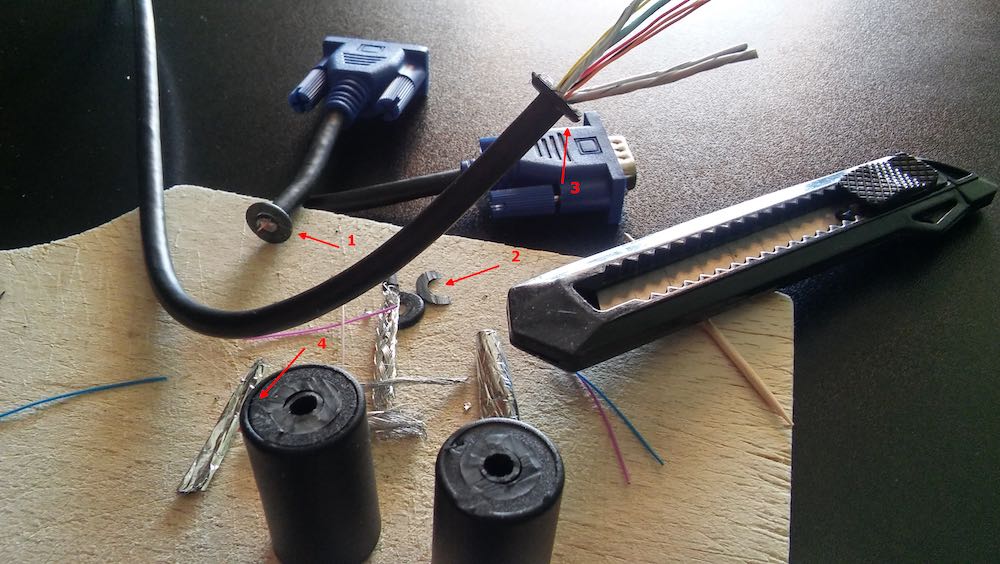
Figure 1

The first thing to do is use a cutter to carefully cut around the “washer” shaped plastic at the connector end of the choke (fig.1, #1,#2, #3 above), then on the same side, after cutting the plastic also cut the inner conductors (fig.1, #1).

Move to the other side of the choke, gently cut around the “washer” w/o cutting the inner conductors, now pull the cable to extract it from the choke (fig.1, #3), repeat the process for the other choke.

Now look at the “cans” containing the chokes, one side of those will show a “cap” (fig.1, #4), insert a small screwdriver into the center hole and gently ply to one side to raise the cap and extract it (fig.2, #1).

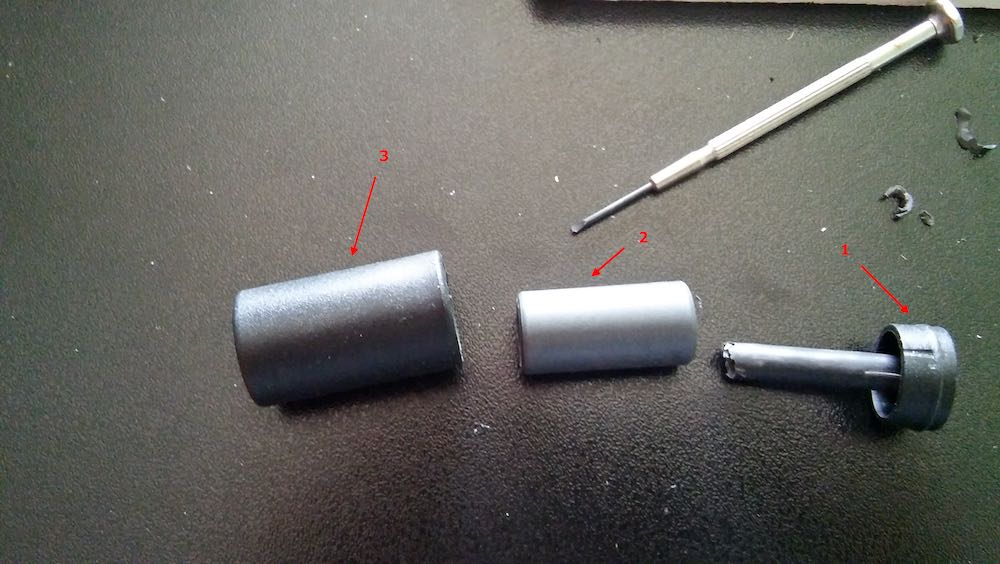
Figure 2

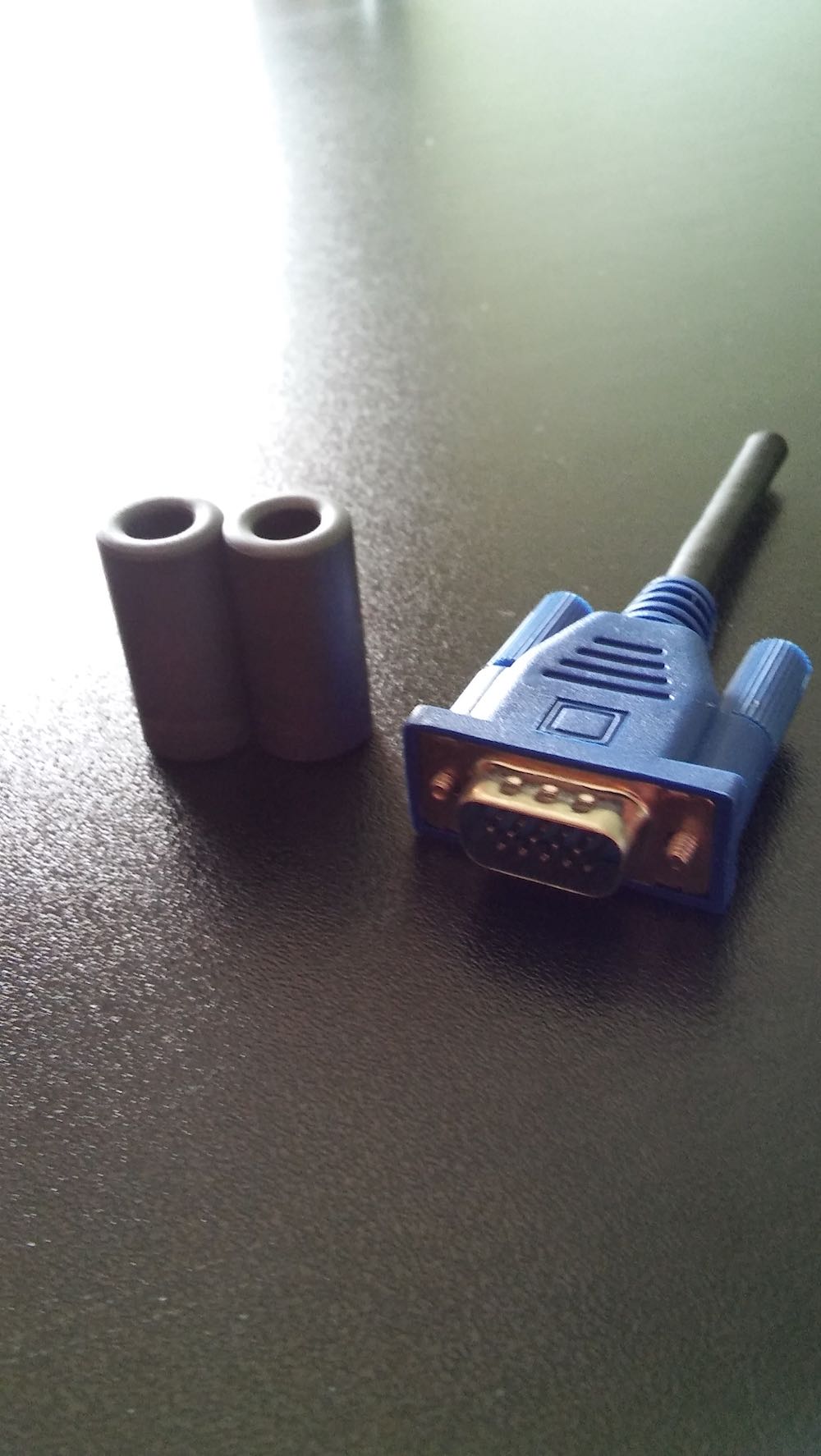
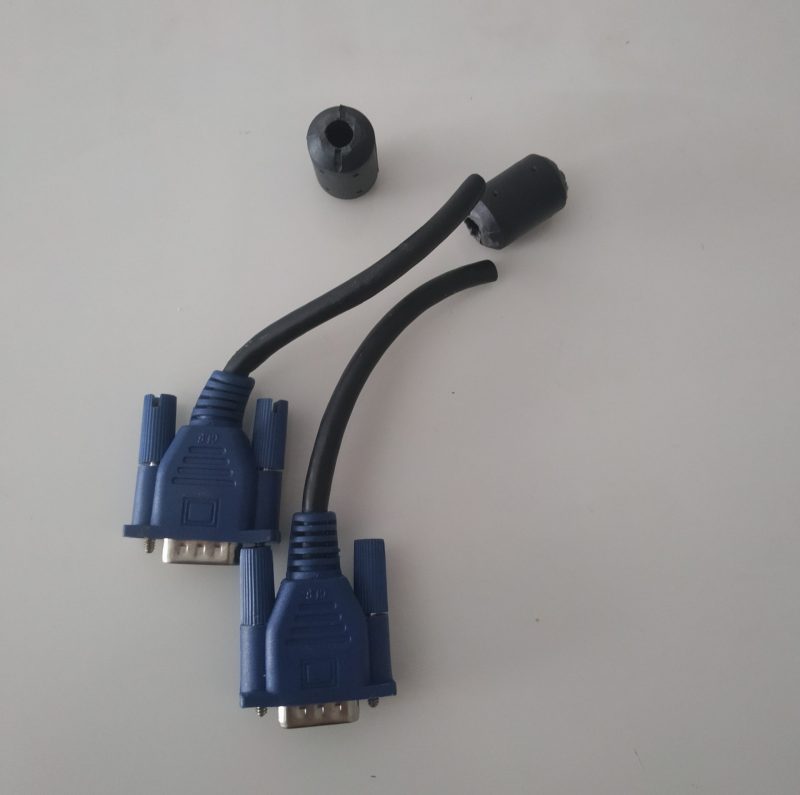
The result will be as in fig.2, where #1 is the closing cap, #2 is the ferrite choke and #3 is the “can” containing the choke. Repeat the process and you’ll have two ferrite chokes as shown in fig.3 (the VGA connector is there to give an idea of the dimensions):

Figure 3

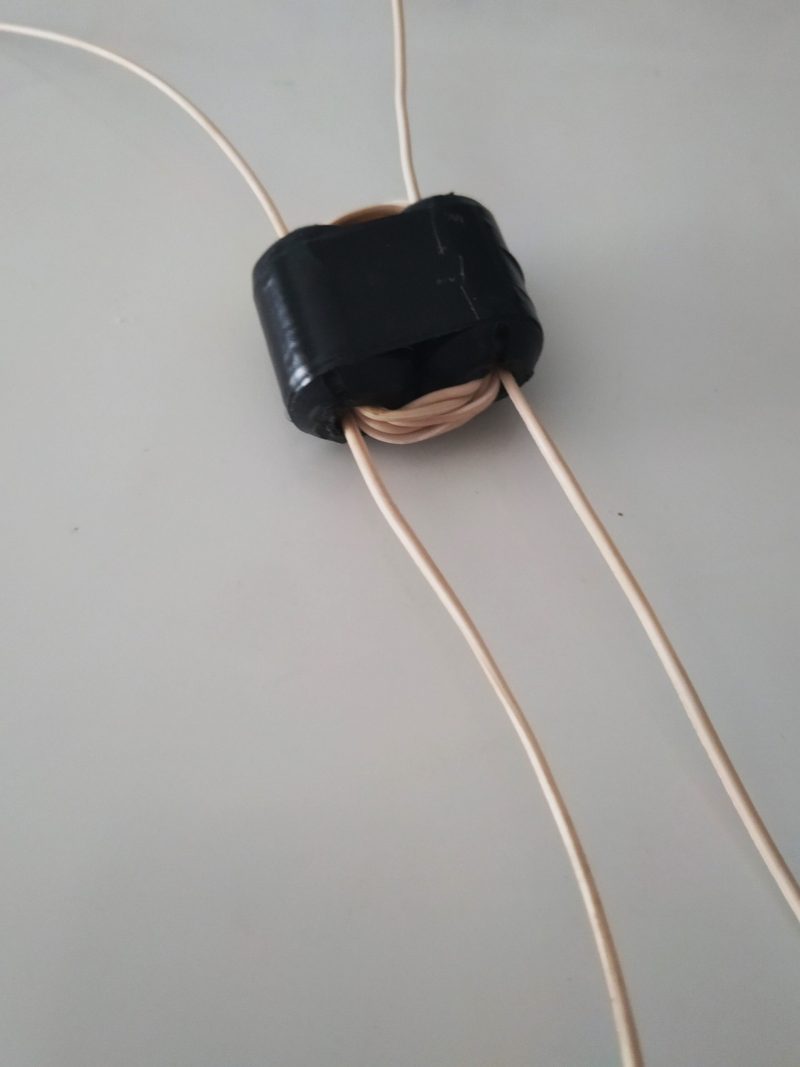
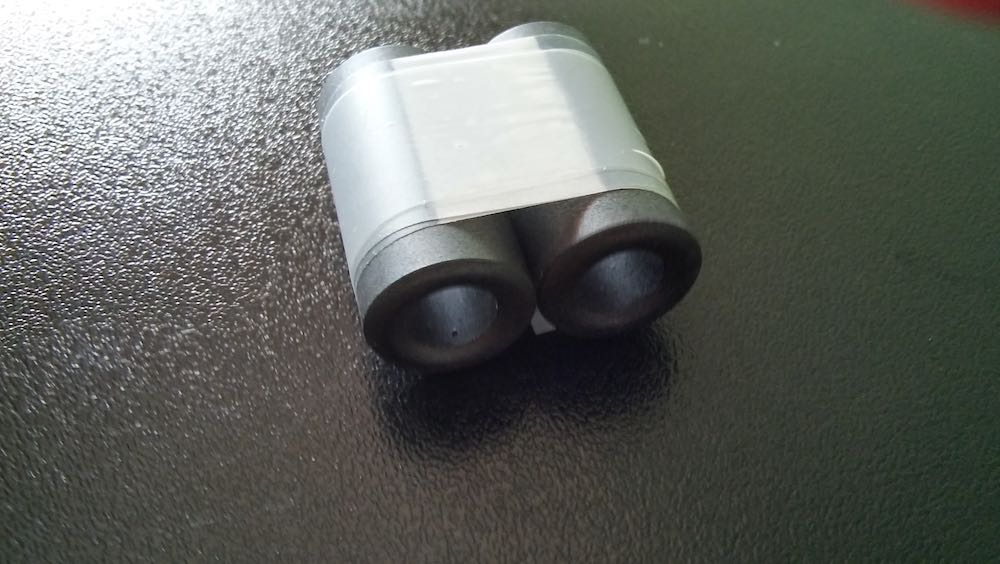
At this point, use some tape (duct tape will be a better idea, I used clear tape just to make an example) to tie the two ferrites together as in fig.4 and you’ll have your “binocular ferrite”:

Figure 4

Willing to use whatever you have there to wind the transformer, you may now extract the tiny insulated wires from the VGA cable (fig.1, #3, see wires) and use them for the windings.

Notice that other cables may use different choke “cans” which may need to cut a larger portion around the flat faces at the ends. But remember that in any case, those are just “snap-in” cans containing the ferrites, so with a bit of attention and patience, it shouldn’t be difficult extracting the ferrites.

Based on a little online research, it sounds like the ferrites used to choke the VGA cables (HDMI ones too) are generally type #31.

Looking at some #31 datasheets it appears that while #73 is works fine at frequencies below 50MHz, the #31 is best suited for the 1-300MHz range.

This means that #31 won’t be the best pick for mediumwave, although if one doesn’t have another choice… well, go for that! Also notice that the ferrite permeability is different:1500 for #31 and 2500 for #73. This means that we’ll need to increase the number of windings to achieve acceptable signal transfer, otherwise the transformer loss will make our antenna deaf.

One might try increasing the number of windings to say 8:8 or 16:16; as long as the winding
ratio will remain the same, there won’t be problems (although the resulting bandwidth will become narrower).

Thanks for documenting and sharing this, Grayhat! Since most of us have more time on our hands at home, I think it would be worth experimenting with the number of windings to see how it affects the antenna performance. That’s a clever thought, too, to use the VGA wires to wind the Balun. As long as the cable is long enough for the amount of turns, it’s certainly the most efficient use of resources!

Radio Waves: Libre Space Foundation Reviews SDRs, ARRL VEC Statement, Pandemic Pastime, and Former CEO of RadioShack Now C-19 ER doctor

Radio Waves:  Stories Making Waves in the World of Radio

Because I keep my ear to the waves, as well as receive many tips from others who do the same, I find myself privy to radio-related stories that might interest SWLing Post readers.  To that end: Welcome to the SWLing Post’s Radio Waves, a collection of links to interesting stories making waves in the world of radio. Enjoy!

Many thanks to SWLing Post contributors Ron, Paul, Marco Zennaro, and Richard Langley for the following tips:


The Libre Space Foundation reviews software defined radios (Hackaday)

If you want to go to the next level with software defined radio (SDR), there are a lot of choices. The RTL-SDR dongles are fine, but if you get serious you’ll probably want something else. How do you choose? Well, your friends at the European Space Agency Libre Space Foundation have published a paper comparing many common options. True, they are mostly looking at how the receivers work with CubeSats, but it is still a good comparison.

The devices they examine are:

  • RTS-SDR v3
  • Airspy Mini
  • SDRPlay RSPduo
  • LimeSDR Mini
  • BladeRF 2.0 Micro
  • Ettus USRP B210
  • Pluto SDR

They looked at several bands of interest, but not the HF bands — not surprising considering that some of the devices can’t even operate on HF. They did examine VHF, UHF, L band, S band, and C band performance. Some of the SDRs have transmit capabilities, and for those devices, they tested the transmit function as well as receive.

The review isn’t just subjective. They calculate noise figures and dynamic range, along with other technical parameters. They also include GNURadio flowgraphs for their test setups, which would be a great place to start if you wanted to do these kinds of measurements yourself.[]

ARRL VEC Issues Statement on Video-Supervised Online Exam Sessions (ARRL News)

Very few ARRL Volunteer Examiner teams have successfully conducted in-person exam sessions (following social distancing guidelines) and video-supervised exam sessions using fillable PDF exams and documents. So far, we have found that both types of sessions take volunteer teams two to three times longer to conduct and accommodate fewer candidates than sessions conducted prior to the COVID-19 pandemic. So far, the video sessions have included only one examinee per session.

We ask the community to be patient with our volunteer teams as they navigate uncharted territory. Please remember with the introduction of significant new processes such as these, that there should be proof of concept, establishment of protocols and procedures, and beta testing before expanding to a larger audience. Video-supervised exam sessions require a different skillset than in-person exam administration. Not all teams will be equipped to deliver video exams right away.

The ARRL Volunteer Examiner Coordinator (VEC) has been investigating options for an online examination system.

Fillable PDFs are cumbersome within a video-supervised exam session process. We recognize that online testing would represent a large-scale solution for our thousands of VEs and would make session procedures easier for our teams, but this will not happen overnight.

The ARRL VEC will continue to adapt and respond to the evolving crisis as we search for viable and easy-to-use online examination system solutions and conduct exam sessions in innovative ways.[]

Pandemic Pastime – Shortwave Radio (KFGO)

Ever since I was a little kid, I was fascinated that at night you could listen to radio stations from all over the country. My little Heathkit radio, which I built myself, could pick up stations in Minneapolis, Chicago, St. Louis, Denver, Little Rock, Pittsburgh to name a few. West coast stations were rare because it was tough getting a signal over the Rocky Mountains.

Then there was shortwave radio. A buddy of mine had one and he showed me a list of all the countries he was picking up. England, France, Germany, Latin American countries, numerous stations on the shortwave bands in America. Even Radio Havana coming out of Cuba. Anything from religion to hard edge rock and roll. He also noted he picked up Radio Free Europe and the Voice of America.

Well years later I would stop by my local Radio Shack and decided it was my turn to take up this hobby of monitoring shortwave radio. This particular radio also had a built in cassette player so you could record your found stations as well. It was really interesting to hear the news from other countries and get their take on what was happening in America.

One of the first frequencies I tuned in was WWV a shortwave radio station out of Fort Collins Colorado, that broadcasts the time via the atomic clock. The seconds tick off until the top of the hour when you hear a voice announce the time, followed by a tone that hits the top of the minute exactly on the nose. Great way to set the clock.

Now I know you can probably find all these shortwave stations on the internet, but what fun is that right?

With the covid-19 pandemic, this is a little something different than binge watching television, or building that 10th jigsaw puzzle or cleaning out that closet again and again.

Have a chair on the patio, a glass of your favorite beverage, extend the antenna, and start turning up and down the dial and see what you can find. I had a little notebook that I kept track of my searches. Don’t have it now though…lost it.

I’ll start a new one.

Stay safe everyone![]

Former CEO of RadioShack now an ER doctor (National Post)

‘I am just one of those people who was very fortunate, where things worked out, and where I could do not just do one thing I really enjoyed in life, but two’

Brian Levy loved science as a kid. He had a microscope, read up on stuff in the encyclopedia and messed around with home experiment kits. During his high school years, he took every science credit possible. By his own admission, he was a “geek,” one with an equally strong passion, alongside science, for electronics.

Levy knew how to operate a shortwave radio. Weekend teenage heaven, in his mind, was hanging around the local RadioShack store, a warehouse of gizmos where he scored his first part-time job in 1974, earning US$1.40 an hour at a shop in downtown Atlanta. He was 15, which, alas, was too young to be working for the company, according to the folks at corporate headquarters in Texas, who fired him upon receiving his paperwork.

The dismissal didn’t sit well with Levy.

“I actually called the vice president of human resources in Texas,” he says. The executive was impressed by the moxie of the kid. On the day he turned 16, Levy was hired back.

[…]Levy did not foresee the premature end to his business career. When it came, rather than being crestfallen, he felt liberated, and free to pursue an “itch” that he had always felt the need to scratch. So he applied to medical school at McMaster University in Hamilton, ON. (Levy came to Canada in the first place after relocating RadioShack HQ north of the border as CEO. He is now a dual citizen, although his soft, buttery accent betrays his roots in the American south.)[]


Do you enjoy the SWLing Post?

Please consider supporting us via Patreon or our Coffee Fund!

Your support makes articles like this one possible. Thank you!

Hack a broken VGA cable to make a binocular ferrite cores for your NCPL antenna

Many thanks to Oscar (EA3IBC) who shares this simple hack.

I’ve gotten quite a few emails from Post readers telling me that the only thing holding them back from building a NCPL antenna is the BN-73-302 binocular ferrite core needed for the 1:1 Balun. While so much of the world is sheltering at home due to Covid-19, it’s less convenient to purchase one just for this purpose.

But almost everyone has an old VGA or USB cable with ferrite cores they can cannibalize for this  very purpose. Oscar shared this super-simple hack on Twitter:

1. Cut the cable and remove the ferrite cores

2. Tape the two cores together

3. And wind four turns on both sides

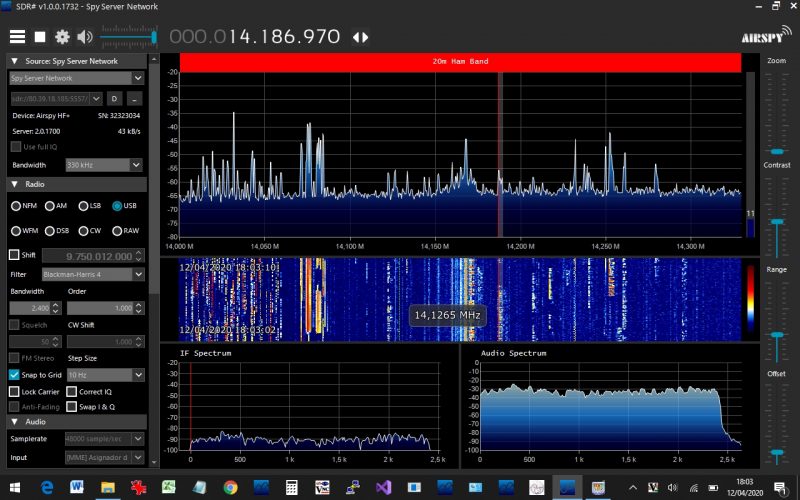
Admittedly, this 1:1 balun might not have the same properties as the BN-73-302 from our tutorial, but it seems to be working for Oscar. Check out this screenshot he shared from SDR# while hooked up to his NCPL antenna:

Thanks again!

Readers, you can follow Oscar on Twitter by clicking here.

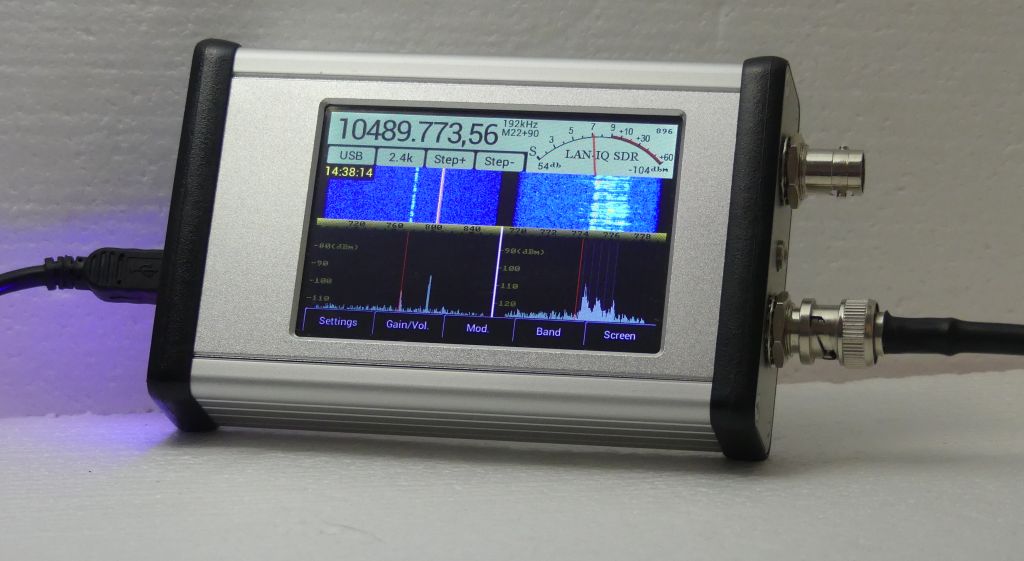
Check out the Afedri LAN-IQ SDR: a new stand-alone touch screen SDR

LAN-IQ SDR rev1.0 (Source: Alfredi SDR-Net)

Many thanks to SWLing Post contributor, Dan Robinson, who shares the following video from Fernando Duarte highlighting the new Alfredi LAN-IQ SDR:

I can’t wait to check out Fenu’s full review of the LAN-IQ when it is posted on his excellent website. The screen seems to be very responsive and layout well thought through.

The Afedri website notes the following features and specifications:

  • 30 kHz to 1700.00MHz continuous frequency range
  • Direct sampling
  • DDC – Digital Down-Conversion
  • 12- bit 76.8 MSPS A/D conversion
  • Stand Alone mode (AM, CW, SSB, NFM, WFM stereo, BPSK, QPSK demodulators)
  • Up to 2.2MHz recording and processing bandwidth
  • Waterfall display functions, when used with appropriate software
  • Recording and playback, when used with appropriate software
  • Sensitivity –  MDS -136 dBm at 500Hz bandwidth (0.03MHz-35MHz)
  • Sensitivity –  MDS -143.5 dBm at 500Hz bandwidth (50MHz-435Mhz)
  • USB 2.0 (Full Speed) interface
  • LAN interface for remote access
  • Compatible with: Linrad, Winrad, HDSDR, Studio1,  SDR Console (SDR-radio), CuteSDR, SdrDX, Quisk, PowerSDR_mrx
  • Powered from USB or external power supply 7-10VDC
  • Dimensions 120mm deep x 78mm wide x 27mm high
  • Unit cost – $339

The LAN-IQ can be connected to a PC via USB or Ethernet (at a 2400 kHz sample rate).

The Afedri website also has a few videos of the LAN-IQ in operation:

As you might have noted, the encoder knob seen in Fenu’s video is not standard but can be added at an additional cost and extended lead time. If I were to order the LAN-IQ, I would want the encoder knob as well.

Also, note that due to Covid-19 affecting the supply chain, Afedri SDR informs me that LAN-IQ availability will be adversely affected. If you would like to order a LAN-IQ, contact Afedri SDR via their website.

Click here to check out the LAN-IQ and all specs at Afedri SDR-Net.

DIY: How to build a Noise-Cancelling Passive Loop (NCPL) antenna

I’ve gotten an number of inquiries from SWLing Post readers asking for a step-by-step guide to building the passive loop antenna I’ve mentioned in a number of previous posts. This antenna is the homebrew version of the commercially-available  Airspy Youloop.

It works a treat. And, yes, folks…it’s fun to build.

There are a number of loop designs out there, and to distinguish this one, I’m going to henceforth refer to this loop as in the title above:  the Noise-Cancelling Passive Loop (NCPL) antenna.

Before we start building, a little antenna theory…

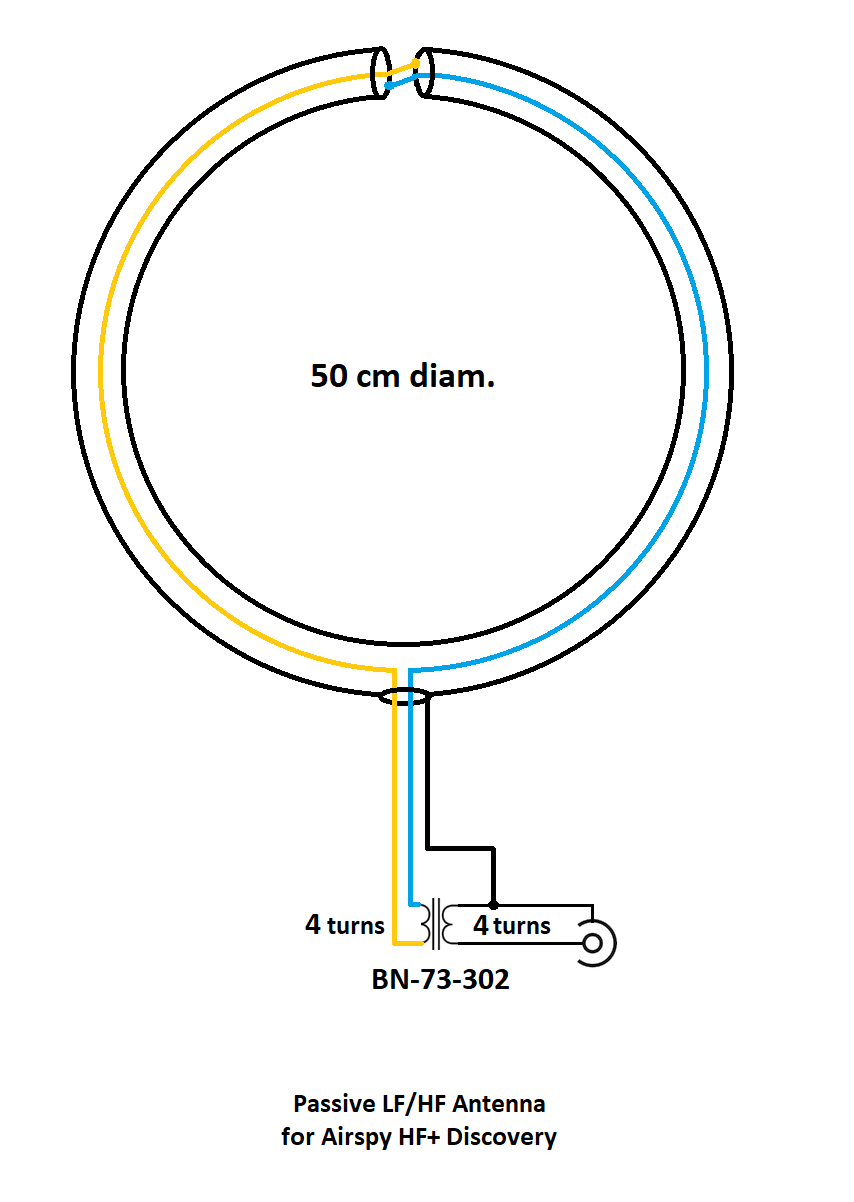
I’m neither an engineer nor am I an antenna expert, so I actually turned to Airspy president and engineer, Youssef Touil, to learn how, exactly, this passive loop works. Youssef was the guy who experimented with several loop designs and ultimately inspired me to build this loop to pair with his HF+ Discovery SDR and the SDRplay RSPdx. “The main characteristic of this loop,” Youssef notes,  “is its ability to cancel the electric noise much better than simpler loop designs.” Got that!  [See loop diagram below]
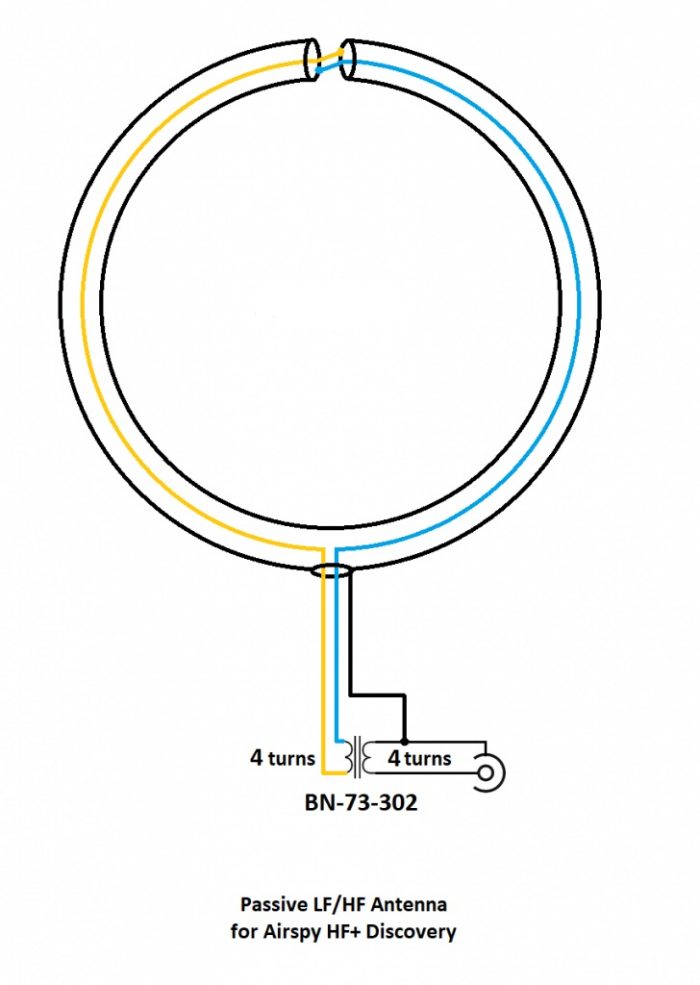
“The second characteristic of this loop antenna is that it is a high impedance loop, which might appear counterintuitive. This means it can work directly with many receivers that have a low noise figure, in order to mitigate the impedance mismatch loss.
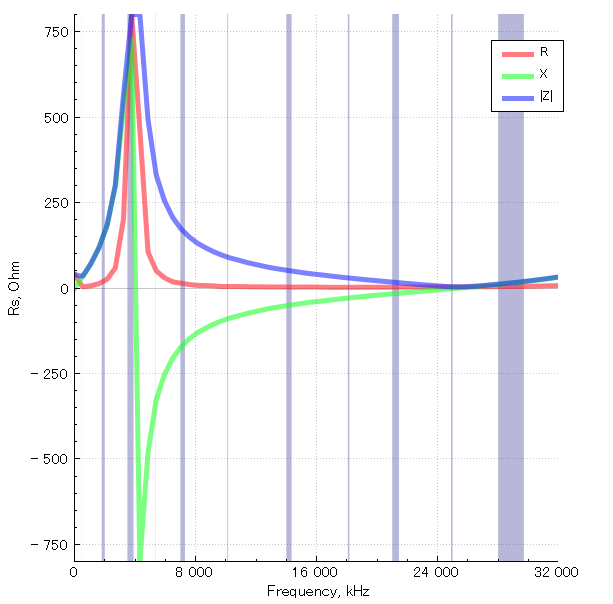
Note the resonance lobe near 4MHz. The resonance frequency is controlled by the diameter of the loop, the parasitic capacitance of the cable, and the loading from the transformer. It happens to be located right where we need it the most.

The transformer is basically a 1:1 BALUN that covers the entire HF band with minimal loss. Our BALUN has typically 0.28 dB loss.

[…]By connecting the center of this outer shield to the ground of the transmission line, you effectively cancel all the electric noise. The BALUN is required for balancing the electric noise, not for adapting the impedance.

[…]If you want to boost the performance in VLF, LW and MW, you can try a different impedance ratio, but this will kill the higher bands.”

What makes this loop so appealing (to me) is that it can be built with very few and common parts–indeed, many of us have all of the items in our junk boxes already. As the name implies, it is a passive design, so it requires no power source which is incredibly handy when you’re operating portable.

When paired with a high-dynamic range SDR like the Airspy HF+ Discovery or SDRplay RSPdx, you’ll be pleased with the wide bandwidth of this antenna and noise-cancelling properties.

If you don’t care to build this antenna, Airspy sells their own version of this loop for a modest $35 USD.

But building an antenna is fun and you can tweak the design to customize performance, so let’s get started:

Parts list

  • A length* of coaxial cable for the loop (see notes below regarding length)
  • Another length of cable terminated on one end with a connector of your choice as a feed line
  • A BN-73-302 Wideband 2-hole Ferrite Core
  • Enough coated magnet wire for a total of eight turns on the BN-73-302
  • Heat-shrink tubing or some other means to enclose and secure the cable cross-over point and balun. (You may be able to enclose these connection points with PVC or small electrical box enclosures, for example)
  • Electrical tape

Tools

  • A cable stripper, knife, and/or box-cutter
  • Soldering iron and solder
  • A heat gun (if using heat shrink)
  • Some patience 

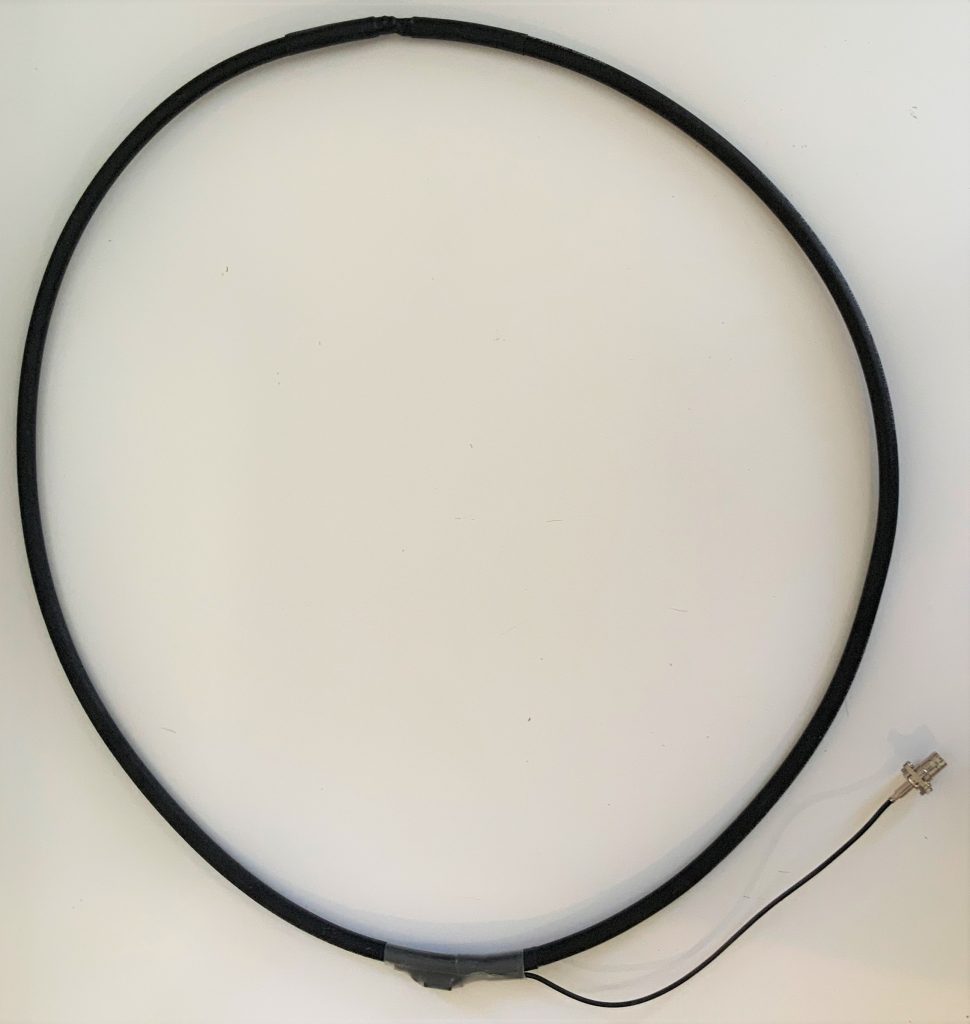
*A note about loop cable length: Vlado and I made a loop with 1.5 meters of cable. The Airspy Youloop ships with two 1 meter legs that combine to give you an overall loop diameter of about 63.6 cm.

Step-by-step guide

When I first decided to build this loop, it was only a day prior to a trip to the South Carolina coast where I planned to do a little DXing. I didn’t have all of the components, so I popped by to see my buddy Valdo (N3CZ). Vlado, fortunately, had all of the components and was eager to help build this loop. As I’ve mentioned in previous posts, Vlado is an amazing engineer and repair technician, so when I say “we” built it, what I really mean is, Vlado did!  But I could’ve done it myself.

This is actually a very simple build––something even a beginner can do, as long as they’re okay with using a soldering iron. It does take patience preparing the loop cable properly. Take your time as you start, and you’ll be on the air in an hour or two.

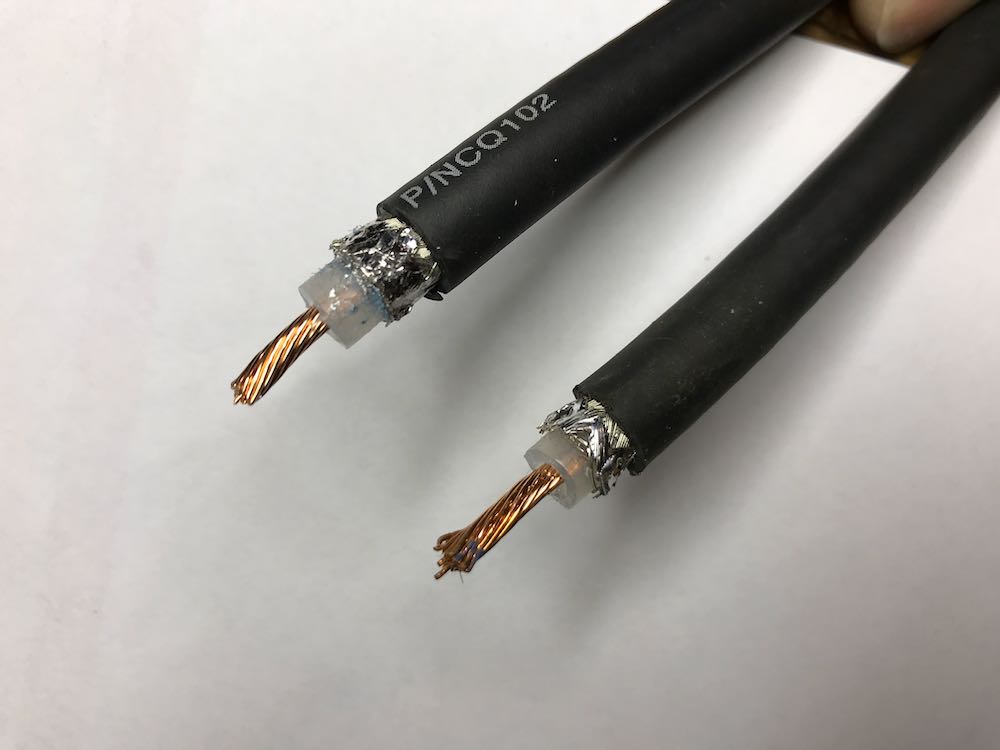
1. Strip the ends of the loop cable.
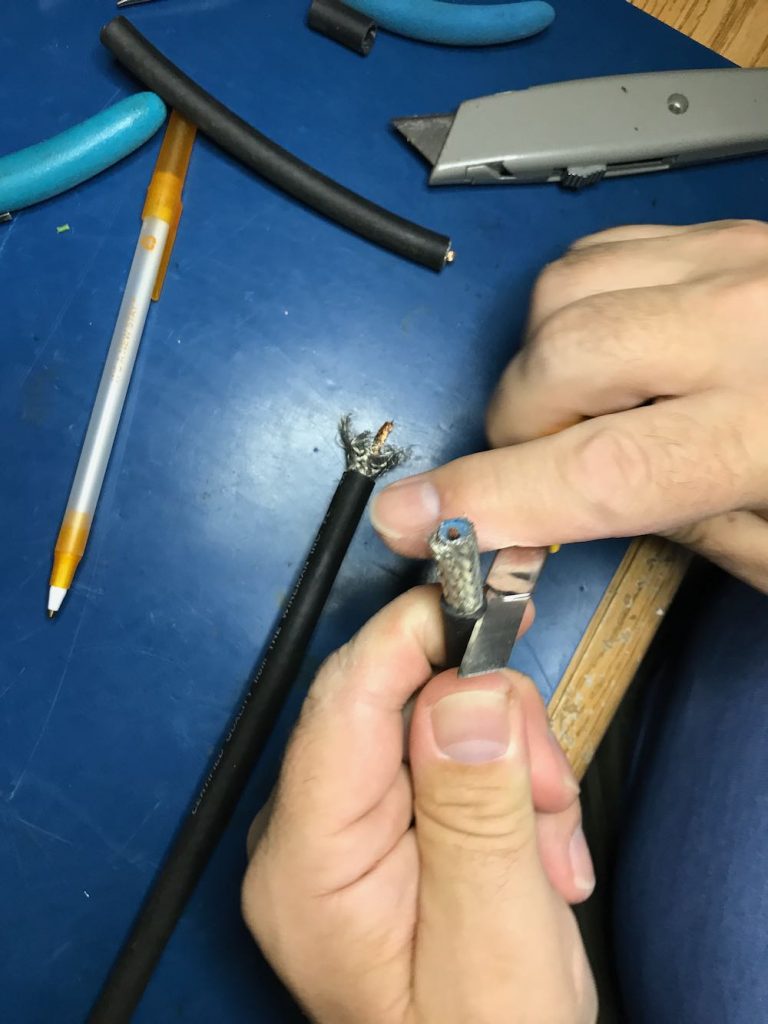
Although your cable type and diameter may vary, strip back the cable ends roughly like this.
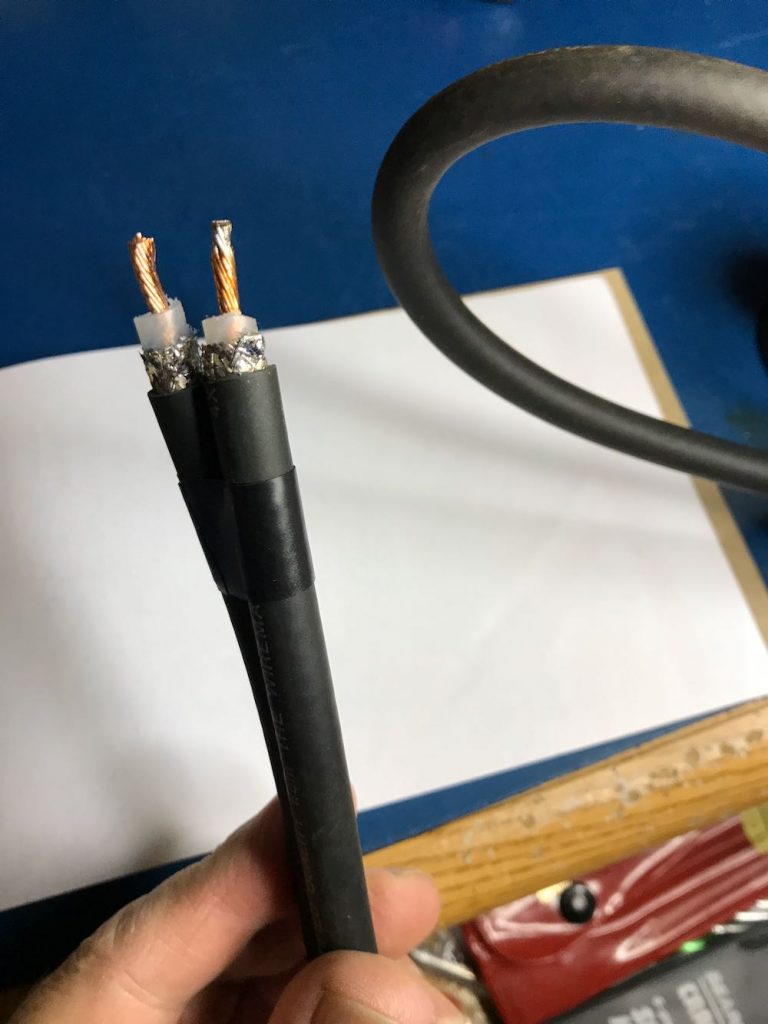
To make finding the middle of the cable easier, we taped off the ends.
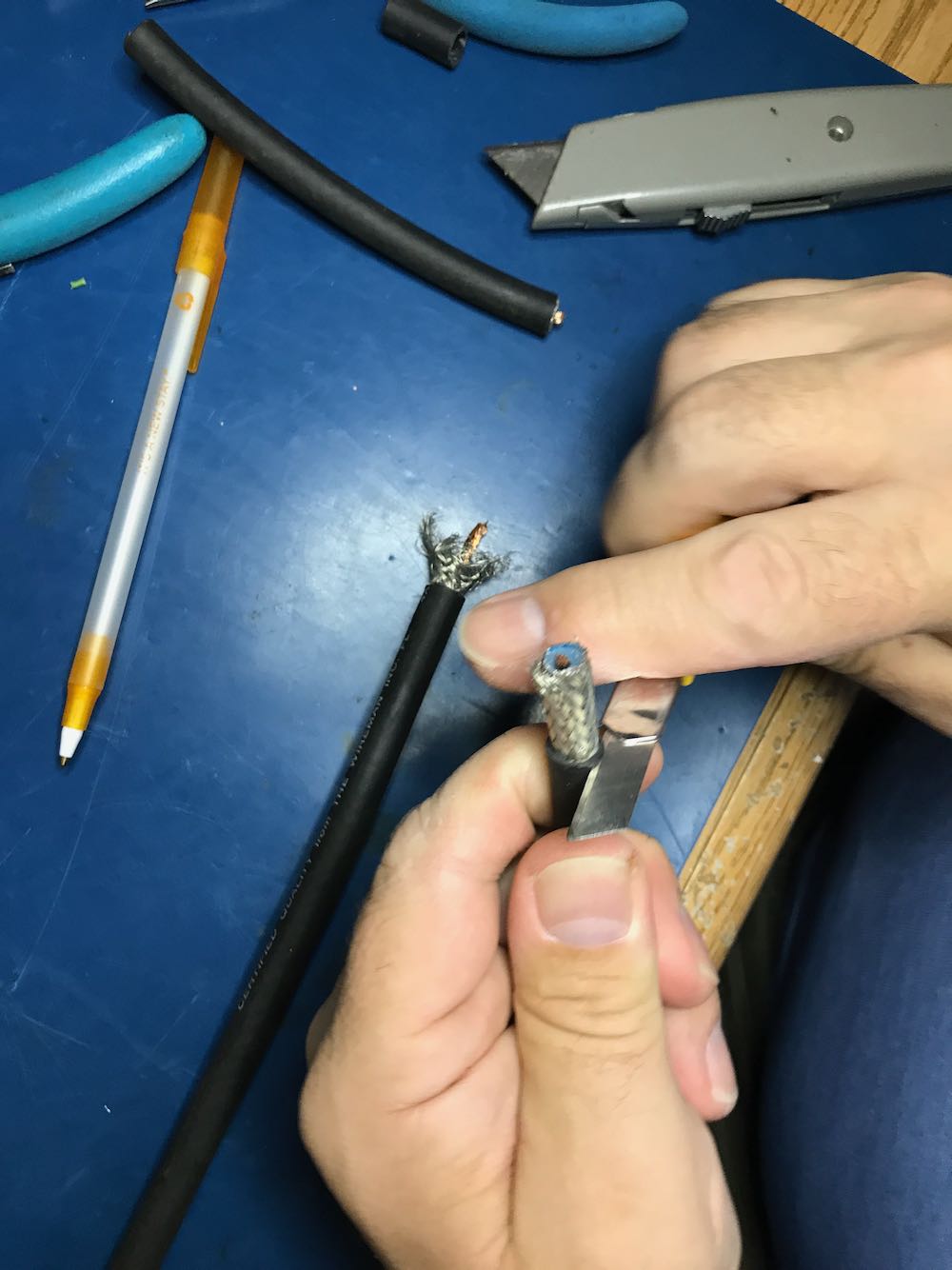
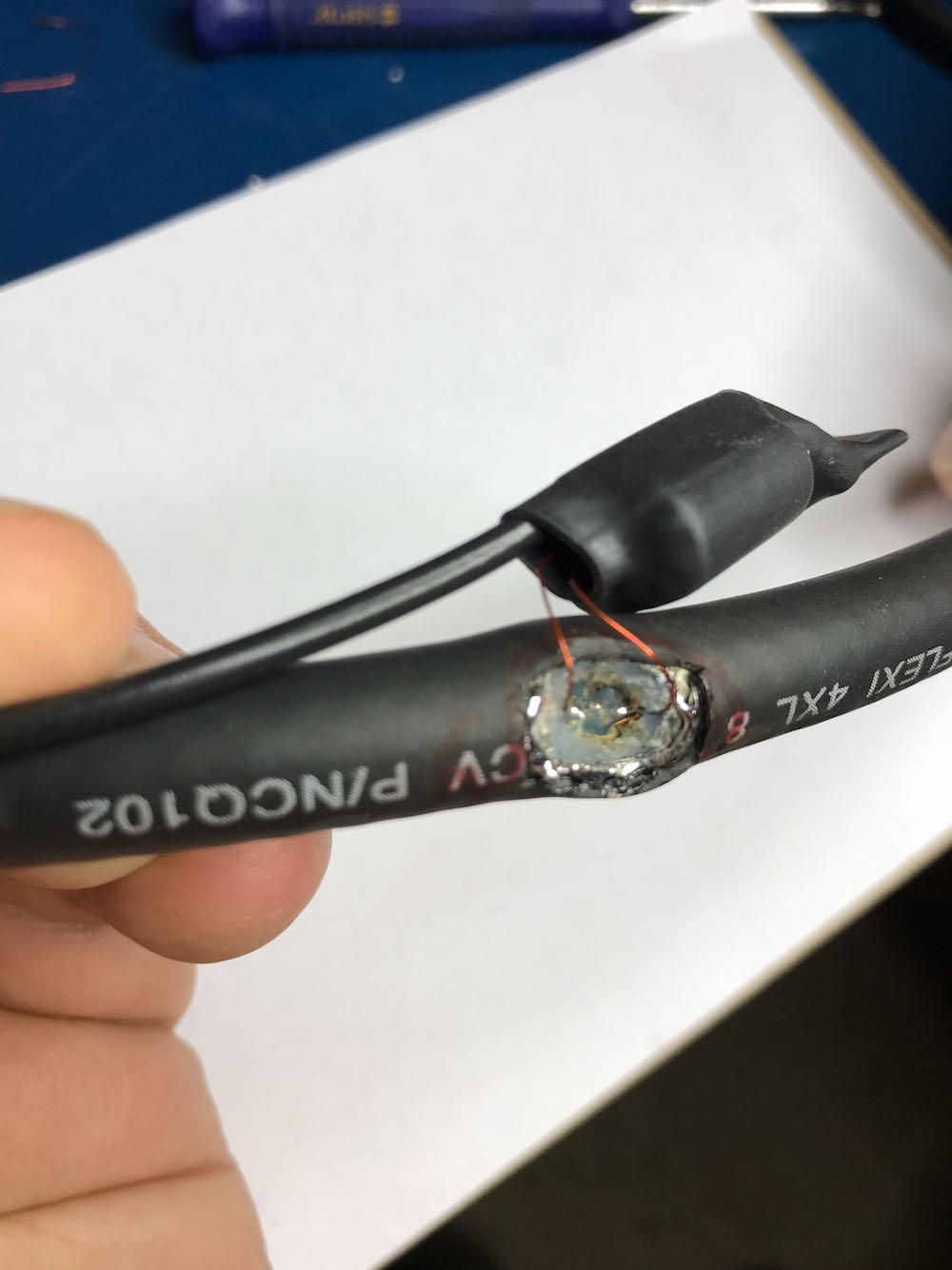
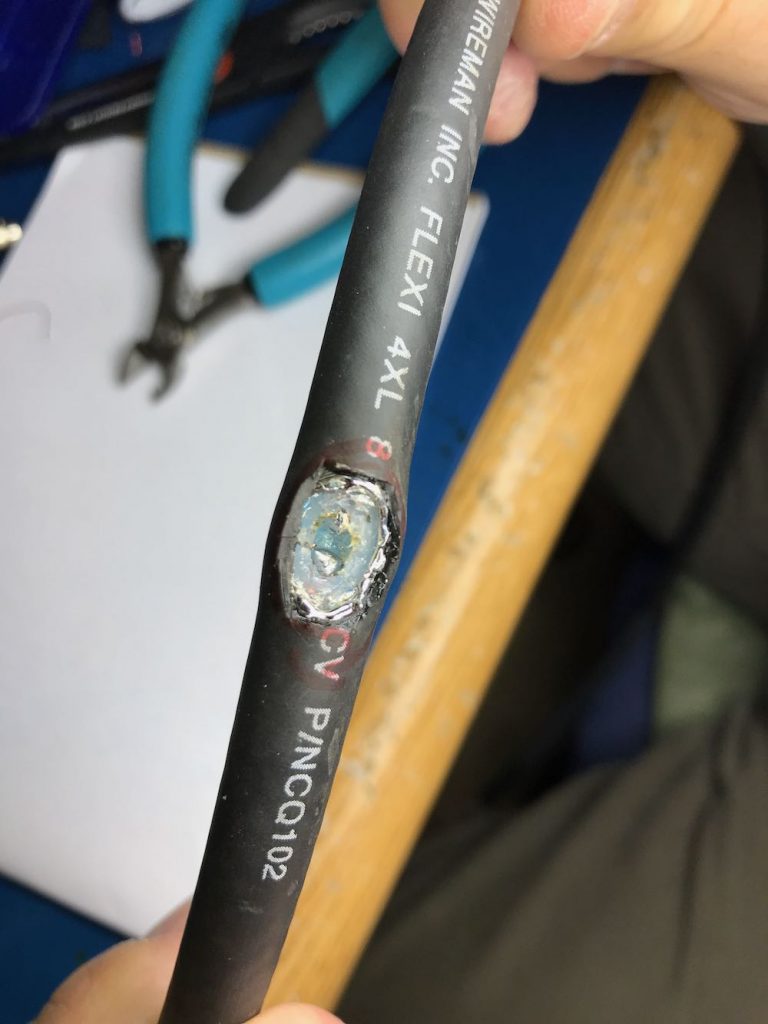
2. Make an opening in the middle of the cable to attach Balun leads to center conductor.

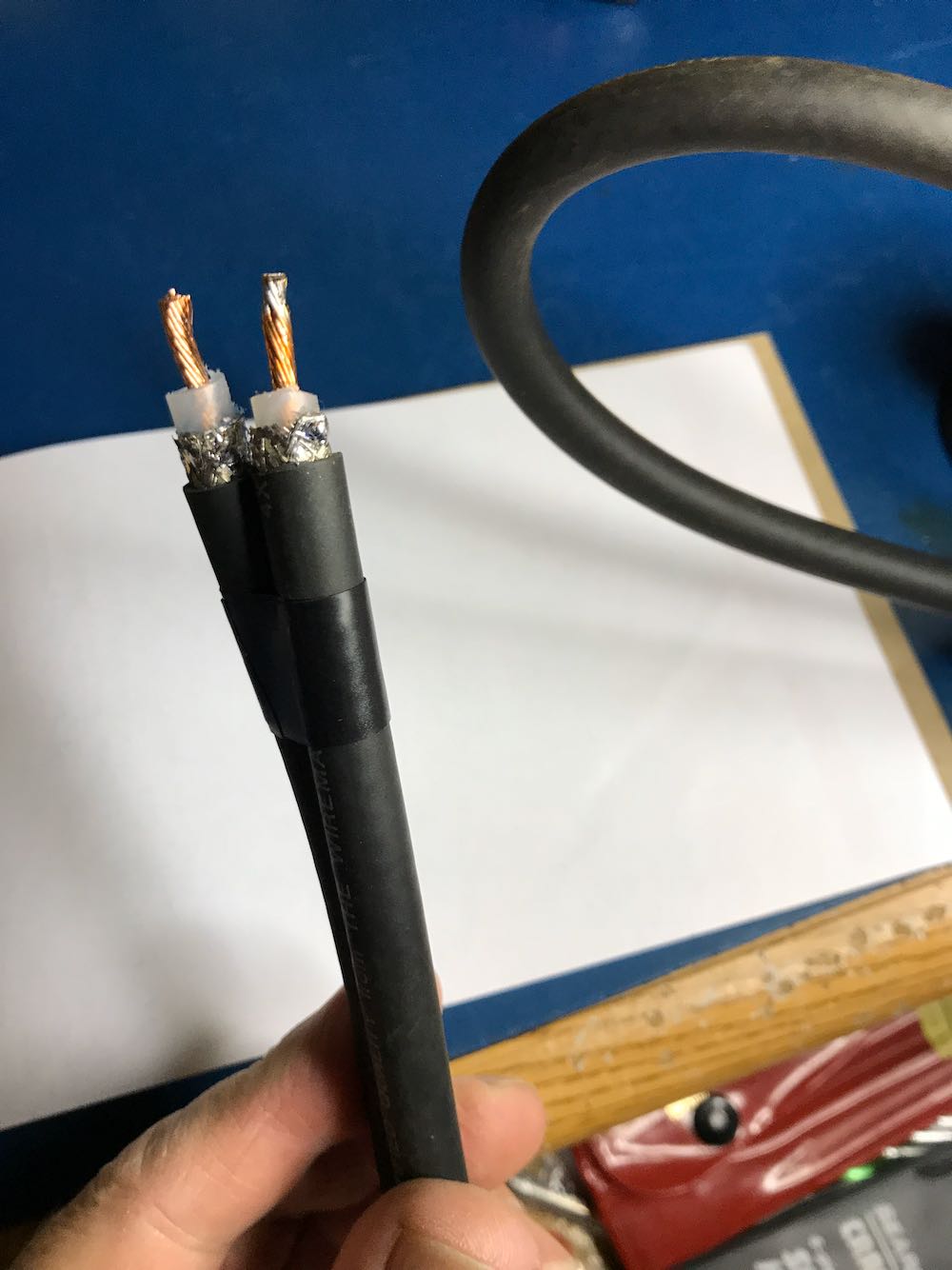
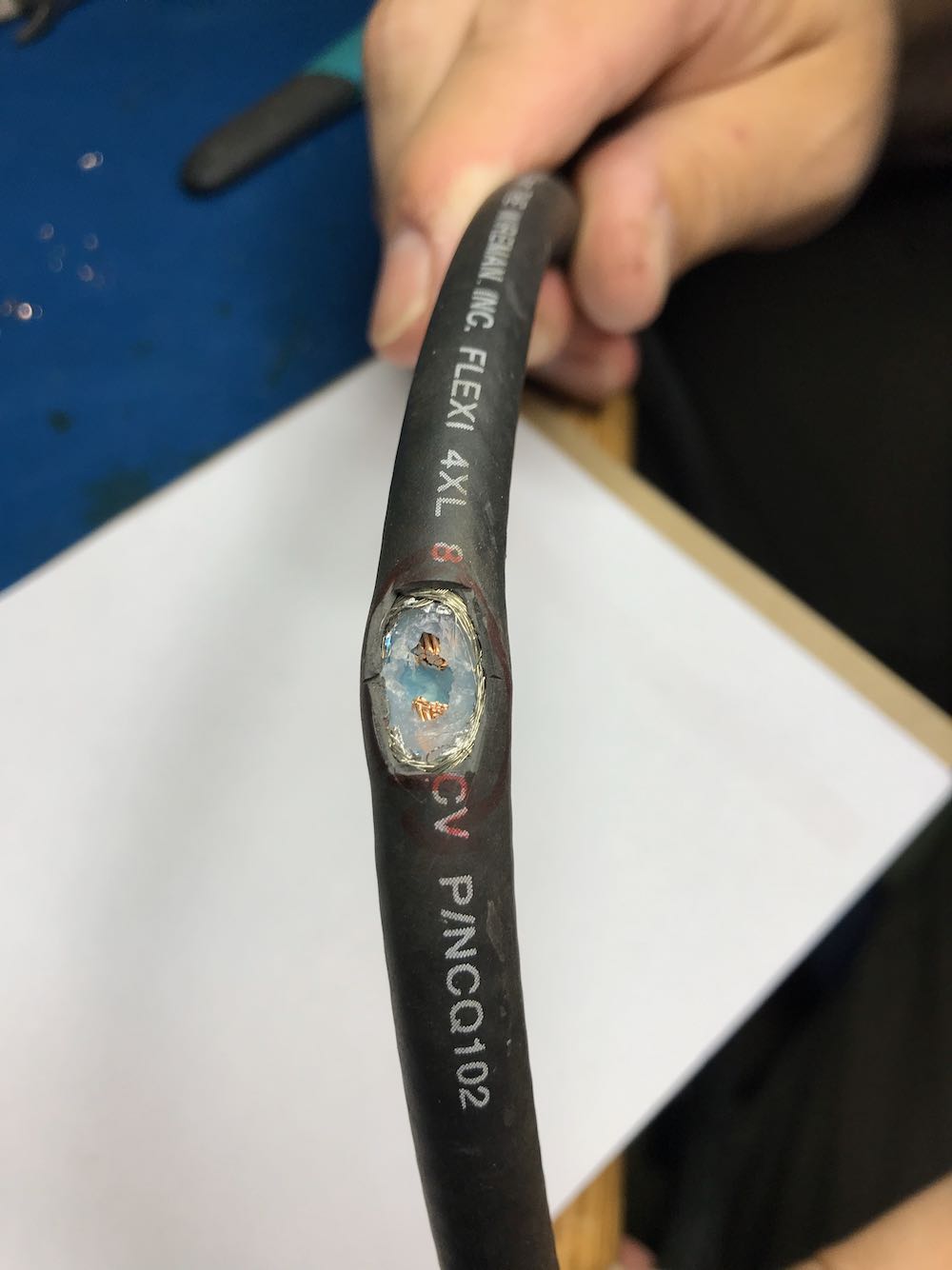
This is the trickiest part of the whole operation. The goal is to create an opening to tap into the center conductor of the cable.

You need to open a hole in the middle of the cable by

1 cutting away a portion of the outer jacket;

2 carefully separating and opening the shielding;

3 digging through the dielectric core, and finally

4 exposing the center conductor of the cable

Try to make an opening just large enough to gain access to the cable’s center conductor, but no bigger. Don’t allow any piece of the shielding to touch the center conductor.

When you reach the center conductor, expose enough of it so that you can clip it in the middle and create an opening to solder your balun leads to both conductor ends.

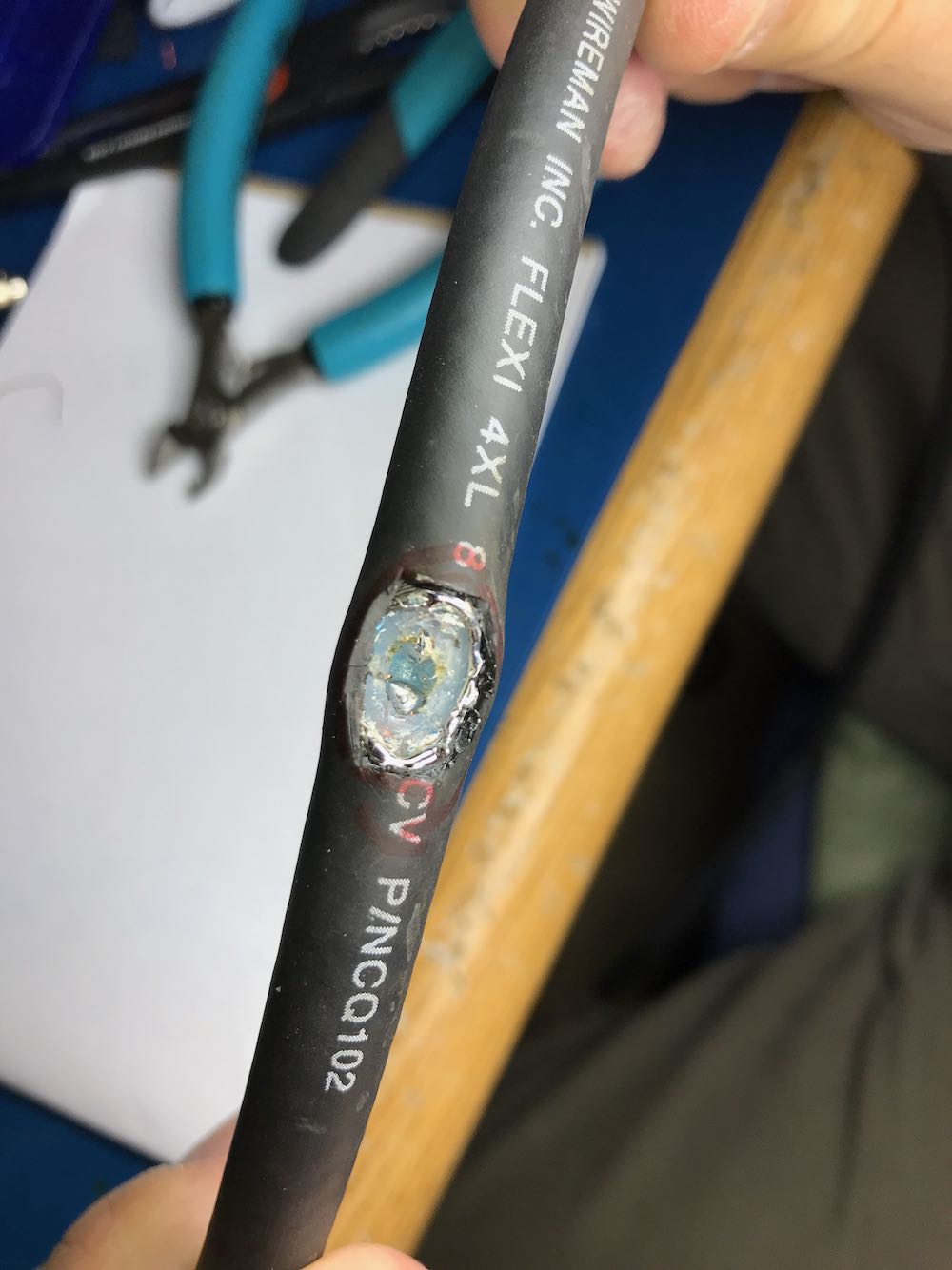
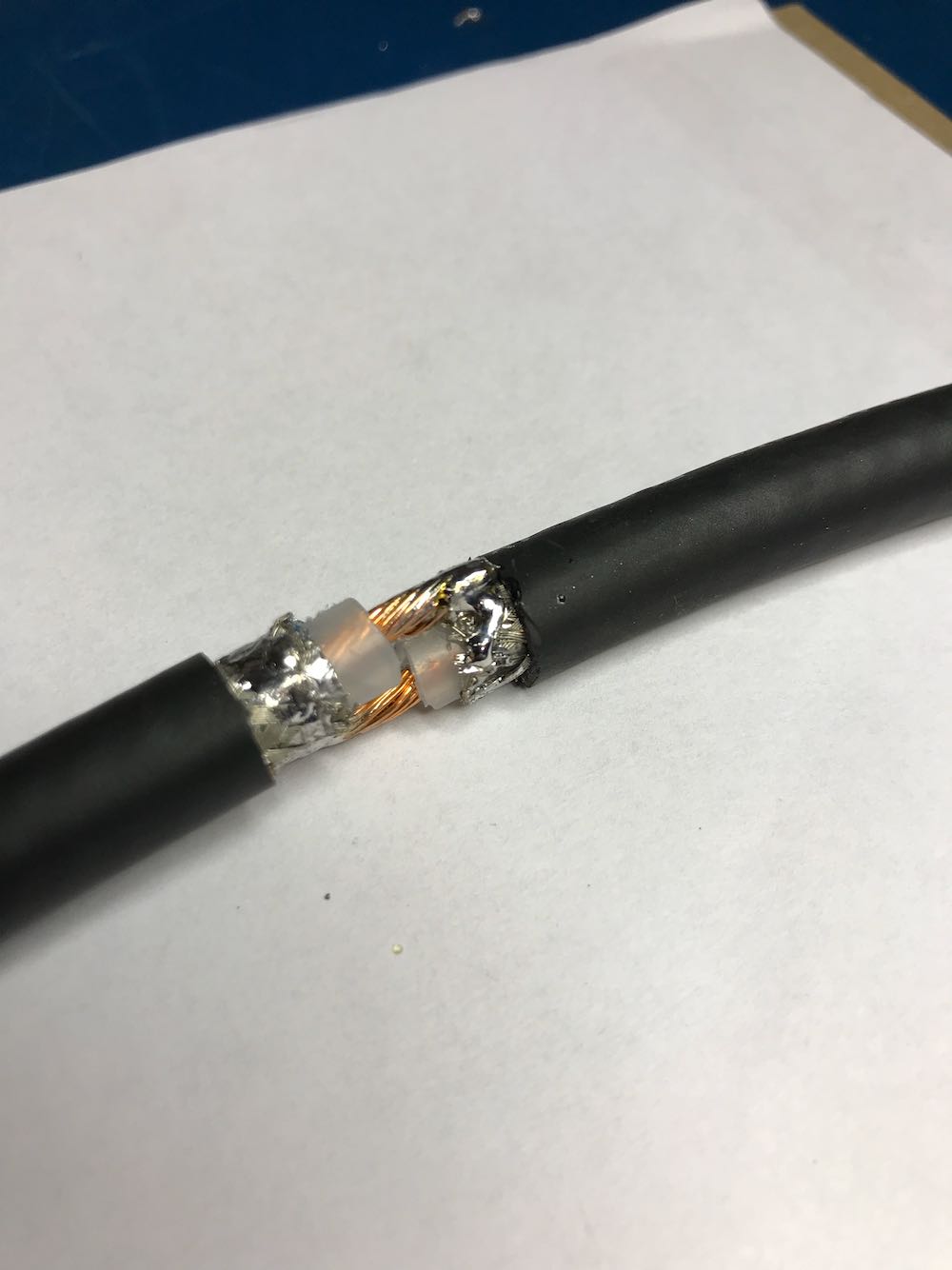
Once you’ve finished with this step, your cable should look something like this…
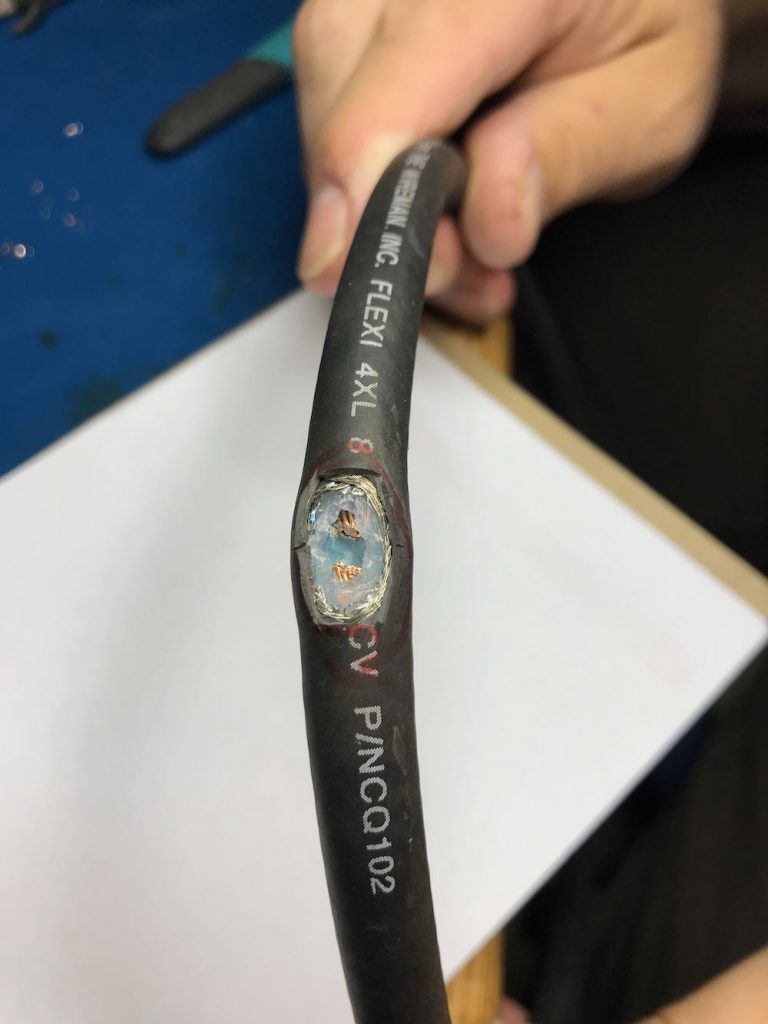
In the photo above, note that the shielding is completely pulled away, the dielectric core has been cut through, and we’ve clipped the center conductor, leaving a gap large enough to solder.

3.  Make a 1:1 Balun

Grab your BN-73-302, and with the coated magnet wire, make four windings on one side, and four on the other. It should look like this:
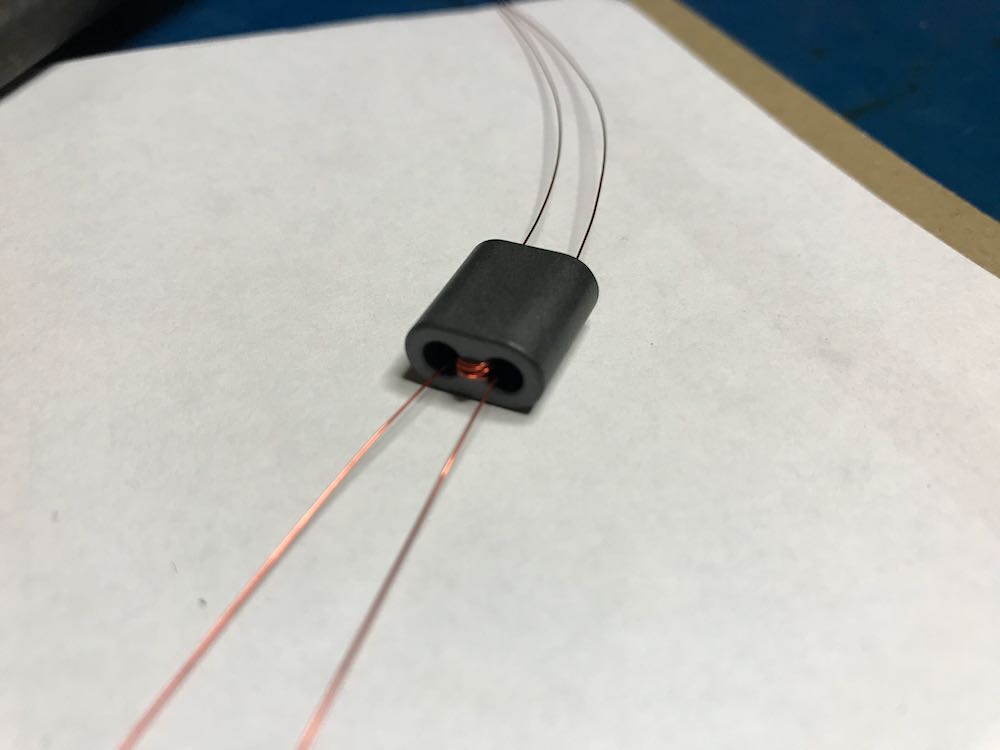
Don’t have a binocular ferrite core like the one above? If you have a broken cable with ferrite cores, you can hack one! Click here to learn more.

4. Connect the Balun to a feed line.

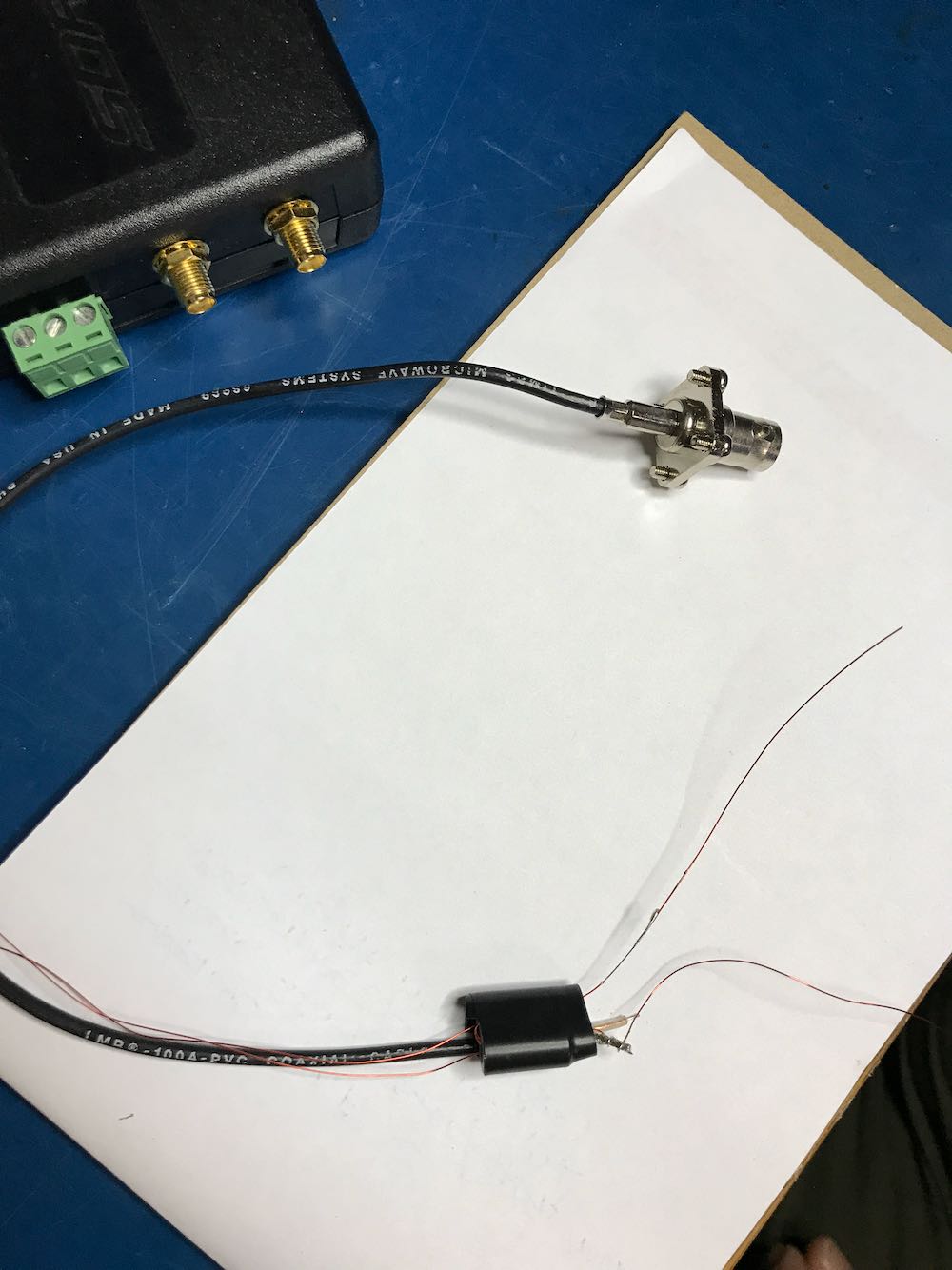
Vlado just happened to have a BNC pigtail in his shack (he’s that kind of guy), so we cut and stripped one end, then connected the center conductor and shield to one side of the balun. We then enclosed the balun in heat shrink tubing to make it a little easier to attach to the loop later:
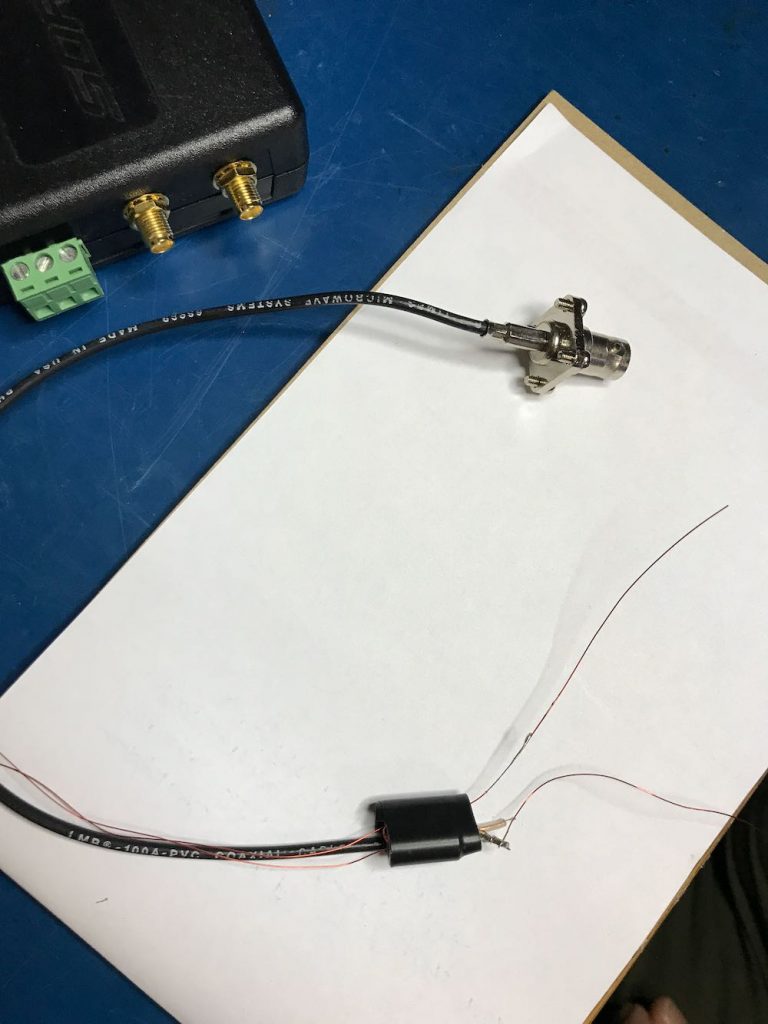
Of course, you could also create this junction in a small enclosure box or short cross-section of PVC. There are a number of ways you could secure this.

Youssef also added the following note about the feedline:

To use the NCPL antenna without a preamp, it is recommended to keep the length of the cable below 10 meters. The supplied Youloop 2 meter cable [for example] is sufficient to keep the antenna away from the magnetic interference of a computer or a tablet, and has very low loss and parasitic capacitance.
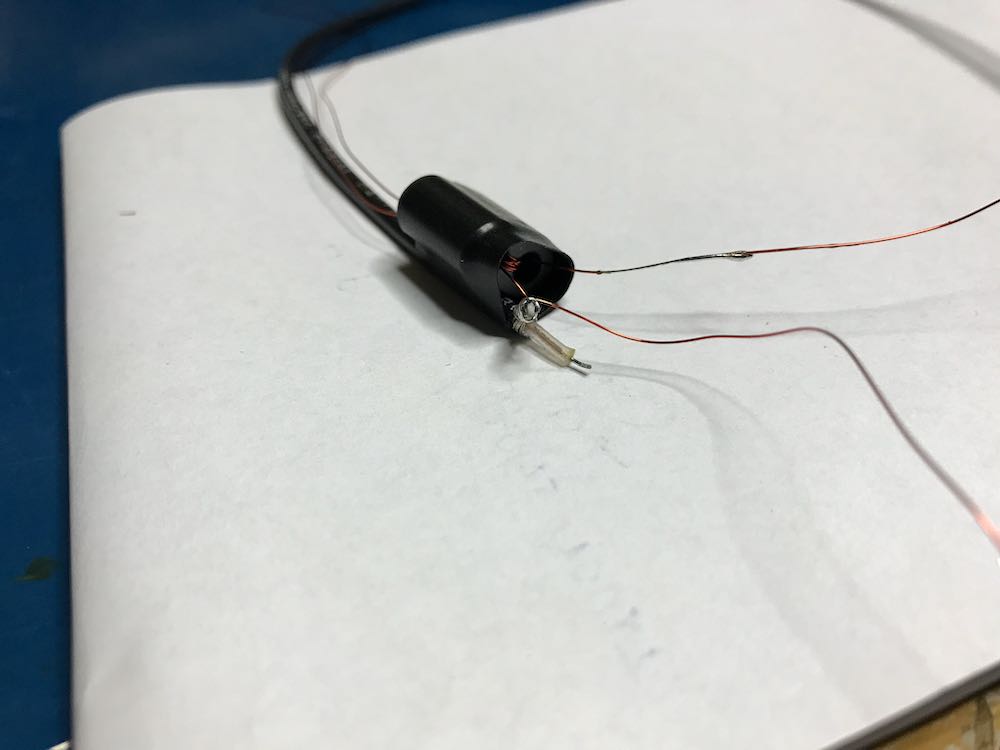
5. Connect Balun to the coaxial loop.
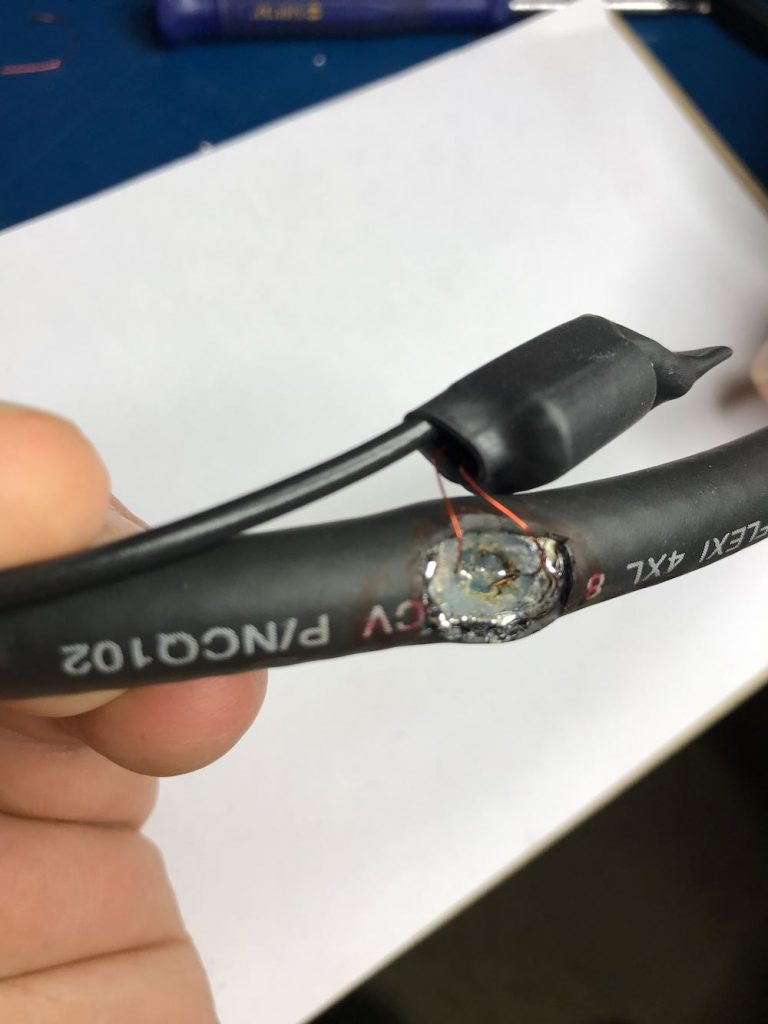
To make a solid connection, tin both sides of the center conductor. Next, attach the other end of the balun leads to each portion of the center conductor, as seen below:
Update: Note in the loop diagram near the top of the page that the ground wire on the output connector connects to the loop coax shielding on the primary side of the balun. I don’t recall that we did this in the build, but I would encourage you to do so. This should result in even lower noise, although admittedly, I’m very impressed with the performance of ours without this connection. Thanks to those of you who pointed out this discrepancy!

6. Secure the Balun/Coax junction.

Since this loop is intended to be handled quite a lot in the field, make sure the junction point of the balun and coax loop is secure. Again, we used several layers of heat shrink tubing since we had some in the shack.
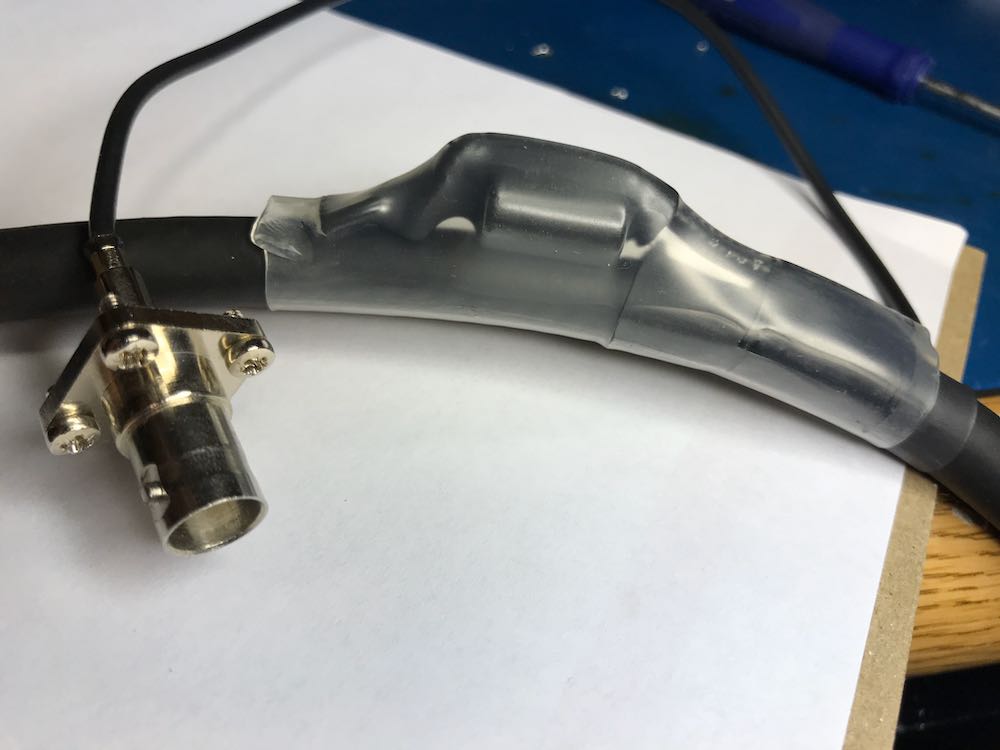
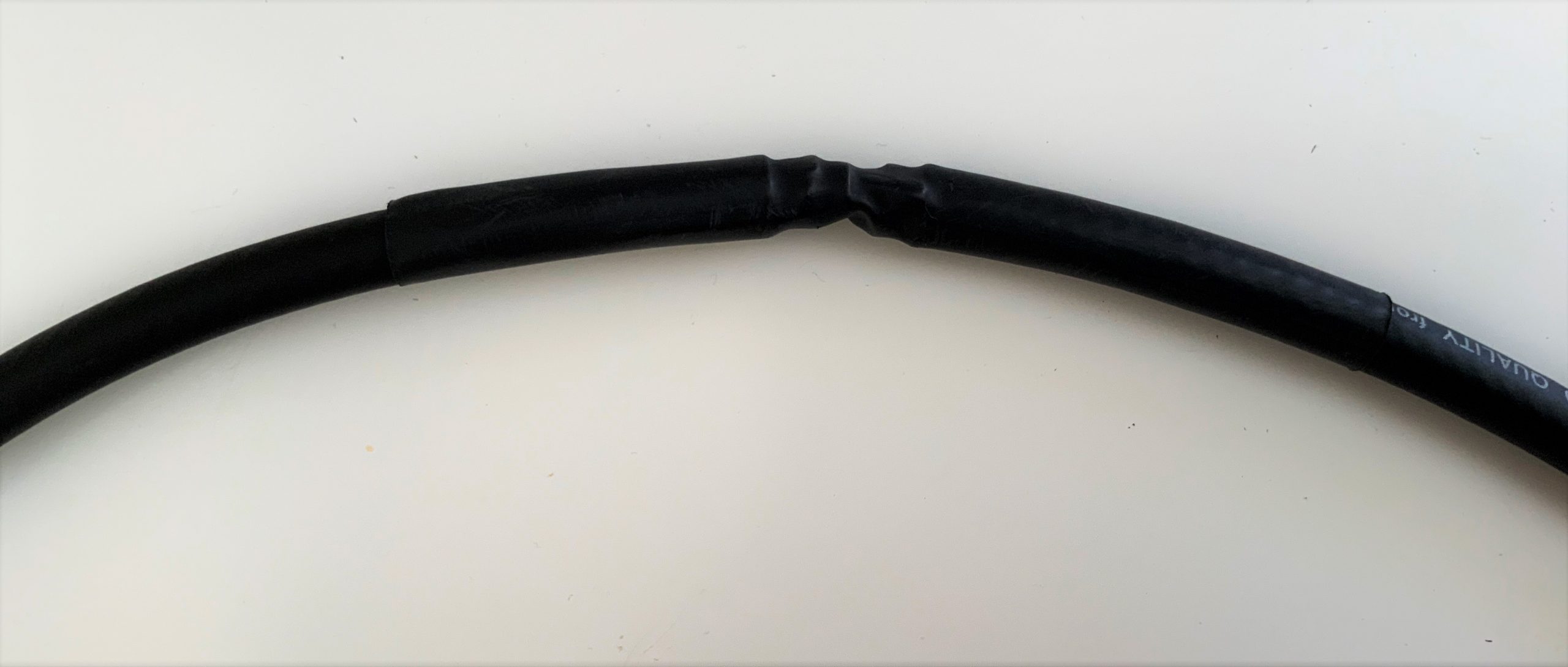
7. Solder and secure the cross-over point.

Next, create the cross-over point of the loop by simply attaching the center conductor of one end of the cable to the shielding on the other end…and vice versa.

Before you grab the soldering iron, howeverif, like we did, you’re using heat shrink tubing to secure the cross-over point of the loop in the next step, you’ll first need to slide a length of tubing onto the coax before you solder the ends together. Vlado, of course, thought of this in advance…I’m not so certain I would have!
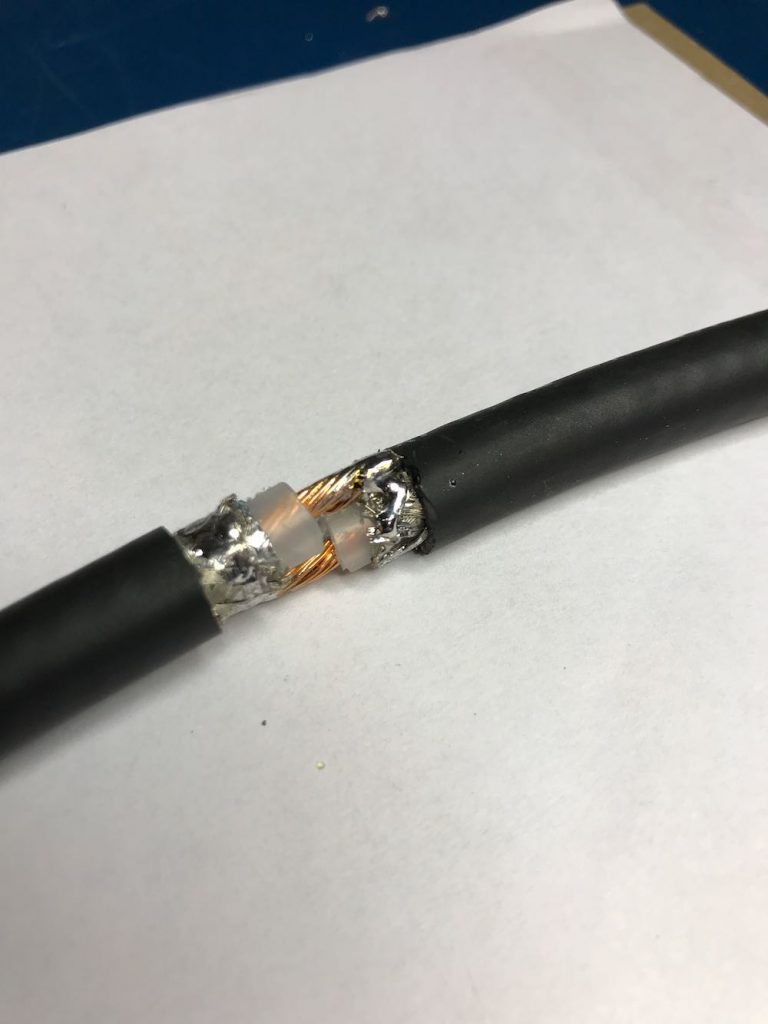
Take your time soldering this connection and making it as solid as you can. If you solder it correctly, and you’re using a high-quality cable as we did, the cross-over point will be surprisingly durable. If you’re using a thinner cable, simply make sure the connection is solid, then use something to make the junction less prone to breaking––for example, consider sealing a length of semi-rigid tubing around this point.
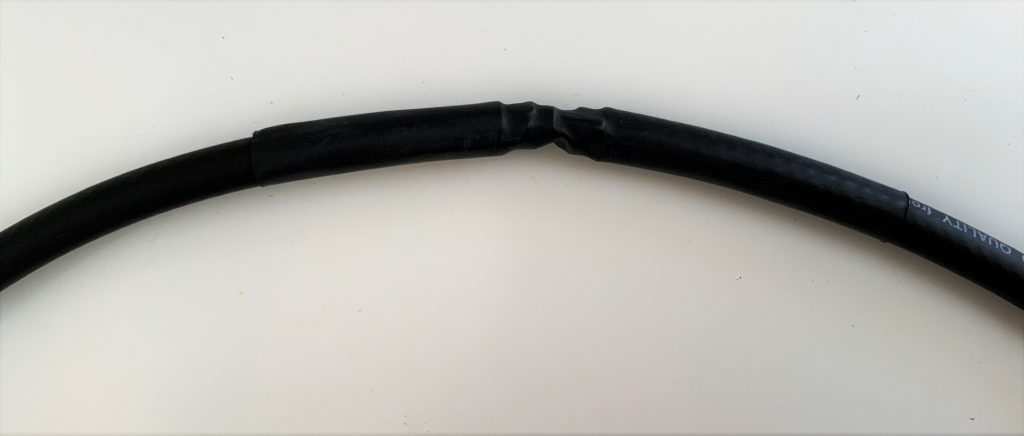
Vlado cleverly added heat shrink tubing around the cross-over point to protect and secure it.

You’re done!

That’s all, folks! Now you’re ready to put your loop on the air.
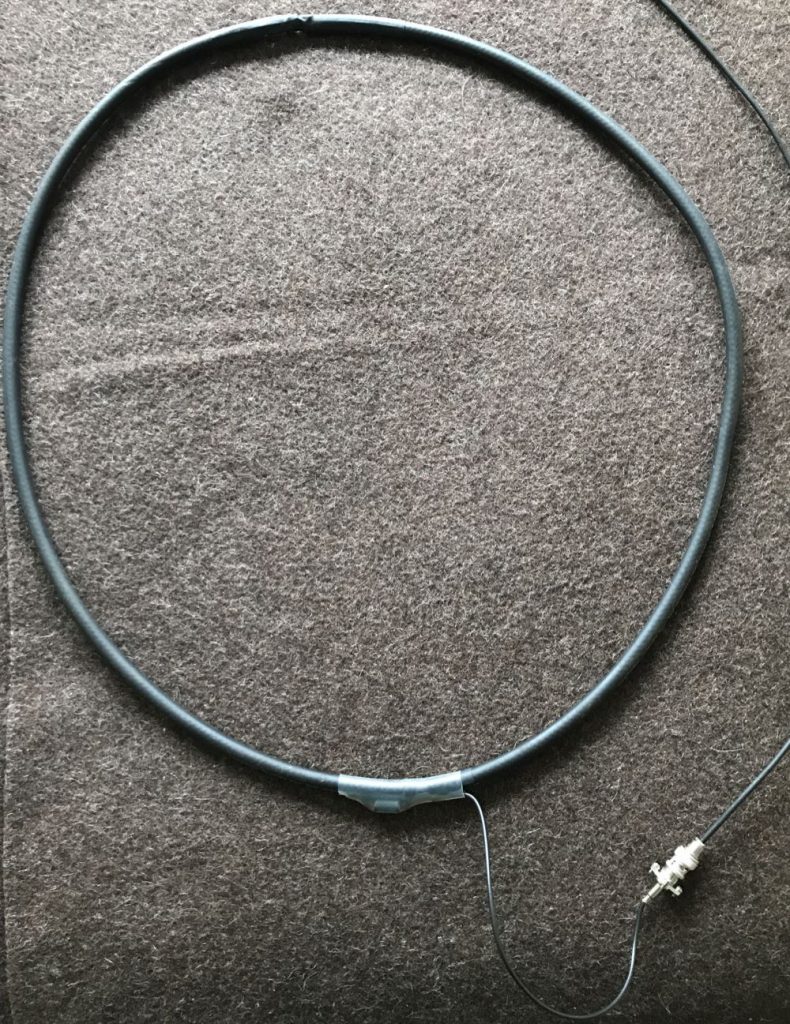
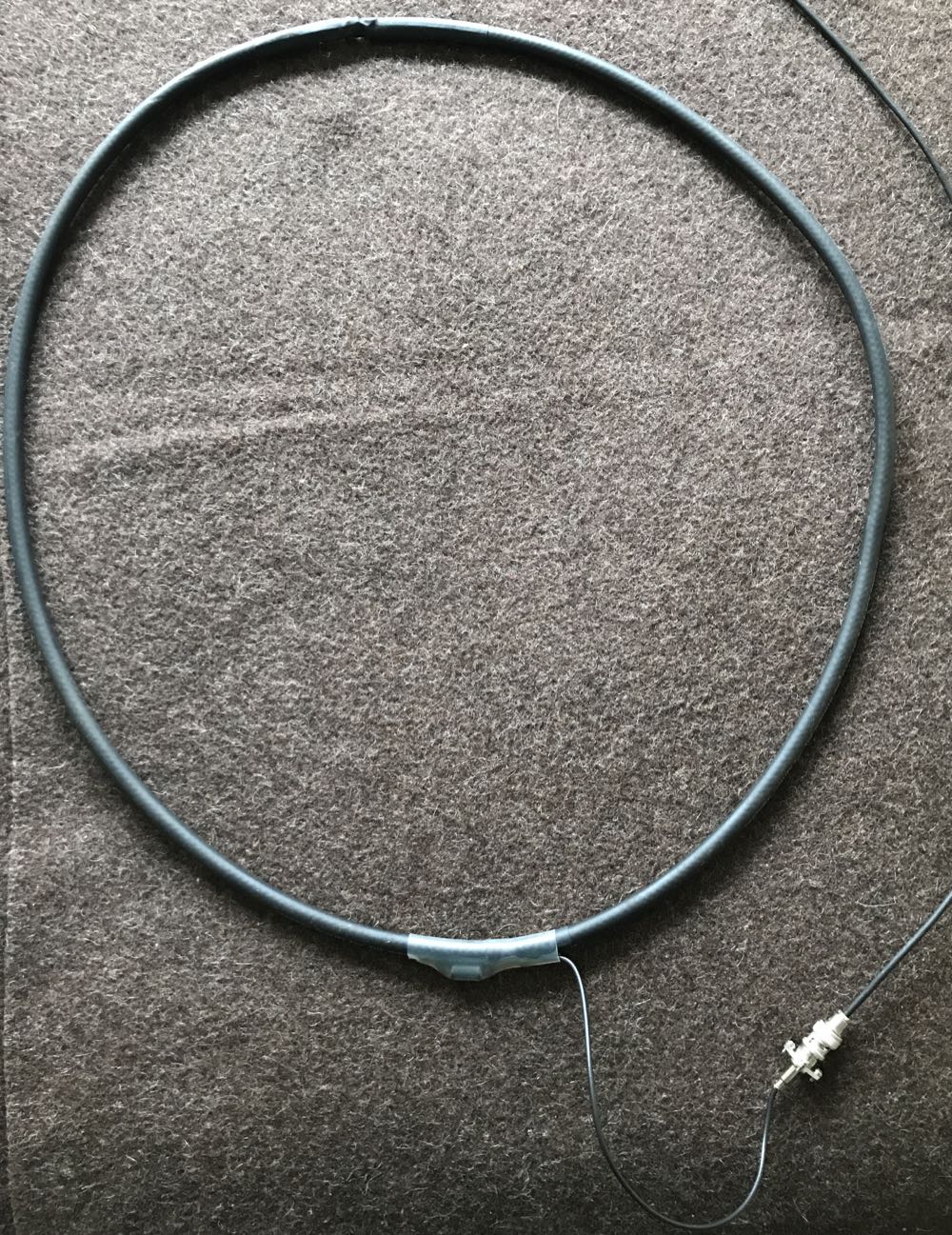
Depending on what type of cable you used for this loop, you might require or prefer some sort of dielectric structure to support the loop so that it maintains the ideal round shape. My loop maintains its integrity pretty well without supports. I’ve supported it a number of times with fishing line/filament from two sides (tying on at 10 and 2 o’clock on the loop). That seems to work rather well.
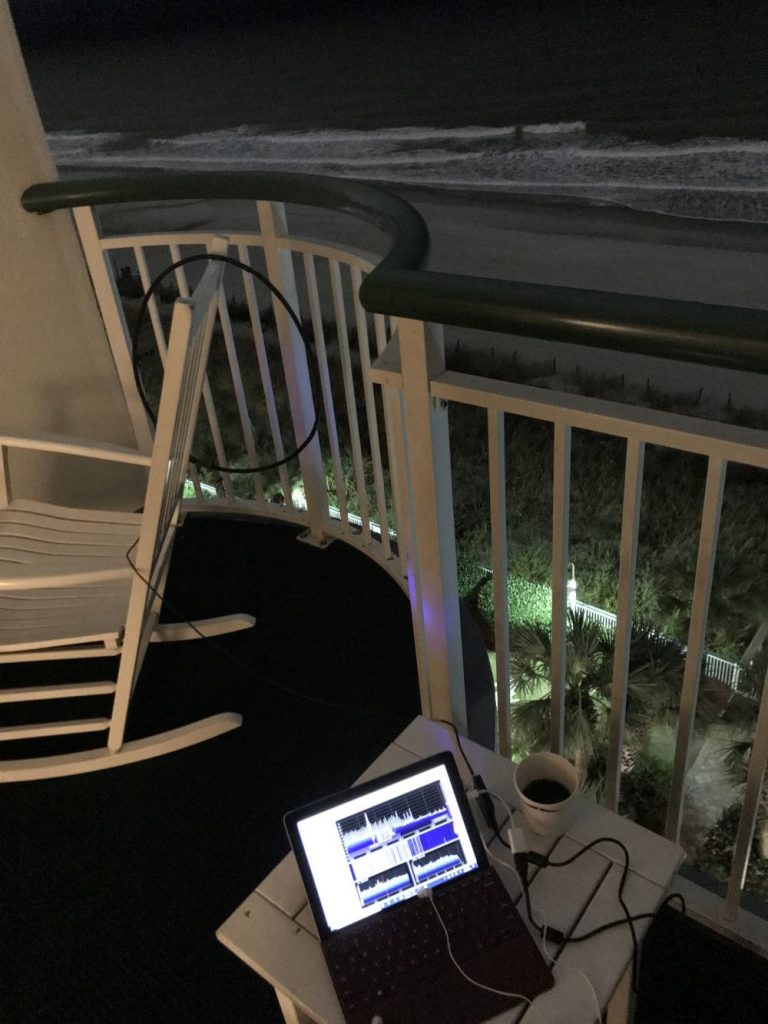
In this setup, I simply used the back of a rocking chair to hold the antenna. As you can see, the loop maintained its shape rather well.

If you’d like to see and hear how this antenna performed on its first outing, check out this post.

Show the Post your loop!

If you build a NCPL antenna, please consider sharing your design here on the SWLing Post! Considering that there are a number of ways this loop can be built, and likely even more optimizations to improve it or make its construction even easier, we’d love to see your designs and/or construction methods. Please comment or, if you prefer, contact me.

And many thanks to my good friend Vlado (N3CZ)  for helping me with this project and allowing me to document the process to share it here on the Post. Got a radio in need? Vlado’s the doctor!


Enjoying the SWLing Post?

Please consider supporting us via Patreon or our Coffee Fund!

Your support makes articles like this one possible. Thank you!

Airspy Youloop and Homebrew Passive Loop Antenna designs

Almost two weeks ago, at the 2020 Winter SWL Fest, I gave a presentation called “A New Era in Portable SDR DXing.

The presentation was essentially an in-depth version of an article I published in the January 2020 issue of The Spectrum Monitor magazine (see cover above).

I devoted a good portion of the presentation describing how to build a passive loop antenna design by Airspy’s engineer and president, Youssef Touil. This passive mag loop takes advantage of the Airspy HF+ Discovery‘s exceptionally high dynamic range and is an impressive performer.

The homebrew loop on the balcony of a hotel.

You may recall, I posted a short article about this loop in November after enjoying a little coastal DXing.

In short? This passive loop antenna pairs beautifully with the Airspy HF+ Discovery. I’ve also been very pleased with results using the new SDRplay RSPdx on the mediumwave band where the receiver now sports a high dynamic range mode.

Overdue corrections…

After returning from the Winter SWL Fest last week, I was hit with an upper respiratory bug. No doubt, a souvenir of my travels!  It wasn’t the flu (I was tested), nor COVID-19, but it did knock me off my feet for a few days with fever, coughing, and headaches. You might have noticed a lot less posts last week and almost no replies from me via email. I’m only now feeling totally human again and trying to catch up with my backlog.

Shortly after my SWL Fest presentation, I realized I made (at least!) two mistakes. I had planned to post corrections here on the SWLing Post last week, but the bug delayed all of that, so here you go:

#1 Schematic of my homebrew passive loop antenna

When Youssef started experimenting with passive loop antenna designs, he posted a few schematics of at least three build options.

Although I described how to build my passive loop antenna, I grabbed the wrong schematic for my presentation slides. Many thanks to those attendees who noticed this.

Here is the schematic I should have shared:

Note that the transformer has four turns on both sides (the one in the presentation had 4:2).

Again, apologies for any confusion.

#2 The Airspy Youloop passive loop antenna

If you’re not inclined to build your own passive loop antenna per the diagram above, Airspy is planning to manufacture and sell a lightweight, high-performance loop of a similar design.

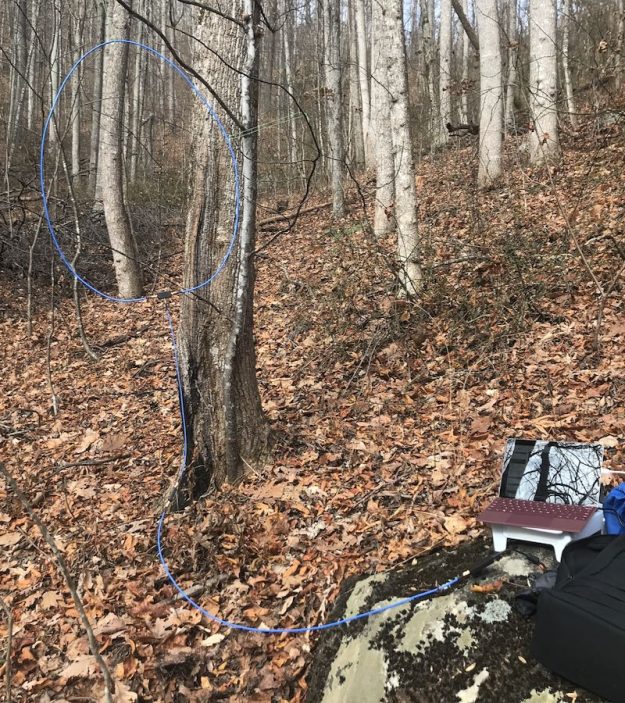
Prototype of the Airspy Youloop in the field (note bright blue cable jacket)

During the presentation, I called the future AirSpy antenna, the “Spytenna.” I was incorrect. (Turns out, I got this name from an early antenna schematic and somehow it stuck in my head!)

Airspy is calling their passive loop antenna the Youloop. Youssef posted the following note in the Airspy email discussion group:

We are currently arranging the shipping of the affordable passive version to Airspy.us and RTLSDR Blog.

Btw, It’s called “Youloop”

Many thanks to Richard Langley and a number of other readers who pointed this out last week.

I’ve had a prototype of the Youloop since November and brought it to the SWL Fest and presentation. It’s a quality antenna and incredibly compact when disassembled and rolled up.

When the Youloop is available to order, we’ll post links here on the SWLing Post.

More to come!

Once I catch up here at SWLing Post HQ, I plan to publish detailed construction photos of the homebrew loop antenna.

Many of you have questions about how to tap into the center conductor at the mid-point of the loop. These photos should help guide you.

Stay tuned!


Do you enjoy the SWLing Post?

Please consider supporting us via Patreon or our Coffee Fund!

Your support makes articles like this one possible. Thank you!