Category Archives: Shortwave Radio

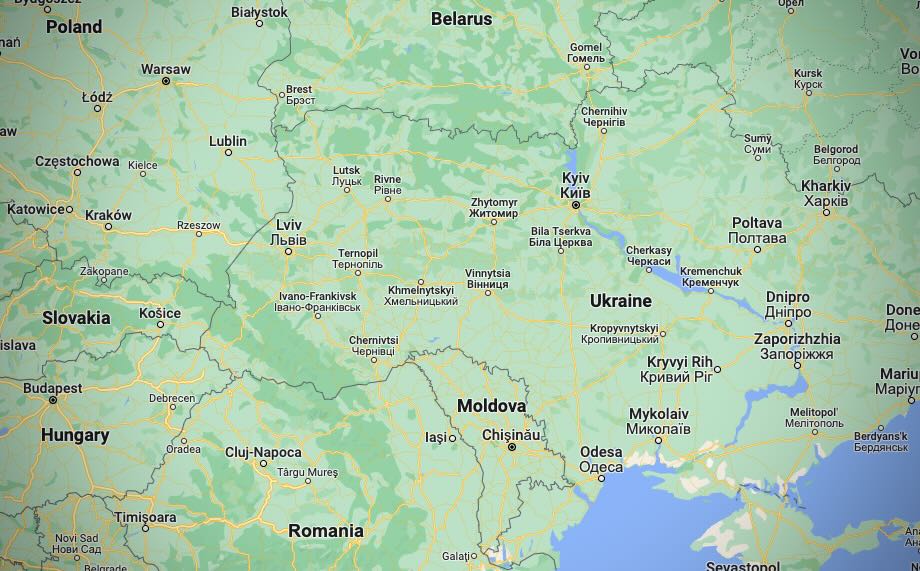
WRMI Resumes Broadcasts of Radio Ukraine International

Many thanks to SWLing Post contributor, Paul Walker, who shares the following news from WRMI:

WRMI Resumes Broadcasts of Radio Ukraine International

Due to the increased interest in the current situation in Ukraine, WRMI has resumed its relays of the daily English language broadcast of Radio Ukraine International, the official overseas service of Ukrainian Radio. RUI can be heard daily, except Friday, at 1200-1230 UTC on 5010 kHz.

Tuning in Ukrainian Radio and State Of Emergency Includes Amateur Radio Ban

Kyiv, Ukraine (Photo by @lifeinkyiv)

Many thanks to SWLing Post contributor, Richard Langley, who shares the following note he also posted to Glenn Hauser’s io group:

As we know, Radio Ukraine International, a.k.a. Ukrainian Radio, is no longer on SW except perhaps for a one-hour German-language relay from a low-power transmitter in Germany. It is also on satellite but that doesn’t help too many. But RUI can be easily accessed on the Web from a couple of URLs:
http://www.nrcu.gov.ua/schedule/play-live.html?channelID=4
and
http://www.ukr.radio/uk/schedule/play-live.html?channelID=4

During the continuous 24-hour streaming, a one-hour English segment is broadcast four times per day (all times UTC ):
21:00 – 22:00
23:00 – 24:00
02:00 – 03:00
13:00 – 14:00

It appears that the first new broadcast of the day is at 21:00 – 22:00 and is then repeated in the following slots.

At other times, there are segments in Ukrainian, Russian, German, and Romanian.
Please let me know if I got anything wrong here.

UPDATE (24 Feb 2022): WRMI has resumed broadcasts of Radio Ukraine International. Click here for details.

Ban on amateur radio in Ukraine (The Kyiv Independent)

Ukraine has declared a state of emergency in all of Ukraine except for eastern Donetsk and Luhansk oblasts starting on Feb. 24.

The parliament approved the decree introduced by President Volodymyr Zelensky on Feb. 23, as the threat of Russia’s all-out invasion of Ukraine continues to grow.

Donetsk and Luhansk oblasts already have a special legal status because of Russia’s ongoing occupation since 2014.

Restrictions introduced by the state of emergency are due to last 30 days and will vary depending on the region.

The state of emergency allows the authorities to temporarily limit the public’s constitutional rights.

The decree green-lights the following measures:

    • increased public order protection and security;
    • checks of identification documents of civilians and frisking if necessary;
    • ban on protests;
    • temporary or permanent evacuation of people from dangerous areas and providing them with accomodation;
    • ban on relocation of conscripts and reservists without notice;
    • ban on producing and spreading information that may “destabilize the situation”;
    • ban on amateur radio transmitting devices.

Other measures that may be implemented “if necessary” include:

    • a curfew;
    • a special regime of entry and exit;
    • ban on mass events;
    • “special rules” for spreading information online.

Radio Waves: RTUK Demands License, Finding MH370 via Signal Disturbances, Massive Collection of Antique Radios, and Free Tech License Class

Radio Waves:  Stories Making Waves in the World of Radio

Because I keep my ear to the waves, as well as receive many tips from others who do the same, I find myself privy to radio-related stories that might interest SWLing Post readers.  To that end: Welcome to the SWLing Post’s Radio Waves, a collection of links to interesting stories making waves in the world of radio. Enjoy!


Turkey demands Deutsche Welle, VOA and Euronews apply for a licence (Broadband TV News)

Turkish media regulator RTÜK has given three international broadcasters 72 hours to apply for a licence or have their online content blocked.

Voice of America (VOA), Deutsche Welle (DW) and Euronews are including video on their websites and are seen as among the few independent news sources still available in Turkey.

RTÜK published a statement on its website Monday, signalling the start of the 72 hour period.

If the procedure for applying for a licence is underway, a broadcaster can continue on-air for another three months, providing the anticipated licence fee is paid to the regulator in advance. [Continue reading…]

Finding MH370: New breakthrough could finally solve missing flight mystery (60 Minutes Australia via YouTube)

Is the biggest aviation mystery of all time, the disappearance of Malaysia Airlines flight MH370, about to be solved? Yes, if you believe the man you’re about to meet. Richard Godfrey is no crackpot; he’s a respected British aerospace engineer and physicist who says he’s found the doomed airliner. If he’s right, he’ll provide desperately needed answers for the families of the 239 passengers and crew who were aboard the Boeing triple-seven when it vanished eight years ago. But knowing where it is isn’t the end of the story – Richard also has to convince authorities to resume the search that’s already cost hundreds of millions of dollars.

Click here to view on YouTube.

Retired electrical engineer, 85, has £15,000 collection of 200 antique radios that he has been building up for 50 years – including one of the oldest sets in the UK (The Daily Mail)

A grandfather-of-five has revealed his impressive antique radio and test instrument collection worth up to £15,000.

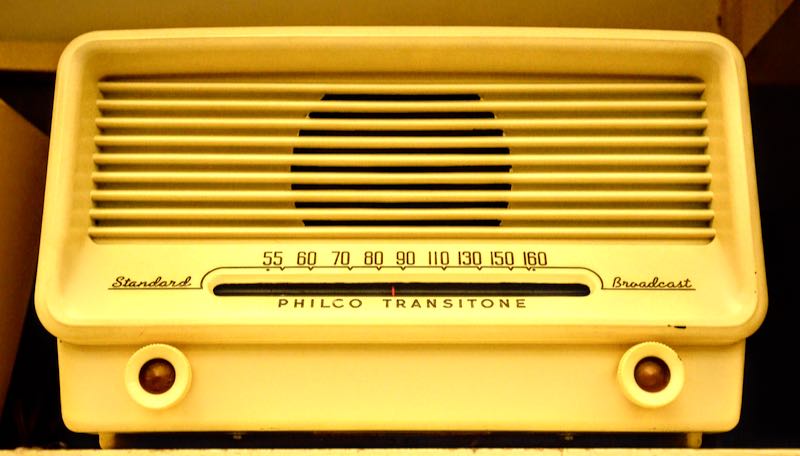
Richard Allan, a retired electrical engineer, has spent the last fifty years collecting antique transistor, valve and crystal sets and has now shown off his impressive collection of more than 200 pieces.

The 85-year-old from Norfolk, first fell in love with radios because of his father, Alexander William, who built his own transmitter and spoke to people all over the world through the airwaves.

In fact, Richard’s first – and favourite radio within his collection – is the one his father, a HAM, or amateur radio lover, played non-stop during World War II after purchasing in 1938.

Another notable piece within his collection is an E52b German military radio, captured in a vehicle at Foxhill, Bath, which was where his father worked in the Admiralty. [Continue reading…]

Free online amateur radio Technician license class (Southgate ARC)

The Montgomery Amateur Radio Club in Maryland is offering a free online Zoom amateur radio Technician license class on seven Saturdays from March 19, 2022 through April 30, 2022 from 1:00 PM to 4:00 PM with an outdoor free test session on Sunday, May 1, 2022 8:30 AM to 11:00 AM.

More information about this Zoom class is at
https://www.marcclub.org/mweb/education/classes/technician.html

This is a great opportunity for you to get your amateur radio license. To learn more about amateur radio, also known as ham radio, go to http://www.arrl.org/what-is-ham-radio

To register for this free class, send an email to [email protected] .

Also, please distribute this announcement to anyone who expresses an interest in getting their ham license and to any newly licensed hams.

Thank you,

David Bern, W2LNX
MARC education committee


Do you enjoy the SWLing Post?

Please consider supporting us via Patreon or our Coffee Fund!

Your support makes articles like this one possible. Thank you!

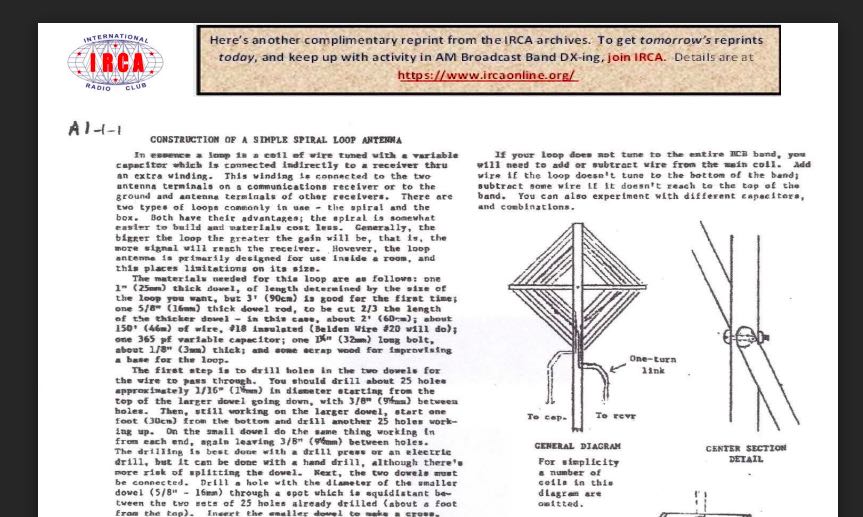
International Radio Club’s Reprints collection of 900+ articles

Many thanks to SWLing Post contributor, Nick Hall-Patch, who shares the following announcement:

The International Radio Club’s Reprints collection of 900+ articles about antennas, radio propagation, receivers, accessories, plus items of general interest to MW DXers, continues to grow.   We’ve published an update to the index, at https://www.ircaonline.org/editor_upload/File/reprints/irca-reprint-index.pdf  ,  so that everyone can get access to these latest additions.

We’re also pleased to start offering reprints that did not initially appear in IRCA’s DX Monitor, but are not easily found elsewhere.  For example, we’ve obtained permission from the family of the late prolific author, Dallas Lankford, to organize and republish his out of print articles. 

(if you’ve used the index before, you may need to refresh the browser page to see the latest update, dated December 2021)

Click here to check out the IRCA Index (PDF).

The 2021 Milcom Files now available on Amazon

Many thanks to Teak Publishing who shares the following press release:


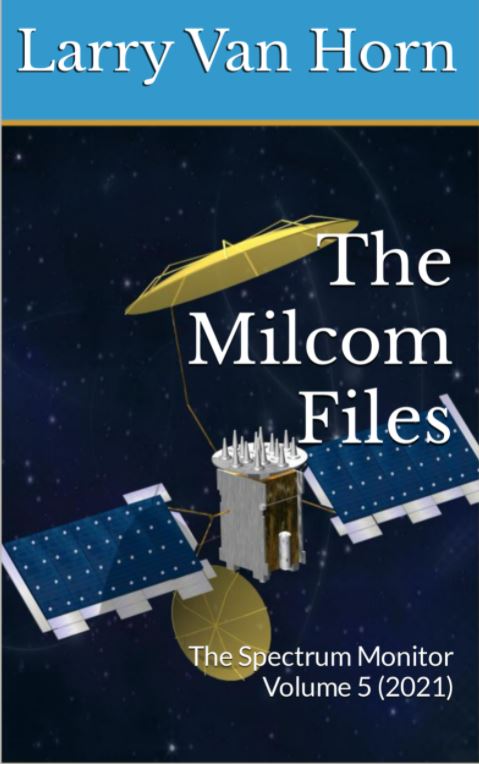
The 2021 Milcom Files – TSM Edition – Now Available on Amazon

Recent world events continue to draw many radio listeners into their radio shacks to tune in on the action using their shortwave radios. software-defined radios, and programmable VHF/UHF scanners. In many cases monitoring the HF/VHF/UHF radio spectrum offers the radio hobbyist an opportunity to hear what is really going on behind the scenes without the filters imposed by news media outlets. Most radio listeners quickly learn that when the world has a crisis, disaster or tensions rise between countries, the military will usually be the first organization called upon to intervene. It pays to monitor military frequencies when international events heat up.

There is a big radio frequency spectrum out there to monitor if you know where to listen, you can eavesdrop on some of the most fascinating radio communications you will hear on a scanner or shortwave radio.

In this regard, the Teak Publishing Company is pleased to announce the release of their latest eBook in the TSM Milcom Archive series – The Spectrum Monitor Volume 4 (2021) by Amazon best-selling author Larry Van Horn.

Some of the topics covered in this new book during 2021 include:

  • The World of Strange Military Stations
  • Military Callsigns
  • US Coast Guard 911 Network and Monitoring Coast Guard Cutters
  • Monitoring UHF Military Satellites and DoD Defense Satellite Network
  • Military Land Mobile Radio Systems Primer
  • Monitoring Military Auxiliary Radio System (MARS) including frequencies and

callsigns

  • NTIA GMF Release and HF – VHF – UHF frequencies
  • Bonus Material: The Spectrum Monitor 2021 Air Show Guide
  • Bonus Material – The Teak Action Bands (LW-MW-HF) Military Frequency List –

Hundreds of discrete U.S. and some foreign military frequencies.

The latest Milcom Files – TSM Milcom edition 226-page eBook is available now on Amazon for just US$4.99. [Note SWLing Post affiliate link.]

Larry Van Horn N5FPW, has been a radio hobbyist for more than 58 years listening to world events and monitoring military radio communications. He has spent over 40 years documenting activity in the military radio spectrum in his monthly Satellite, Utility World, and Milcom (Military Communications) columns in the pages of Monitoring Times, Satellite Times, and now The Spectrum Monitor magazines.

During this time, he has published a treasure trove of military communication monitoring information. All his early MT columns have been published into two e-Books by Teak Publishing. The first two books in the Milcom Files series cover his columns published in Monitoring Times and have previously been published at Amazon. Book one of The Milcom Files covers the columns published from 1998 to 2006 and Book Two covers the period 2007 to 2013

In 2017 Larry joined the Spectrum Monitor writing staff where he continues to chronicle military monitoring in his monthly TSM Milcom column. Now he is publishing all his monthly TSM Milcom columns (2017-2021) at Amazon in the Kindle eBook format. All the books in The Milcom Series archives are available at https://www.amazon.com/gp/product/B078MNXGND.

If you are interested in monitoring military comms. own a scanner, shortwave radio, or have an Internet connection for web software-defined radio (SDR) monitoring, then the Milcom Files are a must reference for the radio library shelf.

For additional information on this and other Teak Publishing radio hobby books is available on the company website at https://www.teakpublishing.com/. Information on other publications by the Larry is available on his author’s page at Amazon http://www.amazon.com/-/e/B00G1QMO4C.

Guest Post: Calculate Station Distances Using Excel Formulas

Many thanks to SWLing Post contributor, Bob Colegrove, who shares the following guest post:


Calculate Station Distances Using Excel

By Bob Colegrove

Introduction

On occasion, I’ve wanted to know just how far away a station was from my home.  I’ve never been much of a contester, but I know distance can play a part in the results.  There are a number of Internet cites which let you enter latitude and longitude information and then calculate the distance across the surface of the earth.  These are alright on an occasional basis, but I often wind up getting the data mixed for the two locations, and it is not handy when you want to make several measurements.  Here’s a way to generate the distance from your home to thousands of stations with just a little effort.

Many years ago, armed with my faded knowledge of high school trigonometry, I used Excel to calculate the surface distance between any two points on earth.  I managed to find the spreadsheet (file dated 1998) which has no fewer than 11 steps in the algorithm.  Although it worked, when I came back to it a few months later to make a change, I couldn’t remember my thought process.  There are Internet sites which develop earth surface calculations in highly esoteric terms and heavy-duty math.  But life is short, and I wanted to cut to the chase.  There are, in fact, several formula variations which have somehow managed to distill all this down to a neat single-cell calculation, and they seem to work very well.

Construction

The spreadsheet figure below is the simplest form used when you have decimal latitude and longitude data as input.  The convention is to use negative numbers for the Western and Southern Hemispheres.  Home is your reception location and all other locations are compared with that to determine the distances.  If you’re curious, the home location (yellow cells) used in these examples is the monument marking the geographic center of all 50 US states in Belle Fourche, South Dakota.  Google Maps is one easy source to determine the exact latitude and longitude of any point on earth.
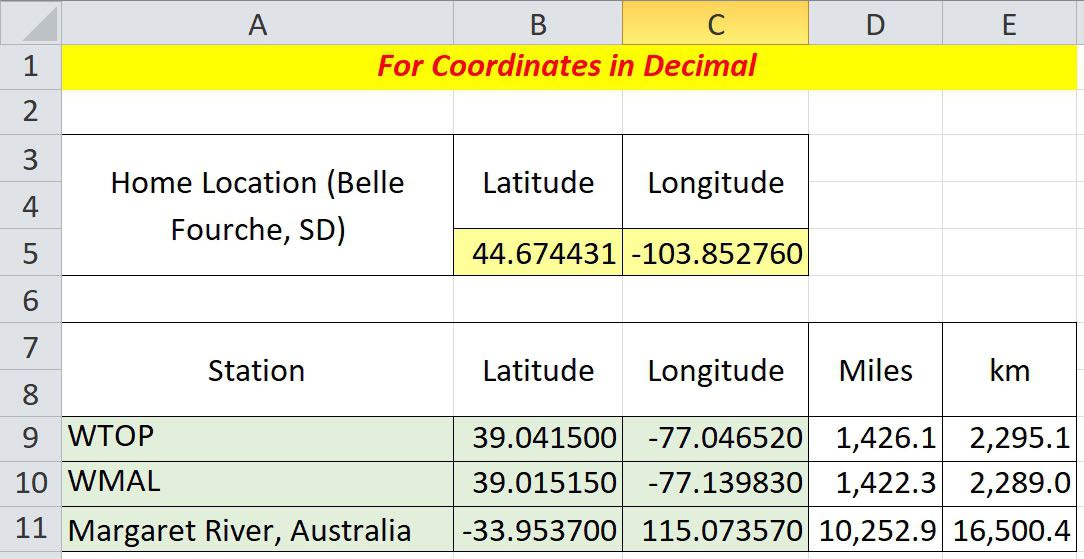
To calculate the distance between any two points on earth, copy the formula below directly into a cell, then change the reference cell names as appropriate, and you’re ready to go.

=ACOS(COS(RADIANS(90-$B$5)) * COS(RADIANS(90-B9)) + SIN(RADIANS(90-$B$5)) * SIN(RADIANS(90-B9)) * COS(RADIANS($C$5-C9))) * 3959

$B$5 and $C$5 are the cell references for your home address (yellow in the figure above).  Of course, the dollar signs indicate these data remain fixed in each calculation.  B9 and C9 are corresponding latitude and longitude for the example radio station, WTOP (green).  Change these four cell locations as necessary.  The constant, 3959, at the end of the formula is the average radius of the earth in miles.  Use 6371 if you want kilometers.  The data cells in Columns D and E are populated with the formula and produce the result. These values are dynamic and can be replicated down the columns for the rest of your station location data.

Degrees, Minutes, and Seconds Format

The US FCC on-line database contains latitude and longitude tower locations for medium wave stations in Region 2, North, South, and Central America.  However, coordinates are in degrees, minutes, and seconds format and must be converted to digital format for calculation of distances.  The conversion process can also be done in Excel.
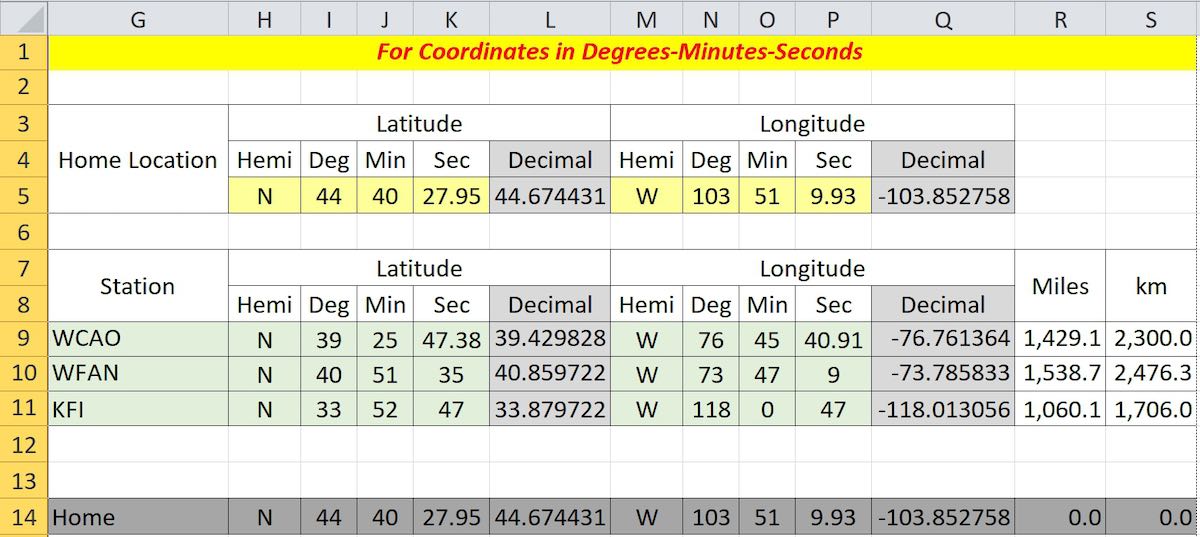
In this case, the inclusion of the coordinate hemispheres, N or S, and E or W is important.  Whereas, the hemispheres in the decimal example were signed + or -, the inclusion of the appropriate letters here is necessary.  Cell L5 reads

=IF(H5=”S”,-I5-(J5/60)-(K5/3600),I5+(J5/60)+(K5/3600))

and cell Q5 is similar for longitude, except “W” is substituted for “S.”  These formulas are then replicated in columns L and Q for each data item.  Columns R and S contain the distance calculation formulas as described above.  Line 14 is not necessary, but can be used to see if your formulas are correct; that is, the distance from home to home should be zero.

Let Excel Get the Information for You

What follows is for anyone tired of copying cumbersome latitude and longitude data.  Unfortunately, it only works on the current version of Microsoft 365 Excel, and apparently goes off into the big cloud in the sky to instantly download the information.
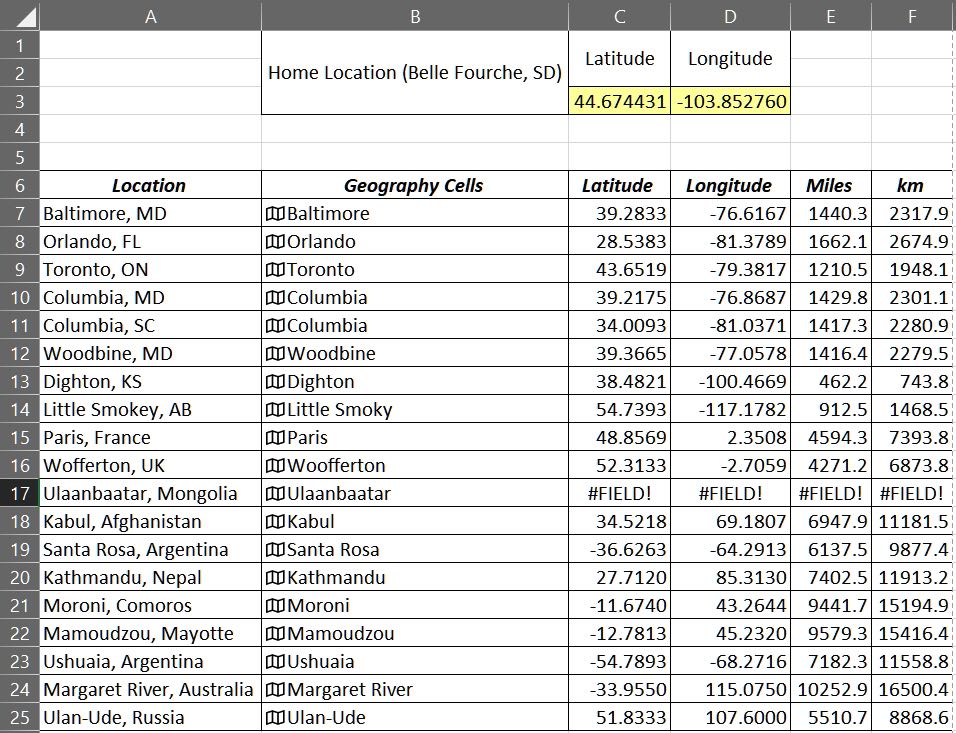
  1. Enter the town followed by either the US state, Canadian province, or other country name (Column A).
  2. Copy these locations to the next column (Column B).  The cells in Column B will become temporary geography cells.  Note:  As shown above, the data have already been converted to geography format (Step 4).
  3. Make sure you have all the geography cell locations selected (Column B).
  4. On the Data ribbon select Geography.  A map icon will appear at the left of each cell, and the state, province and country will be truncated.
  5. For the first latitude (Cell C7), enter =B7.Latitude; likewise, =B7.Longitude in Cell D7.
  6. The formulas in C7 and D7 can be replicated down your list.
  7. Columns for miles and kilometers (E and F) can be added using the distance formula as described above.

The geography data (Column B) cannot be replicated.  If you want to add data later, you will have to reapply the geography format for the new data.  Or, latitude and longitude can still be inserted manually for any additional entries.  The geography data (Column B) are not needed beyond this point and can be deleted or hidden.

Note:  I logged on to my first mainframe computer in September 1976 and have never ceased to be amazed at what these confounded things can be made to do.  I tried as best I could to trip the system with small, obscure towns in faraway places, as well as duplicate names.  I finally succeeded with a relatively large city, Ulaanbaatar, Mongolia.  To be fair, I tried to get it to accept alternate spellings.  So, if you need that one, you’ll have to enter it manually.

Medium Wave Example

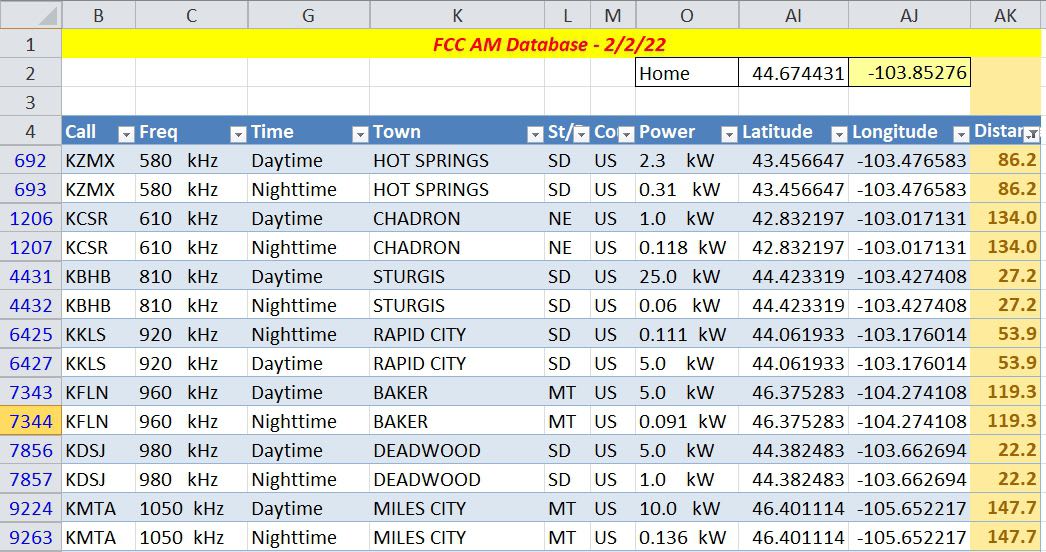
This example is for medium wave DXers in Region 2, the Americas.  It makes use of the FCC AM database at https://www.fcc.gov/media/radio/am-query.  The database currently contains more than 24,500 entries, many of these are duplicate entries for stations using different daytime and nighttime powers.

  1. Download the database as a pipe-delimited text file.
  2. Import the file into Excel.
  3. Create additional columns to convert the latitude and longitude data from degree-minute-second format to decimal as described above.
  4. Add some rows above and enter your home coordinates in decimal.
  5. Create another column to calculate the distance from home to all the stations, again using the base formula above.
  6. Hide any columns in the FCC database that you don’t need.
  7. Finally, by creating an Excel table from all of the data, except your home location, you can do some on-the-fly filtering.

The example below shows some of the stations near our example home in Belle Fourche, South Dakota.  The Distance column on the right has a filter applied to limit the listing in the table to stations within a 150 mile radius, that is, it only lists potential daytime stations.  You could also use the conditional formatting feature of Excel to highlight the same information in the unfiltered data.
Shortwave Example

The AOKI log, http://www1.s2.starcat.ne.jp/ndxc/, has listings for all of the recent broadcasting cycles, B21, A21, etc.  The Excel format files are zipped for download, and include the latitude and longitude of each station.  Unfortunately the coordinates are not only in degrees, minutes and seconds, but they are all mashed together in one cell for each listing.  Excel to the rescue again.  Select Text to Columns in the Data Tools portion of the Data ribbon.  This feature will allow you to divide the single column into four columns each for latitude and longitude, that is, degrees, minutes, seconds and hemisphere.  Then you can use the conversion formula to change degrees-minutes-seconds to decimal.  Note that the first three digits used for longitude are minutes (they go up to 180); the remaining numerical columns have two digits each (up to 60 or 90), and the hemisphere columns (alpha) one character each.

Accuracy

Here are a few things affecting accuracy:

  1. The constants 3959 or 6371 used in the formula for miles and kilometers are generally accepted averages for the earth’s radius.  The difference between the equatorial (longer) and polar (shorter) radii is about 13 miles.
  2. If you are using town locations in your data, remember that the actual distance to the tower in that town is likely to be different.  The FCC and AOKI data are assumed to be station tower locations.
  3. Some decimal sources of latitude and longitude data have less resolution, which could lead to a slight error.

You’re on Your Own

You may have noticed the examples shown in the figures all have multiple station locations. My thought in doing this was provide some test for accuracy and secondly to provide a seed for developing the spreadsheet into a more inclusive log of stations. There is likely enough basic Excel knowledge among the folks gathered here, and each person will likely have an individual preference in designing a spreadsheet. Nevertheless, the spreadsheet shown in the figures can be downloaded by clicking this link.

The first sheet shows Figures 1 and 2 from this article; and the second sheet, Figure 3. The link in Cell I2 of the second sheet describes how to use the geography feature of Microsoft 365 Excel. The third sheet is a recent copy of the FCC AM database (Figure 4). To facilitate storage and downloading, only stations from 530 kHz to 600 kHz are included. Numerous unused columns from the FCC AM database have been hidden; so you can still copy the full, pipe-delimited FCC database into Columns A through AH. The FCC database has been converted to an Excel table; the Home location is not part of the table. Try substituting your own location for Home (Cells AI2, latitude and AJ2, longitude) and setting a distance filter from your home in Cell AK4. In the example, the distance filter has been set limiting the list of stations to less than 600 miles from our example in South Dakota. Note also that the Conditional Formatting feature on the Home ribbon has been used to highlight stations less than 100 miles from home.

If you have any interest in developing your own spreadsheet, perhaps you can comment on what you have done, or provide the rest of us with something I have missed. Hopefully, I have provided enough information to get you started.