Tag Archives: DXing

Part Three: A Beginner’s Guide to ALE

Many thanks to SWLing Post contributor Don Moore–noted author, traveler, and DXer–who shares the following post:
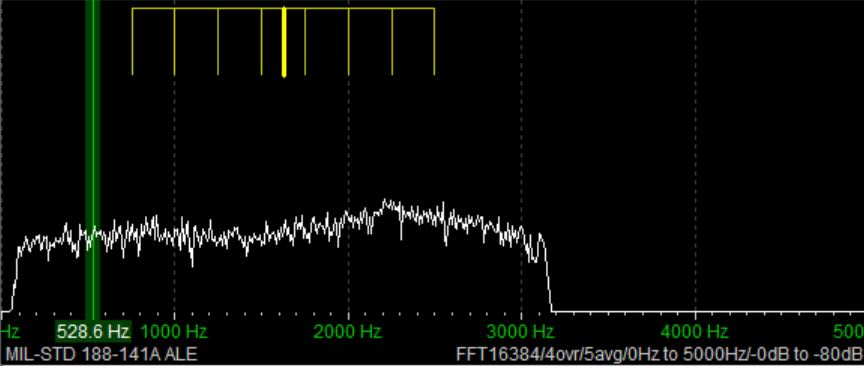

A Beginner’s Guide to ALE: Part Three

By Don Moore

Don’s traveling DX stories can be found in his book Tales of a Vagabond DXer [SWLing Post affiliate link]. If you’ve already read his book and enjoyed it, do Don a favor and leave a review on Amazon.

In the first two parts [Part 1 and Part 2] we looked at software used to decode ALE signals. Now let’s look at the stations and countries waiting to be logged.

If you’ve read the first two parts of this series then you know that there is no listening involved in ALE DXing. I know some traditionalists who would claim it’s not real DXing if you aren’t sitting next to the radio listening to a speaker or headphones. To me, DXing is having fun by logging new and interesting stuff. With ALE, the fun comes from researching the callsigns and frequencies to figure out what was logged. Every DX session produces numerous puzzles.

Identifying ALE stations may not sound hard. After all, one of the best things about monitoring ALE is that the stations are constantly identifying themselves. What could be easier? Unfortunately, it’s not always that easy to match up the callsign with what organization is behind it. Obvious location identifiers like ILLAPEL and VILLAVICENCIO2 are the exception, not the rule.

Around a third of the callsigns I decode stay complete mysteries as to who is behind them and where they are from. For about another third, the organization may be known (and, by extension, the country), but not the transmitter site. Only about a third of my ALE catches can be pinpointed exactly on a map as to where they came from. I wish it were more than that, but that doesn’t mean I haven’t logged some really interesting and unusual places.

Actually, it is surprising that I can pinpoint as many as I do. After all, every ALE network I’m aware of belongs to a government agency, a military, or some other government-affiliated organization. Bureaucracies like those are typically very careful about how they share information even when there is absolutely no security risk involved. Nevertheless, the utility DX community has gathered some excellent information over the years. While some of it is researched from public sources, I understand that some of it comes from inside sources that certain DXers have with people who install the networks. I don’t ask questions about where the information comes from and I’m glad to have the references and lists, which you can find in the links below.

Join the UDXF

The best source of ALE information is the Utility DXers Forum. The UDXF website has a lot of great utility resources that anyone can download. The best information, however, is the members’ loggings. To see those, you have to join the mailing list, where you can see member logs reported in the daily messages. But what you want to do is download the log compilations from the Files section (at Groups.io). Those go all the way back to the UDXF’s founding twenty years ago.

The first zip file is a compilation of all the logs from 2006 to 2019. After that, the logs are compiled into files for each year from 2020 to 2025. Download all of these and unzip them into a single folder. And periodically check back for newer files. At the beginning of each month, there will be a compilation for the previous month. Those will be compiled into a single file for 2026 at the beginning of next year. Finally, you need a way to search within the contents of an entire folder of files. A good text editor, such as Notepad++ for Windows, will do the job.

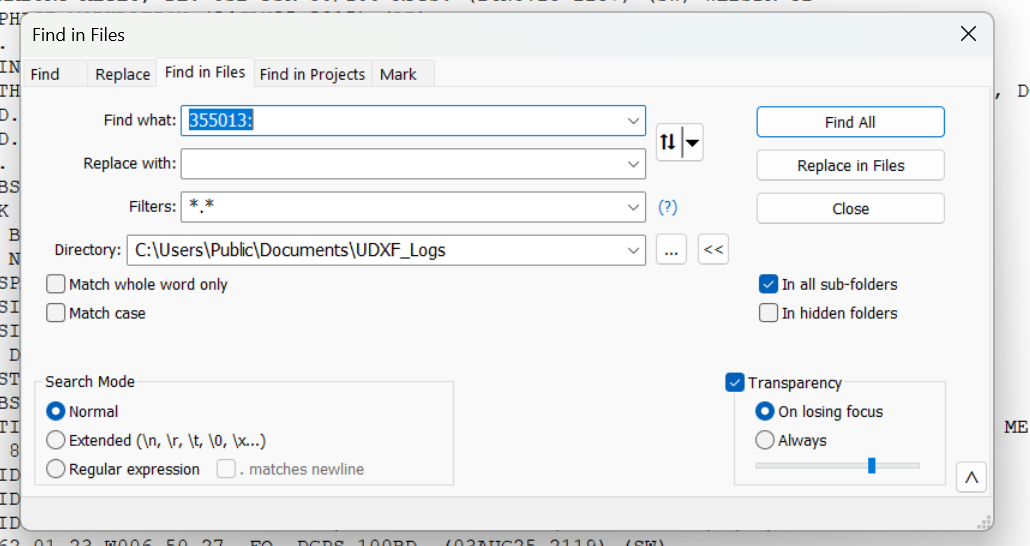
So let’s say I have a logging with the ID of 355013 on 8092 kHz. That really doesn’t tell me a thing about who could be behind the signal. Lots of organizations use six-digit strings as identifiers. I open up the Find in Files feature in Notepad++ and point it at the folder of UDXF logs. Now I type in the ID followed by a colon. Why a colon? Because in the UDXF logs, IDs are followed by a colon. By including the colon in my search term, I can eliminate any other random places that the same string of characters might be. (That’s more important when searching for shorter ID strings, such as three-digit numbers.)
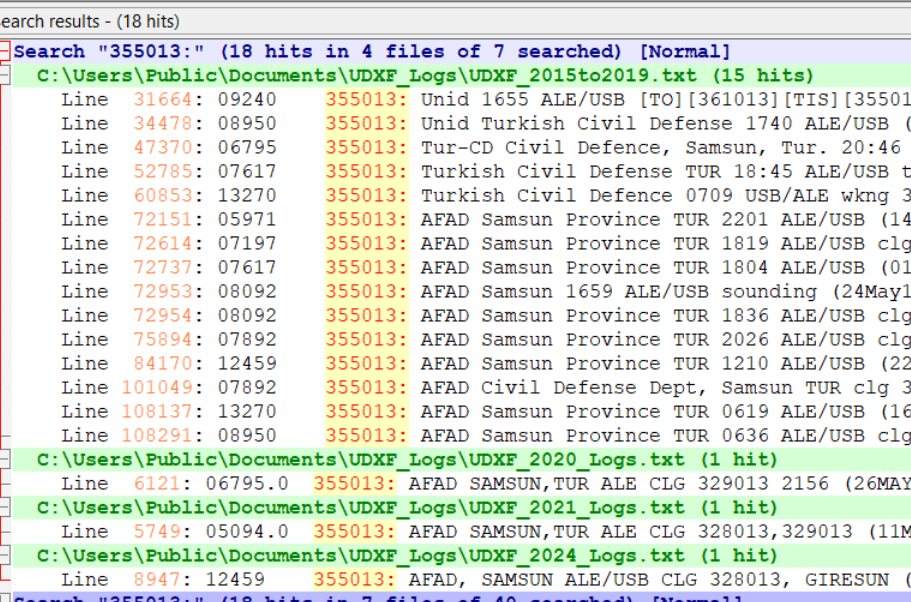
I click Find All and get back a listing of every line in those logs that contains my search string. I can click on any line to open that file at that point. In the frequency column here, I see two hits for this ID on 8092 kHz. I think I can be certain that this is the Turkish Civil Defense station in Samsun province.
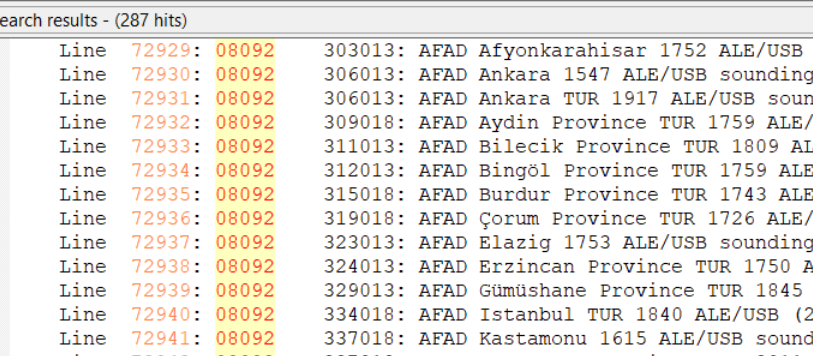
But what if I got these same results, but without any reports on 8092 kHz? That wouldn’t prove that I had logged Samsun even though the six-digit ID is a match on other frequencies. There are other organizations that also use six-digit numbers as IDs, such as UN Peacekeepers in several African countries. What I would do then is run a search for the frequency of 08092 (no colon) to see what other stations have been reported there. That turns out to be an important frequency in the AFAD network, so I could still safely assume that I had logged Samsun.
If the identifier doesn’t show up in the UDXF logs then there are some other resources (listed below) that can be checked. Sometimes the UDXF has complete network lists that include stations not yet reported in the logs. Another thing to do is look to see just what has been reported on that frequency. If there are lots of logs from a particular organization and the IDs follow the same pattern as the one you logged (e.g., six digits beginning with a ‘3’), then you likely got an unknown station in the same network.

If I get this far and still have no idea who is behind the station, then I have two options. I can delete the log and forget about it. Or I can put it in a ‘check later’ list, which I go through every year or so. I’ve identified a number of stations that way, especially from new networks. To be honest, which one I choose to do depends on how I feel that day!

Now let’s take a look at some of the places that stations can be logged from.

North America

The US government heavily uses ALE and there is no question that you will log more stations from the USA than from any other country.

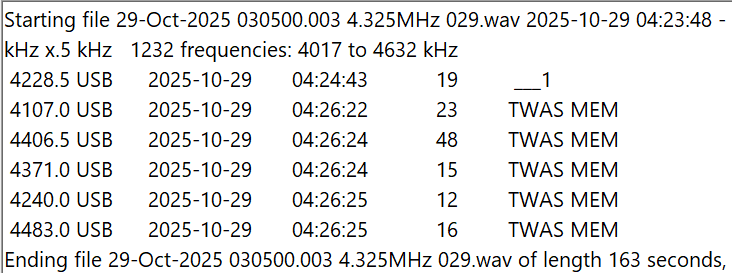
The most widely used set of frequencies by the US government includes 7527, 8912, 10242, 11494, 12222, and 15867 kHz. These frequencies are shared by several organizations, including the US Coast Guard, the FBI, the DEA (Drug Enforcement Agency), and the Customs and Border Patrol. The USCG is an especially heavy user, and it’s easy to log not only USCG bases but also USCG cutters at sea, as well as USCG aircraft. Another heavy user of these frequencies is the COTHEN network, or Cellular Over-The-Horizon Enforcement Network.  This is a network of various law enforcement agencies and includes stations in some unusual places such as Limestone, Florida, and Lovelock, Nevada. Here is a string of Black Cat loggings on five different frequencies by MEM, the COTHEN station in Senatobia, Mississippi.
Another large US government ALE network is run by FEMA (Federal Emergency Management Agency), which operates stations at each of its ten regional offices. The callsigns include the region number, e.g. FC4FEM1 from the region four office in Thomasville, Georgia. If you are in North America, it won’t take long to log all ten regions. Much rarer are the stations in individual state offices, such as SD8FEM in South Dakota and TN4FEM in Tennessee.

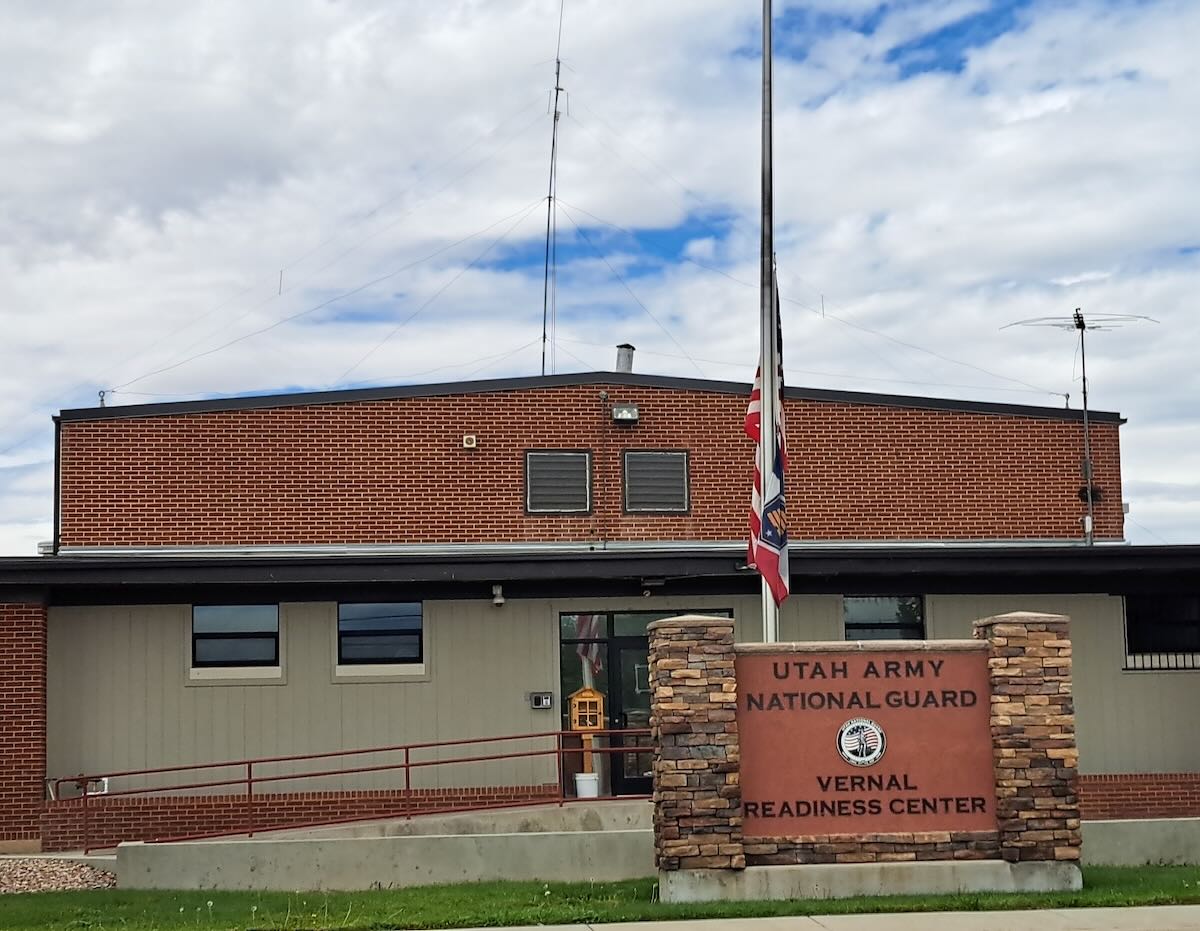
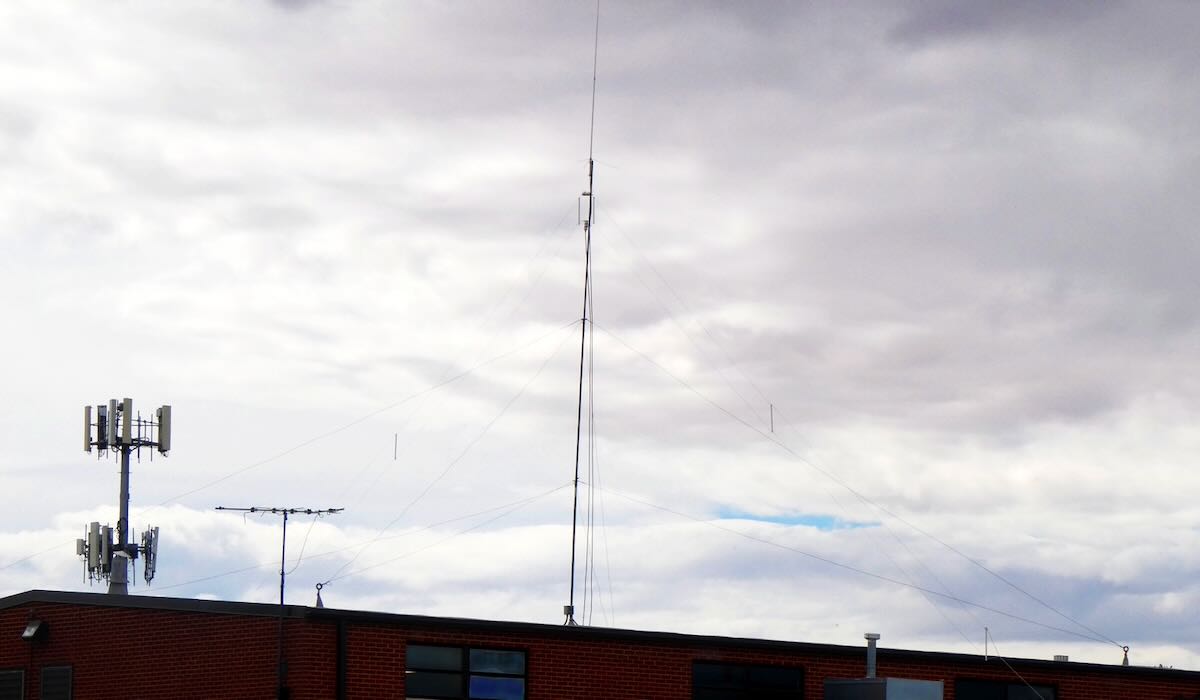
Some state National Guard units also operate on ALE, but by far the most active are the Wyoming and Utah National Guards. These can be logged on several frequencies, including 7805, 7932, and 8065. The Wyoming stations mostly identify by the full town name, e.g. LARAMIE or GILLETTE, while the Utah stations use the first three letters of the local base, e.g. AME for American Fork or TOO for Toole. In September, I passed through Vernal, Utah, and took these pictures of the Vernal National Guard center and the HF antennas on the roof.
Finally, there are several regional government and quasi-government organizations that can be logged. The most active network is probably the Bonneville Power Administration in the Pacific Northwest. It operates a handful of stations with calls including 1121BPA and 1351BPA. Unfortunately, there is no information as to where the individual stations are located.

US government ALE transmissions are not confined to the continental USA. As noted in part one of this series, the US Air Force operates from bases around the world. The US Coast Guard operates from Puerto Rico, Guam, Alaska, and Hawaii. The DEA has a station in Nassau, Bahamas. Finally, the US State Department operates from many consulates and embassies around the world.

The Canadian military has a few ALE stations on the air. Aside from that, to my knowledge, there is no ALE activity from Canada, Mexico, or any of the countries in Central America and the Caribbean, except for that done by the US government.

South America

The militaries of Brazil, Colombia, and Venezuela all operate ALE networks. The Brazilians seem to be particularly active. The police networks of Chile and Colombia, as mentioned in part one, are the most interesting as they identify with the station location. However, logging the Chileans in the northern hemisphere will require good conditions. I’ve only managed to get a few when DXing in the USA, although I have logged several more while DXing in South America.

Africa

Algeria is the heaviest user of ALE from Africa. The Algerian Air Force and Army operate from bases throughout this huge country, and in many cases, the exact locations of the stations are known. One of my favorite ALE logs is CM6 from Tamanrasset in the heart of the Sahara in southern Algeria. Sonatrach, the Algerian national oil company, also has a huge network of stations using four-digit numbers as identifiers. Unfortunately, there is no information as to the exact location of any of those stations.

Morocco, Mauritania, and Tunisia are three other countries with large ALE networks operated by their militaries and/or national police. Finally, United Nations Peacekeepers operate from several countries, including Mali, the Central African Republic, and South Sudan.

Europe and the Middle East

The United States may have the most ALE stations, but without a doubt, the most active ALE callsign is XSS from Forest Moor, England. Operated by the British military, this station pops up on dozens of frequencies throughout the shortwave spectrum. The previously mentioned Turkish AFAD operates what is probably the largest ALE network in this region. Another large network is Italy’s Guardia di Finanza, a sort of combination coast guard and tax enforcement agency. It’s hard to receive in North America, but I did once get one of their patrol boats. ALE is used by the militaries and border patrols of several other countries in this region. My best ALE catch from Europe is getting the Polish UN Peacekeepers in Kosovo. That’s my only logging of any type in that small country.

Asia and Pacific

Australian state police run an ALE network with 10505 kHz being a favorite frequency. To my knowledge, there is no other significant ALE activity in the region aside from that of various US government organizations.

That’s just a general overview of the major users of ALE, but there is a lot more to be logged that I didn’t mention. Unlike a lot of things on HF, the use of ALE is expanding, not contracting. For example, the Colombian police network didn’t even exist two years ago. So, give ALE monitoring a shot. I think you’ll find it to be one more way to make the DX hobby challenging and fun. I do.

Links

Part Two: A Beginner’s Guide to ALE

Many thanks to SWLing Post contributor Don Moore–noted author, traveler, and DXer–who shares the following post:


A Beginner’s Guide to ALE: Part Two

By Don Moore

Don’s traveling DX stories can be found in his book Tales of a Vagabond DXer [SWLing Post affiliate link]. If you’ve already read his book and enjoyed it, do Don a favor and leave a review on Amazon.

In the first part of this series, I explained what the digital ALE mode is and looked at an easy way to get started monitoring ALE stations. In part three, I’ll look in detail at the dozens of countries and hundreds of stations that can be logged in ALE mode. But first, let’s look at a way to let software do the hard work in adding those hundreds of stations.

The Black Cat Approach

Run by longtime DXer Chris Smolinski, Black Cat Systems is a provider of over two dozen quality software programs for radio hobbyists. The one we’re interested in is the Black Cat ALE Vacuum Cleaner. The name describes exactly what it does. The user feeds it a large number of SDR spectrum recordings, and the Vacuum Cleaner sucks up the ALE DX and lists them in a file.

Let’s step through the basics of using the program. But first, you need at least an hour or two of SDR spectrum recordings covering frequencies with lots of ALE traffic. Some of my favorite ranges are 7500-9200 kHz, 10100-11500 kHz, and 15500-16500 kHz.

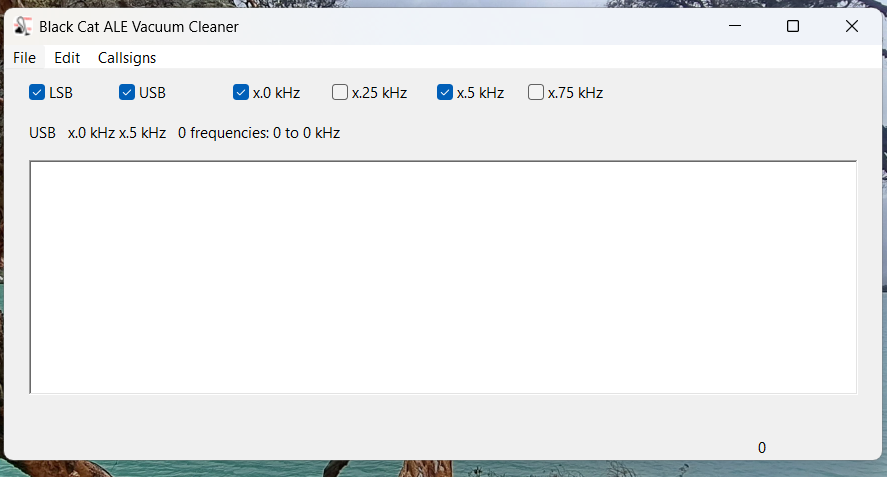
Here’s the main screen on the Vacuum Cleaner:

I recommend you check both USB and LSB. In the logs reported to the Utility DXers Forum, about 97% of all ALE transmissions are in USB mode. From my experience, if LSB is unchecked, the Vacuum Cleaner will step through the files about twenty percent faster, but you will miss a tiny number of stations.

The kHz settings determine how finely the application will tune in looking for ALE signals. I recommend just checking x.0kHz and x.5kHz. Almost all ALE signals on shortwave are transmitted on frequencies that end in either point-zero or point-five kilohertz. The main exception is the US Department of State, which uses frequencies ending in point-six kilohertz (e.g., 8058.6 kHz). Fortunately, the one-hundred Hertz difference from the point-five kilohertz setting isn’t enough to make a difference except maybe with the weakest of signals.

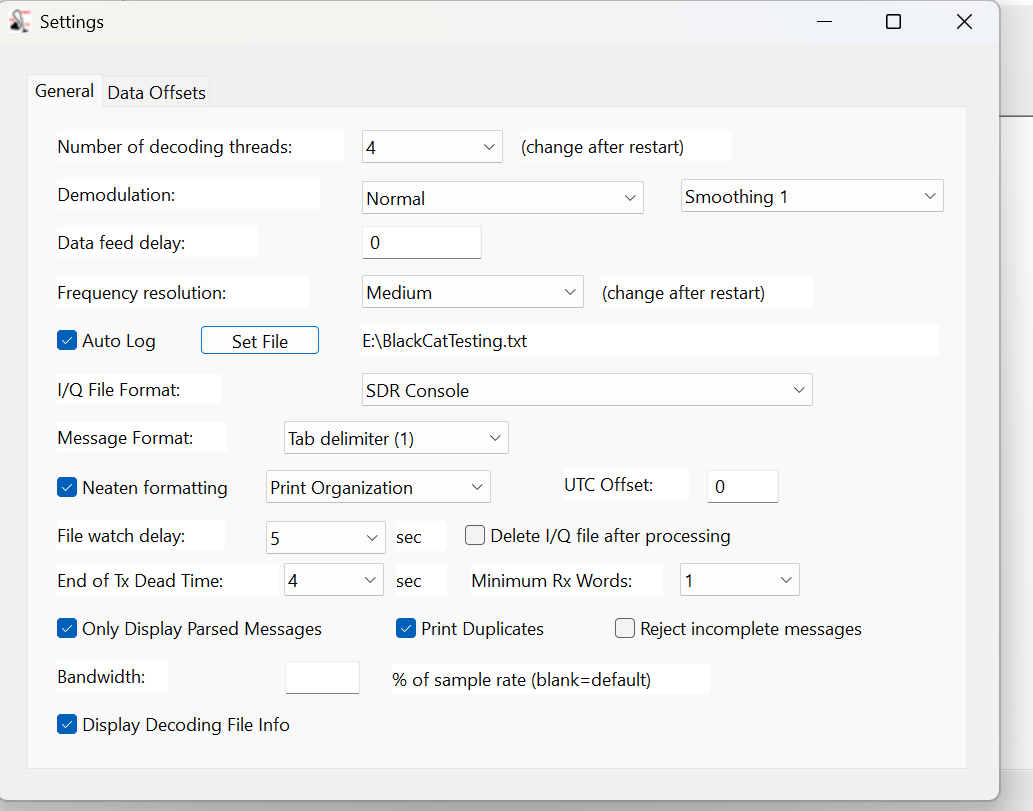
The next step is the Settings, which are found under the Edit menu. Most values can be left at the defaults.

At the top, the number of decoding threads should be no more than the number of cores that your CPU has. Check the Auto Log box, then enter a destination path to record logs to a file. (Otherwise, the logs that show up in the window will be gone when you close the program.) Next, select the file format of the SDR program used in making the I/Q recordings. Finally, set the file format for your logs. I prefer the single tab format so that I can later import the logs into Excel and sort by frequency.

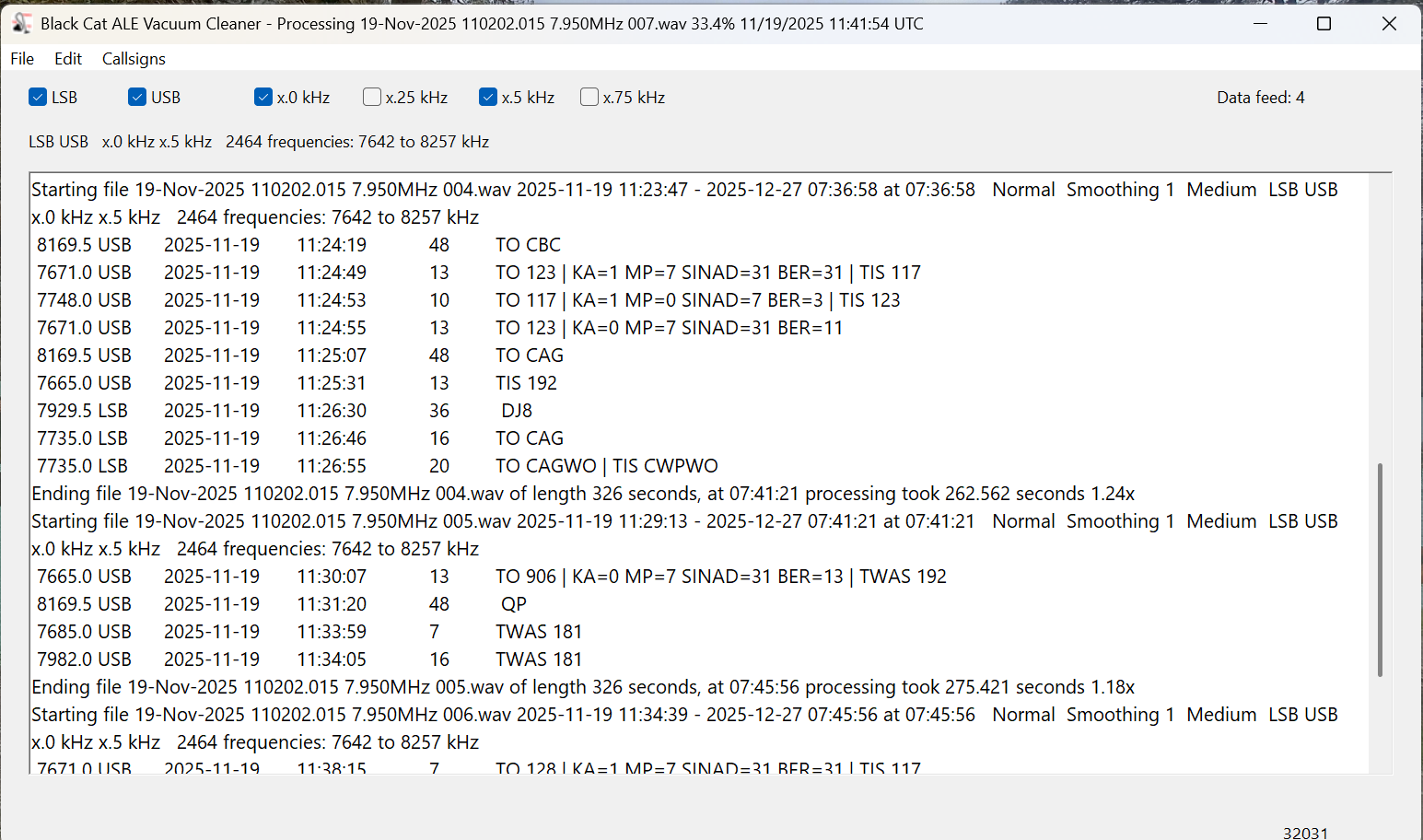
Now it’s time to decode. Under the File menu, select Open I/Q Files and browse to a folder of spectrum recordings to decode. Click on Open in the file selection box, and the Vacuum Cleaner will start decoding the files. Now take a break and come back in fifteen or twenty minutes. The main screen should look like this.

The current settings and the frequencies being scanned are displayed at the top, under the settings checkboxes. There are actually only 1232 distinct frequencies in that range, but the number is doubled as each one is being checked in both LSB and USB. Below that, the output window lists each file as it is being scanned and ALE logs as they are found. (But be sure you are also recording these to a text file.)

To see a list of files still in the queue, select File > Show I/Q Files Awaiting Processing. After a few files have been processed, this will also show an estimate of how much time is needed to complete the queue. To add additional files to the queue, select File > Pause Processing, add the files, and then select File > Resume Processing. Note that the Vacuum Cleaner processes files in date/time order. If you add files that were recorded earlier, they will go to the front of the queue.

How Long Does This Take?

In the above image, notice that after each file is finished, the time taken to decode it is displayed. These files were all exactly 326 seconds long, and the first one took 262 seconds to decode for a speed of 1.24x actual time. That may not seem important, but it depends on how much you have to decode. In a couple of days of serious DXing with my three Airspy receivers, I can easily accumulate a couple of terabytes of spectrum recordings.

Processing time depends on several factors. The first is the bandwidth/sampling rate. Those files above were recorded with SDR-Console at 768 kHz wide. All other things being equal, a narrower sample will process faster and a larger one more slowly. Depending on the band being monitored, I sometimes record with my Airspys at the 912 kHz bandwidth. Those typically take about 25% longer to decode than 768 kHz files.

Another factor is whether or not the Vacuum Cleaner has to share processing power with other running applications. That slows things down. I mostly decode overnight or at times when I’m not otherwise using the laptop. Under those conditions, my 768 kHz files decode at 1.75x and my 912 kHz ones at 1.45x. But those numbers are for my nearly four-year-old main laptop. An older laptop I have at home tops out at around 1.40x on 768 kHz files with nothing else running. If you have a high-performance gaming laptop, you should get much better numbers than I.

Then there are differences between the various SDR applications in how they store data. I won’t go into the technical details that Chris explained to me, but SDR-Console is more efficient in this regard. In my own testing, I found that files of similar bandwidth and time length recorded with SDR-Console decode at least fifty percent faster than those recorded with the default Elad and Perseus software. I’m satisfied with SDR-Console, so I haven’t tried any other programs. If you have other favorite SDR applications, I suggest doing some comparison tests to see what works best for you.

One application that you shouldn’t use is HDSDR. Chris didn’t have good documentation on the file format for this one and wasn’t fully successful in reverse-engineering it. The Vacuum Cleaner will work with HDSDR, but almost all the callsigns that it finds will be errors. And that brings us to an important question.

How Accurate Is It?

When I started using the Vacuum Cleaner, my main concern was whether it would miss valid signals. There was only one way to find out, so I ran several tests. I would give the Vacuum Cleaner a few hours of I/Q recordings to decode, and then I would process the same recordings manually using Sorcerer, as described in part one. Black Cat not only correctly identified every single ALE transmission that I found with my eyes but went way beyond that. It also found and decoded weak and noise-covered signals that I couldn’t see in the Data Analyzer window but were there when I played them back.

As Chris points out in his documentation, the emphasis on weak signal detection does cause the application to sometimes falsely report bogus callsigns. Some of these are produced by random noise, fooling the system. Others come from poorly received signals. He could have taken a ‘high confidence’ approach and only presented callsigns that had been clearly received. But that would have meant some valid callsigns not being reported. Instead, he went with displaying everything. It’s up to the user to weed those out.

If the decode doesn’t contain any of the keywords (TO, TIS, and TWAS) then it’s probably an error. But poorly received signals can cause partial and incorrect callsigns to be reported with a keyword. Spotting those just takes the knowledge and practice that comes from using the program and ALE reference materials. (That’s the topic of part three.)

Is It Worth the Price?

Black Cat ALE Vacuum Cleaner is a high-quality software available for Windows and macOS, and you can try it before buying. The cost is $99.99.

Is it worth it? If all you want to do is sample what ALE is all about, then probably not. But if you get serious about ALE monitoring and want to add hundreds of ALE stations to your logbook, this is the way to do it. I am 100% satisfied with the Black Cat ALE Vacuum Cleaner. I’ve decoded several thousand hours of I/Q files with it over the past few years. (When running multiple SDRs at a DXpedition, it’s easy to accumulate seventy or eighty hours per day.) The program also has a few other tricks I haven’t covered. For example, it is possible to actively monitor a folder and decode I/Q recordings as they are created.

In part three of this series, I’m going to take an in-depth look at the countries and stations that can be logged in ALE mode. Once you’ve seen how much DX there is to log, you might just be convinced, like me, that the program is worth the price. And you married guys can tell the wife that you’re buying a new vacuum cleaner that only you will use, hi!

The Vacuum Cleaner isn’t the only program that Chris has for ALE monitoring. Black Cat ALE is a different program that does live monitoring of up to twenty-four ALE frequencies simultaneously with SDR-Console, assuming your laptop has the resources to handle that.

Finally, Chris tells me that he’s been experimenting with using the Vacuum Cleaner with wide-bandwidth I/Q recordings on high-end laptops. On his M4 Max MacBook Pro, he’s able to process 32-MHz wide recordings at about 0.50X real time and 16-MHz wide recordings at about 0.97X real time. As he says, it won’t be long until it will be possible with the right equipment to monitor the entire HF spectrum for ALE signals in real time. And that will be fun!

Links

Part One: A Beginner’s Guide to ALE

Many thanks to SWLing Post contributor Don Moore–noted author, traveler, and DXer–who shares the following post:


A Beginner’s Guide to ALE: Part One

By Don Moore

Don’s traveling DX stories can be found in his book Tales of a Vagabond DXer [SWLing Post affiliate link]. If you’ve already read his book and enjoyed it, do Don a favor and leave a review on Amazon.

To me, part of the excitement of DXing has always been logging new stations. From the very beginning (over fifty years ago), I went after shortwave broadcast (SWBC), medium wave, and voice utility DX. Up until the mid-90s, I usually averaged logging one new SWBC station per week. Today, it’s hard to add more than one or two each year. There are also far fewer voice utility stations on the air today. At least medium wave is still going strong. Several years ago, my quest for logging new stations on the shortwave frequencies got me involved in DXing digital utility stations. I wrote an article here on monitoring DSC stations: https://swling.com/blog/2022/11/guest-post-monitoring-digital-selective-calling-dcs-with-yadd/).

But DSC is just one of several digital modes that I’ve been playing around with. The one that I’ve found most interesting – and the one that has yielded hundreds of new stations in numerous countries – is ALE.

Now, I am not an expert at monitoring ALE. I’m just an advanced beginner. But I think I know enough to help other beginners get started. And if you are an ALE expert reading this, I welcome your additions, corrections, and even criticisms to the comments section. I still have a lot to learn, too.

What is ALE?

Ever since the early days of radio, one of the most important uses of the shortwave spectrum has been two-way communication. It provides a means for an organization’s far-flung offices or bases to communicate without relying on external infrastructure. That remains true even today because satellites can malfunction and evil powers can cut undersea cables.

But shortwave isn’t consistent. The frequencies that work best between any two points will vary by time of day, time of year, solar conditions, and a host of other factors. In the old days, radio operators had to understand radio propagation to make an educated guess as to the best frequency to use to reach a particular distant station. Sometimes they guessed wrong, and stations would struggle to communicate or maybe not even connect. ALE, or Automatic Link Establishment, was designed to make two-way shortwave communication as simple as making a telephone call. Depending on your point of view, it has taken the guesswork out of frequency selection … or made it so easy that any dummy can be a radio operator.

In an ALE system, each station is assigned a unique identifier and the network has a set of preconfigured frequencies spaced throughout the shortwave spectrum. For example, here’s a partial list of frequencies and stations for the United States Air Force, one of the most active ALE networks.

USAF Common Frequencies: 4721, 5684, 5702, 6715, 6721, 8968, 9025, 11181, 11226, 13215, 15043, 17976, 18003, 23337, 27870 kHz

Most Active USAF Stations

  • ADW Andrews Air Force Base, Maryland, USA
  • AED Elmendorf Air Force Base, Alaska
  • CRO Croughton Air Base, United Kingdom
  • GUA US Air Force Base, Guam
  • HAW Hawthorn Air Force Base, Ascencion Island
  • HIK Hickman Air Force Base, Hawaii
  • ICZ US Air Force Base, Sigonella, Sicily, Italy
  • JDG US Air Force Base, Diego Garcia Island
  • JNR US Air Force Base, Salinas, Puerto Rico
  • JTY US Air Force Base, Tokyo, Japan
  • MCC Beale Air Force Base, California, USA
  • OFF Offutt Air Force Base, Nebraska, USA
  • PLA Lajes Field, Azores

The key to the system is a piece of software called the ALE controller. At periodic intervals, the ALE controller at a particular station, say PLA, will loop through the frequencies and send a “sounding” out on each one. That’s just a short digital identification burst saying “This is PLA!” Here’s a recording of an ALE sounding.

That’s not the kind of signal that anyone would enjoy listening to all day. Fortunately, no human being has to do that. Instead, all the other controllers in the network are monitoring every frequency and automatically make note of how well PLA is received (or not) on each channel. Now, if someone at Offutt Air Force Base needs to send a message to Lajes, they just go to their ALE controller and enter “PLA.” The system will select the best frequency to use based on the most recent observations. That’s the basic explanation. If you want to understand more, see the links at the bottom.

Monitoring ALE

You can’t DX ALE with your ears. A computer program has to do it for you. There are several hobby programs that do the job, and I’m going to look at two of them. The first one will get you started, and the second one will take your ALE DXing to the top.

I began with Sorcerer, a free program that decodes several dozen digital modes. See the links below for downloading. The program doesn’t need to be installed. Just unzip the file and place the executable in a suitable location. Next, you need an SDR and an SDR application. I prefer SDR-Console for digital work, but any SDR program will work if you can feed the audio into a virtual audio cable. And that’s the other thing you need – a direct audio connection from the audio output of your SDR application to Sorcerer. There are several similar products available, but I recommend VB-Cable. Your first VB-Cable is free, and you only need one to run Sorcerer. If you want to expand, you can buy more VB-Cables later.

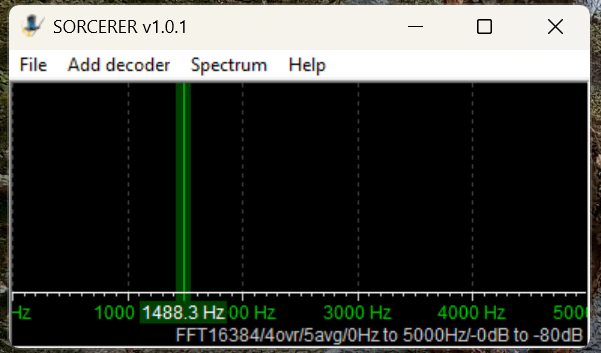
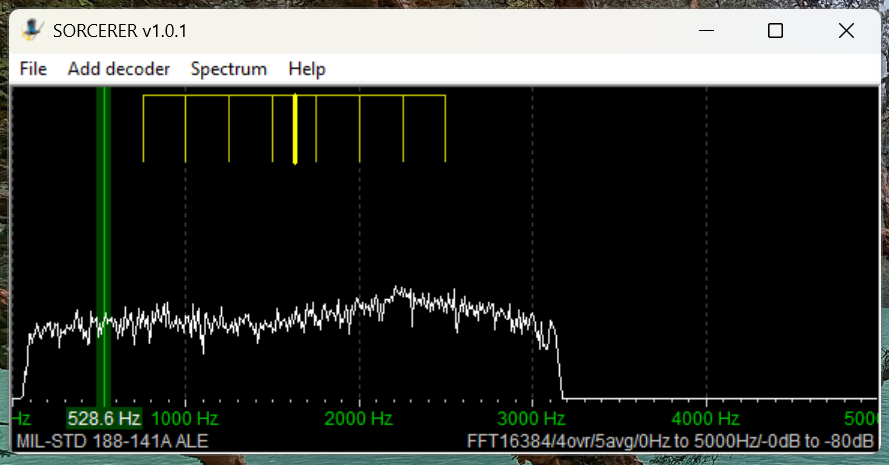
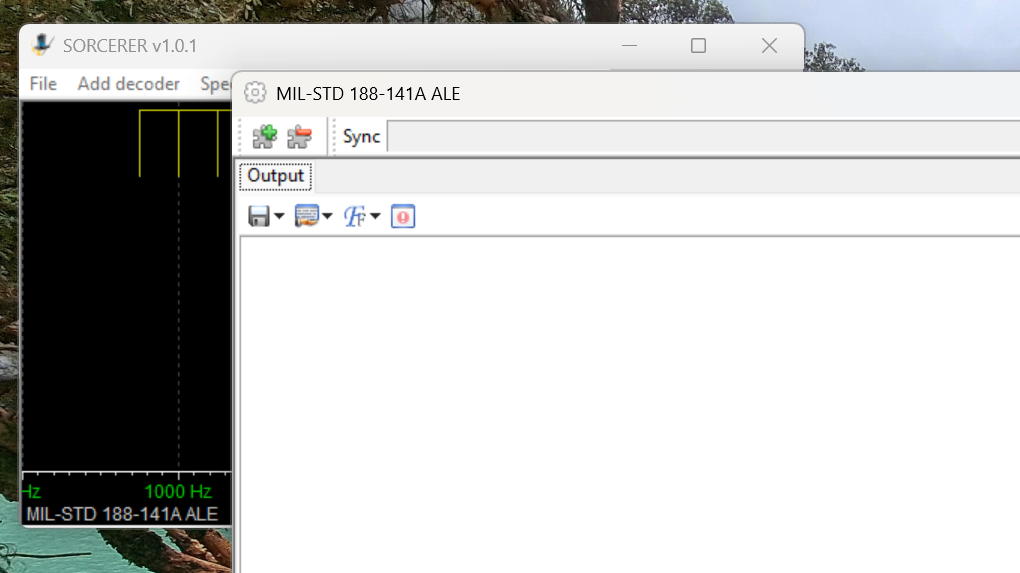
Here’s the main window that opens when you start Sorcerer.

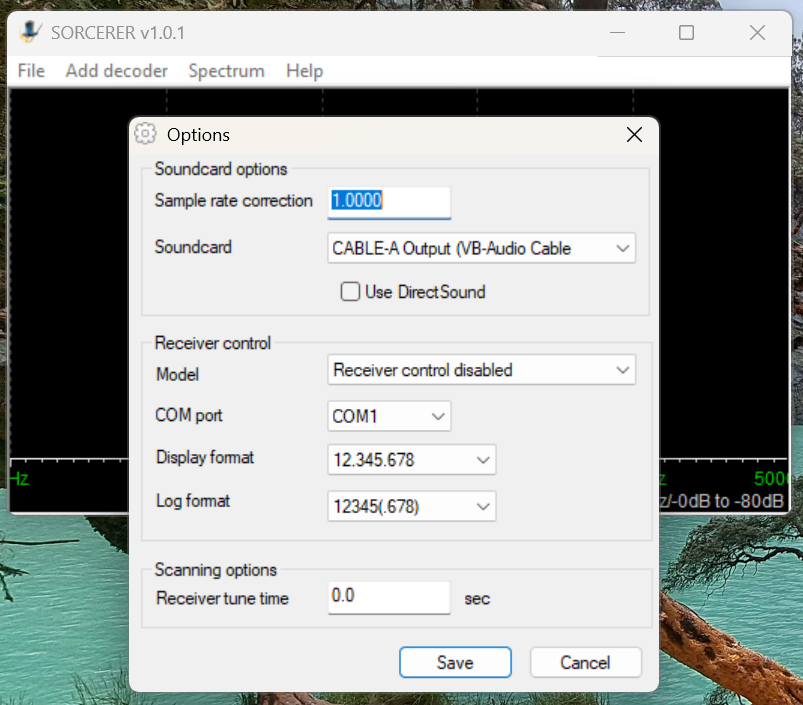
The first time you use Sorcerer you will need to connect it to your VB-Cable. On the menu select File then Options. Find the cable under the Soundcard list and save.

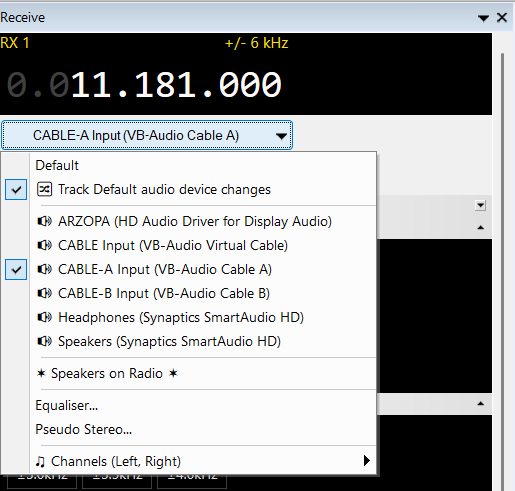
Open your SDR application and tune it to 11181 kHz. Set to USB mode with a filter value of around 2.8 kHz. That is one of the most heavily used frequencies by US Air Force bases around the world. Wherever you are, something should be received. Next, set the audio output of your SDR application to go to VB-Cable. In SDR-Console that’s done by a drop-down box under the current frequency. Next, slide the volume level all the way up.

Now go back to Sorcerer and confirm you are getting audio from the SDR application.

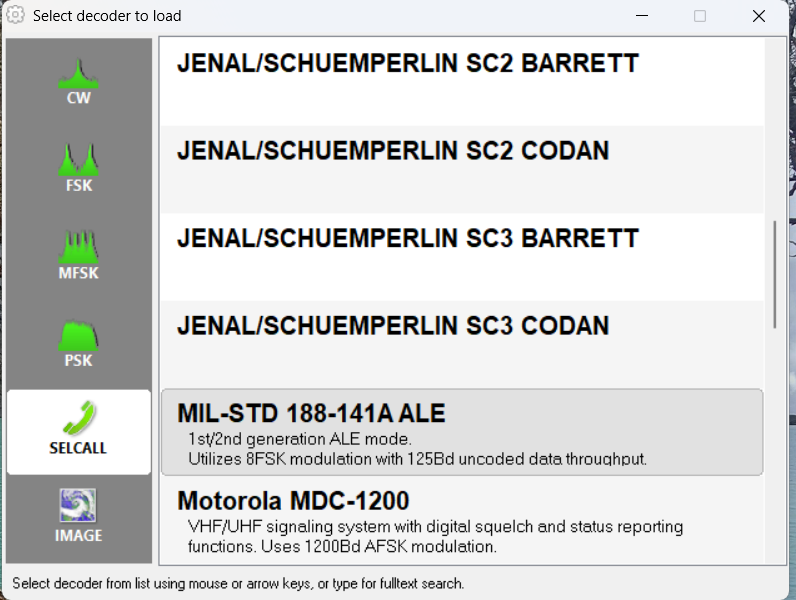
Now select Add Decoder from the top menu in Sorcerer. Then select SELCALL on the left side and scroll down and double-click to select MID-STD 188-141A ALE from the options.

That will open a large decoder window, which you can resize as needed.

Now, go get a cup of coffee and come back in about thirty minutes.

Sample Sorcerer Output

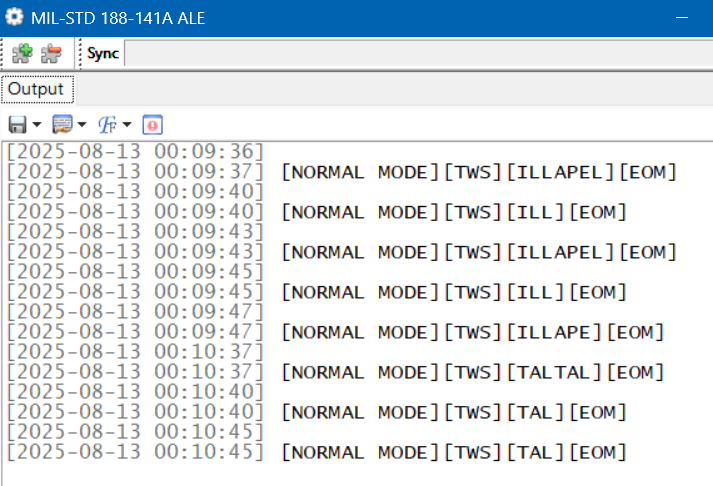
Let’s take a look at some sample output from Sorcerer. These loggings were made on 7915 kHz, a frequency used by the Carabineros (National Police) in Chile. First, Sorcerer shows the time and date the decoding was done per the current time on the laptop. If you are monitoring live, those are the correct date and time of the reception.  For the record, I was decoding from SDR spectrum recordings in these examples, so the times and dates are not the real ones. (I got the real ones from the spectrum recordings.) TWS stands for “This Was” and EOM for “End Of Message.” ILLAPEL and TALTAL are the station identifications, which in this case correspond to two Chilean cities. Note that sometimes the end of the ID can be cut off if reception isn’t clear.

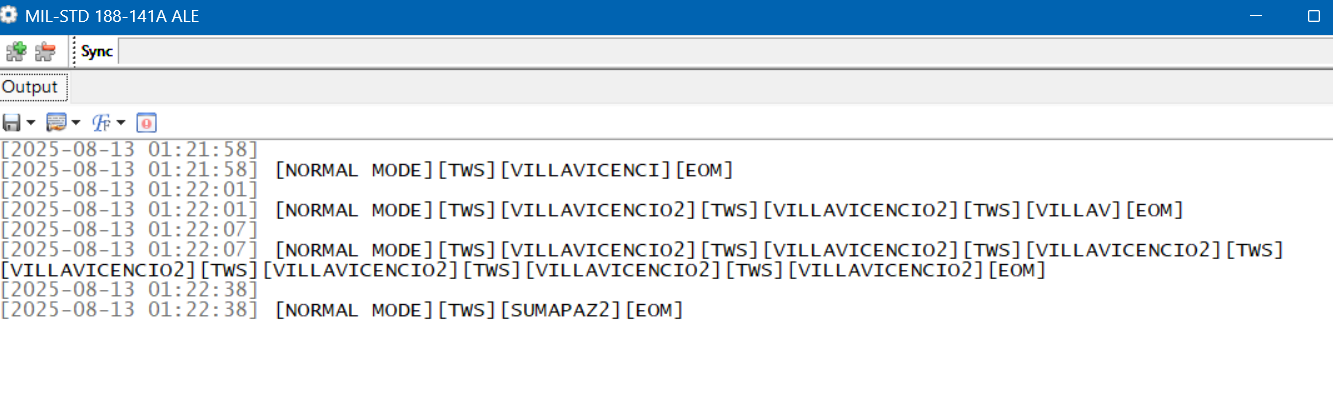
These next loggings are from the national police of Colombia on 7560 kHz. Villavicencio is a city east of the Andes, and Sumapaz is a national park in the remote mountains south of Bogotá.

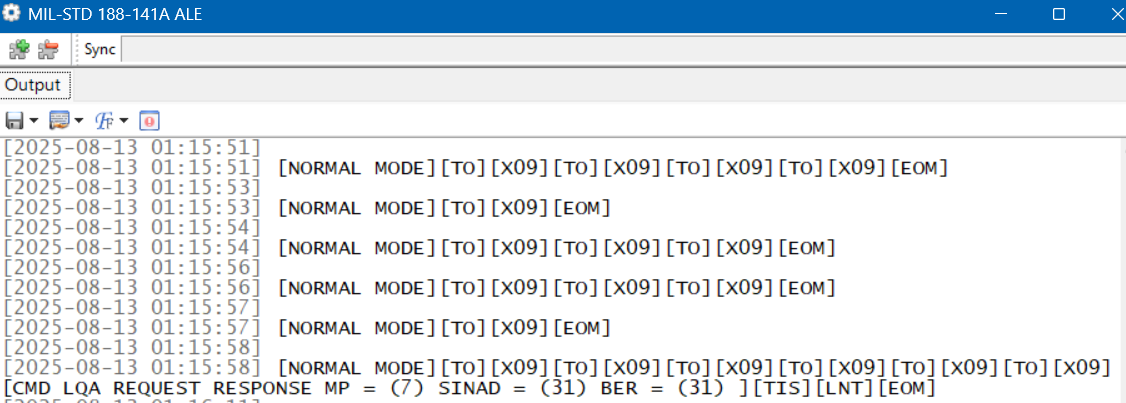
Here is a string of loggings on 7527 kHz, a frequency used by the US Coast Guard and other US government agencies. But here we have a TO, which means someone is trying to call X09. That happens to be a C-27J Spartan, a medium-range surveillance aircraft used by the US Coast Guard. Who’s doing the calling shows up in the final line. TIS (“This Is”) is a variation on TWS. LNT is the identification for CAMSLANT, the big US Coast Guard station in Portsmouth, Virginia.

The Limits of Single Frequency Monitoring

DXing live and monitoring one highly active frequency at a time with Sorcerer makes for a good introduction to ALE. However, if you just stick to monitoring easy frequencies like the USAF ones, you’ll get a lot of logs, but it won’t take long until you feel as if you’ve gotten everything. There are hundreds more ALE frequencies out there, such as the Chilean and Colombian police ones. But those are less active and might only be received at your location when conditions are just right. If you go after those by live monitoring with your SDR parked on a single frequency, you’ll spend a lot of days without getting a single hit.

What is needed is a way to cast a wide net to catch all the activity in a particular band. The idea I came up with was to use the Spectrum Analyzer feature of the SDR-Console program. See my article on this highly useful feature for an understanding of how this works.

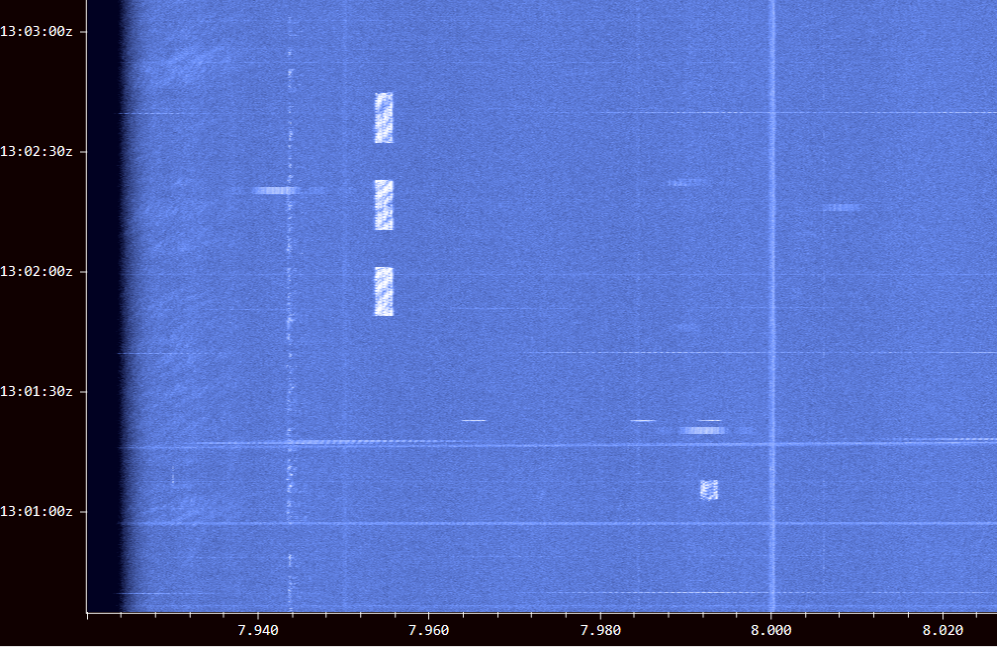
Using an Airspy HF+ Discovery, I would make several hours of spectrum recordings and then use the Spectrum Analyzer to visually find the ALE signals. Here’s a string of three long ALE bursts on 7953 kHz and a single weaker one on 7991 kHz. (Some other digital modes look the same on screen.)

I just had to click on a signal to play it into Sorcerer to get the ID. The process worked really well, and I found a lot of stations this way. But it was also tedious and time-consuming. I wanted something better … something that did the hard work for me. That’s what technology is for, right?

Stay tuned for Part Two … 

Links

Bob’s Radio Corner: It’s DX Season

Noted by Bob Colegrove

In the Northern Hemisphere the nights continue to get longer as we approach the winter solstice; we gain an hour of early evening darkness on Sunday, November 2nd; the summer atmospheric disturbances are nearly gone; propagation is better.  It’s time to set aside the activities of summer and once more dive underneath the headsets.

DXing is not the same thing as listening.  For listening you position yourself in a nice recliner with the radio on a table beside you.  You set the radio to ATS and scan the available fare.  You select one of the more interesting results and, together with your favorite beverage, listen to the programming.  DXing, on the other hand, requires well planned work and lots of patience.  Critics might say it also requires some imagination; however, I have always tried to be honest with myself and ask if what I am hearing is truly QSLable.

Sir Oswald Davenport, intrepid DXer and Chairman,
National Association of Armchair Adventurers

Don’t get me wrong, I listen a lot, but I also DX.  Living on the East Coast of NA, I often direct my antenna toward Asia and the Pacific hoping to hear Japan and New Zealand.  However, more often than not, these have proven to be illusive.  DXing is like fishing.  Often, you pull up an old boot or find the bait is gone.  Further, the sound quality of a true DX signal will have no appeal to an audiophile.  It is intentionally weak and subject to fading.

So, you get your wins when you can.  Last February I scanned the 49-meter band stopping at 6130 kHz to identify some faint pop/rock music.  There were two possibilities, a Chinese station and Radio Europe.  If you have never heard of Radio Europe, it is in Alphen aan den Rijn, The Netherlands, and has a rather imposing name for a modest 1 kW station.  It is targeted to Western Europe, and is listed in HFCC, B25.  The station is identified periodically in English by a dramatic baritone male announcer.  The recording was made at 0211 UTC on February 6, 2025.  The announcement begins 9 seconds into the clip; Radio Europe is mentioned at 23 seconds.

The curious thing is Radio Europe is not necessarily well received at the U. of Twente SDR site just 100 miles away.  Science notwithstanding, there is simply no accounting for propagation.

Well, Radio Europe is back this season as strong as I have heard it, and if you’re a NA East Coaster, you might give it a try from 2300 UTC on.  I see it was reported in Florida in 2023.  Using exalted carrier single sideband (ECSS) (SSB in simpler terms) seems to produce the best results.  Despite low power and long distance, it’s occasional stations like Radio Europe that keep this DXer fishin’.  For a clear sample, it streams here http://p.liveonlineradio.net/?p=radio-europe.

Good DXing ’25-’26.

Dexter D. Xer

From Missouri to Oklahoma: Discovering America’s Secure Nets on 5140 kHz

Many thanks to SWLing Post contributor Don Moore–noted author, traveler, and DXer–who shares the following post:


Icom IC-756 Pro Transceiver DialThe Missouri and Oklahoma Secure Nets

By Don Moore

Don’s traveling DX stories can be found in his book Tales of a Vagabond DXer [SWLing Post affiliate link]. If you’ve already read his book and enjoyed it, do Don a favor and leave a review on Amazon.

I’m always looking for new stations to add to my logbook, and the more unusual, the better.  So I was intrigued by a pair of messages in the Utility DXers Forum (https://www.udxf.nl/) email group in mid-August. Steve Handler posted a list of emergency station call signs from the state of Missouri that he found on the web in a 2014 emergency plan document. Then Jack Metcalfe responded that the last time he had checked, in early 2024, they ran a regularly scheduled net on 5140 kHz.

I immediately sent an email to Jack to find out more. He answered that on Wednesdays the Oklahoma State Secure Net had been doing a check-in at 0900 local time and that the Missouri State Secure Net followed at 0930 local time. Both of these started on 5140 kHz and then moved to 7477 kHz.

Going After the Secure Nets

I was spending my summer at an Airbnb in the north suburbs of Chicago. It wasn’t a good place to DX from, but I had already found a good listening site at the Old School Forest Preserve near Libertyville, Illinois. I began a series of regular Wednesday morning listening sessions. I knew that this wasn’t the best time of year for reception on lower frequencies, but I wanted to give it a try.

All I got from the Oklahoma net was a few very weak and unreadable signals. From the Missouri net, I got two loggings of the net control station, WNBE830, and of WQKX373 in St. Charles County. Two other Missouri stations did check in, but they were too weak for me to copy the call signs. They did say that the net is only on the first and third Wednesdays of the month. And there was nothing on 7477 kHz, so they apparently stick to 5140 kHz only now.

Recording of WNBE830 as heard on 5140 kHz at 1430 UTC on 03 September 2025, as heard in Old School Forest Preserve:

In mid-September, I left Chicago to visit my daughter in western Colorado. While I was planning my return drive back east along I-70, I realized that I would be spending the night of Tuesday, October 14, somewhere around Kansas City. And that meant I would be in the area the next morning for the third Wednesday of the month. I made plans for another mini DXpedition.

I found a hotel in the west suburbs and the next morning headed to a picnic shelter in nearby Wyandotte County Park for another remote DX session with my Airspy HF+ Discovery SDRs and PA0RDT mini whip. It was an excellent location. I logged five stations participating in the Oklahoma net. During the initial chitchat before the roll call, it was mentioned that some of the participants were at a conference. I might have gotten more stations if it hadn’t been for that. The Missouri net, on the other hand, did not make an appearance even though it was the third Wednesday.

Recording of roll call in the Oklahoma State Secure Net on 5140 kHz at 1407 UTC on October 15, 2025, as heard in Wyandotte County Park.

How To Log the Secure Nets

I didn’t hear as many new stations as I had hoped, but then I was listening in late summer and early autumn. There had already been several hours of daylight before the net started, which isn’t the best for propagation on the lower shortwave frequencies. The northern hemisphere is moving into winter, and as that happens, sunrise times will move later. And that will allow 5140 kHz to be heard at greater distances during the timeslot these nets are on. If you can hear WWV on 5 MHz in mid-morning in mid-winter at your location, you should have a chance at these.

The nets are on at 0900 and 0930 local (Central) time. When I was tuning in, that was 1400 and 1430 UTC, but when the US goes off of Daylight Savings Time on November 2nd, that changes to 1500 and 1530 UTC. From what one of the Oklahoma stations said, it sounded like the Oklahoma net is on every Wednesday. The Missouri net did say only first and third Wednesdays, but according to Jack Metcalfe, it was weekly some years ago. And for some reason, they weren’t on the third Wednesday of October.

I’m going to be spending the next four months traveling in Southeast Asia, so I won’t be DXing these again until I return to Chicago for a short visit in March. But hopefully some of you reading this in North America will try to hear these networks, too. Given that there is some question as to which Wednesdays these networks take place, I suggest setting up your SDR to make a spectrum recording including 5140 kHz every Wednesday at 1400/1500 UTC for the next few months. And let me know what you hear by dropping me a message to Don AT DonMooreDXer DOT com. If I get enough good information, I’ll put together an update to this article.

And that brings up something else. Do you know of any other regularly scheduled utility voice networks on shortwave like this one? Over twenty years ago, the US Army Corps of Engineers and the Federal Aviation Administration had weekly voice nets, but those are long gone.

Please post what you know in the comments or send me an email to the above address.

Oklahoma Secure Net Stations

On logs going back to 2005, these are the stations that Jack Metcalfe has heard participating in the net.

  • KNBV428 Santa Fe, NM
  • KNFG267 Oklahoma City, OK (normal net control)
  • KNGR728 Rush Springs, OK
  • WGY926 Oklahoma City, OK
  • WNBM839 Stillwater, OK
  • WNCH624 Department of Emergency Management, Tulsa, OK
  • WNPV700 Durant, OK
  • WNUW211 Oklahoma City, OK
  • WNUW212 Department of Emergency Management, Shawnee, OK
  • WNUW213 Department of Emergency Management, Altus, OK
  • WNUW215 Ponca City, OK
  • WNUW216 Oklahoma City, OK
  • WNUW217 Ardmore, OK
  • WPBV938 Beaver, OK (Beaver County EOC)
  • WPFY721, Oklahoma Emergency Management Agency EOC at the National Guard Armory, Seminole, OK
  • WQSY836 Byng, OK

My logs include three more stations either participating in or being unsuccessfully called.

  • WQYW833 Unknown location
  • WQZT582 Broken Arrow
  • WSHM692 Oklahoma City

Missouri Secure Net

Stations Jack Metcalfe has logged.

  • WNBE830 Ike Skelton Training Center, Jefferson City, MO (net control)
  • WNUW240 Missouri EMA, Jefferson City, MO
  • WQKE203 Missouri Dept of Transportation, Jefferson City, MO
  • WQOI753 Missouri Dept of Transportation, Hannibal, MO
  • WQOI754 Missouri Dept of Public Safety, Sikeston, MO
  • WQOJ557 Missouri State Police Radio Shop, Jefferson City, MO
  • WQOL350 Missouri Dept of Public Safety, Chesterfield, MO
  • WQOL459 Missouri Dept of Transportation, Lee’s Summit, MO

I heard one additional station:

  • WQKX373 St. Charles County, MO

Next listed are the stations Steve Handler found listed in the 2014 edition, Appendix 2, Section 2.22 of the 2014 Emergency Operations Plan. This plan was publicly posted by the City of Battlefield at the following URL:

https://core-docs.s3.us-east-1.amazonaws.com/documents/asset/uploaded_file/4319/CBM/3591786/complete_emergency_operations_plan.pdf

  • KNNT320 Boonville, MO
  • KNNT321 Greenwood, MO
  • WNUW238 Battlefieldd, MO
  • WNBE824 Jackson, MO
  • WNBE825 Rock Port, MO
  • WNBE826 Lee’s Summit, MO
  • WNBE827 Macon, MO
  • WNBE828 St. Louis, MO
  • WNBE829 Springfield, MO
  • WNBE830  Jefferson City, MO
  • WNBE831 Poplar Bluff, MO
  • WNBE832 St. Joseph, MO
  • WNBE833 Willow Springs, MO
  • WNBE834 Raytown, MO
  • WNBE835 St. Charles, MO
  • WNBE836 Hillsboro, MO
  • WNBE837 Neosho, MO
  • WNUS448 Union, MO 64084
  • WNWU734 St. Joseph, MO
  • WPCY526 Kansas City, MO
  • WPBN258 Kirkwood, MO
  • WNZJ459   Belton, MO
  • WPES740  Camdenton, MO
  • WPGA369 Fort Leonard Wood, MO
  • WPKX561 Hermann, MO

According to the same document, the net is authorized to use the following frequencies. Under 7477 kHz, there is a note that the station uses 1000 watts during the day and 250 watts at night.

2326, 2411, 2414, 2419, 2439, 2463, 5140, 5192, 7477, 7802, 7805, and 7935 kHz.

A big thanks to Jack Mecalfe for his assistance with this and to Steve Handler for making the initial post that drew my interest. 

DXing . . . bats?!!

by Jock Elliott, KB2GOM

Just how hardcore are you as a DXer?

I received the following from a ham radio friend:

Greetings all!

I received an interesting opportunity for anyone capable and interested
in helping NYS DEC. This was aimed at Warren County, however I thought
hams in the Northern District surrounding counties could also assist,
particularly Saratoga and Washington counties:

We were recently contacted by a representative of NYS DEC, Fish and
Wildlife Division requesting the assistance of the amateur radio
community. The DEC will be releasing approximately 20 bats with
transmitters attached and hope to track them to their summer roosting
locations. They are scheduled to be released on April 22 at Hague, NY.
The frequencies for these transmitters will be in the 150-151MHz range
and are included below. They will emit about 35 pulses per minute. The
idea is to set up your radio to scan the frequencies (by entering each
one, or scanning from 150-151MHz in 1KHz steps). Should you get a “hit”,
note the frequency and cross it to the serial number of the transmitter.
Note the date and time and report it to me.

This sounds like a fun exercise and we will be helping the DEC as well.
If you think you will be participating, let me know. I’d like to report
back to the DEC representative with an approximate head county.

Thanks and ’73

Mark KD2RJP

Serial # Frequency
276481 150.052
276482 150.075
276483 150.109
276484 150.172
276485 150.192
276486 150.272
276487 150.290
276488 150.351
276489 150.391
276490 150.429
276491 150.449
276492 150.513
276493 150.549
276494 150.571
276495 150.592
276496 150.670
276497 150.690
276498 150.751
276499 150.794
276500 150.829
276501 150.850
276502 150.875
276503 150.916
276504 150.951
276505 150.990

Update:
The release date has been moved to April 22.
One thing I didn’t mention in the original emai l: the transmitters
will work for about 2 weeks. So please scan when and where you are able
to within the 2 week period. Also, many radios do not have the ability
to tune in 1 KHz steps so your radio may not be able to monitor all the
transmitters. Scanners may work. Regardless, do the best you can. If
you are planning to participate and haven’t already notified me,
please let me know so I can notify DEC how many stations will
participate. Finally, here is the data sheet sent by DEC to help log
any “hits” you might get. If you get any “hits”, please send
info to me no later than the following day.

Update:
The bats will tentatively be released around 2015 hrs. tomorrow April
22. IMPORTANT: the transmitters will be using CW, not FM as previously
thought. (This is completely my fault as I assumed 2m band to be FM)
Anyway, please change your mode to CW. I’m hopeful that we will get
some “hits”, especially from the folks to the South. Ashley Meyer,
the DEC representative, has agreed to do a debrief/presentation on
Monday, May 5 at 1915 hrs. I will be sending out a Zoom link a few days
prior.

Thank you all for your interest in this project.

‘73
Mark KD2RJP

All the DEC is looking for is your location when a signal is heard; and
the serial number of the transmitter. Send any reports to Mark at
kd2rjp(at)arrl.net

Vry 73 de
John
K2QY

From NDBs to TIS: A DXer’s Journey Across 1610-1700 kHz

Many thanks to SWLing Post contributor Dan Greenall, who shares the following guest post and asks, “Wonder who can add to this list?“:


A Look Back – DXing between 1610 and 1700 kHz

by Dan Greenall

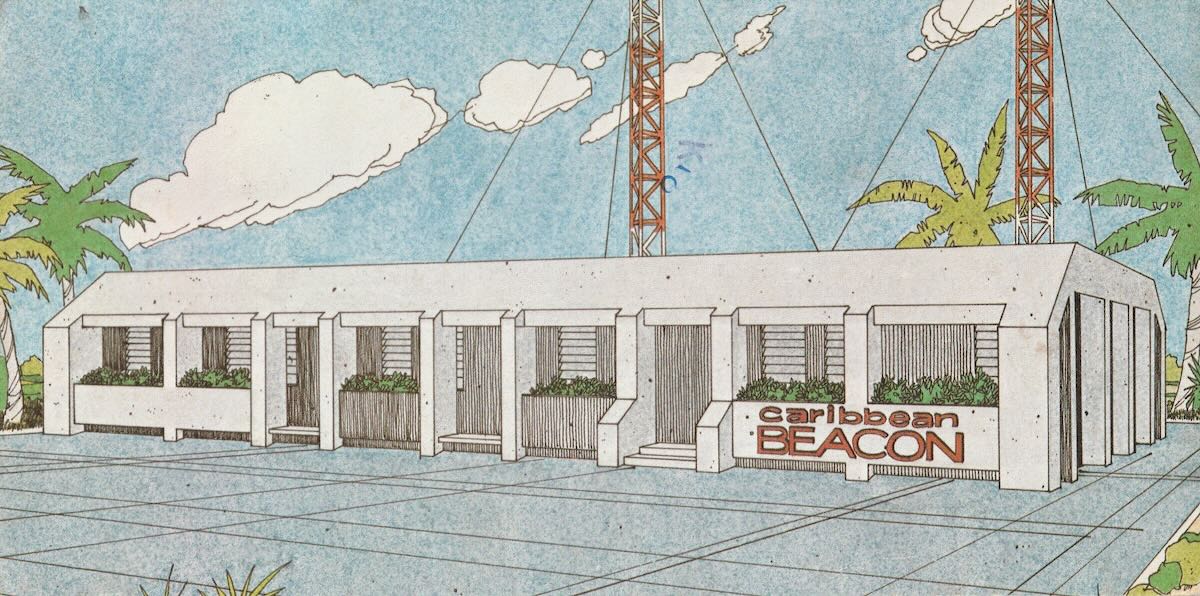
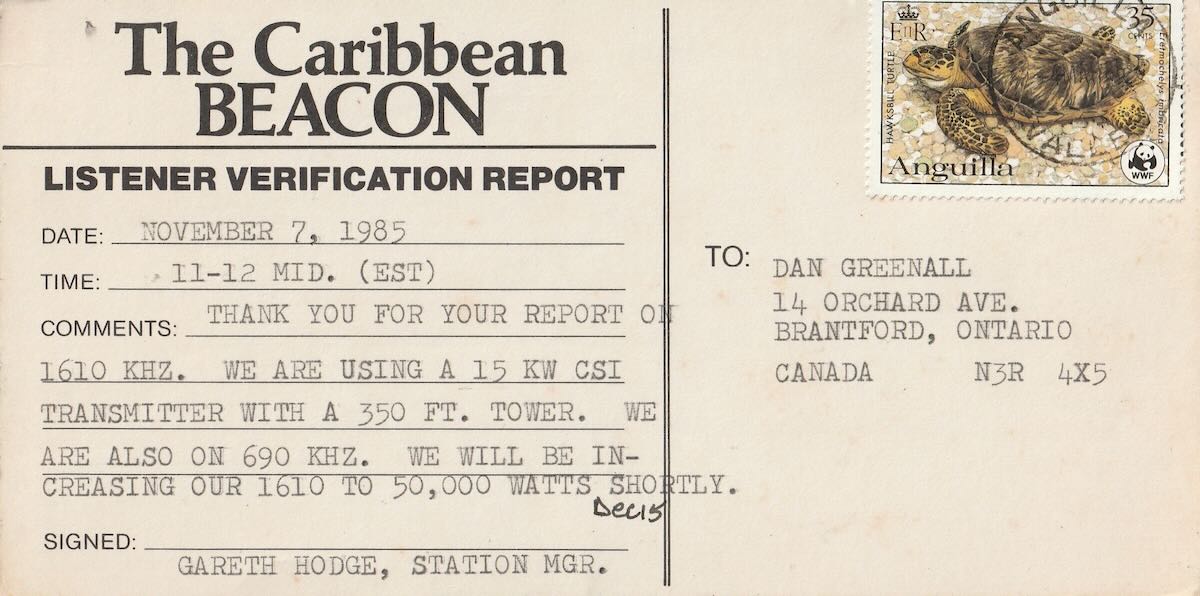
1. The Caribbean Beacon, Anguilla West Indies 1610 kHz (1985 QSL)

2. NDB stations (non-directional beacons)

  • transmitted call letters on CW, mostly from airports, heard in the 1970’s
  • examples: MDE Medellin, Colombia 1690 kHz and RAB Rabinal, Guatemala 1613 kHz

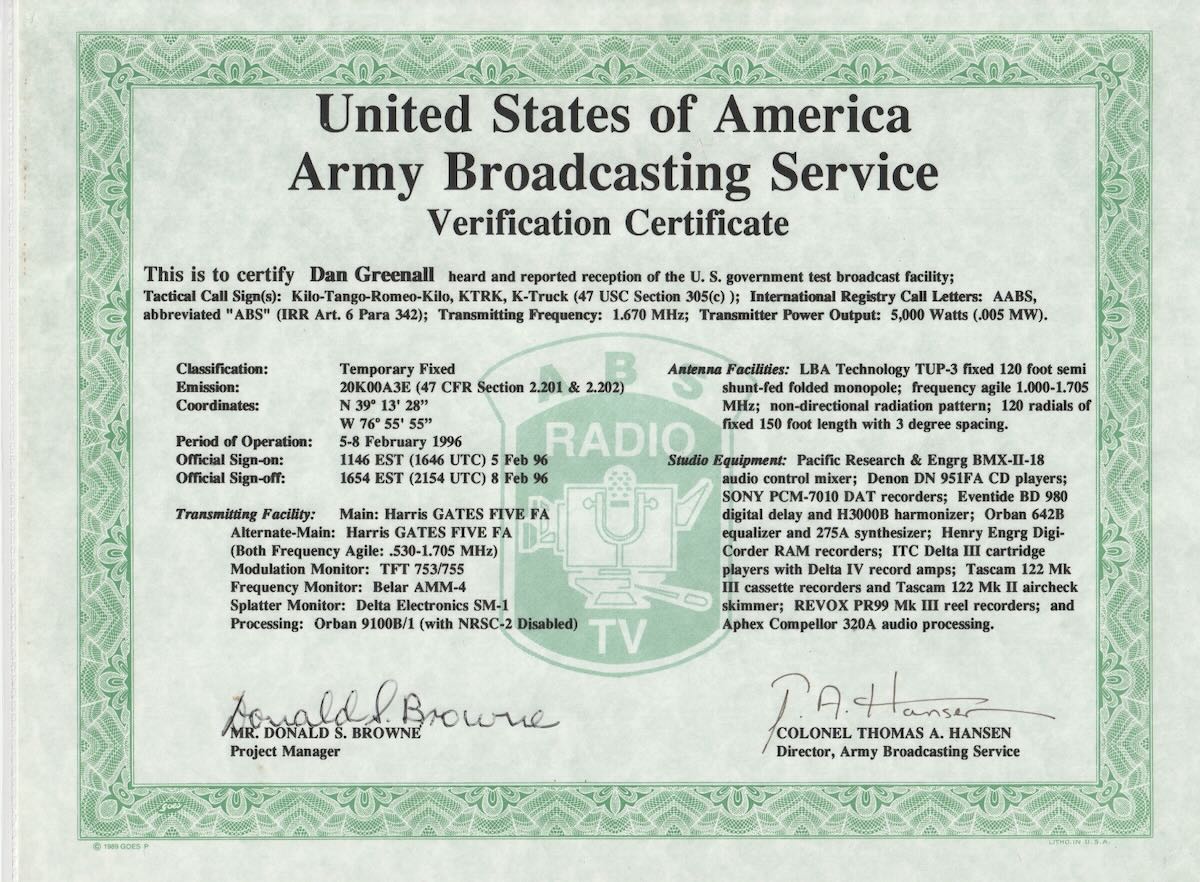
3. U.S. Army Broadcasting Service KTRK 1670 Fort Meade, MD Feb 1996          articles and recordings

https://www.radioheritage.com/ktrk-k-truck-1670-khz/

4. FCC Part 15 Radio Stations

Example:    WDKW 1630 “the Klaw” Dundalk High School near Baltimore, MD

Link to my recording made at a DX camp in Coe Hill, Ontario, Canada on April 20, 1997: https://archive.org/details/wdkw-the-klaw-1630

An internet search revealed the following;

Part 15 of the Federal Communications Commission (FCC) rules allows some low-powered radio devices to operate without a license on the AM and FM radio broadcast bands. These devices are subject to certain restrictions, including:

  • Range: On FM frequencies, the effective service range is limited to about 200 feet (61 meters).
  • Field strength: The field strength should not exceed 250 ?V/m (48db) at 3 meters.
  • Detachable antennas: Part 15 rules prohibit detachable antennas on all Part 15 transmitters.

Some examples of Part 15 radio stations include:

  • Microbroadcasting

Often used by hobbyists, drive-in theaters, or on college or high school campuses.

  • Talking roadsigns, talking houses, or talking billboards

These transmitters air a repeating loop of information, such as traffic or highway construction. They typically operate on empty channels on the AM broadcast band.

  • InfOspot

A custom product that can include special audio systems, USB / internet connectivity, cabinets, and antenna mounting styles.

  • Free-radiate AM radio stations

Educational institutions can use a transmitter without a license if the signal coverage is limited to their property.

5. TIS (Travellers Information Stations)

1610 kHz with low power, usually around 10 watts, such as the one I hear near the Blue Water Bridge between Sarnia, Ontario and Port Huron, Michigan

6. Expanded AM broadcast band 

Over a quarter century ago, these frequencies began to be used in the U.S. by BCB stations.  I still have recordings of a half dozen of these from the early days.

WTDY 1670:

WNML 1670:

WMDM 1690:

KCNZ 1650:

KCJJ 1630:

KBGG 1700:

Also, here is a link to a column in Popular Communications magazine from February 1998.

https://www.worldradiohistory.com/Archive-Popular-Communications/90s/Popular-Communications-1998-02.pdf