Shortwave listening and everything radio including reviews, broadcasting, ham radio, field operation, DXing, maker kits, travel, emergency gear, events, and more
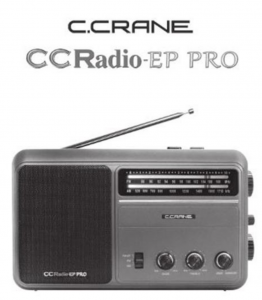
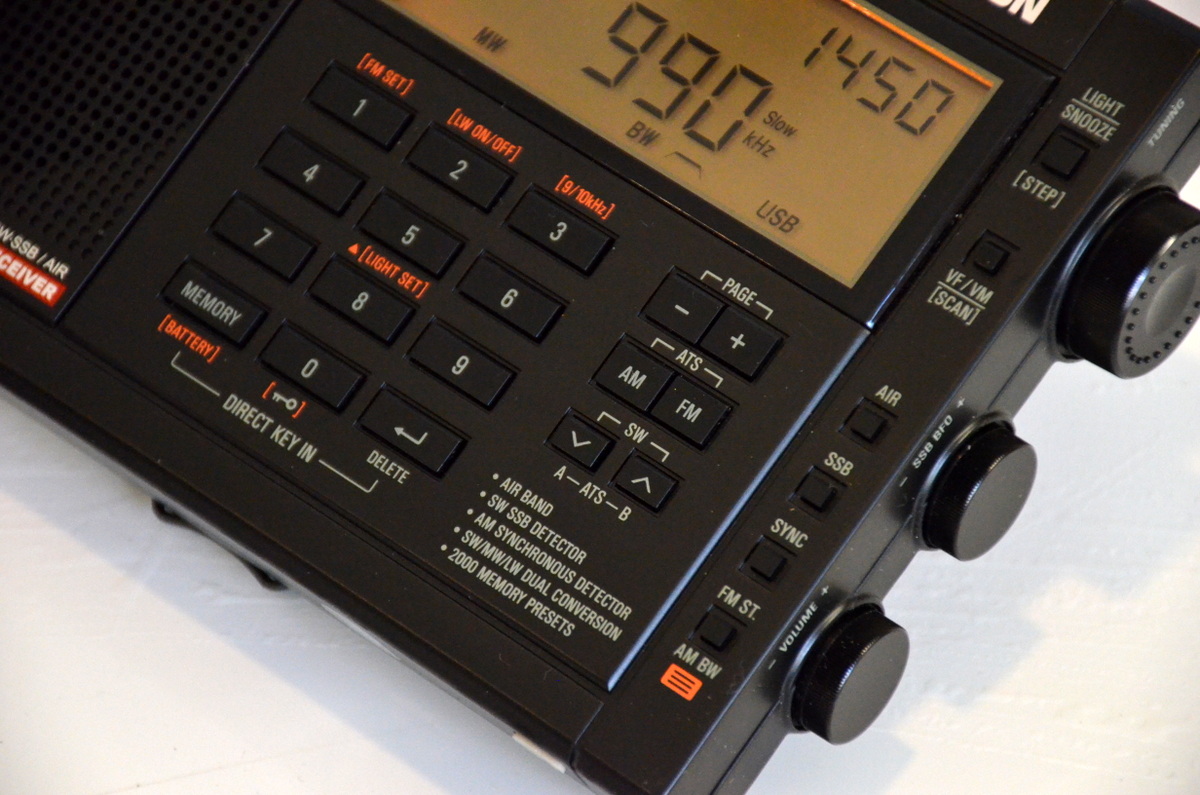
Remember the American television game show To Tell The Truth? This very long-running show challenged four celebrity guests and viewers to identify the real “central character” in the midst of two impostors.I was reminded of this game show when attempting to tell the difference between the original and recently updated versions of C. Crane’s CCRadio-EP Pro receiver when viewing the front panels. If there’s a difference, I can’t spot it! You need to turn around the radios to see the new EP-Pro’s key feature: switchable 9 kHz/10 kHz tuning steps.
The only clue to the newest version of the CCRadio-EP Pro is the 9/10 kHz tuning switch on the back panel.
I recently met with a good friend and radio hobbyist from Oregon to compare a few selected portable radios, FSL (Ferrite Sleeve Loop) antennas, and the newest low-noise Wellbrook ALA100LN module that was introduced just a few weeks ago. I was particularly interested in a head-to-head match-up of my friend’s original EP-Pro versus my newly arrived EP-Pro (9 kHz/10 kHz steps) version.
I’m looking forward to Thomas’ usual thorough review of the new CCRadio-EP Pro, but I want to offer a few observations of medium wave tuning after my time with the two models:
On very weak daytime MW signals, the radios are equally sensitive except on higher frequencies where the new model excels to a moderate degree. It’s enough of an advantage to make the difference between catching an ID or not on a low, DX-level signal.
The new EP-Pro feels more accurate–and simply more enjoyable–to tune, thanks to the elimination of false “peaks” surrounding the main signal. This is a BIG plus for the new radio, and frankly the CCRadio-EP should have performed this way from the start. Kudos to C. Crane for correcting this problem, but I can understand why the original version was brought to market with the odd tuning quirk. It isn’t a deal breaker for most non-DXing purchasers.
I could not find an instance of soft muting on either radio. I listened for a while to signals barely above the noise floor, and never did audio “cut in and out” suddenly, a clue to soft muting. Both receivers are very useful for chasing weak MW stations…but the new version is highly preferred for ease of tuning because of the lack of false audio peaks.
With the tuning working way it should, medium wave channels “snap” in and out as you slowly tune. This took a little getting used to, but after a while I began to appreciate the sense of exactness with the newest CCRadio-EP Pro.
Fast excursions up or down the band (either radio) will blank the audio, recovering when you stop tuning or slow down. I believe this is simply a case of exceeding the AGC’s recovery time, not soft muting. It’s easy to live with, but granted the effect is not one of smoothness as found on traditional, non-DSP analog receivers. Successful DXing takes a slower approach anyway when scanning the band; casual listeners may be more annoyed by either version of the radio if they are used to very quick knob-cranking.
The Twin Coil Ferrite “AM Fine Tuning” control works well on both units, and gives significant gain to weak signals on either extremity of the band. I love this feature; it makes digging out the weak ones a lot more fun!
So, should you buy the newest CCRadio-EP Pro with the 9 kHz/10 kHz steps?
If you already own a CCRadio-EP Pro and are fine with the false tuning peaks and have no desire for the 9 kHz MW step option–keep your radio! Only on high band does the new model have a sensitivity edge. Especially don’t make the jump if you’re a casual listener and listen only to a handful of local stations, or a single distant station.
If you do not own a CCRadio-EP Pro yet, but are in the market, definitely buy the newest version. Be aware that you can only be assured of getting the newest model if you purchase directly from C. Crane. Amazon does not yet carry the newest version according to some reports.
If you’re a radio junkie and just have to have both…go ahead…we understand!
I also made a short video comparison of the new EP Pro versus the top-ranked Panasonic RF-2200 on medium wave:
Guy Atkins is a Sr. Graphic Designer for T-Mobile and lives near Seattle, Washington. He’s a regular contributor to the SWLing Post.
Many thanks to SWLing Post contributor, Gary DeBock, for sharing the following guest post:
Supercharging the XHDATA D-808
Installation of High Performance AM and LW Loopsticks
By Gary DeBock, Puyallup, WA, USA, September 2018
Introduction
As a stock receiver the Chinese-made D-808 AM-LW-FM-SW-AIR portable is a very capable performer, with AM reception superior to that of any current Ultralight model, and impressive FM reception as well. The radio was certainly “inspired” (to use a generous term) by the C.Crane Skywave SSB model, which coincidentally was manufactured in the same part of China by C.Crane’s Redsun partner—with the first units going out the door a few months before the D-808 came into existence.
Because foreign intellectual property is routinely copied in China with no punishment from the government, XHDATA essentially had the chance to copy all the good points in the Skywave SSB design and improve upon its weak points as well. The only precaution that XHDATA took after this wholesale design appropriation was to forbid direct shipments of the D-808 from China to North America—presumably to avoid a copyright lawsuit by C.Crane. As such, the first D-808 models were sold to the rest of the world around January of 2018 at a price about half that of the Skywave SSB, while North American DXers were told that since the model couldn’t be shipped to the USA or Canada, they were out of luck.
Of course some D-808 models did make it into North America, where it was found to be a very capable portable with astonishing value for the price. Finally around March, an enterprising Chinese eBay seller came up with a plan to ship the model to North America through Israel, thereby skirting around XHDATA’s direct shipment prohibition. As of late August this eBay seller (harelan ecommerce) has already sold 62 of the D-808 models this way, even though he charges a premium for shipment to North America. Whether this single supply source will continue to serve North American customers is currently unknown, but out of the 7 models that I have purchased from him there hasn’t been a single D-808 model with any issues– despite the apparent lack of any manufacturer’s warranty offered on the radio.
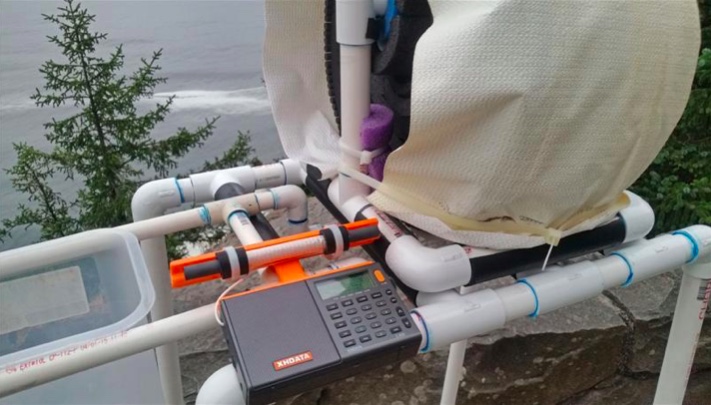
Despite the D-808’s rather dubious design pedigree there is no doubt that the Chinese engineers (or reverse engineers?) did a superb job in creating an awesome radio for the money. Besides directly copying the Skywave’s SSB design and controls, XHDATA also made significant improvements, including a longer loopstick (providing clearly superior AM sensitivity), a much more powerful audio amplifier (correcting a serious shortcoming in the Skywave SSB) and a much lower price (about half that of the $169.99 Skywave SSB, for models shipped outside North America). Another great advantage for someone wishing to perform this loopstick upgrade are the perfectly located, highly accessible Litz wire connections on the RF circuit board—apparently used by the Chinese engineers to conveniently test out various loopsticks, and retained in the final product. The radio’s high quality construction and survivability in adverse conditions were proven repeatedly over the summer here, with the model surviving accidental exposure to a 104 degree (43 degrees C) car trunk temperature, exposure to moderate rain, repeated travel bumps, and use as the main receiver during a 9-day DXpedition to a plunging ocean side cliff in Oregon state. The 3.7v lithium-ion rechargeable battery provides superior run time for extended DXing sessions, and is included in the D-808 shipping package, along with a USB cord to charge the battery, a plug-in wire antenna (for FM,SW and AIR), a vinyl carrying case, and a pretty basic English instruction manual.
One thing you will NOT find supplied with the D-808 is a warranty card– either in the shipping box, or online. This is pretty standard practice in China, incidentally, where concepts like refunds and warranties aren’t generally part of customers’ expectations. This doesn’t necessarily mean that XHDATA won’t repair obvious problems in a new D-808, but it does mean that they aren’t assuming the obligation to do so. I have heard from one North American purchaser who received a new D-808 with a defective speaker, and he is still waiting for the model to be repaired (after paying the shipping charge to send it back to China). Each individual purchaser must decide whether or not this lack of any warranty is a deal breaker. But if you are looking for a final reason to perform this loopstick transplant, why not consider the fact that you will not be violating any manufacturer’s warranty by doing so??
Realistic Expectations
Although this 7.5” loopstick upgrade will certainly make your D-808 far more sensitive than the stock model on Medium Wave or Longwave, it is not designed to compete with large (2’ sided or larger) inductively coupled box loops, or any of the new FSL antennas. The sensitivity upgrade will boost the D-808’s MW band weak-signal performance up to the level of classic portables like the ICF-2010 and RF-2200; however, and since the D-808’s DSP-enhanced selectivity will generally exceed that offered by these classic portables, the overall DXing capability in the AM mode could be considered slightly greater. The D-808 does have SSB capability, although it lacks the SSB tuning convenience offered by the ICF-2010 and RF-2200. It also lacks the ICF-2010’s superb Synch detector, a big advantage in weak signal DXing. But in portability, versatility and DXing value for the price, the “Supercharged” D-808 is a real winner.
Project Overview
This construction article will provide the builder with step-by-step instructions to upgrade the XHDATA D-808’s loopstick to a much more sensitive, externally-mounted 7.5” Medium Wave or Longwave loopstick replacement. Both the Medium Wave and Longwave 7.5” loopstick designs have been thoroughly tested and proven effective in actual DXing by hobbyists other than the author, and as long as the instructions are followed carefully, this relatively inexpensive modification will provide a major improvement in the D-808’s weak-signal reception capability.
This modification project involves close-order soldering on the D-808’s circuit board, and should only be attempted by builders with reasonably good eyesight, good hand coordination and soldering experience. The project also calls for the use of a precut plastic loopstick frame to attach the antenna to the top of the D-808’s top back cabinet surface, and the construction of this precut plastic frame requires either the use of a 12” (or larger) power miter saw, or some rather lengthy cutting with a hacksaw. Use of a power miter saw SHOULD NOT be attempted by those without serious power tool experience! The author assumes that only qualified power tool operators will attempt to use a 12” miter saw to cut these frames quickly, and that other builders who wish to construct them will use a hacksaw. As such, only basic cutting instructions are provided for the 12” power miter saw users, while detailed instructions are provided for the hacksaw users. To assist builders who are not qualified to use power tools, the author has prepared a LIMITED number of these precut plastic loopstick frames on a power miter saw, which will be offered at cost to these builders on a first come, first served basis.
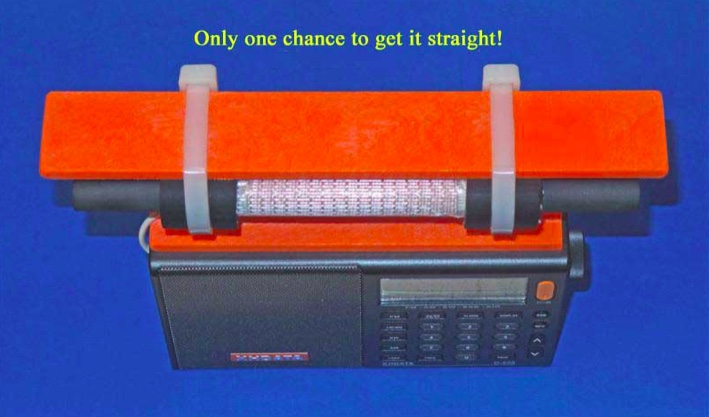
A final warning is in order concerning the step of gluing the precut plastic loopstick frame to the D-808’s top back cabinet surface. Although this step is not dangerous, it is pretty tricky. Since the superglue “grips” very rapidly, you will only get one chance to ensure that the frame is straight, and centered on the D-808’s top cabinet surface. Do yourself a favor, and make multiple “dry runs” to practice this important step before applying the glue! Failure to take this step seriously will probably result in a crooked loopstick frame—which will hold the antenna just fine for DXing purposes, but which will be an eternal reminder to the DXer (and everyone else) of the hazards of haste.
Construction Parts Required
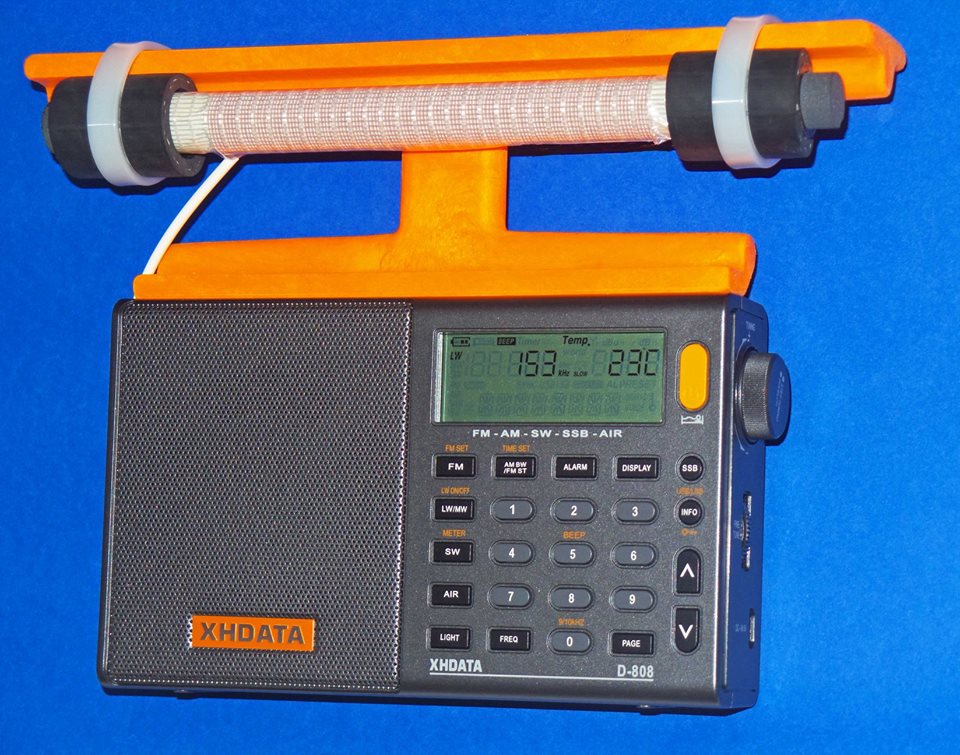
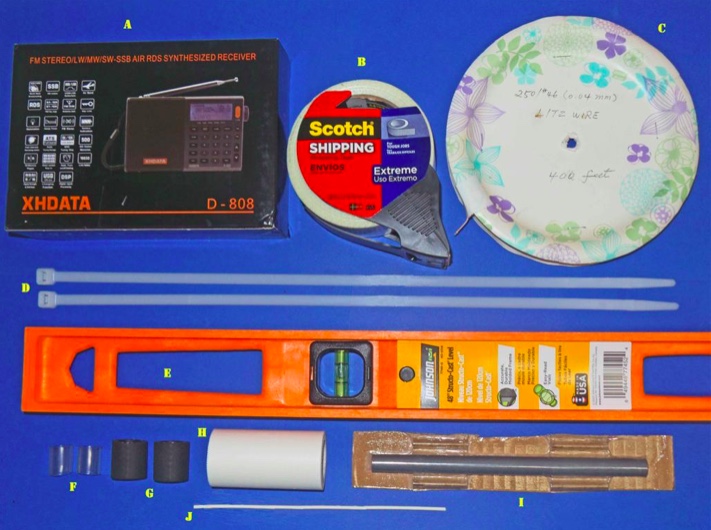
This 7.5” loopstick D-808 construction article will guide you through the assembly of either a 7.5” Medium Wave loopstick D-808 or a 7.5” Longwave loopstick D-808, so make sure that you order the parts necessary for construction of your chosen model. The picture above shows the parts that will be necessary for construction of either model, but the Litz wire and 7.5” ferrite rod components differ according to whether you are building the Medium Wave or Longwave model.
A) XHDATA D-808 Receiver, currently available to North American purchasers (for $112.87 + $10. Click here to search eBay.
B) Scotch brand “Extreme” strapping tape (any size roll)
Miscellaneous: One packet of Duro Super Glue (.07 ounce size), solder, 25w (low heat) soldering iron, hacksaw (or power miter saw), screwdriver set, sandpaper, needle nose pliers, diagonal cutters
D-808 Radio Preparation
Before starting the modification give the radio a thorough test on all bands, ensuring that all the stock model functions work properly, and that there are no issues with the display, speaker, headphone jack, battery or charging system. It’s also a good idea to run a daytime DX band scan on the AM or Longwave band (for whichever band you plan to construct an upgrade loopstick) and document the results—to use as a benchmark for the upgrade loopstick’s performance.
Step-By-Step Construction
Antenna Frame and 7.5 inch Loopstick Preparation
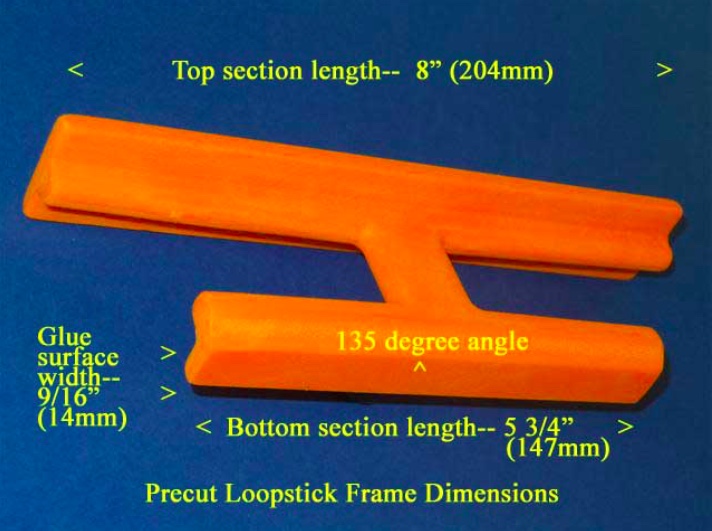
1) Refer to the photo below. Using the “Supercharging the Tecsun PL-380” article (posted at http://www.mediafire.com/file/du3sr5cd9thqvau/7.5inch-LS-PL380.doc/file or available directly from the author) carefully prepare the orange loopstick antenna frame according to construction steps 1-9, EXCEPT note that the lower (glue surface) edge of the antenna frame should be cut to a length of 5 3/4” (147mm), NOT 5” (127mm) as described in the PL-380 transplant article. Pay close attention to the safety precautions concerning power tool usage, and DO NOT attempt to use a power miter saw unless you have SERIOUS power tool experience!
2) If you are constructing an AM (Medium Wave) loopstick, follow construction steps 10-16 in the PL-380 transplant article to construct the antenna. If you are constructing a Longwave loopstick, follow construction steps 10a-16a in the PL-380 transplant article to construct the antenna. If you are constructing both loopsticks, MAKE SURE that the ferrite rod and Litz wire are only used in the antennas for which they were designed. Mixing up these items is very easy, and such a mistake will make both loopsticks perform like clunkers.
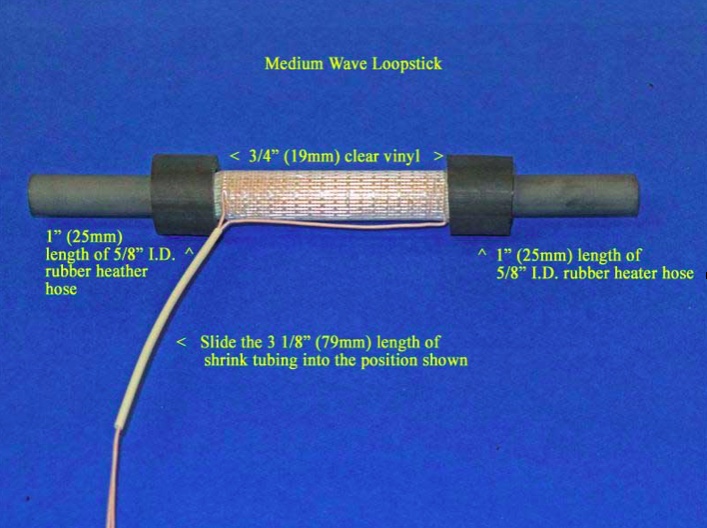
3) After construction of either the AM or Longwave loopstick, follow the instructions in steps 29 and 30 of the PL-380 transplant article to install a piece of 3 1/8” (79mm) shrink tubing, EXCEPT note that this length is slightly longer than the 3” (76mm) length called for in the PL-380 article.
4) Refer to the photo below for the following three steps. [NOTE: Although this photo shows the AM (Medium Wave) loopstick, the procedures in this step are the same for the Longwave loopstick, although the position of the rubber hose lengths and clear vinyl inserts will be closer to the ends of the ferrite rod]. Carefully slide the length of 3 1/8” shrink tubing into the position shown, ensuring that there are no Litz wire kinks or bends inside the shrink tubing.
5) Take the two 3/4” (19mm) clear vinyl inserts and slide them onto the ferrite rod ends, twisting them up against the border of the Scotch “Extreme” tape ends to lock the tape in place under the vinyl inserts. Ensure that the clear vinyl inserts do not touch any Litz wire leads or coil turns.
6) Slide the 1” (25mm) lengths of rubber heater hose over the clear vinyl inserts until the appearance of the loopstick resembles the above photo. Ensure that the rubber hose sections also do not touch either the Litz wire leads or any coil turns. Finally, place the completed loopstick in a safe place until it is called for in Step .
Radio Disassembly
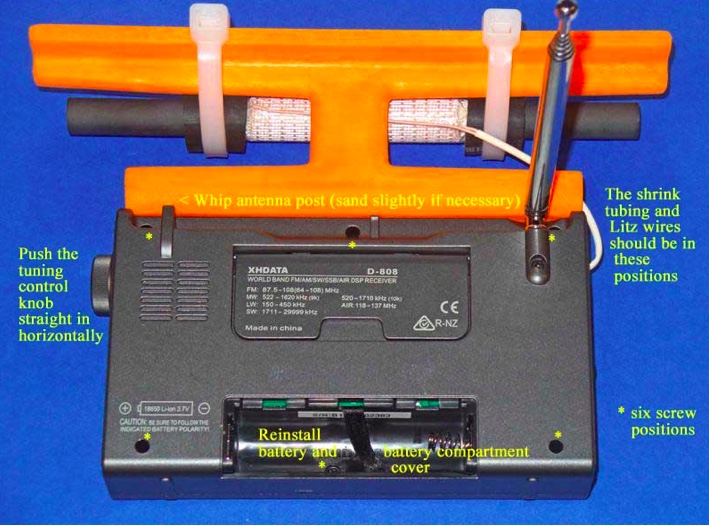
7) Refer to the photo above for this step. Remove the battery from the radio, and using a Jeweler’s Phillips screwdriver of the correct size, remove the six identical screws in the positions shown (NOTE: These screws have a tendency to stick inside their slots, even when the slots are turned upside down. If you cannot remove all six screws it’s not a major problem, but at least ensure that the screws are completely loose in their slots, and that you don’t lose any of them during the remaining steps). Grasp the tuning knob, and pull it out horizontally in a completely straight manner to remove it from the radio. Ensure that the battery, tuning knob and all removed screws are placed in a safe place until the radio is reassembled.
8) Carefully separate the front and back cabinet sections and place them down in the position shown in the photo below. Note that the front and back sections of the radio are connected by a ribbon wire plug-in system– ensure that this plug remains securely inside its slot at all times, and that no great stress is placed on the speaker wires.
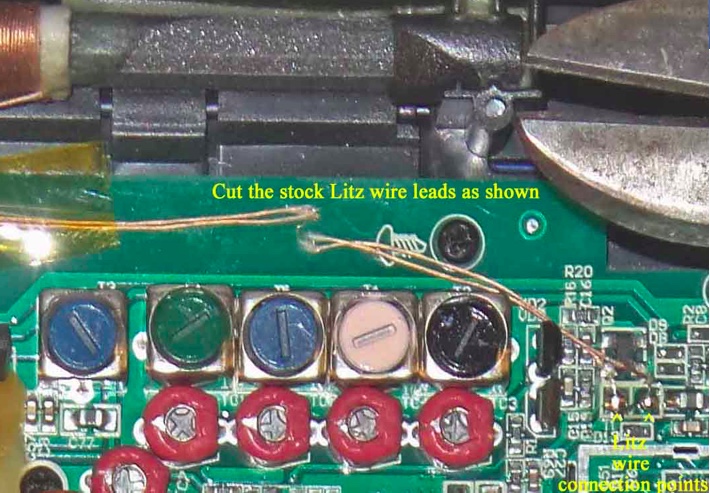
9) Refer to the close up photo below, and note the position of the two Litz wire soldering points on the circuit board (in the lower right corner of the photo). Using diagonal cutters, cut the two Litz wire leads at the position shown, UNLESS you wish to salvage this stock loopstick for other projects—in which case you should desolder the entire lengths of the Litz wire leads from the circuit board at the positions shown in the lower right corner (NOTE: The stock loopstick is of a fairly good design, and has an inductance that would be compatible with any DSP-chip Ultralight radio, providing an AM sensitivity boost in the process).
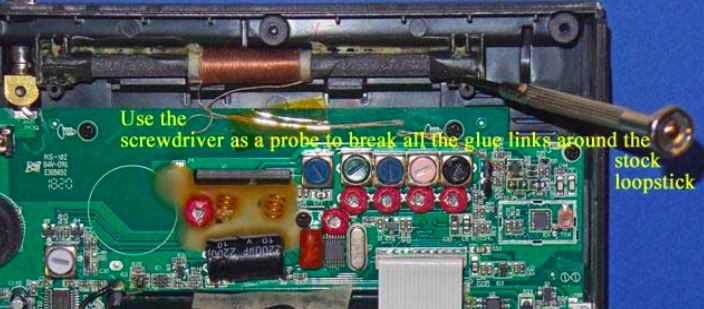
10) Refer to the photo below. Using a flat Jeweler’s screwdriver with a 1/16” blade, carefully probe around all four sides of the stock loopstick to break all of the glue bonds. Work slowly and carefully around the perimeter of the ferrite rod, including the plastic covers on each end. Once most of the glue bonds have been broken the ferrite rod will begin to shift around as you break up the few remaining bonds, but until this point work slowly and patiently to break up the glue.
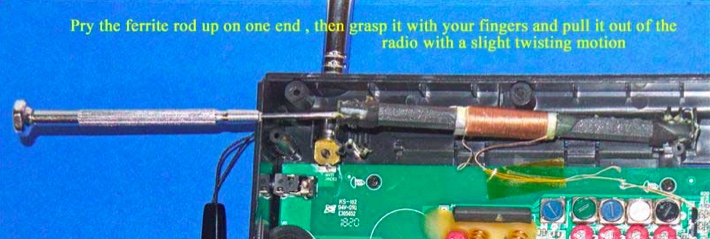
11) Refer to the photo below. Using the flat Jeweler’s screwdriver, once all of the glue bonds have been broken and the ferrite rod is loose in its slot, lift the ferrite rod out of its slot on one side by prying up under the plastic cover on the end of the ferrite rod. Ensure that the Litz wire leads have either been cut or desoldered from the circuit board, then grasp the ferrite rod with your fingers and pull it completely out of the slot with a slight twisting motion.
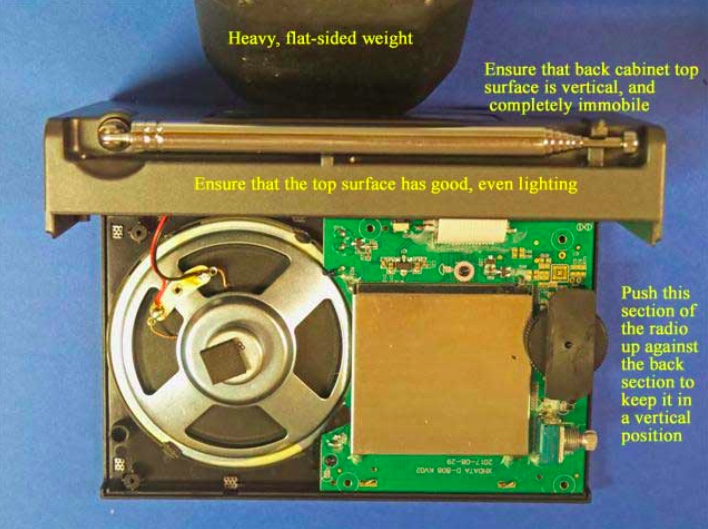
12) Remove the wrist strap, and refer to the photo below. Carefully pick up the two sides of the radio and place the back section in a vertical position as shown, with a heavy flat weight (barbell, or other heavy flat item) pressing up against the back cabinet section to keep it in a vertical position. Ensure that there is adequate, even lighting on the top cabinet section for the gluing process in the next step, and that the back cabinet surface will not shift around as you make the gluing “dry runs,” and perform the actual gluing of the loopstick frame to the top of the cabinet.
13) Take the previously prepared orange plastic loopstick frame, and ensure that its bottom glue surface is completely smooth and flat, with no uneven ridges on the edges of the glue surface (remove these with fine sandpaper, but ONLY on the ridges, and not on the rest of the flat glue surface). Using a damp paper towel, wipe the top cabinet glue surface and the loopstick frame glue surface to remove any dust or debris, then wipe them again with a dry, clean paper towel to ensure that they are both completely dry.
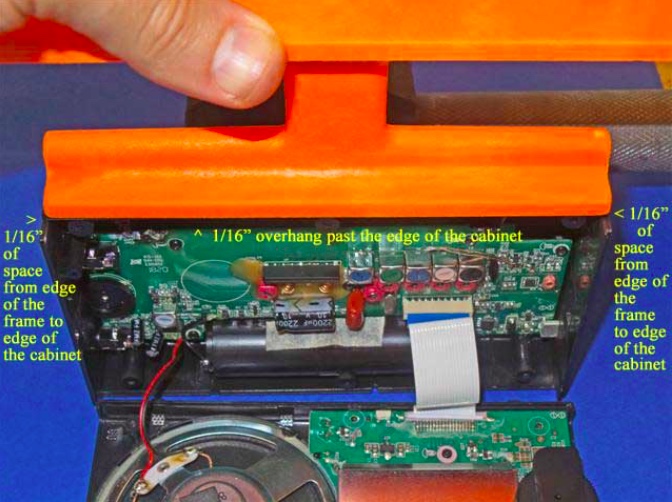
Take the loopstick frame and gently slide the frame over the top cabinet surface to ensure that both surfaces are smooth and flat. Refer to the photo at the top of the next page. Ensure that there is even, bright lighting on the top cabinet surface, and make several “dry runs” to place the loopstick frame in the exact center of the top cabinet surface (with 1/16”, or 1.5mm of space between the frame ends to the cabinet ends), and also 1/16” (1.5mm) of overhang above the front edge of the cabinet’s glue surface (NOTE: if you wish to simplify the process by lining up the front edge of the loopstick frame with the front edge of the cabinet’s glue surface it will still provide an acceptable result, but you will need to do some minor sanding of the whip antenna’s plastic slot post, as shown in the photo below. In either case, make repeated “dry runs” with the loopstick frame to practice placing it in the exact center of the top cabinet’s glue surface, since you will only get one chance to place it in the proper center position once the superglue is applied.
NOTE: The back of the loopstick frame has a beveled surface to permit full operation of the radio’s whip antenna after the frame is glued on the top of the cabinet surface. If the loopstick frame is glued with a 1/16” (1.5mm) overhang in front of the front edge of the cabinet surface then the whip antenna should have enough space for free operation. The alternative is to glue the two front edges lined up with each other to simplify the gluing process, in which case minor sanding may be required on the whip antenna slot post, as shown in the photo below.
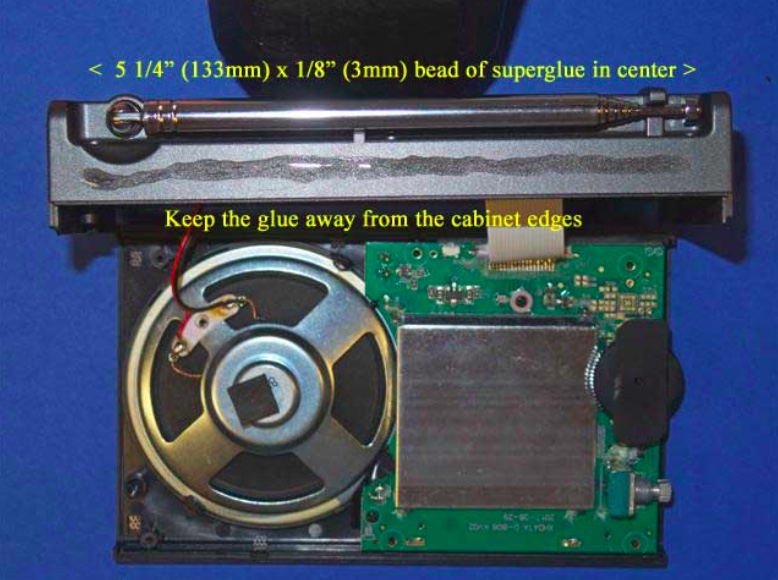
14) After making multiple “dry runs” and becoming familiar with accurate placement of the loopstick frame on top of the cabinet, refer to the photo at the top of the next page. After once again ensuring that the back cabinet section will not shift around during the gluing process, take the Duro superglue packet and apply a thin (1/8”, or 3mm) bead of glue along the center of the cabinet’s glue surface, extending it 5 1/4” (133mm)long, with equal spaces on both ends (as shown). While sighting the two sides place the loopstick frame carefully down in the correct center position as practiced previously, with the 1/16” overhang if desired. If satisfied with the position, press down on the frame to lock the two surfaces together securely. Usually the frame may be shifted around slightly within 1 or 2 seconds of placing it on the superglue, so use this brief time to promptly shift the frame to a straight position, if necessary. After a couple of seconds, though, you will need to be satisfied with whatever position the frame has ended up with (regardless, it will still hold the loopstick just fine, for DXing purposes).
15) After the loopstick frame is securely placed and locked on top of the D-808’s cabinet surface, place downward pressure on the loopstick frame along its length in order to ensure a tight glue bond throughout the entire top cabinet surface. Continue this process for about one minute, and sight both ends of the loopstick frame to ensure that they are both completely flat against the D-808 cabinet.
16) Inspect the front and back edges of the loopstick frame’s border with the D-808 cabinet for any glue seepage, and if any is found, remove it promptly with the 1/16” flat Jeweler’s screwdriver blade. Glue should not be allowed to run past the frame edges. This completes the process of gluing the frame to the D-808 cabinet.
7.5” Loopstick Installation
17) [NOTE: The installation procedures of the Medium Wave (AM) and Longwave loopsticks are identical, except that the plastic tie wraps and rubber hose sections are closer to the ends of the ferrite rod in the Longwave version. The following photos are for the Medium Wave (AM) version, but Longwave loopstick builders should follow the same steps, while referring to the Longwave model photo in the “Operation” section as a guide]
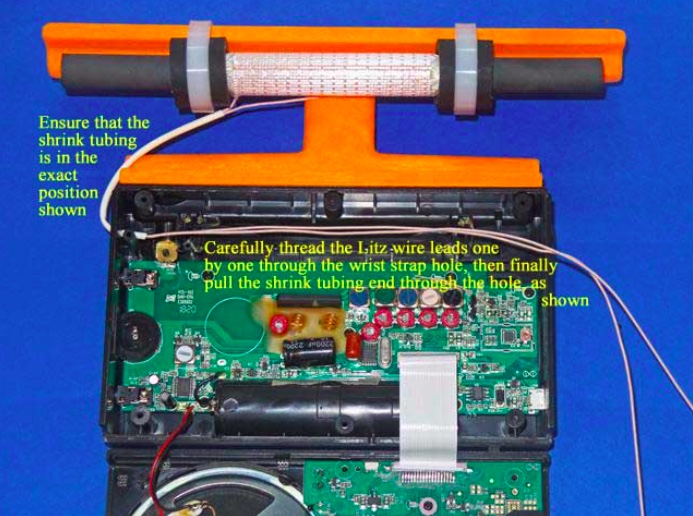
Refer to the photo below. Carefully take the previously prepared 7.5” loopstick and hold it in the position shown—in its slot, centered in the middle of the orange antenna frame, with the shrink tubing and Litz wire leads running down to the left. Take the two plastic tie wraps and install them in the position shown, centered over the rubber hose sections on the loopstick, while ensuring that no Litz wires or shrink tubing is bound under the plastic tie wraps.
18) Refer to the photo below. Lay the two cabinet sections down flat as shown, ensuring that the Litz wire shrink tubing is in the exact position shown (if it isn’t, carefully slide it along both Litz wires until it is in this exact position). Carefully thread one Litz wire end through the empty wrist strap hole, then thread the other Litz wire end through the hole, as shown. Finally pull on the two Litz wires together from the right while guiding the end of the shrink tubing into the empty wrist strap hole, and pull a short section of the shrink tubing through the hole (as shown) to protect the Litz wire insulation from friction damage.
19) Refer to the photo below. Using the previous procedure to install shrink tubing (which is described in the PL-380 transplant article) install a 2.5” (63mm) length of shrink tubing over the two Litz wire ends, and shift the shrink tubing into the position shown in the photo. After this is done cut the two Litz wire leads to the lengths shown in the photo (NOTE: make sure that the ends of both Litz wires are cleanly cut, not frayed and at the minimum diameter before attempting to insert them into the shrink tubing. The process is much easier when the Litz wires pass smoothly through the shrink tubing).
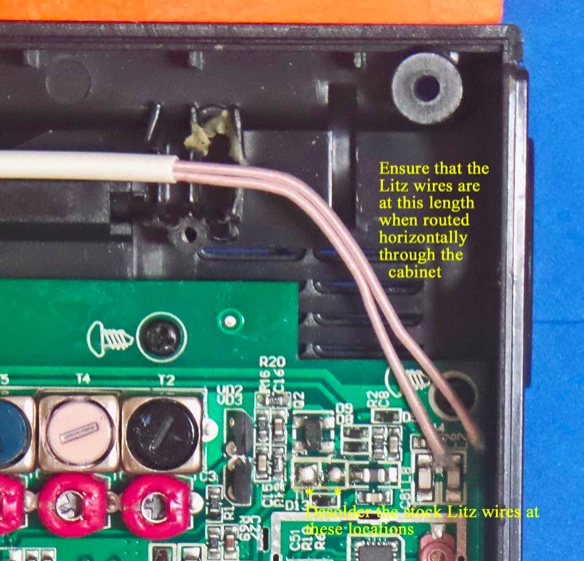
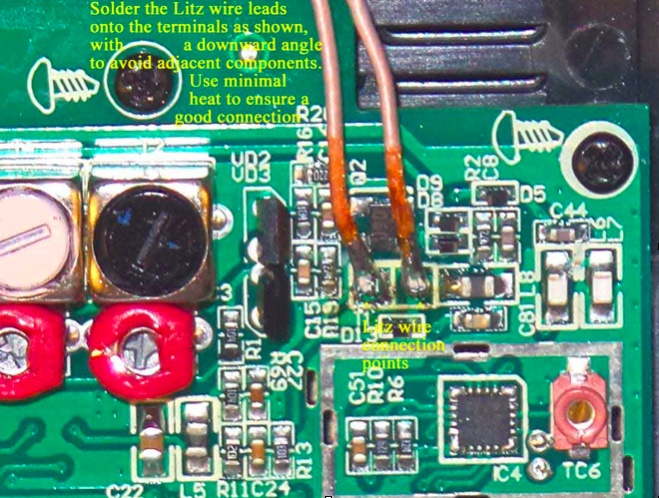
20) Refer to the close up photo below. Using a low heat (25w) pencil-type soldering iron, remove the two stock Litz wire leads at the positions shown, taking care not to use excessive heat, or touch the adjacent components. Ensure that the new Litz wire leads are at the length shown when the leads are in a horizontal position throughout the cabinet, and cut them to this length if they are not.
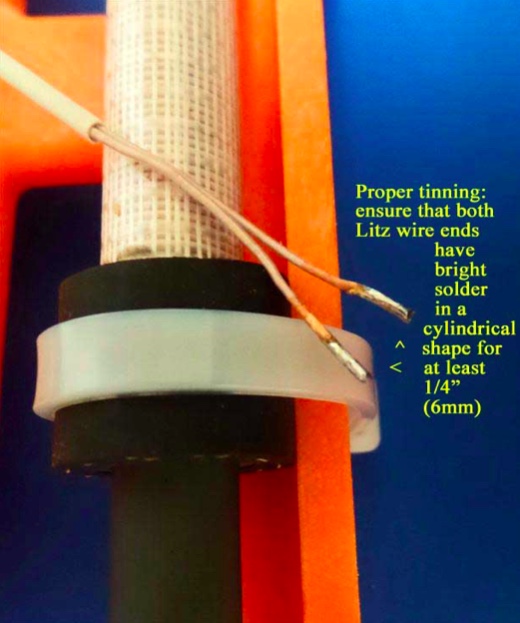
21) NOTE: When tinning the 250/46 Litz wire it is essential that all of the individual Litz wire strands be completely soldered together for a length of at least 1/4” (6mm), with bright, shiny solder around the circumference of the Litz wire ends for this minimum (1/4”) length. The Litz wire must be heated with a clean, hot soldering iron around its circumference in order to melt the solder properly for this step]
Refer to the photo above. Pull the Litz wires up out of the previous position, and place a clean rag underneath them (on top of the circuit board) to completely protect the circuit board from any solder which might accidentally drop down during the tinning process. Using your hot 25w soldering iron melt a generous amount of solder on its tip, and work the soldering iron tip slowly and patiently around the circumference of each Litz wire end until there is a bright, shiny solder length of at least 1/4” (6mm) in a cylindrical pattern at the end of each Litz wire. When doing this, take great care not to allow any solder to drip down onto the circuit board below (i.e., make sure that your rag completely covers the circuit board). The final appearance of your Litz wire lead ends should resemble those in the photo.
22) When your Litz wire lead ends resemble the photo above, cut the soldered portion down to a length of 3/16” (5mm) and observe the appearance of the end of the Litz wire. It should have a bright, solid circular shape, with no gaps or individual Litz wires showing. If not, reheat the end of the Litz wire while adding some solder, and repeat this step.
23) NOTE: The Litz wire connection points on the circuit board are surrounded by other important components. It is important to avoid solder drips on these components, or solder bridges to their leads. Solder the Litz wire leads down at an angle to avoid these surrounding components, and use the minimum amount of heat and solder to ensure good electrical connections)
Refer to the close up photo above. Following the precautions described, solder the two Litz wire leads down onto the circuit board at an angle, as shown in the photo. After soldering, make a close visual inspection to ensure that there are no solder bridges across the Litz wire connections, or nearby components. The remaining length of the Litz wire leads should be routed in a horizontal manner to the wrist strap hole.
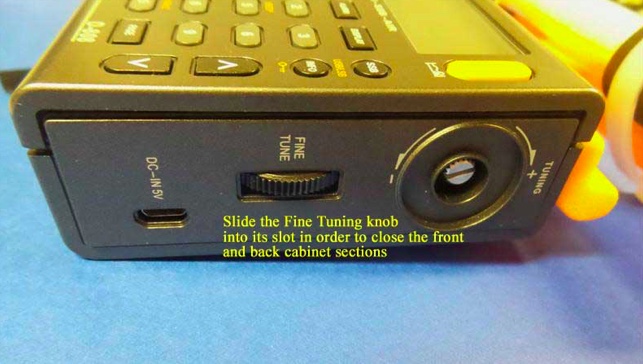
24) Carefully pick up the front and back cabinet sections, and hold the back cabinet section fairly close to the front section (as the radio would normally be oriented, when assembled). Refer to the photo below, and carefully insert the “Fine Tuning” control thumbwheel from the front cabinet section into its slot on the back cabinet section in a sideway movement. This will allow you to fully close the front and back cabinet sections in the next step.
25) Refer to the photo below. Pick up the two cabinet halves and carefully snap them together (this action should not require any great force). Place the radio face down in the position shown (with a soft surface underneath, for protection), and using the Jewelers Phillips screwdriver of the correct size, carefully screw in the six screws that were loosened previously, starting with the screw near the whip antenna post (you should pick up the radio temporarily and hold the two cabinet sections together tightly at this corner, as you do this).
After all six screws have been retightened take the Tuning control knob and press it back onto its shaft in a straight horizontal motion. Finally, reinstall the battery and battery compartment cover to finish up the reassembly.
TESTING AND OPERATION– MEDIUM WAVE MODEL
This 7.5” transplant loopstick is designed to provide a major boost in sensitivity from 530-1700 kHz, and if the antenna is working properly both the weak signal reception and the radio’s nulling capability should be greatly enhanced. It is normal for the antenna to receive more background noise on the low band frequencies, although the sensitivity boost should be substantial across the band.
The construction design of the orange antenna frame allows full usage of the whip antenna for checking SW parallels of MW-DX stations, although if you chose to glue the antenna frame flush with the front of the back cabinet surface to simplify the gluing process, you may need to sand the whip antenna slot post slightly to allow free movement of the whip antenna (see step #13).
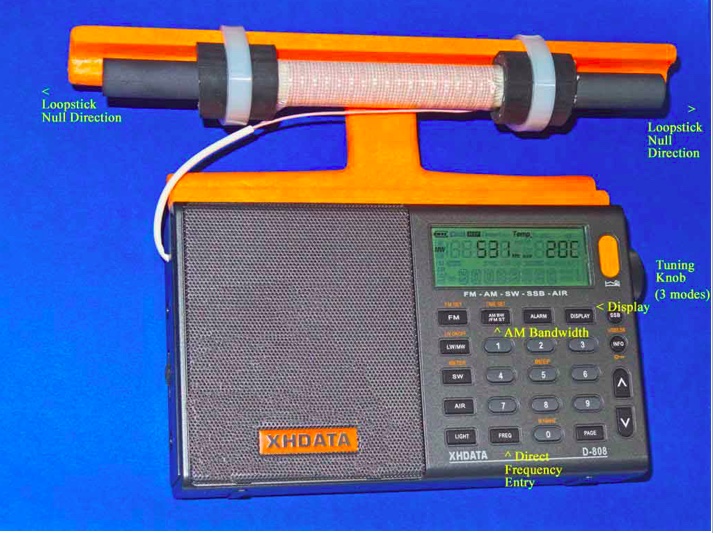
In the photo above, some of the important controls for Medium DXing are highlighted. The AM Bandwidth control allows you to choose multiple DSP filtering selections to enhance selectivity as desired, with the narrowest filtering (1 kHz) providing both the sharpest selectivity and the best weak-signal sensitivity. However this 1 kHz setting also has the poorest audio fidelity, with the higher audio frequencies typically cut off by the DSP filtering. As such, for regular DXing far away from strong local pests, the other AM Bandwidth settings may be more suitable. The Direct Frequency Entry key allows you to manual enter in any MW frequency, to which the radio will shift once the numbers are pressed on the keypad. The Tuning knob has three different modes, which can be toggled by pressing the knob horizontally. The first mode is tuning in either 9 kHz or 10 kHz steps (depending on which of these step you have selected), while the second mode is tuning in 1 kHz steps. The third mode is to lock the frequency in place. Pressing the knob again will return the tuning to 9 or 10 kHz steps.
The XHDATA D-808 has multiple display functions, which can be toggled by the indicated key. The first option is the temperature in either Centigrade or Fahrenheit (depending on your pre-set preference), while the second option is the alarm time. The third option is the current time (which you need to set according whether you prefer UTC or local time), while the fourth option is the received signal strength in both dBu and dB.
The supplied 3.7v lithium ion battery has superior run time, and may be easily charged using the supplied USB cable to either a computer or AC outlet (with the appropriate adapter). As reported in various posts throughout this year, the D-808 model has rugged construction with an excellent record of survival under tough conditions, including hot summer days, moderate rain exposure and extended usage as the main receiver during a 9-day ocean cliff DXpedition in Oregon—performing flawlessly at all times.
Conclusion
It is the author’s sincere hope that this “Supercharged” D-808 model will bring you a lot of DXing fun during travel, as well as at other times. When conditions are good you should never underestimate this enhanced model’s potential of receiving awesome DX beyond your expectations—as an example, here is the stand-alone performance of a 7.5” loopstick D-808 in receiving 1017-A3Z in Nuku’alofa, Tonga (10 kW at 5,632 miles/ 9,063 km) on the ocean cliff near Manzanita, Oregon at 1301 UTC on August 8th of this year:
Not only Tonga is received, but even the Australian horse racing station 1017-2KY in Sydney (5 kW at 7,630 miles/ 12,280 km) is received as a weak co-channel in the middle of the recording. My hope is that you all will be so lucky with your new Supercharged D-808!
73 and Good DX,
Gary DeBock (in Puyallup, WA, USA)
Absolutely amazing! Thank you for taking the time to put this procedure together and describing the process in such fine detail, Gary! Hats off to you!
Click here to read all of Gary DeBock’s posts on the SWLing Post.
Many thanks to SWLing Post contributor, Rich (WD3C), who writes:
Was browsing the Anon-Co site the other day and noticed they are selling replacement rotary encoders for the some Tecsun models.
As I have a PL-660 with a bad encoder decided to order one and replace it. The cost was only $5.95 with free shipping and took about 6 days from Hong Kong.
With a bit of un-soldering the replacement only took about 20 minutes and now works better than new, as the original was always a bit temperamental.
Wow–thank you for pointing this out, Rich! I didn’t realize so many parts were available including knobs, encoders, antennas, back stands and battery doors–essentially, all of the parts that are prone to damage or loss.
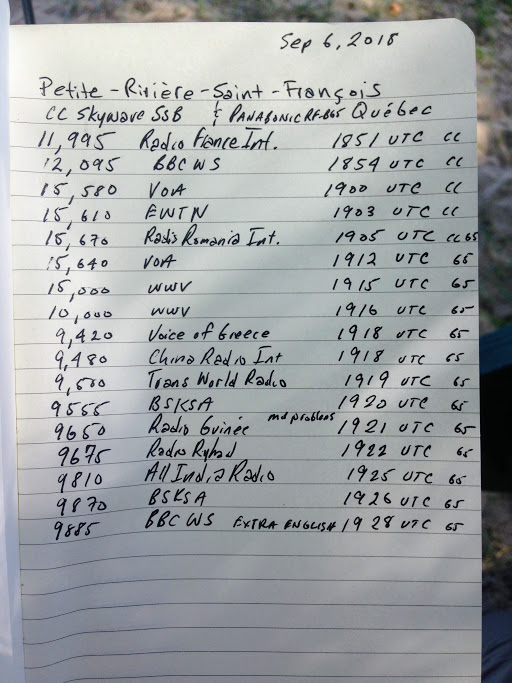
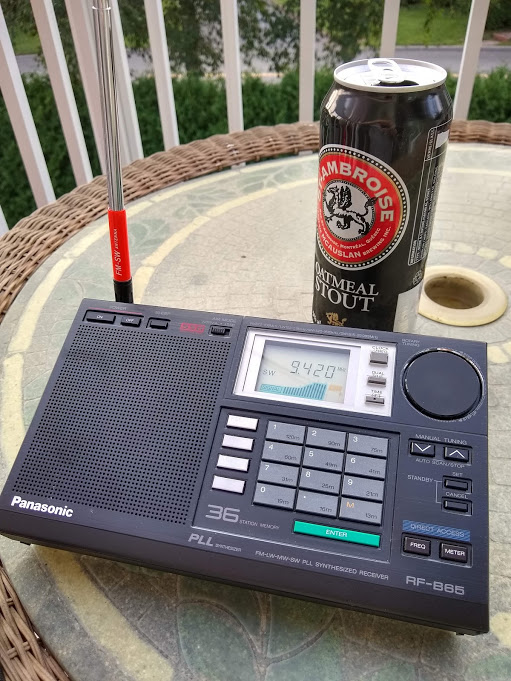
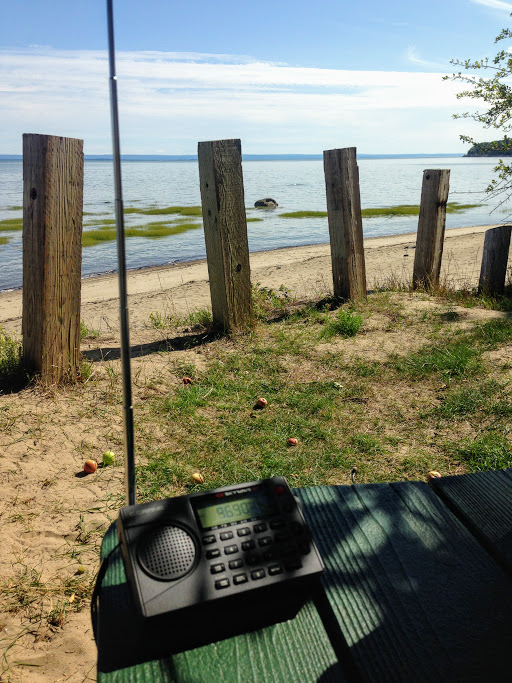
Yesterday, the weather was gorgeous here in Québec, thus a prime opportunity to find a beach, start a new book and, of course, play radio!
I found a fantastic spot on the north bank of the St. Lawrence river near Baie-St-Paul, Québec. There were only a few folks at the beach, so it was all very peaceful.
I found a picnic table perched on the edge of the beach shaded by an apple tree–a perfect spot to relax, play radio and start a new book: Dark Voyage by Alan Furst.
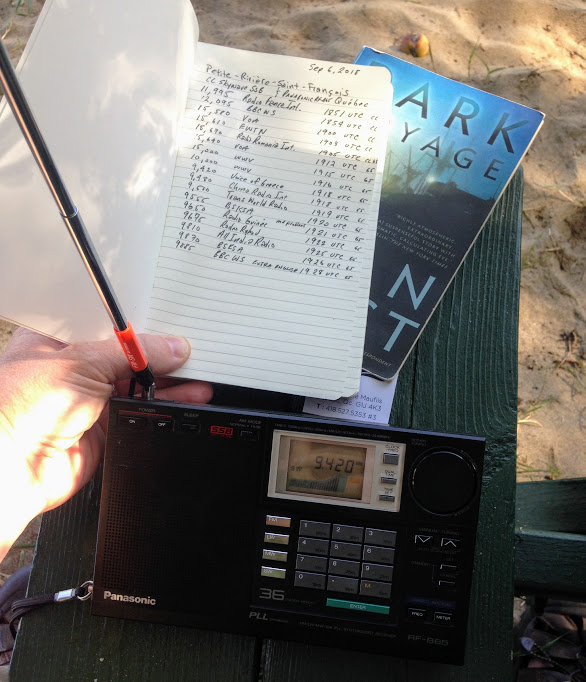
I had not checked to see if propagation was good, but tuning to WWV on 10 MHz and 15 MHz confirmed that signals were travelling. In fact, as I started tuning around–first with the CC Skywave SSB, then with the Panasonic RF-B65–I discovered some of the best propagation I’ve experienced in ages!
I did a relatively quick scan covering the 31 through 19 meter bands. Some signals were absolutely booming in.
I jotted down some of the broadcast details on a make-shift log and recorded a few videos.
Note that after making the first video, I discovered I had limited space on my phone, so most of the clips are quite short:
SDR Primer Part 1: Introduction to SDRs and SDR applications
I author a radio blog known as the SWLing Post; as a result, I receive radio-related queries from my readers on a daily basis. Among the most common questions are these:
“So, what is an SDR, exactly? Are these better than regular radios?”
and/or,
“I think I’d like to buy an SDR. Which one do you recommend?”
Great questions, both! But, before I address them, I must let the reader know that they are also “loaded” questions: simple enough to ask, but quite nuanced when it comes to the answers.
No worries, though; the following three-part primer sets out to address these questions (and many more) as thoroughly as possible. This first part of the primer will focus on the basic components of an SDR system. In part two, next month, we’ll look at affordable SDRs: those costing less than $200 US. In part three, we’ll take a look at pricier models and even include a few transceivers that are based on embedded SDRs.
But before we begin, let’s start with the most basic question: What is a Software Defined Radio (SDR), exactly?
Not your grandpa’s radio
Here’s how Wikipedia defines SDR:
“Software-defined radio (SDR) is a radio communication system where components that have been traditionally implemented in hardware (e.g. mixers, filters, amplifiers, modulators/demodulators, detectors, etc.) are instead implemented by means of software on a personal computer or embedded system.”
Whereas your grandpa’s radio was all hardware––in the form of filters, mixers, amplifiers, and the like––SDRs are a mix of hardware andsoftware. With the exception of tabletop transceivers and receivers with embedded software and systems (which we’ll discuss in part three of our investigation), SDRs typically take on a “black box” appearance: in other words, the radio looks like a simple piece of hardware with a minimum of an antenna port, a data port and many times there’s also some sort of LED or light to let you know when the unit is in operation. On some models of SDRs, there is a separate power port, additional antenna connections, power switch, and possibly some other features; however, “black box” SDRs often look like a nondescript piece of portable computer hardware––something like an external portable hard drive.
Why would you want an SDR?
Many of us have made it through life thus far without an SDR…so, why in the world should we want the use of one? Below, I’ll list some of the most appealing reasons:
Bang-for-buck
The Airspy HF+ (top) and FDM-S2 (bottom). Photo by Guy Atkins.
By and large, SDRs are quite a value when compared to legacy all-hardware radios. For example, I wouldn’t hesitate to pit my SDRs––such as the $500 Elad FDM-S2 or $900 WinRadio Excalibur––against legacy receivers that cost two to three times their price. Indeed, my $200 AirSpy HF+ SDR will give many DX-grade ham radio general coverage receivers a real run for their money. They’re that good.
Spectrum display
SDR applications have a spectrum display which gives you a real-time view of a broad swath of the radio dial. Whereas you can tune to and listen to one frequency at a time with legacy receivers, SDRs allow you to view, say, the entire 31 meter band. With the spectrum display, you can see when signals come on or go off the air without actually being tuned in to them. You can tell what signal might be causing interference because you can see the outline of its carrier. Spectrum displays are truly a window––a visual representation––of what’s on the radio. Using legacy receivers now often makes me feel like I’m cruising the bands with blinders on. After becoming accustomed to having a spectrum display, there’s simply no way I’d want to be without at least one SDR in my shack.
Powerful tools
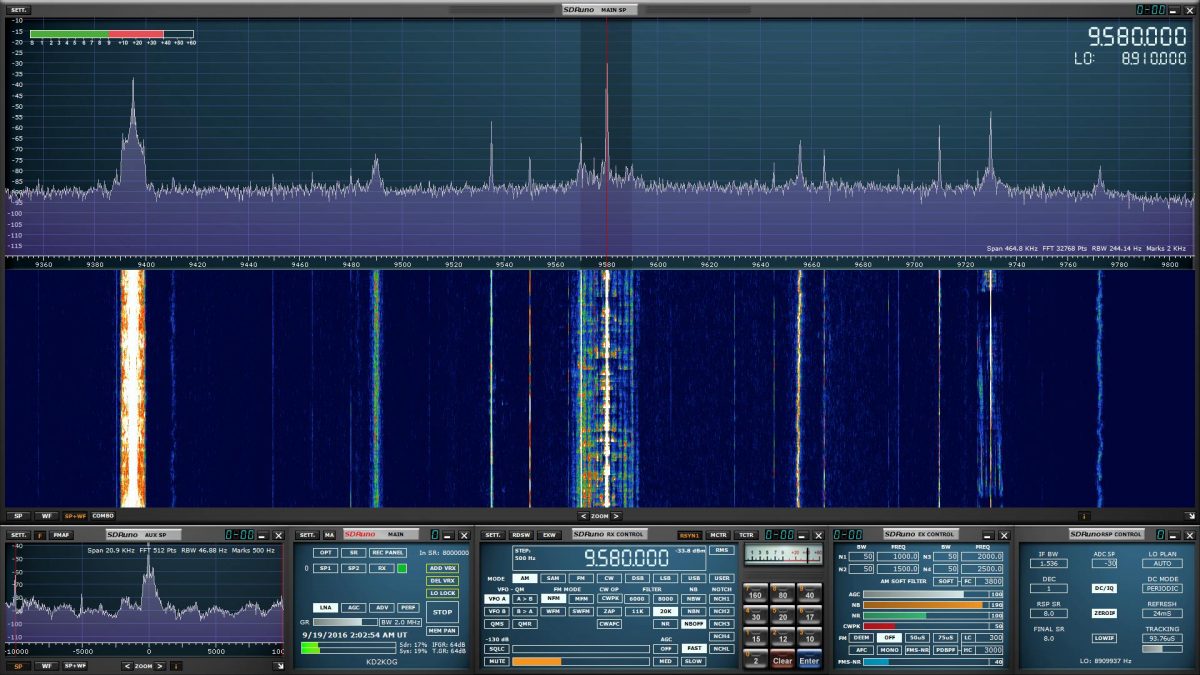
I like how clean the user interface is for this SDR application (SDRuno) window that controls the SDR’s frequency, mode, filters and notch.
SDRs usually afford access to a dizzying array of customizable filters, gain controls, noise blankers, digital signal processing (DSP), audio controls, and more. Being able to customize the SDR’s performance and listening experience is simply unsurpassed. In fact, it’s almost a curse for SDR reviewers like me––comparing two SDRs is problematic because each can be altered so much that identifying the best performance characteristics of one or the other becomes a real challenge. In other words, comparing SDRs is almost like comparing apples to oranges: even using a different application can enhance and thus alter the performance characteristics of an SDR.
Multiple virtual receivers
SDR Console makes managing multiple virtual receivers a breeze.
Whereas most legacy tabletop receivers allow you to switch between two VFOs (VFO A and B) some modern SDR applications allow for multiple independent virtual receivers––in essence, multiple sub-receivers. On my WinRadio Excalibur, for example, I can run three fully-functional and independent virtual receivers within a 2 MHz span. On receiver 1, I might be recording a shortwave broadcaster on 7490 kHz. On receiver 2, I might be recording a different broadcaster on 6100 kHz, and following a 40 meter ham radio net on 7200 kHz in the lower sideband.
Recording tools
SDR applications, more often than not, have functionality for making audio recordings of what you receive. Some, like the WinRadio Excalibur and SDR Console, actually allow for multiple simultaneous recordings on all of their virtual receivers.
SDR Console recording dialog box
Most SDR applications also allow you to make spectrum recordings, that is, to record not just one individual broadcast from one radio station at a time, but to record an entire broadcast band, all at once. Each recording can easily contain dozens of stations broadcasting simultaneously. Later, you open the recording and play it back through the SDR application. Recordings can be tuned and listened to as if they were live. Indeed, to the SDR application, there is no difference in using an antenna or using a recorded spectrum file; the tuning experience to the listener is also identical.
So imagine that propagation is stellar one evening, or there’s a global pirate radio event just when you’re going to be away from home: simply trigger a spectrum recording and do a little radio time travel tuning later. It’s that easy.
Constant upgrades
Both SDR applications and SDR firmware are upgradable from most manufacturers. In fact, I’ve found that the most affordable SDRs tend to have the most frequent upgrades and updates. Updates can have a positive impact on an SDR’s performance, can add new features, such as the ability to expand the frequency range or more filters or embed time stamps in the spectrum waterfall. It could be pretty much anything and that’s what’s so brilliant. As a user you can make requests; your SDR’s developers might, if they like the idea, be able to implement it.
So, what’s not to love?
Looking at all of these advantages of SDRs over legacy radios, it sounds like SDRs should truly suit everyone. But the reality is, they don’t. For some radio enthusiasts, SDRs do have some unfortunate disadvantages:
First, if you’re primarily a Mac OS or Linux user, and/or prefer one of these platforms, you’ll find you have much less selection in terms of SDRs and applications. While there are a few good applications for each, there are many more SDR applications for PCs operating Windows. Until I moved into the world of SDRs, in fact, I was a Mac OS user outside of work. At the time, there were only one or two SDR applications that ran on the Mac OS––and neither was particularly good. I considered purchasing a copy of Windows for my MacBook, but decided to invest in a tower PC, instead.
Second, one of the great things about legacy radios is that with just a radio, a power source, and an antenna, you’re good to go; travel, field operations, and DXpeditions are quite simple and straightforward. SDRs, on the other hand, require a computer of some sort; when traveling, this is typically a laptop. I’ve spent several summers in an off-grid cabin in Prince Edward Island, Canada. My spot is superb for catching DX, and there’s no RF interference, so I love making spectrum recordings I can listen to later. Problem is, powering so many devices while off-grid is an art. Normally, my laptop can run off of battery power for hours, but when the laptop also provides power to an SDR and portable hard drive, it drains the battery two to three times faster.
The ELAD FDM-DUOr (receiver).
With this said, keep in mind that there are fully functional tabletop radios (like the Elad FDM-DUO and FDM-DUOr) that are actually SDRs, providing an easy way to bypass this concern.
Finally, there are simply some people who do not care to mix PCs and radio. I’ve a friend who’s a programmer, and when he comes home to play radio and relax, the last thing he wants to do is turn on a computer. I get it––as a former programmer, I used to feel that way myself. But the world of SDRs lured me in…and now I’m a convert.
Scope of this primer series
The world of SDRs is the fastest growing, most dynamic aspect of the radio world. Because of this, I simply can’t include all SDRs currently on the market in this primer. Let’s face it: there are just too many, and it is beyond the scope of this article to try to cover them all. Instead, I’ve curated my list, by no means comprehensive, to include a selection of the most popular and widely-used models.
I’ll be focusing on SDR receivers unless otherwise noted. In Part Three, I’ll call out some popular SDR transceivers. Additionally, I’ll bring my attention to bear on the “black box” variety of SDRs.
This primer is long overdue on my part, so I’ll provide answers to the most frequent questions I receive. But though this primer is in three parts, it barely scratches the surface of the vast world of SDRs.
Thus far we’ve defined an SDR and discussed its advantages and disadvantages.
Now, let’s take a closer look at what you’ll need to build a station around an SDR.
Assembling an SDR station
Guy Atkins’ laptop running HDSDR software in his SUV; the receiver is an Elad FDM-S2. (Photo: Guy Atkins)
In truth, most of you reading this primer will already have everything you need to build a listening post around an SDR. Understanding the components of the system in advance, however, will put you in a better position to get on the air quickly with an SDR that suits your needs best. Let’s discuss this component by component.
A computer
By virtue of reading this primer now being displayed on your screen, unless you’ve printed it out, I’m guessing you have access to a computer of some sort.
SDRs are really quite flexible in terms of computer requirements. SDRs are compatible with:
A desktop PC running the Windows operating system
A laptop PC running the Windows operating system
A desktop Apple computer running MacOS and/or Windows
A laptop Apple computer running MacOS and/or Windows
A tablet or smartphone computer running Android or Windows
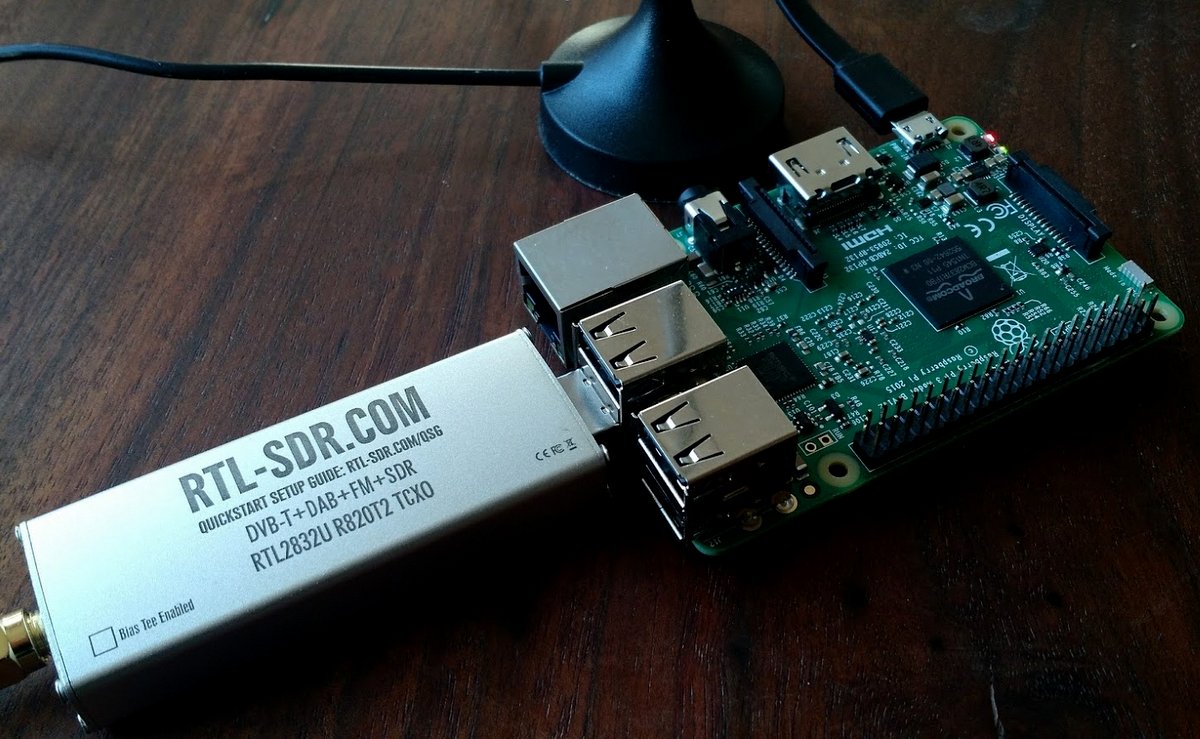
A Raspberry Pi/Beaglebone (or similar budget computer) running a Linux distribution
If SDRs are compatible with so many computer operating systems and configurations, then why would you worry about which ones to choose?
As I mentioned earlier most, but not all, of the SDR applications on the market are only compatible with the Windows operating system. If you want the most out-of-the-box, plug-and-play SDR options, then you should plan to use a Windows PC. If you’re a MacOS user, fear not. Modern Apple computers can support Windows—you simply purchase a copy of Windows and set your system to boot as a Windows machine (assuming you have the storage space for a dual boot).
Secondly, processing speed is certainly a factor: the faster, the better. While you can use an Android/Windows tablet or a Raspberry Pi to run an SDR, they often don’t have features like multiple virtual receivers, wideband spectrum recording capabilities, and large fluid waterfall displays due to the simple lack of processing power. My guess is that by 2023, however, tablets and budget computers will have ample processing power to handle most, if not all, SDR functions.
Finally, if you plan to make spectrum recordings, especially wideband ones (2 MHz, plus), you need both a snappy processor and a high-capacity hard drive with a decent write speed. This is the reason I now have a desktop PC at home for spectrum recordings: I can use a very affordable SATA drive as a storage device, and the write speed is always more than adequate. My OS and SDR applications run on an SSD (solid state drive) which is very fast. All of my recordings are saved to internal and external 4TB+ hard drives. Happily, I’ve never had a hiccup with this system.
An SDR application
SDRuno has an attractive user interface comprised of multiple adjustable windows.
Wait a minute…am I suggesting you choose an SDR application before you choose an SDR? Why, yes, I am! You cannot use an SDR without an SDR application, but, with only a few exceptions, you certainly can use an SDR application without an SDR attached.
Unlike a legacy hardware radio, you can essentially test drive an SDR by downloading an application (almost always free) and then downloading a test spectrum file. Most SDR manufacturers will have all of this on their download page. Simply install the application, open the spectrum file, et voila! You’re now test driving the SDR. Your experience will be identical to the person who originally made the spectrum recording.
The WinRadio Excalibur application also includes a waterfall display which represents the entire HF band (selectable 30 MHz or 50 MHz in width)
I always suggest test driving an application prior to purchasing an SDR.
While all SDR applications have their own unique layout and menu structure, almost all have the same components, as follows:
a spectrum display, which gives you real-time information about all of the signals within the SDR’s frequency range;
a waterfall display, which is a graphical representation of the signals amplitude or strength across the SDR’s frequency range displayed over time;
filter controls, which help you adjust both audio and signal widths;
mode selections, which allow you to change between modes such as AM, SSB, FM, and digital;
a signal meter, which is typically calibrated and resembles a traditional receiver’s “S” meter;
a frequency display for the active frequency;
VFOs/virtual receivers, which may have real estate allocated on the display;
a clock, which displays the time, possibly as both UTC and local time (note that many SDR apps also embed time code in waterfall display);
memories, where you can store a near-infinite number of frequencies (and some SDR applications allow you to import full-frequency databases); as well as
other controls, such as squelch, gain, noise blanker, DSP, notch,etc.
After you’ve become comfortable with one SDR application, moving to another can be a little disorienting at first, but the learning curve is fairly short simply because most have the same components.
Types of SDR applications
SDR applications usually fit one of three categories: proprietary app, free third-party apps, paid third-party apps, and web browser based apps. (Assume each application runs on Windows unless otherwise noted.) Let’s take a look at each.
Proprietary SDR applications
Proprietary apps are those that are designed by the SDR manufacturer and provide native plug-and-play support for the SDR you choose. Proprietary apps give priority support to their own SDR, but some are compatible with other SDRs––or can, at least, read spectrum recordings from other SDRs. Most popular SDRs have a proprietary application. Here are examples of a few proprietary apps:
WinRadio App for the WinRadio/Radixon line of SDRs
Perseus Software Package for the Microtelecom Perseus
Free third party applications are incredibly popular and some even offer performance and feature advantages over proprietary applications. Third party apps tend not to be associated with any one particular manufacturer––SDR# being a noted exception––and tend to support multiple SDRs. I’m a firm believer in supporting these SDR developers with an appropriate donation if you enjoy using their applications.
HDSDR is a very popular application that supports multiple SDRs and spectrum file formats. The layout is simple and operation straightforward.
SDR Console is a very powerful and popular application. Like HDSDR, it supports multiple popular SDRs. It is my SDR application of choice for making audio and spectrum recordings.
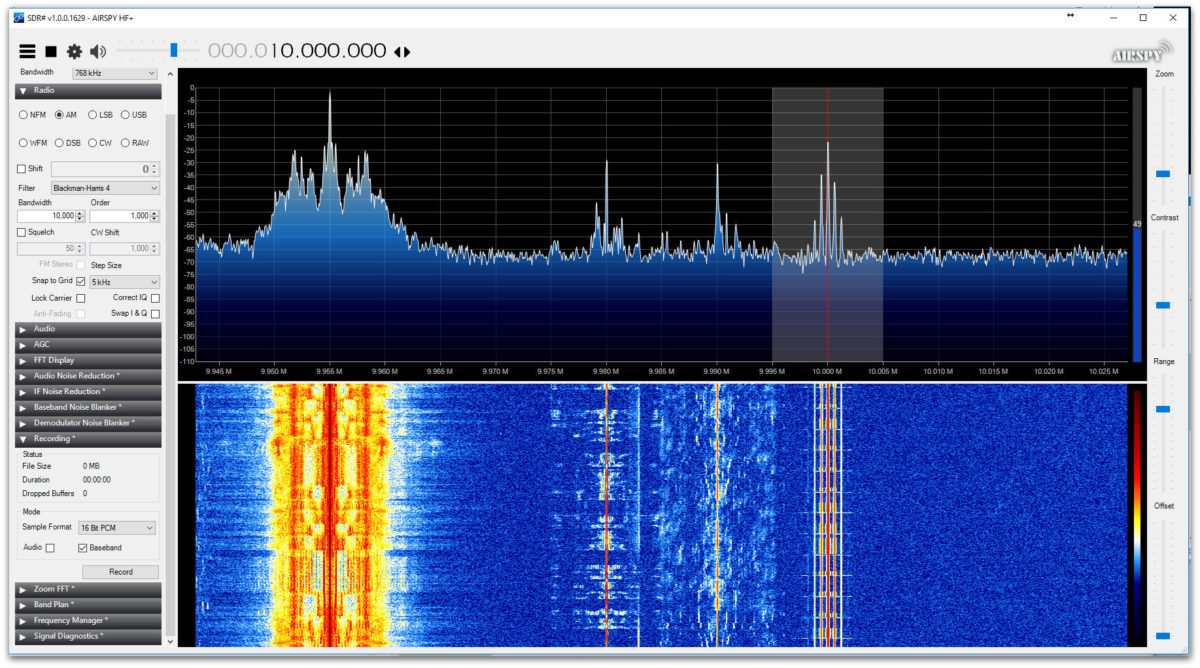
SDR# runs AirSpy SDRs natively, but also supports a number of other receivers including the venerable RTL-SDR dongle.
SDR Touch is a popular SDR application for Android devices (Android)
iSDR is one of the only SDR applications currently available for iOS devices. Its functionality is somewhat limited. There are other SDR applications in the works, but at the moment these are in development stages only. (iOS)
Paid third-party apps
Paid third-party apps represent a tiny fraction of the SDR applications available on the market. Indeed, at time of posting, the only one I know about that’s currently on the market is Studio 1, which has been the choice for those looking for an alternative application to the Microtelecom Perseus Software Package.
Web browser-based SDR applications
The KiwiSDR browser-based application
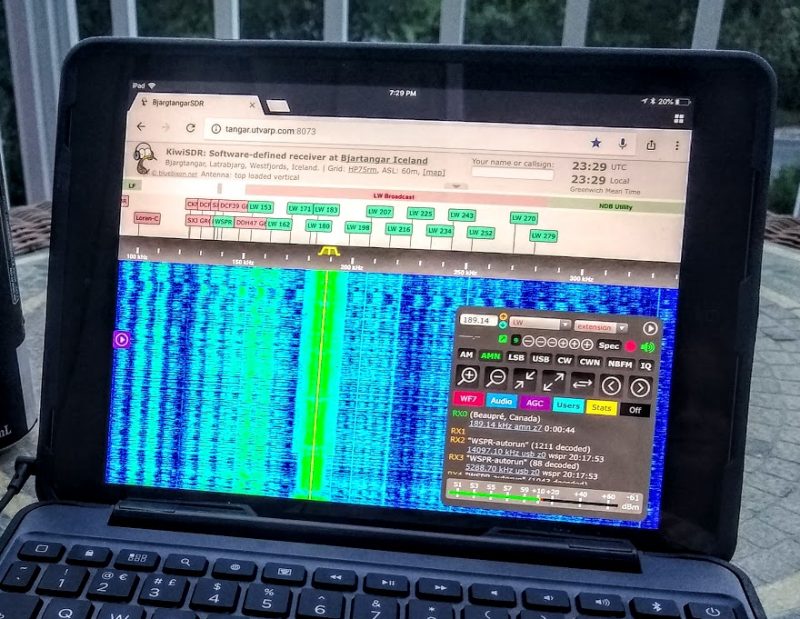
This is, perhaps, one of the newest forms of SDR applications. While a number of SDR applications (like SDR#, SDR Console and the Perseus Software package) allow for remote control of the SDR via the Internet, there are actually few applications that are purely web browser-based. At the time of this writing, the only one with which I’m familiar is the KiwiSDR application, which allows both the SDR owner and (if set up to do so) anyone else in the world to operate the SDR as if they are at the SDR’s location. In fact, the KiwiSDR only has a web browser-based application, there is no downloadable application. It will allow up to four simultaneous users, and the experience of using a KiwiSDR locally or globally is nearly identical. If you would like to use a KiwiSDR, simply visit http://SDR.hu or https://sdr.hu/map and choose a remote location.
[Note that if you like web-based SDRs, I highly recommend checking out the University Twente WebSDR located in the Netherlands.]
Choosing an SDR
In Parts Two and Three of this primer, we’ll take a closer look at some of the SDRs currently on the market; prices range anywhere from $15 to $6,000. As you can imagine from such a price range, these are not all created equally.
But first, ask yourself what your goal is with your SDR. Do you want to monitor ham radio traffic? How about aviation communications? Follow pirate radio? Listen to a range of broadcasters? Pursue radio astronomy? Is your dream to set up a remote receiver?
Whatever your flavor of radio, you’ll want to keep some of these needs in mind as you explore the SDR options available to you.
Budget
Be honest with yourself: how much are you willing to spend on an SDR? While entry-level SDRs can be found for anywhere from $15-50 US, a big leap in performance happens around the $100 mark. If you’re looking for benchmark performance, you may need to appropriate $500 or more. Whatever you choose, keep in mind that SDRs are only as good as the antennas you hook up to them. Set aside some of your budget to purchase––or build––an antenna.
Compatible applications
As mentioned above, not all SDRs are compatible with anything beyond the OEM/proprietary application. If you have a choice third-party application in mind, make sure the SDR you choose is compatible with it.
Frequency range
If you want an SDR that covers everything from VLF/longwave up to the microwave frequencies, then you’ll need to seek a wideband SDR. Each SDR manufacturer lists the frequency ranges in their specifications sheet. It’s typically one of the top items listed. Modern wideband SDRs can be pretty phenomenal, but if you never plan to listen to anything above 30 or 50 MHz, for example, then I would advise investing in an SDR that puts an emphasis on HF performance. Check both specifications and user reviews that specifically address performance on the frequencies where you plan to spend the bulk of your time.
Recording and processing bandwidth
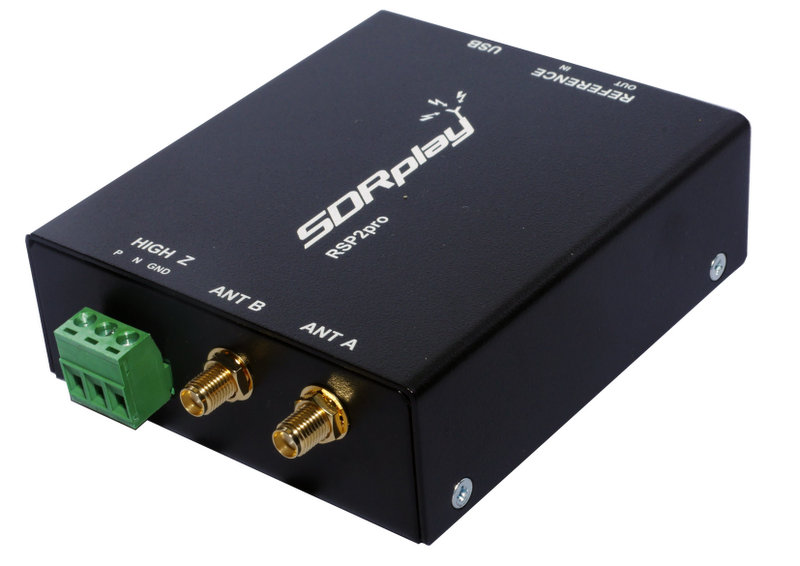
The new SDRplay RSPduo can display up to 10MHz visible bandwidth (single tuner mode) or 2 slices of 2MHz spectrum (dual tuner mode)
If you plan to make either audio or spectrum recordings, or if you plan to monitor multiple virtual receivers, pay careful attention to an SDR’s maximum recording and processing bandwidth. This bandwidth figure is essentially your active window on the spectrum being monitored. Your active virtual receiver frequencies will have to fall within this window, if you’re making simultaneous recordings. In addition, this figure will determine the maximum bandwidth of spectrum recordings. Some budget SDRs are limited to a small window––say 96 kHz or less––while others, like the Elad FDM-S3, can widen enough to include the entire FM broadcast band, roughly 20 MHz!
Portability
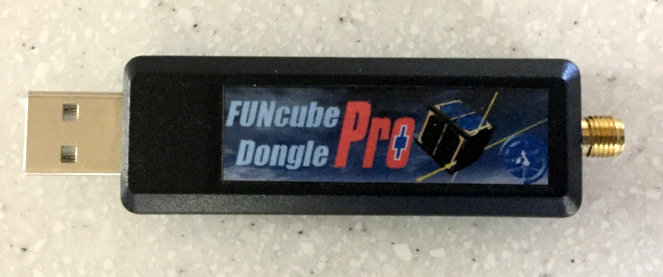
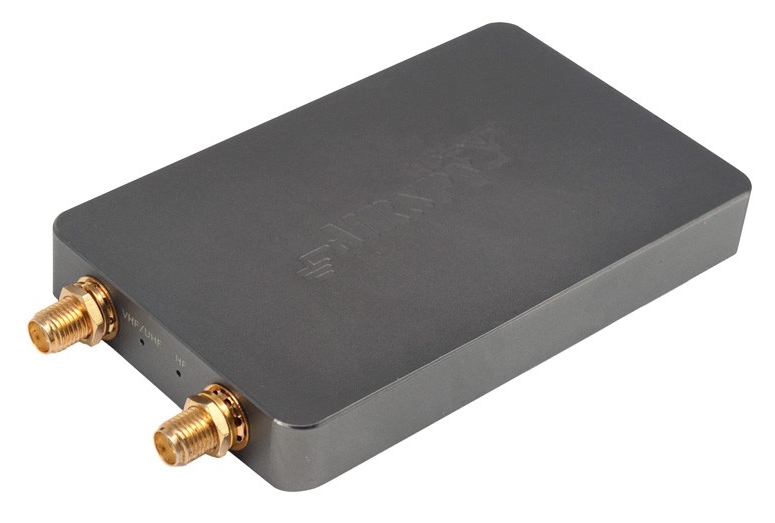
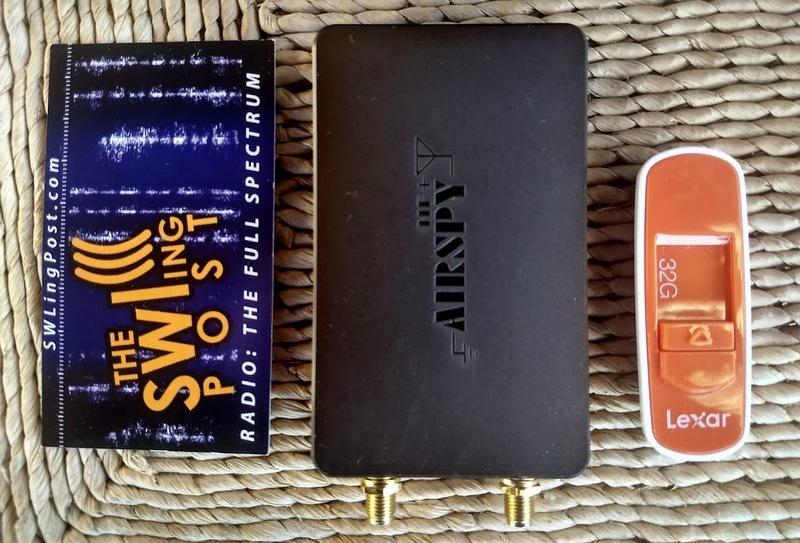
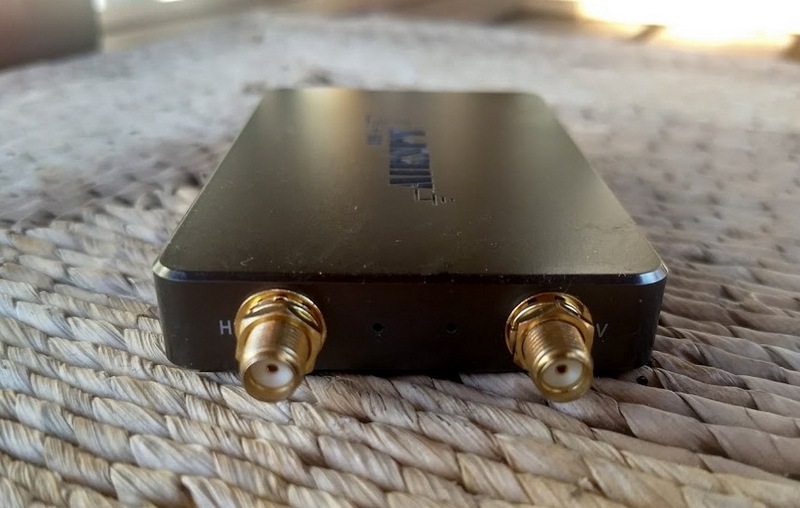
AirSpy’s HF+ was introduced late 2017. Don’t be surprised by its footprint which is similar to a standard business card to its left–this SDR packs serious performance!
If you plan to take your SDR to the field or travel with it, you’ll probably want to choose one that doesn’t require an external power supply. Most late-model SDRs use the USB data cable to power the unit. This means you won’t need to lug an additional power plug/adapter or battery. Still, many professional grade SDRs require an external power supply.
Recording features
If you plan to make spectrum recordings, determine whether you have many options to set the unit’s processing bandwidth. Some SDR applications have robust recording functionality that allows for both spectrum and audio recordings, including advanced scheduling. Some applications don’t even have audio recording or spectrum recording capabilities. Test drive the application in advance to check out their recording functionality. Of course, if recording is your main interest, you’ll also want to set aside some of your budget for digital storage.
Know your goal!
If your goals are somewhat modest––perhaps your budget is quite low, you simply want to familiarize yourself with SDR operation prior to making a bigger purchase, or you only want to build an ADS-B receiver––then you might be able to get by with a $25 SDR dongle. If you plan to use your SDR as a transceiver panadapter during contesting, then you’ll want to invest in a unit that can handle RF-dense environments.
Identify exactly what you’d like out of your SDR, and do your research in advance. Note, too, that many popular SDR models have excellent online forums where you can pitch specific questions about them.
Scoping out the world of SDRs
Three benchmark receivers in one corner of my radio table: The Airspy HF+ (top), Elad FDM-S2 (middle) and WinRadio Excalibur (bottom).
Now that we have a basic grasp on what SDRs are, what components are needed, and what we should research in advance, we’ll look next at some of the SDR options available to us. In Part Two, we’ll look at budget SDRs; those under $200 US in price. In Part Three, we’ll survey higher-end SDR packages.
The update eliminates the “false signal peaks” (images) of the EP Pro, a tuning anomaly that was widely criticized at introduction of this model. In addition, a 9/10 kHz tuning step switch has been added, and Jay also reports that reception performance is improved on the high band of medium wave.
Check out the full details in Jay’s post above!
Guy Atkins is a Sr. Graphic Designer for T-Mobile and lives near Seattle, Washington. He’s a regular contributor to the SWLing Post.
Many thanks to SWLing Post contributor, 13dka, for the following guest post:
Tecsun S-8800 Review
by 13dka
Looking for a new toy again I recently revisited the Tecsun S-8800, which looked like it could replace both my battered old Grundig Satellit and my Tecsun PL-660. Being in production for a few years now, and with the “birdies” situation ironed out long ago, the S-8800 has gathered much acclaim by now but also a few somewhat contradicting reviews. For example, one review reports that the S-8800 can cope with larger antennas, another one states the exact opposite, one praises the MW performance, another one attests only average sensitivity, and only one mentioned an unpleasant detail I’m going to emphasize on in a bit.
All reviews touted the improved SW performance in AM and SSB though, and that was reason enough to make my own experiences. Testing it turned out to be a bit of an emotional rollercoaster though.
I hope I can share more than only redundant bits of information about the radio, and I’ll skip most of the general information you can read in most other reviews.
Off to the 13dka radio test site at the dike!
13dka’s SWL Happy Place
General
Like the technically somewhat similar Tecsun PL-880, the S-8800 is a triple conversion receiver and has 2 conventional IF stages, the third IF stage is using a Si4735 DSP chip again, providing the filters and all that jazz.
Tecsun seems to have thrown a lot more parts into it than in previous radios, plus a pretty big ferrite rod (covering 8-9/10th of the radio’s width) with individual LW and MW coils (most of the smaller receivers have only one coil), a 108mm telescopic whip and of course the “gun metal” knobs. Designing a radio with a rather simple front panel and making a remote control an integral part of the operation concept (like it is reality with TVs for a long time) is a charming oddball approach, in a way reviving an utmost luxurious feature of 1930s high-end radios. So let’s cut to the chase and talk performance:
Longwave and Mediumwave
On LW and MW, I first compared the S-8800 with my old Grundig Satellit 400 at home. The old clunker has similar dimensions, a big old speaker bass/treble controls and it was known to have an average sensitivity on the AMBC band in its time, when all the great, now vintage AM performers were still ubiquitous, so that’s rather a “Jay Allen average” than an “average of the mediocre AM radios of this millenium”. I think Jay Allen might rate it 3 stars.
Longwave
The first station I tuned in was the BBC LW transmitter network on 198kHz and it turned out a tad more noisy on the Satellit. Great! I could also pick up Medi1 and Kalundborg a smidge better than on the Grundig, and in the early evening, out at the beach I was picking up stations on all still populated channels on LW (minus 180kHz where it has one of the remaining birdies). The other new portables I currently own (PL-660, D-808) are far away (PL-660) and far, far, far away (D-808) from that kind of performance.
Mediumwave
Unfortunately that good impression vanishes gradually when leaving the long wave for the NDB band (still good) and finally medium wave. Before I left the house to test the radios on the electrically quiet beach again, I was checking out one of my favorite border case stations (low power station from The Netherlands on 1602kHz, whatever their name is this week) and that made very clear already that the S-8800 can’t hold a candle to the Satellit, at least not on the top end of the MW band. Despite all the noise indoors, on the Satellit I could easily recognize the song being played while the S-8800 didn’t pick up anything at all.
On the beach it turned out that – despite the ferrite rod being twice the size – I find it only marginally better than the PL-660, and not close enough to the little XHDATA D-808 (if you’ve read my D-808 review you already know that this little radio is almost on par with the Grundig on MW):
Of course I have read Thomas’ assessment of the AM performance so I was prepared to be underwhelmed. But at least you can connect some high gain MW antenna to make up for the missing sensitivity and be happy again, or can you?
A not so nice surprise
The unpleasant detail I mentioned before is: the Int/Ext Antenna switch does not turn off the internal ferrite bar antenna. Jay Allen mentioned it in his review, it was the only review with that detail and unfortunately I overlooked it. How does that matter?
The main issue is this: if you’re (like me) forced to use outdoor antennas to escape high indoor noise levels, the internal loopstick just won’t let you. The external antenna will just increase the SNR a bit when the station is strong enough anyway. Even in a low noise environment, the internal loopstick will needlessly add noise to the signal received from a high-performance active loop or FSL antenna.
That also explains a paragraph in Thomas’ S-8800 review:
“I also hooked up the S-8800 to my large horizontal loop antenna. This certainly did improve MW reception, but not as dramatically as I hoped. Additionally, it seemed to be very sensitive to RFI in my shack even when hooked up to the external antenna.”
There’s more external antenna idiosyncrasy: only the BNC jack is wired to the “Ext” position of the antenna switch, the “hot” (red) Hi-Z terminal is active when the switch is in the “Int”-position, it just seems to save you an alligator clip on the whip.
The dedicated “AM antenna” terminal was in part what sold the S-8800 to me. The label made me assume this would be specifically wired to the AM circuit but as it turns out it’s just a generic high impedance input and I really didn’t anticipate that the internal loopstick remains always active (or in case of the Hi-Z terminals, the retracted whip). Yes, technically you can connect an external antenna for MW, practically…YMMV.
To conclude this section, the final outcome of this antenna connector issue plus the not so brilliant MW sensitivity was that not even my active ML-200 loop (connected to the BNC-jack) could improve reception on 1602kHz enough to make the S-8800 get at least a bit into the ballpark of the Grundig with its loopstick antenna. The currently mounted small 80cm rigid loop on the ML-200 just couldn’t produce enough signal to lift the station over the noise that much.
Shortwave SSB
As the other reviews reported already, Tecsun has obviously worked on the AGC issues their former products had. I can confirm this so far, the AGC does not show the distorted onset of leveling anymore – unless the signal is very strong. But the leveling happens much faster than e.g. on the PL-880 so the remaining blasts of distortion are quite short:
A more relaxed AGC release time would save us most of those too. I noticed AGC pumping effects from strong signals in the spectrum neighborhood only with a big antenna connected. But unfortunately there is more…
Stuff you have to live with:
In his great review, Thomas mentioned the auto mute sometimes interfering with reception. I noticed this too (with all bandwidths on SSB) and I credited this to very low noise figures. When the bandwidth is narrow (=less noise) or if you have a very low noise floor anyway like when tuning through 25-30MHz, the receiver gets muted over the entire chunk of spectrum, just to intermittently and pretty suddenly pass the noise again. Sounds like a broken antenna cable and has some potential to confuse people:
Too bad that setting auto mute to ’00’ doesn’t actually turn it off in SSB mode so there’s likely no remedy for that.
On my example, there is absolutely no difference between the 3kHz and 4kHz SSB filters. A working 4kHz filter would have been a good choice for ECSS reception.
Another remaining quirk at least on my specimen of the S-8800 is a slight FM modulation of an oscillator in SSB, particularly with strong signals. You can hear it best if you create a heterodyne or listen to CW, the tone sounds a bit hoarse, so do voices and I’m not sure whether or not this could affect narrow-bandwidth digimiode decoding. The front panel (namely the bandwidth knob area) is quite susceptible for “hand capacity”, the frequency varies a bit when you move your hand in front of the S-8800. This is not uncommon with portables of course, but my D-808 for example has its “Theremin playing area” on the back of the radio.
In this clip you can hear both the “hoarse” modulation and my hand waving to you.
This leads me to calibration and frequency drift. The S-8800 can be calibrated on SSB (see the “Hidden features” section below), however this turned out to be a (too) fast moving target. I don’t know if it’s the VFO or the BFO but it is so temperature-dependent that 6°C temperature difference equates to a quite substantial (for SSB) drift of 150Hz. Whatever oscillator it is, it seems to lack any temperature compensation measures, with all the implications that may have on relaxed SSB listening, digimode decoding and ECSS reception when the temperature isn’t quite stable where you want to use it. After calibrating it, it’s often slightly off again within the same minute. My cheap little D-808 won’t drift even when I take it from an overheated apartment into a -5°C cold winter storm.
The good stuff
Now to the fun part! When I compared the SSB performance of the S-8800 with my PL-660 the first time, I found them very close for some reason. I could find only one weak station that came in noticeably better on the S-8800 and while I was happy that it wasn’t worse than the PL-660 I was also a bit disappointed.
Timeline: 0:00: PL-660, 0:10: S-8800 receiving the “Gander Radio” VOLMET.
Then I repeated the test a few days later, this time a bit more into the evening and the outcome was very, very different. The S-8800 won every single weak signal comparison with ease and sometimes in a way that made me think my PL-660 must be broken.
But then I could help the PL getting a lot closer by simply holding it in my hand, the difference was that I had placed the PL-660 differently so I could record both radios easier. The factor I forgot to put in the equation was that the S-8800 is absolutely not depending on anyone holding it to give it some counterpoise – that and the long whip is certainly a part of its advantage, and the receivers would be much closer when used with the same external antenna. With the radios just standing there tho (and that’s what most people will do with their radio instead of holding it in their hand), the difference is remarkable nonetheless and I also learned that you should always look and listen twice when testing radios!
When I repeated the test yet again but granted the PL-660/D-808 the litte bit of counterpoise they seem to need (I let them rest on the car door instead of holding them), the results were not that unequivocal anymore. However, the receivers were 50% on par, the S-8800 was clearly better the other 50% and overall the other two receivers could not score a single point for them. I think that shows that the S-8800 really is a hair or three better. Beyond the increased sensitivity and minus the frequency drift, SSB reception feels more mature, the the S-8800 behaves more like a regular communications receiver now and the big speaker is a big plus. Of course that means there should be also an improved reception of…
Shortwave Broadcasts
I know that the S-8800 has inherited the “Enjoy broadcasting” and “BCL RECEIVER” lettering from the cheap S350, but after stepping the PL-660 and the S-8800 through all shortwave broadcast bands, I felt that’s exactly hat it was made for, and it shows!
There is no doubt that a big speaker can create the illusion of better reception, but I think I don’t fall for that easily and rather listen to the background noise and how intelligible the “content” is. While the comparison with the PL-660 often ended up in a tie when I subtracted the impact of the speaker in my mind, there were indeed some stations where the S-8800 had remarkably less noise than the PL-660. But of course the big speaker is giving the S-8800 a permanent edge on all reception cases, and it’s a real joy to listen! Combined with lower noise and a generally more stable signal (through better AGC) this made quite a difference between the two.
Bottom line is that when listening to shortwave broadcasts, the S-8800 gives you the warm and lush sound of yesterday’s famous receivers while it technically delivers the best performance of all Tecsun portables so far. If you fancy music programs on shortwave and if you don’t mind the price for the luxury and performance, you’ll enjoy this radio a lot.
FM
Short story: my specimen of the S-8800 lacks the very good FM band sensitivity of the PL-660 or the XHDATA D-808. While the latter radios present my favorite marginal case station 100km away fairly with some noise at sea level, the S-8800 just doesn’t receive that station at all, no matter how I position the whip. It’s not exactly worlds between them but considering that (assumedly) most of the FM receiver is in the Si4735 chip that it shares with a couple of great FM performers from the same company, this is a bit surprising.
Signal handling capabilities
The S-8800 is said to have a pretty robust frontend, which I found true but I want to put that a bit into relation. My “lonely beach/dike listening post” sports 2 abandoned steel flag poles of 6 and 8m height. They can serve as support for wire antennas, or easily be used as an antenna themselves by inductively coupling them to the receiver – IOW by winding a wire 2-4 times around the pole (you could use the Eiffel tower as an antenna this way) and connecting the other end to the radio.
For some reason this contraption produces quite massive output voltages, but I could always use it for a quick and thorough (and due to the location QRM-free!) reception improvement with my PL-660 anyway. Why?
The PL-660/880 have a 3-position (DX, Normal, Local) switch. I think it turns off the input preamp in the “Normal” postion and adds a simple attenuator circuit in the “Local” setting. The latter is sufficient to tame the output of all sorts of antennas (including the flag pole) enough to make my PL-660 work just fine with that on all bands.
The S-8800’s sensitivity switch on the other hand has only 2 positions and telling from the results it really only turns off the preamp. Now it actually acts up much less on the flag pole than the PL-660 in its comparable “DX” and “Normal” positions, so obviously Tecsun has put some effort into making the frontend more robust indeed. But it seems they thought “that should do, let’s ditch the 3rd (attenuator) position and save 3 resistors” and that left me with many (but tolerable) images across the entire shortwave above 3 MHz, and a heavily image-infested 160m band. BTW, a few soft images from (I guess) 49/41m blowtorches could be heard around 29MHz with only the whip.
A word on the audio
I believe that the “legendary” status of the Grundig and Zenith lines of world band receivers is partly owed to their big sound. They had their music loving and program listening audience in mind, and Tecsun’s choice of casing, big speaker, the bass and treble controls are certainly taking the same line.
Compared to my Satellit 400 (80s model, but still has much of that “legendary” sound), the Tecsun sounds a bit more boomy in the lower mids while having a less super-deep bass response than the Grundig, which also sounds more neutral. Besides these very unimportant distinctions, the S-8800 does sound big and that also helps reception – lacking low mid/bass content can impair intelligibility as well, and it causes more fatique on long DXing sessions.
The bass/treble shelving EQ is certainly more sophisticated than the Grundig’s, it has quite sharp cutoffs at very sensibly chosen frequencies, so turning the knobs down will leave the main chunk of the mid range completely unaffected and just helps removing rumble or the 5kHz beat frequency from a band neighbor, or add some nice hifi-highs and beefy low end when you turn them all the way up. In other words you can continuously blend the speaker sound from perfect “voice communications” style to “dad’s big old radio”.
Hidden functions
Of course the S-8800 has some unofficial “power off” and “power on” extra functions assigned to the number keypad on the remote (they all work by pressing and holding a number key for up to 10 seconds). Some are identical to the PL-880, some are different:
0.) I found calibrating the S-8800 on SSB works with the same method used on the PL-880: Tune to a station with a known frequency, switch to USB or LSB and use the fine tuning knob to tune for best audio/music playback. An alternative way of doing this is downloading a free spectrum analyzer app for your smartphone (“SpecScope”), tuning the radio 1kHz off frequency so you get a nice heterodyne tone on USB or LSB, then using the fine tuning knob to tune the tone to hit exactly the 1kHz mark on the analyzer display. Your last 2 (Hz) frequency digits will now show an offset frequency.
1.) Then press and hold the ‘0’ button until a ’00’ appears in the top right corner of the display and the last 2 digits of the frequency readout start flashing. Release the button and quickly use the fine tuning knob to reset the last frequency digits to ’00’ (the number on the top right corner should be changing while doing that), then immediately hold the ‘0’ key again to confirm – tadaa, the offset should be gone while the last 2 frequency digits show ’00’ now. This all needs to happen pretty quickly and with the right timing, so it may take a few attempts to get it right.
2.) With the radio off, button ‘2’ turns the LW band on/off.
3.) Press and hold the ‘3’ button while the radio is off to toggle between permanent and “intelligent” display illumination.
4.) When the radio is turned on, this button enables access to the extra functions of the number 6 and number 9 keys. The display will read “On” when you perform this the first time, doing it again will turn it off again.
5.) Radio on, set to FM band: this toggles between 75 (US) and 50 (anywhere else) microseconds deemphasis on FM.
6.) Radio on: When enabled using the ‘4’-button as described before, holding the ‘6’ will toggle the (annoying) dynamic bandwidth feature off and on. You can set this independently for AM and SSB. Ideally to zero, because it automatically resets your bandwidth setting and since this is happening in steps, it sounds quite strange. The PL-660 uses a stepless dynamic envelope following low pass filter (which is I believe what they called “DNR).
7.) This is still a mystery to me. On the PL-880, this button apparently controls the line out level on FM. On the S-8800 it (ostensibly) seems to control the S-meter bias with numbers running from ’00’ to ‘+99’ and ‘-99′ for all bands. Positive values reduces the S-meter display which made me curious if it rather controls AGC level or gain at some stage, but it really seems to affect the S-meter display only.
8.) Radio off: Toggles the seconds display on the main clock (when the clock is displayed instead of frequency).
9.) Another important one: this controls the threshold of auto squelch/soft mute. If you want to turn that off, turn it down to ’00’ with the main tuning knob, then hit the ‘9’ key again. You need to do this for AM, FM and SSB separately.
Random stuff
The S-meter was indicating a permanent base level of 2 bars even at my remote beach listening post. But even though it can apparently be “calibrated”, a 5-bar indicator is quite a step backwards from the 99-step RSSI meter of the PL-880.
After an initial discharge and recharge cycle, the 2x2000mAh “18650” batteries gave me a continuous runtime of 21 hours. When you connect the charger and then turn on the radio, it stops charging unless – and this seems odd – you are in FM mode. A full charge while listening to FM radio took 4:41.
Verdict
I had a pretty hard time making my mind up about this radio. It has so elaborate details, so much design improvement and costly parts went into it but I feel like it doesn’t quite meet the expectations Tecsun created with this radio. Sadly, it has a few things that were started ambitious and ended underwhelming.
It got a huge 2-coil loopstick and somehow they managed to make it perform slightly worse than a 70€-radio with not even half of that loopstick size, they gave it 2 external antenna ports but they disappoint MW enthusiasts right again by keeping the loopstick always active, and how FM could turn out less sensitive than many radios with the same Silicon Labs chip (including their own models) is beyond me.
They improved the front end but then they dropped the attenuator, which costs the overall flexibility and better overloading-resilience their other radios have, they fixed the SSB issues of the predecessors and introduced a free-floating BFO with a mind of its own.
The price tag is making these downers certainly weigh heavier, and I think without them this radio may have turned out to be a real classic.
On the plus side I found a radio that really excels on shortwave. Shortwave program listeners can feast on a most sensitive, selective, luxurious and well-behaved portable with a big sound and I think there’s probably no current portable that could compete with that.
Ham radio aficionados get improved SSB reception and if there wouldn’t be this “cheap 70s receiver trademark” unstable oscillator, it would come close to communications receiver performance levels (minus the frontend needed for big antenna voltages).
That the price reaches into the ballpark of pre-loved high-end(-ish) JRC/Icom/Yaesu communication receivers or buys you a mint-condition ICF-2010/2001D may seem like a problem too. But then again, none of those radios is perfect either, and only the Sony is a portable.
Despite the quirks, the S-8800 is still a great, valuable radio that revives an out-of-fashion style of radios in a pretty unique and modern way.
What a brilliant, critical review of the Tecsun S-8800! Thank you so much for taking the time to properly test and compare the S-8800 with the venerable PL-660 and the XHDATA D-808 (readers, also check out his review of the D-808).
You’re right, too, in that I’ve noticed some contradictions in reviews–I do wonder if part of this might be variations between US and EU versions of the radio, or perhaps small quirks in production runs.
No doubt, however, that the Tecsun S-8800 is a champion of the shortwave broadcast bands and its audio fidelity is in a class of its own.